Pcsx2: Stuttering in all games in GIT builds (HW and SW affected)
I've been following the GIT builds for PCSX2 for roughly a year now (since accurate blending was introduced in GSOGL), and every GIT build after the 1.4.0 stable release that I have used has had problems with stuttering. The emulator reports 100% speed and 60 FPS and the game timers and physics run at full speed, but the video is very choppy. Normally, this would only happen when I'm recording with Nvidia Shadowplay or playing in windowed mode, but now it happens in fullscreen mode and windowed mode. Switching to software rendering does not fix the issue. Because of this, I'm stuck on 1.4.0 stable (which works pretty well but lacks fast accurate blending and some other fixes that are very useful, especially in the Gran Turismo series). Also, in the most recent builds with the large framebuffer option included, Gran Turismo 3 and 4 both cause massive slowdowns during races and replays at anything higher than 2x native resolution. This never happened in stable release 1.4.0 nor any of the GIT builds leading to it. My settings are as follows:
EE Round: Chop/Zero
EE Clamping: Full
VU Round: Chop/Zero
VU Clamp: Extra+Preserve Sign
Vsync is disabled in Core GS options, enabling does not fix visual stutter.
All speedhacks enabled except for Fast CD/DVD access, EE cyclerate and VU cycle stealing
No manual gamefixes enabled
--GS Plugin settings:
Adapter: Nvidia GeForce GTX 1080
Renderer: OpenGL (Hardware)
Interlacing (F5): Auto
Allow 8-bit textures: ON
Large Framebuffer: ON
Internal Resolution: 3x Native
Texture Filtering: Bilinear (PS2)
CRC Hack Level: Partial (OpenGL Recommended)
HW Hacks: None (tried safe accurate blending, only caused slowdowns)
Accurate Date: ON
Blending Unit Accuracy: High (Recommended high-end PC)
PC Specs:
MoBo: Gigabyte GA-Z97X-Gaming 7
CPU: Intel Core i7 4790K
RAM: 32GB 1600 MHz
GPU: Nvidia GeForce GTX 1080 FE
Drive where PCSX2 and OS load from: Samsung 950 PRO 256GB NVMe M.2 SSD
Drive where .ISO files load from: WD Caviar Blue 1TB 7200 RPM HDD
As I said before, this has only started happening in GIT builds for 1.5.0. This does not affect stable 1.4.0 or any GIT builds that led to that stable release.
 RAZORXKHARA33
All 271 comments
Try to find the first build that got the issue http://buildbot.orphis.net/pcsx2/index.php?m=fulllist
 gregory38
on 29 Jun 2016
gregory38
on 29 Jun 2016
Last build that didn't exhibit the issue was compiled on 2-28-2016. The build is v1.5.0-dev-385-gdb379ad. The next 2 available builds (v1.5.0-dev-401-ge57a75a AND v1.5.0-dev-403-g4b00ec9) will not even boot, and the next build after 403 (v1.5.0-dev-405-g8839632) is the first available build that exhibits the issue, and it was compiled on 2-29-2016. Hope this helps!
RAZORXKHARA33
on 29 Jun 2016
MTVU on/off ? The issue seems related to atomic ! Is hyperthreading enabled on your CPU?
Do you have the issue in VS2013 build ? https://ci.appveyor.com/project/gregory38/pcsx2/branch/master/job/owyu3dhusr0hcbgx/artifacts
gregory38
on 29 Jun 2016
MTVU on/off made no difference, and hyperthreading is enabled on my CPU. I will test the VS 2013 as soon as a replay finishes recording.
RAZORXKHARA33
on 29 Jun 2016
Ok. Could you do a test with HT disabled too ?
gregory38
on 29 Jun 2016
Tested the VS 2013 build, still very bad stuttering, and disabling HT made no difference.
RAZORXKHARA33
on 29 Jun 2016
Hum, do you have the issue if you take an old GSdx with a new PCSX2 binary ?
gregory38
on 30 Jun 2016
Latest build gets rid of the bad slowdowns that I described when Large Framebuffer is enabled, but the stuttering is still there, even with GS plugins from build 385 (which was the last build without the visual stutter). Still stuttering even with GS plugins from stable 1.4.0.
RAZORXKHARA33
on 30 Jun 2016
Ok. Would you able to compile the plugin on your side with some patches ?
gregory38
on 30 Jun 2016
I'm not experienced with that kind of thing, unless I'm just overthinking something. Are you saying that you have everything necessary for the plugin (including the patches) and all I have to do is compile it? I'm bad with this kind of thing unless it's something simpler than I think it is.
RAZORXKHARA33
on 30 Jun 2016
Interesting :). Was wondering what cause the stuttering in GT4.
Good finding.
 tabnk
on 1 Jul 2016
tabnk
on 1 Jul 2016
Btw GTX 1080 FE can easily go 5x native for GT4 :)
tabnk
on 1 Jul 2016
Wrong. I use GSOGL and can only get to 3x native (1080p) before I get slowdowns. Maybe it can in GSDX11/10, but not OGL. I use high accuracy blending so that takes a lot of GPU time (the accuracy is much greater than GSDX11/10 has ever achieved, so it's more demanding from a graphical emulation standpoint.
RAZORXKHARA33
on 1 Jul 2016
Unexpected. A GTX 1080 still cannot get above 3x native. Even high accuracy blending should not affect much. Somethings wrong here.
tabnk
on 1 Jul 2016
It isn't a forum ;) Blending is very costly on the CPU and it also bypass the ROP to do the blending in shader so yeah it could be heavy. Anyway, there are various optimization available to reduce GPU load (I spent most of my time on the CPU side).
Back on the issue, I'm currently thinking what is the best solution to fix the bug. I will try to create a branch with partial atomic support. I need to find which atomic impact the perf. And then see if relaxed atomic can improve the perf. I will ping you when the branch is ready.
gregory38
on 1 Jul 2016
Sounds great! I did let this start to become a forum-esque thread by responding to tabnk the way that I did, so my b.
RAZORXKHARA33
on 1 Jul 2016
Could you test this version (MTVU on/off)
pcsx2-v1.5.0-dev-927-gd525573-windows-x86.7z.zip
gregory38
on 1 Jul 2016
Just tried, still stuttering. An easy way to tell if there will be stuttering is to set interlacing to bob-tff and look at the PlayStation 2 logo that appears during startup. Normally it will bob up and down at a constant pace. However, if there is stuttering, then it will bob up and down sometimes sticking to the top or bottom of its range of movement. It's a bit hard to explain, but if you do this in stable 1.4.0 and the latest GIT builds, you should be able to deduce what I mean. I will note that the stuttering isn't quite as bad as before, but it's still very noticeable.
RAZORXKHARA33
on 1 Jul 2016
Could you test this one, it contains half of the atomic stuff (but it ought to be good)
https://ci.appveyor.com/project/gregory38/pcsx2/build/1.1296-atomic-regression-test-v2/job/5j4bvj9v70nky6f6/artifacts
gregory38
on 1 Jul 2016
Stuttering is gone with this build. I think there needs to be a lot of graphical optimization in general, though. I tested with Gran Turismo 3: A-Spec in the Polyphony Digital Cup Round 9 (Grand Valley Speedway II) and the slowdowns were horrendous. It was always a tough track to render (especially with high-accuracy blending), but the slowdowns were especially bad, even with fast accurate blending. Something must be up with the way that GSdx handles the rendering of light sources in the GT series (even worse in GT4 with texture cache issues and such). Anyways, mini-rant over, this build does not have the stuttering. So the issue was related to atomic?
RAZORXKHARA33
on 1 Jul 2016
Actually it is an old build but with only half of the atomic update. So it remains at least 1 bad commits on the ~5 remaining atomic change. It reduces a bit the scope. I will try to revert 2 commits on the previous branch tomorrow.
gregory38
on 1 Jul 2016
Ok. Sounds great! I was actually getting worse slowdowns with this build but that was because I had MTVU disabled. Re-enabling it didn't reintroduce stutter and brought speed back up to what it was in stable 1.4.0.
RAZORXKHARA33
on 2 Jul 2016
Ok, one more please (available in 10-15 minutes)
https://ci.appveyor.com/project/gregory38/pcsx2/build/job/f0w0w2cta761u3c9/artifacts
Again could you test the stuttering with both MTVU enabled and disabled. Thanks you.
Edit: by the way, I hope you have some free time available because I will need various test to check the fix implementation ;)
gregory38
on 2 Jul 2016
I should be free for a while today. I can't get a hold of the build you just posted, though.
RAZORXKHARA33
on 2 Jul 2016
Ok could you test the previous build. And tell me the current status.
And much later this branch https://ci.appveyor.com/project/gregory38/pcsx2/build/1.1301-atomic-relax
Normally the branch must be better that master but maybe not perfect.
gregory38
on 2 Jul 2016
I still don't have access to either of those builds. Which one am I testing?
RAZORXKHARA33
on 3 Jul 2016
Strange, do you have acces to those one ?
https://ci.appveyor.com/api/buildjobs/f0w0w2cta761u3c9/artifacts/pcsx2-v1.5.0-dev-929-g486dda2-atomic-regression-test-1297-vs2015-Win32-AppVeyor.7z
gregory38
on 3 Jul 2016
Yes, just downloaded both, will report back with results.
EDIT: Stuttering on both builds.
RAZORXKHARA33
on 3 Jul 2016
Ok. Previous link was a link to the bot, then you need to select VS version and then artifact submenu.
Anyway, I'm waiting your feedback on those 2 builds.
gregory38
on 3 Jul 2016
And then could you test this one too
Thanks you :)
gregory38
on 3 Jul 2016
All three of the latest builds linked are stuttering. Thankfully, I believe that the major slowdowns brought on by a previous GIT build (not just stuttering) are fixed.
RAZORXKHARA33
on 3 Jul 2016
Just to be sure: What exactly are you looking for in your testing?
I can tell you that PCSX2 at this moment can't produce a frame limiter to 60hz that is good enough for stutter free interlace bobbing. So if you look at the ps2logo for example, checking if it bobs evenly, then this will not work. If it worked once, then it probably has more to do with driver vsync.
 ramapcsx2
on 4 Jul 2016
ramapcsx2
on 4 Jul 2016
So it appears to be a framelimiter issue? It only started in GIT builds released around the beginning of March. Maybe a change is causing the driver to handle something differently, causing the stutters. Before the GIT builds that I referenced, the stutters would only occur when Shadowplay was recording or when the emulator was in windowed mode. Now it happens no matter what.
RAZORXKHARA33
on 5 Jul 2016
:( Did you test with MTVU on or off ? I need to find the bad commit. Here a build based on old code.
gregory38
on 5 Jul 2016
The build that you just linked does not stutter, neither with MTVU on nor off. That build is working very well (barring the usual slowdowns that have been there as far as I can remember). The three builds that you linked roughly 2 days ago all stutter both with MTVU on and off.
I think when I was going through past GIT builds, the first build that I ran into problems with was this one:
http://buildbot.orphis.net/pcsx2/index.php?m=get&rev=v1.5.0-dev-401-ge57a75a&platform=windows-x86
That build and this one:
http://buildbot.orphis.net/pcsx2/index.php?m=get&rev=v1.5.0-dev-403-g4b00ec9&platform=windows-x86
would not even boot.
The next one (which would boot):
http://buildbot.orphis.net/pcsx2/index.php?m=get&rev=v1.5.0-dev-405-g8839632&platform=windows-x86
was the first build where I encountered the stuttering issue.
RAZORXKHARA33
on 5 Jul 2016
OoO, this build contains most of the atomic code (I need to double check). There are potentially 2 regressions on master :(
gregory38
on 5 Jul 2016
Another old build
https://ci.appveyor.com/api/buildjobs/m9fv8y03v8odhi88/artifacts/pcsx2-v1.5.0-dev-385-g0dffed7-atomic-regression-test-v3-1331-vs2015-Win32-AppVeyor.7z
It is very close of the build 405 except 2 minor changes.
gregory38
on 6 Jul 2016
No stuttering in this build both MTVU on and off.
RAZORXKHARA33
on 6 Jul 2016
Just to be sure, could you test the build with GSdx from git ?
gregory38
on 6 Jul 2016
Just ran a quick lap of Grand Valley Speedway II (sunset) in GT3, which is one of the most graphically demanding tracks to render in GT3 and 4, and no stutters. All I got were the usual slowdowns that happen because the GPU side of things is in need of optimization. I used the GSdx plugin from the latest GIT build available from Orphis's build bot:
http://buildbot.orphis.net/pcsx2/index.php?m=get&rev=v1.5.0-dev-937-g31a74ab&platform=windows-x86
Worked just fine, no stutters with MTVU on and off.
RAZORXKHARA33
on 6 Jul 2016
Ok
gregory38
on 6 Jul 2016
What about this one?
https://ci.appveyor.com/api/buildjobs/1pnxraep7duhvs7x/artifacts/pcsx2-v1.5.0-dev-386-gff84540-atomic-regression-test-v4-1338-vs2015-Win32-AppVeyor.7z
Good or bad ?
gregory38
on 6 Jul 2016
No stuttering with MTVU on and off. I also tested with the GSdx plugin from later GIT builds and no stuttering there either. GOOD.
RAZORXKHARA33
on 6 Jul 2016
Not so good. The previous build is the version 405 without the spanish translation (except if I screw up). Above build is vs2015, old 405 build is vs2013.
v1.5.0-dev-405-g8839632 Gregory Hainaut 2016-02-29 22:29:54 Download Merge: 4b00ec9 3d5c1b4 Merge pull request #1211 from PCSX2/atomix-fetch-correction Core|Common: restore old interlocked add/sub behavior
I'm puzzled
gregory38
on 7 Jul 2016
So I did a diff and there are some difference. So it is potentially the interaction of severals parameter. I wil post a new build soon. However it could be a vsync story.
If previous build is bad, could you also test again the build 383 http://buildbot.orphis.net/pcsx2/index.php?m=get&rev=v1.5.0-dev-383-g2d4e2fb&platform=windows-x86
A flag was removed on wx, that impact vsync/tearing and stuff.
        // PCSX2: WS_POPUP causes fullscreen tearing when using OpenGL and the
        // GSPanel rendering area exactly covers the full screen. (always
        // affects stretch mode, but most people have 16:9 monitors, so in
        // general the widescreen 16:9 mode is also affected). Let's remove the
        // window style.
        // newStyle |= WS_POPUP;
I tried both builds and they were stuttering with MTVU on/off.
RAZORXKHARA33
on 9 Jul 2016
ok so issue was before atomic. @turtleli does the above change could be the source of stuttering ?
gregory38
on 9 Jul 2016
It could be. I think WS_POPUP causes the driver (or whatever) to bypass the Desktop Window Manager when OpenGL is used in fullscreen mode, but some users were having issues with screen tearing (#1075). I've never noticed stuttering on my end.
@RAZORXKHARA33 What version of Windows are you using?
 turtleli
on 9 Jul 2016
turtleli
on 9 Jul 2016
@turtleli I'm using Windows 10 Pro.
RAZORXKHARA33
on 10 Jul 2016
Is there a chance that it's an issue with your system? If the stuttering issue was more widespread I'm sure more people would have reported it already. It should not be stuttering regardless of whether you're using windowed or fullscreen mode.
turtleli
on 10 Jul 2016
I have a GTX 1080 and it doesn't happen on build 385 or earlier (doesn't happen on stable 1.4.0, either). I'm pretty sure people just haven't been looking out for it or their systems never ran 60 FPS games like GT3 and 4 at full speed. It's only really noticeable with 60 FPS games and the PS2 boot logo if you set interlacing to bob tff.
RAZORXKHARA33
on 10 Jul 2016
Note you said the 383 above has the issue.
gregory38
on 10 Jul 2016
It's strange. 385 did not stutter the last time I tested it, nor did 383 when I tested it around the same time. It was stuttering this most recent time for reasons beyond my comprehendshion.
RAZORXKHARA33
on 10 Jul 2016
Note again that in no PCSX2 version ever you could reliably have even shaking of the ps2 logo (your test with bob tff). It's likely that it happens to fall "just right" in earlier versions but that would just be for your machine. There are several components not ready for this test. We can't even maintain consistent frame times. Note also that this wouldn't be noticeable much EXCEPT if you engineer a test like that.
ramapcsx2
on 10 Jul 2016
Why don't you try moving the PCSX2 folder to the WD Caviar and launching it there?
*Total BS on this; but maybe the crossing between the HDD for games and SSD for the OS/PCSX2 is causing some loss of synchronization; thus creating a stuttering effect?
 MrCK1
on 10 Jul 2016
MrCK1
on 10 Jul 2016
Already done before, no difference. If the build didn't stutter before, then moving it didn't cause stuttering and if it did, moving it didn't stop the stuttering. It appears to be an issue with PCSX2's framelimiter that has only come to light in recent GIT builds because something else changed and caused what was already an issue to become more prominent.
RAZORXKHARA33
on 10 Jul 2016
@turtleli
It could be. I think WS_POPUP causes the driver (or whatever) to bypass the Desktop Window Manager when OpenGL is used in fullscreen mode, but some users were having issues with screen tearing (#1075). I've never noticed stuttering on my end.
Tell me if I'm wrong. But either your synchronize the screen with the display but get potential stuttering. Or you don't synchronize but get potentially tearing. Besides, @ramapcsx2 saw that internal frame timing suck so we could easily miss vsync event.
@RAZORXKHARA33 are you using PAL (50fps) or NTSC (60 fps) games? Do you have VSYNC enabled ?
gregory38
on 11 Jul 2016
by the way following #1075 , and the forum entry at the end. A French guy complain about stuttering too with Windows 10.
gregory38
on 11 Jul 2016
@gregory38 I'm using NTSC 60 FPS games. I just have Vsync enabled in Nvidia Control Panel. Enabling it in the emulator options only slightly adds to slowdowns and does not remove stuttering.
RAZORXKHARA33
on 11 Jul 2016
Tell me if I'm wrong. But either your synchronize the screen with the display but get potential stuttering. Or you don't synchronize but get potentially tearing. Besides, ramapcsx2 saw that internal frame timing suck so we could easily miss vsync event.
Yes, that's my understanding, and yes, it could be vsync that causes stuttering too.
Alternatively, it could be Windows DWM scheduling that's causing issues (I doubt it, but might as well test it). Build at https://ci.appveyor.com/api/buildjobs/7axd8uiy8m3rwo0f/artifacts/pcsx2-v1.5.0-dev-957-g13d199b-purge-dwm-343-vs2015-Win32-AppVeyor.7z that changes the scheduling slightly (https://github.com/turtleli/pcsx2/commit/13d199b9b1abd3df770edd7f9dacb3213c9d0b8c, basically removes a call to DwmEnableMMCSS(), which tells DWM to participate in multimedia class service scheduling, but the documentation isn't clear on what effects it has, and I want to see whether it actually has much use).
turtleli
on 11 Jul 2016
No difference, still stuttering. I tested with a full lap of Grand Valley Speedway in GT3.
RAZORXKHARA33
on 11 Jul 2016
Since you're testing with full runs of a very demanding game, this issue could also be from a core PCSX2 change to one of the components that cause the GT engine to be slow. For example: If a GIF packet takes longer to prepare for some reason, it could push frame times over the 16/33ms boundary and make you notice it. So what I'm suggesting here is that even though your pc is very good and manages an average of well over 60FPS, it could still occasionally get very high frame times. It would be nice if you could find a game that isn't as taxing as the GT series.
ramapcsx2
on 12 Jul 2016
Also, you can actually do the frame times test yourself, too! :)
You need Fraps and Fraps Bench Viewer, set Fraps to record Frametimes (under FPS) and analyze the results of a run with Fraps Bench Viewer.
You'll get something like this: http://i.imgur.com/8HCmG27.png
ramapcsx2
on 12 Jul 2016
Some fraps stat will be nice to check the behavior.
gregory38
on 13 Jul 2016
Here are several samples I took during a few laps of Grand Valley II in GT3. When I find a less intense game to test in my library, I will upload images of the frametime charts.
This benchmark started during PS2 Boot and carried into the first tunnel at Grand Valley II.

This one started after the 3rd tunnel and before the tight hairpin turn leading to the hill straight and ended after the first corner. A lot of what you see are slowdowns but there was a lot of stuttering during the hairpin, even with PCSX2 reporting 100% speed.

The rest were just taken intermittently over the course of a couple of laps.


EDIT: Just tested HotWheels World Race (not sure how intense this game is to emulate graphically, but it is a 60 FPS game). Here are the results taken from a run at Tezla's Cube I noticed a good bit of stuttering at certain points, which you will probably see in the charts:
These were taken in series during the 3 lap run:


Hopefully this helps.
RAZORXKHARA33
on 14 Jul 2016
Have you checked your VRAM usage during these slowdowns in GT3? Alot of the recent work has been done on GT4; but we haven't really done anything signifcant with GT3 yet.
MrCK1
on 14 Jul 2016
VRAM usage mostly spikes at race start and on sunset tracks (because the light sources include headlights, taillights when braking, street/tunnel lights, and the sun. Any light source in GT3 tends to cause VRAM spikes. Also, in Garage when looking at any car in GT3 and a lot of cars in GT4, the game slows down to less than 50% speed with high-accuracy blending enabled. GPU usage hits 100% in that scenario.
RAZORXKHARA33
on 15 Jul 2016
I can agree with you that the GPU usage does hit 100%; but that was only for fractions of a second. I did a test on my 970, and got around 20fps in the GT4 garage with High Blending Accuracy. However, when I switched Blending Accuracy to "Medium" - my fps went up to a prefect 60.
On this graph the left side shows my GPU usage with HBA, and the right with MBA. Overall, my idle usage went from 25% to 10%. I would try doing some tests with Medium Blending Accuracy instead.

MrCK1
on 15 Jul 2016
Well, the graphs look horrible alright :p
Can you check if they look any better in the older versions that didn't stutter for you?
ramapcsx2
on 16 Jul 2016
Other interesting stuff?
http://libretro.com/forums/showthread.php?t=5428
https://github.com/libretro/RetroArch/issues/2193
https://github.com/libretro/docs/blob/master/docs/guides/optimal-vsync.md
https://support.microsoft.com/en-us/kb/2006076
 mirh
on 17 Jul 2016
mirh
on 17 Jul 2016
@turtleli Can you explain why we need for DirectInput in Lilypad? I know it had been deprecated in favor of Xinput; which has been standard since XP SP1.
MS recommended that Windows Messaging be used instead of DirectInput for modern applications.
MrCK1
on 17 Jul 2016
Tbh, it first appeared in October 2005 DX SDK.
But anyway: because lots of controllers are DirectInput? And what's the matter?
mirh
on 17 Jul 2016
@MrCK1 This issue is unrelated to DirectInput. Brief reply - some controllers: DirectInput only (or so I read); mouse/keyboard: dunno if it's useful. If there's a need for discussion, please open an issue so anyone who is interested/knows stuff can chime in.
turtleli
on 17 Jul 2016
@ramapcsx2 I'll retest with Stable 1.4.0 in a little while.
RAZORXKHARA33
on 18 Jul 2016
@RAZORXKHARA33 Thanks. Also a tip: Try to force enable vsync in your driver and make sure it's enabled in PCSX2 (options > GS window) as well. This might help a bit or it might make it worse, dunno.
ramapcsx2
on 18 Jul 2016
In past experience, it's made no difference. My most recent tests were no different.
RAZORXKHARA33
on 19 Jul 2016
@MrCK1 Please keep DirectInput in Lilypad!
Even though I'm using a 360-style controller (Logitech F310) it has a switch between Xinput and DirectInput. For whatever reason when using Xinput it shows 4 different 'controllers' in LilyPad but switching only to DirectInput makes it work fine.
Not everyone has an Xinput-compatible controller and removing DirectInput will make things much less accessible to a wider audience. Remember you're emulating a PlayStation 2 here (meaning some people using PS2-style controllers) and PS2 controllers aren't Xinput :P
@RAZORXKHARA33 Not to be pedantic but perhaps you could try using Preset 1 or Preset 2 and see if you still have the stuttering issues. That might help.
 jcdenton2k
on 24 Jul 2016
jcdenton2k
on 24 Jul 2016
Don't worry, no one will remove DirectInput from LilyPad. Also, it's completely offtopic here. :S
 FlatOutPS2
on 24 Jul 2016
FlatOutPS2
on 24 Jul 2016
Sorry for the lack of frametimes for PCSX2 1.4.0. I've been a bit busy lately getting ready for college, and I leave for vacation tomorrow. My laptop is nowhere near powerful enough to emulate PS2 at full speed, so frametimes taken using that would be inaccurate, as the games would almost never hit full speed. I don't get back for about a week and a half, so unless I can find time to run a few quick tests using stable 1.4.0, it'll have to wait a while.
RAZORXKHARA33
on 26 Jul 2016
I'm coming back home in a couple of days, so I'll be able to post frametimes for stable 1.4.0 for reference. Has anything transpired with regards to this issue in the time that I've been gone?
RAZORXKHARA33
on 5 Aug 2016
No. But if @gregory38 is in the mood, I'd like to do something with the modifications to the PCSX2 framelimiter we experimented with. It won't fix the kind of problems you see but it could be nice on faster games, limiting them more consistently.
ramapcsx2
on 5 Aug 2016
New laptop comes in today with GTX 1080, so I will be able to test any changes made regarding this issue (if there are any). This is contingent on having enough time with college stuff taking precedence, but I should still have some time, particularly on weekends.
RAZORXKHARA33
on 30 Aug 2016
Soooo.. While I was trying to find out something turtleli didn't already know in vain, I stumbled upon many interesting info that might or might not affect this issue.
Which imo, is about imperfect sync with DWM (which without exclusive fullscreen becomes a constant)
I'm not aware of anybody of those reporting the stuttering problem ever trying to disable it (easy on vista/7, possible with hacks even at least in 8), so for the time being I'll stick with this conjecture.
For as much as I know, there might not even be a single one solution.. But let's proceed with order.
- As discussed in the issue linked above this post, we have DWM_PRESENT_PARAMETERS. Unfortunately only available on Vista/7/8.
Otherwise we have a nice bunch of API-dependent ideas:
- D3D9 with simply D3DSWAPEFFECT_FLIPEX and at most its friend D3DPRESENT_FORCEIMMEDIATE (caveats?)
- D3D10/11 (or better, DXGI 1.2) that have a similar function, DXGI_SWAP_EFFECT_FLIP_SEQUENTIAL.
EDIT: stuff
But putting aside it's unclear if it was backported to W7+pu or not _It does!_, we are still missing the Queen™ of the APIs.
As I necroposted in the vsync thread (and as it seems everybody in the fuck world does) DwmFlush (or whatever timer for vblank) seems The Fix. EDIT2: also
Other.. stuff here and here but I'm too tired now to put my mind on that.
Night, have a good reading.
mirh
on 11 Apr 2017
@mirh @turtleli
Based on this old post maybe we could try to call DwmFlush() after present (for the GL case). What do you think ?
gregory38
on 9 May 2017
I think that I hardly can relate to code, but nevertheless that's what every(successful)body seems to be using.
I had stumbled upon that post anyway, but found whatever I posted in https://github.com/pcsx2/pcsx2/issues/529#issuecomment-293110693 to be more.. _insightful_ eventually
mirh
on 9 May 2017
Based on this old post maybe we could try to call DwmFlush() after present (for the GL case). What do you think ?
I guess it might work for the vsync case? Dunno.
turtleli
on 9 May 2017
I asked a guy to do some tests. And it said that it feels better not yet perfect but better.
Here the extract of the tested code (GSWndWGL.cpp)
#include "stdafx.h"
#pragma comment(lib,"dwmapi.lib")
#include "GSWndWGL.h"
#include "Dwmapi.h"
void GSWndWGL::Flip()
{
    SwapBuffers(m_NativeDisplay);
    DwmFlush();
}
It would be nice to include it properly (i.e. link correctly the lib and check if Dwn is enabled or put an option). @turtleli could you take care of it ? Thanks you.
gregory38
on 10 May 2017
https://github.com/glfw/glfw/blob/731ff91acd7c52abe74bcde0f333f1c11c16f3db/src/wgl_context.c#L272
Ideally miraculous code to possibly monkey
mirh
on 10 May 2017
@AzazelDC
Did you test in fullscreen or windowed more ?
Could you try to invert the 2 lines SwapBuffers/DwmFlush.
void GSWndWGL::Flip()
{
    DwmFlush();
    SwapBuffers(m_NativeDisplay);
}
Tests are in Fullscreen or miximized window.
No différence with invert line.
Desktop compositing and Vsync is always enabled on windows 10 also.
 Illynir
on 10 May 2017
Illynir
on 10 May 2017
Hum, I suspect one way gives you 1 frame of latency. I don't know which one is better ?
gregory38
on 10 May 2017
I think WS_POPUP causes the driver (or whatever) to bypass the Desktop Window Manager when OpenGL is used in fullscreen mode, but some users were having issues with screen tearing (#1075).
https://github.com/glfw/glfw/issues/519 perhaps _this_ was the actual fix for the WS_POPUP issue?
mirh
on 10 May 2017
At this time i didn't have stuttering, just tearing BUT forced vsync in Nvidia driver worked.
Put "FramerateNTSC=60.00" in PCSX2_vm.ini helped also.
Since that time it's stuttering land...
Illynir
on 10 May 2017
So.. until gregory bangs his head on gcc, I'll try to lead the code train (hoping *this time*, meant *that* time with WS_POPUP)
Could you try
void GSWndWGL::SetVSync(bool enable)
{
    m_swapinterval(0);
}

void GSWndWGL::Flip()
{
    DwmFlush();
    SwapBuffers(m_NativeDisplay);
}
Yes, I'm a punk.
p.s. fun fact: amd driver possibly put [at least] our GL fullscreen window in exclusive mode
mirh
on 10 May 2017
Sorry Gregory, i made a bad test on invert line, i used the bad compiled plugin... I remade the test with the good plugin:
Code in (GSWndWGL.cpp) :
#include "stdafx.h"
#pragma comment(lib,"dwmapi.lib")
#include "GSWndWGL.h"
#include "Dwmapi.h"
+
void GSWndWGL::Flip()
{
    DwmFlush();
    SwapBuffers(m_NativeDisplay);
}
Vsync on PCSX2 is OFF, Windows 10 has always the vsync on with DWM anyway:
Window/Maximized windows ==> No stuttering, No tearing (test on 30 minutes)
Fullscreen ==> No stuttering, No tearing (test on 30 minutes)
We did it, yeah !!!
My code for include the library (dwmapi.lib) is maybe bad but works, if anybody has a better idea please feel free. I'm new at this. :)
Perfect on OpenGL and Windows 10 now, yeah. :)
Illynir
on 11 May 2017
Sound nice. Any pre-build pcsx2.exe because I'm like to test on Gran Turismo 4 and other games :)
tabnk
on 11 May 2017
There are 4 cases
- DWM enabled + PCSX2 vsync => SwapI(0) + Dflush + SwapB()
- DWM enabled + no PCSX2 vsync => What todo here ? Same as before ? Don't wait Dflush.
- DWM disabled + PCSX2 vsync => SwapI(1) + SwapB()
- DWM disabled + no PCSX2 vsync => SwapI(0) + SwapB()
gregory38
on 11 May 2017
Little wonder: should we also use PFD_DOUBLEBUFFER_DONTCARE when dwm is enabled or vsync is not enabled?
mirh
on 11 May 2017
No you need it with current code. Otherwise you need to sync stuff differently (with glFinish). It could be done but I don't think it worth to bother (tbh I was close of implement it). SwapBuffers could be optimized as a pointer swap. Even if it is a memcpy, it is quite small for modern system.
@AzazelDC
https://github.com/PCSX2/pcsx2/blob/master/plugins/GSdx/vsprops/common.props#L20
Actually do you want to implement it and do the PR. So it frees @turtleli time.
gregory38
on 11 May 2017
Otherwise you need to sync stuff differently
Even if you don't care about it (aka you love tearing, or low input lag) at all?
mirh
on 11 May 2017
Honestly it would be awful, frame tears + lags. Because if you don't notify the driver the rendering. It could stay in the GL pipeline. You need to flush it. Note it is about CPU/GPU synchronization not about compositor/GPU/display synchronization.
Besides, front buffer rendering might trigger some strange paths on the drivers. So let's keep current triple buffering.
gregory38
on 11 May 2017
Hello,
Here the GSDX Plugin (SSE4) with modified code : https://mega.nz/#!FQpkHBba!lhRhdJiUWHOLVglX9u3beupBxghKGu7dPiDbCYVJnPw
Please test. :)
I have only Nvidia card( GTX 1050 Ti) and Windows 10. Maybe make test on Windows 7 and AMD user just to make sure.
@Gregory I'm afraid to make a mistake. :P
Illynir
on 11 May 2017
It could stay in the GL pipeline.
I thought GL didn't suffer from chaining problems and just rendered last frame?
Besides, front buffer rendering might trigger some strange paths on the drivers.
Well, I just was thinking there are people that would sell their mothers to have even 1ms less input lag. 😛
Windows 7 and AMD
It doesn't crash the world, so I guess it's already a feat.
In other news, I just noticed that when I'm in [supposedly borderless] fullscreen mode, and I press the Win keyboard button (so taskbar get shown) I get a black frame (OpenGL only, it doesn't happen with other renderers).
Which means, that at least AMD is very likely indeed making us a true exclusive fullscreen program in that case. What about intel/nvidia?
So as GLFW guys noted, window status should also be checked along with DwmIsCompositionEnabled.
mirh
on 11 May 2017
@AzazelDC
Tested your build GSDX Plugin (SSE4) with Gran Turismo 4 on Windows 10 Creator Update (Nvidia GPU with OpenGL) . Almost zero stuttering or frame pacing. It feel and look like running on my REAL PS2 hardware.
In other words, it work great and significant improved. :)
tabnk
on 11 May 2017
ALT-TABing or pressing Win makes for a black frame or not?
mirh
on 11 May 2017
@tabnk Thank you for your report, excellent. :)
@mirh On my NVIDIA, i have no black frame and alt-tab is immediat. no exclusive fullscreen here.
Then, maybe make one test only on the code ?
If DWM activate ==> Dwmflush
else ==> no Dwmflush
No ? More simple.
With that: https://msdn.microsoft.com/en-us/library/windows/desktop/aa969518(v=vs.85).aspx
Illynir
on 11 May 2017
@mirh
You seem to imply that DwmIsCompositionEnabled will give you true even in exclusive fullscreen. Is it right ?
gregory38
on 11 May 2017
I thought GL didn't suffer from chaining problems and just rendered last frame?
No it is unrelated. GL is an asynchronous API. You send commands to the server and they will be executed one day. So you need to tell the server I finish to send all my commands, please process them.
gregory38
on 11 May 2017
So you need to tell the server I finish to send all my commands, please process them.
I believed PIXELFORMATDESCRIPTOR stuff was quite after this part of the rendering/pipeline?
You seem to imply that DwmIsCompositionEnabled will give you true even in exclusive fullscreen.
It does indeed.
Exclusive fullscreen mode (which we don't normally use) always bypassed it.
Now though, we are brought into it (which is not all that bad per-se, given you finally get ZERO lagged behind frames), and I'd fear we might be missing v-sync in this case (assuming users wanted it).
So that's why I was saying an additional check would be needed.
If different vendors have different behaviors though.. I'm not even sure GLFW method is enough then.
AFAIU pcsx2 just knows to be maximized, period, at that point.
Doing [yet another 😭] rough vendor check seems awful tbh, so I wonder, regardless, which variables the driver may be altering that we could control for. Window styles maybe?
(btw, would be interesting to know intel behavior)
disclaimer: I didn't have actual problems even when testing new plugin, but (be it me, be it my monitor) I never ever really suffered tearing or stuttering in the first place, so I'm not really the last
In the meantime anyway, I guess like this last damn tricky caveat shouldn't personally bother you and your coding.
I'll wait for the windows gurus 🙃
mirh
on 11 May 2017
I believed PIXELFORMATDESCRIPTOR stuff was quite after this part of the rendering/pipeline?
The window interacts with openGL based on the WGL/GLX/EGL API. It is not complicated but code must be updated.
Anyway, maybe we can propose something easier a new vsync option. Because, I'm afraid it will depends on various factors. And it might break again in the future if HW vendors change the behavior of the driver.
So instead of the 2 states vsync options. Let's add a combo box
- off
- Vsync
- Vsync DWM
gregory38
on 11 May 2017
Yes, i love the idea. More simple. :)
Illynir
on 11 May 2017
I'm not sure about the gain?
And it might break again in the future if HW vendors change the behavior of the driver.
Assuming my window styles hypothesis is right, it's not like they can change the behavior without falling back to standard.
mirh
on 11 May 2017
I'm pretty sure there is no standard. I mean the window options are the same on both side. For example we remove WS_POPUP so Nvidia doesn't tear likely because it doesn't bypass dwm anymore. Yet AMD is exclusive fullscreen.
If you have a reliable solution to detect the exclusive mode, I take it. Otherwise IMHO, the best solution is yet another option.
gregory38
on 11 May 2017
If you have a reliable solution to detect the exclusive mode, I take it.
That's what I was looking forward to get tested.
Even without, honestly, I find better for user to just experience tearing in this particular situation, than adding yet another scary setting to pcsx2 (and hoping that whenever turtleli awake he might have brought some insight to call everything a day, I told you not to bother with this for the moment)
EDIT: if it was for me, at this point I'd even bring back WS_POPUP and merge it with this other case (again, once we get it settled down).
As I was saying: yes, tearing and all, but there are people that just wouldn't care and appreciate.
EDIT2: !! Just bring it in and we are done.
Then whenever GetWindowRect=GetSystemMetrics(SCREEN) (or some other way to detect fullscreen I guess?), if user has vsync enabled set swapinterval to 1.
We'd still have to find out what folks at intel do eventually, but it's already kilometers better than current situation imo.
EDIT3: Should intel not follow any of the above driver behavior, this might be tried
mirh
on 11 May 2017
@AzazelDC
I'm used your build to play on GT4 again and it definitely fixed the frame pacing. However, previously it was tested without speaker so I'm didn't notice there was some sort audio skip if SPU2 selected "None: Audio will skip".
Edit:
In other words, 1 or 2 frames skipped or stuttering.
tabnk
on 14 May 2017
I just found out even Intel uses to have this borderless fullscreen --> exclusive behavior for OpenGL (thanks @avih!)
Which as I was saying in the other thread is quite likely due to drivers needing some way for GL windows to work with 3D/variable refresh rate (Intel has none, but whatever).
So, imo, we should re-add the style for the nvidia hack, then just take into account the 4 cases gregory mentioned, with a check not only looking for DwmIsCompositionEnabled, but also for window size != monitor size (or whatever other parameters we could query)
mirh
on 14 May 2017
Besides exclusive FS means gsync support, isn't it ? But compositor is disabled in this mode. So we don't care about dwm, isn't ?
So I suspect SwapInterval doesn't work as expected. So people got tearing even when vsync was enabled but not forced in the driver.
gregory38
on 14 May 2017
By the way, maybe adaptive vsync seems to be possible. It could worth a test.
gregory38
on 14 May 2017
Do the latest builds on the buildbot have the fixes being tested right now, or no?
RAZORXKHARA33
on 14 May 2017
Besides exclusive FS means gsync support, isn't it ?
Variable refresh rate means also gsync, yes.
But compositor is disabled in this mode.
Nooooooooooooopeee
Compositor is _bypassed_ in this mode (since the OS or whatever it is, is reserving the whole screen exclusively to your app, above everything else).
And we need to know when compositor is not being *used* instead.
So I suspect SwapInterval doesn't work as expected.
Mhh.. I'm not sure why you would suspect such thing?
If you are talking about #1075, my very, very, educate guess is that during "history" we have always implicitly confided in compositor to handle v-sync. And once you consider that by default it is disabled in GS window settings.. you have why one might be confused.
By the way, maybe adaptive vsync seems to be possible. It could worth a test.
Woow, that would really be cool.
I guess... That would be a replacement for "v-sync enabled" mode?
...
I'd suggest to have a build working fine with plain version first for safety though :S
Do the latest builds on the buildbot have the fixes being tested right now, or no?
No, test azadel dll posted here.
mirh
on 14 May 2017
@tabnk
It's normal, use SPU Async or SPU TimeStretch. :)
Impossible to have 100% perfect accuracy.
Illynir
on 14 May 2017
@AzazelDC
So conclusions
Without DwmFlush() - No frame stalling but had frame pacing issue.
With DwmFlush() - Fixed frame pacing but had 1 or 2 frame stalling/stuttering.
tabnk
on 15 May 2017
And with "FramerateNTSC=60.00" in the file PCSX2_vm.ini ?
Illynir
on 15 May 2017
Same issue.
tabnk
on 15 May 2017
Did you disable v-sync in driver and pcsx2?
mirh
on 15 May 2017
Compositor is bypassed in this mode (since the OS or whatever it is, is reserving the whole screen exclusively to your app, above everything else).
And we need to know when compositor is not being *used* instead.
Ok compositor is bypassed. But in this case, it doesn't make sense to use DwmFlush. Or did I misunderstand something ?
Actually, would it be possible to test if Nvidia is exclusive fullscreen if we add back MS_POPUP.
@AzazelDC Could you restore this line. Just remove the leading // and tell us how behave the alt-tab ?
I think the trick is that driver configuration always overwrite the configuration of the Application. Typically if user enabled Adaptive Vsync/Always Vsync/No Vsync, we are screwed. And typically, Adaptive Vsync is better for FPS but it will tear (less than no Vsync but still)
gregory38
on 15 May 2017
Pcsx2 v-sync is off. Nvidia setting v-sync depend on Pcsx2.
Another game Wild ARMs 4 also had 1 or 2 frame stalling/stuttering with DwmFlush.
tabnk
on 15 May 2017
But in this case, it doesn't make sense to use DwmFlush.
Absolutely, sure.
I was just pointing out the shortcomings of DwmIsCompositionEnabled alone.
Typically if user enabled Adaptive Vsync/Always Vsync/No Vsync, we are screwed.
No, they are screwed :p
And typically, Adaptive Vsync is better for FPS but it will tear (less than no Vsync but still)
Oh, gosh.. I guess you are right.
I wonder how this would play out with pcsx2 running at 50/60 fps though.
Nvidia setting v-sync depend on Pcsx2.
Could you also try to tinker with rendered ahead frames?
mirh
on 15 May 2017
Didn't try ahead frames yet but uncomment https://github.com/PCSX2/pcsx2/blob/d8e0b9f5412431ab89bc14b9b8c30b0bef46a560/3rdparty/wxwidgets3.0/src/msw/toplevel.cpp#L1114 (build a new pcsx2.exe), Gdsx without DwmFlush and enable v-sync on Nvidia setting.
No more frame pacing. No stuttering. Good enough for me :D
Btw, only tested on OpenGL.
tabnk
on 15 May 2017
@tabnk
What happen if you use "application handle vsync" and enable vsync on PCSX2 ? Do you have tearing ?
gregory38
on 15 May 2017
Yes, screen tearing if enable v-sync on pcsx2.
tabnk
on 15 May 2017
No screen tearing if use Nvidia full v-sync on and disabled vsync on pcsx2.
tabnk
on 15 May 2017
What are your exact driver option ? Adaptive Vsync or related variable refresh rate ? It seems like the driver always overwrite the setting of PCSX2/GSdx.
gregory38
on 15 May 2017
And are you in exclusive fullscreen or not ?
gregory38
on 15 May 2017
https://github.com/PCSX2/pcsx2/blob/d1ae298211f4cf5b8005abec08ebba4a46861dcd/3rdparty/GL/wglext.h#L492
WTF WTF WTF WTF ?
p.s: also, what part of code is "SwapBuffer" supposed to call?
mirh
on 15 May 2017
@mirh don't panic and take a deep breath :) The goal of define is to avoid multiple includes.
gregory38
on 15 May 2017
gregory38
on 15 May 2017
Ok, I'm dumb, that just means we *could* use the feature, but we aren't setting swap(-1).
EDIT: ... which would just mean basically then.. That we are already done and should simply have to put -1 to use it?
...
back to the second question instead? Are we defining SwapBuffer function somewhere, or is it something that gets sent to driver/system directly?
p.s.2: you ninja'd me
mirh
on 15 May 2017
Let's do a summary
Current issue
- adaptive vsync not supported (need negative integer on SwapInterval). And I'm afraid not supported with EGL.
- multiple frame vsync for 120Hz display. Potentially we might need to use
SwapInterval(2)instead ofSwapInterval(1). I.e. need to wait 2 display interruptions. - Nvidia doesn't seem to be affected by
SwapInterval(1). Actually it could be adaptive vsync. Capped at 60 fps but with tearing.
@tabnk @AzazelDC
The question for you
- Is Nvidia running in exclusive mode when WS_POPUP is set ?
- Do you think you have adaptive vsync when you control Vsync from the application and enable Vsync from PCSX2 ? Edit: you can check if you're plummet to 30 under heavy load or if you have fps between 30/60.
gregory38
on 15 May 2017
@gregory38
I tested with "newStyle |= WS_POPUP;" and no difference for me on Nvidia and Windows 10==> No exclusive fullscreen. Alt tab is immediat and works perfectly as before. Vsync is totally normal, no adaptative...
It's perfect on my PC as before. No tearing, no stuttering.
Here the build:
https://mega.nz/#!RBhknSwI!YCpmtwqQ8iS5wICqBBE8jSaxh4peIhVxLV9WEc_ZXMQ
Illynir
on 15 May 2017
If WS_POPUP is set:
Pcsx2 no exclusive full screen but screen tearing. Fixed tearing by enable full v-sync in Nvidia setting.
Vsync from the application and enable Vsync from PCSX2:
No, doesn't look like adaptive v-sync.
tabnk
on 15 May 2017
What the hell !!!
So WS_POPUP doesn't trigger exclusive fullscreen. But still it impacts the Vsync.
And what give you WS_POPUP set + DwnFlush (with/without Vsync on the driver)
gregory38
on 15 May 2017
My build above is already with DWMFlush.
You want me to try without DWMFlush ?
Illynir
on 15 May 2017
My build above is already with DWMFlush.
With or without WS_POPUP ?
gregory38
on 15 May 2017
both. With "DWMFlush" AND "WS_POPUP".
Illynir
on 15 May 2017
Wait, wait, wait, perhaps I have the "solution":
what if nvidia had a bug in the driver that always get adaptive vsync enabled?
which together with people possibly not even having the same game region... makes for an incredible mess?
Because I mean, reports in #1075 really seemed straightforward.
Given -I read- pcsx2 forcefully disable v-sync when frame limiting is off.. Perhaps could you try to lower your monitor refresh rate (to, say, anything just below NTSC/PAL refresh rate) and check?
I wonder how wx cube sample (which was explicitly mentioned in the wx issue enabling all of this) reacts.
EDIT: ok.. I even managed to set it up.. Though it clearly has no-vsync by itself, and I wouldn't know how to add it.
mirh
on 15 May 2017
Sample's here
On my ati I had seemingly no tearing in fullscreen.
EDIT: you have to press space for the thing to start
mirh
on 16 May 2017
So there are 2 possibilities to explain the tearing
- Either we have adaptive vsync
- Or we synchronize on the wrong signal (on display instead of compositor)
gregory38
on 16 May 2017
I was told wx sample has no tearing... And I'm ending ideas then..
What if we tried to delete all the lines we have in wglext.h about WGL_EXT_swap_control_tear and WGL_NV_delay_before_swap?
EDIT: ok, no, you are right, it doesn't change anything
mirh
on 16 May 2017
@mirh could you stop to look at this header file ? It doesn't do anything, it just a bunch of constant.
Me too, I'm clueless. WS_POPUP doesn't seem to trigger exclusive fullscreen mode. Yet it impacts vsync behavior.
@AzazelDC @tabnk
What happen if you enable turbo mode, with PCSX2 vsync ? Do you have 60 fps or more ? Try combinations of WS_POPUP and DwmFlush.
And did you do your test on 16:9 ?
So far, I think the best solution is to extend the Vsync option with
- adaptive vsync (because it can add value for the SW renderer)
- Dwm vsync
On WS_POPUP side, I don't know what to do. Maybe restore it. Maybe add a thing to enable/disable it until we are sure to understand the behavior.
Based of my previous link, we can expect behavior change on the driver.
gregory38
on 16 May 2017
I'm clueless.
I am too. I'm trying to understand why wx sample with WS_POPUP (unless they did anything in last git?) isn't tearing while we do.
I can hell confirm the sample is entering exclusive fullscreen anyhow.
EDIT: tested with wx3.03 and it change nothing
mirh
on 16 May 2017
Hum I did a trick on OpenGL that maybe trigger bad stuff on driver. Window is created with a display connection from core. But GSdx will open a new display connection to create context/present frame. This way it avoid threading issue. Maybe the driver is lost in the heuristic to detect whatever.
gregory38
on 16 May 2017
Ok, I think I'll go crazy.
I just sent the sample with swapinterval(0) instead (which does tear on my computer)... And they told me that it doesn't!!!
Even with driver forced-disabled!
mirh
on 16 May 2017
@gregory38
Games are tested in 16/9, yes.
With Turbo mode and Vsync ON or OFF on PCSX2 ==> Games @ 60 FPS, no difference...
Illynir
on 16 May 2017
Tested on 16:9 aspect ratio and OpenGL.
Enable turbo mode, with PCSX2 vsync off: FPS over 200%
Enable turbo mode, with PCSX2 vsync on: FPS over 200%
tabnk
on 17 May 2017
Above setting: No DWMFlush, Enabled WS_POPUP and Nvidia set manage by pcsx2.
tabnk
on 17 May 2017
BTW with No DWMFlush, Enabled WS_POPUP and Nvidia setting manage by pcsx2.
Desktop mode: No screen tearing
Full screen mode: Screen tearing
tabnk
on 17 May 2017
FWIW, I'm trying to extend the Vsync checkbox to a combobox with the various vsync implementations.
gregory38
on 21 May 2017
I pushed what I have done so far. I need to think how we can control easily the WS_POPUP flag to ease testing.
gregory38
on 21 May 2017
EDIT3: Should intel not follow any of the above driver behavior, this might be tried
So, I was re-reading stuff to answer in the new thread, when I noticed this.
Just for the records, aside of WS_POPUP, do we also have WS_VISIBLE, WS_CLIPSIBLINGS and WS_CLIPCHILDREN ?
mirh
on 22 May 2017
@tabnk @AzazelDC Could you please re-test just about something of the weird stuff above with 378 driver branch or older? [_if possible_, not in Creator's Update]
Thanks.
mirh
on 24 May 2017
I tested the the build provided by AzazelDC and i can confirm there is no tearing or stuttering.
 BParks21
on 29 May 2017
BParks21
on 29 May 2017
I pushed some change from the current branch into master. Now you can set the WS_POPUP flags with the hidden option EnableVsyncWindowFlag. disabled by default, set it to enabled if you have an Nvidia driver and suffer of stuttering. (until a better solution is found and implemented)
gregory38
on 2 Jul 2017
Totally new discover: AMD driver enters aforementioned exclusive full-screen mode, only when "stretch" or "16:9" aspect ratio is chosen (having a 16:9 monitor might have something to do with it)
If I use 4:3 it maintains non-exclusive.
Does it make sense for you?
mirh
on 2 Jul 2017
Does it make sense for you?
Of sorts. In those modes (in full screen) the output resolution matches the monitor resolution, which could trigger exclusive mode.
 avih
on 2 Jul 2017
avih
on 2 Jul 2017
Yeah that also what I meant by "what does it mean to have a fullscreen window".
Currently we have the window. Then we extract a part of it as a surface. Maybe it would be better to keep a full size surface ("fullscreen") and to only draw a section of it. But it would make huge change.
gregory38
on 2 Jul 2017
In those modes (in full screen) the output resolution matches the monitor resolution
I fail to see how the driver would be able to differentiate between the different modes, if rendering resolution was native and window size itself (afaik in the end) was the same.
Then we extract a part of it as a surface
Meaning that we have rendering > surface > window?
And the second is already scaled up to whatever size the window (that just prints it as a 2D texture?) will be?
mirh
on 2 Jul 2017
You have 3 different sizes. The size of the windows. The thing you see in your desktop (it is the borders).
A surface (the buffer that will contain the data) is attached to the window. The surface can be of any size.
And finally you can draw anywhere in the surface but you could limit yourself to a small of it. That being said the swap will update all pixels of the surface (or swap the pointer).
Currently the size of the surface is handled by the core (ratio/zoom/etc). GSdx will query the size of the surface before vsync to rescale the framebuffer to the size of the backbuffer (aka the surface).
gregory38
on 2 Jul 2017
@gregory38 Tried the latest build with the hidden option "EnableVsyncWindowFlag" set to enabled, it did not help with the stuttering on my nvidia card (latest drivers) in windows 10. Seems to have made no difference at all. The only thing that has worked is the plugin provided by AzazelDC .
BParks21
on 3 Jul 2017
The EnableVsyncWindowFlag setting is only going to have an utility whenever the hell nvidia is going to fix its driver.
Regarding which older versions, I'll stress again, I'm awaiting tests.
mirh
on 3 Jul 2017
I think the option is limited to win7 (and likely dwm off).
gregory38
on 3 Jul 2017
I thought toggling WS_POPUP to test for #1075 was what your commit was about?
I guess what you say may currently be the only way to have v-sync off in newer nvidia drivers, but all my moaning was always about understanding in which cases pcsx2 should enforce v-sync itself, and when instead gracefully let OS do it.
Right?
mirh
on 3 Jul 2017
Yes it is to help testing. Meanwhile if it can reduce the issue for some people I will be happy.
I found another flag. wxPOPUP_WINDOW that can be set by SetWindowStyle. I need to investigate the behavior
gregory38
on 3 Jul 2017
Thank you, captain "stfu just give me what I want".
The thing is, nvidia cards once did X, now they do Y.
My educate guess is that driver got updated, but since nobody is giving any fucking reply, it may be as well W10 CU, AU or illuminatis for as much as I know.
Comprende why that's important?
I brought up DWMFlush (or if any, the link gregory posted was also in one of mines), we all know it works, nobody is arguing that.
Thank you.
Though i tested your "cube" test on the forum and: No tearing on both.
And I already got at least 5 people confirming that on W10 with >380
mirh
on 3 Jul 2017
Guy please calm down.
gregory38
on 3 Jul 2017
We are you grateful for compiling the fix, but unfortunately the current blocker is that we don't understand what's going on.
I don't know why it must be so hard to grasp.
@gregory38
I think a if ((DwmIsCompositionEnabled && surface!=monitor) || vendorId==nvidia) check for dwmflush (and perhaps force v-sync to 0? - unsure) should be enough to call it a day, if they are so eager then.
mirh
on 3 Jul 2017
Does AMD/Intel have issue in windowed mode ?
gregory38
on 3 Jul 2017
You mean stuttering?
I never really felt anything, but I'm a very bad human benchmark myself.
Also, having only PAL games might add some additional unwanted variable to the thing.
Also, also.. Which amd/intel users are probably going to use GL? 😄
Also, also, also.. Now that I think.. Why dx has no [reported?] stuttering even though I don't think we sync to dwm?
Ok, I reconnected my mind. Hell be frozen if microsoft hadn't made that by default or something (knowing details would be sorta nice then I guess)
Regardless though, I find pretty elegant that check for us not to.. use more code than necessary, if I can explain.
mirh
on 3 Jul 2017
So far only
- Windows user
- with DWM enabled
- with Nvidia driver
- on OpenGL renderer
are impacted.
Any sane person will think it is an Nvidia driver bug ;)
gregory38
on 3 Jul 2017
Mhh, I dunno.
For starters, the first two points and the later two, could even be grouped together to entail the same thing basically.
Ie, 99,9% of users has dwm always enabled.
And.. Opengl is basically only working (thus being used) rendering-or-performance-wise on nvidia cards.
Moreover, this was reported a year ago. Way, way before than the current unconfirmed suspect I have.
Any sane person would proceed further digging/bisect why for instance WS_POPUP 2 years ago was a big problem, while now it does nothing - but hey, personally I did everything I could.
mirh
on 3 Jul 2017
Man I really just wanna be able to use opengl without stuttering it's so noticeable........
BParks21
on 4 Jul 2017
Yes, we understood that, thank you.
mirh
on 4 Jul 2017
I have a new branch with all black magic. I need to review my code and I will likely make a new PR tonight. The branch also implements correctly all the logic for late vsync but no GUI. I don't how to export it properly on the GUI. (Either combo box or a gsdx option, other?)
gregory38
on 4 Jul 2017
Cool.
Yeah, adaptive v-sync really bugs my mind (it would be cool to test it nicely after PR lands)
A combo box (where the "middle square" is it) feels pretty right.
I don't think v-sync in gsdx is right. Or at least, then why we have the option in core?
Of course we should mention that it's opengl-only (and adjust dx to take 1 and 2 values to mean 1?)
mirh
on 4 Jul 2017
Of course it need to be tested but normally it should fallback to standard vsync if adaptive isn't supported.
My 2 mains issues are
Of course we should mention that it's opengl-only<= mean string translation update- quid of preset behavior ? Keep Vsync by default ? Or use adaptive ? Or better remove vsync from preset? @avih
gregory38
on 4 Jul 2017
Of course we should mention that it's opengl-only <= mean string translation update
Lol, yes, but now that I think to it, of course we should also state what the "middle square" is for in the first place too!
Or better remove vsync from preset?
I thought we already had v-sync off by default?
mirh
on 4 Jul 2017
We need people to test the PR #2000 Feel free to give it a try and to report some info.
gregory38
on 18 Jul 2017
@gregory38 will do but both Appveyor and the Buildbot are broken right now correct?
MrCK1
on 18 Jul 2017
I see both of them there now.
mirh
on 18 Jul 2017
Seems to work as expected, I don't really have a good eye for tearing.

The only thing I'll note is that my FPS was always capped at the monitor refresh rate (144Hz) even if VSync was off and the Framelimiter disabled.
MrCK1
on 19 Jul 2017
I don't really have a good eye for tearing.
Me neither, though I think it's pretty easy to notice on the "no disc" bios menu spinning cubes animation.
mirh
on 19 Jul 2017
Where can i download and test this?
BParks21
on 19 Jul 2017
Seems to work as expected, I don't really have a good eye for tearing.
The only thing I'll note is that my FPS was always capped at the monitor refresh rate (144Hz) even if VSync was off and the Framelimiter disabled.
Well, you have less tearing/stuttering at 144Hz by construction.
Yes, it is kinds of normal that you're locked on the monitor refresh rate. When the driver doesn't enable the exclusive fullscreen mode, we are sync with the compositor (which itself is sync with your monitor).
gregory38
on 19 Jul 2017
@gregory38 Am i blind i can't seem to find a build for this?
BParks21
on 19 Jul 2017
https://ci.appveyor.com/project/gregory38/pcsx2/build/1.3169-master/artifacts
The fact that (contrarily to @MrCK1 experience) I'm still not getting the dwmflush lock, seems to confirm my suspicion about failure for me to trigger at all CompositorEnabled.
But I'd move in the other thread to discuss this now.
mirh
on 19 Jul 2017
@mirh Aren't you on AMD GPU? I'm on Nvidia FWIW.
MrCK1
on 19 Jul 2017
That was my assumption indeed.
mirh
on 19 Jul 2017
@MrCK1
Actually my first implementation only sync with the compositor when the vsync option was enabled in the PCSX2 side. But it means stuttering/tearing if the option isn't enabled. @mirh told me it was better to always sync with the compositor.
@mirh
Could you run a debugger to check the values of both GetClientRect and GetWindowRect. Maybe there are some borders. Note you need to use a 16:9 (16:10) rendering.
gregory38
on 19 Jul 2017
I think the compositor sync should be tied to the vsync option (or there should be some other way of disabling it) . My monitor is 60Hz, and with the framelimiter disabled, I get 60fps. It'd suck for benchmarks too.
turtleli
on 19 Jul 2017
Yeah. I will put the check back.
gregory38
on 19 Jul 2017
I think the compositor sync should be tied to the vsync option
As I said 999 times, that would negate the fix for this very thread in the first place.
(or there should be some other way of disabling it)
I suggested triple buffering - but for some reasons I don't understand, gregory said that would introduce latency.
Could you run a debugger to check the values of both GetClientRect and GetWindowRect. Maybe there are some borders
Not a debugger (that I'm too dumb to use), but with the last of these tools I found out window and client rect to be the same.
Though, I made some very serendipitous discovery.
To avoid tampering with the fullscreen state (I'm not sure that still did it, but w/e) I connected an hdmi cable to my monitor so that I could get another screen "to work on the pcsx2 window".
In this situation, (2 detected monitors) once I had started pcsx2.. I got frame locked.
But going back to a single monitor didn't seem to change anything!
.. until I closed and resumed emulation. That did it.
So.. My guess is that the check is somehow not getting updated something.
mirh
on 19 Jul 2017
As I said 999 times, that would negate the fix for this very thread in the first place.
Well, I don't really read your posts because I find them difficult to understand. DwmFlush is essentially a form of vsync, so why shouldn't it be a tied to a vsync option?
On a side note: It'd probably be a good idea to define what "OpenGL fullscreen exclusive" is. On my NVIDIA card (GTX970), with WS_POPUP enabled and the aspect ratio set to stretch (1920x1200 resolution, that's the only aspect ratio that'll match my resolution without changing my resolution) I get tearing, which I assume is "fullscreen exclusive". However, if I alt-tab or press the windows key I don't get a black frame, it flickers black very briefly (probably less than 1/8th of a second) but the rendering continues without tearing anymore until the window is focused again. So I suspect defining what behaviour "OpenGL fullscreen exclusive" has might clear things up a bit on this issue.
turtleli
on 20 Jul 2017
Well, I don't really read your posts because I find them difficult to understand.
Mhh.. thank you?
Anyway, I think you are very justified this time since discussion is scattered around at lest 4 threads
so why shouldn't it be a tied to a vsync option?
Because being subject to DWM "syncing" is not something the program has to choose.
Failure to comply with it (seemingly - personally I guess I'm too of a slowpoke to notice it) results in the stuttering reported here.
However, if I alt-tab or press the windows key I don't get a black frame, it flickers black very briefly
I'm not sure if ultimately we aren't talking about the same thing.
I get tearing, which I assume is "fullscreen exclusive"
So I suspect defining what behaviour "OpenGL fullscreen exclusive" has might clear things up a bit on this issue.
I'm not getting mad at you only because my complaints for goddamn people to test are buried among 500 other comments.
What driver/OS combination are you on?
Because you are the first person since 4 months that I hear get opengl exclusive fullscreen on a nvidia card.
mirh
on 20 Jul 2017
Because being subject to DWM "syncing" is not something the program has to choose.
Failure to comply with it (seemingly - personally I guess I'm too of a slowpoke to notice it) results in the stuttering reported here.
Not sure I understand the first sentence. Skipping. The stuttering I assume is because a frame is skipped, which is why DwmFlush fixes it - it prevents the frame from being skipped.
I'm not sure if ultimately we aren't talking about the same thing.
Perhaps you should explain what happens in your case in more detail then?
What driver/OS combination are you on?
Because you are the first person since 4 months that I hear get opengl exclusive fullscreen on a nvidia card.
382.53, Windows 10. And that's exactly why I suggest defining what "OpenGL fullscreen exclusive" is because what I define it as (can suffer from tearing) may be different to what other people define it as, and that only causes confusion (as evidenced by this thread).
turtleli
on 20 Jul 2017
Well i tested this build with Windows 10 and the latest Nvidia driver, with the standard vsync option selected i get no stuttering or tearing using Opengl. This is with a 60hz monitor.
BParks21
on 20 Jul 2017
I also just tested my monitor at 120hz and 144hz. I had stutters with 120hz and no stutters with 144hz. Before this build all these refresh rates had stuttering, 60hz was the worst but it's perfectly smooth now in opengl just like d3d. I just wanted to clarify that this monitor is a true native 144hz so it supports 144, 120, 100, 85 and 60hz refresh rates.
BParks21
on 20 Jul 2017
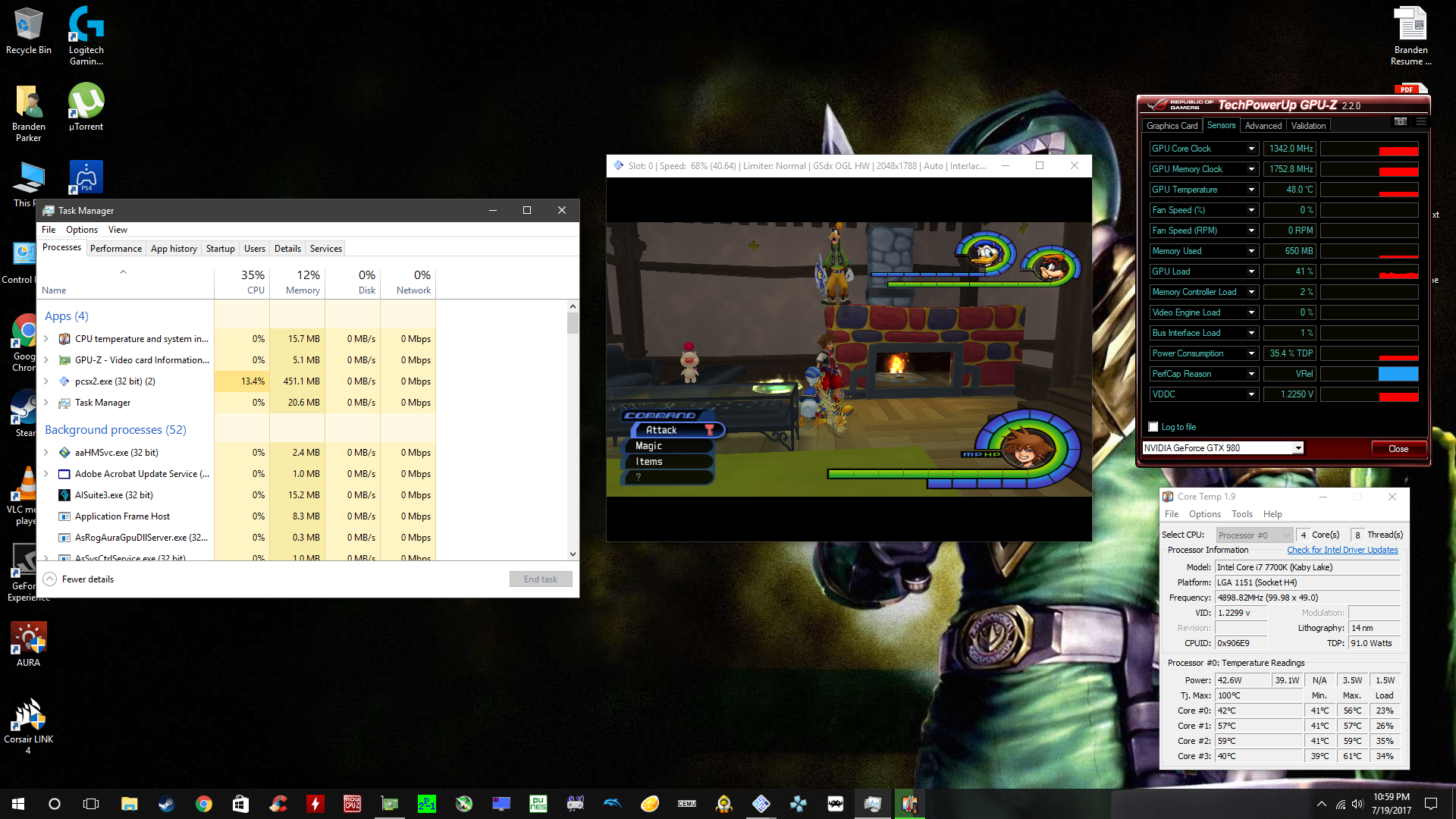
I'm getting some strange performance issues in Kingdom Hearts 1 with this build for some reason. In Traverse Town the accessory shop in particular even at just x2 native i can't maintain 100% game speed. As you can see in the screenshot my cpu and gpu load along with the temps are just fine so there is no throttling going on. Only at x1 native can i get 100% game speed. No other settings seem to make a difference.
BParks21
on 20 Jul 2017
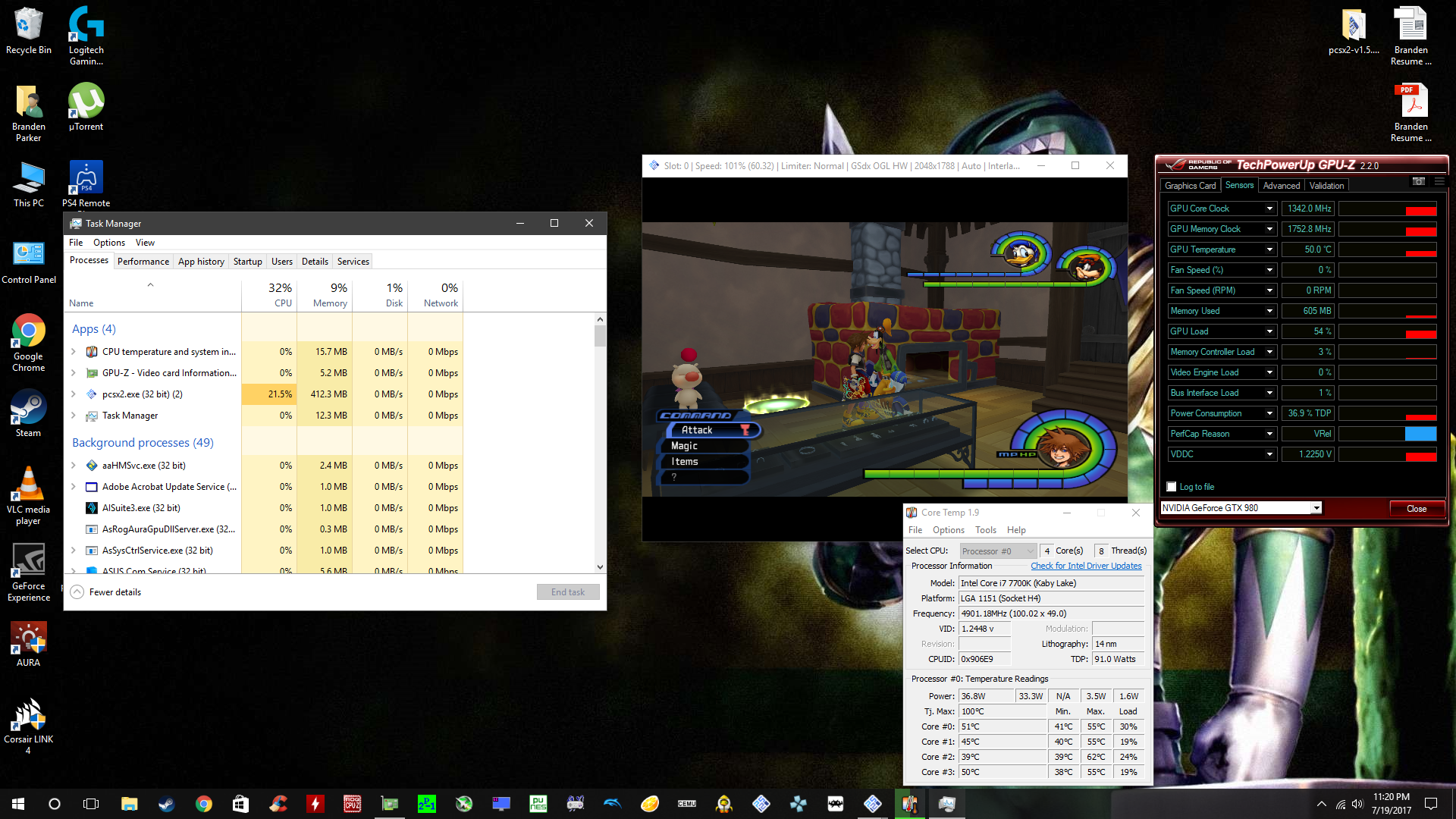
Yeah i just tested this version of pcsx2 v1.5.0-dev-2136-gbab9826 and with the same exact settings as v1.5.0-dev-2148-g27b6bca2f-3169 the game runs flawlessly. There is some performance bug with this build a massive one.
Whats funny too is that the build running slowly actually utilizes less of my gpu than the one running full speed.
BParks21
on 20 Jul 2017
Hum, I did an emergency fix for the fullscreen detection.
@mirh the thing with your proposal is that both Vsync ON/OFF will behave the same. Without Vsync you have no guarantee on the presentation. So you have tearing, and now you will have stuttering (on some condition).
@turtleli
If you're motivated, there is also a wxPOPUP_WINDOW flag. From Dolphin.
    // OpenGL requires the pop-up style to activate exclusive mode.
SetWindowStyle((GetWindowStyle() & ~wxDEFAULT_FRAME_STYLE) | wxPOPUP_WINDOW);
@WizLizard
Could you retest the new build. Try to test vsync on/off. The performance issue is likely related to dwmwait.
At all, we can also open another topic. What ought to be the adaptive vsync behvavior versus dwmwait ?
gregory38
on 20 Jul 2017
Not sure I understand the first sentence. Skipping.
If the DWM is affecting pcsx2 window, you don't get to choose "oh, I don't want sync".
And the only thing you would achieve by skipping dwmflush then is, wait for it, keeping the stuttering.
To the best of what I (we?) know, there's no other way to fix it.
While for benchmarking 3B is still an option.
Perhaps you should explain what happens in your case in more detail then?
A black frame that makes for flicker?
382.53, Windows 10.
:/
Windows 10 Creators update?
Do these tests behave like they should?
And that's exactly why I suggest defining what "OpenGL fullscreen exclusive" is because what I define it as (can suffer from tearing) may be different to what other people define it as, and that only causes confusion
😭😭😭
That's what I'm trying to do since 2 months.
And it's not different because they "define it otherwise".
It's different because different drivers (and with nvidia I wouldn't even know if it's code or magic) have different criteria to enable it.
(as evidenced by this thread)
This thread only evidenced that there are some people that give no fuck to others' needs - as long as their only whim has been covered.
EDIT: no, not you, if it wasn't clear
the thing with your proposal is that both Vsync ON/OFF will behave the same.
If DWM is being applied (please could we really change the name of the function? it misleads) yes, the result would be that those option wouldn't matter.
They could not in the first place!
// OpenGL requires the pop-up style to activate exclusive mode.
Uh. My sources thought otherwise.
Also this (assuming wxPOPUP_WINDOW has something to do with WS_POPUPWINDOW)
mirh
on 20 Jul 2017
If DWM is being applied (please could we really change the name of the function? it misleads) yes, the result would be that those option wouldn't matter.
They could not in the first place!
You still have the case of bad auto detection of exclusive fullscreen (which is kinds of random so far). Besides, you can choose to suffer of stuttering. It doesn't hurt to control DWM with the vsync.
(assuming wxPOPUP_WINDOW has something to do with WS_POPUPWINDOW)
I'm not sure that wxPOPUP_WINDOW is the same as WS_POPUPWINDOW.
gregory38
on 20 Jul 2017
You still have the case of bad auto detection of exclusive fullscreen
Of course I'm assuming we can nail that down perfectly.
(which is kinds of random so far)
Just on nvidia (did I already say this?) if you ask me.
Besides, you can choose to suffer of stuttering
Lol? Yes I guess everything in this world can be chosen, but.. The point being?
It doesn't hurt to control DWM with the vsync
To the very least it's really counterintuitive.
I'm not sure that wxPOPUP_WINDOW is the same as WS_POPUPWINDOW.
Ok you are right. The former should just set 0x00020000 flag.
I really still have to understand how "combining" works, but according to WinUser.h that should equal to WS_GROUP.
I hardly can see how that would matter for exclusive fullscreen though :/
mirh
on 20 Jul 2017
@gregory38 I retested with vsync on and off. I get the same poor performance.
BParks21
on 21 Jul 2017
Can confirm dwmflush nor vsync seems to get applied now
Could we move to #2000 this little wondering and just leave here big philosophical issues like Triple Buffering and DWMFlush behavior?
EDIT: additional point for 3B: how do we expect PAL users to use (normal) v-sync without it?
mirh
on 21 Jul 2017
there is also a wxPOPUP_WINDOW flag. From Dolphin.
It has no effect. It seems the & ~wxDEFAULT_FRAME_STYLE is responsible for the "fullscreen exclusive" behaviour (I didn't test what specific style/combination of styles causes it).
If the DWM is affecting pcsx2 window, you don't get to choose "oh, I don't want sync".
And the only thing you would achieve by skipping dwmflush then is, wait for it, keeping the stuttering.To the best of what I (we?) know, there's no other way to fix it.
While for benchmarking 3B is still an option.
Skipping DwmFlush allows the framelimiter to be properly disabled and not restricted to the monitor refresh rate. DwmFlush "fixes" the stuttering by simply slowing things down (syncing) so that all frames are presented and no frames are missed by the compositor.
No idea what you mean by 3B.
A black frame that makes for flicker?
Not sure if it's same or different. An earlier post of yours simply mentioned black frame. Here it flickers black but then the graphics reappear immediately.
Windows 10 Creators update?
Do these tests behave like they should?
Yes.
Behaviour is "fullscreen exclusive" without tearing.
It's different because different drivers (and with nvidia I wouldn't even know if it's code or magic) have different criteria to enable it.
Well, AFAICT the criteria is:
- Set the aspect ratio to stretch (unless your resolution has a 16:9 or 4:3 aspect ratio, in which case the other aspect ratios will work as well, see vsub's testing in #1075) so the rendering window covers the entire screen
- Have the FMV switch renderer hack disabled (I think) - IIRC it alters the rendering window dimensions to prevent crashing on certain GPUs i.e. AMD. It prevents the first criteria from happening.
- Use the WS_POPUP window style (dunno if this last one is only true on NVIDIA, and I don't know if other window styles/combinations of window styles trigger a switch due to the wxDEFAULT_FRAME_STYLE stuff I mentioned earlier).
This thread only evidenced that there are some people that give no fuck to others' needs - as long as their only whim has been covered.
Well, I don't exactly think you were clear on what you wanted others to specifically test for. And if you use language such as 'captain "stfu just give me what I want"' and 'PCSX2 forum base is pretty retard' then it just makes people more reluctant to respond.
turtleli
on 21 Jul 2017
Skipping DwmFlush allows the framelimiter to be properly disabled and not restricted to the monitor refresh rate.
Yes, I know.
3B stands for triple buffering, and I was thinking was the thing that could make the circle square.
Absolutely a universal lock would be a disaster.
An earlier post of yours simply mentioned black frame. Here it flickers black but then the graphics reappear immediately.
Guess like we can call this a day.
Behaviour is "fullscreen exclusive" without tearing.
_Ohhh_...
Well, now I have people having reported just about anything about those nvidia drivers...
Though at least, the only constant is that "seeing tearing" is never a thing.
I'm not sure we'd be supposed to still sync to dwm in these cases or not.
Use the WS_POPUP window style (dunno if this last one is only true on NVIDIA
Apparently amd doesn't require it.
Then I don't know if WS_CLIPSIBLINGS couldn't also play a role.
For the remainder yes, those were my findings too.
Well, I don't exactly think you were clear on what you wanted others to specifically test for.
Check behavior with previous driver? I think I stated it like tens of times.
then it just makes people more reluctant to respond.
Guess like that could already be an improvement, compared to the "moan because fix isn't getting pushed but provide no help at all".
mirh
on 21 Jul 2017
It has no effect. It seems the & ~wxDEFAULT_FRAME_STYLE is responsible for the "fullscreen exclusive" behaviour (I didn't test what specific style/combination of styles causes it).
Oh !
Well, AFAICT the criteria is:
Thanks for the info. You're right about the crash 5871874f7007e2876760ea25aa76a5a868747623. The automatic detection from GSdx seems doomed.
So I propose that we merge the "adaptive vsync" part of the PR.
And then we think about a proper solution for this fullscreen stuff.
- A better way to avoid the FMW switch crash
- An exclusive fullscreen option on the core ? Or Always use
~wxDEFAULT_FRAME_STYLE | WS_POPUPflags in fullscreen - An option in GSdx to replace vsync by DwmFlush. Or find a way to improve the autodetection.
gregory38
on 21 Jul 2017
The actual unexplainable weird thing is why @WizLizard is getting poor performance (meaning.. either stuttering or frame lock, whatever) with both vsync off and on setting.
(while personally I still cannot get lock nor v-sync)
An exclusive fullscreen option on the core ?
Not sure that's doable. That should also be something consistent among drivers.
And I think we'd have to add that to DirectX too.
An option in GSdx to replace vsync by DwmFlush. Or find a way to improve the autodetection.
Either way it feels just _a bit_ problematic for nvidia users to be condemned to locked framerate.
Or for everybody else having to toggle everytime another option to choose between stutter-free and frame-limiting off.
If you could at least on IRC try to explain why 3B (aside of complexity, which then is another matter) would be a problem..
mirh
on 21 Jul 2017
I nearly forgot about the perf issue. I don't know, maybe he ran the wrong build. The no vsync case should be the same as master or I screwed up something in the code.
gregory38
on 21 Jul 2017
Pretty certain I'm using the correct build.
BParks21
on 21 Jul 2017
Pretty certain I'm using the correct build.
Can you state the specific version you are using?
turtleli
on 21 Jul 2017
I believe it was this version but I'm at work so I'm not entirely sure. v1.5.0-dev-2148-g27b6bca2f-3169.
BParks21
on 21 Jul 2017
3169
That's Wednesday build.
All but latest.
mirh
on 21 Jul 2017
Yes that was the one you linked me Wednesday. I will test 1.3187. Hopefully tonight.
BParks21
on 21 Jul 2017
Ok I tested 1.3191-master from the AppVeyor and i had no performance issue but i had the stuttering.
BParks21
on 21 Jul 2017
That's the wrong one. Try 1.3185-master with both vsync on and off.
turtleli
on 22 Jul 2017
Ok
On Jul 21, 2017 6:04 PM, "Jonathan Li" notifications@github.com wrote:
That's the wrong one. Try 1.3185-master with both vsync on and off.
—
You are receiving this because you were mentioned.
Reply to this email directly, view it on GitHub
https://github.com/PCSX2/pcsx2/issues/1437#issuecomment-317123398, or mute
the thread
https://github.com/notifications/unsubscribe-auth/ALncllcNaFrvCcesrGvWdQwRefiu8F1Uks5sQSCJgaJpZM4JAy-B
.
BParks21
on 22 Jul 2017
Guess like we can call this a day.
So... does that mean similar or different behaviour? I'm unable to read your mind.
Well, now I have people having reported just about anything about those nvidia drivers...
Though at least, the only constant is that "seeing tearing" is never a thing.
Not really. AFAICT most reports actually report the same behaviour, even though they seemingly conflict. The only reason why AMD seems to have consistent behaviour on this thread is because I think you're the only one who's reported on the AMD fullscreen behaviour. Sample of one. Reading some of what was reported:
- Having to Ctrl-Alt-Del when a breakpoint is triggered when running PCSX2 with the VS debugger to get back to the desktop - not actually reported above. But it affects me with "OpenGL fullscreen exclusive" mode.
- Alt-tab is immediate - I get that too with "OpenGL fullscreen exclusive". The D3D games I have take longer to transition.
- Tearing, but not fullscreen exclusive - Fullscreen exclusive may be associated with slow alt-tabbing/back to desktop
- No black frame - I get a very brief flicker at most. I wouldn't call it a black frame.
- No tearing - Can't really explain this one. Some things don't tear or don't produce noticeable tearing, but user did mention tearing at one point. Unless user accidentally has vsync enabled in the driver. But hey, you had an argument with that user, and the user was actually quite helpful...
So essentially, people have different ideas on what "fullscreen exclusive" is. Which is exactly why I said it would be a good idea to define what "OpenGL fullscreen exclusive" is.
turtleli
on 22 Jul 2017
@turtleli Ok I tested 1.3185-master. With vsync off i get no slowdown but stuttering also no tearing. With vsync on i get slowdown, no tearing and no stuttering. With vsync adaptive i seem to get minimal stuttering, no tearing but slowdown.
BParks21
on 22 Jul 2017
So... does that mean similar or different behaviour?
Similar, I guess.
Sample of one.
Yes.
Meanwhile there are all the reports in this world that nvidia is doing something fishy with latest drivers.
But I guess @Illynir could explain us which driver/w10build he had above.
Unless user accidentally has vsync enabled in the driver. But hey, you had an argument with that user, and the user was actually quite helpful
1) Ok, whatever. Seems like you miss the chat part with only moaning. 2) I already sent to 5 nvidia people the cube samples, and none of them were able to spot tearing.
And with v-sync forced off.
Then I guess I have been quite hasty to automatically associate lack of tearing with lack of exclusive fullscreen.
Is this with WS_POPUP build or already with master?
mirh
on 22 Jul 2017
Meanwhile there are all the reports in this world that nvidia is doing something fishy with latest drivers.
And are those bugs relevant to this particular issue?
Also, you could perhaps test whether #842 affects AMD GPUs as well since it's potentially an NVIDIA-only issue.
Seems like you miss the chat part with only moaning.
I read the argument when it took place. I don't think you responded well.
Is this with WS_POPUP build or already with master?
Not sure what you're referring to. I can get tearing in PCSX2 but not in the wx sample., The "exclusive fullscreen" method doesn't matter (WS_POPUP or SetWindowStyle(GetWindowStyle() & ~wxCAPTION);.
turtleli
on 24 Jul 2017
Also, you could perhaps test whether #842 affects AMD GPUs as well since it's potentially an NVIDIA-only issue.
I'm not getting sync in the first place, so.. Hard to tell.
Given only forcing it in driver seems to work (not even "default on, unless otherwise specified") I guess pcsx2 is doing something wrong.
I can get tearing in PCSX2
... ok I'm done.
mirh
on 24 Jul 2017
Alright, tested the latest build from the build bot and can confirm no stuttering nor any tearing...
...on the Nvidia driver before the current one.
On the current Nvidia driver, both the latest GIT build and even stable 1.4.0 now have intermittent episodes of severe tearing, even with Vsync on (tested standard and adaptive for the latest build). Forcing thru the driver does not help. I still find it better than it was before the main issue in this thread was being investigated, but Nvidia really fucked something up with this latest driver, because I'm having issues with stable 1.4.0 now.
RAZORXKHARA33
on 6 Aug 2017
Alright, tested the latest build from the build bot and can confirm no stuttering nor any tearing...
...on the Nvidia driver before the current one.
😲 😲 😲
So that would/might mean... That dwmflush is just needed to cope with a driver (what a novelty) bug?
(might explain why I never noticed the problem with amd)
mirh
on 6 Aug 2017
- First we need to fix the Vsync option to be sure it is always applied correctly.
- And then we need to remove the rounding of the screen size. AMD crashed should be fixed differently.
gregory38
on 6 Aug 2017
AMD crashed should be fixed differently.
Maybe it already got fixed 😄
mirh
on 6 Aug 2017
I think it is with a legacy driver...
gregory38
on 6 Aug 2017
The latest build from the build bot still gives me stuttering with enabled or adaptive selected.
BParks21
on 9 Aug 2017
I was testing with the second latest build from the build bot. This one:https://buildbot.orphis.net/pcsx2/index.php?m=dl&rev=v1.5.0-dev-2155-g41bfb6e80&platform=windows-x86
It was behaving the same way as stable 1.4.0, so no stuttering nor any tearing on the previous Nvidia driver. This latest driver has fucked so many things up for me (and probably many others, too). My Shadowplay recordings have EVEN MORE stuttering than they did before (didn't even think that was possible) and I get very infrequent tearing and stuttering in both the build linked above as well as stable 1.4.0. This leads me to believe that something is seriously wrong with the latest driver, given that I have no issues with the previous driver, and the GIT build with vsync changes is producing consistent 60 FPS when the game is running at full speed, no stutters, no tears, nothing. Just nice, smooth gameplay.
END RANT, Nvidia sucks, I guess... :P
RAZORXKHARA33
on 9 Aug 2017
@RAZORXKHARA33 Same.
BParks21
on 9 Aug 2017
The latest build from the build bot still gives me stuttering with enabled or adaptive selected.
That's normal given all the DWMflush changes were dropped.
Now though, thanks to somebody freaking finally trying older driver versions we now know that nvidia driver is not only a variable on the fix end.. But probably the cause in the first place.
Even more so a reason to report which driver version caused what.
EDIT: I would recommend everybody to try <372
mirh
on 9 Aug 2017
Well I know that this has been an issue ever since the opengl renderer in pcsx2 became usable. If nvidia gets their heads out of their asses then this would likely solve the stutter other emulators suffer from with opengl. I imagine.
BParks21
on 9 Aug 2017
Well I know that this has been an issue ever since the opengl renderer in pcsx2 became usable.
The other user is reporting otherwise AFAIK
mirh
on 9 Aug 2017
Well for me it was present even on 1.2
On Aug 9, 2017 5:42 PM, "mirh" notifications@github.com wrote:
Well I know that this has been an issue ever since the opengl renderer in
pcsx2 became usable.
The other user is reporting otherwise AFAIK
—
You are receiving this because you were mentioned.
Reply to this email directly, view it on GitHub
https://github.com/PCSX2/pcsx2/issues/1437#issuecomment-321389724, or mute
the thread
https://github.com/notifications/unsubscribe-auth/ALnclhINiazjKtkv6ch2GcfVVzwlQdVHks5sWiffgaJpZM4JAy-B
.
BParks21
on 10 Aug 2017
I'm not sure about everything that has been said in this thread (its is very long) but if I'm not wrong the cause of the stuttering is being pinned on Nvidia drivers and GL. Well I am using AMD and also getting intermittent stuttering in Gran Turismo 4 using DX11HW.
Specs:
4790k
16GB
FuryX
pcsx2-v1.5.0-dev-2162-g8c37418e4-windows-x86
I use a 21:9 monitor so I play the game with aspect ratio set to "Fit to screen" and use hor fov hacks.
Here's what happens, I start a race and 75% of the time it starts off smoothly and stutter free. After 3 or 4 laps (6 mins) stuttering slowly starts creeping in. When this happens if I just go look at the GSDX settings (which freezes emulation) and just press OK, emulation resumes smoothly again without stutter. In fact I have just noticed that you dont have to be in a race for this to happen as it also happens on the menu screen in Gran Turismo mode.
It is as if the game slowly starts to fall out of sync. Vram does not exceed 2gb when the stuttering happens. Not sure how relevant this information is but thought I'd throw it in there.
 P8M3
on 11 Aug 2017
P8M3
on 11 Aug 2017
Just to add more on the post above, it would seem that this happens in many games not just GT4. I can alter when it starts to stutter by changing the NTSC refresh rate. For example if I set it to 60.00 it would no longer stutter after a few minutes. Instead it would stutter every 20 seconds for about 1 second. So it seems that I can just not set the correct refresh rate in PCSX2_vm without it eventually falling out of sync. Tried 3 different monitors and vsync still the same.
P8M3
on 11 Aug 2017
facepalms
Putting aside I'm not sure even a Fury is enough to get playable framerates in GL on Windows for AMD..
Could you try the supposed workaround fix above?
mirh
on 11 Aug 2017
GL is not even worth considering with AMD so it is DX11 only unfortunately until pcsx2 follows rpcs3's route and implements Vulkan.
So I tried the the plugin that was mentioned in the fix and it's still the same problem. Can only play for around 5 or 6 minutes before I have to pause and resume emulation due to stuttering/sync issues. At least that is the case in GT4.
P8M3
on 13 Aug 2017
Can only play for around 5 or 6 minutes before I have to pause and resume emulation due to stuttering/sync issues.
This has nothing to do with this issue then.
EDIT: you can open another one, if really any
mirh
on 13 Aug 2017
As I said before, the issue that started this thread appears to have been fixed in v1.5.0-dev-2155-g41bfb6e80, as it is now behaving the same as stable 1.4.0. Both are now exhibiting tearing after roughly 5 minutes of gameplay regardless of vsync setting, and it seems to be caused by the latest Nvidia driver, as I am not experiencing it with the previous driver. What @P8M3 is experiencing sounds exactly like what I am getting, though he should test stable 1.4.0 as well and see if it exhibits the same behaviour. If it does, then it's safe to say that the remaining issue is driver-related and that AMD and Nvidia both need to get their shit together and fix their god-damned drivers!
RAZORXKHARA33
on 14 Aug 2017
...
So you are telling me, that all the stuttering people reported here with no time lag.. is 5 minutes delayed for you?
Fuck me
Also, I'm not understanding how you could have "latest nvidia driver" like a year ago.
If it does, then it's safe to say that the remaining issue is driver-related and that AMD and Nvidia both need to get their shit together and fix their god-damned drivers!
Or microsoft, you know probably.
mirh
on 14 Aug 2017
What I am saying is that the original issue I reported to start this thread a year ago is no longer happening for me on the build I mentioned in my most recent comment, so it is behaving like 1.4.0 now.
The issue I am having now is tearing (not the stuttering that I reported a year ago) because it seems that vsync is not being enforced correctly on this latest Nvidia driver, so all is well until about 5 minutes into gameplay (though not sure why it's delayed by 5 min.). Who knows what kind of black magic is falling apart to cause this on the latest driver...
I also agree and wouldn't rule out MS, either.
RAZORXKHARA33
on 14 Aug 2017
What I am saying is that the original issue I reported to start this thread a year ago is no longer happening for me on the build I mentioned in my most recent comment
Ooooh.
Cool. So I guess we could close this issue F I N A L L Y.
(And if somebody still have stuttering, we can open another one - focused perhaps just on DWM issues)
(also valid for tearing problems ofc)
Could you please try to bissect where this got fixed?
mirh
on 14 Aug 2017
Please let's remain calm & cool.
@P8M3
Could you test the behavior with frame limiter disabled and both Vsync & adaptive Vsync ?
@RAZORXKHARA33
It is quite strange. Are you sure that you didn't enabled the hidden vsync option EnableVsyncWindowFlag ? What happen if you disable the frame limiter.
Note: if you update the option, presses F9 two times. (we have some internal bugs that don't apply vsync properly)
gregory38
on 14 Aug 2017
@gregory38 I just tried the build I mentioned above both with the hidden option enabled and disabled and forcing vsync on in the Nvidia Control Panel. With the option disabled, I get the 5 min of smooth gameplay, and then stuttering, but no tearing. With the option enabled, I get perfectly smooth gameplay indefinitely. Again, this is with vsync forced on in the Nvidia Control Panel. If I set it to "Use 3D Application Setting," then I get tearing after about 5 min., no matter what vsync option I use in the PCSX2 config (standard or Adaptive). I also get that result if I force vsync to Adaptive in the NVCP. Again, this is on build v1.5.0-dev-2155-g41bfb6e80.
RAZORXKHARA33
on 14 Aug 2017
@gregory38 Tested with build v1.5.0-dev-2155-g41bfb6e80. Frame limiter disabled and Vsync on in PCSX2 seems to have resolved the issue (been on the same track for 20 mins and no stutter, will continue testing). Vsync is "off unless application specifies" in AMD settings. I swear I tried that already but obviously not. I tried a lot of things and got overwhelmed I guess. Feeling a little foolish. I noticed before that the fps would randomly jump up to 64fps for a split second but now it is very stable.
Thank you very much.
@RAZORXKHARA33 Hope you can fix your issue quickly and fulfill mirh's dream of closing this thread.
@mirh Peace.
Thank you all.
P8M3
on 14 Aug 2017
Tbh I think I'm one of the few people that has read the latest 200 messages and I don't mind for even another half of that.
Given the original issue reported by the original reporter is claimed by him to be fixed with WS_POPUP, it seems only obvious for *that* to be considered solved (once we bring it back).
That likely has no effect at all in the first place on AMD, so to the very least you should already report in another issue.
Also, IIRC all of this was just about an opengl-only problem originally.
mirh
on 14 Aug 2017
@RAZORXKHARA33
If I set it to "Use 3D Application Setting," then I get tearing after about 5 min., no matter what vsync option I use in the PCSX2 config (standard or Adaptive).
Fwiw, Adaptive Vsync does't remove tearing if you're PC can't manage the 60fps. Anyway, in this situation, what happen if you disable the frame limiter ? Does it goes above 60 fps, which mean no sync at all or does it cap at 60 fps which means there is another kinds of Vsync enable somewhere.
@P8M3
Interesting. @ramapcsx2 told me that PCSX2 limiter is rather suboptimal. I don't know how Dx manage but it likely suffers of a similar issue. In my opinion, adaptive vsync (OpenGL) should replace the frame limiter.
gregory38
on 14 Aug 2017
Fwiw, Adaptive Vsync does't remove tearing if you're PC can't manage the 60fps.
I'd propose to open a "what do you think of adaptive v-sync" thread on the forums.
In my opinion, adaptive vsync (OpenGL) should replace the frame limiter.
PS2 refresh rate and player monitor should really, really have nothing to do.
--- Nevertheless, I don't think frame limiter code (for as much possibly subpar) was ever touched in the last years or so, especially so much to cause any "explode after handful of minutes" problem.
mirh
on 14 Aug 2017
@gregory38 I've had the frame limiter disabled all of this time. Also, DX suffers from the same issue I mentioned in the OP, but that happens in stable 1.4.0 as well. It's been an issue for longer, but since I've been using OpenGL ever since the plugin was updated sometime in 2015, I haven't bothered with DX 11. It's been less accurate and worse performing in every game I've played, so I see no reason to use it over OpenGL. This is on a GTX 1080 BTW.
RAZORXKHARA33
on 15 Aug 2017
Did some futher testing and am now getting consistently good behaviour in GT3. Now I either need more powerful hardware or some performance optimizations need to be made, as I get a lot of slowdown-stutter at tracks like Laguna Seca and the Special Stage Routes. However, the stutter I'm now talking about is one that I've experienced ever since I started using PCSX2 and is a result of the game slowing down--completely unrelated to what this thread is about. FTR, it happens whenever the sun comes in/out of view. That's for a separate issue, though. Unless anyone thinks otherwise, I think we can close this thread now.
RAZORXKHARA33
on 15 Aug 2017
I think we should first get WS_POPUP _on_.
(either because we drop the .ini toggle altogether because we are confident it shouldn't be needed anymore, or at least by making it enabled by default)
and is a result of the game slowing down
Then I usually call it "lag". Stuttering is more about framerate "inconsistently variable"
You can open another issue for GT3 specifically
EDIT: @RAZORXKHARA33 you can close, see below
mirh
on 15 Aug 2017
Why is this closed?
BParks21
on 11 Sep 2017
... the last post?
mirh
on 11 Sep 2017
Oops yeah don't know how i missed that -_-
BParks21
on 11 Sep 2017
To be honest, I'm completely lost at my side. So what setup @RAZORXKHARA33 did you use ? With or without the vsync option.
gregory38
on 12 Sep 2017
@gregory38 EnableVsyncWindowFlag enabled, vsync option in pcsx2 set to adaptive, vsync in NVCP set to On.
RAZORXKHARA33
on 12 Sep 2017
https://github.com/PCSX2/pcsx2/issues/1437#issuecomment-322208096, as I posted in the follow-up thread.
mirh
on 12 Sep 2017
@WizLizard Try EnableVsyncWindowFlag=enabled, with adaptive v-sync in pcsx2... And just whatever might do it in nvidia control panel.
mirh
on 15 Jan 2018
@mirh Sorry same results, still frame pacing issues very noticeable immediately upon spinning the camera around in any game with 360 camera control.
The only thing that ever worked was that custom gsdx plugin you linked a while back with a tweak you made. Unfortunately it caused a weird performance issue. At least i think it was you.
BParks21
on 16 Jan 2018
@mirh Ok it is fixed. I didn't realize in the GS Window tab i had zoom level set to 100.83, setting it back to 100 got rid of the stutter. Sorry, i was messing with that a while back and forgot to set it back to normal.
BParks21
on 16 Jan 2018
Related issues
mirh
·
6Comments
 backgamon
·
5Comments
backgamon
·
5Comments
 XXXBold
·
4Comments
XXXBold
·
4Comments
 mcabel
·
4Comments
mcabel
·
4Comments
 Nezarn
·
6Comments
Nezarn
·
6Comments
Most helpful comment
Alright, tested the latest build from the build bot and can confirm no stuttering nor any tearing...
...on the Nvidia driver before the current one.
On the current Nvidia driver, both the latest GIT build and even stable 1.4.0 now have intermittent episodes of severe tearing, even with Vsync on (tested standard and adaptive for the latest build). Forcing thru the driver does not help. I still find it better than it was before the main issue in this thread was being investigated, but Nvidia really fucked something up with this latest driver, because I'm having issues with stable 1.4.0 now.