Paypal-checkout-components: paypal button dynamic height
It would be nice if we had control over the height of the button. We have specific height-styled buttons, and matching paypal's arbitrary height selection (as well as paypal's chosen height-adjusted responsive breakpoints when using the responsive size) is something that should be easier? Maybe I'm missing an obvious answer here?
Thanks for any help you can provide.
 719media
All 15 comments
hi @719media, I'm not sure I understand your question correctly. Do you want to override the button styles?
 khanghoang
on 22 May 2018
khanghoang
on 22 May 2018
Hello @khanghoang
I merely want to be able to explicitly set the button height, so that it will visually match the height of other buttons I have on the page.
719media
on 22 May 2018
Here's an example using bootstrap, a fairly popular framework:
https://jsfiddle.net/rj2ezhnc/
You'll notice if you change the viewport size of the render that sometimes the button is bigger, sometimes it is smaller, etc.
719media
on 22 May 2018
@719media I may be wrong but I think this is the one that you're looking for.
khanghoang
on 23 May 2018
@khanghoang I don't think you looked at the fiddle example, or if you did, you did not pay attention to the issue. This is regarding explicitly setting the height of the button. Responsive mode of the paypal button changes the max-width of the button at larger container sizes, and just arbitrarily picks various heights at different container sizes.
719media
on 23 May 2018
@abarco Is there any way you could provide a sentence or two of feedback here? My team is looking for direction if this is something that you guys would be interested in solving, or if control over button height is something we should never plan on getting with the paypal checkout script. We'd love to update our integration but this is the holdup for us.
Thank you very much for your time.
719media
on 5 Jun 2018
@719media We do not offer option to increase the height of the button. We use the width and use that to calculate height such that the button is visually structured correctly. yes, we have experimented with these in the past and have tried to come up with a most apt range which works for most of our buttons. This range is definitely not random.
 vishakha94
on 28 Jun 2018
vishakha94
on 28 Jun 2018
@vishakha94
Thank you for the reply. I understand you have tested various settings and optimized for your own desires look and feel within the PayPal buttons. But you have not offered an option for someone to have it look nice with their own page elements. To someone else, your height/width selections ARE arbitrary because there is no universal standard for button height at different widths. ApplePay and GooglePay and payment request offer no such restrictions. Of course, they are very different tools with different implementation. They have guidelines for branding but allow the buttons to appear nicely within a design.
Perhaps you were able to take a look at the jsfiddle as an example, it explains this concept quite clearly.
I think it is a mistake for you not to support this. I hope you reconsider.
719media
on 28 Jun 2018
@719media Thank you for your concern and I totally see your point. Let me get back to you with whether we can consider having this change in the near future.
vishakha94
on 28 Jun 2018
Hello paypal team @bluepnume @vishakha94 , any update on this? Is it something the paypal team is interested in considering? Thanks
719media
on 13 Nov 2018
It looks like buttons support height within a range of values now:
https://developer.paypal.com/docs/checkout/how-to/customize-button/#button-styles
seems promising! using the above-mentioned fiddle, now adding in the height attribute:
https://jsfiddle.net/nr2ygdo3/
I think this issue can be closed?
719media
on 13 Nov 2018
Thanks @719media.
vishakha94
on 13 Nov 2018
_I honestly don't know why it took you guys so long to figure this out. This is the third time I've implemented PayPal and each time it's a fiasco having to fight around issues like this. At least now I can stop using the legacy API (which allowed me to use any old DIV as a button)._
@vishakha94 Thanks for finally adding this option :-)
HOWEVER there are two outstanding things:
The current documentation states:
Set the style.height option to one of these values:
small,medium,large.
However this value actually takes a number (which is far more preferable) and not a string value. So the documentation needs updating to indicate you actually need to provide a number.
Also when I use these settings:
  style = {
                color: 'gold',
                shape: 'rect',
                size: 'responsive',
                height: 43,
                label: 'checkout',
                tagline: false
            };
I get a button with 10px padding included in the DIV (for a height of 53px).
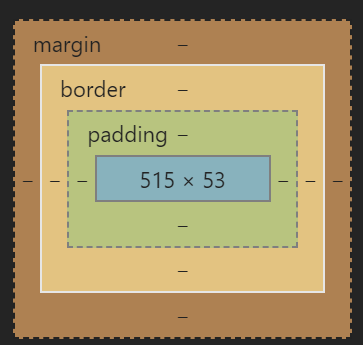
If you can't trust a developer to add their own padding around a button then you need a new developer!!
Fortunately now I can manually set the height I can set a height on the containing element too, but this ought to be fixed. I can add my own padding - the button DIV should be the size I specify in style.height.

Suggestion:
To prevent breaking this perhaps a padding: boolean property under styles can be introduced with true as the default?
 simeyla
on 15 Dec 2018
simeyla
on 15 Dec 2018
I have been pulling my hair our trying to figure out how to set a static button height with the responsive setting..... I cannot believe that I stumbled across this issue that revealed an undocumented feature that style.height could accept a simple number when the documentation clearly states it only accepts the string values of small, medium and large.
Unreal, Paypal. Fix your documentation.
 Jakobud
on 27 May 2020
Jakobud
on 27 May 2020
This issue has been automatically locked since there has not been any recent activity after it was closed. Please open a new issue for related bugs.
![github-actions[bot] picture](https://avatars.githubusercontent.com/in/15368?v=4&s=40) github-actions[bot]
on 28 May 2021
github-actions[bot]
on 28 May 2021
Related issues
 MrMooky
·
3Comments
MrMooky
·
3Comments
 rfdc
·
6Comments
rfdc
·
6Comments
 JeromeDeLeon
·
4Comments
JeromeDeLeon
·
4Comments
 i7eo
·
3Comments
i7eo
·
3Comments
 stephen-last
·
6Comments
stephen-last
·
6Comments
Most helpful comment
It looks like buttons support height within a range of values now:
https://developer.paypal.com/docs/checkout/how-to/customize-button/#button-styles
seems promising! using the above-mentioned fiddle, now adding in the height attribute:
https://jsfiddle.net/nr2ygdo3/
I think this issue can be closed?