Paypal-checkout-components: PayPal Payments SDK script not present on page!
Hi! I use paypal (v5.0.23), but i have some problems. Can you help me to review these problems?
Description

Code:
function loadScript(url, callback){
var script = document.createElement ("script")
script.type = "text/javascript";
if (script.readyState){ //IE
script.onreadystatechange = function(){
if (script.readyState == "loaded" || script.readyState == "complete"){
script.onreadystatechange = null;
callback();
}
};
} else { //Others
script.onload = function(){
callback();
};
}
script.src = url;
document.getElementsByTagName("head")[0].appendChild(script);
}
var url = "https://paypal.com/sdk/js?client-id=Abyg6MnA1DfpRZ0AkqiXVsReMTZvIlS5iyaexyuRwKPb41T68SF5hWZ9VN3w78AO8cIpXmlDbZeIoE_i¤cy=USD&intent=authorize&commit=false&vault=true&components=buttons"
loadScript(url, function() {
// paypal.Buttons().render('body');
})
I want to display smart payment button correctly on the page in the page. but now the button didn't display on the page
Affected browsers
- [ ] Chrome
- [ ] Safari
- [ ] Firefox
- [ ] Edge
- [ ] IE
- [ ] Chrome Mobile/Tablet
- [ ] Safari Mobile/Tablet
- [ ] Web View / Safari ViewController
- [ ] Other
 i7eo
i7eo
All 3 comments
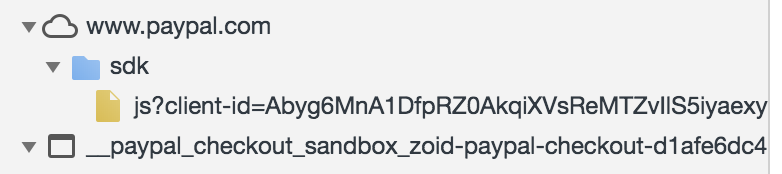
hi, I use the 'velocity' template(.vm) in my Java web project. I found that when I loaded with my own clientid, I was missing the smart file resource(pic-1). When I use you provide to ‘https://www.paypal.com/sdk/js?client-id=sb' The smart file resource exists(pic-2).
When I delete all the template code of the product details page(goodsDetail.vm), the example given in the official website exists in the smart file resource (pic-2).
pic-1:
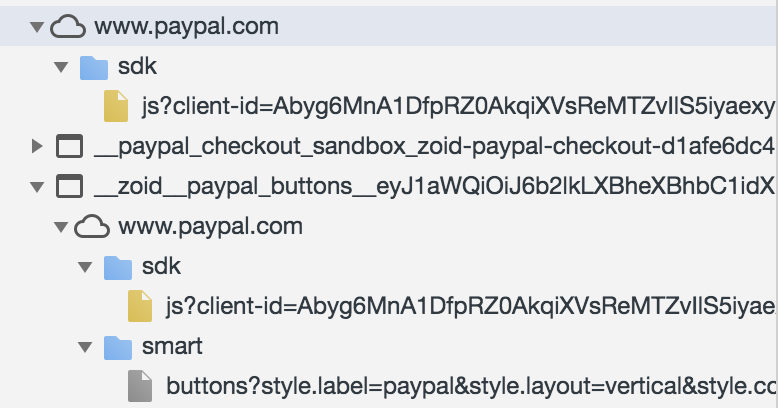
The official website code demo:
<!DOCTYPE html>

<head>
  <meta name="viewport" content="width=device-width, initial-scale=1">
  <meta http-equiv="X-UA-Compatible" content="IE=edge" />
</head>

<body>
    <script src="https://www.paypal.com/sdk/js?client-id=Abyg6MnA1DfpRZ0AkqiXVsReMTZvIlS5iyaexyuRwKPb41T68SF5hWZ9VN3w78AO8cIpXmlDbZeIoE_i"></script>
  <!-- </script> -->

  <div id="paypal-button-container"></div>

  <script>
    paypal.Buttons().render('#paypal-button-container');
  </script>
</body>
pic-2:
i7eo
on 12 Apr 2019
If anyone else stumbles upon this issue then try loading the script with www.paypal.com instead of paypal.com as per documentation.
 moax6629
on 29 Jan 2020
moax6629
on 29 Jan 2020
This issue has been automatically locked since there has not been any recent activity after it was closed. Please open a new issue for related bugs.
![github-actions[bot] picture](https://avatars.githubusercontent.com/in/15368?v=4&s=40) github-actions[bot]
on 29 Jan 2021
github-actions[bot]
on 29 Jan 2021
Related issues
 JDevjs
·
6Comments
JDevjs
·
6Comments
 rfdc
·
6Comments
rfdc
·
6Comments
 domtripodi
·
5Comments
domtripodi
·
5Comments
 gastonyelmini
·
3Comments
gastonyelmini
·
3Comments
 JeromeDeLeon
·
4Comments
JeromeDeLeon
·
4Comments
Most helpful comment
If anyone else stumbles upon this issue then try loading the script with www.paypal.com instead of paypal.com as per documentation.