Paypal-checkout-components: Can not render button in IE intranet mode
Hi, I am getting "Can not render button in IE intranet mode" for some version window 7 IE11 in our application. The paypal button doesn't show up. I try both the sandoxbox and prod account.
I am seeing this in the console log: ppxo_ie_intranet_mode {"timestamp":1498683823004,"windowID":"9d9d2f4ec5","pageID":"54466789c3","referer":
If I try the demo in the the problem IE11: https://developer.paypal.com/demo/checkout/#/pattern/client , the button show up. But if I copy the code and run it locally. I am having a similar problem. Does anyone know what is going on? Is it IE setting related or host name related?
 peterc2
All 8 comments
It'll be related to the host name.
You may need to follow these steps: https://support.microsoft.com/en-us/help/255176/sites-deleted-from-the-trusted-sites-zone-reappear-when-you-next-start
Thanks,
Daniel
 bluepnume
on 28 Jun 2017
bluepnume
on 28 Jun 2017
Hi Daniel, the fix seem to fix "damage in the associated registry key". We have multiple win IE 11 machines in our company that are able to reproduce this paypal problem. just want to confirm that is the cause before I talk with our sys admin.
thanks
peterc2
on 29 Jun 2017
I don't necessarily think it's damage -- just that IE is flagging your local domains as intranet. You may be able to solve this locally without messing with the registry by doing the following from that page:
1. Start Internet Explorer, click Internet Options on the Tools menu, and then click the Security tab.
2. Click Trusted Sites, and then click Sites.
3. Click the site you want to delete, and then click Remove.
great, thanks Daniel
peterc2
on 29 Jun 2017
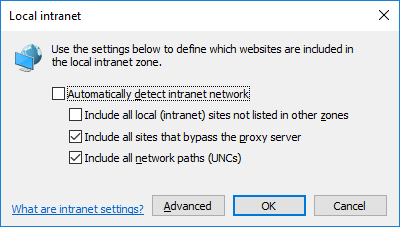
This worked for me.
Go to Tools -> Internet Options -> Security -> Local Intranet -> Sites
and clear the option "Include all local (intranet) ...."
 msaccone
on 17 Nov 2017
msaccone
on 17 Nov 2017
I had localhost in my registry keys. Removing that from here, as described fixed the issue for me:
HKEY_CURRENT_USER\Software\Microsoft\Windows\CurrentVersion\Internet Settings\ZoneMap\Domains
One step closer to rendering in IE now.
 greglanier
on 21 Nov 2017
greglanier
on 21 Nov 2017
@thomlan -- if you have any time to do so, would you possibly mind adding a PR to update https://github.com/paypal/paypal-checkout/blob/master/docs/debugging/ie-intranet.md with the steps you took to modify the registry key, to escape intranet mode?
bluepnume
on 21 Nov 2017
This issue has been automatically locked since there has not been any recent activity after it was closed. Please open a new issue for related bugs.
![github-actions[bot] picture](https://avatars.githubusercontent.com/in/15368?v=4&s=40) github-actions[bot]
on 18 Dec 2020
github-actions[bot]
on 18 Dec 2020
Related issues
 rfdc
·
6Comments
rfdc
·
6Comments
 PhilibertDugas
·
5Comments
PhilibertDugas
·
5Comments
 i7eo
·
3Comments
bluepnume
·
3Comments
i7eo
·
3Comments
bluepnume
·
3Comments
 mtshare
·
5Comments
mtshare
·
5Comments
Most helpful comment
This worked for me.
Go to Tools -> Internet Options -> Security -> Local Intranet -> Sites
and clear the option "Include all local (intranet) ...."