Patternfly-react: The input box in the Pagination component is too small
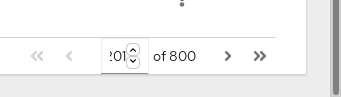
The input box is very narrow and also occupied by spinners. This makes the pagination bar unable to display triple digit page numbers correctly.
In my opinion, its width should be calculated while it's rendered, based upon the total page count, rather than setting it to a fixed width.
 LeshemNoa
All 11 comments
Thanks @LeshemNoa can you upload the whole screenshot, please?
This screenshot does show the problem but having the whole picture can help us determine what could be the real issue.
Thanks again.
//cc @mcarrano @mcoker - can you look at this, please?
 boaz0
on 20 Jan 2020
boaz0
on 20 Jan 2020
@LeshemNoa @boaz0 It's true that the width of the field will not accommodate more than 2 characters. We were concerned that making the field wider by default would consume too much horizontal space. If we can update the component to either dynamically render the width, as suggested, or just allow the consumer to override the default width, I think that would fix this.
 mcarrano
on 20 Jan 2020
mcarrano
on 20 Jan 2020
Thanks @mcarrano I will be working on this.
I will probably do as @LeshemNoa suggested, count the number of digit in the current page and set the width of the input according to it. It's not a perfect solution (different fonts might have different font-weight/space) but assuming we are using Red Hat fonts we are going to be OK.
boaz0
on 21 Jan 2020
@mcoker do you have any ideas here on approach?
cc @tlabaj
 rachael-phillips
on 21 Jan 2020
rachael-phillips
on 21 Jan 2020
Assuming we want to keep using the input[type="number"] element for this, which seems appropriate, I agree updating the element on some sort of change event is the best solution.
Chrome and Safari support auto sizing that element using the max attribute, so using <input type="number" min="0" max="999"> would auto-size the input to support 3 characters. However since this doesn't work in Firefox, we can't use that method.
The suggested method on MDN is to use CSS width: https://developer.mozilla.org/en-US/docs/Web/HTML/Element/input/number#Controlling_input_size
However MDN uses ems, which works OK, but doesn't exactly scale well. For example, 3em shows 3 characters well, but 1em shows none, and 5em shows 6 characters.
As far as I can tell the best approach seems to be to use the ch unit, which is the width of a 0 character in whatever font you're using, and adding 2ch to however many characters you want to show to account for the little up/down arrow buttons in the input to change the value. 3ch shows 1 character, 5ch shows 3, etc.
We could set the base width in core to 4ch, then update the width in react when the component loads and on events that change the input. I took a stab at a basic CSS and JS approach here - https://codepen.io/mcoker/pen/MWYZrJZ
A variation to that could be to remove the up/down arrow buttons, then just use [n]ch to size the element, where n is the number of characters to show. But if we like the buttons, the approach above seems to work well.
 mcoker
on 22 Jan 2020
mcoker
on 22 Jan 2020
@mcarrano any thought on the options @mcoker has suggested?
 tlabaj
on 30 Jan 2020
tlabaj
on 30 Jan 2020
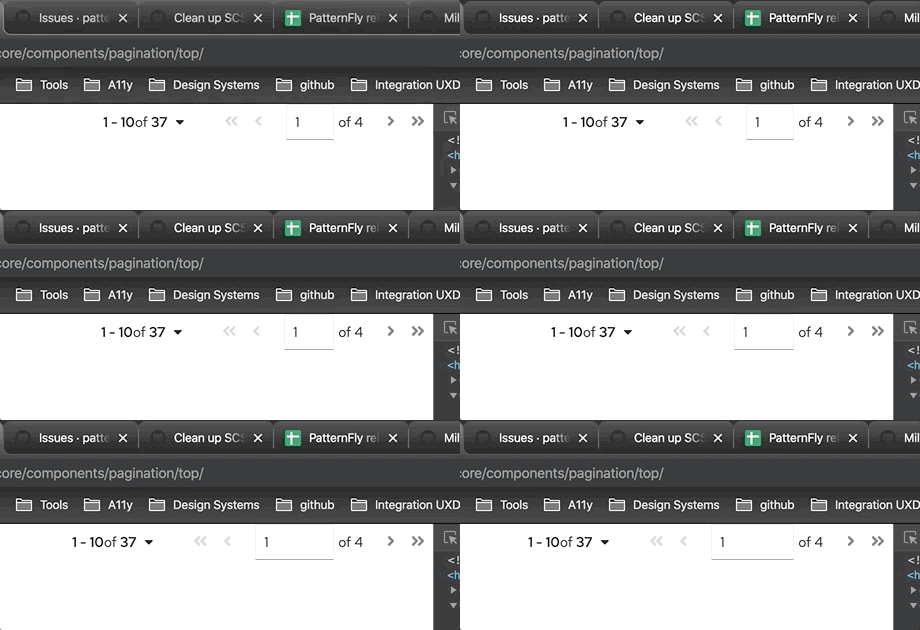
I like the approach suggested by @mcoker . It looks like that will dynamically resize the field. My only question is how that works in the pagination as the field resizes. Does it push other elements to the right? To the left?
mcarrano
on 30 Jan 2020
@mcarrano it will push the elements to the left.
mcoker
on 30 Jan 2020
@mcoker thanks a lot! I will use your idea.
boaz0
on 31 Jan 2020
@boaz0 great! Will you create the patternfly-next issue to support this, or would you prefer I do it?
mcoker
on 31 Jan 2020
I would love to work on that, if you don't mind :smile_cat:
boaz0
on 1 Feb 2020
Related issues
 marshmalien
·
4Comments
marshmalien
·
4Comments
 mohd-akram
·
3Comments
mohd-akram
·
3Comments
 dlabrecq
·
5Comments
dlabrecq
·
5Comments
 andrewballantyne
·
4Comments
andrewballantyne
·
4Comments
 rvsia
·
5Comments
rvsia
·
5Comments
Most helpful comment
@mcarrano it will push the elements to the left.