Patternfly-react: PF4 react-table colums (title) to support jsx (also in collapsed view)
Pretty pretty please, would be great if pf-table didn't hate this
this kinda thing
    const [cols] = useState([
        { title: intl.formatMessage(messages.rulesTableColumnTitleRule), transforms: [sortable] },
        { title: intl.formatMessage(messages.rulesTableColumnTitleAdded), transforms: [sortable, cellWidth(15)] },
        { title: intl.formatMessage(messages.rulesTableColumnTitleTotalrisk), transforms: [sortable] },
        { title: intl.formatMessage(messages.rulesTableColumnTitleSystems), transforms: [sortable] },
        { title: <><AnsibeTowerIcon size='md' /> {intl.formatMessage(messages.rulesTableColumnTitleAnsible)}</>, transforms: [sortable] }
    ]);
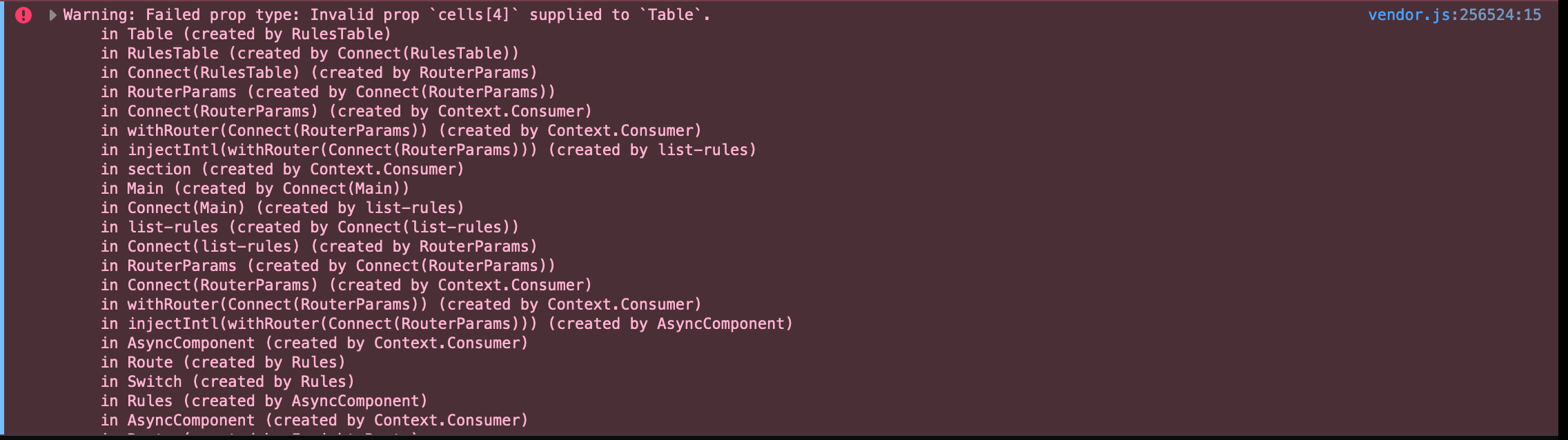
throws this warning (it doesn't enjoy the <><AnsibeTowerIcon size='md' />...</>
also, it doesn't collapse very well, displays fallback rather than the column name
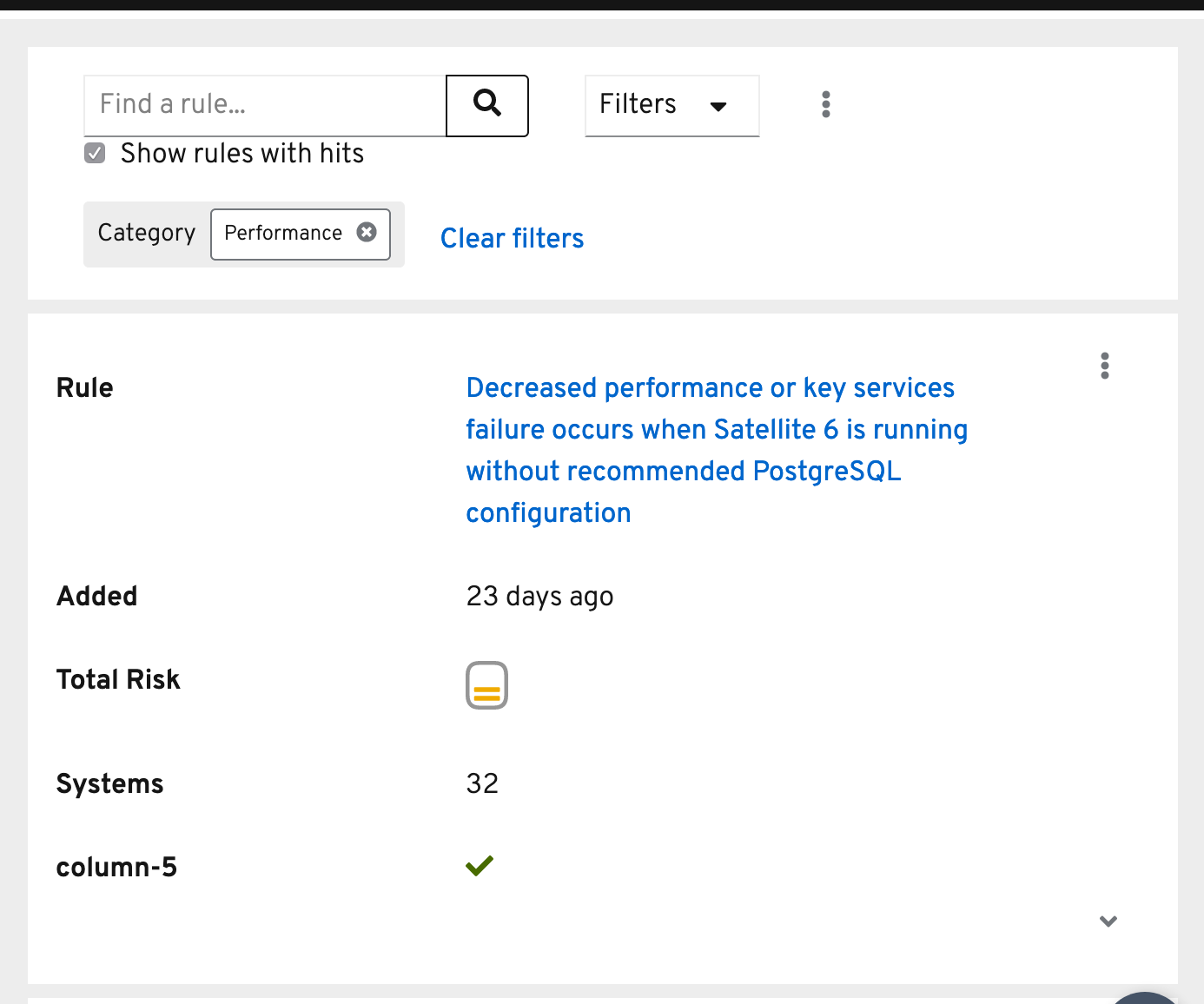
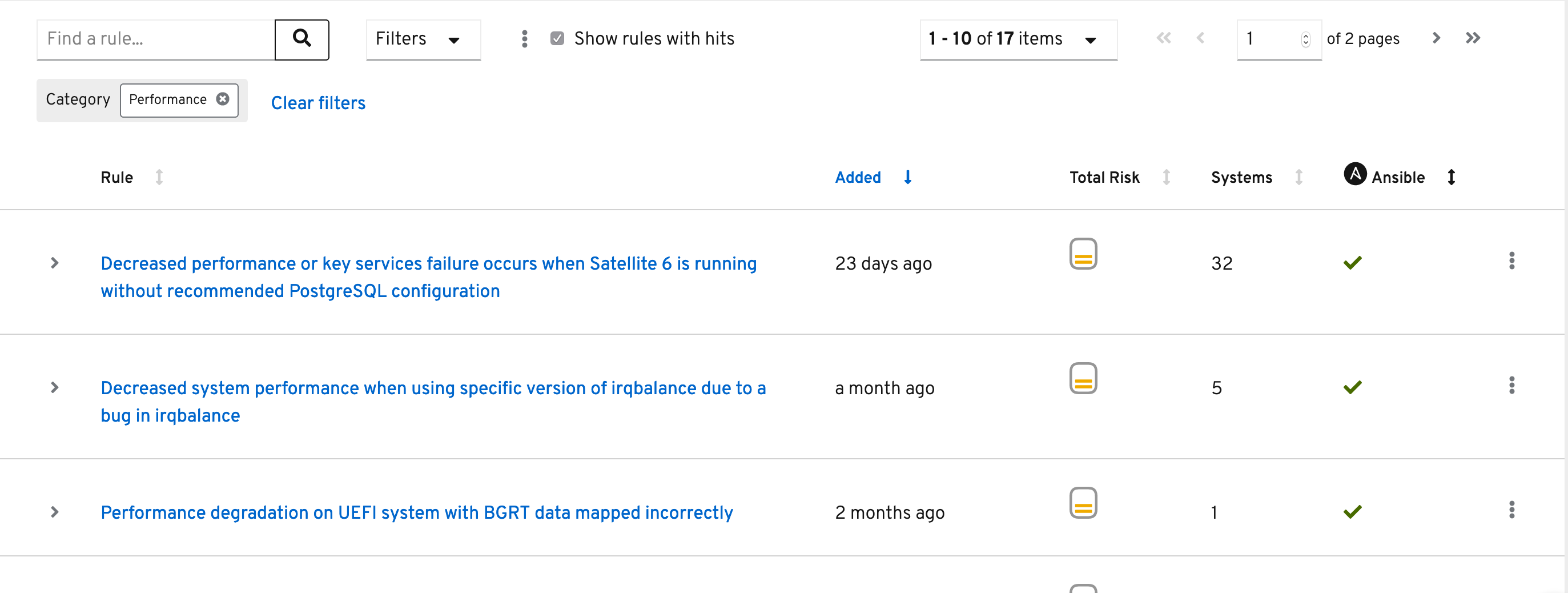
what it oughta look like
 AllenBW
All 10 comments
@LHinson @rachael-phillips Can you help prioritize this? This is currently in production for cloud.redhat.com Insights :(
 katierik
on 16 Sep 2019
katierik
on 16 Sep 2019
@AllenBW Can you split this up into two issues for us?
 rachael-phillips
on 17 Sep 2019
rachael-phillips
on 17 Sep 2019
@priley86 can this all be addressed in React for table or will we need to open a Core issue? cc @mcoker
rachael-phillips
on 17 Sep 2019
@rachael-phillips unsure if there two issues here, i believe the collapsed column name issue is because its gettin somethin it doesn't want/support SO if we make it supported
AllenBW
on 17 Sep 2019
this should fix the warning: https://github.com/patternfly/patternfly-react/pull/2967
As far as mobile support for headings w/ icons, this is a question for Core... should we add some kind of attribute to support this? Is there alternative markup we aren't considering?
Indeed able to replicate w/ markup like this...
<tr>
   <td data-label="" data-key="0" class=""></td>
   <th scope="col" data-label="Header cell" data-key="1" class="">Header cell</th>
   <th scope="col" data-label="Branches" data-key="2" class="">Branches</th>
   <th scope="col" data-label="column-3" data-key="3" class="">
      <svg fill="currentColor" height="1em" width="1em" viewBox="0 64 1024 1024" aria-hidden="true" role="img" style="vertical-align: -0.125em;">
         <path d="M512.059-73.143c-282.338 0-512.059 229.673-512.059 512.025 0 282.238 229.721 511.975 512.059 511.975 282.283 0 511.941-229.735 511.941-511.975 0.005-282.352-229.659-512.025-511.941-512.025zM512.059 826.523c-213.826 0-387.728-173.856-387.728-387.643 0-213.888 173.904-387.691 387.728-387.691 213.717 0 387.671 173.803 387.671 387.691 0.005 213.785-173.957 387.643-387.671 387.643zM726.283 506.777c-3.429 3.477-7.803 5.223-13.138 5.223h-128.005v128.007c0 5.333-1.739 9.71-5.218 13.138s-7.936 5.141-13.351 5.141h-109.143c-5.417 0-9.863-1.714-13.351-5.141-3.481-3.429-5.221-7.808-5.221-13.141v-128.005l-128.007-0.002c-5.333 0-9.71-1.737-13.138-5.218-3.426-3.477-5.141-7.934-5.141-13.351v-109.143c0-5.417 1.714-9.856 5.141-13.351 3.429-3.481 7.808-5.221 13.141-5.221l128.005 0.002v-128.009c0-5.335 1.744-9.707 5.225-13.134 3.477-3.429 7.927-5.145 13.344-5.145h109.143c5.417 0 9.858 1.717 13.351 5.145 3.477 3.429 5.223 7.803 5.223 13.138v128.002h128.007c5.335 0 9.707 1.742 13.134 5.225 3.429 3.477 5.145 7.927 5.145 13.344v109.143c0 5.417-1.717 9.863-5.145 13.351z" transform="rotate(180 0 512) scale(-1 1)"></path>
      </svg>
      Pull requests
   </th>
   <th data-label="" data-key="4" class=""></th>
</tr>
 priley86
on 19 Sep 2019
priley86
on 19 Sep 2019
Good/Bad news, #2967 DID fix the column title error, but we're still not seeing the jsx content on collapse
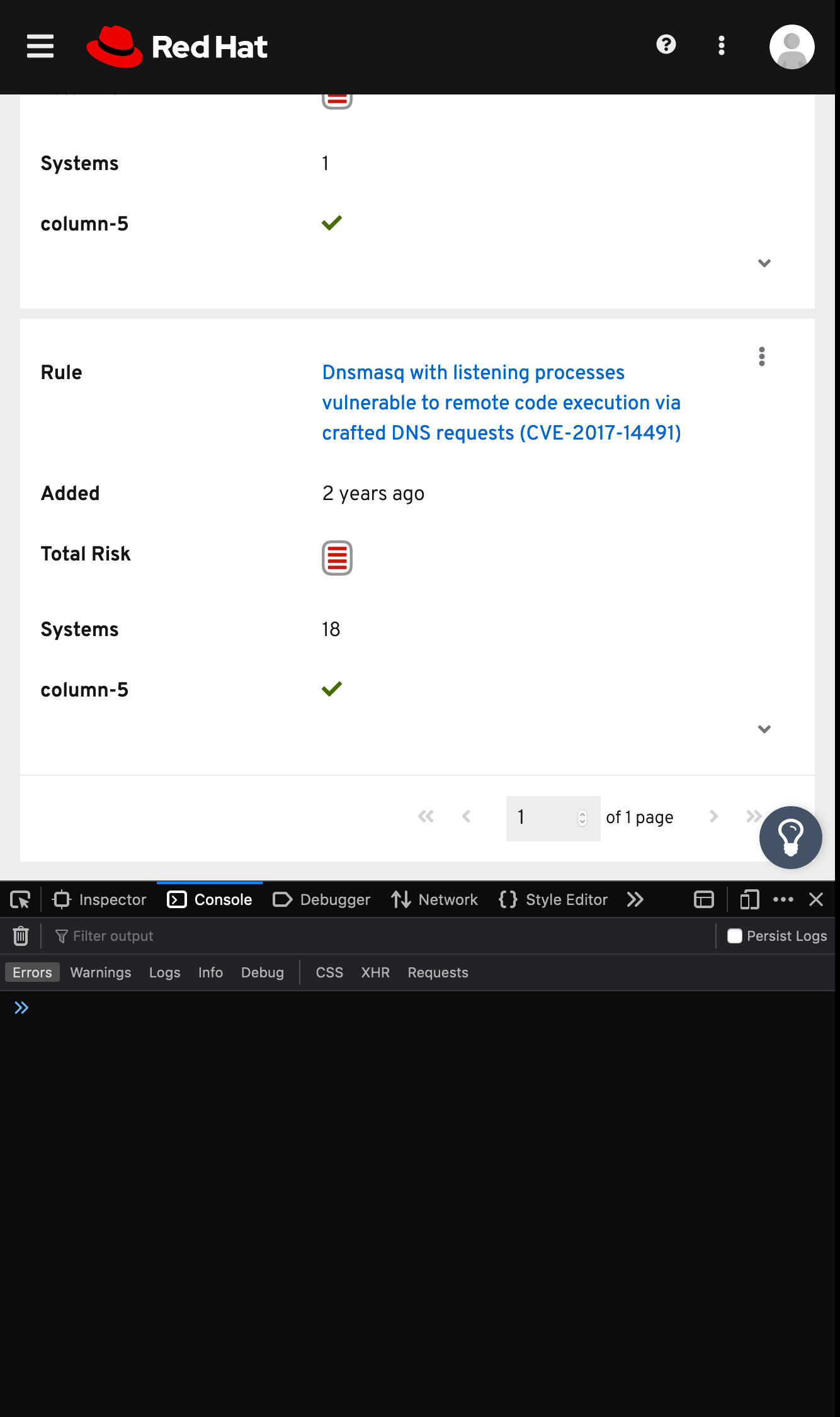
cc @mcoker @priley86 🤗
AllenBW
on 23 Sep 2019
@AllenBW the problem with this approach and how the table is configured currently is that we use the data-label attribute on each cell to generate the title/header via CSS on the left of each cell in the mobile/responsive layout. We do that by using content: attr(data-label); in the ::before pseudo element of each cell, and unfortunately the content property value isn't parsed by the browser, so it won't render HTML in the document tree.
To be able to display the content of the table columns from the default table view (desktop) to the grid layout view (responsive/mobile), I think we would need to consider a different approach.
 mcoker
on 25 Sep 2019
mcoker
on 25 Sep 2019
Thanks for the quick reply @mcoker!!! Also bummer. Lemme play around a bit to see what I can come up with....
AllenBW
on 25 Sep 2019
@AllenBW sounds good! Let me know if you want to brainstorm or if I can help out in any way.
mcoker
on 25 Sep 2019
@mcoker ok ok ok WHAT IF we make data-label a brand new optional prop…. n then do something like this: 'data-label': dataLabel || typeof title === 'string' ? title : column-${key},
here https://github.com/patternfly/patternfly-react/blob/419b6ff6d8e83a4de7fdc11e3f8338468d5a8348/packages/patternfly-4/react-table/src/components/Table/utils/headerUtils.tsx#L83
so if yah want to customize collapsed titles yah can, otherwise nothing changes ?
AllenBW
on 30 Sep 2019
Related issues
 andrewballantyne
·
4Comments
andrewballantyne
·
4Comments
 dlabrecq
·
5Comments
dlabrecq
·
5Comments
 rvsia
·
5Comments
rvsia
·
5Comments
 Hyperkid123
·
6Comments
Hyperkid123
·
6Comments
 marshmalien
·
4Comments
marshmalien
·
4Comments
Most helpful comment
@AllenBW sounds good! Let me know if you want to brainstorm or if I can help out in any way.