Patternfly-react: PF4 Table: Provide empty state support
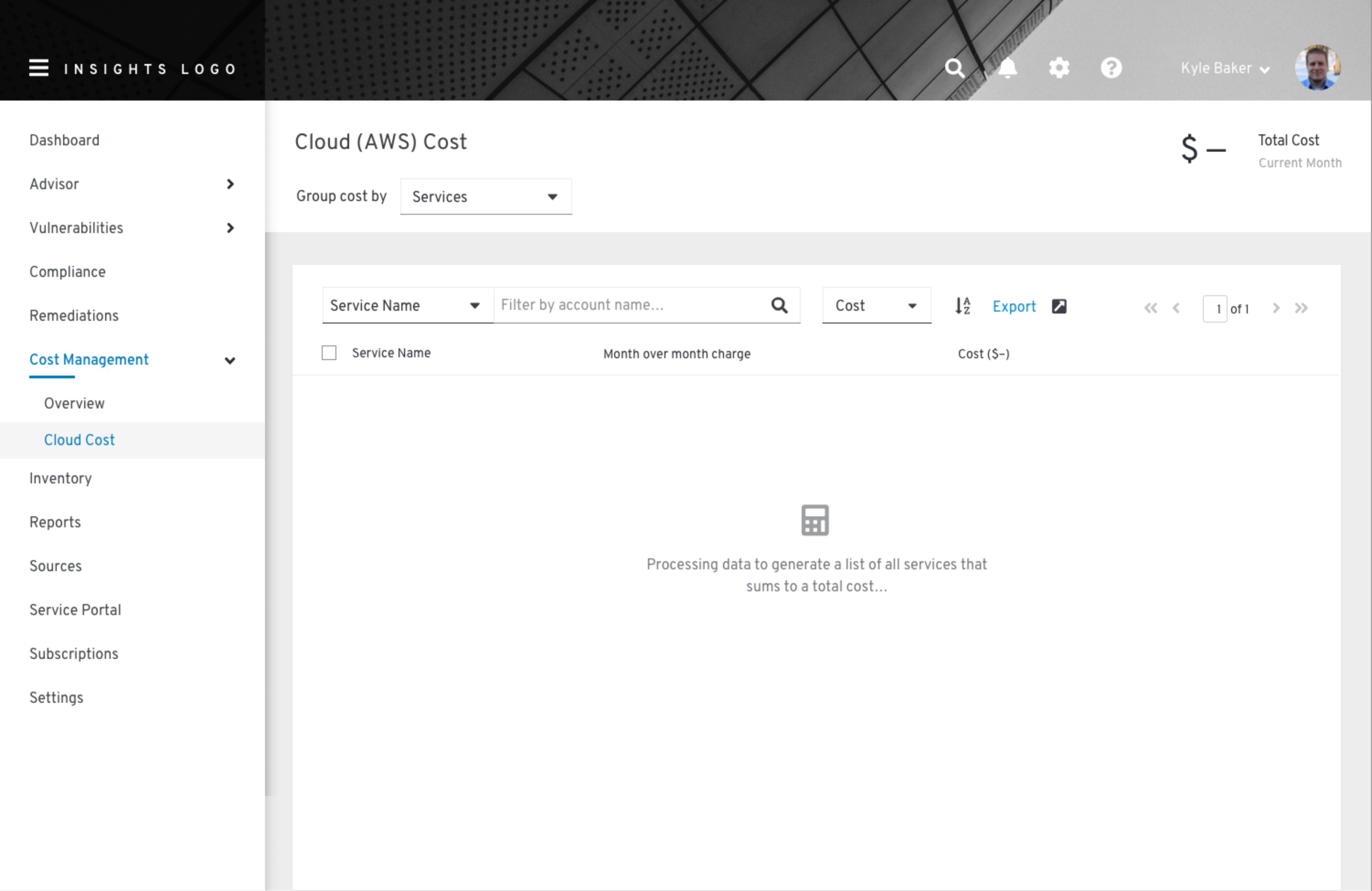
The Cost Management UI needs to provide an empty state in a table, per Kyle's high fidelity mock below. For example, if the applied filter results in no data. However, I cannot place the PF4 empty state component inside the Table, nor the TableBody.
If I place the empty state components within the Table, the empty state component does not span columns. The column headers shift right, while the empty state is aligned left.

I can trick the table by placing the empty state components within a row cell. However, I still get the expanding row checkbox, which is not desired.


A possible work around is to add my own tbody, tr, and td tags like this:
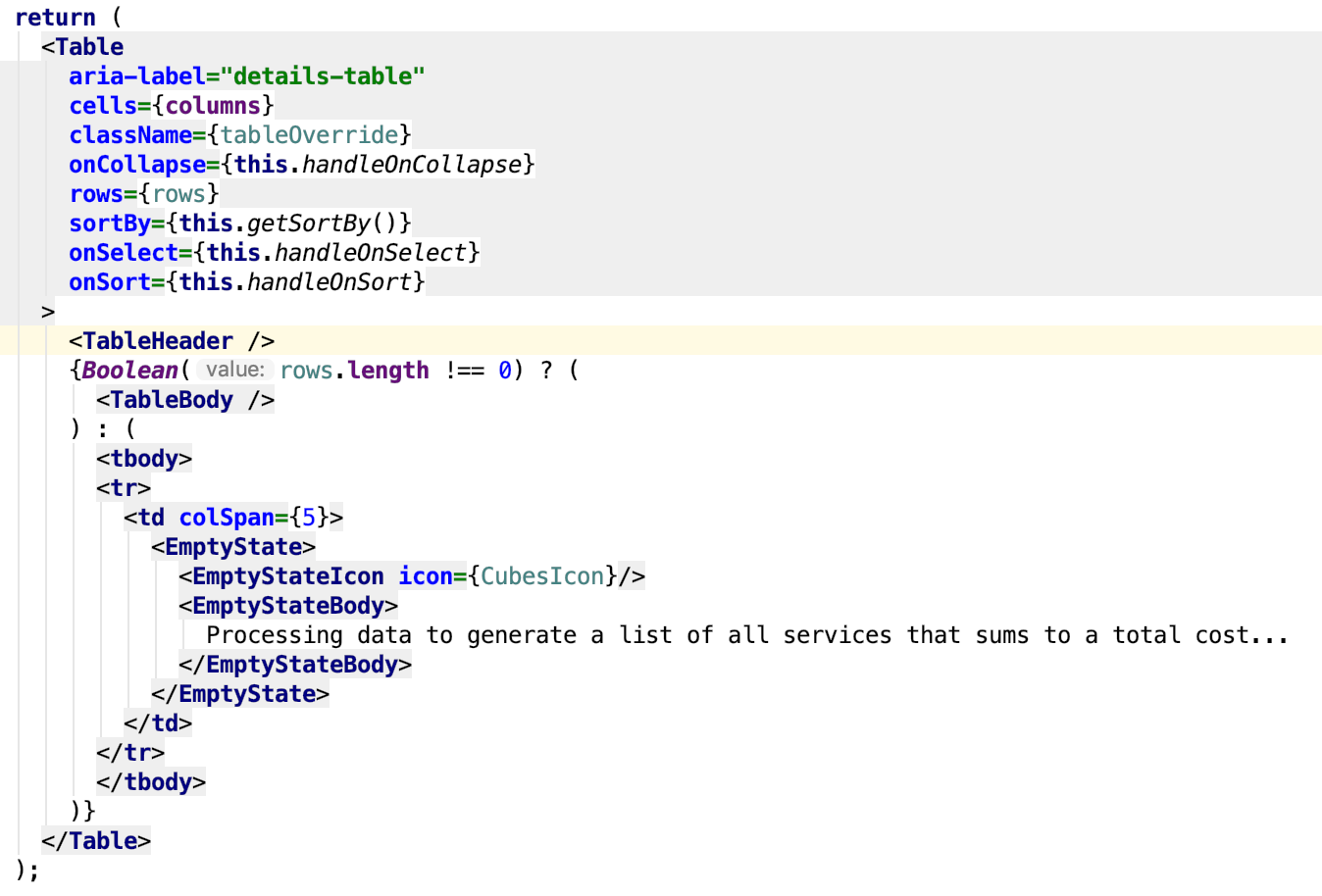
That said, my workaround is to place the empty state outside the table in a div and apply my own styling. The problem with that is everyone will likely implement that differently.
Ideally, TableBody could be modified to include the empty state as a child? Or, create another component (e.g., TableEmptyState) just for this purpose that spans all columns?
That way, default padding, height, etc. could be applied uniformly.
Kyle's Mock:
 dlabrecq
All 14 comments
@mcoker making you aware of this issue :) What do you think next steps should be here? cc @tlabaj
 rachael-phillips
on 7 Mar 2019
rachael-phillips
on 7 Mar 2019
@dlabrecq if I understand correctly, since there is no colspan equivalent in CSS, even if we created a separate component that was full-width that would hold the empty state, you would still need to apply colspan in your td the way you have done here to create the full-width container to place the new empty state component. It seems to me that either approach you mentioned above - applying colspan and placing the empty state inside, or displaying the empty state component outside of the table, are valid approaches.
I wonder if this is something that we could create a demo of in core and the functionality could be added to react as an option for when there are 0 filter results. The core demo would just be adding the empty state component inside of a td with colspan as you've shown above.
 mcoker
on 8 Mar 2019
mcoker
on 8 Mar 2019
I've added the empty state outside the table, but with my own choices for margins, vertical height etc. Unfortunately, folks will likely implement this differently.
dlabrecq
on 9 Mar 2019
Gotcha. What I'm proposing would be just using the default table cell and empty state padding, and placing the empty state in the table cell inside of a bullseye layout to center it.
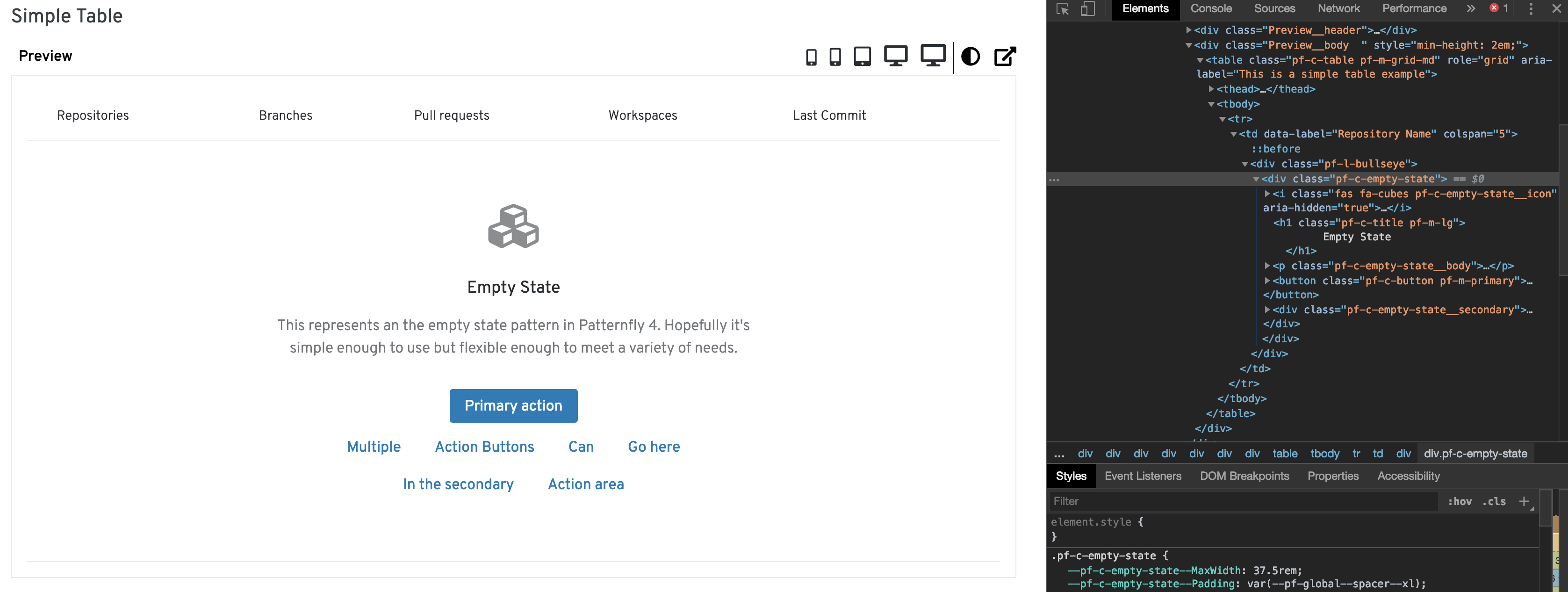
@mceledonia @mcarrano what do you think?
mcoker
on 9 Mar 2019
@mcoker Looks good to me!
 mceledonia
on 11 Mar 2019
mceledonia
on 11 Mar 2019
@mcoker I think this is fine as a technical solution. But from a design perspective the content of the current empty state component is not exactly appropriate for this use case. For PF3, we had a variant of an empty state to report a case where a query results in an empty result set. See https://www.patternfly.org/pattern-library/forms-and-controls/filter/#design
There are actually a couple of different use cases:
- The query returns a null set.
- Data loading is in progress (this looks like what Kyle's mockup is expressing).
Not sure exactly how we should proceed, but these might be additional variants of an empty state that we should support.
 mcarrano
on 12 Mar 2019
mcarrano
on 12 Mar 2019
but these might be additional variants of an empty state that we should support.
This is the golden rule here. Do not try to implement new component just cause we want to have some variation of it. I think the best way here would be to privide example of table with content that spans across whole table. This content can be anything, either spinner or empty state w/e.
 karelhala
on 14 Mar 2019
karelhala
on 14 Mar 2019
@dlabrecq Can this be closed or do we need something on the PF4 side?
 dlabaj
on 18 Mar 2019
dlabaj
on 18 Mar 2019
It's not clear what the solution is here? It appears that @mcoker had a possible solution above. Did the PatternFly team shoot it down?
dlabrecq
on 19 Mar 2019
I don't think there is anything needed on the core side for implementation. We could create a demo of the empty state in a table though, basically what I showed in the screenshot above.
As for the react implementation, I'm not sure what the best approach would be. Is displaying a full-width table cell either centered (using Bullseye) or not something we would build into the table component? Or would we simply make this a demo that users reference and they would create the full-width/bullseye/empty state (or spinner or whatever) layout themselves?
mcoker
on 20 Mar 2019
r would we simply make this a demo that users reference and they would create the full-width/bullseye/empty state (or spinner or whatever) layout themselves?
Yup, that would be the best approach.
karelhala
on 20 Mar 2019
We now have demos for empty state table and loading state table in core.
However, before we can build these demos, we need updates for empty state (https://github.com/patternfly/patternfly-react/issues/2929) and table (https://github.com/patternfly/patternfly-react/issues/2930)
mcoker
on 14 Sep 2019
If I'm not mistaken, I think this can be closed via #3133
 jenny-s51
on 28 Oct 2019
jenny-s51
on 28 Oct 2019
Yes, looks like #3133 provides an empty state example as part of its demo. This can be closed
dlabrecq
on 28 Oct 2019
Related issues
 laviro
·
7Comments
laviro
·
7Comments
 rvsia
·
5Comments
rvsia
·
5Comments
 priley86
·
3Comments
priley86
·
3Comments
priley86
·
3Comments
priley86
·
3Comments
 SpyTec
·
3Comments
SpyTec
·
3Comments
Most helpful comment
This is the golden rule here. Do not try to implement new component just cause we want to have some variation of it. I think the best way here would be to privide example of table with content that spans across whole table. This content can be anything, either spinner or empty state w/e.