Patternfly-react: Table header with tooltip does not work in Firefox
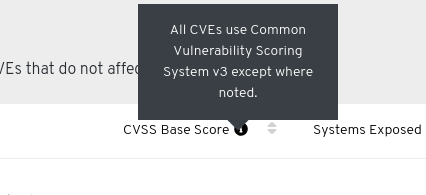
In table component when a header with tooltip is provided to column, tooltip does not get displayed in Firefox, works fine in Chrome though.
 jiridostal
All 22 comments
@jiridostal is this issue found with PF3 or PF4?
 tlabaj
on 4 Feb 2019
tlabaj
on 4 Feb 2019
PF4, sorry for omitting this information.
jiridostal
on 5 Feb 2019
There was a recent update made to Tooltip. Can you still reproduce the issue with the most recent version of @patternfly/react-core ? If so would be good to have a running example of this. For example using https://codesandbox.io/s/qv9647lmrj as a template. Thanks
 jschuler
on 5 Feb 2019
jschuler
on 5 Feb 2019
I do not see the difference between Firefox and Chrome when recreating the issue, however it works the same - no tooltip for sortable columns. Please check https://codesandbox.io/s/vzpk59v5l. If it's a bad usage, please give me a hint on how to force tooltips on sortable columns.
jiridostal
on 5 Feb 2019
@karelhala @priley86 any idea why the transforms: [sortable] on the first column header breaks the tooltip?
jschuler
on 12 Feb 2019
It breaks the tooltip because sortable wraps the entire header in button and Mozzila doesn't support hover actions in button [1]. Easiest sollution is to check this out. I think that the best way would be to wrap the sortable column in a element instead. But that would require core rewrite.
 karelhala
on 12 Feb 2019
karelhala
on 12 Feb 2019
So to describe the problem more deeply, we have a mock where table header sort has icon over which we want to hover and show tooltip. However the sortable function wraps our component in button (as shown in core) and tooltip cannot apear in button. We could solve that by providing custom decorator and wrap sorable in tooltip, but that would meant hovering over sortable column would show tooltip (not sure if that is correct).
Oh and this is replicable only for firefox https://bugzilla.mozilla.org/show_bug.cgi?id=843003
karelhala
on 12 Feb 2019
There is already a bug report filed in our JIRA. Is there any action planned on this?
jiridostal
on 5 Mar 2019
This issue is really tricky, because it has a couple of ways how to solve it, but none of it is easy. The problem as we all know is that FF blocks all hover events on button so we have to somehow either move that tooltip out of the button component or change it to something else.
One fairly simple solution would be to move that icon outside of button, but that would make mock ups and implementation inconsistent.
Another solution (my preferred way) would be to change sort column from button to a element. This has to be done in core first so we can cover all accessibility issues and such. However this would eventually be really handy, because consumers would be able to update route based on what has been sorted by. And bookmarking sorted tables would be really cool thing.
karelhala
on 18 Mar 2019
to follow up on this, I have started to prototype sort in CNV and I don't believe there'd be any issue w/ what @karelhala is proposing from a React/Redux standpoint. As long as the click callback could be handled and preventDefault() called on the event, we could still maintain the same behavior on an a as we would a button. Currently I am tracking the URL / sort state in Redux & url history based on the sort header callback's sort direction/sort column.
https://github.com/priley86/web-ui/blob/6e5e31c03e71fe2c4096f05b1908ddde1a99a09d/frontend/public/components/factory/table.tsx#L334
I think this is probably not ideal from an a11y perspective though (to my knowledge a button is more semantic than an a in many cases). @jgiardino any thoughts? Or I am missing on this one?
 priley86
on 26 Mar 2019
priley86
on 26 Mar 2019
My rule of thumb with <a> elements is if you can provide a value for href, then <a> is valid. I agree with @karelhala that being able to bookmark a sorted table would be pretty cool!
However, I don't think the element type is causing the issue. When I test the latest version of the tooltip with a <button> in FF, the tooltip displays.
The issue is with the way the tooltip component is wrapping the contents of a button. Looking at the runtime html for https://codesandbox.io/s/vzpk59v5l, I see the following:
<button class="pf-c-button pf-m-plain">
  <span tabindex="0">I should have a tooltip!</span>
  <span class="pf-c-table__sort-indicator">...</span>
</button>
When a <span> element is wrapped in the Tooltip component, the Tooltip component adds tabindex="0" to make the <span> focusable. And when this span has focus, then the tooltip will display.
However, this span is inside a button which can also receive focus. It looks like the button receives focus and prevents the span from receiving focus, therefore preventing the tooltip from ever displaying.
Ideally, the consumer should be able to associate a tooltip with the sortable <button>/<a> element, or add an additional element to the <th> that is a sibling to the sortable <button>/<a> .
 jgiardino
on 26 Mar 2019
jgiardino
on 26 Mar 2019
Is there a date this will be fixed? This bug fix is needed for a Summit release. cc @jiridostal
 katierik
on 22 Apr 2019
katierik
on 22 Apr 2019
Hi @katierik, we are having a code freeze this Friday and afterwards will be working on blocking bugs. Do you consider this to be blocking implementation? We will resume work on our P1s post rc.1 launch.
 rachael-phillips
on 23 Apr 2019
rachael-phillips
on 23 Apr 2019
Not a blocker. We can work around. I guess we're post RC1!
katierik
on 23 Apr 2019
Since this is still open, I'm assuming it missed the code freeze for the early june release? Can this be expected to get released before the typography update?
katierik
on 30 May 2019
Yes, that's right, @katierik. This issue has not been picked up yet, and we will get it in to our prioritized backlog. Do you need this change before the typography update?
rachael-phillips
on 31 May 2019
No I don't think we do need it before typography, but we would ideally have it for our next release, beginning of Oct.
katierik
on 11 Jun 2019
Thanks @katierik
rachael-phillips
on 13 Jun 2019
The firefox issue https://bugzilla.mozilla.org/show_bug.cgi?id=843003 has been fixed as of version 66. However the issue is still being seen in the table, even after upgrading to the latest released version of PatternFly. The issue is also present in Chrome as well. One possible solution is to update the API to allow a tooltip too specified for the columns. However after speaking with Karel a better solution might be to write a title decorator instead of changing the API.
 dlabaj
on 26 Sep 2019
dlabaj
on 26 Sep 2019
I would write tooltip decorator, it shouldn't be that hard and it would allow consumers to adapt to it much easier than updating API.
karelhala
on 1 Oct 2019
It's worth noting that the example provided in this comment is not valid HTML because you cannot nest an interactive element inside another interactive element. Whatever solution we provide should produce valid HTML.
In this section of the HTML spec, for Example 19, the following statement is included:
Another example would be the way interactive content cannot be nested. For example, a button element cannot contain a descendant textarea element. This is because the default behavior of nesting interactive elements would be highly confusing to users.
jgiardino
on 2 Oct 2019
This issue has been automatically marked as stale because it has not had recent activity. It will be closed if no further activity occurs.
![stale[bot] picture](https://avatars3.githubusercontent.com/in/1724?v=4&s=40) stale[bot]
on 1 Dec 2019
stale[bot]
on 1 Dec 2019
Related issues
 Hyperkid123
·
4Comments
Hyperkid123
·
4Comments
 crackcomm
·
4Comments
crackcomm
·
4Comments
 rvsia
·
5Comments
rvsia
·
5Comments
 andrewballantyne
·
4Comments
priley86
·
3Comments
andrewballantyne
·
4Comments
priley86
·
3Comments
Most helpful comment
This issue is really tricky, because it has a couple of ways how to solve it, but none of it is easy. The problem as we all know is that FF blocks all hover events on button so we have to somehow either move that tooltip out of the button component or change it to something else.
One fairly simple solution would be to move that icon outside of button, but that would make mock ups and implementation inconsistent.
Another solution (my preferred way) would be to change sort column from button to
aelement. This has to be done in core first so we can cover all accessibility issues and such. However this would eventually be really handy, because consumers would be able to update route based on what has been sorted by. And bookmarking sorted tables would be really cool thing.