Paper.js: Compositing modes affecting separate layers.
When I use a "blendMode" that is a native canvas globalCompositeOperation, all layers on the canvas are affected.
Ideally, blendModes would stay scoped to the layer.
 LukeAskew
All 13 comments
Related: #377
 lehni
on 14 May 2014
lehni
on 14 May 2014
This has been marked as "closed", but the issue seems to still be present. Here's a sketch:
http://sketch.paperjs.org/#S/pZM9b8IwEIb/yikLIKV8tGUBdWJtpUodCYPjHMTCOUf2BRQh/nvtBBBUKSpqJvv86LXvsXOISBQYzaKvLbLMoziSJgvznbCQGmZTvIsaLbwB4R6acX8wT2g0AocMVXmiQDeYoAzKiv3MbhBSXSFIZaVGMASKE7rKHArJaicYm8CwYVEvWrjd7VNwPmwr/UNCCScskRjtDJaT6Th+no5XcVu3IlOVm4EvhcIxJCZ8zhs6tmaLC6NN6KSn1SbncLjeLbZWWndD4L8Llmqk7MN7ChgZWwjdBNG1FjblDye8NycZ7mwjNO3BbsXnhVtPfodW7sZifZG7Q6tF6WCvOL/W/rDXl26vkz95DUe6p7Rj/ReXwaMfat+LkNtzmy43lc68PF2DWK9RMvR9bT8Azm+ENAGKHKPIYm/6RLuGu36VwitDrWOQ1pSlos3lWh5w9vqft9g0eE9aF3BjLUPHigQrQ0+KenP/E6cWxbY0ithFs+Xq+A0=
Does this mean that all layers going to be affected by blend modes or that in the future the blend modes will be confined to specific layers?
Thanks.
 mrandrey
on 19 Apr 2018
mrandrey
on 19 Apr 2018
This is still an issue as of May 2019.
mrandrey
on 21 May 2019
We're aware. Feel free to create a MR to fix it.
lehni
on 21 May 2019
Great. Just making sure it didn't get lost. At the moment I'm working around it by putting everything in the layer into a group, which seems to bind the blending modes within.
mrandrey
on 21 May 2019
I'm finally looking into this. @mrandrey I can't get the workaround that you describe to work here:
http://sketch.paperjs.org/#V/0.12.1/S/pZPBT8MgFMb/FcKlNalmYzvVeNphF02MHtseaHm2ZOzRUKrRZf+7YLfZrNXZyIHkwQf53veDHUW+BRrT5w3YoqIRLbTw9Ss3pKl4DXNyRxDeyCO31c0TFJZjqSDcpUjORgFowcQkmc9mEXFTFg1FjfwAJ2FOwsYVL1KplVba3RTkqoXgTLO/uk0xxZNB1je4kqb4hzvDhWyb2G9fcGZAjBrrL3QmS6Pb+pji2hdh0iUbHRrIvjtS/B3MUXzvi7A730l6bS+mc/Ghkx9Sn8alNAB4CcxyIpjf7P0djDYuiMGj8SNXgOLBPW+nEtBYidxKjde6tcFIJyd2bITd4sBumY1D/+LIhhyZl7tflhvgm1pLtA2Nk2z/CQ==
Could you share a sketch of this working?
lehni
on 7 Jun 2019
It turns out that my workaround was simply applying blendMode "multiply" to the group, which worked for my purposes (all my layers are on "multiply" and are black and white). This isn't true separation, though.
Here's your altered sketch to demonstrate what I mean:
http://sketch.paperjs.org/#V/0.12.1/S/pZNBT4MwFMe/StMLmOCydTthPO3gRROjR+BQ4A2ada+kFM1c9t1tZUMy0EnsgfDoD/J/71cOFPkOaEhft2CykgY0U7mr37gmdckrWJB7gvBOnrkpZy+QGY6FBP8QI7lYGaABHZJoMZ8HxF6SYAjV4gMswizCxomNkHKtpLJf8lLZgHfBHG/uYoyxC8j6AddCZ/9Ip3kumjp021eSachHg/UftCELrZrqPMUHV/hRO9ng1EDy3ZHke9Bn+NEVfvt+i/TaXk734oZOfpj6NC+FBsBrYlYTxfwW7+9ilLaDGBwat1IJmD/Z422pHGojkBuh8FY1xhvppHPHRtwtT+5Wybj0L49s6JE5vL2bdXks5u0aaUQl957dt39hqoFvKyXQ1DSMkuMn
mrandrey
on 7 Jun 2019
I've started looking into this, and found the situation to be more complicated than I anticipated:
There are blend modes where we want the current behavior, e.g.:
http://sketch.paperjs.org/#V/0.12.1/S/pZJBi8IwEIX/SsilCkW03iqevCosu8e2hzQdbXCcljRdUfG/m1iVUisiziEwk0d438ucOIkd8JD/bcHInPtcFpnr/4VmVS5KmLA5I9izH2Hy0S9II2iDMDjFxDolgQzokEWT8dhn9kj8Z1GljmAlgZUE/Yq1QlwUWNiXvBRr8Dqa83AWU0wPg0Hb4EJp+YU7LTJVV6G7fuNMQ9ZrrD1oTKI4gL6nuHTNIGqS9W8ASUPUYpp+HrpLlL2I9LPQNxqAunCuUgTKVnY/rGhXo1ElHryXn3PlDnq4p5bXLlqqQWzLQpGpeBgl5ws=
It looks like we can separate the modes into blend modes and composite modes... And only for compositing modes, we'd want this kind of layering on the parent. But I'm not sure what's the right way to handle this? What if a group has two children, one with a blend mode as in my example, and one with a a composite mode that needs layering as in the example of the initial issue? If we do render the parent in a separate layer, then we break the blend mode of the first child. If we don't then the composite mode of the 2nd child looks wrong.
I really don't know what the right solution is here...
lehni
on 11 Jun 2019
What I mean is this example here:
http://sketch.paperjs.org/#V/0.12.1/S/pVPPS8MwFP5XQi6dUGXrdqp42lVB9Nj2kCbPNSx7KUmqzLH/3YROCV2dK75D4L18hO/Hy4Ei2wHN6esWHG9oSrkWoX9nhtiGtbAgDwThgzwz19y9AHcMNwpmhxLJoDigA5OTYjGfp8QfVXoOsvITPCTzkGwc8SaVWmul/UtJrTpIBpjjzX2JJf4QzGKCa2n4P9gZJmRn83D9BzMDYpRYPOhJKrYH8+3iY2hmRe9sehJQ9YoiTcvppgdHyS+WTjN9YwBwKC5UrQDFk98PD9p1yslW7ZPL4awmhnNJxfXhaOP9OlucoQQB1klkTmq81Z0bUxIPojSzkTSXpzRXPk3/jWoDbNtqic7SvKiOXw==
We can render it as currently:
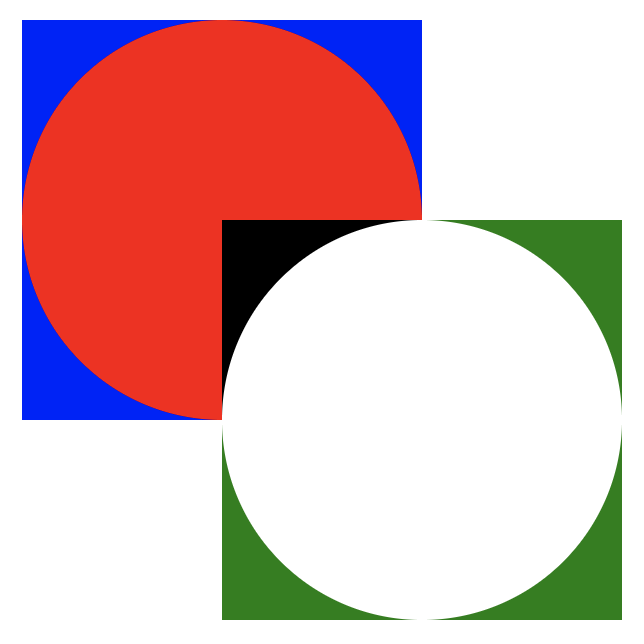
Or with layering, where we break the first blend mode:
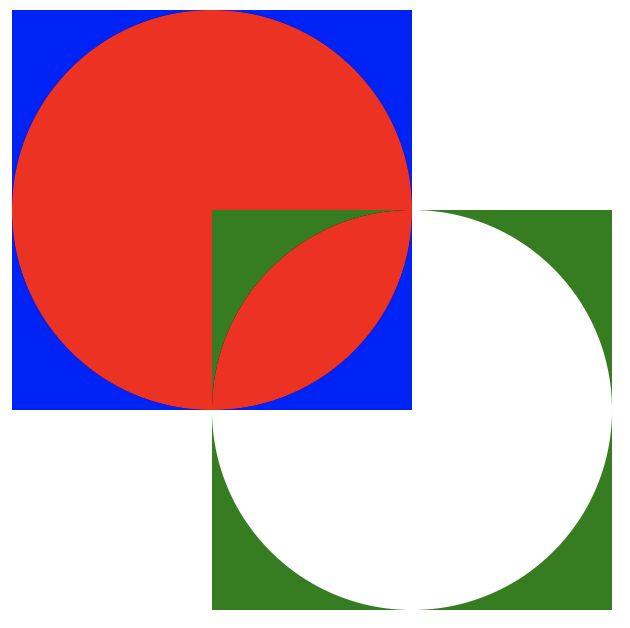
Neither of those seem right to me...
lehni
on 11 Jun 2019
I'm not sure that I follow 100%. To me, the ideal would seem to be able to have layers default to "normal" blend mode, with option to specify others. So if all the elements within a layer want to go crazy with "multiply", "destination-out", etc modes, and the layer blend mode stayed as "normal", the final layer render would be interpreted as a sort of a raster of the entire layer. So you can have several layers, within each of which the objects can be doing wild render mode modifications, but which would not affect the other layers unless the main layer blend mode was altered from "normal" to "multiply", etc.
The blend modes of the individual objects would only transfer as far as the layer, and would only interact with other layers as a combined raster image if the parent layer's blend mode was changed from normal.
I hope this makes sense.
mrandrey
on 12 Jun 2019
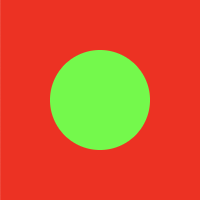
My point is that if you have a layer with a child that has the blend mode set to something else than normal, you get the wrong behavior if you isolate the layer for rasterization: The child doesn't blend with the background, because there is no background in isolated rendering. Try this scenario with SVG and you'll see that what it's currently doing is what we normally want:
<svg version="1.1" xmlns="http://www.w3.org/2000/svg" xmlns:xlink="http://www.w3.org/1999/xlink" width="785" height="1238" viewBox="0,0,785,1238">
    <g  style="mix-blend-mode: normal">
        <path d="M0,100v-100h100v100z" fill="#ff0000" />
        <g fill="#00ff00">
            <path d="M25,50c0,-13.80712 11.19288,-25 25,-25c13.80712,0 25,11.19288 25,25c0,13.80712 -11.19288,25 -25,25c-13.80712,0 -25,-11.19288 -25,-25z" style="mix-blend-mode: screen" />
        </g>
    </g>
</svg>
Actual behavior:

If containing group was rastered in isolation due to a child using a blend mode:
lehni
on 12 Jun 2019
My point also was that in SVG for example, you can only pick blend modes, that work correctly without isolation of rendering. There is no destination-out blend (or better: composite) mode available:
https://developer.mozilla.org/en-US/docs/Web/CSS/blend-mode
destination-out is a composite modes. Those can be used, e.g. in combination with masks:
https://developer.mozilla.org/en-US/docs/Web/CSS/-webkit-mask-composite
But they're not the same things. We use the same name blendMode for both, but I have a feeling now that this is actually wrong...
lehni
on 12 Jun 2019
I've experienced this same issue. I was experimenting with blend modes, hoping to see a demo of each blend mode on the screen at once.
See the following sketch for a simple design of 8 overlaid circles repeated for each of the 33 blend modes. The blend modes are disabled because most of the sketch becomes invisible when you enable them. Pease view the sketch as is and then un-comment line 48 to enable the blend modes. You might notice the sketch falls apart when you enable blend modes.
http://sketch.paperjs.org/#V/0.12.7/S/bVRNc9sgFPwrjHqQHMu23KSZ1B+9eNpT2vFMerN8QIAtxgg0CBynGf/3PiSrQko5SPD28WCXhfdA4oIFi+DlxAzJgzggirpxKs9Yo6PmdKsqbriSFVqj3X6ZyoPSkQM1BJIl0quv8BmPRx1CGoSsHuADyHsqEbRetWlpqzyS7BVtFZcmekzG5O7zPImho++ektEIlrqmMpW7ZnYolS6wCGN0GxdWGF6Kty5SEc2Y7MbqzLTAfoI6mIngx9x0sRxrOkGDIFFC6QlV9MiGwcxqbwmK9clfsq7jByg/HJhmkniF2IUIW4EK3i6sh1fYWI1NL0HYgksn3ttgQ90QU+rVsJnRmHicMKiBfT4ll0MxJDsO1q2U1YRNnJQfgvw/edZ8iGGjSk8QVhku61UGVX3EL92b4df3gf4izTHowTlpX7rSE/ICMqZyPwUDf8ckj6KsiLOCj9D6G7qZ1/kavMSc651rn10/ciZ1aOt8vgbf89X9o/uN1xF0Zk+j9gK0dUps8luZLXSnG66JYJGX5RphEigs0C6JUbKP+6DGlNtqgeZf+sBshjLBJP0J13iBgEZ/2oELsXGuWYSfkiQJO/TaUnHNbXCqlcGGRTyuR5myklZTUPmZHYyfXKsyBfNtci5o5LJb+NplNb1B7r/r/5tdjM+/dEGgfj/kThSI4qAetY4WCjOBySn0QZjyAxdcvAG6AUtyOMRf7HWY88L/gGTzh9vWRy2JZs8lPyvTHlr9YiVxMki5vW2Q1XvqdmCl/bIRAWSGRzbTDJ9qjlWw2O2vfwE=
 jonashw
on 3 Sep 2020
jonashw
on 3 Sep 2020
Related issues
 rajilesh
·
4Comments
rajilesh
·
4Comments
 wes-r
·
3Comments
wes-r
·
3Comments
 sansumbrella
·
3Comments
sansumbrella
·
3Comments
 arel
·
3Comments
arel
·
3Comments
 BHuys
·
3Comments
BHuys
·
3Comments
Most helpful comment
My point also was that in SVG for example, you can only pick blend modes, that work correctly without isolation of rendering. There is no
destination-outblend (or better: composite) mode available:https://developer.mozilla.org/en-US/docs/Web/CSS/blend-mode
destination-outis a composite modes. Those can be used, e.g. in combination with masks:https://developer.mozilla.org/en-US/docs/Web/CSS/-webkit-mask-composite
But they're not the same things. We use the same name
blendModefor both, but I have a feeling now that this is actually wrong...