Paper.js: boundary of raster image element inside svg
I am loading an svg image onto paper using:
importSVG(mysrc.svg)
The svg includes text as well as raster images within it.
For example, mysvgitem.children[0] is a PointText item, and mysvgitem.children[1] = Raster item.
The svg loads correctly, but when I try to get the boundary information of the raster element inside it for instance
mysvgitem.children[1].boundary
it gives me completely different numbers for width, height and x, y position (than what would show up as the actual boundary, e.g. when I do mysvgitem.children[1].selected = true)
Is this a known bug?
 hishin
All 19 comments
This happens also when you load an SVG image directly to a Raster Element.
Example:
raster = new paper.Raster('mySvg.svg')
Now if i print the rasted dimensions( raster.width, raster.height),
The printed dimensions are obviously wrong.
But I found a way around this bug:
Lets say we have a Raster: raster = new Raster('mySvg.svg')
or we import an svg: raster.importSVG('mySvg.svg')
Then raster.width holds the value we want this raster element to have
Unfirtunatelly, setting raster.width = raster.width or raster.setWidth(raster.getWidth()
has no effect.
The way of fixing it is to write:
raster.setHeight(raster.height+1);
 raster.setHeight(raster.height-1);
Ofcourse the svg image presented has not the initial quality, But at least it is fixed
That is just for now.
I hope the developers will solve this bug soon.
 supernlogn
on 17 Nov 2016
supernlogn
on 17 Nov 2016
Could you share the original SVG file that produces this scenario? Hard to look into an issue without seeing the data. Thanks!
 lehni
on 3 Jan 2017
lehni
on 3 Jan 2017
@supernlogn I am still hoping to get some SVG data to reproduce this. Could you share it?
lehni
on 9 Mar 2017
Here is the image: https://drive.google.com/file/d/0BxzY0txWsh_MN2x0TTRKc2xzTTg/view?usp=sharing
I am just 4 months late :P
Try this:
raster = new paper.Raster("theImageIuploaded.svg"); // create new raster from an SVG
raster.translte( paper.Point(300,300)); //center it
raster.setHeight(raster.height+1); raster.setHeight(raster.height-1); // Bug ahoy!!
To see that there is a bug. The image height suddently shrinks to 151 pixels.
supernlogn
on 11 May 2017
I am in badly need for this stuff to work, so I wonder if there is any progress at all on this front.
I have noticed that the size of the canvas affects the image imported as well, if the canvas size isent of the same aspect ratio as the image the image will be cut of in strange ways.
Also scaling behaves very strangly, if I scale the image using scale(0.5) the image will be scaled down to 50% but the center of the image will be moved to lower right of it's bouding box, so one will only see 1/4 of the image and that part will be the top left quater of the image.
To make even more strange things happen try fiddling with the item position like:
item.position = paper.view.center;
This will generate some very strange cut-off's and placement of the image.
Sketch that demonstrates the issue
Also rasterizing or cloning the item will result in another behaviour:
Clone & Rasterized behavoiur
 lilltiger
on 9 Jun 2017
lilltiger
on 9 Jun 2017
That's indeed a bug. But weirdly, I see the same behaviour for both sketches above. Could you include screenshots of what you're seeing @lilltiger?
lehni
on 9 Jun 2017
These are two separate issues really: The one described by @hishin is the same as @lilltiger. What @supernlognis describing is a separate problem and needs a separate issue.
lehni
on 9 Jun 2017
The other behavoiur is that it cuts the other way, so one get's the lower right quadrant of the file insted of the upper left.
But as you say when I open the linksthey look the same untill I reload the Clone & Rasterized one, then it updates to the result shown in this screenshot:

lilltiger
on 12 Jun 2017
@lehni maybe it's mine that needs a different issue, they both are talking about incorrect bound sizes, while for me the sizes seems to be correct, just that the actual image is offset depending on the aspect-ratio and scale compared to the boundingbox.
lilltiger
on 12 Jun 2017
What I meant is: There's a big difference between using an SVG as the source for a Raster, or importing it as vector graphics. Issues with bounding boxes in both situations are not at all the same, as the first relies on the browser to do the SVG rendering, while the 2nd is converting it to a paper.js scene graph.
lehni
on 12 Jun 2017
Ahh ok, sorry for missunderstanding.
I have done some more testing and found another strange thing that seems related, when doing translation of the image it moves twice the given translation, I think that messes with the scale as the scale translate it to the center and then back.
Here is an example of the doubled translation:
Double translation length of images in SVG
lilltiger
on 12 Jun 2017
I couldent find any issues in the scale nor the translation functions, but for some reason the transformation matrix seems to be applied twice when the item is drawn.
The position and bounds are proper when printing them to console, but on the canvas they are applied twice.
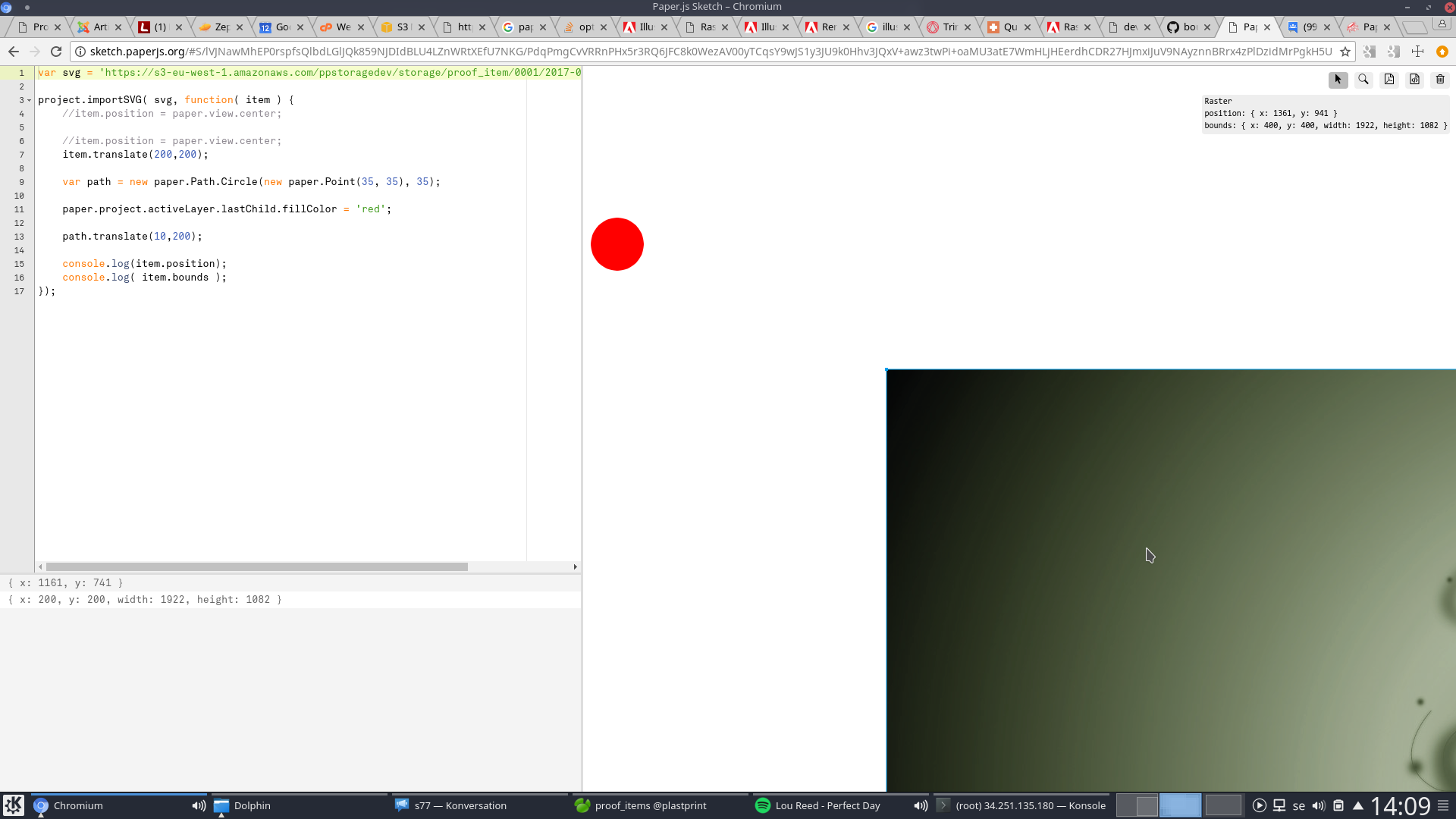
(Just a screenshot of the last sketch but with printing out the positions and mouseovering the object to show the difference in values.)
lilltiger
on 12 Jun 2017
@lehni this issue eludes me quite a bit.
item.translate(20,20);
Then on line 3528:
getView: function() {
    return this._project._view;
}
here:
this.bounds
is translated by the inverse of the translate value (in this case -20,-20).
EDIT:
The setImage (line: 5187) seems to be called to set an image with the bounds of the translate, then again it's called this time with bounds of the 'image size - translate size', should it do that?
lilltiger
on 13 Jun 2017
It seems to have to do with the fact that the item has not finished constructing, if I place a timeout in the import function then it works as expected.
But I thought that the object is supposed to be fully loaded before executing the user code.
lilltiger
on 13 Jun 2017
Now that I think about it I seem to recall that we had a simmilar issue erlier with regular SVG's without images, that they acted strangly because they where not fully loaded when read in as strings. But that issue was fixed, maybe this is the same thing but for raster, could it be that it emits a state of loaded before it actualy is fully loaded?
EDIT:
That issue was another issue, that time the onLoad did not trigger at all, but that was fixed. And I do not find any issue with the onLoad call in the paper.js code so I have no way to procede. Hopefully someone more familliar with the code will take a peak at this issue. But until then I will have to live with the ugly setTimeout workaround.
lilltiger
on 13 Jun 2017
Fixed my sketches, CORS was preventing the images from loading, added http://sketch.paperjs.org to the list of allowed origins.
lilltiger
on 27 Feb 2018
For another repro of this you can see it when importing from svg in this sketch
The embedded image has a transform on it that is applied as it is initially rendering but places the image in the wrong location where as it places the rectangle where it is expected.
 park9140
on 1 Mar 2018
park9140
on 1 Mar 2018
I have tried this patch out and it does seem to fix the issue, and I am yet to find any complications from it!
Great work @park9140!
lilltiger
on 6 Mar 2018
Closed by #1452
lehni
on 6 Mar 2018
Related issues
 BHuys
·
3Comments
BHuys
·
3Comments
 eljefedelrodeodeljefe
·
5Comments
eljefedelrodeodeljefe
·
5Comments
 sansumbrella
·
3Comments
sansumbrella
·
3Comments
 JohnMcLear
·
5Comments
JohnMcLear
·
5Comments
 wes-r
·
3Comments
wes-r
·
3Comments
Most helpful comment
Now that I think about it I seem to recall that we had a simmilar issue erlier with regular SVG's without images, that they acted strangly because they where not fully loaded when read in as strings. But that issue was fixed, maybe this is the same thing but for raster, could it be that it emits a state of loaded before it actualy is fully loaded?
EDIT:
That issue was another issue, that time the onLoad did not trigger at all, but that was fixed. And I do not find any issue with the onLoad call in the paper.js code so I have no way to procede. Hopefully someone more familliar with the code will take a peak at this issue. But until then I will have to live with the ugly setTimeout workaround.