panel.Param does not support changing objects of ObjectSelector dynamically
Panel: 0.9.5
bokeh: 2.0.2
I was trying to help a user on Discourse here https://discourse.holoviz.org/t/based-on-a-select-widget-update-a-second-select-widget-then-how-to-link-the-latter-to-a-reactive-plot/917.
I could develop an answer to his question but I believe there is a bug. I had to implement a hack/ work around to get it working.
import numpy as np
import matplotlib.pyplot as plt
from matplotlib.figure import Figure
import colorcet as cc
import panel as pn
import param

COLLECTIONS = ["matplotlib", "colorcet"]

MATPLOTLIB_COLORMAPS = sorted(
    [
        "viridis",
        "plasma",
    ],
    key=str.casefold,
)

COLORSET_COLORMAPS = sorted(
    [
        "bgy",
        "bkr",
        "bgyw",
    ]
)
COLOR_MAPS = {"matplotlib": MATPLOTLIB_COLORMAPS, "colorcet": COLORSET_COLORMAPS}


class ColorApp(param.Parameterized):
    collection = param.ObjectSelector(default="matplotlib", objects=COLLECTIONS)
    color_map = param.ObjectSelector(default="viridis", objects=MATPLOTLIB_COLORMAPS)
    use_hack = param.Boolean(default=False)

    settings_pane = param.Parameter()
    plot_pane = param.Parameter()
    view = param.Parameter()

    def __init__(self, **params):
        params["settings_pane"] = pn.Param(
            self, parameters=["collection", "color_map", "use_hack"], show_name=False, width=300, background="grey"
        )
        params["view"] = pn.Row(sizing_mode="stretch_width")

        super().__init__(**params)

        self.view[:] = [self.settings_pane]

    @param.depends("collection", watch=True)
    def _update_color_map_parameters(self):
        print(f"update to {self.collection}")
        objects = COLOR_MAPS[self.collection]
        self.param.color_map.objects = objects

        default = objects[0]
        if self.param.color_map.default not in objects:
            self.param.color_map.default = default
        if self.color_map not in objects:
            self.color_map = default

        # hack to get drowdowns and plot to update ???
        # I should file an issue on Github
        if self.use_hack:
            self.settings_pane.object = self
            self.settings_pane.parameters = ["collection", "color_map", "use_hack"]


if __name__.startswith("bokeh"):
    ColorApp().view.servable()
else:
    ColorApp().view.show(port=5007)
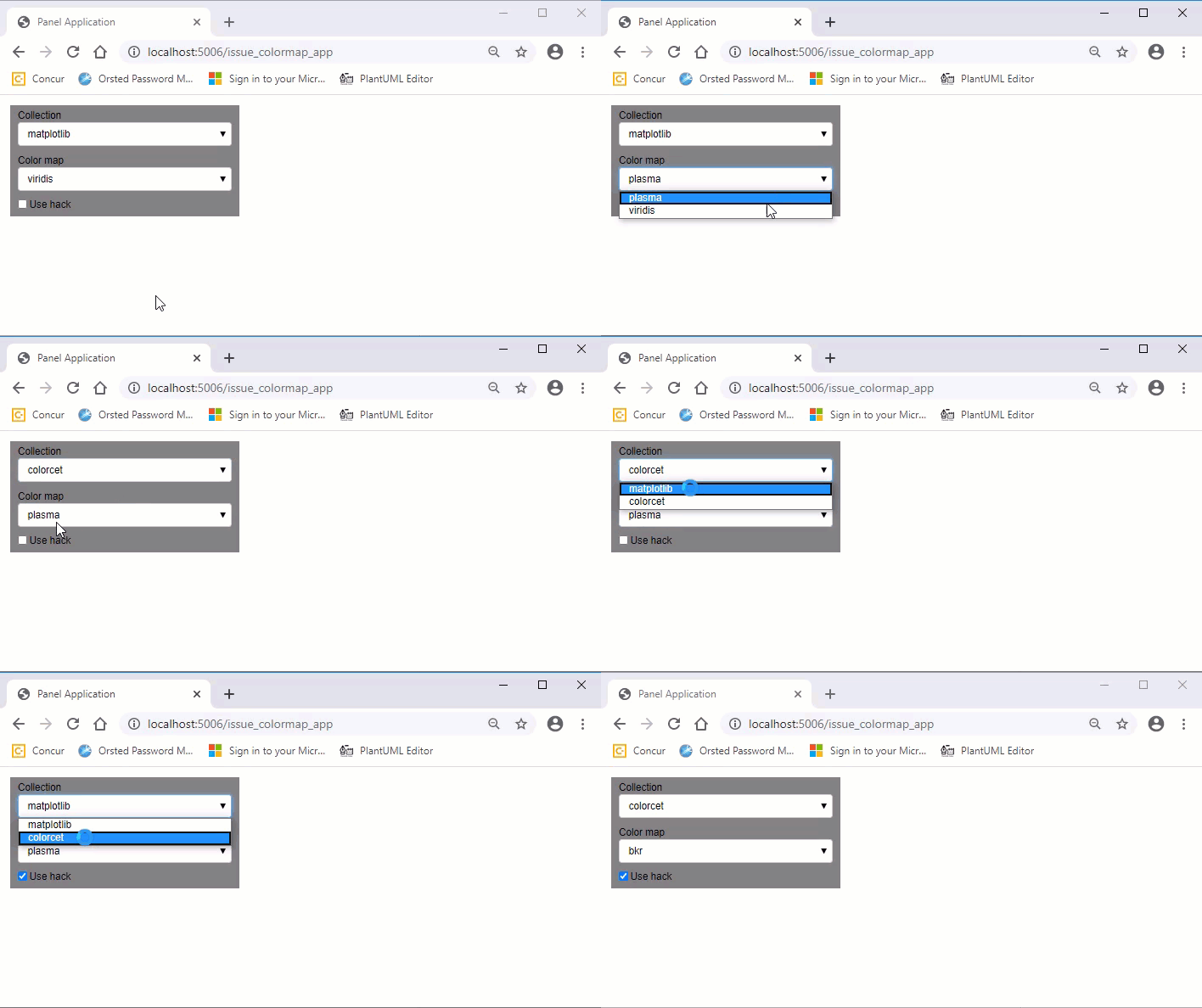
As you can see in the .gif video above the second select widget does not update in response to a change in selection of the first select widget. But if I enable the hack it does.
 MarcSkovMadsen
All 8 comments
The hack does not work nicely as there is a glitch when the panel.Param pane updates. If there is a more efficient hack/ workaround to trigger the update, that would also help me.
MarcSkovMadsen
on 2 Jul 2020
Not exactly the way you do it, but what about the following code?
import panel as pn
import param
COLLECTIONS = ["matplotlib", "colorcet"]
MATPLOTLIB_COLORMAPS = sorted(["viridis", "plasma"], key=str.casefold)
COLORSET_COLORMAPS = sorted(["bgy", "bkr", "bgyw"])
COLOR_MAPS = {"matplotlib": MATPLOTLIB_COLORMAPS, "colorcet": COLORSET_COLORMAPS}
class ColorApp(param.Parameterized):
def __init__(self, **params):
self.collection = pn.widgets.Select(name="Collection", options=COLLECTIONS)
self.color_map = pn.widgets.Select(
name="Color map", options=MATPLOTLIB_COLORMAPS
)
self.setting_pane = pn.Column(
self.collection, self.color_map, width=300, background="grey",
)
super().__init__(**params)
@pn.depends("collection.value", watch=True)
def _update_color_map_parameters(self):
print(f"update to {self.collection.value}")
objects = COLOR_MAPS[self.collection.value]
self.color_map.options = objects
self.color_map.value = self.color_map.options[0]
ColorApp().setting_pane.servable()
May I ask what the advantages is of using param objects instead of panel objects?
 Hoxbro
on 6 Jul 2020
Hoxbro
on 6 Jul 2020
Thanks @hoxbro
I very much like focusing on the business problem, i.e. using Param to model that. And only in the end defining layout, styling and widgets.
I think it is more flexible, scales better and is more maintainable.
But maybe its just a subjective thing.
MarcSkovMadsen
on 7 Jul 2020
Thank you for your explanation, I will properly try to see how it works next time I do something similar. :)
I found out you can avoid the glitch by changing the precedence to -1 in param.parameters, which always hides the parameters.
settings_pane = param.Parameter(precedence=-1)
plot_pane = param.Parameter(precedence=-1)
view = param.Parameter(precedence=-1)
The glitch you see is because it shows all parameters and then hides them except collection, color_map and use_hack. With this the second line of your hack is properly not needed.
I also found that the Google Map Viewer example in the documentation seems to have the same problem. Maybe a git bisect could check when the example stopped working.
Hoxbro
on 7 Jul 2020
That’s an interesting finding @Hoxbro . I’m wondering if in general there would be a benefit for setting precedence to -1 for reactive panel components and holoviews plots I don’t expect to show via Param?
MarcSkovMadsen
on 7 Jul 2020
I would properly only set precedence to -1 if it is absolute needed to not create any confusion.
I have finally got the example to work without doing a hack by changing the __init__ to the following:
    def __init__(self, **params):
        super().__init__(**params)
        self.settings_pane = pn.Param(
            self, parameters=["collection", "color_map", "use_hack"], show_name=False, width=300, background="grey"
        )
        self.view = pn.Row(sizing_mode="stretch_width")
        self.view[:] = [self.settings_pane]
@Hoxbro . So the solution is to use Param after the super init?
I think I have experienced problems before actually using Param before super init.
@philippjfr . Is there an explanation for that? Is it a bug or did I do something not supported?
MarcSkovMadsen
on 8 Jul 2020
You should always initialize parameters via the super before doing anything with them. If you have initialized with super and it still errors it's definitely a bug though.
 philippjfr
on 8 Jul 2020
philippjfr
on 8 Jul 2020
Related issues
MarcSkovMadsen
·
5Comments
 maximlt
·
5Comments
MarcSkovMadsen
·
3Comments
maximlt
·
5Comments
MarcSkovMadsen
·
3Comments
 joelostblom
·
3Comments
MarcSkovMadsen
·
3Comments
joelostblom
·
3Comments
MarcSkovMadsen
·
3Comments
Most helpful comment
Thank you for your explanation, I will properly try to see how it works next time I do something similar. :)
I found out you can avoid the glitch by changing the
precedenceto -1 inparam.parameters, which always hides the parameters.The glitch you see is because it shows all parameters and then hides them except
collection,color_mapanduse_hack. With this the second line of your hack is properly not needed.I also found that the Google Map Viewer example in the documentation seems to have the same problem. Maybe a
git bisectcould check when the example stopped working.