Pandoc: No command-line switch for coloring links in PDF format?
I'm using Pandoc to generate PDF from Markdown using the xelatex engine with BasicTex installed. Both URLs and internal links _work_, but you have to know they are there or pass your mouse over them to see the cursor change. They aren't colored, underlined, or in any way set off from the surrounding text.
After reading the Pandoc documentation, it seemed I should be able to pass arguments to Pandoc like:
--urlcolor=cyan
but this just generates an error. For example:
pandoc: unrecognized option `--urlcolor=cyan'
Does Pandoc support arguments to the chosen LaTeX engine? If not, what is the current way that this feature is supported? It's non-obvious from the documentation how to implement link and url colors, even though the keywords are mentioned in the Pandoc User's Guide.
 todd-a-jacobs
All 13 comments
Try
--variable urlcolor=cyan
Notice that in the manual, urlcolor appears under the list
of Variables for LaTeX, in the section Templates. If you
look up at the top of the section, it says: "Variables may
be set within the document using YAML metadata blocks.
They may also be set at the command line using the
-V/--variable option." You can look at the documentation
for that option to see how to use it.
+++ Todd A. Jacobs [Dec 07 15 08:47 ]:
I'm using Pandoc to generate PDF from Markdown using the xelatex engine
with BasicTex installed. Both URLs and internal links work, but you
have to know they are there or pass your mouse over them to see the
cursor change. They aren't colored, underlined, or in any way set off
from the surrounding text.After reading the Pandoc documentation, it seemed I should be able to
pass arguments to Pandoc like:
--urlcolor=cyanbut this just generates an error. For example:
pandoc: unrecognized option `--urlcolor=cyan'Does Pandoc support arguments to the chosen LaTeX engine? If not, what
is the current way that this feature is supported? It's non-obvious
from the documentation how to implement link and url colors, even
though the keywords are mentioned in the Pandoc User's Guide.—
Reply to this email directly or [1]view it on GitHub.References
 jgm
on 7 Dec 2015
jgm
on 7 Dec 2015
Thanks, @jgm. That worked perfectly. I think the issue is that, cognitively, it didn't occur to me that LaTeX options could or should be set as _template_ options with the --variable flag. It may be worth explaining that somehow, or having a link in the relevant options sections back to the Template section.
I can't think of the best way to word that right now, but could take a stab at it and make a pull-request if you think that adds value. If the problem is solely between keyboard and chair on this end, though, then you can close the ticket as resolved and with my gratitude.
todd-a-jacobs
on 7 Dec 2015
Feel free to make a suggestion if you like. colorlinks is already described inside the Template section, so I'm not sure it makes sense to link from there to the Template section.
jgm
on 12 Dec 2015
Noob question, how can this be set in the YAML block?
I tried
urlcolor: blue
---
and
urlcolor: "blue"
---
 gandalfsaxe
on 5 Mar 2018
gandalfsaxe
on 5 Mar 2018
You also need to set colorlinks: true.
+++ Gandalf Saxe [Mar 05 18 02:28 ]:
Noob question, how can this be set in the YAML block?
I tried
urlcolor: blue
and
urlcolor: "blue"
—
You are receiving this because you modified the open/close state.
Reply to this email directly, [1]view it on GitHub, or [2]mute the
thread.References
jgm
on 5 Mar 2018
Thanks. In the manual it says that colorlinks should be "automatically enabled if any of linkcolor, citecolor, urlcolor, or toccolor are set". Is this implicitly only true when setting the variable as a command option, not in the yaml header?
gandalfsaxe
on 7 Mar 2018
You're right -- and from a look at the source, this should
work. What version of pandoc are you using?
+++ Gandalf Saxe [Mar 07 18 09:34 ]:
Thanks. In the manual [1]it says that colorlinks should be
"automatically enabled if any of linkcolor, citecolor, urlcolor, or
toccolor are set". Is this implicitly only true when setting the
variable as a command option, not in the yaml header?—
You are receiving this because you modified the open/close state.
Reply to this email directly, [2]view it on GitHub, or [3]mute the
thread.References
jgm
on 7 Mar 2018
I thought I was using a new version, but I can see now that I'm on pandoc 1.19.2.1.
Apparently my system defaults to using Anaconda3's pandoc, not homebrew's pandoc. I can't get a newer version with condo upgrade pandoc, but I can get a newer one from https://anaconda.org/conda-forge/pandoc. Is conda-forge or brew preferred on Mac or is it purely a matter of taste?
Anyway I'll try to do this again when I upgrade to the newest pandoc version.
gandalfsaxe
on 8 Mar 2018
Can confirm that colorlinks: true does not need to be set in pandoc 2.1.2, and thus appears to be correctly set as default value in the newest version 👍
gandalfsaxe
on 11 Mar 2018
Hi, how can I use an hex color like #9068be?
 pepas24
on 19 Feb 2019
pepas24
on 19 Feb 2019
pandoc 2.8
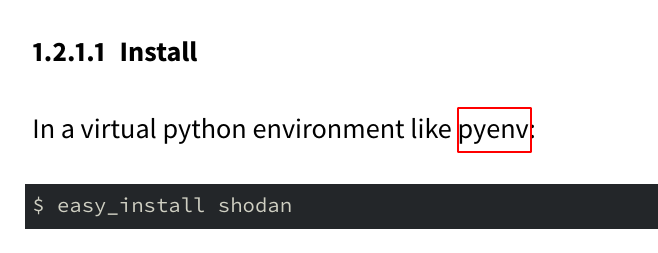
markdown to pdf no link color by default
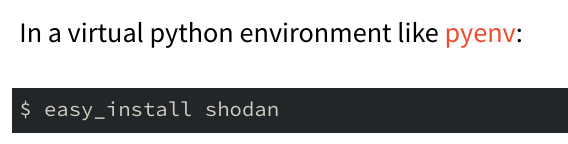
adding urlcolor: "RedOrange"
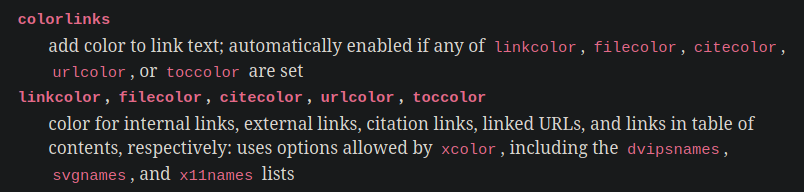
But something is still wrong, the documentation is saying
including the dvipsnames, svgnames, and x11names lists
RedOrange from dvipsnames works (previous screenshot) but DarkOrange from svgnames doesn't work.
Error producing PDF.
! Package xcolor Error: Undefined color `DarkOrange'.

See the xcolor package documentation for explanation.
Type  H <return>  for immediate help.
 ...
Same error with DarkOrange2 from x11names.
@jgm Do you want me to open a new issue svgnames and x11names not supported for xcolor color names
 noraj
on 3 Feb 2020
noraj
on 3 Feb 2020
Yes, a new issue would make sense; it's a simple doc change but we should try to figure out why that was in the docs in the first place.
jgm
on 3 Feb 2020
Hi, how can I use an hex color like #9068be?
@pepas24, try this syntax: --variable urlcolor='[HTML]{9068be}'
 smokris
on 8 May 2020
smokris
on 8 May 2020
Related issues
 elliottslaughter
·
4Comments
elliottslaughter
·
4Comments
 chrissound
·
4Comments
chrissound
·
4Comments
 tolot27
·
5Comments
tolot27
·
5Comments
 guifh
·
4Comments
guifh
·
4Comments
 RLesur
·
3Comments
RLesur
·
3Comments
Most helpful comment
Try
Notice that in the manual, urlcolor appears under the list
of Variables for LaTeX, in the section Templates. If you
look up at the top of the section, it says: "Variables may
be set within the document using YAML metadata blocks.
They may also be set at the command line using the
-V/--variable option." You can look at the documentation
for that option to see how to use it.
+++ Todd A. Jacobs [Dec 07 15 08:47 ]: