Pandoc: Incorrect attribute for HTML4 numbered section headings
Hi,
When producing a HTML4 document with Pandoc 2.8 and 2.8.0.1, numbered section headings gain a number attribute instead of a data-number attribute like HTML5 documents.
This number attribute raises errors in the W3C Validation Service.
Here is a minimal example:
HTML4
_Command line_
pandoc -N -t html4 <<< "# Hello"
_Actual output_
<h1 number="1" id="hello"><span class="header-section-number">1</span> Hello</h1>
_Expected output (edited, see https://github.com/jgm/pandoc/issues/5944#issuecomment-559580301)_:
<h1 data-number="1" id="hello"><span class="header-section-number">1</span> Hello</h1>
<h1 id="hello"><span class="header-section-number">1</span> Hello</h1>
For comparison:
HTML5
_Command line_
pandoc -N -t html <<< "# Hello"
_Actual (and correct) output_
<h1 data-number="1" id="hello"><span class="header-section-number">1</span> Hello</h1>
 RLesur
All 3 comments
The data- prefix is currently only added in HTML5 output, out of a (probably mistaken and groundless) belief that data- attributes were only supported in HTML5. If this isn't true, this can easily be fixed.
 jgm
on 28 Nov 2019
jgm
on 28 Nov 2019
Sorry, I forgot this point: data- attributes are not supported in HTML4. So, the expected output for HTML4 should be unchanged:
<h1 id="hello"><span class="header-section-number">1</span> Hello</h1>
The number attribute is not allowed by the HTML specification.
So for file.md document with content:
title: Cross-reference
site: bookdown::bookdown_site
---

# Part 1 {#p1}

## Chapter 1 {#p1ch1}

Some text.

## Chapter 2 {#p1ch2}

Here we need to refer to chapter 1 as ``` `[p1ch1](#p1ch1)` ```: see ch. [p1ch1](#p1ch1).
converted to html4 with pandoc 2.8.0.1:
pandoc -s file.md -o file.html -t html4 --number-sections
and looks like
<!DOCTYPE html PUBLIC "-//W3C//DTD XHTML 1.0 Transitional//EN" "http://www.w3.org/TR/xhtml1/DTD/xhtml1-transitional.dtd">
<html xmlns="http://www.w3.org/1999/xhtml">
<head>
  <meta http-equiv="Content-Type" content="text/html; charset=utf-8" />
  <meta http-equiv="Content-Style-Type" content="text/css" />
  <meta name="generator" content="pandoc" />
  <title>Cross-reference</title>
  <style type="text/css">
    code{white-space: pre-wrap;}
    span.smallcaps{font-variant: small-caps;}
    span.underline{text-decoration: underline;}
    div.column{display: inline-block; vertical-align: top; width: 50%;}
    div.hanging-indent{margin-left: 1.5em; text-indent: -1.5em;}
  </style>
</head>
<body>
<div id="header">
<h1 class="title">Cross-reference</h1>
</div>
<h1 number="1" id="p1"><span class="header-section-number">1</span> Part 1</h1>
<h2 number="1.1" id="p1ch1"><span class="header-section-number">1.1</span> Chapter 1</h2>
<p>Some text.</p>
<h2 number="1.2" id="p1ch2"><span class="header-section-number">1.2</span> Chapter 2</h2>
<p>Here we need to refer to chapter 1 as <code>`[p1ch1](#p1ch1)`</code>: see ch. <a href="#p1ch1">p1ch1</a>.</p>
</body>
</html>
W3C validation tool reports errors:
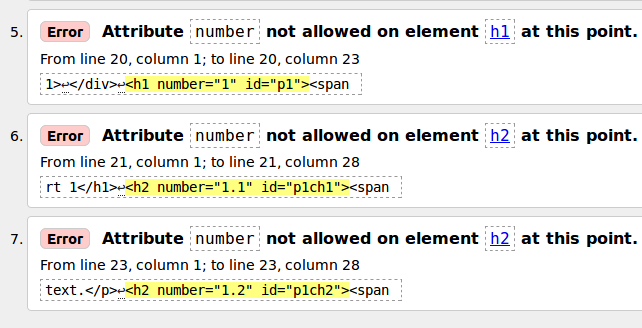
Please note that pandoc 2.7.3 use spans
<div id="header">
<h1 class="title">Cross-reference</h1>
</div>
<h1 id="p1"><span class="header-section-number">1</span> Part 1</h1>
<h2 id="p1ch1"><span class="header-section-number">1.1</span> Chapter 1</h2>
<p>Some text.</p>
<h2 id="p1ch2"><span class="header-section-number">1.2</span> Chapter 2</h2>
and therefore passes the HTML validation.
 N0rbert
on 28 Nov 2019
N0rbert
on 28 Nov 2019
Related issues
 krobelus
·
4Comments
krobelus
·
4Comments
 chrissound
·
4Comments
chrissound
·
4Comments
 elliottslaughter
·
4Comments
elliottslaughter
·
4Comments
 felixsanz
·
5Comments
felixsanz
·
5Comments
 georgewsinger
·
4Comments
georgewsinger
·
4Comments
Most helpful comment
Sorry, I forgot this point:
data-attributes are not supported in HTML4. So, the expected output for HTML4 should be unchanged: