Outlookgooglecalendarsync: Events with multiple categories are not synced
I only want to sync certain events to Google, for which I use a own category.
It happens, that I use more than one category on an Event. If that happens, the Events are not synced with Google or are even deleted, if I add another category to the one indicating my sync.
Steps to reproduce:
- In Tab "
Outlook" Use "Filter categories" with "include" and activate some categories - Open a specific Event and use a
included categoryon this Event - sync
- OGCS will sync the Event to the configured Google calendar
- now add another category to the Event used in step 2
- sync
- OGCS will delete (depending on configuration) the Event
If you already add at least another category, which is not in the included configurationin step 2, the Event won't sync to Google at all.
I expected the Event configuration as a "OR"-condition, not an "AND"-condition, meaning, if at least one category is in the included-option, the Event would sync with Google.
 binderth
All 12 comments
Thanks for the report - could you confirm what version of OGCS you're running?
 phw198
on 11 Oct 2017
phw198
on 11 Oct 2017
Hi Paul,
sorry, I forgot: it is 2.6.2.0alpha - should I try the beta instead? Something else, I could do?
PS: It is Outlook 2013 (15.0.4963.1002), 32-bit on Windows 10 if this is also important to know.
binderth
on 12 Oct 2017
Sorry - I can't replicate this.
- OGCS; Include; Green + Blue category
- Outlook event; Blue + Orange category
It syncs over...
The code uses an intersect, so as long as at least one selected category exists in the Outlook appointment, it will sync. I'm on Outlook 2016, but I don't think it should make a difference.
If you include 2 non-sequential categories, eg the 2nd and 4th category and then set an appointment to have those 2 categories, does that sync?
phw198
on 15 Oct 2017
The catagories never were consecutive, much more like this:
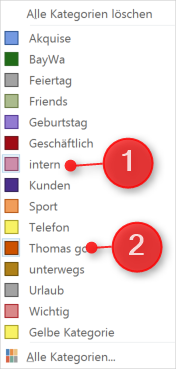
I just added a new Event with the catagories shown above - and it didn't sync. Removing the "intern"-category, it synced promptly.
As far as I remember, the "Thomas GC" category was added by me and was not a standard one... Perhaps this is a issue?
edit: just tested it with two other categories which definitely were Standard ones - the exact same behaviour...
binderth
on 23 Oct 2017
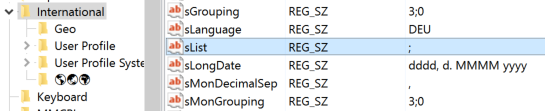
Think I've tumbled to it. As per MS documentation, could you check what the value in your registry is for HKEY_CURRENT_USER\Control Panel\International\sList? I suspect it's not a comma...
phw198
on 23 Oct 2017
Yes Paul, it's semicolon! ;)
binderth
on 23 Oct 2017
:package: This should now be resolved with hotfix v2.6.3.1.zip (see instructions for applying).
Let me know how it goes!
phw198
on 24 Oct 2017
Unfortunately, the hotfix won't start. I replaced the EXE within my Installation, but on start it crashes with those two entries in the eventlog (sorry, german Windows):
Protokollname: Application
Quelle:        .NET Runtime
Datum:         24.10.2017 07:38:02
Ereignis-ID:   1026
Aufgabenkategorie:Keine
Ebene:         Fehler
Schlüsselwörter:Klassisch
Benutzer:      Nicht zutreffend
Computer:      TBinder
Beschreibung:
Anwendung: OutlookGoogleCalendarSync.exe
Frameworkversion: v4.0.30319
Beschreibung: Der Prozess wurde aufgrund einer unbehandelten Ausnahme beendet.
Ausnahmeinformationen: System.IO.FileNotFoundException
   bei OutlookGoogleCalendarSync.Program.Main(System.String[])


Ereignis-XML:
<Event xmlns="http://schemas.microsoft.com/win/2004/08/events/event">
  <System>
    <Provider Name=".NET Runtime" />
    <EventID Qualifiers="0">1026</EventID>
    <Level>2</Level>
    <Task>0</Task>
    <Keywords>0x80000000000000</Keywords>
    <TimeCreated SystemTime="2017-10-24T05:38:02.973948300Z" />
    <EventRecordID>80206</EventRecordID>
    <Channel>Application</Channel>
    <Computer>TBinder</Computer>
    <Security />
  </System>
  <EventData>
    <Data>Anwendung: OutlookGoogleCalendarSync.exe
Frameworkversion: v4.0.30319
Beschreibung: Der Prozess wurde aufgrund einer unbehandelten Ausnahme beendet.
Ausnahmeinformationen: System.IO.FileNotFoundException
   bei OutlookGoogleCalendarSync.Program.Main(System.String[])

</Data>
  </EventData>
</Event>
Protokollname: Application
Quelle:        Application Error
Datum:         24.10.2017 07:38:03
Ereignis-ID:   1000
Aufgabenkategorie:(100)
Ebene:         Fehler
Schlüsselwörter:Klassisch
Benutzer:      Nicht zutreffend
Computer:      TBinder
Beschreibung:
Name der fehlerhaften Anwendung: OutlookGoogleCalendarSync.exe, Version: 2.6.3.1, Zeitstempel: 0x59ee7265
Name des fehlerhaften Moduls: KERNELBASE.dll, Version: 10.0.14393.1770, Zeitstempel: 0x59bf2bcf
Ausnahmecode: 0xe0434352
Fehleroffset: 0x000daa12
ID des fehlerhaften Prozesses: 0x574c
Startzeit der fehlerhaften Anwendung: 0x01d34c8a424db3d3
Pfad der fehlerhaften Anwendung: C:\Users\thomas.binder\AppData\Local\OutlookGoogleCalendarSync\app-2.6.2-alpha\OutlookGoogleCalendarSync.exe
Pfad des fehlerhaften Moduls: C:\WINDOWS\System32\KERNELBASE.dll
Berichtskennung: 0277498f-2961-4b10-919c-b5c09c042f04
Vollständiger Name des fehlerhaften Pakets:
Anwendungs-ID, die relativ zum fehlerhaften Paket ist:
Ereignis-XML:
<Event xmlns="http://schemas.microsoft.com/win/2004/08/events/event">
  <System>
    <Provider Name="Application Error" />
    <EventID Qualifiers="0">1000</EventID>
    <Level>2</Level>
    <Task>100</Task>
    <Keywords>0x80000000000000</Keywords>
    <TimeCreated SystemTime="2017-10-24T05:38:03.031604000Z" />
    <EventRecordID>80207</EventRecordID>
    <Channel>Application</Channel>
    <Computer>TBinder</Computer>
    <Security />
  </System>
  <EventData>
    <Data>OutlookGoogleCalendarSync.exe</Data>
    <Data>2.6.3.1</Data>
    <Data>59ee7265</Data>
    <Data>KERNELBASE.dll</Data>
    <Data>10.0.14393.1770</Data>
    <Data>59bf2bcf</Data>
    <Data>e0434352</Data>
    <Data>000daa12</Data>
    <Data>574c</Data>
    <Data>01d34c8a424db3d3</Data>
    <Data>C:\Users\thomas.binder\AppData\Local\OutlookGoogleCalendarSync\app-2.6.2-alpha\OutlookGoogleCalendarSync.exe</Data>
    <Data>C:\WINDOWS\System32\KERNELBASE.dll</Data>
    <Data>0277498f-2961-4b10-919c-b5c09c042f04</Data>
    <Data>
    </Data>
    <Data>
    </Data>
  </EventData>
</Event>
If you've got the original .exe for v2.6.2, could you reinstate that and then upgrade to v2.6.3 via the About tab in OGCS. Then reapply the hotfix.
If that doesn't work, try downloading the portable ZIP version of v2.6.3, extract and apply the patch to that.
Failing all that, I'll have to check the built I gave you to see what's gone wrong!
phw198
on 24 Oct 2017
hi Paul,
I'm sorry, neither works. About-Update freezes the application,
1) reinstalling the 2.6.2 with 2.6.3 and then applying 2.6.3.1 throws these errors:
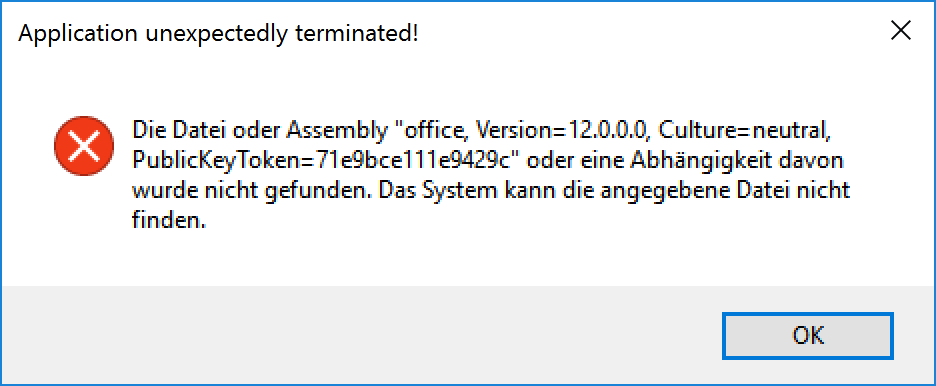
Protokollname: Application
Quelle:        .NET Runtime
Datum:         25.10.2017 08:21:20
Ereignis-ID:   1026
Aufgabenkategorie:Keine
Ebene:         Fehler
Schlüsselwörter:Klassisch
Benutzer:      Nicht zutreffend
Computer:      TBinder-SF1
Beschreibung:
Anwendung: OutlookGoogleCalendarSync.exe
Frameworkversion: v4.0.30319
Beschreibung: Der Prozess wurde aufgrund einer unbehandelten Ausnahme beendet.
Ausnahmeinformationen: System.IO.FileNotFoundException
   bei OutlookGoogleCalendarSync.Program.Main(System.String[])


Ereignis-XML:
<Event xmlns="http://schemas.microsoft.com/win/2004/08/events/event">
  <System>
    <Provider Name=".NET Runtime" />
    <EventID Qualifiers="0">1026</EventID>
    <Level>2</Level>
    <Task>0</Task>
    <Keywords>0x80000000000000</Keywords>
    <TimeCreated SystemTime="2017-10-25T06:21:20.468209100Z" />
    <EventRecordID>80352</EventRecordID>
    <Channel>Application</Channel>
    <Computer>TBinder-SF1</Computer>
    <Security />
  </System>
  <EventData>
    <Data>Anwendung: OutlookGoogleCalendarSync.exe
Frameworkversion: v4.0.30319
Beschreibung: Der Prozess wurde aufgrund einer unbehandelten Ausnahme beendet.
Ausnahmeinformationen: System.IO.FileNotFoundException
   bei OutlookGoogleCalendarSync.Program.Main(System.String[])

</Data>
  </EventData>
</Event>
and
Protokollname: Application
Quelle:        Application Error
Datum:         25.10.2017 08:21:20
Ereignis-ID:   1000
Aufgabenkategorie:(100)
Ebene:         Fehler
Schlüsselwörter:Klassisch
Benutzer:      Nicht zutreffend
Computer:      TBinder-SF1
Beschreibung:
Name der fehlerhaften Anwendung: OutlookGoogleCalendarSync.exe, Version: 2.6.3.1, Zeitstempel: 0x59ee7265
Name des fehlerhaften Moduls: KERNELBASE.dll, Version: 10.0.14393.1770, Zeitstempel: 0x59bf2bcf
Ausnahmecode: 0xe0434352
Fehleroffset: 0x000daa12
ID des fehlerhaften Prozesses: 0x7f4c
Startzeit der fehlerhaften Anwendung: 0x01d34d5978f7583e
Pfad der fehlerhaften Anwendung: C:\Users\thomas.binder\AppData\Local\OutlookGoogleCalendarSync\OutlookGoogleCalendarSync.exe
Pfad des fehlerhaften Moduls: C:\WINDOWS\System32\KERNELBASE.dll
Berichtskennung: 8d126c28-80f3-41e7-ae49-d195392f6b4c
Vollständiger Name des fehlerhaften Pakets:
Anwendungs-ID, die relativ zum fehlerhaften Paket ist:
Ereignis-XML:
<Event xmlns="http://schemas.microsoft.com/win/2004/08/events/event">
  <System>
    <Provider Name="Application Error" />
    <EventID Qualifiers="0">1000</EventID>
    <Level>2</Level>
    <Task>100</Task>
    <Keywords>0x80000000000000</Keywords>
    <TimeCreated SystemTime="2017-10-25T06:21:20.578891200Z" />
    <EventRecordID>80353</EventRecordID>
    <Channel>Application</Channel>
    <Computer>TBinder-SF1</Computer>
    <Security />
  </System>
  <EventData>
    <Data>OutlookGoogleCalendarSync.exe</Data>
    <Data>2.6.3.1</Data>
    <Data>59ee7265</Data>
    <Data>KERNELBASE.dll</Data>
    <Data>10.0.14393.1770</Data>
    <Data>59bf2bcf</Data>
    <Data>e0434352</Data>
    <Data>000daa12</Data>
    <Data>7f4c</Data>
    <Data>01d34d5978f7583e</Data>
    <Data>C:\Users\thomas.binder\AppData\Local\OutlookGoogleCalendarSync\OutlookGoogleCalendarSync.exe</Data>
    <Data>C:\WINDOWS\System32\KERNELBASE.dll</Data>
    <Data>8d126c28-80f3-41e7-ae49-d195392f6b4c</Data>
    <Data>
    </Data>
    <Data>
    </Data>
  </EventData>
</Event>
Then I downloaded 2.6.3 portable and applied 2.6.3.1 in there and I got these again:
Protokollname: Application
Quelle:        .NET Runtime
Datum:         25.10.2017 08:28:07
Ereignis-ID:   1026
Aufgabenkategorie:Keine
Ebene:         Fehler
Schlüsselwörter:Klassisch
Benutzer:      Nicht zutreffend
Computer:      TBinder-SF1
Beschreibung:
Anwendung: OutlookGoogleCalendarSync.exe
Frameworkversion: v4.0.30319
Beschreibung: Der Prozess wurde aufgrund einer unbehandelten Ausnahme beendet.
Ausnahmeinformationen: System.IO.FileNotFoundException
   bei OutlookGoogleCalendarSync.Program.Main(System.String[])


Ereignis-XML:
<Event xmlns="http://schemas.microsoft.com/win/2004/08/events/event">
  <System>
    <Provider Name=".NET Runtime" />
    <EventID Qualifiers="0">1026</EventID>
    <Level>2</Level>
    <Task>0</Task>
    <Keywords>0x80000000000000</Keywords>
    <TimeCreated SystemTime="2017-10-25T06:28:07.847602400Z" />
    <EventRecordID>80358</EventRecordID>
    <Channel>Application</Channel>
    <Computer>TBinder-SF1</Computer>
    <Security />
  </System>
  <EventData>
    <Data>Anwendung: OutlookGoogleCalendarSync.exe
Frameworkversion: v4.0.30319
Beschreibung: Der Prozess wurde aufgrund einer unbehandelten Ausnahme beendet.
Ausnahmeinformationen: System.IO.FileNotFoundException
   bei OutlookGoogleCalendarSync.Program.Main(System.String[])

</Data>
  </EventData>
</Event>
and
Protokollname: Application
Quelle:        Application Error
Datum:         25.10.2017 08:28:07
Ereignis-ID:   1000
Aufgabenkategorie:(100)
Ebene:         Fehler
Schlüsselwörter:Klassisch
Benutzer:      Nicht zutreffend
Computer:      TBinder-SF1
Beschreibung:
Name der fehlerhaften Anwendung: OutlookGoogleCalendarSync.exe, Version: 2.6.3.1, Zeitstempel: 0x59ee7265
Name des fehlerhaften Moduls: KERNELBASE.dll, Version: 10.0.14393.1770, Zeitstempel: 0x59bf2bcf
Ausnahmecode: 0xe0434352
Fehleroffset: 0x000daa12
ID des fehlerhaften Prozesses: 0x18ec
Startzeit der fehlerhaften Anwendung: 0x01d34d5a6bc5880e
Pfad der fehlerhaften Anwendung: C:\Users\thomas.binder\Downloads\Portable_OGCS_v2.6.3\OutlookGoogleCalendarSync.exe
Pfad des fehlerhaften Moduls: C:\WINDOWS\System32\KERNELBASE.dll
Berichtskennung: bf534672-664f-45c7-a9b3-9f45247e03c4
Vollständiger Name des fehlerhaften Pakets:
Anwendungs-ID, die relativ zum fehlerhaften Paket ist:
Ereignis-XML:
<Event xmlns="http://schemas.microsoft.com/win/2004/08/events/event">
  <System>
    <Provider Name="Application Error" />
    <EventID Qualifiers="0">1000</EventID>
    <Level>2</Level>
    <Task>100</Task>
    <Keywords>0x80000000000000</Keywords>
    <TimeCreated SystemTime="2017-10-25T06:28:07.932836600Z" />
    <EventRecordID>80359</EventRecordID>
    <Channel>Application</Channel>
    <Computer>TBinder-SF1</Computer>
    <Security />
  </System>
  <EventData>
    <Data>OutlookGoogleCalendarSync.exe</Data>
    <Data>2.6.3.1</Data>
    <Data>59ee7265</Data>
    <Data>KERNELBASE.dll</Data>
    <Data>10.0.14393.1770</Data>
    <Data>59bf2bcf</Data>
    <Data>e0434352</Data>
    <Data>000daa12</Data>
    <Data>18ec</Data>
    <Data>01d34d5a6bc5880e</Data>
    <Data>C:\Users\thomas.binder\Downloads\Portable_OGCS_v2.6.3\OutlookGoogleCalendarSync.exe</Data>
    <Data>C:\WINDOWS\System32\KERNELBASE.dll</Data>
    <Data>bf534672-664f-45c7-a9b3-9f45247e03c4</Data>
    <Data>
    </Data>
    <Data>
    </Data>
  </EventData>
</Event>
as Information:
Protokollname: Application
Quelle:        Windows Error Reporting
Datum:         25.10.2017 08:28:09
Ereignis-ID:   1001
Aufgabenkategorie:Keine
Ebene:         Informationen
Schlüsselwörter:Klassisch
Benutzer:      Nicht zutreffend
Computer:      TBinder-SF1
Beschreibung:
Fehlerbucket 109215973030, Typ 1
Ereignisname: APPCRASH
Antwort: Nicht verfügbar
CAB-Datei-ID: 0

Problemsignatur:
P1: OutlookGoogleCalendarSync.exe
P2: 2.6.3.1
P3: 59ee7265
P4: KERNELBASE.dll
P5: 10.0.14393.1770
P6: 59bf2bcf
P7: e0434352
P8: 000daa12
P9:
P10:

Angefügte Dateien:
\\?\C:\ProgramData\Microsoft\Windows\WER\Temp\WER7BF1.tmp.WERInternalMetadata.xml

Diese Dateien befinden sich möglicherweise hier:
C:\ProgramData\Microsoft\Windows\WER\ReportArchive\AppCrash_OutlookGoogleCal_918f52358cd960bb95ed35b12ec3afcf50f4e456_cd76dbd0_27db8095

Analysesymbol:
Es wird erneut nach einer Lösung gesucht: 0
Berichts-ID: bf534672-664f-45c7-a9b3-9f45247e03c4
Berichtstatus: 0
Bucket mit Hash: 0364ce1af70166dacd2e0c27eb510fa0
Ereignis-XML:
<Event xmlns="http://schemas.microsoft.com/win/2004/08/events/event">
  <System>
    <Provider Name="Windows Error Reporting" />
    <EventID Qualifiers="0">1001</EventID>
    <Level>4</Level>
    <Task>0</Task>
    <Keywords>0x80000000000000</Keywords>
    <TimeCreated SystemTime="2017-10-25T06:28:09.582138000Z" />
    <EventRecordID>80360</EventRecordID>
    <Channel>Application</Channel>
    <Computer>TBinder-SF1</Computer>
    <Security />
  </System>
  <EventData>
    <Data>109215973030</Data>
    <Data>1</Data>
    <Data>APPCRASH</Data>
    <Data>Nicht verfügbar</Data>
    <Data>0</Data>
    <Data>OutlookGoogleCalendarSync.exe</Data>
    <Data>2.6.3.1</Data>
    <Data>59ee7265</Data>
    <Data>KERNELBASE.dll</Data>
    <Data>10.0.14393.1770</Data>
    <Data>59bf2bcf</Data>
    <Data>e0434352</Data>
    <Data>000daa12</Data>
    <Data>
    </Data>
    <Data>
    </Data>
    <Data>
\\?\C:\ProgramData\Microsoft\Windows\WER\Temp\WER7BF1.tmp.WERInternalMetadata.xml</Data>
    <Data>C:\ProgramData\Microsoft\Windows\WER\ReportArchive\AppCrash_OutlookGoogleCal_918f52358cd960bb95ed35b12ec3afcf50f4e456_cd76dbd0_27db8095</Data>
    <Data>
    </Data>
    <Data>0</Data>
    <Data>bf534672-664f-45c7-a9b3-9f45247e03c4</Data>
    <Data>0</Data>
    <Data>0364ce1af70166dacd2e0c27eb510fa0</Data>
  </EventData>
</Event>
:package: Please give this new v2.6.3.1.zip a go... :crossed_fingers:
phw198
on 26 Oct 2017
YAY!!!!! Now it works! Thanks!
binderth
on 30 Oct 2017
Related issues
 LHuisingh
·
6Comments
LHuisingh
·
6Comments
 tdalon
·
5Comments
tdalon
·
5Comments
 invalidCards
·
4Comments
invalidCards
·
4Comments
 schwaben-github
·
5Comments
schwaben-github
·
5Comments
 dmccrea
·
6Comments
dmccrea
·
6Comments