Outlookgooglecalendarsync: Sync multiple calendars
This functionality is now being developed!
- [x] Allow
settings.xmlto have multiple calendar settings. - [x] Migrate old settings to new XML on upgrade
- [x] Improve setting export to XML for nested values
- [x] New "Profile" tab under Settings
- [x] Add, delete, rename options
- [x] Move sync timers into
Settings\Calendarclass
- [ ] Currently displayed settings not used in sync unless manually triggered
- [x] Store
Settings\Calendarclass againstMainFormfor GUI and manual sync - [x] Store
Settings\Calendarclass againstSync.Enginefor scheduled sync
- [ ] "Delay sync" option needs to apply to _all_ timer schedules
Until this is released there are a couple of workarounds below.
Please add any comments / feedback to this ticket.
:warning: Unless you are on v2.7.6 or later, do not use this to sync more than one source calendar into the same destination calendar. Supported configurations still apply:

Start OGCS with Command Line Parameters
This is new from v2.7.2 and allows the same install of OGCS to be run multiple times with different configurations. See Issue #481 for further details.
- Download and deploy at least v2.7.2 - ZIP or Install, it doesn't matter
Start>Run>cmd.exe- Enter the full path to the OGCS executable, eg:
C:\Users\<user-id>\AppData\Local\OutlookGoogleCalendarSync\app-2.7.2-alpha\OutlookGoogleCalendarSync.exe
- Provide path to OGCS settings for "Calendar1"
/s:C:\OGCS\Calendar1\settings.xml; or
/s:C:\OGCS\calendar1.xml - Provide path for OGCS to log to for "Calendar1"
/l:C:\OGCS\Calendar1\OGcalsync.log; or
/l:C:\OGCS\calendar1.log
- Provide path to OGCS settings for "Calendar1"
- Hit
Enterto start OGCS for Calendar 1. - Enter the full path to the OGCS executable again
- Provide path to OGCS settings for "Calendar2"
/s:C:\OGCS\Calendar2\settings.xml; or
/s:C:\OGCS\calendar2.xml - Provide path for OGCS to log to for "Calendar2"
/l:C:\OGCS\Calendar2\OGcalsync.log; or
/l:C:\OGCS\calendar2.log
- Provide path to OGCS settings for "Calendar2"
- Hit
Enterto start the second instance of OGCS.
Your final commands would look like:
C:\Users\<user-id>\AppData\Local\OutlookGoogleCalendarSync\app-2.7.2-alpha\OutlookGoogleCalendarSync.exe /s:C:\OGCS\Calendar1\settings.xml /l:C:\OGCS\Calendar1\OGcalsync.log
C:\Users\<user-id>\AppData\Local\OutlookGoogleCalendarSync\app-2.7.2-alpha\OutlookGoogleCalendarSync.exe /s:C:\OGCS\Calendar2\settings.xml /l:C:\OGCS\Calendar2\OGcalsync.log
From v2.8.2, there is also a new parameter to append a custom string to the title bar of OGCS: /t:"Some config name"
Start OGCS on Startup
Note, the Start on startup option will only work for a single instance of OGCS, so if you want multiple instances of OGCS to start on startup with different configurations you have two options.
Windows menu Startup folder
Start>Run> Typeexplorer.exe+Enter- In the address bar type
%APPDATA%\Microsoft\Windows\Start Menu\Programs\Startupand hitEnter Right-click>New text document- Name it, eg
startOGCS.bat- :warning: make sure it ends in.batand not.txt Right-clickthe new file andEdit- Paste in the commands to start your various OGCS instances, eg as per the final commands in the previous section.
- To have each instance of OGCS run in parallel, prefix each line with
start
- To have each instance of OGCS run in parallel, prefix each line with
- Save the file and close Notepad
Windows Registry
Manually create your own registry keys:
Start>Run> Typeregedit+Enter- Navigate to
HKEY_CURRENT_USER\Software\Microsoft\Windows\CurrentVersion\Run Right-click>New>String Value
- Give it a name, eg "Work Calendar 1"
Double-clickthe new registry key and enter in the string to start up OGCS, egC:\Users\<user-id>\AppData\Local\OutlookGoogleCalendarSync\app-2.7.2-alpha\OutlookGoogleCalendarSync.exe /s:C:\OGCS\Calendar1\settings.xml /l:C:\OGCS\Calendar1\OGcalsync.log- Click
OK
- Repeat for additional calendars.
Deploy Portable Copies of OGCS
This requires the portable ZIP extracted files to be copied to different locations on your computer
- Download the latest alpha ZIP release
- Unzip the contents to two different locations - 1 for each calendar to be synced
- Start the app and select "Make Portable" under options
- Configure it to sync the first calendar
- Repeat step 3 for the second location the ZIP was extracted to
- Configure it to sync the second calendar
MJE2 wrote at 2016-06-27 23:48:
Thanks!
CapeCods wrote at 2016-07-03 15:32:
MJE2 wrote at 2016-07-03 16:10:
CapeCods wrote at 2016-07-14 20:21:
 Bandwidth is also ok though if you have a slow connection it might not be the best option.

phw198 wrote at 2016-08-11 16:22:
I do plan on bringing in sync of multiple calendars to the tool, but I've not started development on that yet. Glad you have a stable work around to it meanwhile...
So just to clarify - are you using the ZIP deployment, unzipped 9 times to different folders and each one configured as "Portable"? This way each will have their own configuration (settings.xml) file.
StevenBoatman wrote at 2016-08-31 23:33:
Thanks for this technique. It helps a lot.
This was a big help - thanks. I still had some problems with the work-around. It seems like in the second instance you can sync to either the same Outlook calendar or a separate one. If you go with a separate one it's difficult to see all events at once in Outlook. If you sync to the same Outlook calendar they have the same category and it's difficult to distinguish them. There is not an option to categorize calendar events in Outlook 2016, at least not that I could see and after some research there are others with the same problem - probably an Outlook bug.
I'll look forward to OGCS having a way to sync multiple Google calendars to categories in Outlook. Thanks.
CapeCods wrote at 2016-09-01 19:25:
StevenBoatman wrote at 2016-09-04 22:39:
On the other hand I may still give up using Outlook 2016. I also have a Mac and that version of Outlook no longer syncs to the Mac calendar. When it did in the earlier version it was a way to get Google synched with Outlook but no longer. I wish there was a Mac version of OGCS.
Thanks agin for the help.
llmiller wrote at 2016-10-10 23:08:
 phw198
All 27 comments
Hello,
supporting syncing multiple Outlook Calendars would be very helpful.
Although this workaround will work, I'm hesitant as it may cause more complexity.
thanks for your efforts
 mstfldmr
on 15 Sep 2017
mstfldmr
on 15 Sep 2017
Hi @phw198 , the workaround for multiple calendars could be easily improved, if you would allow to start the application with a parameter that specifies the settings.xml so that you don't need to have so many different copies but just start the same exe with multiple settings.xml.
 sgoschin
on 24 Feb 2018
sgoschin
on 24 Feb 2018
@sgoschin et al, a development build of your suggestion is now available on #481.
phw198
on 4 Mar 2018
Adding my vote to be able to sync multiple google calendars with OGCS. I have a work schedule calendar where the events are one color which I want reflected in Google and Outlook as the same color.
 WarningU2
on 11 Nov 2018
WarningU2
on 11 Nov 2018
When using the workaround in the first comment, how should the sequence work? I tried doing this with three different sync pairs (three commands in the batch file) and each command launches an instance of OGCS, but no subsequent instance will launch until the previous one is closed which doesn't allow for concurrent syncing of all pairs. I'm using the portable version of 2.7.7 if that matters.
 camdecoster
on 13 Mar 2019
camdecoster
on 13 Mar 2019
@camdecoster
If you run several commands in a batch file and they shall not wait until execution use something like start to create a separate process. https://ss64.com/nt/start.html
sgoschin
on 13 Mar 2019
@sgoschin
Thanks for the suggestion! That worked. I'd suggest to @phw198 that this info should be added to the first post regarding the batch file.
camdecoster
on 18 Mar 2019
calendar.log
I am trying to sync from Outlook to Google with 5 different instances of OGCS for each of the categories in Outlook. I created 5 google calendars. I followed directions above. In general, it works. But have 2 issues.
1) The startogcs.bat gives an Outlook error that it wont Allow access since it is not open and asks how many minutes I want to give access. Is there a way around this on startup or do I have to somehow delay OGCS and start Outlook immediately. I did put the bat file in startup.
2) I keep getting 1 or 2 OGCS error messages on using the bat file that File Update check has failed. I have unchecked the look for alpha change but I cant see where else to tell the program not to do an update check. Annoying. I attach the verbose output for you for the error.
The actual syncs are working. Thanks for this.
 sjsdoc60
on 18 Apr 2019
sjsdoc60
on 18 Apr 2019
@sjsdoc60
- If this only happens on startup because Outlook is not ready, add a delay to OGCS starting by adding the
/d:60parameter to your command (where that would delay it 60 seconds). Depending on the speed of your computer you may need to try longer values, eg 300 - Good point. I'll downgrade the log message to
FAILso it won't pester about turning on error reporting :slightly_smiling_face:
phw198
on 4 May 2019
===========RESOLVED > SKIP TO BOTTOM FOR MORE INFO =================
Hoping someone might have some insight for me. I'm attempting to use OGCS to sync two separate Outlook calendars (local calendars in 2 separate IMAP accounts) with their respective Google calendars. I had previously installed the program and then uninstalled it in order to install the zip files into separate locations as noted in the guidance above. I have been able to get both working a few times now, but on reboot of computer or restart of the program from the respective locations, they both will load with the same set of Outlook-Google calendars to sync. So after restart I have two instances performing the same task. I am able to disconnect one of them from Google, retrieve the 2nd account, and configure again and all works well until the programs are closed. Then the settings will revert.
My assumption is that only 1 set of settings is being retained and that somehow the "portable" functionality isn't working. Perhaps because of the previous install prior to using the portable process.
Any thoughts on files I can/should manually wipe to get back to ground zero? Then I can try the entire process from scratch and see if the issue persists. Since many people have had success, I am eager to try again. Thanks in advance!
============ UPDATE =============================================
I fooled around with it a bit more and seem to have resolved the issue. Not sure the exact fix, but may help someone else reading this. I tried toggling the "portable" option in both instances of the application. It kicked out an error about not finding the settings.xml file at the c:\users...\app data\roaming\outlook google calendar sync location. I navigated to that location and deleted the folder which was there as it may have been created by the toggle or legacy from the previous uninstall. Either the toggling of the "portable" switch or the removal of that folder seems to have resolved the issue. Both portable installations are retaining their settings now.
 davelot
on 13 Jun 2019
davelot
on 13 Jun 2019
I have 5 calendars syncing from Google to Outlook with 7 categories in Outlook. The key is to set up a unique folder for the settings of each instance of sync. Only 1 folder for base OGCS files. I include a portion of my batch file below. Note the delays which I found to be necessary on Windows startup. Search issues for more info on this topic. Does not require portable version. 1 problem I have documented is that Google Calendar to Outlook does not add the proper category despite in settings. The event is there but with no category. I have a separate ticket on this. But it works otherwise.
YMMV!
+++++++++++++++++++++++
timeout 30
C:\Users\sjsdo\AppData\Local\OutlookGoogleCalendarSync\OutlookGoogleCalendarSync.exe /s:C:\Users\sjsdo\AppData\Local\OutlookGoogleCalendarSync\personalsettings.xml /l:C:\Users\sjsdo\AppData\Local\OutlookGoogleCalendarSync\personal\calendar.log
timeout 5
C:\Users\sjsdo\AppData\Local\OutlookGoogleCalendarSync\OutlookGoogleCalendarSync.exe /s:C:\Users\sjsdo\AppData\Local\OutlookGoogleCalendarSync\businesssettings.xml /l:C:\Users\sjsdo\AppData\Local\OutlookGoogleCalendarSync\business\calendar.log
timeout 5
C:\Users\sjsdo\AppData\Local\OutlookGoogleCalendarSync\OutlookGoogleCalendarSync.exe /s:C:\Users\sjsdo\AppData\Local\OutlookGoogleCalendarSync\vacationsettings.xml /l:C:\Users\sjsdo\AppData\Local\OutlookGoogleCalendarSync\vacation\calendar.log
sjsdoc60
on 13 Jun 2019
Hi Paul, first of all thank you for an outstanding program! OGCS has been a life saver for me. I followed your instructions here for running two portable versions of 2.8.0.0 to sync two google calendars to my outlook (one bidirectionally and the other one unidirectionally, using categories to not end up with duplicate events in google calendar). The release notes for 2.8.0.0 state "Syncing a common calendar to/from more than one other now supported!". Does that mean that there is now a way to do what I'm currently doing with two portable versions with one single instance? Thanks again.
 nprez83
on 30 Jun 2019
nprez83
on 30 Jun 2019
@nprez83 No, syncing to/from a common calendar just means you can now use multiple instances of OGCS to sync, for example, two different Outlook calendars in to the same Google calendar (O->G<-O). Previously, if you did that, all sorts of add and delete mayhem ensued. :bomb:
Syncing multiple calendars with just one instance of OGCS is what this enhancement ticket is all about - it's a _substantial_ amount of work to make this possible... The "common calendar" functionality was really a pre-requisite to "multiple calendars" too.
I'll likely be posting development builds here when I'm ready for people to start testing it (ie pre-alpha releases).
phw198
on 26 Aug 2019
@phw198 great product Paul! And this feature imho is the main missing component, since many people have multiple cals (facebook events, meetups, other shared calendars). Is there any plan when this approximately should be released?
 pmunin
on 19 Sep 2019
pmunin
on 19 Sep 2019
also why using this workaround is there any way to set the Title of the app/window in the settings or cmd line params? Cause right now when you have multiple instances running it's hard to say which is running what profile - since they all look the same:
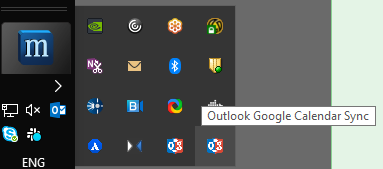
It would be great to be able to specify the "Configuration name", that will by displayed in the title of the window and the Tooltip in Tray
pmunin
on 19 Sep 2019
@pmunin I can't really give ETAs, but I am working on it. Meanwhile, I've put in a quick and dirty - the below patch for v2.8.1 now supports a new command line parameter: /t:"Some config name":-
:package: Patch v2.8.1.8.zip (see instructions for applying).
phw198
on 22 Sep 2019
Hi. I was able to start two instances of OGCS just like mentioned here:
Although this is not yet available directly within OGCS, it is still possible to set this up by running multiple instances of OGCS at the same time, one for each calendar to be synced.

From v2.7.2, OGCS can be run with additional parameters to specify different settings and logfiles for each instance.
But to be honest I haven't quite figured out how to do the following:
From v2.7.6, OGCS also supports two-way sync between a "common" calendar. For example, Outlook Workplace 1 ↔️ Google calendar ↔️ Outlook Workplace 2.
I see an option of "Outlook <-> Google" in the app, but I wasn't able to choose 3 different calendars. What am I missing?
 ghnogueira
on 8 Sep 2020
ghnogueira
on 8 Sep 2020
The Google calendar acts as the hub, with the Outlook calendars as the spokes. If OGCS from both instances is set to bi-directional (<->) they should all keep up to date. Make sure in each instance you set the correct calendar on the Outlook and Google tabs. Suggest also setting to confirm deletions when you're first setting up in case something is misconfigured.
davelot
on 15 Sep 2020
Hi davelot, thanks for the reply. My point is that in these tabs I can only select a single calendar in each, so I can easily configure an Outlook <-> Google bi-directional syncing with 2 calendars, but not 3. That was my doubt :)
ghnogueira
on 16 Sep 2020
I do not think you would encounter a limit in the number of Outlook calendars you can sync, but if you want 3, you will need a third instance of OGCS running. I've used 3 in the past successfully. Even if multiple Outlook calendars are on the same machine, you will need to run multiple instances, one for each calendar. Hope that helps.
davelot
on 17 Sep 2020
Not really, but thanks for trying :)
I already have 2 instances running with uni-directional syncing:
- Google "Personal" -> Outlook "Business"
- Outlook "Business" -> Google "Business"
This way I sync my personal appointments to Outlook (which is my business account), and then all my business appointments are also synced to Google, but on a different calendar to differentiate it from my personal one. This is currently working OK with 2 instances.
But I saw Paul's comment I quoted here saying that we could use, on a single instance, 3 different calendars when syncing bi-directionally, and my doubt is how to do that, since in the Outlook and Google tabs I can only select a single calendar each. As you can see in his example (I quoted), he mentions a single Google calendar and 2 different Outlook calendars syncing bi-directionally, both Outlook calendars being synced with the same Google calendar.
ghnogueira
on 17 Sep 2020
I run two instances, one to keep my main google calendar and my Outlook synced, and another one to sync my family calendar from google to Outlook. The way I do this is by running one instance in unidirectional Google -> Outlook mode, for my Family calendar, and the second one in bidirectional Outlook <> Google mode, but importantly excluding family calendar, otherwise I'd end up with duplicate events in my main google calendar. Hope it helps.
nprez83
on 18 Sep 2020
From v2.7.6, OGCS also supports two-way sync between a "common" calendar. For example, Outlook Workplace 1 ↔️ Google calendar ↔️ Outlook Workplace 2.
@ghnogueira As @davelot has tried to explain, the model here would be two separate Outlook _accounts/profiles_ syncing to a common Google calendar account. For example, syncing an Exchange work calendar to Google and _also_ at home on a stand-alone non-Exchange Outlook installation to that same Google account.
As you note, currently OGCS only allows configuration of a single calendar within each instance of OGCS - getting it support multiple calendars is what this ticket is all about....just it's stalled rather due to time available.
phw198
on 25 Oct 2020
Hi Paul. Thanks for explaining. I'll keep the way I'm currently doing, then :)
ghnogueira
on 26 Oct 2020
Paul, I realized that one set of calendars from Google is not moving to
Outlook. I have a Read Only web link to an external calendar in my Google
Calendar. It does show up in the Settings/Google/Select calendar list.
That shows a list of 9 calendars in my Google list. I have only ever
sync'd my default calendar based on this email address. I tried to add
that other calendar with Ctrl-click, shift-click but it does not appear to
be a multi-select list. This is interesting in that the Outlook calendar
has boxes to do multi-select.
Am I missing something? Is it only a single Google calendar but can have
multiple Outlook filter categories (settings/outlook/Filter
categories/include)?
Thank you
Mark
On Sun, Oct 25, 2020 at 1:32 PM Paul Woolcock notifications@github.com
wrote:
From v2.7.6, OGCS also supports two-way sync between a "common" calendar.
For example, Outlook Workplace 1 ↔️ Google calendar ↔️ Outlook Workplace
2.@ghnogueira https://github.com/ghnogueira As @davelot
https://github.com/davelot has tried to explain, the model here would
be two separate Outlook accounts/profiles syncing to a common Google
calendar account. For example, syncing an Exchange work calendar to Google
and also at home on a stand-alone non-Exchange Outlook installation to
that same Google account.As you note, currently OGCS only allows configuration of a single calendar
within each instance of OGCS - getting it support multiple calendars is
what this ticket is all about....just it's stalled rather due to time
available.—
You are receiving this because you were mentioned.
Reply to this email directly, view it on GitHub
https://github.com/phw198/OutlookGoogleCalendarSync/issues/165#issuecomment-716199354,
or unsubscribe
https://github.com/notifications/unsubscribe-auth/AL3PLZNHTX3LONC3MJE3SMTSMR4NRANCNFSM4DLIXTRA
.
sjsdoc60
on 27 Oct 2020
@sjsdoc60 OGCS only currently supports 1:1 calendar syncing; true for both Google and Outlook. The check boxes you appear to be referring to are for Outlook _categories_ which is quite a different thing.
phw198
on 31 Oct 2020
upvoting from #1097
 RobinEd
on 25 Jan 2021
RobinEd
on 25 Jan 2021
Related issues
 jesseelliott
·
4Comments
jesseelliott
·
4Comments
 tdalon
·
5Comments
tdalon
·
5Comments
 schwaben-github
·
5Comments
schwaben-github
·
5Comments
 mfalkvidd
·
5Comments
phw198
·
3Comments
mfalkvidd
·
5Comments
phw198
·
3Comments
Most helpful comment
@camdecoster
If you run several commands in a batch file and they shall not wait until execution use something like start to create a separate process. https://ss64.com/nt/start.html