Outline-client: windows client: Internet Connection Problem related to TAP and outline
Last week, Suddenly my laptop didn't connect to Internet, the problem was related to DNS. And it was wonderful because the problem was between only my laptop (window 7) and my router. my laptop could connect to my phone's hot-spot and other devices could connect to WiFi and internet correctly.
After googling a lot, finally I reset my tcp/ip by this command:
netsh int ip reset
After reseting, Ouline could not connect and showed 'Unexpected Error ...'. I had searched in issues and found the problem is related to TAP, so I deleted and inatlled tap again.
Every thing was OK but after restart windows, the internet connection problem occurred again.
I think it's related to new version of Outline.
Best Regards
 mataqvazadeh
All 15 comments
@mataqvazadeh try this:
- reboot laptop
- internet not working
- disconnect from wifi
- close outline
- connect to wifi
- internet works fine?
I think I might faced this issue too.
 lgg
on 2 Nov 2018
lgg
on 2 Nov 2018
@lgg I tried steps.
I rebooted laptop
yes, internet did not working
I disconnected from wifi
but, ouline had been closed with restart. so I opened it and closed again.
I connected to wifi again
Noting happened.
But when internet had problem, and I tried to use Outline, I got 'Another VPN error' and command prompt showed this message:
Pipe connected
Got data from pipe
Pipe connected
Got data from pipe
could not connect: UnsupportedRoutingTable (OutlineService says: no interface has an IPv4 gateway (network config: outline-tap0 (Down): 0 x ipv4 gateways, 0 x ipv6 gateways, Bluetooth Network Connection (Down): 0 x ipv4 gateways, 0 x ipv6 g
ateways, Wireless Network Connection (Up): 0 x ipv4 gateways, 0 x ipv6 gateways, Local Area Connection (Down): 0 x ipv4 gateways, 0 x ipv6 gateways, Loopback Pseudo-Interface 1 (Up): 0 x ipv4 gateways, 0 x ipv6 gateways, isatap.{6A027EC6-86E6-4552-971B-2695F1050F9B} (Down): ipv4 disabled, 0 x ipv6 gateways, Teredo Tunn
eling Pseudo-Interface (Down): ipv4 disabled, 0 x ipv6 gateways, isatap.{1A47844B-34D4-40E4-98BD-BD463C5B96B9} (Down): ipv4 disabled, 0 x ipv6 gateways))
ss-local exited with signal SIGTERM
tun2socks exited with signal SIGTERM
Error: net::ERR_NETWORK_CHANGED
Promise "DNS lookup" resolved before 10000 ms.
Promise "Reachability check" resolved before 10000 ms.
@mataqvazadeh how did you get the command prompt output?
lgg
on 3 Nov 2018
@lgg I ran Outline from command prompt in windows.
mataqvazadeh
on 4 Nov 2018
My friend is having the exact same issue when connecting to my server last week. Hope someone could share insight of how this happened.
 gaotongsh
on 5 Nov 2018
gaotongsh
on 5 Nov 2018
@mataqvazadeh Thanks for the report - sorry you've been having trouble connecting with Outline. It looks like your laptop has problems connecting to your wifi router. Two questions for now:
- was this the case before you installed Outline?
- does Outline work when your laptop is using your phone's hotspot?
 trevj
on 5 Nov 2018
trevj
on 5 Nov 2018
@trevj
Thanks, No Problem. There is no software without bugs.
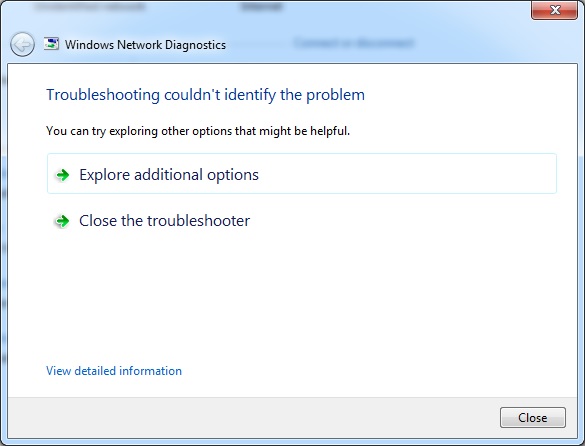
Actually my laptop connects to router but the problem is internet connection. I can access router settings but I can't access any website. When I run Windows Troubleshooter , I get this message:

And answering to your questions:
Absolutely not. This problem occurred after updating Outline to new version (1.2.17)
I tried using outline with my phone's hot spot, and after restarting windows problem occurred again with my hot spot connection. same scenario. But this time I got this message from windows troubleshooter:
Best Regards
mataqvazadeh
on 6 Nov 2018
Temporary solution for this problem is to close/disconnect outline client before shut down the OS.
If you forgot to do this just uninstall and then install your LAN/WLAN adapter (For install hit "Scan for hardware changes" button) through "device manager" .
 saeedghod
on 7 Nov 2018
saeedghod
on 7 Nov 2018
@saeedghod Thanks. Yeah, Accidentally I found this solution last night.
mataqvazadeh
on 7 Nov 2018
I have the same problem on two of my PCs with Windows 10. There's no internet connection after each reboot. Uninstalling the actual network adapter and than scanning for hardware changes helps. Uninstalling Outline doesn't. So there's no proof, but I think it's related to Outline too.
 ppryamikov
on 12 Nov 2018
ppryamikov
on 12 Nov 2018
Hi @trevj my 2 laptops are having the same exact issue.
Is there an update coming? in the first moment i didnt know how to solve it and reset the network adapters completely to get it working again. Reboots/disconnecting etc. didnt help by themselves.
It seems like outline is not properly disconnecting when i shut down computers. then on a reboot-wake up, the issue happens that it cant connect to the internet at all. and starting outline brings up an error that say another vpn is already engaged, which it isnt.
route delete 0.0.0.0
and ipconfig/renew worked for me last time (so i dont have to completely reset it, didnt see this thread before with other suggestions.)
 jandornig
on 15 Nov 2018
jandornig
on 15 Nov 2018
@saeedghod actually, the solution "close/disconnect outline client before shut down the OS" doesn't work fine, as I noticed the same Internet Connection Problem after rebooting PC with Outline being disconnected. Driver re-installation didn't help so I solved this issue with System restore.
There is Wi-Fi adapter on my PC (Windows 7, x64), so I decided to replay same scenario on VirtualBox Windows 7:
- installed Outline client
- connected to server
- disconnected from server
- shut virtual Windows
- run it again (internet works fine)
- shut it down with disconnected Outline
- left it turned off for several days
After several days I ran virtual Windows 7 and it showed Internet Connection Problem.
netsh int ip reset was the only way I found to solve it (thanks, @mataqvazadeh).
 Flawks
on 17 Nov 2018
Flawks
on 17 Nov 2018
There is defnetly some problem with outline application. Firstly I thought that it is connected with hamachi adapter that was conflicting with outline adapter in some way. After deleting hamachi adapter I had my Internet connection going, but then again this error occured without hamachi. It really looks like it appears after turn on/trun off or after I wake pc from sleep mode.
 0ttik
on 19 Nov 2018
0ttik
on 19 Nov 2018
@mataqvazadeh @gaotongsh @ppryamikov @jandornig @gisha Thanks for the reports and apologies for any inconvenience this may have caused.
@lgg @saeedghod @Flawks Many thanks for the helpful workarounds.
I believe this is related to how Outline creates persistent routes on the system. We originally made these routes persistent to properly handle sleep and suspend but it seems that's no longer necessary - without persistent routes, rebooting your system should always return it to a useable state.
Fix here and should appear in the next release sometime next week:
https://github.com/Jigsaw-Code/outline-client/pull/430
trevj
on 7 Dec 2018
This was released in:
https://github.com/Jigsaw-Code/outline-client/releases/tag/windows-v1.2.23
trevj
on 20 Dec 2018
Related issues
 hwnahm
·
5Comments
hwnahm
·
5Comments
 canesin
·
5Comments
canesin
·
5Comments
 d1eselboy
·
4Comments
d1eselboy
·
4Comments
 whg517
·
4Comments
whg517
·
4Comments
 tanchengqiu
·
6Comments
tanchengqiu
·
6Comments
Most helpful comment
@mataqvazadeh @gaotongsh @ppryamikov @jandornig @gisha Thanks for the reports and apologies for any inconvenience this may have caused.
@lgg @saeedghod @Flawks Many thanks for the helpful workarounds.
I believe this is related to how Outline creates persistent routes on the system. We originally made these routes persistent to properly handle sleep and suspend but it seems that's no longer necessary - without persistent routes, rebooting your system should always return it to a useable state.
Fix here and should appear in the next release sometime next week:
https://github.com/Jigsaw-Code/outline-client/pull/430