Describe the bug:
After last additions of display modes to HUD overlay, shift + tab don't work as expected, it always moves between "Never" and "Hide during gameplay", no matter the option selected.
In the video below I do the next:
-Open menu search for HUD options and select "always" (in this case it was already selected)
-Play a beatmap in auto
-Press shift + tab 2 times (it changes to "Hide during gameplay")
-Press again shift + tab (now it changes to "Never")
I do this 4 or 5 times, and always it moves between this 2 options.
In auto it does not look bad, if you press shift + tab it hides the elements, and if you press again it shows them again, but if you are in gameplay, the elements are never shown.
Screenshots or videos showing encountered issue:
https://drive.google.com/file/d/1qmdmTd8ciPgKO8ELsULhfBw3dNGVN67k/view?usp=sharing
osu!lazer version:
2020.1020.0
Logs:
I don't think logs are needed, if they are please ask for them and I will attach them quickly.
 Gonzalo-Bruna
All 8 comments
Ouch, that's an oversight
 peppy
on 21 Oct 2020
peppy
on 21 Oct 2020
Not sure what the expected behaviour would be here - cycling across all available options, or always going [current user setting that isn't hidden] <-> hidden?
 bdach
on 21 Oct 2020
bdach
on 21 Oct 2020
I think this makes more sense
[current user setting that isn't hidden] <-> hidden?
Gonzalo-Bruna
on 21 Oct 2020
So I got a branch that I thought would resolve this, but then started doubting it. The primary issue is what happens if player is exited with the overlay off.
- Should the setting be reverted to what it was at the beginning of the map?
- Should it remain off for the rest of the session, or forever?
- If it's the last one, then if you press Shift-Tab on the next play in the same session, or in a week from now, should it go back to the value you had before, or can it go back to "Hide during gameplay" now?
The branch I have has a "memory span" of a single beatmap, as in if you exit with it off, the old value of the setting is lost irrecoverably without manual intervention, which doesn't feel like much of a fix. As it turns out having this setting no longer binary brings much larger a headache than maybe expected...
bdach
on 25 Oct 2020
I think the best way to think of the Shift-Tab disable is a per session variable. It should probably not save to config.
At which point, maybe we should remove the "never" display setting from settings completely. I doubt there are many people who want the HUD permanently disabled, maybe defaulting to "during breaks" is a good compromise, along with the above.
Interested in thoughts from players that use shift-tab regularly.
peppy
on 26 Oct 2020
I play with HUD disabled on stable, which I enable back when entering breaks (a setting already covers this in lazer) but I also sometimes shift+tab very briefly in a middle of a map to check my accuracy / combo.
What would make most sense to me is to have Shift+Tab work as a toggle forcing the HUD to show or hide depending of your current HUD visibility settings to permit still doing this in game.
 Game4all
on 26 Oct 2020
Game4all
on 26 Oct 2020
I gave making the Shift-Tab a session-wide variable a go, but without further conveyance it still sucks. It's incredibly unclear as to when the HUD is supposed to be showing or not, and the session state is either not shown anywhere or, if I add it to settings, just screams "this is way too complicated for what it needs to be":
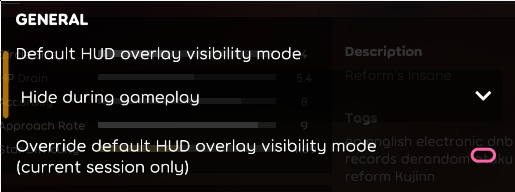
Like, I'm not even sure how I'm supposed to word these better. Maybe it would better as a notification, not sure. Not to mention that pressing the shortcut with i.e. "HUD only during gameplay" set sometimes seemingly does nothing and sometimes actually does what it's supposed to.
I'm half inclined to propose disabling the shortcut entirely on "only during gameplay" and "only during breaks" and toggle normally between the two remaining settings.
bdach
on 27 Oct 2020
I don't think the state needs to be shown for the session state, similar to stable. In stable, it shows a notification when the HUD is hidden (just once, similar to volume muted), and will reset on game restart anyway, if a user really doesn't know how they hid it.
peppy
on 27 Oct 2020
Related issues
 Joehuu
·
3Comments
Joehuu
·
3Comments
 skhrenov
·
3Comments
skhrenov
·
3Comments
 GameBoyYeet
·
3Comments
GameBoyYeet
·
3Comments
 smileyhead
·
3Comments
smileyhead
·
3Comments
smileyhead
·
3Comments
smileyhead
·
3Comments
Most helpful comment
I think this makes more sense