Osu: Song bar doesn't show in tournament client at particular resolution
Describe the bug:
Beatmap song bar wrong.
as you can see the pic.
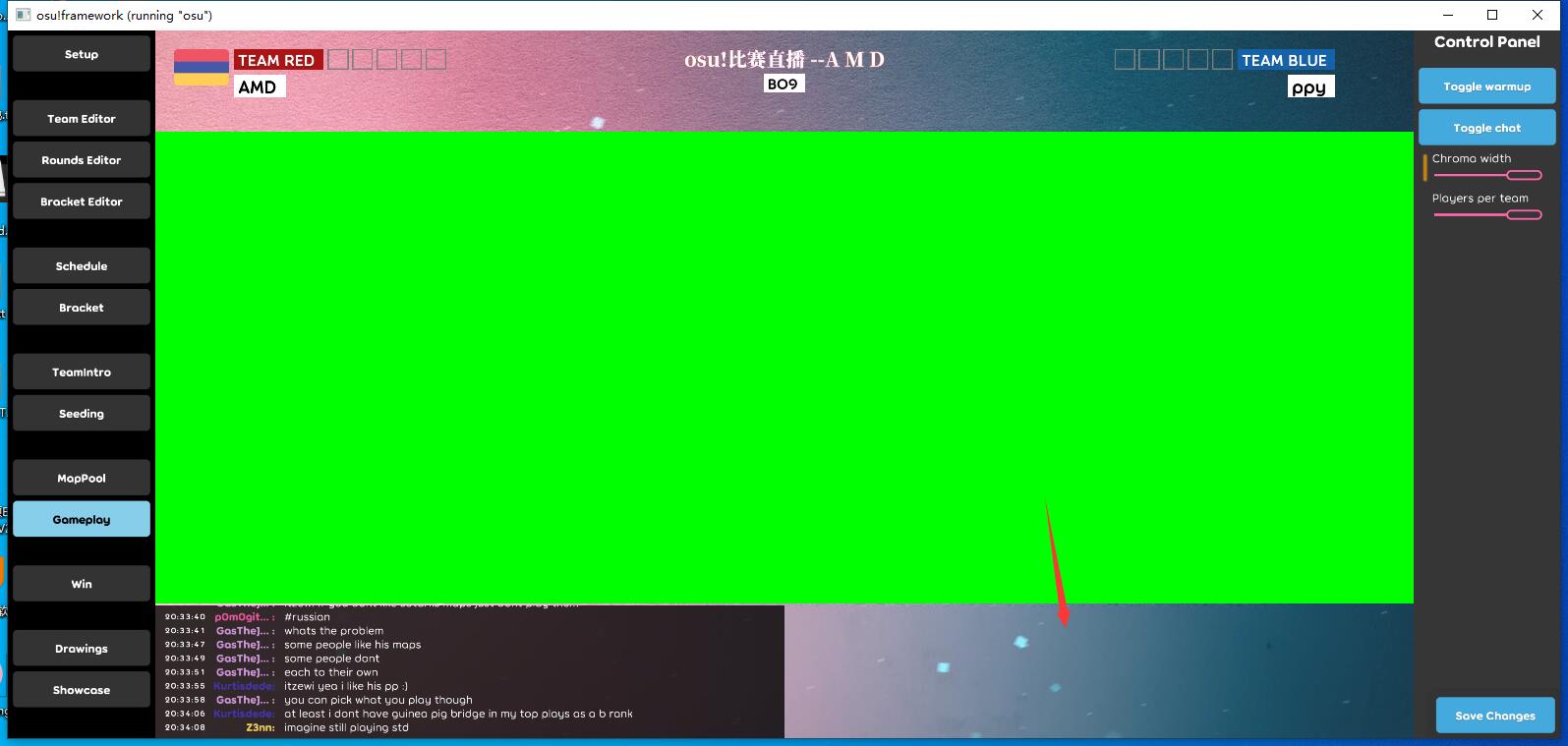
if 1280x720 Beatmap song bar was wrong
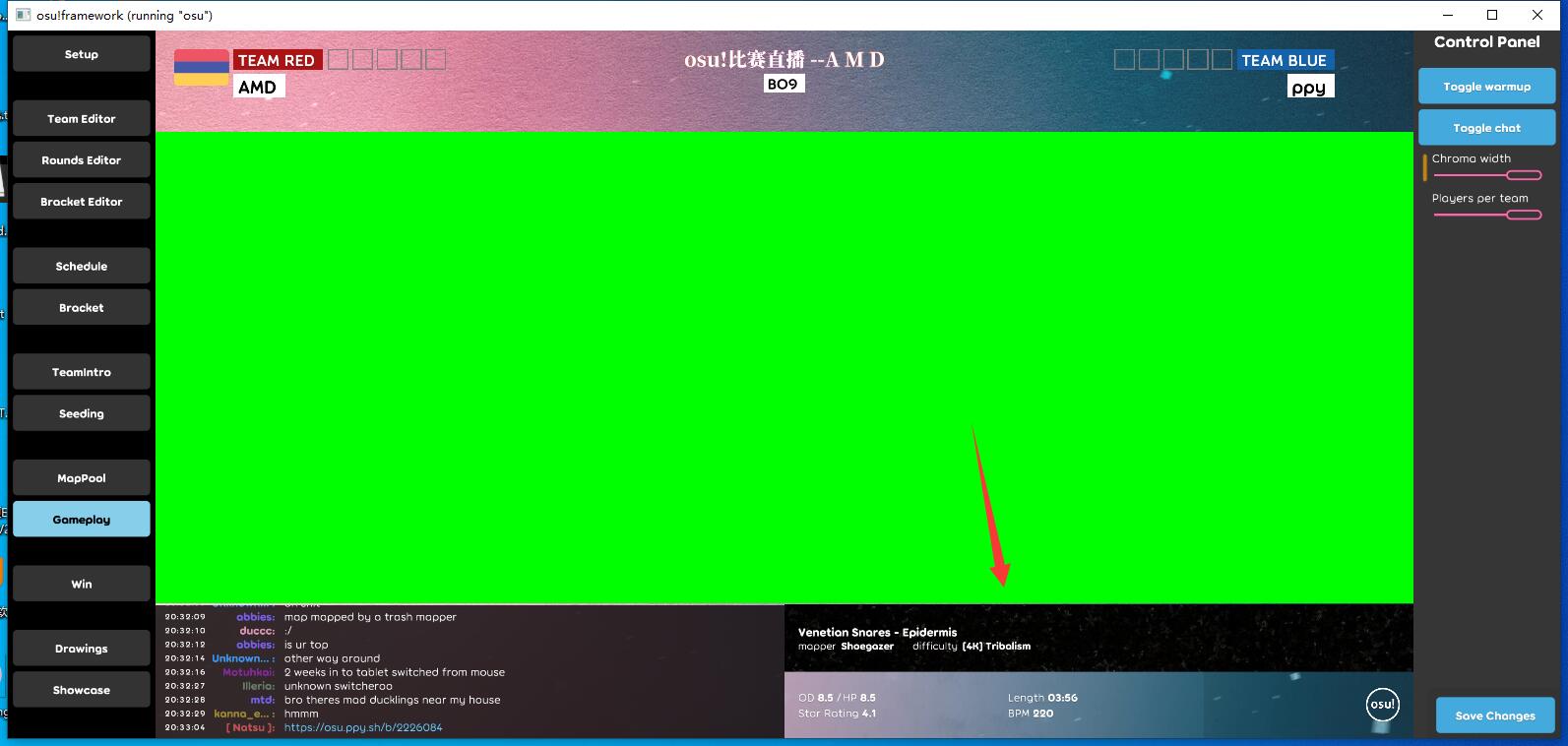
if other resolution ,beatmap song bar was show
Screenshots or videos showing encountered issue:
↓other resolution↓

↓1280*720↓

osu!lazer version:
2020.602.0
 mas-alone
All 25 comments
by resolving power do you mean resolution?
 integerrr
on 3 Jun 2020
integerrr
on 3 Jun 2020
he most certainly does.
 TheWildTree
on 3 Jun 2020
TheWildTree
on 3 Jun 2020
by resolving power do you mean resolution?
Yes my bad.change now
mas-alone
on 3 Jun 2020
This looks like a weird failure case of AutoSize (or maybe invalidation?). Song bar can have zero height even despite having children with non-zero height:
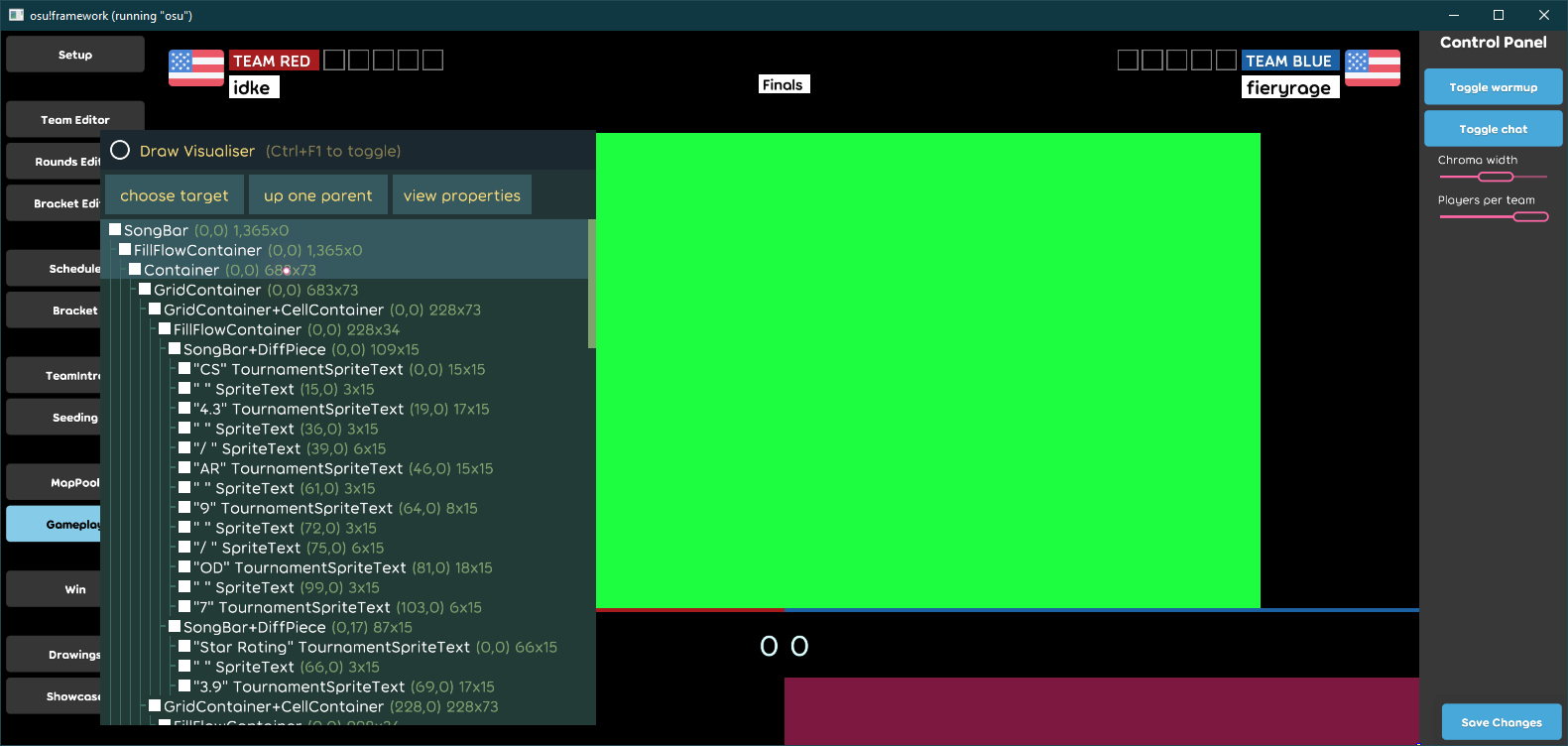
For reproduction, the resolution has to be set to 720p before loading the gameplay screen the first time and not changed.
 bdach
on 3 Jun 2020
bdach
on 3 Jun 2020
Can reproduce, that is quite disturbing. I have vague recollection of this occurring before in other places, specific to FillFlow but not sure if that was fixed (@smoogipoo will probably know better).
 peppy
on 4 Jun 2020
peppy
on 4 Jun 2020
What's going on here is that SongBar has IsMaskedAway = true because it is ever-so-slightly outside of the screen's bounds before children are received by a nested container, resulting in updates never propagating to the flow to reflow.
This is resolvable via https://github.com/ppy/osu-framework/issues/3369. I'll try see if that's feasible or think of an alternative - maybe propagating Invalidation.Parent upwards could be possible if performance is an issue.
 smoogipoo
on 4 Jun 2020
smoogipoo
on 4 Jun 2020
As an update, I have a WIP branch that aimed to fix this issue here: https://github.com/smoogipoo/osu-framework/tree/propagate-children-size-invalidations
It fixes one of the test cases, but it looks like this case has another layer to it, which is that it has a LayoutDuration. Because of this, the content turns out to be off-screen for over one update frame.
I.e. we have:
---- Frame 0 ----
SongBar.UpdateSubTree(); skip;     <--- IsPresent = false
SongBar.UpdateSubTree(); skip;     <--- IsPresent = false

---- Frame N ----                  <--- After entering GameplayScreen
SongBar.UpdateSubTree();
Flow.UpdateSubTree();
Flow.UpdateAfterChildren();        <--- Adds flow transforms, then compute auto-size (=0 at this point)
SongBar.UpdateAfterChildren();     <--- Compute auto-size (=0 at this point)
SongBar.UpdateSubTreeMasking();    <--- IsMaskedAway = true
Flow.UpdateSubTreeMasking();       <--- IsMaskedAway = true

---- Frame N+1 ----
SongBar.UpdateSubTree(); skip;     <--- IsMaskedAway = true, auto-size valid
It would take one of the child's transforms to update to invalidate auto-size. My fix only causes that invalidation to propagate upwards all the way. So now there needs to be a way to signal that children _should_ be getting updated even though IsMaskedAway = true at a higher level.
It's a very complicated scenario which I'm not sure of the resolution to yet.
This completely resolves without my branch by removing the LayoutDuration value.
smoogipoo
on 4 Jun 2020
Just happened to stumble upon this problem again, but on 2020.623.1 this issue is still present:

Reproduction instructions:
- Change height from 1080 to 720
- Close osu!lazer tournament
- Reopen osu!lazer tournament
- Switch to the gameplay scene
The workaround of switching to a resolution height higher than 720 (like 900 or 1080) and then changing it back to 720 before entering the gameplay scene still works.
 MiraiSubject
on 28 Jun 2020
MiraiSubject
on 28 Jun 2020
@MiraiSubject can you test this again? it should be fixed in the latest release.
peppy
on 17 Aug 2020
Just tested it on 2020.814.0 and it's indeed fixed.
MiraiSubject
on 17 Aug 2020
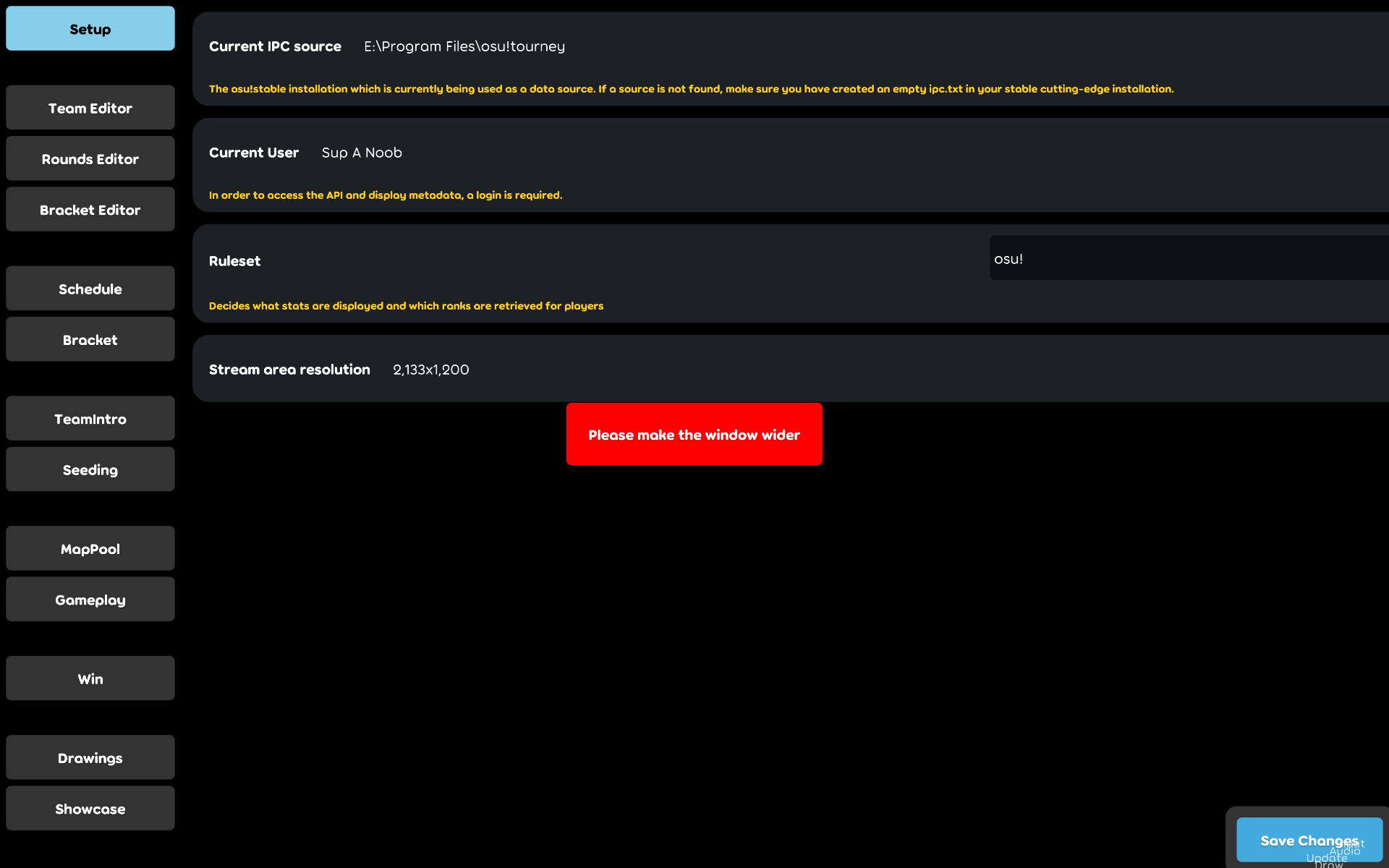
I seem to have an issue with the resolution of this thing. Over on main osu!tourney client it appears to be set up correctly (Height: 720). How can I resolve this?
 MasterCritics
on 18 Aug 2020
MasterCritics
on 18 Aug 2020
That screenshot looks intensely wrong on multiple levels (why is "stream area resolution" 2133x1200 if the image is 1920x1200? What is going on with that fps counter text in the corner?)
What is your display setup? (one? many? windowed/borderless/fullscreen?)
bdach
on 18 Aug 2020
I'm on dual screen display. Both Stable (configured to cutting edge as per setup instructions) and Lazer are run on fullscreen.
The FPS counter only looks like that in the screenshot, it seems.
MasterCritics
on 19 Aug 2020
Any idea how I could troubleshoot this? I would like to get this up on time for the next osu! tournament beatmap showcase by the weekend, if possible.
MasterCritics
on 20 Aug 2020
I'm having a hard time understanding what your issue is. Please first confirm that your issue is separate to the issue outlined in the OP of this thread.
If I'm understanding your issue correctly, it's that the size of the lazer window is not what you expect it to be? Have you set a resolution and pressed the "set height" button?

smoogipoo
on 20 Aug 2020
I can't adjust height. What you see in the screenshot I've sent is what I can interact with.
After some investigation, I might've found out the real reason.
osu!lazer tourney client automatically scales up the screen size to a 16:9 resolution. The problem is, my monitors are 16:10 resolution, or 1920x1200 to be exact. osu! lazer tourney client scales the screen up to 2133x1200 which is about 16:9, but inconveniently cuts off at the edge of the screen. I don't think it's anything I can fix on my end other than buying a 16:9 monitor.
MasterCritics
on 20 Aug 2020
You will need to drag the window either smaller vertically or larger horizontally to see that button. The UI/UX there is extremely weird.
smoogipoo
on 20 Aug 2020
You can run it at 1080p instead, or lower. The nature of the client means that you need spare real estate on the side to interact with it.
Alternatively, you can let part hang off your screen.
peppy
on 20 Aug 2020
If running it at 1080p or lower means making that setting through tournament.cfg, I've already done that, and it's at 720.
And I've tried dragging the window...which would work if there was something to drag...
MasterCritics
on 20 Aug 2020
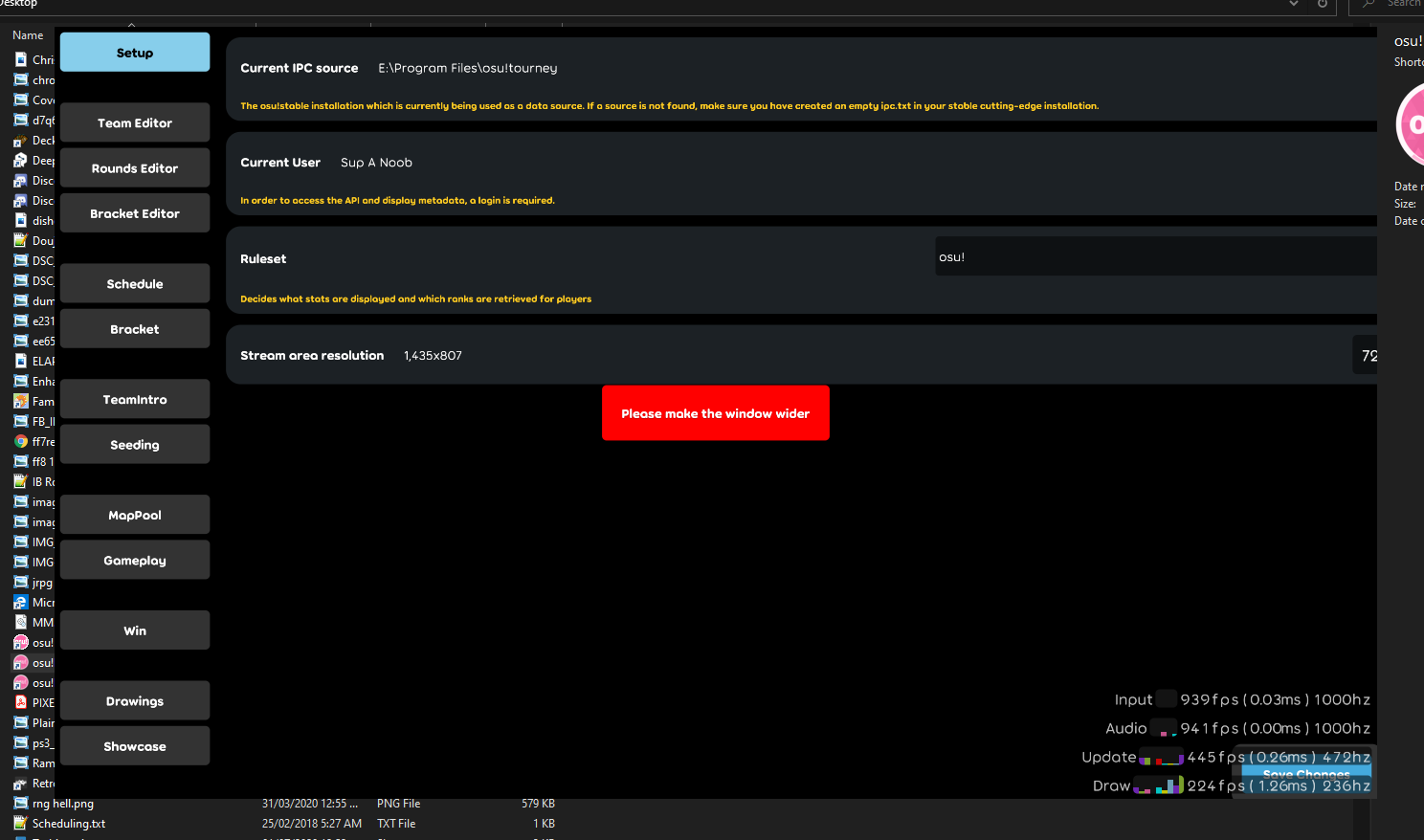
For reference this is how it looks like "windowed" (I showed some space around it to show that it's the case). I can't actually expand the window by dragging. And while I can change the value of the resolution, I can't actually save those changes. It's very weird.
MasterCritics
on 20 Aug 2020
You need to make it wider.
peppy
on 20 Aug 2020
I can't make it wider, that's what I mean.
MasterCritics
on 20 Aug 2020
Drag the edge of the window, like any other window on your PC.
peppy
on 20 Aug 2020
o_O why does your window not have any borders? Try pressing alt+enter a few times to make sure you're not in some weird borderless state.
smoogipoo
on 20 Aug 2020
I did all that, no avail.
An idea did pop up though. Went to regular lazer and set it to windowed mode, then turned it off. Now I can adjust my tournament client since it opens in actual windowed mode.
Will update if there is anything else
MasterCritics
on 20 Aug 2020
Related issues
 czapek1337
·
3Comments
czapek1337
·
3Comments
 Gonzalo-Bruna
·
3Comments
Gonzalo-Bruna
·
3Comments
 Axeanz
·
3Comments
Axeanz
·
3Comments
 lauthaiming
·
3Comments
lauthaiming
·
3Comments
 smileyhead
·
3Comments
smileyhead
·
3Comments
Most helpful comment
What's going on here is that
SongBarhasIsMaskedAway = truebecause it is ever-so-slightly outside of the screen's bounds before children are received by a nested container, resulting in updates never propagating to the flow to reflow.This is resolvable via https://github.com/ppy/osu-framework/issues/3369. I'll try see if that's feasible or think of an alternative - maybe propagating
Invalidation.Parentupwards could be possible if performance is an issue.