Osticket: Attachment download size = 0 bytes
Prerequisites
- [x] Can you reproduce the problem in a fresh installation of the "develop" branch?
- [x] Do you have any errors in the PHP error log, or javascript console?
- [x] Did you check the osTicket forums?
- [x] Did you perform a cursory search to see if your bug or enhancement is already reported?
Description
Clicking on attachment in ticket thread downloads file, but the file has size of 0 bytes.
Steps to Reproduce
- Create ticket via e-mail with attachment
- Click on attachment
- File downloads, but size is 0 bytes.
I've found simmilar problems(not resolved on forum):
- https://forum.osticket.com/d/96372-attachment-downloads-are-0-bytes
- https://forum.osticket.com/d/96370-inline-images-not-displayed/2
Problem exists on fresh instalation from git - develop branch.
I'm using Ubuntu 18.10 server.
Checked on Chrome, Firefox and Brave browser - same problem.
I don't see any relevant logs in OSTicket dashboard or on server.
Versions
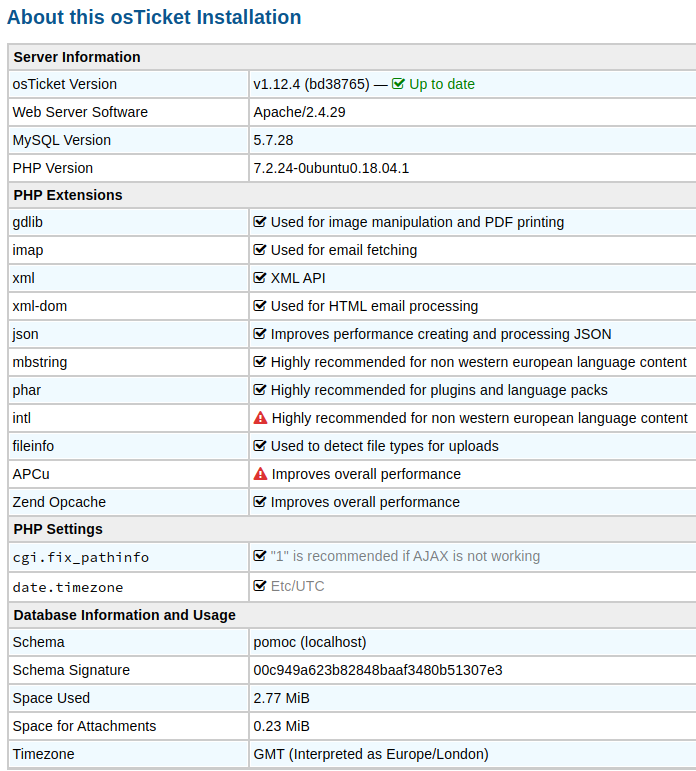
 cuspat96
All 19 comments
The same here as well! v1.12.4
 AndrewG10i
on 21 Nov 2019
AndrewG10i
on 21 Nov 2019
Problem also on v1.14
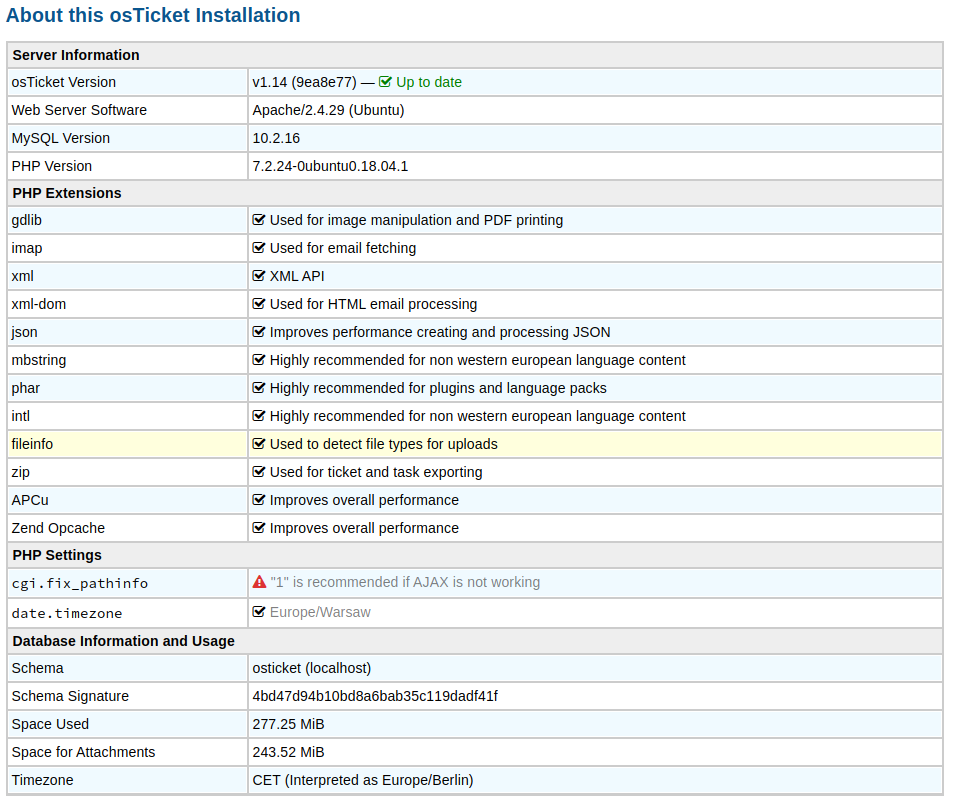
cuspat96
on 21 Nov 2019
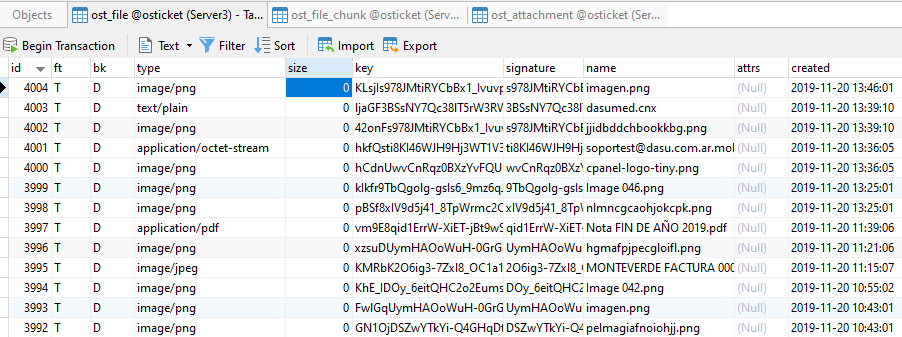
I can confirm this issue. Field size in ost_file table has value of 0 in all these cases.
 jabrugger
on 21 Nov 2019
jabrugger
on 21 Nov 2019
We had the same issue and compared the code to the previous version. So not sure if this is the correct fix but it works for us:
file: include/class.mailfetch.php
line: 838
change
$file['dataclb'] = function() use ($self, $mid, $a) {
to
$file['data'] = function() use ($self, $mid, $a) {
 ssn-github
on 21 Nov 2019
ssn-github
on 21 Nov 2019
PR #5205 addresses the issue.
 protich
on 21 Nov 2019
protich
on 21 Nov 2019
Applied the patch. Now I get:
PHP Fatal error:  Uncaught Error: Call to undefined method AttachmentFile::getMimeType() in /var/www/soporte/include/class.mailer.php:520
Stack trace:
#0 [internal function]: Mailer->{closure}(Array)
#1 /var/www/soporte/include/class.mailer.php(525): preg_replace_callback('/cid:([\\w.-]{32...', Object(Closure), '<div style="dis...')
#2 /var/www/soporte/include/class.email.php(190): Mailer->send(Array, '[#329502] test', '<div style="dis...', Array, Array)
#3 /var/www/soporte/include/class.email.php(195): Email->send(Object(TicketOwner), '[#329502] test', 'Su solicitud de...', NULL, Array)
#4 /var/www/soporte/include/class.ticket.php(1661): Email->sendAutoReply(Object(TicketOwner), '[#329502] test', 'Su solicitud de...', NULL, Array)
#5 /var/www/soporte/include/class.ticket.php(4457): Ticket->onNewTicket(Object(MessageThreadEntry), true, true)
#6 /var/www/soporte/include/class.mailfetch.php(886): Ticket::create(Array, Array, 'Email')
#7 /var/www/soporte/include/class.mailfetch.php(935): MailFetcher->createTicket(1)
#8 /var/www/s in /var/www/soporte/include/class.mailer.php on line 520
@jabrugger
I do not...are you sure you applied the patch correctly?
Cheers.
 JediKev
on 21 Nov 2019
JediKev
on 21 Nov 2019
@jabrugger
I do not...are you sure you applied the patch correctly?
Cheers.
I´ve downloaded the three full files from Github and replaced the 1.14 original ones ...
I´ll try by "patching" but I think there is no difference.
jabrugger
on 21 Nov 2019
We had the same issue and compared the code to the previous version. So not sure if this is the correct fix but it works for us:
file: include/class.mailfetch.php
line: 838change
$file['dataclb'] = function() use ($self, $mid, $a) {
to
$file['data'] = function() use ($self, $mid, $a) {
This patch seems to work fine @JediKev (I´m using it right now and all seems to be working ok).
jabrugger
on 21 Nov 2019
We had the same issue and compared the code to the previous version. So not sure if this is the correct fix but it works for us:
file: include/class.mailfetch.php
line: 838
change
$file['dataclb'] = function() use ($self, $mid, $a) {
to
$file['data'] = function() use ($self, $mid, $a) {This patch seems to work fine @JediKev (I´m using it right now and all seems to be working ok).
This is incorrect way of applying the patching - brings back vulnerability we were addressing. We will have a new release shortly so no worries.
protich
on 21 Nov 2019
This is incorrect way of applying the patching - brings back vulnerability we were addressing. We will have a new release shortly so no worries.
Great! Thanks
jabrugger
on 21 Nov 2019
Applied 1.12.5 update. This fixed the issue with new emails processing attachments properly. How can I reprocess attachments that came in during the last couple of days when this was a problem?
 canuckbrian
on 21 Nov 2019
canuckbrian
on 21 Nov 2019
@canuckbrian
I will refer you to my Forum comment:
Cheers.
JediKev
on 21 Nov 2019
Sorry for replying to closed issue(1.14.1 fixed the issue), but i've prepared SQL select which will help to update file size column in ost_file table.
I'm assuming ost_ prefix for tables.
@canuckbrian :)
``
SELECT a.id, SUM(OCTET_LENGTH(b.filedata)) as size
FROM ost_file a
JOIN ost_file_chunk b
  ON a.id = b.file_id
WHERE a.size = 0
GROUP BY a.id
````
Above select will display id and size column which you need to populate
ost_file` with.
Thanks for your great work btw!
Cheers.
cuspat96
on 22 Nov 2019
@cuspat96
Nice! Thanks for the query! It will help in most cases but I do want to note that this will not work for files stored on the file system. For that you can run a simple ls -al in the attachment directory sub folders to get the size in bytes.
Cheers.
JediKev
on 22 Nov 2019
On my machine, @cuspat96 s snippet leads to an syntax error (GROUP BY before WHERE). Fixing it by switching those lines gives me an nice timeout. Didn't investigate further, but feteched the few missing attachments from the last days from the IMAP-trash and added to internal notes instead.
 spackmat
on 25 Nov 2019
spackmat
on 25 Nov 2019
@spackmat
I didn't actually run it, I just read it on my phone and it looked okay (but didn't notice the GROUP BY before the WHERE, oops lol).
Below is the corrected query:
SELECT A1.`id`, SUM(OCTET_LENGTH(A2.`filedata`)) AS `size`
FROM `ost_file` A1
JOIN `ost_file_chunk` A2
    ON A1.`id` = A2.`file_id`
WHERE A1.`size` = 0
GROUP BY A1.`id`;
Cheers.
JediKev
on 25 Nov 2019
@JediKev Thanks, that works for single file-IDs. My database is about 3GB, so that also loeads to timeouts. My workaround is: Get the files with size 0 (in my case 10) and let the WHERE clause use the that IT in the id field. That was simpler than looking for a SELECT which can run on such a large table.
spackmat
on 26 Nov 2019
@spackmat yeah, I was writing it by memory and made mistake with the order (oops). I'll edit the comment, thanks.
cuspat96
on 29 Nov 2019
Related issues
 lifeofguenter
·
4Comments
lifeofguenter
·
4Comments
 ghost
·
3Comments
ghost
·
3Comments
 alansebastian
·
3Comments
alansebastian
·
3Comments
 roman-1983
·
5Comments
roman-1983
·
5Comments
 cervedgroup
·
5Comments
cervedgroup
·
5Comments
Most helpful comment
We had the same issue and compared the code to the previous version. So not sure if this is the correct fix but it works for us:
file: include/class.mailfetch.php
line: 838
change
$file['dataclb'] = function() use ($self, $mid, $a) {to
$file['data'] = function() use ($self, $mid, $a) {