Osticket: attachments to file system error
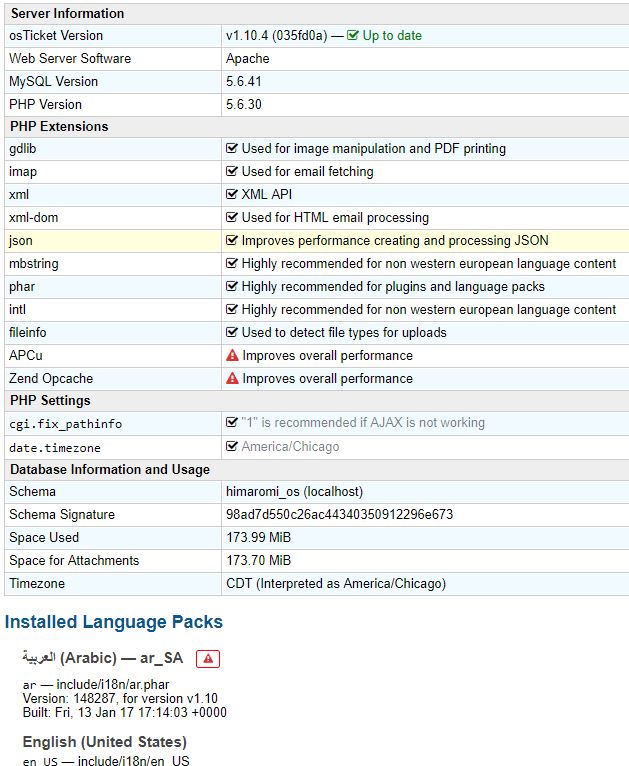
i did activate plugin to save attachments to file server
i did follow this steps
https://github.com/osTicket/osTicket/issues/1243#issuecomment-54715803
but still the attachment save in database and in the attachments folder only create new empty folder every time i upload new attach
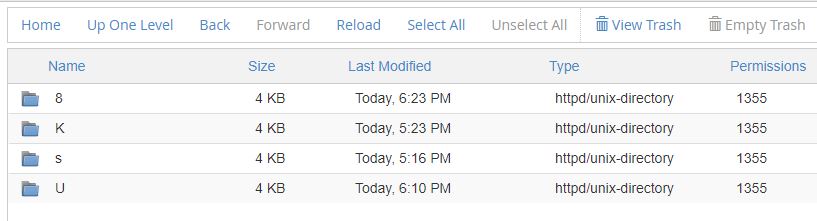
the attachments folder looks from inside like that new folder for every new attach
 iromih
All 22 comments
@iromih
What are the errors from Apache/PHP error logs as well as Linux System Logs?
Cheers.
 JediKev
on 16 Jan 2019
JediKev
on 16 Jan 2019
@iromih
What are the errors from Apache/PHP error logs as well as Linux System Logs?
Cheers.
where i can get this error , by the way i host it to host gator
iromih
on 16 Jan 2019
@iromih
Ask your host.
Also, ensure the attachments directory has the appropriate permissions/ownership.
Cheers.
JediKev
on 16 Jan 2019
i give it 777 permissions
iromih
on 16 Jan 2019
@iromih
Okay, is it owned by the Apache User/Group?
Cheers.
JediKev
on 16 Jan 2019
@iromih
Okay, is it owned by the Apache User/Group?
Cheers.
honestly i dont i dont know how how to do it it's cpanal web host, can u tell me how i can do it ?
iromih
on 16 Jan 2019
@iromih
Ask your host to do it. Or look it up online, either way.
Cheers.
JediKev
on 16 Jan 2019
ok, thanks alot
iromih
on 16 Jan 2019
now after i changed permission to all the folders under attachment folder to 777 the the attach files appear in it but the database size didn't change, and the new attach cant appear in it is new folder till i change the folder permission to 777 manual
iromih
on 16 Jan 2019
@iromih
What do you mean? The db size isn’t supposed to change..?
Something is up with your permissions/ownership then. Make sure the folder is owned by Apache User/Group.
Cheers.
JediKev
on 16 Jan 2019
supposed DB size decrease after the attach file save to attach folder but its not ,
ill back to host again to see the Apache permission
iromih
on 16 Jan 2019
@iromih
When you upload a file with the FS plugin installed, a File record is created in the db under ost_file (which should _increase_ the db size VERY slightly), then the file data is stored on the filesystem (which does nothing to the db size), lastly an Attachment record is created in the database under ost_attachment (which should _increase_ the db size VERY slightly).
Do you mean the files that were SUPPOSED to be uploaded to the folder but instead was stored in the database should be moved to the Filesystem? If so, you are supposed to do this manually via the command line module:
php manage.php file migrate --backend D --to F
You will have to have command line access to your server though. (contact your host if you're not sure)
Cheers.
JediKev
on 16 Jan 2019
@iromih
When you upload a file with the FS plugin installed, a File record is created in the db under
ost_file(which should _increase_ the db size VERY slightly), then the file data is stored on the filesystem (which does nothing to the db size), lastly an Attachment record is created in the database underost_attachment(which should _increase_ the db size VERY slightly).Do you mean the files that were SUPPOSED to be uploaded to the folder but instead was stored in the database should be moved to the Filesystem? If so, you are supposed to do this manually via the command line module:
php manage.php file migrate --backend D --to FYou will have to have command line access to your server though. (contact your host if you're not sure)
Cheers.
i understand this but in my case if i upload attach 10MB file size the DB increase the same 10 DB and the attach didn't appear in the attachment folder till i go to the new created folder and changed its permission from 1355 sometimes its 3355 sometimes other thing but when i change to 0777 then the attach appear in the folder, and still the data base the same size
iromih
on 16 Jan 2019
@iromih
Then it’s not actually uploading to the FS properly. You need the errors from Apache/PHP error logs.
Cheers.
JediKev
on 17 Jan 2019
i couldn't get the Apache/PHP error logs because my host account is shared account, what i should do now , and any advice which better host to for ostickets , by the way i tried bluehost and hostgator and same error i got
iromih
on 17 Jan 2019
@JediKev in the data base have table name ost_file_chunk its the biggest one its contain the most size of the DB its size 173 MB and overhead with 53 MB however the whole DB size is 227 MB
iromih
on 17 Jan 2019
UPADTE : files not stored in the DB i watch the DB size before and after upload attach nothing change , and also it didn't appear in the attach folder till i go manually change the new created folder permission too 775 however that i can download the attach before change the permission and before it appear in the folder , i cant understand what happend but that it what i found
iromih
on 17 Jan 2019
With out webserver/php error logs I do not think that anyone will be able to assist you. I recommend that you talk to your web host.
 ntozier
on 18 Jan 2019
ntozier
on 18 Jan 2019
It's shared web host can't get error log
iromih
on 29 Jan 2019
So you talked to your web host and they will not give you the errors from the logs that your site is generating?
ntozier
on 29 Jan 2019
i'm facing the same issue..., when editing the PHAR file and letting the plugin make directories with CHMOD 0777 then folders are created and files are put into the folder.
But this only happens when creating a new ticket and adding an attachments. When sending a mail that gets fetched automatically , the file is not stored on the filesystem ... (my webuser = cpanel-username)
 yellowscream
on 27 May 2019
yellowscream
on 27 May 2019
@yellowscream
Have you:
1.) Enabled the plug-in.
2.) Saved the Changes in the plugin configs to ensure it can read from/write to the directory.
3.) Gone to Admin Panel > Settings > System and set the Store Attachments setting to the attachment directory.
Cheers.
JediKev
on 28 May 2019
Related issues
 ghost
·
3Comments
ghost
·
3Comments
 Taps7734
·
5Comments
Taps7734
·
5Comments
 simonnzg
·
5Comments
simonnzg
·
5Comments
 spalekg
·
6Comments
spalekg
·
6Comments
 extremesurf
·
3Comments
extremesurf
·
3Comments