Osticket: Closed tickets (with resolved/closed status) not being reopened when having a response
I have the option to reopen a closed ticket that is on a resolved state (closed state) on but it's not working. The message is received on the ticket but it remains closed. I have the option "Allow tickets on this status to be reopened by end users" set for both statuses (resolved and closed)
I'm using:
ost v1.10 (new installation e.g.: not an upgrade)
ubuntu 14.04.5
php 5.5.9
apache 2.4
 twisterbr
All 29 comments
What do you have the "Reopen Status" set to?
 ntozier
on 26 Sep 2017
ntozier
on 26 Sep 2017
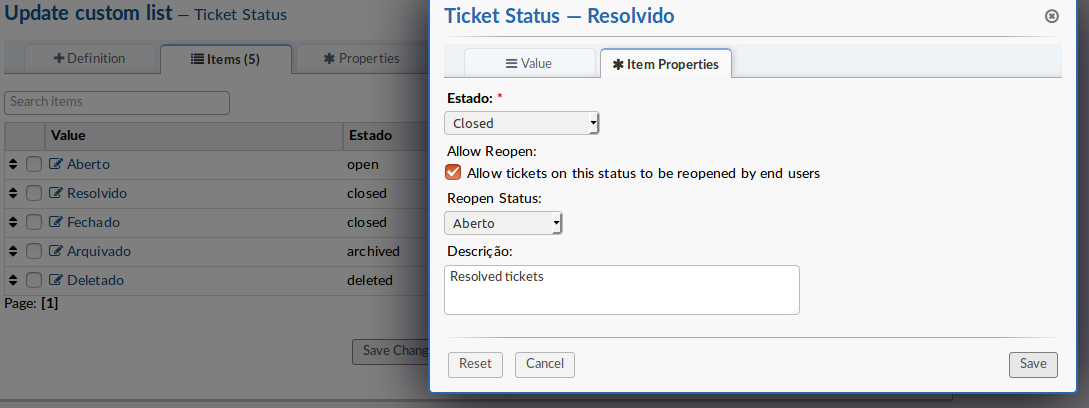
Its set to Open ('Aberto' in my language)
twisterbr
on 26 Sep 2017
Post a screenshot of the entire properties column for the Resolvido status in the ost_ticket_status table.
 JediKev
on 26 Sep 2017
JediKev
on 26 Sep 2017

Heres the screenshot asked.
allowreopen is set to false, thats odd.. that would be the option that reopens the ticket, right?
I tried unchecking and checking again (from interface) but this data record is not affected..
twisterbr
on 27 Sep 2017
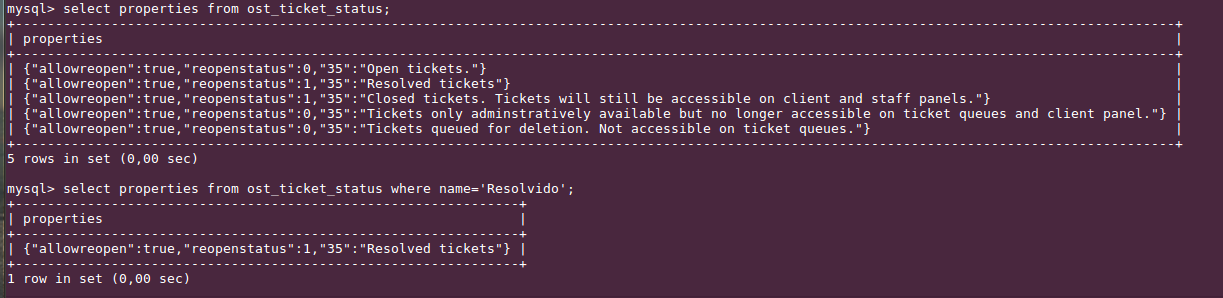
Oh man I'm so sorry, I printed a test database that I have (that has a similar name) and not the one i'm using. Here's the correct one:
twisterbr
on 28 Sep 2017
Any suggestions guys?
twisterbr
on 3 Oct 2017
Change reopenstatus to 0 for Resolvido and retest.
JediKev
on 3 Oct 2017
Also, have you modified the code at all? Have you added a third party theme or third party plugin?
JediKev
on 3 Oct 2017
Thanks JediKev, but it didn't work, I changed reopenstatus to 0 and the ticket remained closed when it got a response.. I also tried with "Fechado"/closed status and the result is the same.
I didn't make any modifications of any kind.. and I dont have third party theme or plugin installed..
twisterbr
on 3 Oct 2017
This is very strange...my tickets are reopening just fine from both Closed and Resolved statuses on a clean install of 1.10.1 🤔
JediKev
on 3 Oct 2017
Let me ask you this, how did you change the names of the ticket statuses? Lang pack or manually edited them? If you manually edited them tell me exactly what you did to change them.
JediKev
on 3 Oct 2017
I think the names were changed manually but I'm not sure..
Do you think if I disable langpack and rename the ticket statuses is something that could resolve? Or it would not make a difference?
twisterbr
on 3 Oct 2017
This wouldn't be caused by a lang pack (people install/use them all the time) it would be caused by someone editing them incorrectly.
JediKev
on 3 Oct 2017
You mean editing incorrectly in what way?
In my case I havent edited osticket files, what was changed was only what it can be done from osticket interface
twisterbr
on 3 Oct 2017
My bad, by I think the names were changed manually but I'm not sure.. I thought you meant manually by code not by interface. I get you now though.
Try changing all your properties to match this and retest:

The order of the properties in my image:
Open
Resolved
Closed
Archived
Deleted
If that doesn't work, my next questions are:
- Are you getting any errors in your PHP or Apache error logs?
- Where did you download your osTicket from?
- Do you have any language packs installed and if so, where did you download them from?
JediKev
on 3 Oct 2017
Sadly it didn't work =/
I only needed to change Archived and Deleted statuses, cause the others were already set..
- No errors are logged on php or apache
- I downloaded v1.10 from osticket's official website (http://osticket.com/download)
- Yes, Português BR, downloaded from osticket's site too
twisterbr
on 4 Oct 2017
Any more suggestions?
twisterbr
on 4 Oct 2017
Okay so the following is a lot of steps but this is the only way to test what's going on so please bear with me:
- Do a clean install of the latest version 1.10.1
- backup that clean db
- test the reopening on the clean install
- if it doesn't work then it's something with your environment configuration and it'll be next to impossible to debug without errors (but it should work because it works for everyone else)
- if it does work then backup your 1.10 db
- import the 1.10 db into the 1.10.1 db
- the system will prompt for upgrade, do the upgrade
- retest the reopening and if it works then you can do the upgrade on your 1.10 site and you should be all set
- if it doesn't work now but it worked on the 1.10.1 then you know the data is the culprit and you should post here and I'll give you more steps to try to import everything except the ticket statuses and see if that works.
Makes sense?
JediKev
on 5 Oct 2017
I did as you suggested.
It worked on a clean install (1.10.1)
And its still working after I imported the db!
I installed the language pack and its still working too.
When I imported the db, it didn't ask for an update as you said it would. My dump file had DROP TABLE in it. Is that correct? Should I remove it before I do the restore?
twisterbr
on 5 Oct 2017
Well that's very good news!
Ahhh, the reason there was no update triggered is because there were no db changes only code changes.
Try it with it and if it works then great! If it doesn't work then try again without it. You should have backups of _all_ dbs so you can just revert back if something goes wrong. 👍
Let me know how this goes!
JediKev
on 5 Oct 2017
I got the same problem again.. but now I think I get what is happening...
I guess it has to do with the header Return-Path: at the message that is being received. If its blank, the ticket is not reopened, and if its filled with the sender's address, it will be reopened.
It seems my mail server fills this field only if its a direct message (not forwarded/redirected).. and all my mails configured at osticket are addresses that receives redirected messages. When I tested sending directly to these accounts, the tickets got reopened.
And when I was doing the tests, I was sending to direct accounts, thats why it was working.
Do osticket do some checkings on this field?
twisterbr
on 5 Oct 2017
If you go to Admin Panel > Dashboard > System Logs, do you see any bounce notices or any form of email errors?
JediKev
on 6 Oct 2017
If not then set the Default Log Level setting to DEBUG in Admin Panel > Settings > System and then retest with a blank Return-Path. If it throws an error you should see it there.
JediKev
on 6 Oct 2017
Thanks @JediKev
No errors are shown even with debug level activated. It only shows "Cron job executed".
twisterbr
on 6 Oct 2017
This is an old thread, but I had this issue today and found a work around.
https://github.com/osTicket/osTicket/blob/24dbd3b3da1b48334abe881347cef1ef23c7d83f/include/class.ticket.php#L2333-L2343
The autorespond/isBounceOrAuthReply code that is called here: was setting reopen to false. I wasn't seeing WHY it thought all emails matched this condition when viewing email headers, so I simply added
$reopen = true;
Having a few extra tickets reopen was a small concession to not having them open at all.
 carl689
on 4 May 2018
carl689
on 4 May 2018
I was working on something unrelated to this and I saw what causes this issue (With Amazon Marketplace customers at least)
For Amazon, customer emails have the following header set
'X-AMAZON-MAIL-RELAY-TYPE' => 'NOTIFICATION',
This header is checked by the isAutoReply function
carl689
on 11 May 2018
@carl689 NICE 👌🏻
JediKev
on 11 May 2018
Hi, my issue is when the ticket is re-open after receiving a new message from the user:
1) System doesn't send any alert to the agents! (Previously, when the ticket was open, all agents receives an alert on every activity of the ticket.)
---Expected: i wanted that all agent receive an alert that a new activity is log
2) Ticket appears open only on the UI of the last respondent, that to under "My tickets" tab and not "Open" tab. (Other agents still see the the ticket as closed, Note that ticket was assigned previously to the whole department.)
---Expected: i want the ticket to appear as open for all agents.
 dharsini3118
on 17 Jul 2018
dharsini3118
on 17 Jul 2018
- There is no "re-open alert". Also the Agents: "New Message Alert" does not have a "Department" option.
That being said you can cheat. Do you use the department manager? If you do not then you can create an email address [which is actually a mailing list and has the department members of the Department on the list] and Agent account for the Department manager. Then you can enable"New Message Alert"for Department managers.
- Admin panel -> Settings -> Tickets -> un tick "Assigned Tickets" and "Answered Tickets".
ntozier
on 17 Jul 2018
Related issues
 ghost
·
3Comments
ghost
·
3Comments
 markus4000
·
4Comments
markus4000
·
4Comments
 rachelsupport
·
5Comments
ghost
·
6Comments
rachelsupport
·
5Comments
ghost
·
6Comments
 dmnc-net
·
3Comments
dmnc-net
·
3Comments
Most helpful comment
I was working on something unrelated to this and I saw what causes this issue (With Amazon Marketplace customers at least)
For Amazon, customer emails have the following header set
'X-AMAZON-MAIL-RELAY-TYPE' => 'NOTIFICATION',
This header is checked by the isAutoReply function