Osticket: Paste screenshot into redactor from clipboard breaks
Description
We cannot paste a screen grab/ screenshot directly into the redactor wysiwyg html editor.
We can upload images through the "Upload Image" icon and also drag and drop existing ones from i.e. my desktop, but a lot of our clients are trying to paste a screenshot they have copied to their clipboard directly into the editor using (ALT+PRINT SCREEN) and then (CTRL + V) on windows.
This works if it is the first thing you do, once you start with a fresh ticket. But as soon as there are other text in the editor, it only brings up a loading image and then time-out.
I have tried to track the error down and think it has to do with the compatibility between osTicket's code and redactor. Becasue I tested the redactor wysiwyg and it works fine on their website.
I even tried to purchase the latest redactor js files, but was not able to merge it into the latest version of osTicket. There were a lot of new errors popping up.
Does anyone know what the solutions is here and when we can expect the devs to release a bug fix?
Steps to Reproduce
- Open a new ticket
- Type something in the box and press enter.
- Take a screenshot (ALT+PRINT SCREEN) and then paste it in the editor (CTRL + V) on windows
Expected behavior:
It is suppose to paste the image because redactor allows for this functionality.
Actual behavior:
But it does not paste it. Sometimes it might, but then as you type anything else, it will stop pasting images in.
Versions
Issue on both v1.10-rc.3 & v1.10
Web Server Software Apache/2.4.7 (Ubuntu)
MySQL Version 5.7.16
PHP Version 5.5.9-1ubuntu4.20
Browsers
We are experiencing this accross all browsers.
 salmonerasmus
All 20 comments
clarified that this is specifically talking about the way windows typically handles screenshots from the clipboard, as opposed to from the file system which, works perfectly fine.
Edit:
It also seems to be the case that many Microsoft programs use the same clipboard image method. Regardless, the problem seems to be fixed in the latest version of redactor.
 rayfoss
on 8 Feb 2017
rayfoss
on 8 Feb 2017
If the issue has been solved with Redactor, when can we expect to see the solution in OsTicket as well? We are getting reports almost daily from our agents on this issue.
 thinkfuture
on 8 Feb 2017
thinkfuture
on 8 Feb 2017
Hi there, thanks for coming back to me on this.
I just tested this on my mac and I am experiencing the same problem. When I copy (pressing Command-Control-Shift-4) and then paste (command + v ) it does not paste, but only show a little load icon for couple of seconds.
PLEASE NOTE: if you paste an image as the very first "action" it works fine, but as soon as there are any text or spaces it only brings up a load icon, but fails to paste the image.
The javascript error I am getting is:
(unknown) The given range isn't in document. addRange
As mentioned before the Redactor code seem to work fine on their website demo's, so it must be the way that osTicket interacts with it that I think is causing this error. Or osTicket needs to bring in working copy from Redactor and customise it to work.
salmonerasmus
on 8 Feb 2017
@thinkfuture it's been solved in a completely new version of redactor... which is not open source. We're looking into it...
Video of it breaking under very specific scenarios:
small.zip
rayfoss
on 8 Feb 2017
Hi rayfoss,
Thanks, I watched the video and am glad you are getting the same issue I am.
We work with a lot of customers and this issue comes up all the time unfortunately....we have been trying to solve this ourselves by trying out the latest Redactor as I mentioned and also by trying to play around with the code, but no luck unfortunately.
The place where the intial error seems to pop up, is at this code below. I think this is the redactor.min.js
......get:function({
this.sel=document.getSelection();if(document.getSelection&&this.sel.getRangeAt&&this.sel.rangeCount){this.range=this.sel.getRangeAt(0)}else{this.range=document.createRange()}},addRange:function(){try{this.sel.removeAllRanges()}catch(e){}this.sel.addRange(this.range)},getCurrent:function(){var el=false;this.selection.get();if(this.sel&&this.sel.rangeCount>0){el=this.sel.getRangeAt(0).startContainer}return this.utils.isRedactor.....
salmonerasmus
on 8 Feb 2017
Hi rayfoss,
Do you have any idea what the turn around time on these things are? It this a quick fix do you reckon?
Thanks for you help.
salmonerasmus
on 9 Feb 2017
same problem :(
 balojs
on 8 Mar 2017
balojs
on 8 Mar 2017
This is the error, the users are getting when pasting a screenshot into the editor (with firefox):

 pespi123
on 16 Mar 2017
pespi123
on 16 Mar 2017
Also waiting for solution
 inphower
on 29 Apr 2017
inphower
on 29 Apr 2017
I don't think that this is the true proper solution but it does work for me and I think it would point anyone who knows anything about Javascript to the true solution for this problem. Hope this helps.
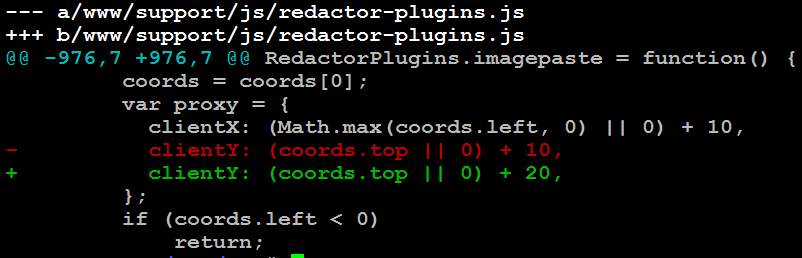
 dbummy
on 23 Aug 2017
dbummy
on 23 Aug 2017
For all who have been strugling with this issue, I've managed to solve it and another issue with repeatedly pasting a string too fast, where Enter would not break the line in the middle of the pasted text.
I've created a pull request for osTicket, but the fix is very easy to apply (you can use a patch).
- Get redactor.unpacked.js and put the new script in
osticket/js(you can pack it or minify it) - Edit
include/staff/footer.inc.phpandinclude/client/header.inc.phpto load this new file Comment (or delete) line 313 in
js/redactor-osticket.php:

Be sure to clear cache or add something like
?1ininclude/staff/footer.inc.phpandinclude/client/header.inc.phpto force refresh ofjs/redactor-osticket.phpnext time your users visit osTicket:
<script type="text/javascript" src="<?php echo ROOT_PATH; ?>js/redactor-osticket.js?1"></script>
Limitation
The image is saved inline - it doesn't get sent to the server for attachment.
 SaraivaDaniel
on 7 Dec 2017
SaraivaDaniel
on 7 Dec 2017
Everyone, try this pull request and get back to me: https://github.com/osTicket/osTicket/pull/4113
Cheers.
 JediKev
on 8 Dec 2017
JediKev
on 8 Dec 2017
Worked for me! I have used it for two days now with no problems yet. I am also using the file system plugin with no issues. I'll let you know if I encounter any hiccups. Thanks!
From: JediKev notifications@github.com
Sent: Friday, December 8, 2017 2:14:38 PM
To: osTicket/osTicket
Cc: Savoy, Sean; Comment
Subject: Re: [osTicket/osTicket] Paste screenshot into redactor from clipboard breaks (#3669)
Everyone, try this pull request and get back to me: #4113https://github.com/osTicket/osTicket/pull/4113
Cheers.
—
You are receiving this because you commented.
Reply to this email directly, view it on GitHubhttps://github.com/osTicket/osTicket/issues/3669#issuecomment-350361245, or mute the threadhttps://github.com/notifications/unsubscribe-auth/AXTdjRDQ6bDSftyUjqusNJgUcXdxsvl8ks5s-ZiugaJpZM4L65rq.
dbummy
on 8 Dec 2017
@dbummy Wait, you tested mine or the one that was posted before me?
JediKev
on 8 Dec 2017
Sorry, the first one. I'll try yours next week.
From: JediKev notifications@github.com
Sent: Friday, December 8, 2017 3:17:00 PM
To: osTicket/osTicket
Cc: Savoy, Sean; Mention
Subject: Re: [osTicket/osTicket] Paste screenshot into redactor from clipboard breaks (#3669)
@dbummyhttps://github.com/dbummy Wait, you tested mine or the one that was posted before me?
—
You are receiving this because you were mentioned.
Reply to this email directly, view it on GitHubhttps://github.com/osTicket/osTicket/issues/3669#issuecomment-350374080, or mute the threadhttps://github.com/notifications/unsubscribe-auth/AXTdjQYDC0ubF4AIxNjeQxcjPzS2WdiZks5s-adMgaJpZM4L65rq.
dbummy
on 8 Dec 2017
@SaraivaDaniel Your solution works fine for me at the moment.
Really the patch is for do this modifications automatically??? I have a centos server with osticket. How I can apply this patch?
 gbernabe
on 25 May 2018
gbernabe
on 25 May 2018
@SaraivaDaniel I've testing this solution, but I've found some problems.
I some occasions, when I paste a image, If I write text too, sometimes the text disapears.
In other occasions, when I write some text lines, when I have to press enter key anytimes, when y sent the post in a ticket, is only save the first line text and the others lines disappear.
I've had to disassemble what I did.
Keep investigating.
gbernabe
on 30 May 2018
Can someone tell me which redactor file redactor.unpacked.js replaces. I see that it is not mentioned in the footer at all before modification. Do we append this to the resources by just adding it as an extra import or replace one of the resources. If the latter, which file does it replace? Thanks for any extra help. Seems a little silly such a bug has lived so long. My question is in reference to
SaraivaDaniel commented on Dec 6, 2017
 kparker32
on 7 Dec 2018
kparker32
on 7 Dec 2018
Can someone tell me which redactor file redactor.unpacked.js replaces. I see that it is not mentioned in the footer at all before modification. Do we append this to the resources by just adding it as an extra import or replace one of the resources. If the latter, which file does it replace? Thanks for any extra help. Seems a little silly such a bug has lived so long. My question is in reference to
SaraivaDaniel commented on Dec 6, 2017
Hi, maybe you already figure it out, but redactor.unpacked.js replaces redactor.min.js
Works for me on osticket 1.10.4
Regards
 lezioul
on 31 Jan 2019
lezioul
on 31 Jan 2019
git remote add origin https://github.com/grizzlysananto/Read-me.git
git push -u origin master
 grizzlysananto
on 9 Dec 2019
grizzlysananto
on 9 Dec 2019
Related issues
 simonnzg
·
5Comments
simonnzg
·
5Comments
 mlipok
·
5Comments
mlipok
·
5Comments
 Taps7734
·
5Comments
Taps7734
·
5Comments
 spalekg
·
6Comments
spalekg
·
6Comments
 roman-1983
·
5Comments
roman-1983
·
5Comments