Origin: [bug] Unable to configure Local Persistent Volumes
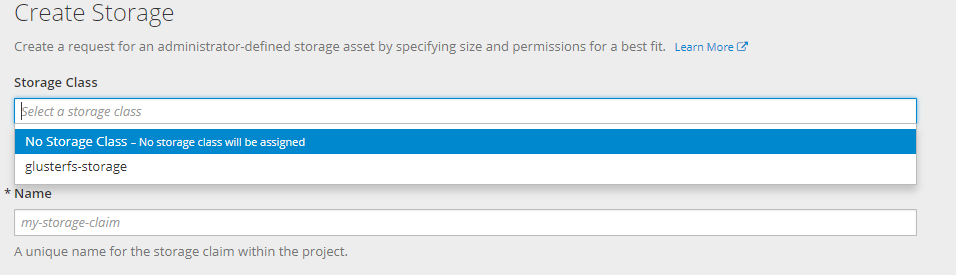
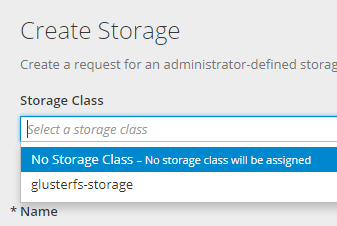
After creating resources for add Local persisten volumes ( from this doc https://docs.openshift.com/container-platform/3.7/install_config/configuring_local.html) , I can not see the two new storage-classes.
And this error
Version
oc version
oc v3.7.2+5eda3fa-5
kubernetes v1.7.6+a08f5eeb62
features: Basic-Auth GSSAPI Kerberos SPNEGO
Server https://console.myserver.org:8443
openshift v3.7.2+5eda3fa-5
kubernetes v1.7.6+a08f5eeb62
Steps To Reproduce
follow this exact steps https://docs.openshift.com/container-platform/3.7/install_config/configuring_local.html
oc new-project local-storage
 oc create -f ./local-volume-configmap.yaml
 oc create serviceaccount local-storage-admin
 oc adm policy add-scc-to-user hostmount-anyuid -z local-storage-admin
 oc create -f https://raw.githubusercontent.com/openshift/origin/master/examples/storage-examples/local-examples/local-storage-provisioner-template.yaml
 oc new-app -p CONFIGMAP=local-volume-config   -p SERVICE_ACCOUNT=local-storage-admin   -p NAMESPACE=local-storage local-storage-provisioner
with this file
yaml
kind: ConfigMap
metadata:
  name: local-volume-config
data:
    "local-ssd": |
      {
        "hostDir": "/mnt/local-storage/ssd",
        "mountDir": "/mnt/local-storage/ssd"
      }
    "local-hdd": |
      {
        "hostDir": "/mnt/local-storage/hdd",
        "mountDir": "/mnt/local-storage/hdd"
      }
And this directories ( without mounted devices yet)
````
tree -up -d -v /mnt/local-storage/
/mnt/local-storage/
├── [drwxr-xr-x root ] hdd
│ ├── [drwxr-xr-x root ] disk1
│ ├── [drwxr-xr-x root ] disk2
│ └── [drwxr-xr-x root ] disk3
└── [drwxr-xr-x root ] ssd
├── [drwxr-xr-x root ] disk1
├── [drwxr-xr-x root ] disk2
└── [drwxr-xr-x root ] disk3
````
Current Result
there is not the two new storage classes to select.
When inspecting the local-storage project we can see this error.
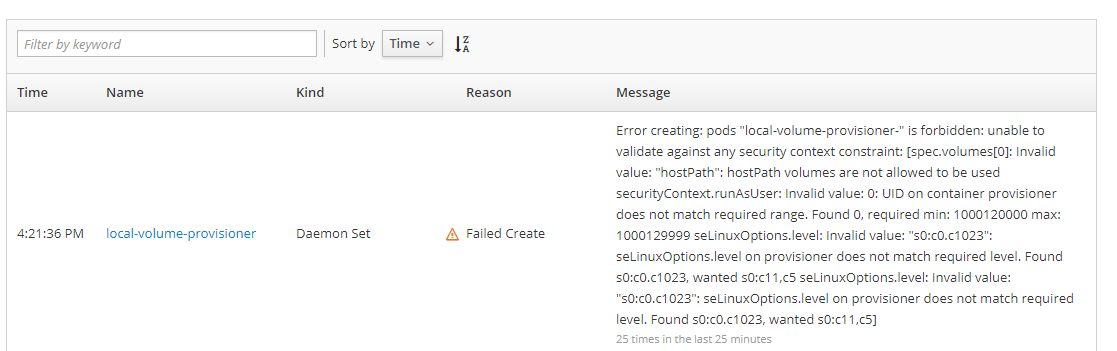
With this text:
"Error creating: pods "local-volume-provisioner-" is forbidden: unable to validate against any security context constraint: [spec.volumes[0]: Invalid value: "hostPath": hostPath volumes are not allowed to be used securityContext.runAsUser: Invalid value: 0: UID on container provisioner does not match required range. Found 0, required min: 1000120000 max: 1000129999 seLinuxOptions.level: Invalid value: "s0:c0.c1023": seLinuxOptions.level on provisioner does not match required level. Found s0:c0.c1023, wanted s0:c11,c5 seLinuxOptions.level: Invalid value: "s0:c0.c1023": seLinuxOptions.level on provisioner does not match required level. Found s0:c0.c1023, wanted s0:c11,c5]"
When changed the seLinuxOption level in the YAML from "s0:c0.c1023" to "s0:c11,c5" , the daemonset
on each node has started ok
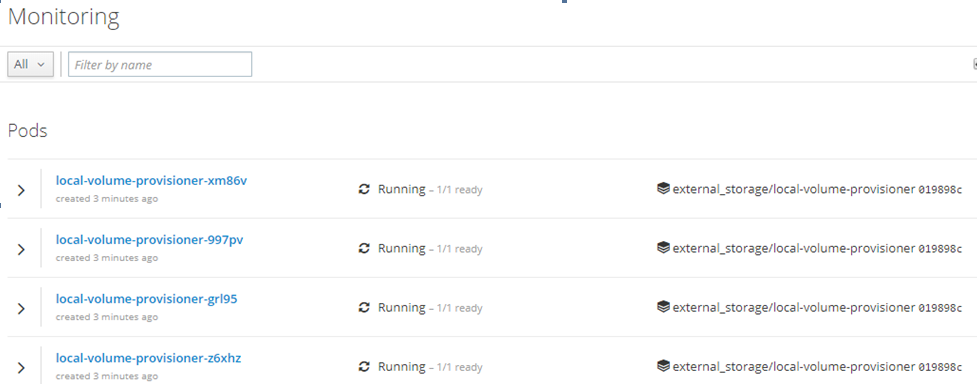
But this error is still in the console
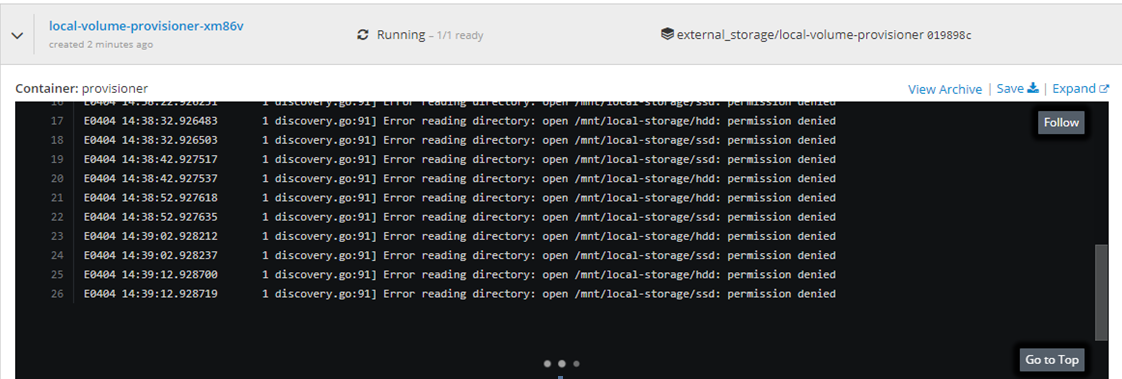
And no way to select the new storage classes.
Expected Result
Two new storage-classes has been generated and could be selected from the PVC web form
 toni-moreno
All 18 comments
I didn't ever setup this. But perhaps you can post the YAML of the daemon set to see whether it has proper namespace, service account, config map, etc. Also good to check the YAML of the SCC to make sure the service account is properly set. IIRC it is easy to add something not existing to the SCC by a typo or something.
 akostadinov
on 5 Apr 2018
akostadinov
on 5 Apr 2018
Hi @akostadinov
I've recreated the full openshift cluster, but now with real mounted devices as you can see in my fstab
/dev/localstorage_vg/ssd_lv1 /mnt/local-storage/ssd/lv1 xfs     defaults        1 2
/dev/localstorage_vg/ssd_lv2 /mnt/local-storage/ssd/lv2 xfs     defaults        1 2
/dev/localstorage_vg/hdd_lv1 /mnt/local-storage/hdd/lv1 xfs     defaults        1 2
/dev/localstorage_vg/hdd_lv2 /mnt/local-storage/hdd/lv2 xfs     defaults        1 2
And the error happened again.
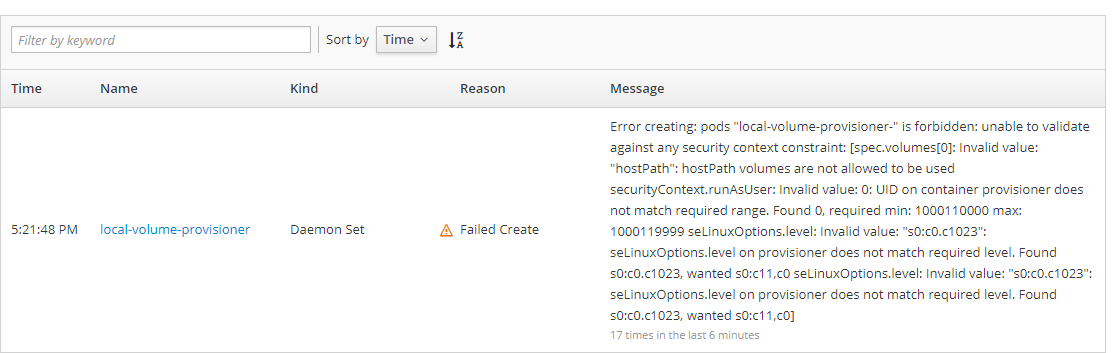
Error creating: pods "local-volume-provisioner-" is forbidden: unable to validate against any security context constraint: [spec.volumes[0]: Invalid value: "hostPath": hostPath volumes are not allowed to be used securityContext.runAsUser: Invalid value: 0: UID on container provisioner does not match required range. Found 0, required min: 1000110000 max: 1000119999 seLinuxOptions.level: Invalid value: "s0:c0.c1023": seLinuxOptions.level on provisioner does not match required level. Found s0:c0.c1023, wanted s0:c11,c0 seLinuxOptions.level: Invalid value: "s0:c0.c1023": seLinuxOptions.level on provisioner does not match required level. Found s0:c0.c1023, wanted s0:c11,c0]
I've changed the daemon set YAML to the requested value s0:c11,c0, and again the daemon set began work.
yaml
apiVersion: extensions/v1beta1
kind: DaemonSet
metadata:
  annotations:
    openshift.io/generated-by: OpenShiftNewApp
  creationTimestamp: '2018-04-05T15:17:42Z'
  generation: 3
  labels:
    app: local-volume-provisioner
  name: local-volume-provisioner
  namespace: local-storage
  resourceVersion: '17641'
  selfLink: >-
    /apis/extensions/v1beta1/namespaces/local-storage/daemonsets/local-volume-provisioner
  uid: 7ca5a7cd-38e4-11e8-b0b8-080027788273
spec:
  revisionHistoryLimit: 10
  selector:
    matchLabels:
      app: local-volume-provisioner
  template:
    metadata:
      creationTimestamp: null
      labels:
        app: local-volume-provisioner
    spec:
      containers:
        - env:
            - name: MY_NODE_NAME
              value: openshift01
            - name: MY_NAMESPACE
              valueFrom:
                fieldRef:
                  apiVersion: v1
                  fieldPath: metadata.namespace
            - name: VOLUME_CONFIG_NAME
              value: local-volume-config
          image: 'quay.io/external_storage/local-volume-provisioner:v1.0.1'
          imagePullPolicy: IfNotPresent
          name: provisioner
          resources: {}
          securityContext:
            runAsUser: 0
            seLinuxOptions:
              level: 's0:c11,c0'
          terminationMessagePath: /dev/termination-log
          terminationMessagePolicy: File
          volumeMounts:
            - mountPath: /mnt/local-storage
              name: local-storage
            - mountPath: /etc/provisioner/config
              name: provisioner-config
              readOnly: true
      dnsPolicy: ClusterFirst
      nodeSelector:
        nodetype: default
      restartPolicy: Always
      schedulerName: default-scheduler
      securityContext: {}
      serviceAccount: local-storage-admin
      serviceAccountName: local-storage-admin
      terminationGracePeriodSeconds: 30
      volumes:
        - hostPath:
            path: /mnt/local-storage
          name: local-storage
        - configMap:
            defaultMode: 420
            name: local-volume-config
          name: provisioner-config
  templateGeneration: 3
  updateStrategy:
    type: OnDelete
status:
  currentNumberScheduled: 1
  desiredNumberScheduled: 1
  numberAvailable: 1
  numberMisscheduled: 0
  numberReady: 1
  observedGeneration: 3
And this is the error.
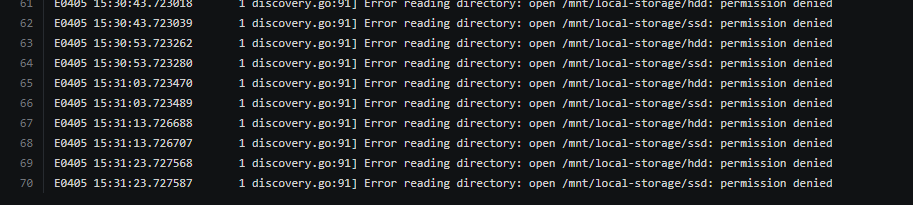
Again there is no way to get the new storage class.
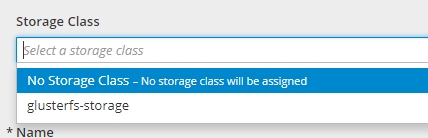
the ServiceAcount YAML
````yaml
apiVersion: v1
imagePullSecrets:
- name: local-storage-admin-dockercfg-skpwp
kind: ServiceAccount
metadata:
creationTimestamp: '2018-04-05T15:17:42Z'
name: local-storage-admin
namespace: local-storage
resourceVersion: '14237'
selfLink: /api/v1/namespaces/local-storage/serviceaccounts/local-storage-admin
uid: 7c4a2be1-38e4-11e8-b0b8-080027788273
secrets: - name: local-storage-admin-dockercfg-skpwp
- name: local-storage-admin-token-9qdtc
````
What other info could I show you in order to find the issue?
toni-moreno
on 5 Apr 2018
How about
ls -ld /mnt /mnt/local-storage /mnt/local-storage/*
ls -Zd /mnt /mnt/local-storage /mnt/local-storage/*
Here the output for these commands
bash
[root@openshift01 installcentos]# ls -ld /mnt /mnt/local-storage /mnt/local-storage/*
drwxr-xr-x. 3 root root 27 abr  5 23:24 /mnt
drwxr-xr-x. 4 root root 28 abr  5 23:24 /mnt/local-storage
drwxr-xr-x. 4 root root 28 abr  5 23:24 /mnt/local-storage/hdd
drwxr-xr-x. 4 root root 28 abr  5 23:24 /mnt/local-storage/ssd
[root@openshift01 installcentos]# ls -Zd /mnt /mnt/local-storage /mnt/local-storage/*
drwxr-xr-x. root root system_u:object_r:mnt_t:s0       /mnt
drwxr-xr-x. root root unconfined_u:object_r:mnt_t:s0   /mnt/local-storage
drwxr-xr-x. root root unconfined_u:object_r:mnt_t:s0   /mnt/local-storage/hdd
drwxr-xr-x. root root unconfined_u:object_r:mnt_t:s0   /mnt/local-storage/ssd
toni-moreno
on 5 Apr 2018
I'll try to reproduce this.
akostadinov
on 6 Apr 2018
I 've this script to reproduce the environtment using a /dev/sdc with 100 Gb disk
````bash
vgcreate localstorage_vg /dev/sdc
lvcreate -L 10G -n ssd_lv1 localstorage_vg
lvcreate -L 10G -n ssd_lv2 localstorage_vg
lvcreate -L 10G -n hdd_lv1 localstorage_vg
lvcreate -L 10G -n hdd_lv2 localstorage_vg
mkfs.xfs /dev/localstorage_vg/ssd_lv1
mkfs.xfs /dev/localstorage_vg/ssd_lv2
mkfs.xfs /dev/localstorage_vg/hdd_lv1
mkfs.xfs /dev/localstorage_vg/hdd_lv2
mkdir -p /mnt/local-storage/ssd/lv1
mkdir -p /mnt/local-storage/ssd/lv2
mkdir -p /mnt/local-storage/hdd/lv1
mkdir -p /mnt/local-storage/hdd/lv2
cp /etc/fstab /etc/fstab_backup
cat <
/dev/localstorage_vg/ssd_lv2 /mnt/local-storage/ssd/lv2 xfs defaults 1 2
/dev/localstorage_vg/hdd_lv1 /mnt/local-storage/hdd/lv1 xfs defaults 1 2
/dev/localstorage_vg/hdd_lv2 /mnt/local-storage/hdd/lv2 xfs defaults 1 2
EOF
mount -a
oc new-project local-storage
oc create -f ./local-volume-configmap.yaml
oc create serviceaccount local-storage-admin
oc adm policy add-scc-to-user hostmount-anyuid -z local-storage-admin
oc create -f https://raw.githubusercontent.com/openshift/origin/master/examples/storage-examples/local-examples/local-storage-provisioner-template.yaml
oc new-app -p CONFIGMAP=local-volume-config -p SERVICE_ACCOUNT=local-storage-admin -p NAMESPACE=local-storage local-storage-provisioner
````
with this local-volume-configmap.yaml
yaml
kind: ConfigMap
metadata:
  name: local-volume-config
data:
    "local-ssd": |
      {
        "hostDir": "/mnt/local-storage/ssd",
        "mountDir": "/mnt/local-storage/ssd"
      }
    "local-hdd": |
      {
        "hostDir": "/mnt/local-storage/hdd",
        "mountDir": "/mnt/local-storage/hdd"
      }
on the local-storage-provisioner-template.yml I have also changed the sleLinuxOptions to 's0:c11,c0'
toni-moreno
on 6 Apr 2018
Hi,
I'm working with @toni-moreno and we found the following open issue that can be related:
https://bugzilla.redhat.com/show_bug.cgi?id=1524568
We will test the following command:
chcon -Rt svirt_sandbox_file_t /mnt/local-storage
 sbengo
on 6 Apr 2018
sbengo
on 6 Apr 2018
Hi,
We have applied the proposed fix:
chcon -Rt svirt_sandbox_file_t /mnt/local-storage
The volumes seems to be loaded and recognized:
````
I0406 09:25:51.614468 1 discovery.go:141] Found new volume at host path "/mnt/local-storage/hdd/lv1" with capacity 10726932480, creating Local PV "local-pv-a95f27f5"
| I0406 09:25:51.630095 1 cache.go:55] Added pv "local-pv-a95f27f5" to cache
| I0406 09:25:51.630600 1 discovery.go:156] Created PV "local-pv-a95f27f5" for volume at "/mnt/local-storage/hdd/lv1"
| I0406 09:25:51.630635 1 discovery.go:141] Found new volume at host path "/mnt/local-storage/hdd/lv2" with capacity 10726932480, creating Local PV "local-pv-4ea996b0"
| I0406 09:25:51.635626 1 discovery.go:156] Created PV "local-pv-4ea996b0" for volume at "/mnt/local-storage/hdd/lv2"
| I0406 09:25:51.635726 1 discovery.go:141] Found new volume at host path "/mnt/local-storage/ssd/lv1" with capacity 10726932480, creating Local PV "local-pv-743582d3"
| I0406 09:25:51.635979 1 cache.go:55] Added pv "local-pv-4ea996b0" to cache
| I0406 09:25:51.640424 1 cache.go:55] Added pv "local-pv-743582d3" to cache
| I0406 09:25:51.641117 1 discovery.go:156] Created PV "local-pv-743582d3" for volume at "/mnt/local-storage/ssd/lv1"
| I0406 09:25:51.641153 1 discovery.go:141] Found new volume at host path "/mnt/local-storage/ssd/lv2" with capacity 10726932480, creating Local PV "local-pv-f152e5fe"
| I0406 09:25:51.645566 1 cache.go:55] Added pv "local-pv-f152e5fe" to cache
| I0406 09:25:51.646579 1 discovery.go:156] Created PV "local-pv-f152e5fe" for volume at "/mnt/local-storage/ssd/lv2"
| I0406 09:25:51.648879 1 cache.go:64] Updated pv "local-pv-a95f27f5" to cache
| I0406 09:25:51.653368 1 cache.go:64] Updated pv "local-pv-4ea996b0" to cache
| I0406 09:25:51.657361 1 cache.go:64] Updated pv "local-pv-743582d3" to cache
| I0406 09:25:51.661804 1 cache.go:64] Updated pv "local-pv-f152e5fe" to cache
````
Runniing the command oc get pv:
NAME                                       CAPACITY   ACCESSMODES   RECLAIMPOLICY   STATUS      CLAIM                                 STORAGECLASS        REASON    AGE
local-pv-4ea996b0                          10230Mi    RWO           Delete          Available                                         local-hdd                     8m
local-pv-743582d3                          10230Mi    RWO           Delete          Available                                         local-ssd                     8m
local-pv-a95f27f5                          10230Mi    RWO           Delete          Available                                         local-hdd                     8m
local-pv-f152e5fe                          10230Mi    RWO           Delete          Available                                         local-ssd                     8m
But it still not being able to be selected as StorageClass on UI:
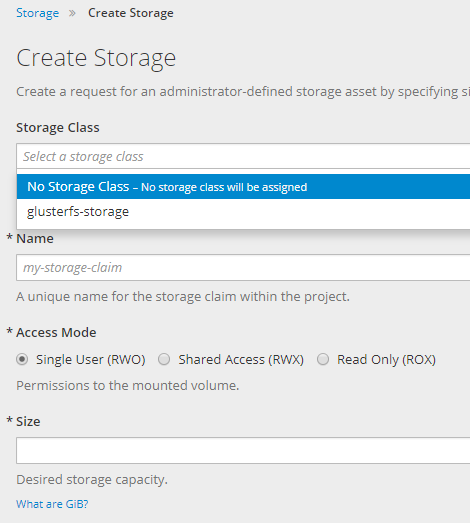
sbengo
on 6 Apr 2018
@akostadinov , we have good news. @sbengo finally have fixed the the storage class on UI with these commands.
bash
 oc create -f ./storage-class-ssd.yaml
 oc create -f ./storage-class-hdd.yaml
storage-class-ssd.yaml
yaml
apiVersion: storage.k8s.io/v1
kind: StorageClass
metadata:
 name: local-ssd
provisioner: kubernetes.io/no-provisioner
volumeBindingMode: WaitForFirstConsumer
storage-class-hdd.yaml
yaml
apiVersion: storage.k8s.io/v1
kind: StorageClass
metadata:
 name: local-hdd
provisioner: kubernetes.io/no-provisioner
volumeBindingMode: WaitForFirstConsumer
toni-moreno
on 6 Apr 2018
Awesome, well done! So it looks like the documentation is missing instructions to actually create the necessary storage classes. I actually see a mention of this in kubernetes docs.
If things are working for you now, I guess we can now close this issue and open a doc bug. Please confirm.
Thank you for looking into this.
akostadinov
on 6 Apr 2018
Thank you !!
toni-moreno
on 6 Apr 2018
Hi @akostadinov The problem is not still solved.
As a part of a new install we are modified the local-storage-provisioner-template.yml with our seLinuxOptions to 's0:c11,c0' and the seLinux Error has been reproduced.
now ( mysteriously ) the new optios are:
yaml
  securityContext:
    seLinuxOptions:
      level: 's0:c12,c4'
So we @sbengo and myself has seen that the project generates itself some "default" security context on creation time ( and are not always the same).
In our current instal.lation are "openshift.io/sa.scc.mcs=s0:c12,c4"
````bash
oc describe project local-storage
Name: local-storage
Created: 2 days ago
Labels:
Annotations: openshift.io/description=
openshift.io/display-name=
openshift.io/requester=toni
openshift.io/sa.scc.mcs=s0:c12,c4
openshift.io/sa.scc.supplemental-groups=1000140000/10000
openshift.io/sa.scc.uid-range=1000140000/10000
Display Name:
Description:
Status: Active
Node Selector:
Quota:
Resource limits:
````
So perhaps the best way to create loca-volumes should be first create an inmutable SecurityContext, and assing it to the local-storage-provisioner-template.yml file.
toni-moreno
on 12 Apr 2018
My intuition says that dealing with low level details like selinux context is too much of a stretch for most users and too error prone.
Did you try 3.9? I read in the bugzilla you linked to earlier that local storage is a tech preview in 3.8. This is a private comment (not sure why it was marked private). But there is no 3.8 official release, there is 3.9. So perhaps some things internally have been fixed.
This is the exact content of the comment:
chcon should fix this issue. Since local storage is tech preview in 3.8, change to 3.8
akostadinov
on 12 Apr 2018
Hi @akostadinov I have plans to test this configuration in 3.9 ASAP.
toni-moreno
on 16 Apr 2018
Hi @akostadinov I've done a complete 3.9 origin install and test again the local volume configuration, now with this other document (https://docs.openshift.org/3.9/install_config/configuring_local.html)
But I'have another problem related with the version 3.9 That I've described in (https://github.com/openshift/origin/issues/19389)
Afte follow the mounts, and created project and all other artifacts with this commands.
bash
oc new-project local-storage
oc create serviceaccount local-storage-admin
oc adm policy add-scc-to-user privileged -z local-storage-admin
oc create -f ./local-volume-configmap.yaml
oc create -f ./local-storage-provisioner-template.yaml
 oc new-app -p CONFIGMAP=local-volume-config \
  -p SERVICE_ACCOUNT=local-storage-admin \
  -p NAMESPACE=local-storage \
  -p PROVISIONER_IMAGE=quay.io/external_storage/local-volume-provisioner:v1.0.1 \
  local-storage-provisioner
This is the result.
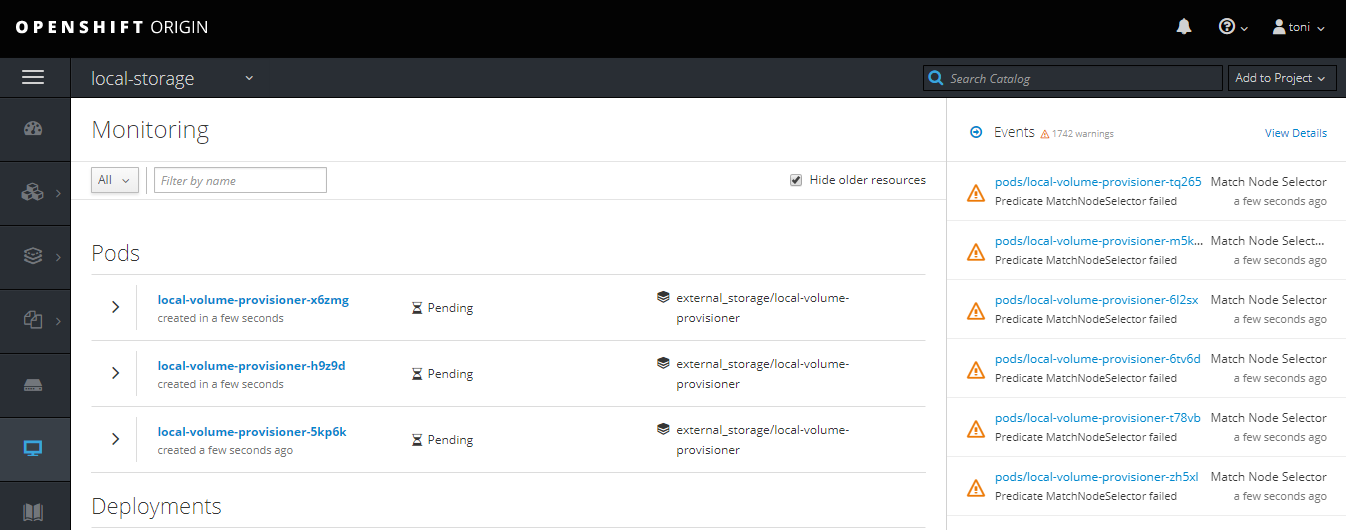
toni-moreno
on 17 Apr 2018
Hi @akostadinov , after fixing the related problem on the 3.9 origin version I've applied the above script , and recreated the Local Volumes Ok, without any other extra action. No everything seems to be working fine.
````
[root@openshift01 localvolumes]# ./create_local_storage.sh
Now using project "local-storage" on server "https://openshift01:8443".
You can add applications to this project with the 'new-app' command. For example, try:
oc new-app centos/ruby-22-centos7~https://github.com/openshift/ruby-ex.git
to build a new example application in Ruby.
serviceaccount "local-storage-admin" created
scc "privileged" added to: ["system:serviceaccount:local-storage:local-storage-admin"]
configmap "local-volume-config" created
template "local-storage-provisioner" created
--> Deploying template "local-storage/local-storage-provisioner" to project local-storage
 * With parameters:
    * SERVICE_ACCOUNT=local-storage-admin
    * NAMESPACE=local-storage
    * CONFIGMAP=local-volume-config
    * PROVISIONER_IMAGE=quay.io/external_storage/local-volume-provisioner:v1.0.1
--> Creating resources ...
clusterrolebinding "local-storage:provisioner-pv-binding" created
clusterrolebinding "local-storage:provisioner-node-binding" created
daemonset "local-volume-provisioner" created
--> Success
Run 'oc status' to view your app.
[root@openshift01 localvolumes]# oc get all
NAME DESIRED CURRENT READY UP-TO-DATE AVAILABLE NODE SELECTOR AGE
ds/local-volume-provisioner 1 1 1 1 1 nodetype=default 12s
NAME READY STATUS RESTARTS AGE
po/local-volume-provisioner-45zh8 1/1 Running 0 12s
````
Here the 4 local pv's created ok.
[root@openshift01 localvolumes]# oc get pv
NAME                CAPACITY   ACCESS MODES   RECLAIM POLICY   STATUS      CLAIM                    STORAGECLASS   REASON    AGE
local-pv-4ea996b0   10230Mi    RWO            Delete           Available                            local-hdd                15m
local-pv-743582d3   10230Mi    RWO            Delete           Available                            local-ssd                15m
local-pv-a95f27f5   10230Mi    RWO            Delete           Available                            local-hdd                15m
local-pv-f152e5fe   10230Mi    RWO            Delete           Available                            local-ssd                15m
registry-volume     5Gi        RWX            Retain           Bound       default/registry-claim                            1h
Again needed to create manually the two new storageclasses , to see them in the console.
 oc create -f ./storage-class-ssd.yaml
 oc create -f ./storage-class-hdd.yaml
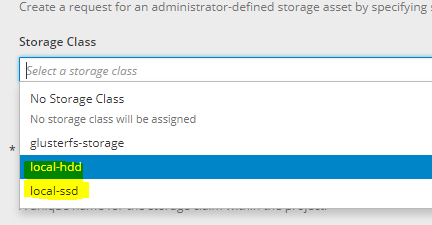
toni-moreno
on 18 Apr 2018
Awesome, the docs about creating classes should be added as part of https://github.com/openshift/openshift-docs/issues/8670, thank you for helping with this issue.
akostadinov
on 18 Apr 2018
Hi, I had similiar issue with 3.10 it was fixed with: oc adm policy add-cluster-role-to-user cluster-reader system:serviceaccount:local-storage:local-storage-admin
 raatti
on 12 Oct 2018
raatti
on 12 Oct 2018
Related issues
 surajssd
·
4Comments
surajssd
·
4Comments
 slmzig
·
3Comments
slmzig
·
3Comments
 davivd
·
4Comments
davivd
·
4Comments
 enj
·
4Comments
enj
·
4Comments
 syui
·
3Comments
syui
·
3Comments
Most helpful comment
Hi, I had similiar issue with 3.10 it was fixed with: oc adm policy add-cluster-role-to-user cluster-reader system:serviceaccount:local-storage:local-storage-admin