Origin: Allow service accounts to push images to the internal registry
In order to create a more efficient mechanism to build images from source code, we need to publish images to the Openshift internal registry directly.
Unfortunately, user guides state that only "normal" users are allowed to docker login to the internal registry to push images, while service accounts are not allowed to do so (my experiments seem to confirm this).
We used mechanisms such as S2I binary builds in the past (e.g. in fabric8 maven plugin), just to make the S2I builder push images on our behalf.
But instantiating a binary build has a high cost, because it means pulling a builder image on a Node and spinning up a new Pod, pulling the requested base image, building a new image on top of it and then pushing the result back to the registry: the initial pulls are very likely to result in cache misses.
If we allow pushing container images directly from a user Pod (with a specific service account), people will create more efficient mechanisms to push images than standard S2I, maybe optimized for specific use cases.
There are a lot of build tools now that allow building container images without a docker daemon...
Is it possible to authorize standard service accounts to push images directly into the registry?
 nicolaferraro
All 3 comments
save sa to a project
ns=openshift
create service account
oc ${ns} create serviceaccount my-service-account
Authorization
## cluster or project
oc adm policy  add-cluster-role-to-user edit system:serviceaccount:${ns}:my-service-account

# Generate two tokens at the same time
get service account token
# No need base64 decode
oc  -n ${ns}  describe secret my-service-account-xxx

# Annotations not include openshift.io/create-dockercfg-secrets
start login
echo "${token}" | docker login --password-stdin -u unused ${internal_registry}
I'm here:
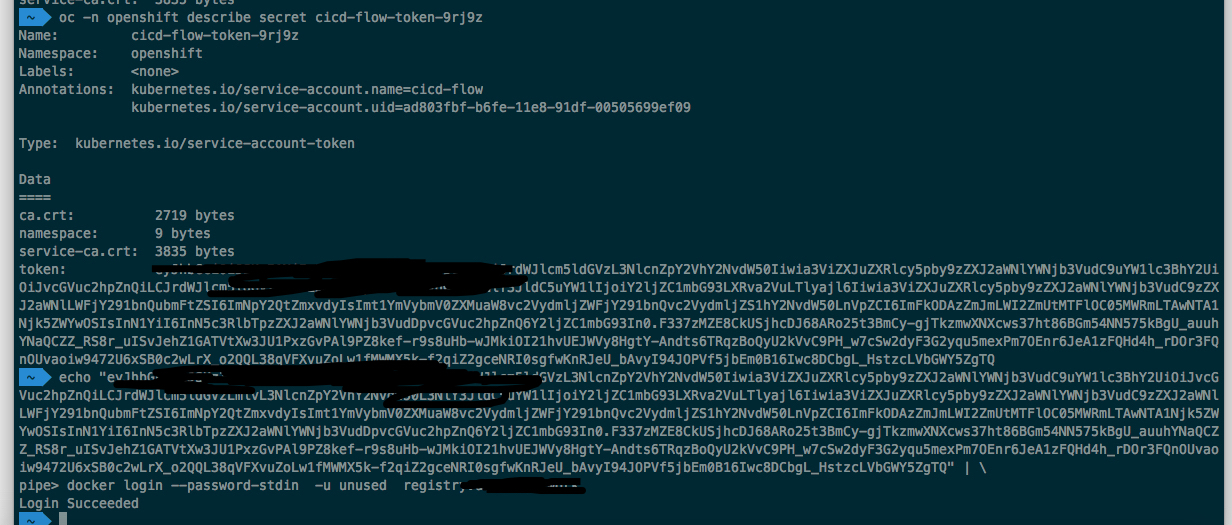
hope this helps : )
 klzsysy
on 19 Sep 2018
klzsysy
on 19 Sep 2018
@openshift/sig-developer-experience
 jwforres
on 1 Oct 2018
jwforres
on 1 Oct 2018
Unfortunately, user guides state that only "normal" users are allowed to docker login to the internal registry to push images, while service accounts are not allowed to do so (my experiments seem to confirm this).
@nicolaferraro Can you point to the doc that says this so we can fix it? it's not true.
As @klzsysy noted, you can login using your service account token, you just need to pass something else as the username becaues colons are not tolerated. The username does not matter when doing a docker login with a token.
docker login -u openshift -p $token will work.
Thanks @klzsysy
 bparees
on 1 Oct 2018
bparees
on 1 Oct 2018
Related issues
 alikhajeh1
·
3Comments
alikhajeh1
·
3Comments
 surajssd
·
4Comments
surajssd
·
4Comments
 adohe-zz
·
5Comments
adohe-zz
·
5Comments
 thescouser89
·
3Comments
thescouser89
·
3Comments
 edseymour
·
3Comments
edseymour
·
3Comments
Most helpful comment
@nicolaferraro Can you point to the doc that says this so we can fix it? it's not true.
As @klzsysy noted, you can login using your service account token, you just need to pass something else as the username becaues colons are not tolerated. The username does not matter when doing a docker login with a token.
docker login -u openshift -p $tokenwill work.Thanks @klzsysy