Orgzly-android: Did we lost some menu options from long press over a Notebook?
Greetings!
Recently updated to v1.7.1 (from… don't know which version I had before) and I can't get the options for resolving a sync conflict.
When a sync conflict existed, I think I used to do a long press (on the Notebooks view) over the notebook. This would make the notebook selected and then in the "three dots menu" options _Force Load_ and _Force Save_ would show up.
Now I only have _Rename_, _Set Link_, Export, and _Delete_.
Thanks for this wonderful software. :-)
 bjacquet
All 5 comments
First two, before overflow-menu are Force Load and Force Save.
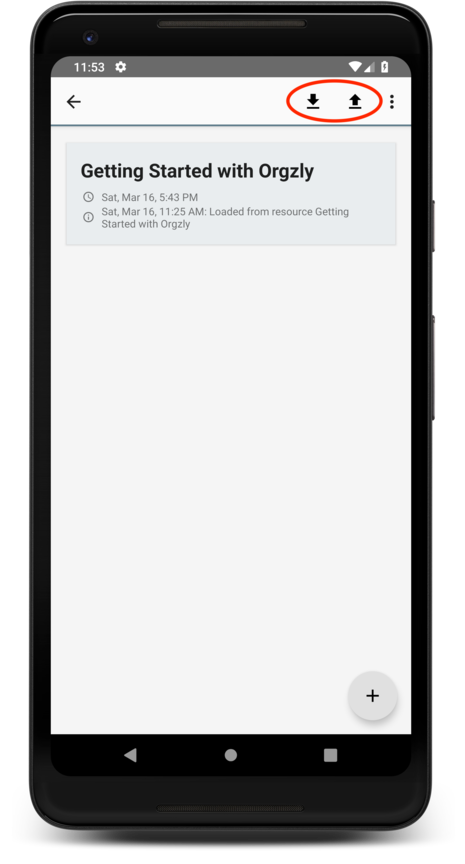
 nevenz
on 16 Mar 2019
nevenz
on 16 Mar 2019
Wow!!! 😮 I thought that was for sorting. 🤦♂️
Thanks for the info. 😃
bjacquet
on 17 Mar 2019
These icons really need to re-design, they will led to more confusion, even reduce the professionalism of this application.
You can take referance to google/material-design-icons, I think the icons solution could be considering an overlay of up/down arrow on the top of 'sd storage' icon of 'Devices'.
 NiceFeather
on 17 Mar 2019
NiceFeather
on 17 Mar 2019
Existing icons are used from https://material.io/tools/icons/?style=baseline. I've changed these in the latest beta to outlined cloud_upload and cloud_download. It's probably going to be confusing to someone using a local directory as a repo, but oh well.
nevenz
on 25 Mar 2019
O looked into material's icon and I agree cloud_upload and cloud_download will work better.
For someone who is using a local directory, maybe these icons could be hidden from them? Since they wouldn't do anything. (I guess.) (I'm out of my depth here.)
bjacquet
on 25 Mar 2019
Related issues
 psamim
·
3Comments
psamim
·
3Comments
 ghost
·
3Comments
ghost
·
3Comments
 memeplex
·
5Comments
memeplex
·
5Comments
 Ypot
·
5Comments
Ypot
·
5Comments
 edgimar
·
6Comments
edgimar
·
6Comments