Orchardcore: How to enable header in razor pages
I'm using razor pages to display content from the Orchard Core CMS. By default the user theme is used, however the header is not showing. I'm using the blog theme and layout.liquid shows this:
{% render_section "Header", required: false %}
Is there a way I can render the header or other defined sections of the liquid view from within the razor page? I hope there is some way I can instruct the display to show that part of the site. Something along these lines, even though this doesn't work:
@await Html.PartialAsync("Header", Model)
Any help would be appreciated.
 mattobox
All 17 comments
Have a look to Zones
 hishamco
on 5 Aug 2020
hishamco
on 5 Aug 2020
Thanks for that clue. I apologize, but I'm pretty new to Orchard Core. Is there any sample code on how to call a specific zone within a razor page?
mattobox
on 5 Aug 2020
I will refer you to a little partial that I need to inject into the layout few days ago https://github.com/OrchardCoreContrib/OrchardCoreContrib.Modules/commit/33b15dc6784e9e7b85bea7c16658342228535be1#diff-a72f4e7a6172b278b23ddc5c21640877R50-R52
hishamco
on 5 Aug 2020
This is the issue that I open #6815, I think its quite similar to what I asked for
hishamco
on 5 Aug 2020
@mattobox
You can define Zone with ZoneTagHelper as following
<zone name="xyz">
    <h2>My Zoned header</h2>
    .......
</zone>
That you can render using following in liquid
{% render_section "xyz", required: false %}
or in cshtml
@await RenderSectionAsync("xyz", required: false)
All content of MVC View or Razor Pages are rendered at @await RenderBodyAsync() of your layout
However if you need sub sections withn Razor Pages (like nested layouts) than you could use solution provided in https://github.com/OrchardCMS/OrchardCore/issues/3963#issuecomment-580754019
 ns8482e
on 5 Aug 2020
ns8482e
on 5 Aug 2020
@ns8482e thanks for your response. This is helpful. For some reason the RenderSectionAsync does not exist in page context. Here is my simple razor page. Any clues?

mattobox
on 5 Aug 2020
Please check the _ViewImports.cshtml if it has
@inherits OrchardCore.DisplayManagement.Razor.RazorPage<TModel>
@mattobox Sorry It's working for MVC view but not for Razor Pages, I didn't realize that PR #6135 is still open.
For Now mitigation would be to use ViewComponent
ns8482e
on 5 Aug 2020
I'm sure I'm missing something easy, but it won't compile. Here's the two files:
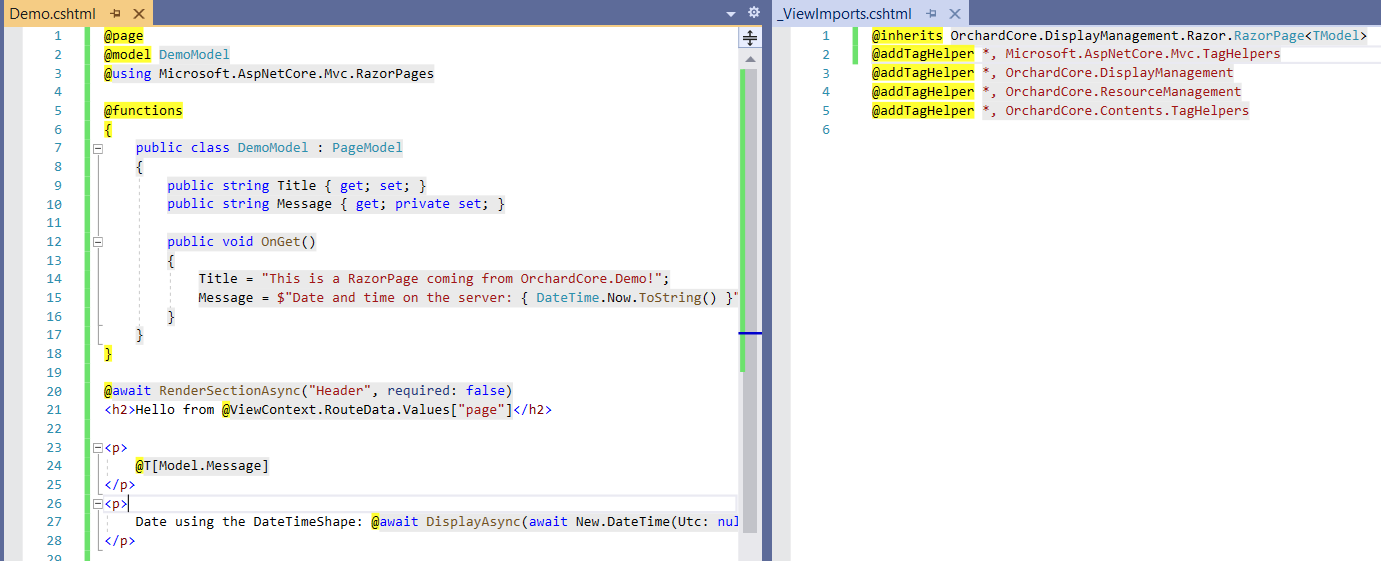
Here are the errors:
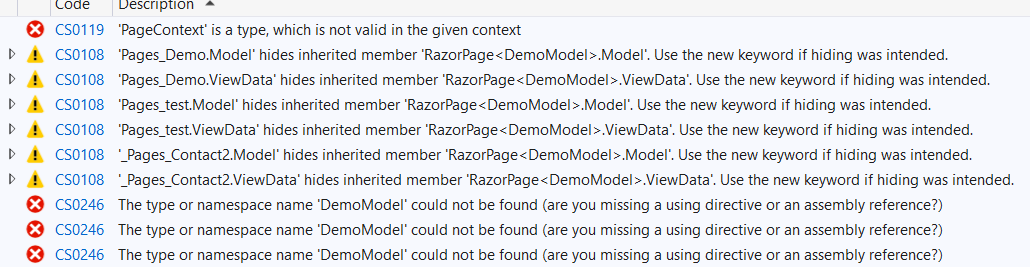
mattobox
on 5 Aug 2020
@mattobox Sorry for the confusion
For RazorPages you inherit from OrchardCore.DisplayManagement.RazorPages.Page
and For MVC Views rendered from Controller inherit from OrchardCore.DisplayManagement.Razor.RazorPage or OrchardCore.DisplayManagement.Razor.RazorPage<TModel>
Solution that I suggested above is currently working only for MVC Views and not for RazorPages as related PR for RazorPages #6135 is still open.
ns8482e
on 5 Aug 2020
@mattobox I would suggest you use ViewComponent for RazorPages
public class HeaderViewComponent : ViewComponent
    {
        public IViewComponentResult Invoke()
        {
            return View("Default");
        }
    }
Define /Pages/Components/Header/Default.cshtml
and Use in your Page.cshtml as
@await Component.InvokeAsync("Header")
Thanks for providing this workaround. I may be mistaken, but I believe this would require me to create an additional header separate from the CMS. My hope is to use the header already defined in the CMS. The theme is working, but the header isn't showing by default. I'm hoping to enable it in someway.
mattobox
on 5 Aug 2020
If you prefer Html.PartialAsync there is sample code available in Demo module.
ns8482e
on 5 Aug 2020
@mattobox
If you use the theming engine, an mvc view or @page is ""body" rendered by the Layout of the current theme in the content zone, and this is this Layout (if not overridden) that renders other zones. As said by @ns8482e, any view / page can use the zone tagHelper to add things to a given zone, but any zone is intended to be rendered by the Layout that is a RazorPage.
So, if you are using the theming engine, to render a zone in the context of a @page i would say to just use the following, this is what RenderSectionAsync() does.
@await DisplayAsync(ThemeLayout["Header"])
But as said above, it is intended to be called by the Layout. So yes RenderSectionAsync() doesn't exist for @page but normally we don't need it. Normally in your @page you may just need to add things to a zone that will be rendered by the Layout that is a RazorPage. Just tried the following that works with the Hello page of the Demo module
<zone name="Header">My header content</zone>
The above is then rendered by the layout of the current theme (here the blog theme) in the Header zone.
 jtkech
on 6 Aug 2020
jtkech
on 6 Aug 2020
Thanks @jtkech I tried calling this:
@await DisplayAsync(ThemeLayout["Header"])
But I'm not seeing the header. My page looks like below, which is a similar result. I'm still trying to figure out how to get the header to show.

mattobox
on 6 Aug 2020
@mattobox
This is because you have nothing in your Header zone and it is not intended to be rendered here.
Try to add a simple widget in the header zone through the admin layers, as we already have in the Footer zone, then you will see it without having to do anything.
Then if you want to render something else dynamically, use the zone tag helper
jtkech
on 6 Aug 2020
Thanks. I think this puts me on the right track. I was getting confused by whether or not the header needed to be defined in the CMS if there's a reference to it in the liquid pages. I appreciate your help.
mattobox
on 6 Aug 2020
Related issues
 aghili371
·
40Comments
aghili371
·
40Comments
 stevetayloruk
·
30Comments
stevetayloruk
·
30Comments
 Skrypt
·
33Comments
Skrypt
·
33Comments
 jptissot
·
56Comments
jptissot
·
56Comments
 DaRosenberg
·
43Comments
DaRosenberg
·
43Comments