Orchardcore: Modern Orchard = Layout + Flow + Live Editor
I got chance to play around with orchard core last week, I like the “block editor style” of Flow Page however it seems incomplete without WYSIWYG view of organized content like Layouts in orchard 1.9.x separated by columns and rows. As content editor are non-technical users who are more focused on content creation and organizing and prefer WYSIWYG while they are editing the page.
"Add Widget" in Flow Page surely better than toolbox of orchard 1.9.x however horizontal stack of editable content is undesirable and time consuming for user. It might be ok for few editable content however if page is complex and have more than 50 content items or more than three level of nested content it becomes unmanageable and difficult to locate specific content without WYSIWYG.
1) Drag drop for content works only at first level, I was unable to move nested content.
2) It’s better to see content in Rows/Columns while designing similar to 1.9.x, People still develop websites for large screens 😊
3) RichText box for html editor - with top and bottom toolbar seems redundant, single toolbar like Ribbon in MS Word with contextual actions.
4) Today Almost all browser support contenteditable attribute, Why not use this attribute in "Live Preview" and convert it into "Live Editing" or have themed design surface with contenteditable attribute?
 ns8482e
All 4 comments
I agree with these comments. Today users expect a drag and drop live editing experience especially for not structure page content. This also applies to the site structure too. Users should be able to arrange pages in a structured way so in large sites they can understand the arrangement of pages as well.
 scleaver
on 4 May 2018
scleaver
on 4 May 2018
I think we moved from the Layout to Flow page after reviewing what other trendy CMS uses. If you look at Craft CMS, Statamic who are next gen CMS they use the same kind of live editor. The only difference is that they have the tools working in the same browser window which is something I should be able to start working on as soon as I'm done with NodaTime.
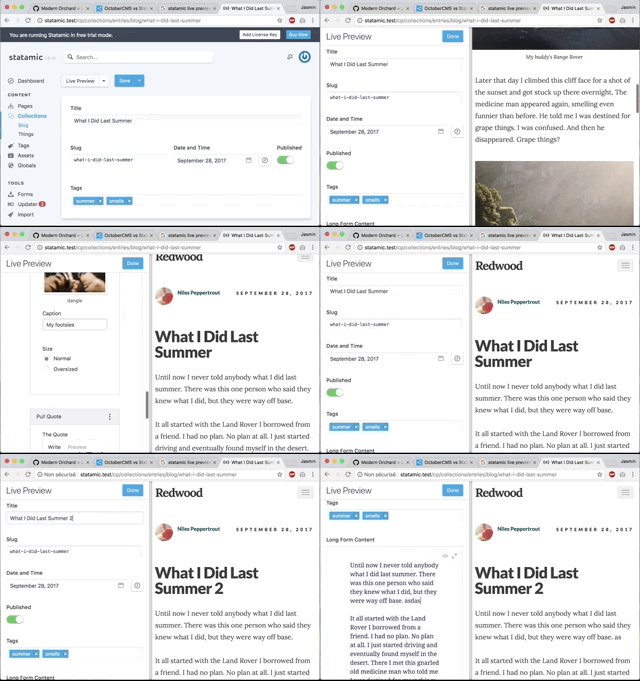
Live Editing using contenteditable attribute on HTML is something that has been tried in 01 but never really made it. There's nothing preventing from creating such tool in Orchard if you guys want to create it but I think the Flow page integrated like showed in the image above should be fine enough for most needs. Remember also that contenteditable requires far more client side integration which can lead to browser compatibility issues that we don't get with a Flow page. I think the flow page is a nice compromise for seeing live content preview. Somehow I prefer it over contenteditable just like I prefer having a touch bar on a Macbook instead of a touch screen ... just less messy to work with.
 Skrypt
on 4 May 2018
Skrypt
on 4 May 2018
Is there an overview of goals or milestones for the Flows module somewhere? It's hard to gauge which functionality to expect in the eventual release without any open discussions or documentation.
Will there be default styling so that text alignment and widget size settings do something out of the box? I understand that you don't want a Bootstrap dependency on the front end but it's weird that all those switches are there under every widget when they have no effect.
Will nested Flows be officially supported? Right now you can put a widget with a FlowPart inside of a Flow and it renders as expected but it breaks TheAgencyTheme's javascript. Putting a content item (or a widget) with a FlowPart in a Bag crashes the front end. Nothing prevents me from doing this, so sometimes it's not very clear what approach I'm expected to use for a certain scenario.
By default, the FlowPart is pretty limited. None of my clients know HTML, so at the very least I have to switch the HTML Field on the HTML Widget to use WYSIWYG. Then it becomes just about as practical as a single BodyPart but with a second set of controls for text-alignment that you can't use. Stacking several blocks of text directly on top of each other inside of the same container isn't particularly useful. I'm much more likely to use a WidgetList, which currently seems like a better Flow to me, so that I can at least edit the whole page. Are there plans to include additional widgets for a slightly richer Flows experience out of the box?
 Lawyerson
on 14 Jun 2018
Lawyerson
on 14 Jun 2018
Created pull request #4106 to support nested drag/drop and row/column within FlowPart
ns8482e
on 27 Aug 2019
Related issues
 Ujinjinjin
·
3Comments
Ujinjinjin
·
3Comments
 deanmarcussen
·
3Comments
Skrypt
·
4Comments
deanmarcussen
·
3Comments
Skrypt
·
4Comments
 khoshroomahdi
·
4Comments
khoshroomahdi
·
4Comments
 sebastienros
·
4Comments
sebastienros
·
4Comments
Most helpful comment
Is there an overview of goals or milestones for the Flows module somewhere? It's hard to gauge which functionality to expect in the eventual release without any open discussions or documentation.
Will there be default styling so that text alignment and widget size settings do something out of the box? I understand that you don't want a Bootstrap dependency on the front end but it's weird that all those switches are there under every widget when they have no effect.
Will nested Flows be officially supported? Right now you can put a widget with a FlowPart inside of a Flow and it renders as expected but it breaks TheAgencyTheme's javascript. Putting a content item (or a widget) with a FlowPart in a Bag crashes the front end. Nothing prevents me from doing this, so sometimes it's not very clear what approach I'm expected to use for a certain scenario.
By default, the FlowPart is pretty limited. None of my clients know HTML, so at the very least I have to switch the HTML Field on the HTML Widget to use WYSIWYG. Then it becomes just about as practical as a single BodyPart but with a second set of controls for text-alignment that you can't use. Stacking several blocks of text directly on top of each other inside of the same container isn't particularly useful. I'm much more likely to use a WidgetList, which currently seems like a better Flow to me, so that I can at least edit the whole page. Are there plans to include additional widgets for a slightly richer Flows experience out of the box?