Orchardcore: Bug with External (Azure AD) authentication redirect
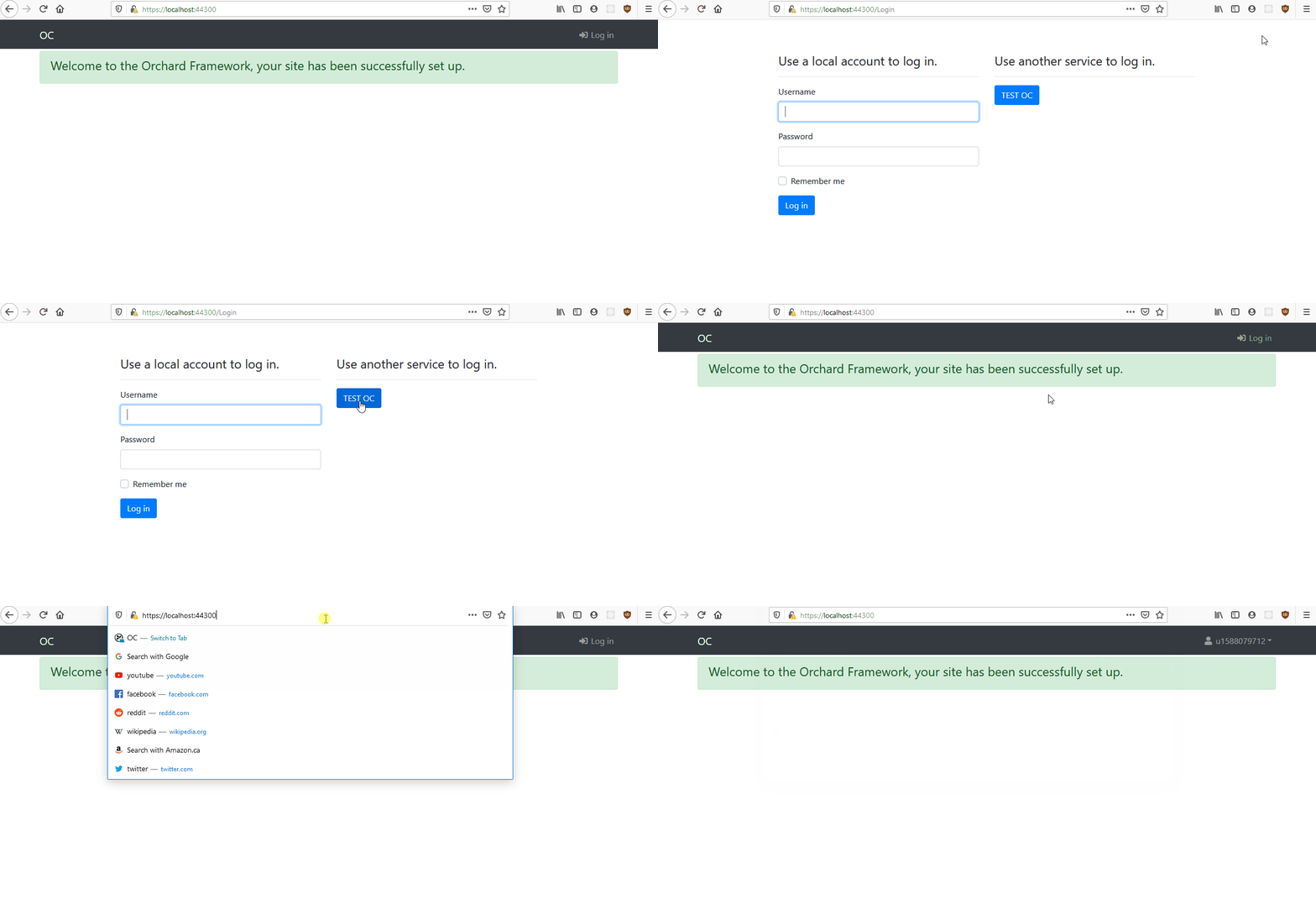
When using an external login provider to login to a site, on the first request (after the login callback) the Page does not reflect the fact that the user is authenticated. Refreshing the page manually works as expected.
I tried stepping through the code and everything looks good.
https://github.com/OrchardCMS/OrchardCore/blob/acee23ef121a09568198ebda164d591ae9f084ed/src/OrchardCore.Modules/OrchardCore.Users/Controllers/AccountController.cs#L387
This line get's called with returnUrl= null which triggers this line https://github.com/OrchardCMS/OrchardCore/blob/acee23ef121a09568198ebda164d591ae9f084ed/src/OrchardCore.Modules/OrchardCore.Users/Controllers/AccountController.cs#L276
But, on the frontend, I still see the Log In button as you can see in the gif below. However, clicking on the URL bar and hitting enter loads the user just fine. The gif below is using Azure AD authentication but we saw the same behavior with Github authentication.
 jptissot
All 6 comments
/cc @MichaelPetrinolis
jptissot
on 28 Apr 2020
I found the culprit... it's the cookie policy.
This should be set to options.Cookie.SameSite = SameSiteMode.None; for all external login providers. Currently, it's only being set for the OpenID module.
jptissot
on 30 Apr 2020
@jptissot you should just be able to call
            services.ConfigureApplicationCookie(options =>
            {
                 options.Cookie.SameSite = SameSiteMode.None;
            }
and modify the options anywhere in your pipeline (after users).
The Microsoft.Authentication feature should be able to do the same
 deanmarcussen
on 30 Apr 2020
deanmarcussen
on 30 Apr 2020
Yeah, fixed in my project by adding this to a module: https://github.com/OrchardCMS/OrchardCore/blob/ebfb9071d98f00c883e75f3132fe88dc618d8c61/src/OrchardCore.Modules/OrchardCore.OpenId/Startup.cs#L76
I will make a PR to fix this in OC. Should we simply revert the change in the user's module or add SameSiteMode.None to all external login providers ? I tested with Github and Azure AD and both are broken, not sure about the others.
jptissot
on 30 Apr 2020
The change to the users module was needed to be able to access the site through http with the google chrome changes, otherwise you can only get in via https.
so I would suggest adding to the external login providers (they all need https anyway I imagine?)
Can you try with ConfigureApplicationCookie instead of the cookie policy middleware. Should work as well
            services.ConfigureApplicationCookie(options =>
            {
              options.Cookie.SameSite = SameSiteMode.None;
            }
It did not work with ConfigureApplicationCookie :(
Edit: It worked after I added a Dependency to the OrchardCore.Users module.
jptissot
on 30 Apr 2020
Related issues
 superluminalK
·
4Comments
deanmarcussen
·
3Comments
superluminalK
·
4Comments
deanmarcussen
·
3Comments
 JanSichula
·
3Comments
JanSichula
·
3Comments
 jeffolmstead
·
4Comments
jeffolmstead
·
4Comments
 khoshroomahdi
·
4Comments
khoshroomahdi
·
4Comments
Most helpful comment
The change to the users module was needed to be able to access the site through http with the google chrome changes, otherwise you can only get in via https.
so I would suggest adding to the external login providers (they all need https anyway I imagine?)
Can you try with
ConfigureApplicationCookieinstead of the cookie policy middleware. Should work as well