Orchardcore: Creating content in a nested workflow fails (`database table is locked`)
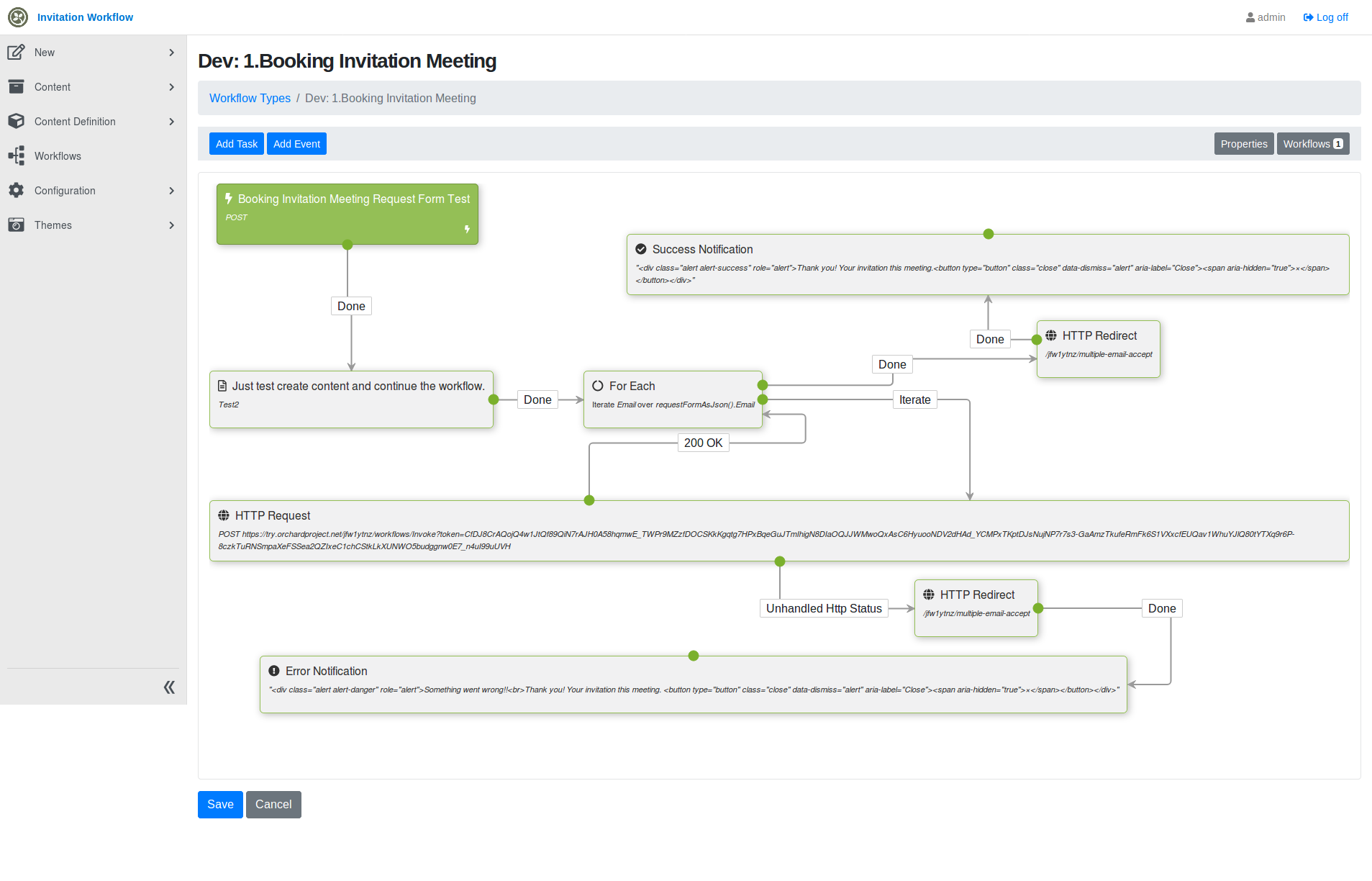
We have a workflow where a convenor can create a meeting slot and invite multiple people to meet.
- An item is created to represent the meeting.
- We iterate invitees and kick off a confirm/decline workflow for each of them.
This blows up due to the _create item_ task. If we remove that task, it works.
Is this supposed to work, are we doing something wrong?
Here's a zip to reproduce the issue:
Exportworkflows.zip
Create item and start a workflow instance per invitee
Here we're creating a placeholder Test2 item, but in reality that will be a meeting-slot item which lists the meeting details and the invitees.
Send email and await response for an invitee
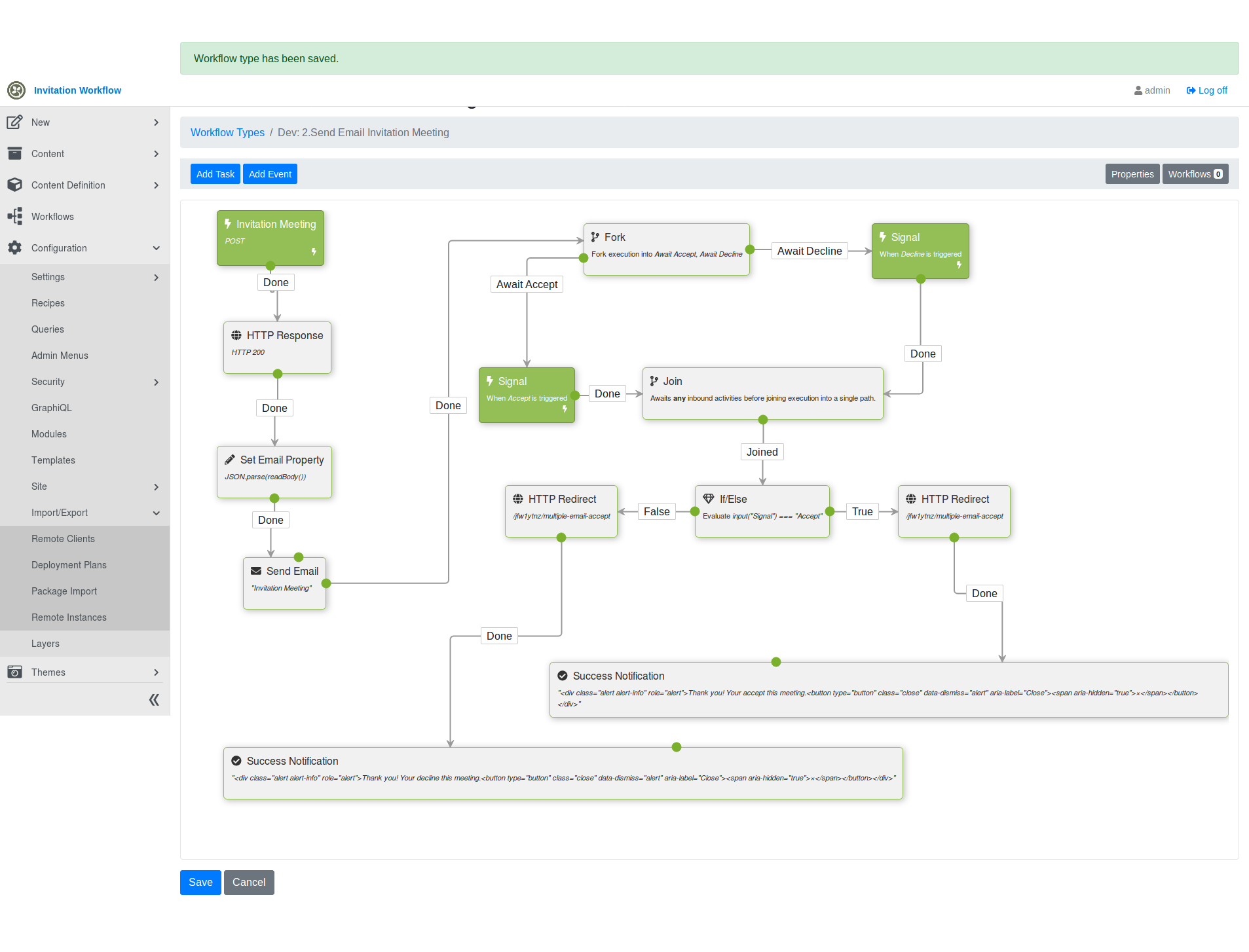
With the attached recipe, we can reproduce this at https://try.orchardproject.net/ , but we can't see a traceback.
Here's a local traceback:
2019-09-11 15:44:03.2032|Default|80000021-0001-ff00-b63f-84710c7967bb||OrchardCore.Workflows.Services.WorkflowStore|ERROR|IWorkflowHandler thrown from OrchardCore.Workflows.Http.Handlers.WorkflowRoutesHandler by SqliteException Microsoft.Data.Sqlite.SqliteException (0x80004005): SQLite Error 6: 'database table is locked'.
   at Microsoft.Data.Sqlite.SqliteException.ThrowExceptionForRC(Int32 rc, sqlite3 db)
   at Microsoft.Data.Sqlite.SqliteCommand.ExecuteReader(CommandBehavior behavior)
   at Microsoft.Data.Sqlite.SqliteCommand.ExecuteScalar()
   at System.Data.Common.DbCommand.ExecuteScalarAsync(CancellationToken cancellationToken)
--- End of stack trace from previous location where exception was thrown ---
   at Dapper.SqlMapper.ExecuteScalarImplAsync[T](IDbConnection cnn, CommandDefinition command) in C:\projects\dapper\Dapper\SqlMapper.Async.cs:line 1217
   at YesSql.Session.SaveEntityAsync(Object entity) in C:\projects\yessql-un1yf\src\YesSql.Core\Session.cs:line 189
   at YesSql.Session.FlushAsync() in C:\projects\yessql-un1yf\src\YesSql.Core\Session.cs:line 621
   at YesSql.Services.DefaultQuery.Query`1.FirstOrDefaultImpl() in C:\projects\yessql-un1yf\src\YesSql.Core\Services\DefaultQuery.cs:line 950
   at OrchardCore.Workflows.Http.Handlers.WorkflowRoutesHandler.UpdateRouteEntriesAsync(WorkflowContext context) in C:\Users\Patchareeya\Documents\Projects\htfn\OrchardCore\src\OrchardCore.Modules\OrchardCore.Workflows\Http\Handlers\WorkflowInstanceRoutesHandler.cs:line 44


   at OrchardCore.Workflows.Http.Handlers.WorkflowRoutesHandler.CreatedAsync(WorkflowCreatedContext context) in C:\Users\Patchareeya\Documents\Projects\htfn\OrchardCore\src\OrchardCore.Modules\OrchardCore.Workflows\Http\Handlers\WorkflowInstanceRoutesHandler.cs:line 27
   at OrchardCore.Modules.InvokeExtensions.InvokeAsync[TEvents](IEnumerable`1 events, Func`2 dispatch, ILogger logger) in C:\Users\Patchareeya\Documents\Projects\htfn\OrchardCore\src\OrchardCore\OrchardCore.Abstractions\Modules\Extensions\InvokeExtensions.cs:line 78    at Microsoft.Data.Sqlite.SqliteException.ThrowExceptionForRC(Int32 rc, sqlite3 db)
   at Microsoft.Data.Sqlite.SqliteCommand.ExecuteReader(CommandBehavior behavior)
   at Microsoft.Data.Sqlite.SqliteCommand.ExecuteScalar()
   at System.Data.Common.DbCommand.ExecuteScalarAsync(CancellationToken cancellationToken)
--- End of stack trace from previous location where exception was thrown ---
   at Dapper.SqlMapper.ExecuteScalarImplAsync[T](IDbConnection cnn, CommandDefinition command) in C:\projects\dapper\Dapper\SqlMapper.Async.cs:line 1217
   at YesSql.Session.SaveEntityAsync(Object entity) in C:\projects\yessql-un1yf\src\YesSql.Core\Session.cs:line 189
   at YesSql.Session.FlushAsync() in C:\projects\yessql-un1yf\src\YesSql.Core\Session.cs:line 621
   at YesSql.Services.DefaultQuery.Query`1.FirstOrDefaultImpl() in C:\projects\yessql-un1yf\src\YesSql.Core\Services\DefaultQuery.cs:line 950
   at OrchardCore.Workflows.Http.Handlers.WorkflowRoutesHandler.UpdateRouteEntriesAsync(WorkflowContext context) in C:\Users\Patchareeya\Documents\Projects\htfn\OrchardCore\src\OrchardCore.Modules\OrchardCore.Workflows\Http\Handlers\WorkflowInstanceRoutesHandler.cs:line 44
   at OrchardCore.Workflows.Http.Handlers.WorkflowRoutesHandler.CreatedAsync(WorkflowCreatedContext context) in C:\Users\Patchareeya\Documents\Projects\htfn\OrchardCore\src\OrchardCore.Modules\OrchardCore.Workflows\Http\Handlers\WorkflowInstanceRoutesHandler.cs:line 27
   at OrchardCore.Modules.InvokeExtensions.InvokeAsync[TEvents](IEnumerable`1 events, Func`2 dispatch, ILogger logger) in C:\Users\Patchareeya\Documents\Projects\htfn\OrchardCore\src\OrchardCore\OrchardCore.Abstractions\Modules\Extensions\InvokeExtensions.cs:line 78
2019-09-11 15:44:46.9944|Default|0HLPMGN2542Q2||OrchardCore.Modules.ModularBackgroundService|ERROR|Error while processing background task 'OrchardCore.Workflows.Timers.TimerBackgroundTask' on tenant 'Default'. System.NullReferenceException: Object reference not set to an instance of an object.
   at OrchardCore.Workflows.Services.WorkflowManager.ResumeWorkflowAsync(Workflow workflow, BlockingActivity awaitingActivity, IDictionary`2 input) in C:\Users\Patchareeya\Documents\Projects\htfn\OrchardCore\src\OrchardCore.Modules\OrchardCore.Workflows\Services\WorkflowManager.cs:line 184
   at OrchardCore.Workflows.Services.WorkflowManager.TriggerEventAsync(String name, IDictionary`2 input, String correlationId) in C:\Users\Patchareeya\Documents\Projects\htfn\OrchardCore\src\OrchardCore.Modules\OrchardCore.Workflows\Services\WorkflowManager.cs:line 157
   at OrchardCore.Modules.ModularBackgroundService.<>c__DisplayClass12_2.<<RunAsync>b__1>d.MoveNext() in C:\Users\Patchareeya\Documents\Projects\htfn\OrchardCore\src\OrchardCore\OrchardCore\Modules\ModularBackgroundService.cs:line 128    at OrchardCore.Workflows.Services.WorkflowManager.ResumeWorkflowAsync(Workflow workflow, BlockingActivity awaitingActivity, IDictionary`2 input) in C:\Users\Patchareeya\Documents\Projects\htfn\OrchardCore\src\OrchardCore.Modules\OrchardCore.Workflows\Services\WorkflowManager.cs:line 184
   at OrchardCore.Workflows.Services.WorkflowManager.TriggerEventAsync(String name, IDictionary`2 input, String correlationId) in C:\Users\Patchareeya\Documents\Projects\htfn\OrchardCore\src\OrchardCore.Modules\OrchardCore.Workflows\Services\WorkflowManager.cs:line 157
   at OrchardCore.Modules.ModularBackgroundService.<>c__DisplayClass12_2.<<RunAsync>b__1>d.MoveNext() in C:\Users\Patchareeya\Documents\Projects\htfn\OrchardCore\src\OrchardCore\OrchardCore\Modules\ModularBackgroundService.cs:line 128
 jean
jean
All 21 comments
@Patchareeya :eyes:
jean
on 12 Sep 2019
Hmm, seems that when you create an item and then if the workflow is not completed, it fails to persist its current state (through the WorkflowRoutesHandler : WorkflowHandlerBase).
Maybe in CreateContentTask we would need to use an isolated transaction, e.g by creating a new child scope (with its own session), so that this transaction is committed before continuing the workflow.
 jtkech
on 13 Sep 2019
jtkech
on 13 Sep 2019
The workflows should commit the transaction even if it's not complete. It should just be a single transaction, the whole request, like any other one.
 sebastienros
on 13 Sep 2019
sebastienros
on 13 Sep 2019
Yes, i think this is already the case as the worflow executes in a scope whose session will be committed automatically and so on.
But here, regarding the trace, it seems that, when a content item has been created and marked to be saved (_session.Save()), then it fails to do the following.
_session.Query<WorkflowType, WorkflowTypeIndex>(x => x.WorkflowTypeId == workflowTypeId).FirstOrDefaultAsync();
Probably two scopes are created with write access, but sqlite doesn't handle that.
sebastienros
on 13 Sep 2019
At the same time we have fixed some issues in yessql, and try.orchardproject.net is using an old version of OC, correct @agriffard ?
sebastienros
on 13 Sep 2019
I also saw in the 2nd trace that ModularBackgroundService is involved.
Do you use any workflow with a timer event?
If so, could you try to disable this workflow and see if you still have the issue?
jtkech
on 13 Sep 2019
Is try.orchardproject.net using sqlite too?
Do you use any workflow with a timer event?
No (just what is in the attached recipe), but the confirm/decline workflow waits for a signal to be triggered (via clicking a link in the email).
Could it be that which is _resuming_ the workflow?
jean
on 13 Sep 2019
@jtkech I have used timer event and remove from workflow but timer event still write error log.
 Patchareeya
on 13 Sep 2019
Patchareeya
on 13 Sep 2019
Is try.orchardproject.net using sqlite too?
Not sure but i think so
I have used timer event and remove from workflow but timer event still write error log.
So, maybe you still have in the database a workflow type with a timer activity or an old related pending instance with a blocking activity. As i remember, through the admin we can remove such instances, but not sure if the related workflow type doesn't exist anymore.
As a 1st test, could you disable the OrchardCore.Workflows.Timers feature through the admin.
jtkech
on 13 Sep 2019
could you disable the OrchardCore.Workflows.Timers feature through the admin.
I disable this feature already.
Currently, I using PostgreSQL database instead Sqlite. This workflow's work!
Patchareeya
on 13 Sep 2019
So, it seems that you can repro locally, can you try with the last dev. Note: There is one public version on myget that has been pushed just before we migrated to 3.0.
As @sebastienros said some issues have been fixed in yessql, e.g, as i remember, about session / transaction pool where an instance may not be cleaned correctly and then not ready to be re-used. E.g on an exception the underlying transaction was not correctly closed.
jtkech
on 14 Sep 2019
Currently, I tested with dev branch (Commit hash: c110128693ae52cd5a6864993df64f7f0db071b2
) and I found this error:
2019-09-27 16:38:46.9033|Default|80000033-0007-ff00-b63f-84710c7967bb||OrchardCore.Workflows.Services.WorkflowManager|ERROR|An unhandled error occurred while executing an activity. Workflow ID: '14'. Activity: '4tqv07dxwdfb6t7trmsak62hne', 'SetPropertyTask'. Putting the workflow in the faulted state. System.InvalidOperationException: Synchronous operations are disallowed. Call ReadAsync or set AllowSynchronousIO to true instead.
   at Jint.Runtime.ExceptionHelper.ThrowMeaningfulException(Engine engine, TargetInvocationException exception)
   at Jint.Runtime.Interop.DelegateWrapper.Call(JsValue thisObject, JsValue[] jsArguments)
   at Jint.Runtime.Interpreter.Expressions.JintCallExpression.EvaluateInternal()
   at Jint.Runtime.Interpreter.Expressions.JintExpression.GetValue()
   at Jint.Runtime.Interpreter.Expressions.JintCallExpression.EvaluateInternal()
   at Jint.Runtime.Interpreter.Expressions.JintExpression.GetValue()
   at Jint.Runtime.Interpreter.Statements.JintExpressionStatement.ExecuteInternal()
   at Jint.Runtime.Interpreter.JintStatementList.Execute()
   at Jint.Engine.Execute(Program program)
   at OrchardCore.Scripting.JavaScript.JavaScriptEngine.Evaluate(IScriptingScope scope, String script) in C:\Users\Patchareeya\Documents\Projects\orchardcore\src\OrchardCore\OrchardCore.Scripting.JavaScript\JavaScriptEngine.cs:line 53
   at OrchardCore.Scripting.DefaultScriptingManager.Evaluate(String directive, IFileProvider fileProvider, String basePath, IEnumerable`1 scopedMethodProviders) in C:\Users\Patchareeya\Documents\Projects\orchardcore\src\OrchardCore\OrchardCore.Infrastructure\Scripting\DefaultScriptingManager.cs:line 45
   at OrchardCore.Workflows.Evaluators.JavaScriptWorkflowScriptEvaluator.EvaluateAsync[T](WorkflowExpression`1 expression, WorkflowExecutionContext workflowContext, IGlobalMethodProvider[] scopedMethodProviders) in C:\Users\Patchareeya\Documents\Projects\orchardcore\src\OrchardCore.Modules\OrchardCore.Workflows\Scripting\JavaScriptWorkflowScriptEvaluator.cs:line 49
   at OrchardCore.Workflows.Activities.SetPropertyTask.ExecuteAsync(WorkflowExecutionContext workflowContext, ActivityContext activityContext) in C:\Users\Patchareeya\Documents\Projects\orchardcore\src\OrchardCore.Modules\OrchardCore.Workflows\Activities\SetPropertyTask.cs:line 45
   at OrchardCore.Workflows.Services.WorkflowManager.ExecuteWorkflowAsync(WorkflowExecutionContext workflowContext, ActivityRecord activity) in C:\Users\Patchareeya\Documents\Projects\orchardcore\src\OrchardCore.Modules\OrchardCore.Workflows\Services\WorkflowManager.cs:line 312    at Jint.Runtime.ExceptionHelper.ThrowMeaningfulException(Engine engine, TargetInvocationException exception)
   at Jint.Runtime.Interop.DelegateWrapper.Call(JsValue thisObject, JsValue[] jsArguments)
   at Jint.Runtime.Interpreter.Expressions.JintCallExpression.EvaluateInternal()
   at Jint.Runtime.Interpreter.Expressions.JintExpression.GetValue()
   at Jint.Runtime.Interpreter.Expressions.JintCallExpression.EvaluateInternal()
   at Jint.Runtime.Interpreter.Expressions.JintExpression.GetValue()
   at Jint.Runtime.Interpreter.Statements.JintExpressionStatement.ExecuteInternal()
   at Jint.Runtime.Interpreter.JintStatementList.Execute()
   at Jint.Engine.Execute(Program program)
   at OrchardCore.Scripting.JavaScript.JavaScriptEngine.Evaluate(IScriptingScope scope, String script) in C:\Users\Patchareeya\Documents\Projects\orchardcore\src\OrchardCore\OrchardCore.Scripting.JavaScript\JavaScriptEngine.cs:line 53
   at OrchardCore.Scripting.DefaultScriptingManager.Evaluate(String directive, IFileProvider fileProvider, String basePath, IEnumerable`1 scopedMethodProviders) in C:\Users\Patchareeya\Documents\Projects\orchardcore\src\OrchardCore\OrchardCore.Infrastructure\Scripting\DefaultScriptingManager.cs:line 45
   at OrchardCore.Workflows.Evaluators.JavaScriptWorkflowScriptEvaluator.EvaluateAsync[T](WorkflowExpression`1 expression, WorkflowExecutionContext workflowContext, IGlobalMethodProvider[] scopedMethodProviders) in C:\Users\Patchareeya\Documents\Projects\orchardcore\src\OrchardCore.Modules\OrchardCore.Workflows\Scripting\JavaScriptWorkflowScriptEvaluator.cs:line 49
   at OrchardCore.Workflows.Activities.SetPropertyTask.ExecuteAsync(WorkflowExecutionContext workflowContext, ActivityContext activityContext) in C:\Users\Patchareeya\Documents\Projects\orchardcore\src\OrchardCore.Modules\OrchardCore.Workflows\Activities\SetPropertyTask.cs:line 45
   at OrchardCore.Workflows.Services.WorkflowManager.ExecuteWorkflowAsync(WorkflowExecutionContext workflowContext, ActivityRecord activity) in C:\Users\Patchareeya\Documents\Projects\orchardcore\src\OrchardCore.Modules\OrchardCore.Workflows\Services\WorkflowManager.cs:line 312
2019-09-27 16:38:47.1014|Default|80000060-0004-ff00-b63f-84710c7967bb||OrchardCore.Workflows.Services.WorkflowManager|ERROR|An unhandled error occurred while executing an activity. Workflow ID: '13'. Activity: '4r5980jy1fty346fkhxjqnttcb', 'HttpRequestTask'. Putting the workflow in the faulted state. System.Threading.Tasks.TaskCanceledException: The operation was canceled.
 ---> System.IO.IOException: Unable to read data from the transport connection: The I/O operation has been aborted because of either a thread exit or an application request..
 ---> System.Net.Sockets.SocketException (995): The I/O operation has been aborted because of either a thread exit or an application request.
   --- End of inner exception stack trace ---
   at System.Net.Sockets.Socket.AwaitableSocketAsyncEventArgs.ThrowException(SocketError error, CancellationToken cancellationToken)
   at System.Net.Sockets.Socket.AwaitableSocketAsyncEventArgs.GetResult(Int16 token)
   at System.Net.Security.SslStream.<FillBufferAsync>g__InternalFillBufferAsync|215_0[TReadAdapter](TReadAdapter adap, ValueTask`1 task, Int32 min, Int32 initial)
   at System.Net.Security.SslStream.ReadAsyncInternal[TReadAdapter](TReadAdapter adapter, Memory`1 buffer)
   at System.Net.Http.HttpConnection.FillAsync()
   at System.Net.Http.HttpConnection.ReadNextResponseHeaderLineAsync(Boolean foldedHeadersAllowed)
   at System.Net.Http.HttpConnection.SendAsyncCore(HttpRequestMessage request, CancellationToken cancellationToken)
   --- End of inner exception stack trace ---
   at System.Net.Http.HttpConnection.SendAsyncCore(HttpRequestMessage request, CancellationToken cancellationToken)
   at System.Net.Http.HttpConnectionPool.SendWithNtConnectionAuthAsync(HttpConnection connection, HttpRequestMessage request, Boolean doRequestAuth, CancellationToken cancellationToken)
   at System.Net.Http.HttpConnectionPool.SendWithRetryAsync(HttpRequestMessage request, Boolean doRequestAuth, CancellationToken cancellationToken)
   at System.Net.Http.RedirectHandler.SendAsync(HttpRequestMessage request, CancellationToken cancellationToken)
   at System.Net.Http.DiagnosticsHandler.SendAsync(HttpRequestMessage request, CancellationToken cancellationToken)
   at System.Net.Http.HttpClient.FinishSendAsyncBuffered(Task`1 sendTask, HttpRequestMessage request, CancellationTokenSource cts, Boolean disposeCts)
   at OrchardCore.Workflows.Http.Activities.HttpRequestTask.ExecuteAsync(WorkflowExecutionContext workflowContext, ActivityContext activityContext) in C:\Users\Patchareeya\Documents\Projects\orchardcore\src\OrchardCore.Modules\OrchardCore.Workflows\Http\Activities\HttpRequestTask.cs:line 180
   at [OrchardCore.Workflows.Services.WorkflowManager.ExecuteWorkflowAsync(WorkflowExecutionContext](url) workflowContext, ActivityRecord activity) in C:\Users\Patchareeya\Documents\Projects\orchardcore\src\OrchardCore.Modules\OrchardCore.Workflows\Services\WorkflowManager.cs:line 312    at System.Net.Http.HttpConnection.SendAsyncCore(HttpRequestMessage request, CancellationToken cancellationToken)
   at System.Net.Http.HttpConnectionPool.SendWithNtConnectionAuthAsync(HttpConnection connection, HttpRequestMessage request, Boolean doRequestAuth, CancellationToken cancellationToken)
   at System.Net.Http.HttpConnectionPool.SendWithRetryAsync(HttpRequestMessage request, Boolean doRequestAuth, CancellationToken cancellationToken)
   at System.Net.Http.RedirectHandler.SendAsync(HttpRequestMessage request, CancellationToken cancellationToken)
   at System.Net.Http.DiagnosticsHandler.SendAsync(HttpRequestMessage request, CancellationToken cancellationToken)
   at System.Net.Http.HttpClient.FinishSendAsyncBuffered(Task`1 sendTask, HttpRequestMessage request, CancellationTokenSource cts, Boolean disposeCts)
   at OrchardCore.Workflows.Http.Activities.HttpRequestTask.ExecuteAsync(WorkflowExecutionContext workflowContext, ActivityContext activityContext) in C:\Users\Patchareeya\Documents\Projects\orchardcore\src\OrchardCore.Modules\OrchardCore.Workflows\Http\Activities\HttpRequestTask.cs:line 180
   at OrchardCore.Workflows.Services.WorkflowManager.ExecuteWorkflowAsync(WorkflowExecutionContext workflowContext, ActivityRecord activity) in C:\Users\Patchareeya\Documents\Projects\orchardcore\src\OrchardCore.Modules\OrchardCore.Workflows\Services\WorkflowManager.cs:line 312

Patchareeya
on 27 Sep 2019
Good catch, we can't read the request body synchronously anymore, unless by setting an option, we changed it in some places e.g for GraphQL, but i missed this one, i will do a PR to fix it.
jtkech
on 27 Sep 2019
Do a global search for ReadToEnd()
sebastienros
on 27 Sep 2019
Okay
jtkech
on 27 Sep 2019
Now I tested this workflow is still raise error SQLite Error 6: 'database table is locked'.
and this error https://github.com/OrchardCMS/OrchardCore/issues/4255#issuecomment-535871916 not found any more.
Patchareeya
on 7 Oct 2019
Okay, i could repro the same exception by using your recipe and i could fix it.
Here the parent worflow creates an item in a given scope and, before this scope ends and commit the session, it does an HttpRequestTask that triggers a nested workflow that also create an item (here it is just when it ends and save its finished workflow instance). The problem is that the nested workflow, to be able to save its finished instance, it is waiting for the parent scope to finish, but the parent workflow is waiting for the nested workflow to finish to continue the execution flow, and so on.
With SQLite we can create items in 2 different scopes and, when it is done at the same time, a given scope 2 wait for the other scope 1 to finish. But if for another reason the scope 1 also wait for the scope 2 to finish, there is a dead lock. Here the other reason is a blocking activity.
That's why, in a given request scope, a nested scope can't create an item if its parent scope already did it, here the other reason is the code execution flow. When in 2 different request scopes that's ok, but here the other reason is the execution flow of the workflow. So, in both case, the parent needs to create its item by using another child scope.
First, a quick workaround in your case is to check, in the nested workflow, the
Delete successfully completed workflowsso that the nested workflow doesn't create an item to save its finished instance. But if in the nested worflow you want to create another item you would have the same issue.But i found a fix, as said in an above comment
Maybe in CreateContentTask we would need to use an isolated transaction, e.g by creating a new child scope (with its own session), so that this transaction is committed before continuing the workflow.
This is what i tried in
CreateContentTask.ExecuteAsync()and that fixed it.In place of using the
ContentManagerof the current scope.// Here we use the `ContentManager` resolved from the current scope await ContentManager.CreateAsync(contentItem, versionOptions);I created a child scope from which i resolved and used another instance so that when the child
scope is released its session is commited. Here my testing codeusing OrchardCore.Environment.Shell;
using OrchardCore.Environment.Shell.Scope;
...
...
var shellHost = ShellScope.Services.GetRequiredService();
var shellScope = await shellHost.GetScopeAsync(ShellScope.Context.Settings);await shellScope.UsingAsync(async scope =>
{
var contentManager = shellScope.ServiceProvider.GetRequiredService(); // Here we use a content manager instance resolved from a child scope. await contentManager.CreateAsync(contentItem, versionOptions);});
Another workaround is to create another nested workflow to create the item that would be triggered by the parent by another http request activity. Here the idea is that the parent doesn't create any item (unless at the end to save its finished instance), and all items are created in nested workflows but that are non nested from each other.
So, e.g with SQLite, seems that all activities that mutate the database would need to do their operations in an isolated child scope. As i tried here and that seems to fix the issue
jtkech
on 14 Oct 2019
As @sebastienros said to me, a simpler solution is to do explicitly a session / transaction commit in place of creating a new scope. But in both solutions we create multiple transactions, so if one transaction fails the other ones are not cancelled.
So we will create a CommitTransactionTask activity that you may use e.g after writing to the database and before triggering another workflow that will also write to the database but through another transaction. Or that you may not use if the nested workflow will execute in the same scope and transaction.
jtkech
on 15 Oct 2019
@jtkech this sounds great .. so we can choose whether the entire workflow commits as a single transaction, or use CommitTransactionTasks to commit at any stage during a workflow?
jean
on 17 Oct 2019
Yes exactly and you can use it more than once.
But better to not use it when it is possible by reorganizing the flow, so that the related scoped session doesn't have to create new transactions. Hmm, but if after a only one commit task you don't do any other database operation, there is no problem.
jtkech
on 18 Oct 2019
Related issues
 kevinchalet
·
4Comments
kevinchalet
·
4Comments
 aghili371
·
3Comments
aghili371
·
3Comments
 webmedia1012
·
4Comments
webmedia1012
·
4Comments
 jeffolmstead
·
4Comments
jeffolmstead
·
4Comments
 chillibug
·
4Comments
chillibug
·
4Comments
Most helpful comment
Okay, i could repro the same exception by using your recipe and i could fix it.
Here the parent worflow creates an item in a given scope and, before this scope ends and commit the session, it does an
HttpRequestTaskthat triggers a nested workflow that also create an item (here it is just when it ends and save its finished workflow instance). The problem is that the nested workflow, to be able to save its finished instance, it is waiting for the parent scope to finish, but the parent workflow is waiting for the nested workflow to finish to continue the execution flow, and so on.With SQLite we can create items in 2 different scopes and, when it is done at the same time, a given scope 2 wait for the other scope 1 to finish. But if for another reason the scope 1 also wait for the scope 2 to finish, there is a dead lock. Here the other reason is a blocking activity.
That's why, in a given request scope, a nested scope can't create an item if its parent scope already did it, here the other reason is the code execution flow. When in 2 different request scopes that's ok, but here the other reason is the execution flow of the workflow. So, in both case, the parent needs to create its item by using another child scope.
First, a quick workaround in your case is to check, in the nested workflow, the
Delete successfully completed workflowsso that the nested workflow doesn't create an item to save its finished instance. But if in the nested worflow you want to create another item you would have the same issue.But i found a fix, as said in an above comment
This is what i tried in
CreateContentTask.ExecuteAsync()and that fixed it.In place of using the
ContentManagerof the current scope.I created a child scope from which i resolved and used another instance so that when the child
scope is released its session is commited. Here my testing code
using OrchardCore.Environment.Shell;();
using OrchardCore.Environment.Shell.Scope;
...
...
var shellHost = ShellScope.Services.GetRequiredService
var shellScope = await shellHost.GetScopeAsync(ShellScope.Context.Settings);
await shellScope.UsingAsync(async scope =>();
{
var contentManager = shellScope.ServiceProvider.GetRequiredService
});
Another workaround is to create another nested workflow to create the item that would be triggered by the parent by another http request activity. Here the idea is that the parent doesn't create any item (unless at the end to save its finished instance), and all items are created in nested workflows but that are non nested from each other.
So, e.g with SQLite, seems that all activities that mutate the database would need to do their operations in an isolated child scope. As i tried here and that seems to fix the issue