Orchardcore: Issue with image liquid filter in paragraph widget
i add an image in the paragraph and it doesn't render the image tag code.
in editor :
مهدي مهدوي كيا در سال ٢٠١٤  ميلادي "آكادمي فوتبال كيا" را در تهران تاسيس كرد.

{{ "FCKIA/News/U13CUP-2019-3.jpg" | asset_url | img_tag }}
in view:
مهدي مهدوي كيا در سال ٢٠١٤  ميلادي "آكادمي فوتبال كيا" را در تهران تاسيس كرد.

{{ "FCKIA/News/U۱۳CUP-۲۰۱۹-۳.jpg" | asset_url | img_tag }}
I'm using this for rendering the page:
  <div class="container">
      {{ Model.Content | shape_render }}
  </div>
 aghili371
All 13 comments
What file did you override? It matters because Model.Content can mean different things based on the template name.
 sebastienros
on 6 May 2019
sebastienros
on 6 May 2019
i have created new content type and then create Content-pageContainer.liquid in my theme.
aghili371
on 7 May 2019
@sebastienros i tested with an image widget, it renders but the image inside paragraf widget doesn't render.

aghili371
on 11 May 2019
I will try to define some repro steps, but please give us the correct ones if I am wrong:
- Create a new Page content item
- Add a Paragraph widget
- And an image tag in the paragraph widget
- Render the page
Expected: the image should be rendered
sebastienros
on 16 May 2019
yes, that's it,
to be sure i tested by add new page in agency receipt. and it doesn't render the image which added in paragraph weget
aghili371
on 16 May 2019
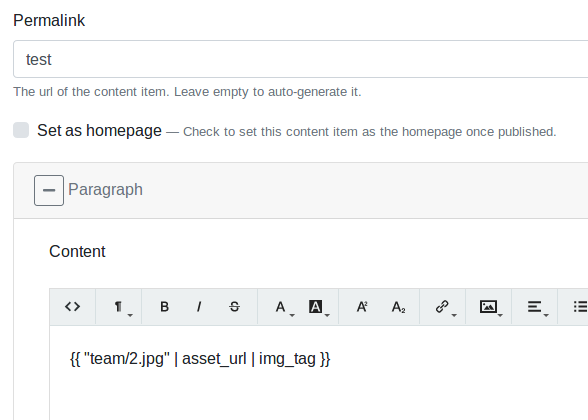
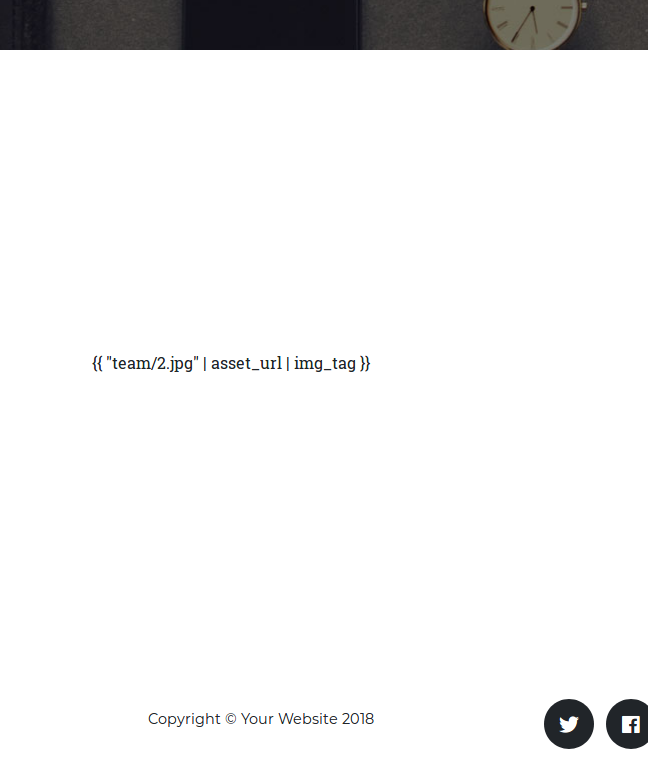
I'm seeing this behaviour on try.orchardproject.net, e.g. https://try.orchardproject.net/sv0er1sm/test
I'm following the repro steps above.
 jean
on 17 Jun 2019
jean
on 17 Jun 2019
so the issue here is that the blog and agency theme widget views display the html field's value rather than the shape that has been rendered by the driver
<article class="{{ Model.Classes | join: " " }}">
    {{ Model.ContentItem.Content.Paragraph.Content.Html | raw }}
</article>
if the templates are changed to
<article class="{{ Model.Classes | join: " " }}">
    {{ Model.Content | shape_render }}
</article>
The paragraph widget and others have then rendered the liquid values inside them.
But then you get the wrapper div from the HtmlField, so the output becomes more like
<article class="{{ Model.Classes | join: " " }}">
    <div class="html-field-simplified">
       <the-value-of-the-html-field-with-liquid-media-filter-rendered-correctly/>
    </div>
</article>
Unless maybe there is another way to have liquid render a field value inside a liquid template, which would be ideal?
 deanmarcussen
on 18 Jun 2019
deanmarcussen
on 18 Jun 2019
We need a liquid filter to render liquid "from a view". The "from a view" is important as it needs to inject some custom services that are only available from views.
@jtkech can you do this?
sebastienros
on 18 Jun 2019
Kind of like the | include filter
 Skrypt
on 18 Jun 2019
Skrypt
on 18 Jun 2019
Okay, i will look at it soon.
 jtkech
on 18 Jun 2019
jtkech
on 18 Jun 2019
So, in #3851 i did a liquid filter to render a liquid string from a liquid view.
E.g in
Content-Page.liquidif the Page content type has a text field nameText1.{{ Model.ContentItem.Content.Page.Text1.Text | liquid }}
Depending on what your are doing, you can also pass a model through the 1st parameter.
{{ Model.ContentItem.Content.Page.Text1.Text | liquid: Model.Content["Page-Text1"] }}
E.g in
Widget-Paragraph.liquid.{{ Model.ContentItem.Content.Paragraph.Content.Html | liquid }}
jtkech
on 25 Jun 2019
Could we reopen this?
Just to update the Widget templates in TheBlog and Agency theme to use the new liquid filter
deanmarcussen
on 8 Jul 2019
Open a different issue / PR for this.
Skrypt
on 8 Jul 2019
Related issues
 dodyg
·
33Comments
dodyg
·
33Comments
 agriffard
·
34Comments
agriffard
·
34Comments
 infofromca
·
30Comments
dodyg
·
76Comments
agriffard
·
37Comments
infofromca
·
30Comments
dodyg
·
76Comments
agriffard
·
37Comments
Most helpful comment
I will try to define some repro steps, but please give us the correct ones if I am wrong:
Expected: the image should be rendered