Orchardcore: Implementation notes for decoupled CMS
I am going to write a running commentary and notes for a decoupled CMS website implementation so it can be a reference for official documentation/guide.
I am using
<PackageReference Include="OrchardCore.Application.Cms.Targets" Version="1.0.0-beta3-71077" />
The website I am building contains:
- Home Page
- A blog
- A contact us form
- A client listing page
- A generic single page
I am not using any themes in this decoupled CMS implementation because it's not really obvious how to use it or whether it is beneficial at all.
I prefer the decoupled CMS approach at this moment because as a developer, using the traditional approach requires higher learning curve than using decoupled approach.
There are things like Zone, Placement or whatnot that are simply not obvious and I assume necessary when using traditional approach. Using decoupled CMS, I just need to worry about getting the content and I can put them exactly where I want.
 dodyg
dodyg
All 76 comments
It's important to inherit @inherits OrchardCore.DisplayManagement.Razor.RazorPage<TModel> in all your cshtml shape templates.
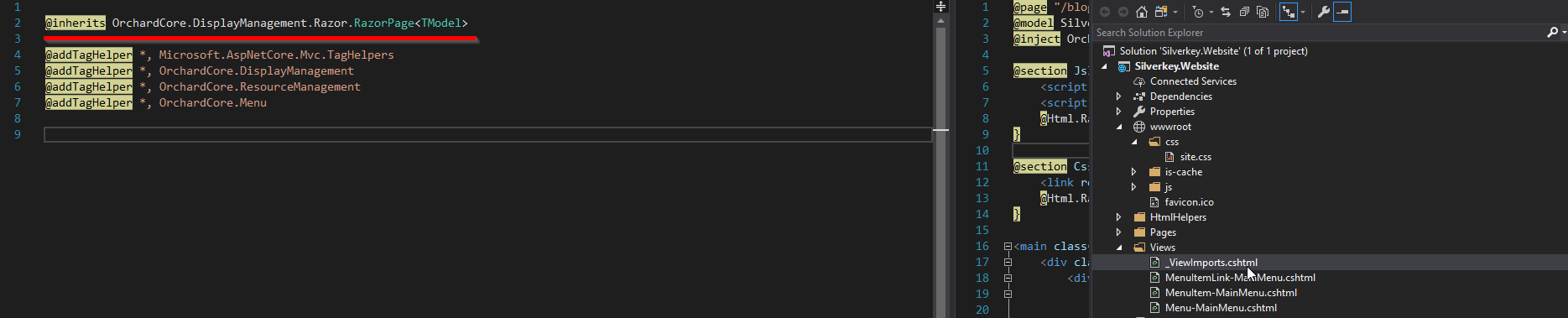
Note: I am not sure whether the CMS will pick up the shape templates anywhere or it has to be under /Views.
dodyg
on 1 May 2019
The concept of Shape and Shape Templates needs better discussion in the current documentation. All the shape discussion is based on Orchard Core 1.0 documentation.
dodyg
on 1 May 2019
Do not precompile your Razor otherwise your Shape templates won't work
This is how to prevent Razor precompilation
  <PropertyGroup>
    <TargetFramework>netcoreapp2.2</TargetFramework>
    <AspNetCoreHostingModel>InProcess</AspNetCoreHostingModel>
    <RazorCompileOnPublish>false</RazorCompileOnPublish>
  </PropertyGroup>
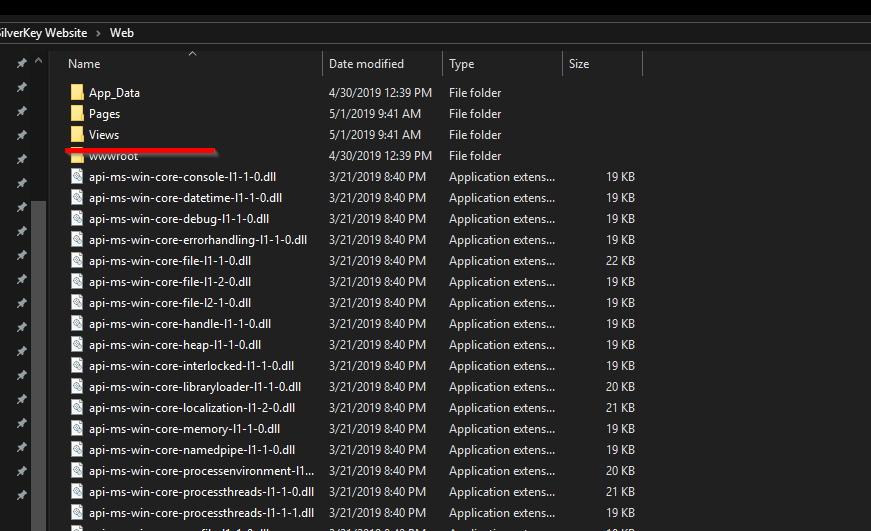
The Views folder contains the Shapes templates. If you precompile your Razor views, this 'Views' folder won't be copied over and your Shapes rendering customization won't work.
Example
When Shape templates are available

When Shape templates are missing because the Views folder isn't at the published folder

dodyg
on 1 May 2019
SQL Queries module is kinda useless in comparison to Lucene Queries module because the thing that you can sort and filter in SQL Queries is very limited. You can't for example filter/sort by your Content Types field in SQL Queries. That just makes it a deal breaker. Lucene Queries doesn't have this limitation.
dodyg
on 1 May 2019
All you need is love and
private readonly OrchardCore.IOrchardHelper _helper;
private readonly OrchardCore.Queries.IQueryManager _queryManager;
or @inject them at your views.
These two are pretty much all you need to implement decoupled CMS AFAIK.
dodyg
on 1 May 2019
Get by Alias
await _helper.GetContentItemByAliasAsync("alias:blog");
Get by Slug
await _helper.GetContentItemByAliasAsync("slug:blog/my-awesome-content");
Taxonomy module sounds cool but I have no idea how to use it from the Admin or how it relates to content.
OK this article is really useful: https://www.davidhayden.me/blog/taxonomies-in-orchard-core-cms
dodyg
on 1 May 2019
I wish there's an option to modify the /admin path for OrchardCore admin UI.
dodyg
on 1 May 2019
Admin Menu should be enabled by default in an empty installation. It's super useful and it's not obvious for people implementing OrchardCore for the first time.
dodyg
on 1 May 2019
Content Types and Content Parts need discussions at the documentation. Right now people have to rely on Orchard 1 documentation.
This whole Orchard Core basic concepts from v1 need to be migrated and updated.
dodyg
on 1 May 2019
I still can't find a way how to obtain the site name and display it in Razor page.
dodyg
on 1 May 2019
@inject OrchardCore.Settings.ISiteService SiteService
string siteName = (await SiteService.GetSiteSettingsAsync()).SiteName;
 agriffard
on 1 May 2019
agriffard
on 1 May 2019
It would be super nice if there's a version of _helper.GetContentItemByAliasAsync; that takes multiple aliases.
dodyg
on 1 May 2019
Who would have thought that the humble TextField has awesome list of editors!

dodyg
on 1 May 2019
@agriffard how does one load Widget in decoupled CMS? Just this _helper.GetContentItemByIdAsync?
dodyg
on 1 May 2019
Once some keys concepts are understood, developing decoupled CMS with OrchardCore is a very pleasant experience.
dodyg
on 1 May 2019
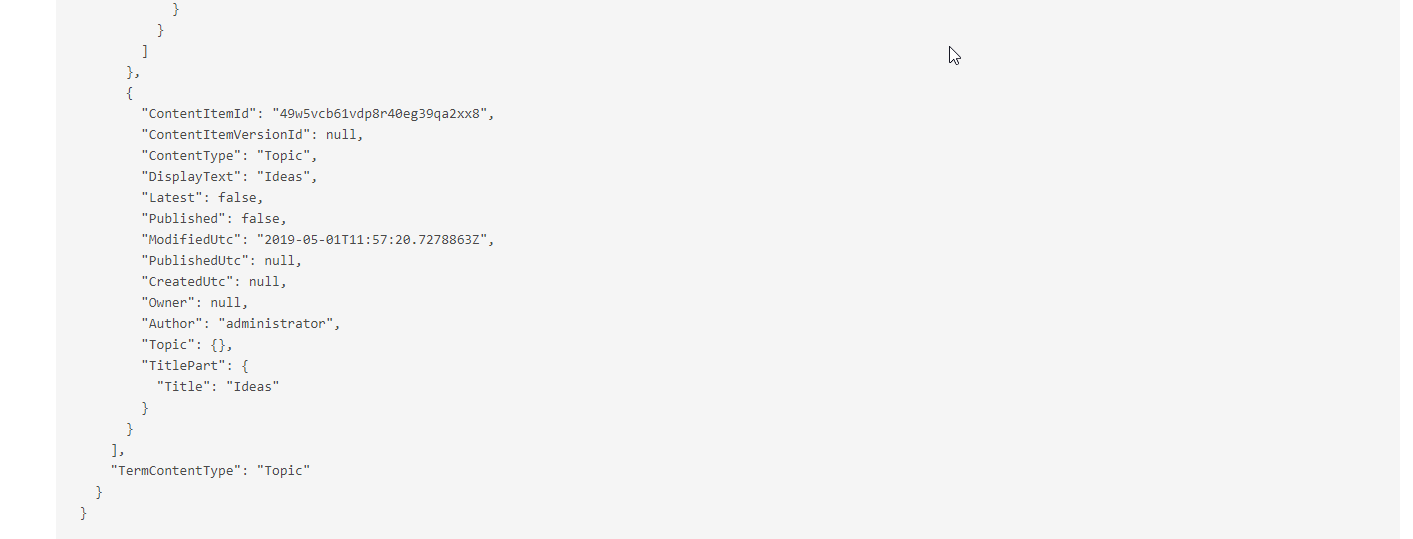
This JSON rendering of a Content Item is just so invaluable. In this case this is a taxonomy content item. @Model.Topics.Content.
dodyg
on 1 May 2019
It's important to inherit @inherits OrchardCore.DisplayManagement.Razor.RazorPage
in all your cshtml shape templates.
No. It has lots of helpers but you don't need them if you are not using a theme usually. You just need to inject @inject OrchardCore.IOrchardHelper OrchardHelper and you have access to most of the things you need in a decoupled CMS.
Do not precompile your Razor otherwise your Shape templates won't work
You don't need shapes either. You should precompile your views.
SQL Queries module is kinda useless in comparison to Lucene Queries
There is a PR that provides it already, I will blame @Skrypt if it's not ready yet
I still can't find a way how to obtain the site name and display it in Razor page.
We definitely need to add an helper to IOrchardHelper for this
how does one load Widget in decoupled CMS
My advice is to create a "Section" content type that is based on FlowPart and you give it an alias. then you can load it and render it. You can also just use it as a data structure and render it by yourself.
json
Yes, we need helpers to render a json tree that can be navigated in html directly
something like this: https://www.jqueryscript.net/other/Beautiful-JSON-Viewer-Editor.html
But we should do it in the admin first, simpler and would solve most issues
 sebastienros
on 2 May 2019
sebastienros
on 2 May 2019
Helper.QueryCategorizedContentItemsAsync usage isn't yet documented.
 await _helper.QueryCategorizedContentItemsAsync(query =>
            {
               return query.Where(x => x.TermContentItemId == contentItemId);
            });
This sample from the documentation isn't clear.
@foreach(var termId in Model.TermContentItemIds)
{
    @await OrchardCore.GetTaxonomyTermAsync(Model.TaxonomyContentItemId, termId);
}
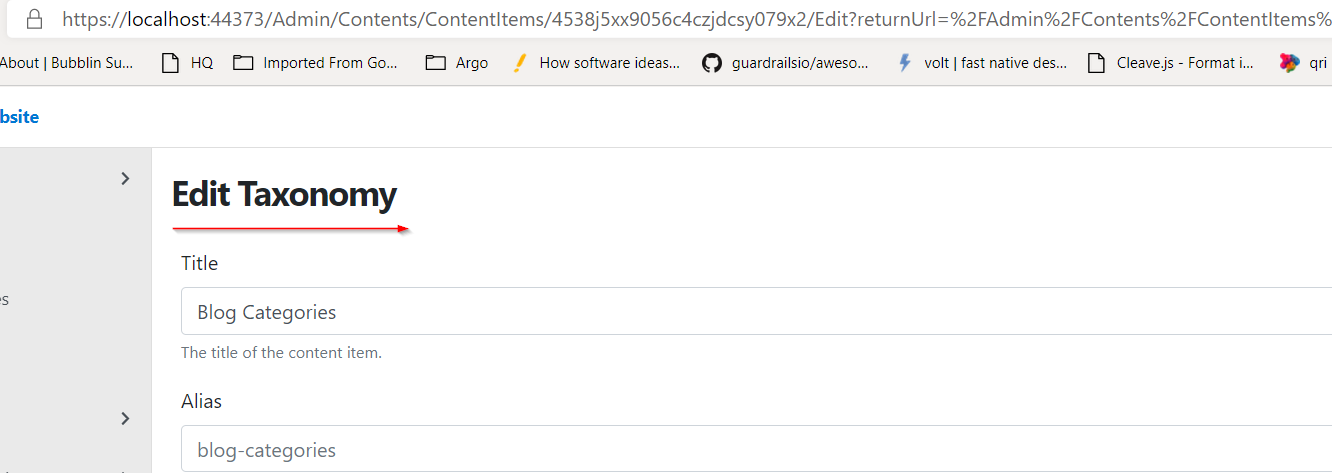
It will be much user friendly if ContentItemId is visible in the UI.
It can be much smaller in contrast of the other UI element. Right now we have to fish it out of the url.
dodyg
on 3 May 2019
Hello, I'm working on similar website using decoupled CMS. I also came across with missing information on this part. There is a very nice video with Sebastien but it's just one :). Now I'm facing problems with contact form and sending e-mail. If i make it as widget, how will i insert it in my ready html. On the other side, when i start to write my logic in back-end, I should struggle with workflows and their usage. It will be nice if you share some experience :)
 LatinaAtanasova
on 3 May 2019
LatinaAtanasova
on 3 May 2019
@LatinaAtanasova I have not started to touch the form and sending email although that's coming. I will let you know when I figure it out. As you say, it's not very obvious.
dodyg
on 3 May 2019
I tried precompilation but orchard core does not pick up the Shape templates that was located at Views folder. Now I have to copy the folder manually over.
dodyg
on 4 May 2019
If you are using the .Web sdk then it's automatic. All our module work like this.
sebastienros
on 4 May 2019
@dodyg so far i managed to use
LatinaAtanasova
on 7 May 2019
@LatinaAtanasova yeah I don't know how to render the form yet on decoupled CMS.
dodyg
on 7 May 2019
@sebastienros I already use .Web SDK.
<Project Sdk="Microsoft.NET.Sdk.Web">

  <PropertyGroup>
    <TargetFramework>netcoreapp2.2</TargetFramework>
    <AspNetCoreHostingModel>InProcess</AspNetCoreHostingModel>
  </PropertyGroup>


  <ItemGroup>
    <PackageReference Include="Markdig" Version="0.16.0" />
    <PackageReference Include="Microsoft.AspNetCore.App" />
    <PackageReference Include="Microsoft.AspNetCore.Razor.Design" Version="2.2.0" PrivateAssets="All" />
    <PackageReference Include="Microsoft.VisualStudio.Web.CodeGeneration.Design" Version="2.2.3" />
    <PackageReference Include="OrchardCore.Application.Cms.Targets" Version="1.0.0-beta3-71077" />
  </ItemGroup>


  <ItemGroup>
    <Content Update="wwwroot\css\site.css">
      <CopyToOutputDirectory>Always</CopyToOutputDirectory>
    </Content>
  </ItemGroup>

</Project>
me too :)
LatinaAtanasova
on 7 May 2019
Yes, at the app level that's ok for pure mvc views but shape views need to be outputed on publishing.
This is because the shape discovering relies on the existing file providers, a shape view needs to be discovered at runtime even the related precompiled view will be used.
It works for modules because we also embed view contents in their assemblies, so shape views are found through our embedded file provider.
Right now, you need to output app level shape views (razor and liquid) on publishing.
 jtkech
on 7 May 2019
jtkech
on 7 May 2019
Hello again, I need help on my project :) I have a few pages:
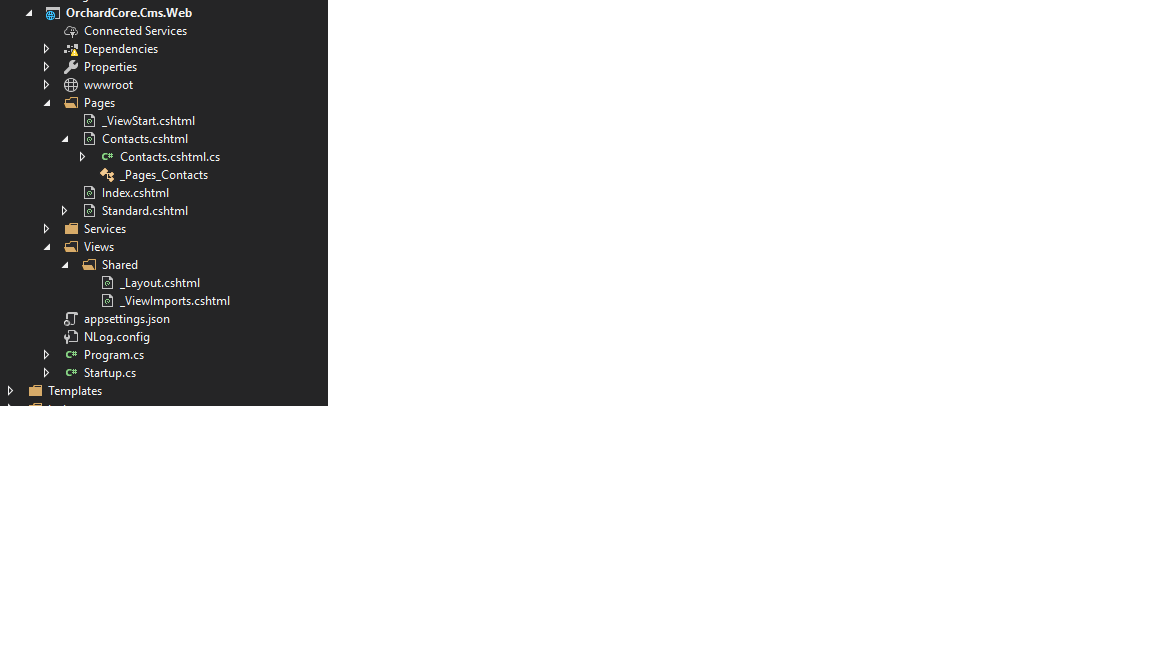
and in order to use menu functionality i included "The Theme" with restyling the menu html.
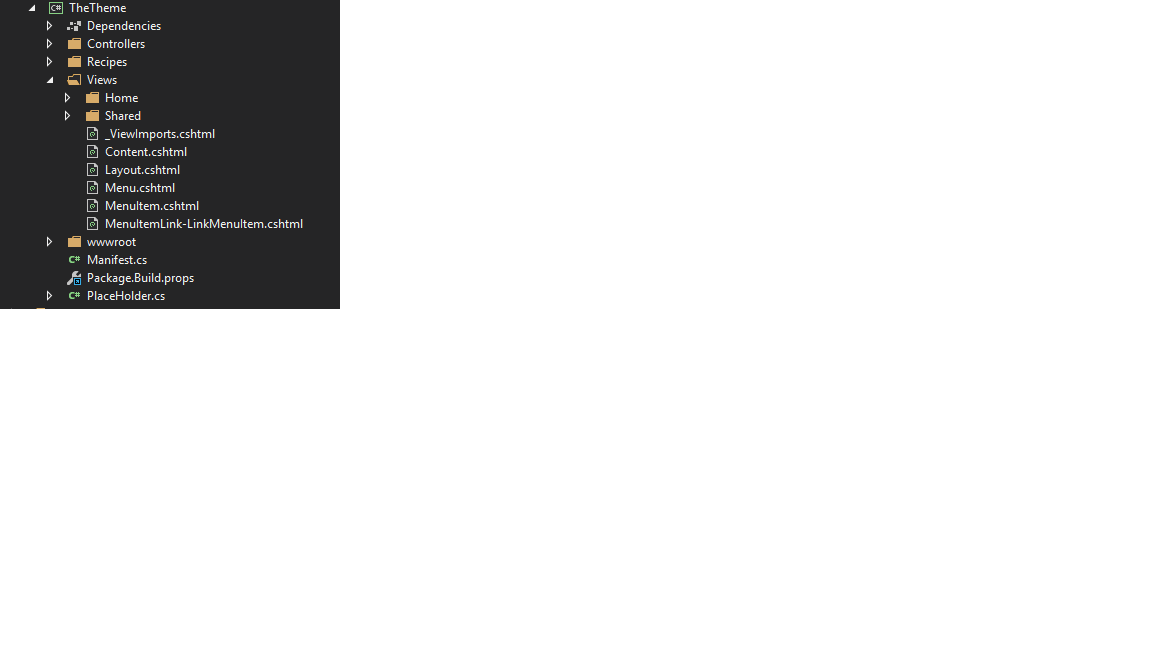
I try to understand and implement one simple widget. I created an alert message as follows:
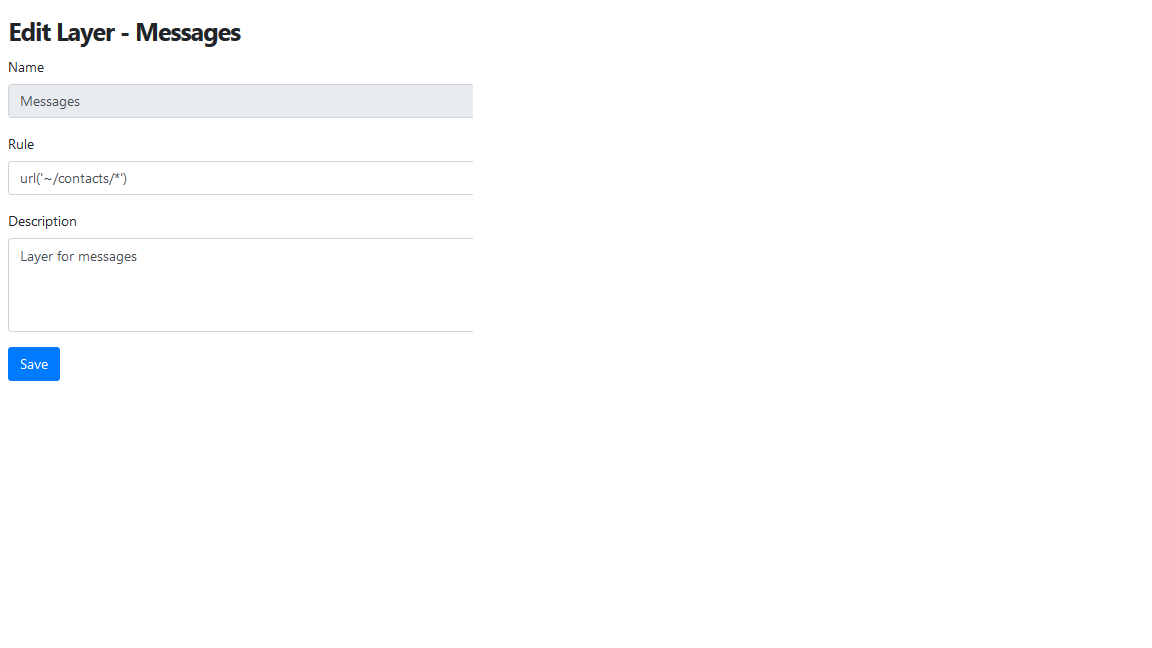

My idea is to visualize that alert in zone name="Messages" which is in Contacts Page. (Next step will be to have it as success or warning, etc.)
I try it with
<zone name="Messages">
          @await DisplayAsync(Model.Content);
</zone>
but DisplayAsync is not reachable. I know that it can be used if page inherits OrchardCore.DisplayManagement.Razor.RazorPage
"The name 'PageContext' does not exist in the current context" when trying to reach that page. If i remove "@page" at the start of "Contacts"page "await DisplayAsync" can be used, but page is than not reachable and i get "The page cannot be displayed".
Obviously I am missing something. I am really new to Orchard but I want to understand and use it.
My main question is what is the best approach to build a web side with ready html pages? I tried with replacing existing theme, but it was kind of mess :)
I need to have contact page, user registrations, some items and mapping them to users. I'll appreciate every advice :)
LatinaAtanasova
on 8 May 2019
I need to have contact page, user registrations, some items and mapping them to users. I'll appreciate every advice :)
Right now my approach is to build the contact page form in razor as normal then submit the value to a workflow end point. I haven't completed the process yet. I will update when I am done.
Note: I just found out zone tag helper exists. I will research this further today and see if I can find a solution to the problem you encounter.
dodyg
on 8 May 2019
Thanks :) It will be great if you can share your experience with workflow. I also made one, but couldn't submit the value to it. I'm missing something with the transition between admin and back-end.
LatinaAtanasova
on 8 May 2019
Make sure you enable HTTP Workflows Activities module
dodyg
on 8 May 2019
I screwed up a workflow and now my Content Item listing is broken.
https://github.com/OrchardCMS/OrchardCore/issues/3593
dodyg
on 9 May 2019
@LatinaAtanasova,
This is a good guide for workflow except that it's a bit out of date in the liquid part.
This contains the latest up to date reference on what is available for Liquid.
My workflow is this.
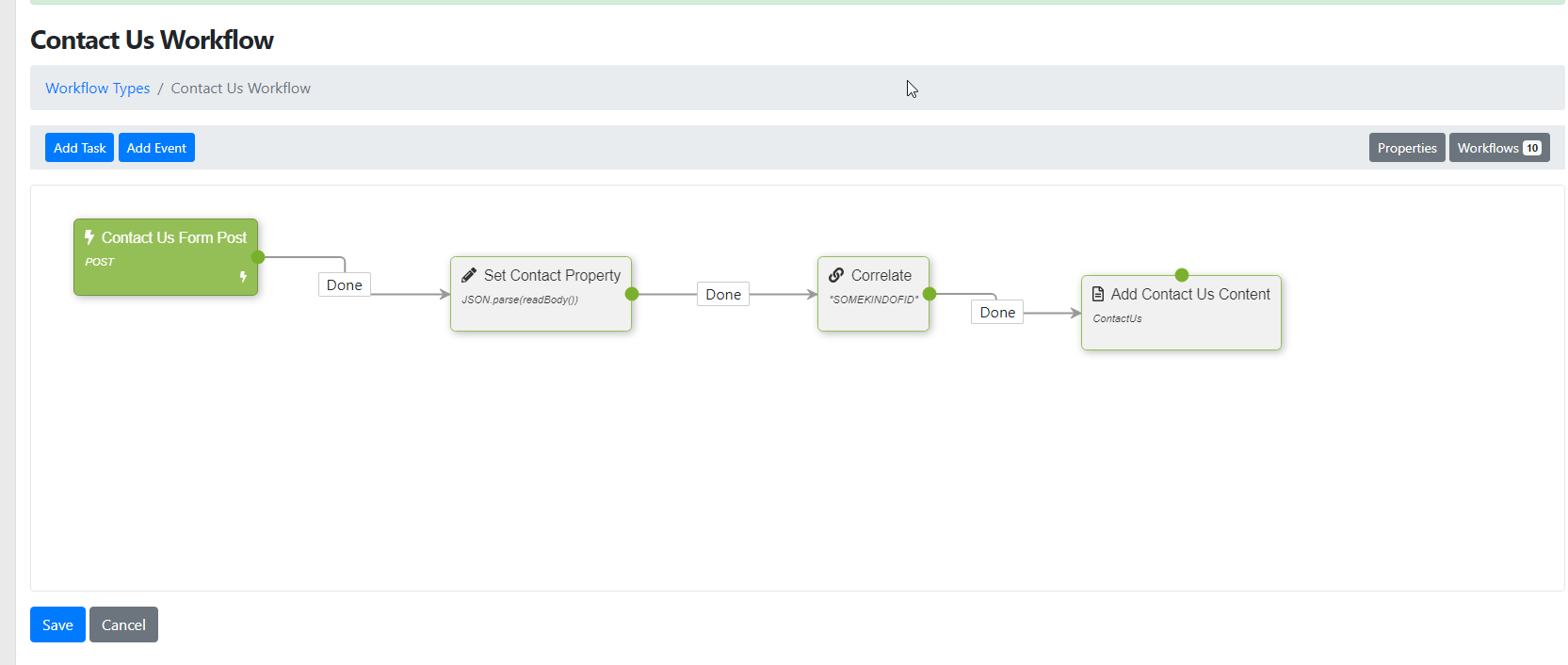
You need to create:
- A HTTP Request Event, set it to Post and mark it as a startup
- Set a property Task. This one I call it "Contact". It just have this value
JSON.parse(readBody()) - I set a correlation Task just as a test. The value here is random.
- I add a Create Content Task and set it to ContactUs content type (I've created it previously). You can see the script below.

In my ContactUs form, I just serialize a json payload and post it to the URL set by the HTTP Request event.

So now when I submit my contact us form, a new content will be added in OrchardCore.
dodyg
on 9 May 2019
Thank you. I'll try it. By the way the following solution is nice and useful. I don't know if you have come across it.
https://github.com/psijkof/ModernBusiness.OC.RazorPages
LatinaAtanasova
on 10 May 2019
Good find. Let me review that.
dodyg
on 10 May 2019
This is an important information regarding media resize https://github.com/OrchardCMS/OrchardCore/issues/3474#issuecomment-483791638.
You cannot resize image outside these values.
To override the default values, do this in your startup.cs
MediaFileProvider.DefaultSizes = new[] { 16, 32, 50, 100, 160, 240, 480, 576, 600, 1024, 2048 };
The default values are very limiting because it doesn't allow you to do the ratio of still photography https://en.wikipedia.org/wiki/Aspect_ratio_%28image%29#Still_photography
dodyg
on 11 May 2019
Lucene Queries seems to have problem with sorting https://github.com/OrchardCMS/OrchardCore/issues/3278. Bummer.
dodyg
on 11 May 2019
Or use SupportedSizes configuration to provide custom supported resizing for the media module https://github.com/OrchardCMS/OrchardCore/commit/8da9513d011d62c272adeb917488c56efed9f950
dodyg
on 15 May 2019
We have an issue already and a design to support "any" size also.
sebastienros
on 16 May 2019
All you need is love and
private readonly OrchardCore.IOrchardHelper _helper;
private readonly OrchardCore.Queries.IQueryManager _queryManager;
or
@injectthem at your views.These two are pretty much all you need to implement decoupled CMS AFAIK.
Could you give an example of how to use these objects to execute a query in the controller and send the result of the query to the view?
 juniordev19
on 17 May 2019
juniordev19
on 17 May 2019
This will get you going (Razor Page)
using System;
using System.Collections.Generic;
using System.Linq;
using System.Threading.Tasks;
using Microsoft.AspNetCore.Mvc;
using Microsoft.AspNetCore.Mvc.RazorPages;
using OrchardCore.ContentManagement;

namespace Silverkey.Website.Pages
{
    public class GeneralPageModel : PageModel
    {
        private readonly OrchardCore.IOrchardHelper _helper;
        private readonly OrchardCore.Queries.IQueryManager _queryManager;

        public ContentItem PageContent { get; set; }

        public GeneralPageModel(OrchardCore.IOrchardHelper helper, OrchardCore.Queries.IQueryManager QueryManager)
        {
            _helper = helper;
            _queryManager = QueryManager;
        }

        public async Task<ActionResult> OnGetAsync(string alias)
        {
            if (string.IsNullOrEmpty(alias))
                return NotFound();

            var content = await _helper.GetContentItemByAliasAsync($"alias:{alias}");

            if (content is null)
                return NotFound();

            PageContent = content;

            return Page();
        }
    }
}
View
@page "/p/{*alias}"
@model Silverkey.Website.Pages.GeneralPageModel
@{
    ViewData[Fmt.Title] = Model.PageContent.DisplayText;
    bool sideSectionExists = Model.PageContent.ContentItem.Content.SideSections.ContentItems.Count > 0;

    var mainSectionSize = sideSectionExists ? "is-two-thirds" : Model.PageContent.ContentItem.Content.SinglePage.ColumnCssClass.Text;
}

@foreach (var pitch in Model.PageContent.ContentItem.Content.Pitch.ContentItems)
{
    <section class="hero is-fullheight-with-navbar">
        <div class="hero-body has-background-grey-lighter">
            <div class="container">
                <div class="columns is-centered">
                    <div class="column is-half" style="text-align:center;">
                        <h1 class="title is-1">@pitch.TitlePart.Title</h1>
                        <div class="content">
                            @Fmt.Markdown((string)pitch.MarkdownBodyPart.Markdown)
                        </div>
                    </div>
                </div>
            </div>
        </div>
    </section>
}

<main class="section">
    <div class="container">
        <div class="columns">
            <div class="column @mainSectionSize">
                <main>
                    <h1 class="title is-1">@Model.PageContent.ContentItem.Content.TitlePart.Title</h1>
                    <div class="content">
                        @Fmt.Markdown((string)Model.PageContent.ContentItem.Content.MarkdownBodyPart.Markdown)
                    </div>

                    <div class="content">
                        @foreach (var part in Model.PageContent.ContentItem.Content.MainSections.ContentItems)
                        {
                            <h2>@part.DisplayText</h2>
                            if (part.ContentType == "Columns")
                            {
                                <div class="columns">
                                    @foreach (var column in part.BagPart.ContentItems)
                                    {
                                        <div class="column">
                                            <h3>@column.DisplayText</h3>
                                            @Fmt.Markdown((string)column.MarkdownBodyPart.Markdown)
                                        </div>
                                    }
                                </div>
                            }
                        }
                    </div>
                </main>
            </div>
            @if (sideSectionExists)
            {
                <div class="column">
                    @foreach (var part in Model.PageContent.ContentItem.Content.SideSections.ContentItems)
                    {
                        <div class="card">
                            <div class="card-header">
                                <p class="card-header-title is-centered">
                                    @part.TitlePart.Title
                                </p>
                            </div>
                            <div class="card-content">
                                <div class="content">
                                    @Fmt.Markdown((string)part.MarkdownBodyPart.Markdown)
                                </div>
                            </div>
                        </div>
                    }
                </div>
            }
        </div>
    </div>
</main>

@foreach (var part in Model.PageContent.ContentItem.Content.BottomSections.ContentItems)
{
    <section class="section">
        <div class="container">
            <div class="columns">
                <div class="column">
                    <div class="content">
                        @part.TitlePart.Title
                        @Fmt.Markdown((string)part.MarkdownBodyPart.Markdown)
                    </div>
                </div>
                <div class="column">
                </div>
            </div>
        </div>
    </section>
}
Note @Fmt.Markdown is my own method.
If you want to see what properties are available for you to access, do @Model.PageContent.Content and it will show you all the structure in Json that you can access dynamically.
dodyg
on 20 May 2019
Thanks for the detailed example.
Do you know how to create a table managed from the admin panel?
juniordev19
on 20 May 2019
Use a text field with HTML Editor
dodyg
on 20 May 2019
When you are implementing a module, at="Foot" is your friend. It puts the scripts at the bottom of the page.
<script at="Foot" src="https://unpkg.com/[email protected]/js/gijgo.min.js" type="text/javascript"></script>
<script at="Foot">
    document.write('<!-- some script -->');
</script>
Don't forget to put the Admin attribute for controller that handles your module admin pages

dodyg
on 3 Jun 2019
Encountered a deployment problem https://github.com/OrchardCMS/OrchardCore/issues/3755. The cause because the environment was set to Development.
dodyg
on 5 Jun 2019
This is important https://github.com/OrchardCMS/OrchardCore/issues/3752
Check that each module using the razor sdk also references directly (not transitively) the Microsoft.AspNetCore.Mvc package, that modules using our custom script tag reference OrchardCore.ResourceManagement, and that their _ViewImports.cshtml import the related tag helpers @addTagHelper *, OrchardCore.ResourceManagement.
For a Admin Controller, Id suggest adding Admin to the controller name too... JobApplicationAdminController.cs -just my two cents ;)
 Jetski5822
on 6 Jun 2019
Jetski5822
on 6 Jun 2019
Back from hiatus. This is important (re: content query/index/lucene) https://github.com/OrchardCMS/OrchardCore/issues/3794
dodyg
on 24 Jun 2019
asp-append-version is now available!
https://github.com/OrchardCMS/OrchardCore/pull/3581
Although I think I found a bug in the implementation https://github.com/OrchardCMS/OrchardCore/issues/3885
dodyg
on 7 Jul 2019
This is no longer available at/after version 1.0.0-beta3-71772.
MediaFileProvider.DefaultSizes = new[] { 16, 32, 50, 100, 160, 240, 480, 512, 600, 1024, 2048 };
Configure it via configuration file instead
dodyg
on 7 Jul 2019
https://github.com/OrchardCMS/OrchardCore/issues/3899 (Document IShellConfiguration) is useful
dodyg
on 12 Jul 2019
 dodyg
on 12 Jul 2019
dodyg
on 12 Jul 2019
I am watching this https://github.com/OrchardCMS/OrchardCore/issues/3902 because the orchard core workflow looks powerful enough to be integrated in general business application/module.
dodyg
on 13 Jul 2019
If you creating a module and want to create a menu section on the admin panel, implement a INavigationProvider
    public class AdminMenu : INavigationProvider
    {
        public AdminMenu(IStringLocalizer<AdminMenu> localizer)
        {
            T = localizer;
        }

        public IStringLocalizer T { get; set; }

        public Task BuildNavigationAsync(string name, NavigationBuilder builder)
        {
            if (!String.Equals(name, "admin", StringComparison.OrdinalIgnoreCase))
                return Task.CompletedTask;

            builder.Add(T["Recruitment"], configuration =>
            {
                configuration
                    .Add(T["Manage"], "1", settings => settings
                            .Action("Index", "Admin", new { area = "Crucible.Module" })
                            .Permission(Permissions.ManageSettings)
                            .LocalNav());

                configuration
                    .Add(T["Jobs"], "2", settings => settings
                            .Action("Index", "Job", new { area = "Crucible.Module" })
                            .Permission(Permissions.ManageSettings)
                            .LocalNav());

                configuration
               .Add(T["Tags"], "3", settings => settings
                       .Action("Index", "Tag", new { area = "Crucible.Module" })
                       .Permission(Permissions.ManageSettings)
                       .LocalNav());
            });

            return Task.CompletedTask;
        }
    }
and add it at your module startup
public override void ConfigureServices(IServiceCollection services)
{
  services.AddScoped<INavigationProvider, AdminMenu>();
}
@dodyg What's the goal of this topic. Are these all things that should be added to a documentation about decoupled CMS? Else maybe a readme.md file would be more appropriate than adding a lot of different topics in a single issue?
 Skrypt
on 18 Jul 2019
Skrypt
on 18 Jul 2019
My goal is to be able to figure how to implement a decoupled CMS with a custom module that is well integrated with the rest of the CMS.
The problem is my knowledge is still patchy so I am just putting notes here of all the new things I am figuring out. When I finally figure out how Orchard Core Framewor/CMS works, I will write a guide based on these notes.
Ideally I can do most of the things in the standard CMS mode using Liquid but I haven't figured that part out yet. There are concepts like Zone, Widget, etc that I have yet to understand.
dodyg
on 18 Jul 2019
Until @dodyg 's site is done, I am fine with this issue as a public note taking tool. It also helps us understand how users try to solve their solutions and let us react to it.
sebastienros
on 18 Jul 2019
It's not clear on how to create a shared _layout.cshtml for a module while integrating it with the OrchardCore Admin theme.
I am aiming for something like
-- OrchardCore.Admin Theme
--- Module._Layout
---- The rest of the views in the module inherits from Module._Layout via _ViewStart.cshtml
Right now if I create a module _Layout, all the admin themes are not included.
Module._Layout should have something like this something like this
@inject  OrchardCore.ResourceManagement.IResourceManager ResourceManager

@{
    Layout = "~/TheAdmin/Layout";
}

@RenderBody()
I tried this as well
@inject OrchardCore.ResourceManagement.IResourceManager ResourceManager
@inject OrchardCore.DisplayManagement.Theming.IThemeManager ThemeManager
@{
    var theme = await ThemeManager.GetThemeAsync();
    Layout = "/" + theme.SubPath + "/Views/Layout";
}

@RenderBody()
OK progress
@inject OrchardCore.ResourceManagement.IResourceManager ResourceManager
@inject OrchardCore.DisplayManagement.Theming.IThemeManager ThemeManager
@{
    var theme = await ThemeManager.GetThemeAsync();
    Layout = "/" + theme.SubPath + "/Views/Layout.cshtml";
}

@await RenderBodyAsync()
This one seems to get access to the Layout page of the theme however now it generates
InvalidOperationException: RenderBody has not been called for the page at '/Areas/Crucible.Module/Views/Shared/_Layout.cshtml'. To ignore call IgnoreBody().
This old case seems to be related https://github.com/OrchardCMS/OrchardCore/issues/993#issuecomment-329160442
dodyg
on 23 Jul 2019
I created a case for this custom module nested layout https://github.com/OrchardCMS/OrchardCore/issues/3963
dodyg
on 23 Jul 2019
IPermissionProvider now asks for Task<IEnumerable<Permission>> GetPermissionsAsync() on version 1.0.0-beta3-72166. It might have been introduced at earlier build but this is the version I encounter the change.
An example is here
https://github.com/OrchardCMS/OrchardCore/blob/c65ed0958abe5ea4da4a523cace6bf430f80870a/src/OrchardCore.Modules/OrchardCore.Apis.GraphQL/Permissions.cs
dodyg
on 24 Aug 2019
This is super cool Adds Liquid Razor Extension Method & Markdown Helper parses liquid
https://github.com/OrchardCMS/OrchardCore/pull/3992
It makes writing blog post in markdown and attaching images much easier.
dodyg
on 24 Aug 2019
Oops.
dodyg
on 24 Aug 2019
This is the website I've been working all these time
https://www.silverkeytech.com/
This is a decoupled CMS implementation with one custom module. The website is still missing a couple of parts.
The next challenge is to figure out how to create a website the traditional way (full CMS), not decoupled.
dodyg
on 26 Aug 2019
Well done! :)
LatinaAtanasova
on 26 Aug 2019
Congrats @dodyg and thanks for sharing
Now that your site is done, could you enumerate all the things you wished were different, or that you missed? That could be the conclusion of this long thread.
sebastienros
on 26 Aug 2019
And feel free to also include what were the big wins for you, or what would make you do it again with OC.
sebastienros
on 26 Aug 2019
Will do
dodyg
on 27 Aug 2019
Decoupled CMS
Pro
- Decoupled mode solves the perennial problem of "I want to build a web system that has CMS functionalities". This capability alone is worth investing in Orchard Core. It is much better than any of your half-ass 'CMS' implementation.
- The module system takes sometimes to figure out but once you get a hang of it, it is very powerful.
- The content data model is very dynamic and pretty much handles everything that you need to create a content website
- The CMS is fast!
IOrchardHelperandIQueryManageris super handy.- The learning curve for decoupled mode is much lower than the traditional CMS.
- The community is responsive.
Cons
- It's not clear how to use the dynamic form functionality from decoupled mode.
- Try to 'sort', 'filter', 'page' contents are way to hard. I mean you can't even get a
counton how many items you have. - It's hard to figure out how to use Workflow.
- The Admin theme needs to be updated.
- Figuring out how to theme dynamic menu is hard.
- Content Type "Technical Name" cannot be changed. So once you figure out a better name for your content type, it is all too late. It makes laying out data model in code super annoying because now you are stuck with the naming you have chosen in the beginning.
- Development/production sync problem. Once you go to production, creating new content type and new custom pages in your programming environment makes it out of sync with the production version. There is no way to sync it at the moment. I end up resorting to download copy of production db to my local environment all the time.
- There is no device detection facility built in. Responsive design can go only so far.
- With decoupled approach you lost the preview functionality.
Suggestions
- Create a comparison table between traditional and decoupled and show which approach has what.
- Create a checklist of what to do when using decoupled CMS approach.
- Create "content features" toolkit gallery, e.g. "blog", "event page", "contact us" (with workflow), etc that contains recommended content types structure and the related C# code.
Bottom line: It is a very productive CMS regardless of its current limitation. The true gem of the CMS is its module system. It has a very promising future and I'll use it again for my next project.
dodyg
on 31 Aug 2019
Example: Fetch items from Orchard CMS through provided alias
I can't believe that nobody wrote about this. All the answers here say that you "inject" the IOrchardHelper in C# code (but no clear way of how this is achieved).
Furthermore, from what I could read, the preferred way is to do @inject OrchardCore.IOrchardHelper Orchard in the razor page, but that is a waste of space and clearly does not uphold the DRY principle (don't-repeat-yourself). So I present a better way of doing this:
C# File (ProjectName.SomeStaticClass) :
public static async Task<IHtmlContent> FetchFromAlias(OrchardCore.IOrchardHelper orchard, string alias)
{
    var content = await orchard.GetContentItemByAliasAsync($"alias:{alias}");
    if(content == null)
    {
        return new HtmlString("Could not fetch content from CMS.. (content was null!)");
    }
    return await orchard.MarkdownToHtmlAsync((string)content.Content.MarkdownBodyPart.Markdown)
}
Razor Page :
@page
@model ProjectName.SomeModel
@inject OrchardCore.IOrchardHelper Orchard

@await ProjectName.SomeStaticClass.FetchFromAlias(Orchard, "some-alias");
The only downside is that I don't know how to actually inject in C#, but I still save myself a lot of trouble. Hopefully this helps someone out there who, like me, was completely clueless.
 alexpanter
on 1 Dec 2019
alexpanter
on 1 Dec 2019
@alexpanter should I reopen this case?
dodyg
on 1 Dec 2019
@dodyg not for my sake :) I was just looking for some help, went looking here, saw some hints, and solved my problem. I only hoped that someone else might find my research useful.
alexpanter
on 1 Dec 2019
Related issues
 aghili371
·
3Comments
aghili371
·
3Comments
 superluminalK
·
4Comments
superluminalK
·
4Comments
 kevinchalet
·
4Comments
kevinchalet
·
4Comments
 randaratceridian
·
3Comments
randaratceridian
·
3Comments
 mobinzk
·
4Comments
mobinzk
·
4Comments
Most helpful comment
Content Types and Content Parts need discussions at the documentation. Right now people have to rely on Orchard 1 documentation.
This whole Orchard Core basic concepts from v1 need to be migrated and updated.