Orchardcore: Admin Menus Permission
why Admin Menus doesn't have role Permission?
if i login with a user who is not Admin member, the admin menus still shown. i need to show menu items by user role Permissions.
do you have the plan to improve Admin Menus ?
 aghili371
All 6 comments
 pgy866
on 11 Apr 2019
pgy866
on 11 Apr 2019
Yes it's in the plans
 Skrypt
on 11 Apr 2019
Skrypt
on 11 Apr 2019
Yes it's in the plans
other menus are shown too.
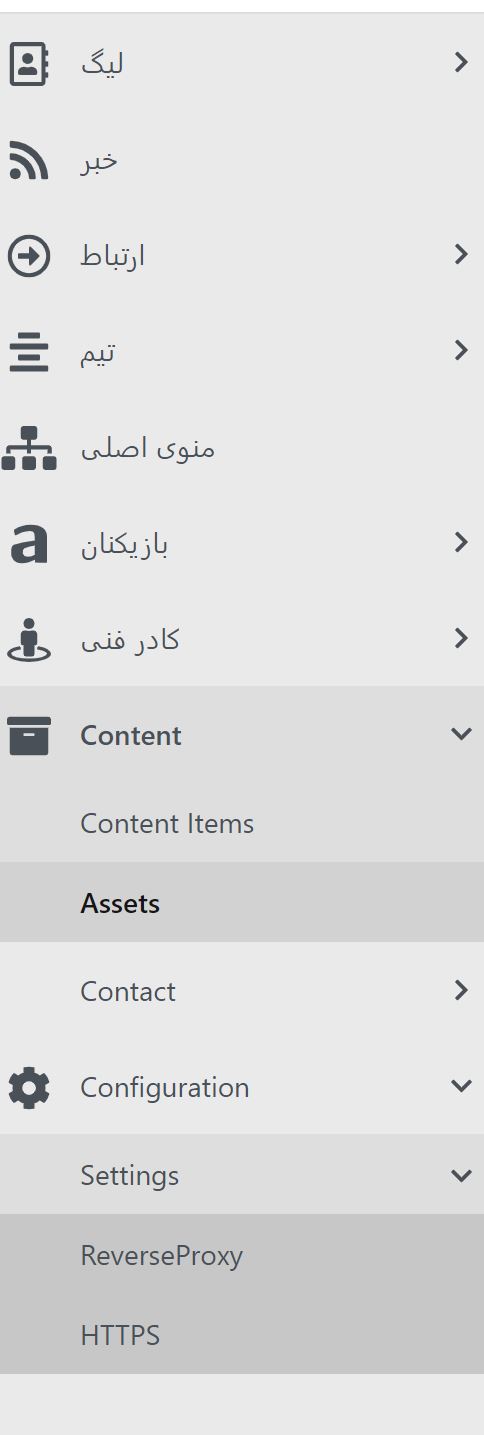
aghili371
on 12 Apr 2019
We've ended up doing the following in the menu builder: -
        var userName = _httpContextAccessor.HttpContext.User.Identity.Name;
        var user = (User)(await _userService.GetUserAsync(userName));
        var hasAdministrator = user.RoleNames.Contains("Administrator");
Can then combine this with user name being 'admin' to correctly show/hide admin menu items
 Wej1971
on 12 Apr 2019
Wej1971
on 12 Apr 2019
@Wej1971
this panel should work for user roles, so we need one property to set access menu inside create menu admin node.
and then should compare this access with user roles.
aghili371
on 12 Apr 2019
@aghili371 @Wej1971 I just started working on this.
There are two sides here I think:
Adding permissions to manage admin menu module (EDITED: this part was already implemented).
Configuring the current admin nodes so that they honor the right permissions. I mean, for example, if we setup a content type node that displays a link to show "Articles" content types, that link should not be visible to users that don't have a permission to publish Articles.
The same goes for list admin nodes. Now that @sebastienros implemented dynamic content type permissions doing this seems easy:
https://github.com/OrchardCMS/OrchardCore/blob/96bc580c8882d63311c9cae07990298f7fbfe715/src/OrchardCore.Modules/OrchardCore.Contents/AdminNodes/ContentTypesAdminNodeNavigationBuilder.cs#L59
In case you are in a hurry, you can take a look at the work in progress in this branch:
https://github.com/OrchardCMS/OrchardCore/tree/matiasmolleja/apply-dynamic-permissions
 matiasmolleja
on 12 Apr 2019
matiasmolleja
on 12 Apr 2019
Related issues
aghili371
·
3Comments
 Ujinjinjin
·
3Comments
Ujinjinjin
·
3Comments
 khoshroomahdi
·
4Comments
khoshroomahdi
·
4Comments
 kevinchalet
·
4Comments
kevinchalet
·
4Comments
 cbadger360
·
4Comments
cbadger360
·
4Comments
Most helpful comment
@aghili371 @Wej1971 I just started working on this.
There are two sides here I think:
Adding permissions to manage admin menu module (EDITED: this part was already implemented).
Configuring the current admin nodes so that they honor the right permissions. I mean, for example, if we setup a content type node that displays a link to show "Articles" content types, that link should not be visible to users that don't have a permission to publish Articles.
The same goes for list admin nodes. Now that @sebastienros implemented dynamic content type permissions doing this seems easy:
https://github.com/OrchardCMS/OrchardCore/blob/96bc580c8882d63311c9cae07990298f7fbfe715/src/OrchardCore.Modules/OrchardCore.Contents/AdminNodes/ContentTypesAdminNodeNavigationBuilder.cs#L59
In case you are in a hurry, you can take a look at the work in progress in this branch:
https://github.com/OrchardCMS/OrchardCore/tree/matiasmolleja/apply-dynamic-permissions