Orchardcore: DataAnnotation attributes localisation.
AddDataAnnotationsLocalization() doesnt seem to work with PO string localizers.
DataAnnotation attributes (like [Required]) still display error messages in english (like "The UserName field is required.").
 inhumator
All 34 comments
@Skrypt if i'm not wrong this should be work without any issue
 hishamco
on 10 Jan 2019
hishamco
on 10 Jan 2019
Maybe the Localization module gets initialized after the User module is. Need to investigate, but yes, it should work.
 Skrypt
on 10 Jan 2019
Skrypt
on 10 Jan 2019
I can't get it to work,. It's not just the Users module - messages like "The Title field is required." from content editor still refuse to use localization from PO files (msgid "The {0} field is required."). Buttons ("Publish", "Save draft", etc..) localize just fine but data annotations don't. Is there a working demo of data annotations localization by any chance ?
inhumator
on 28 Jan 2019
Maybe there are use cases that don't work but for infos here what i just tried and which is working.
namespace OrchardCore.Title.Model
{
    public class TitlePart : ContentPart
    {
        [Required(ErrorMessage = "Error message")]
        public string Title { get; set; }
    }
}

// Could be in 'App_Data/Localization/fr-FR.po', but the app is a module
// so i tried it in 'App_Data/Localization/OrchardCore.Cms.Web/fr-FR.po'

msgctxt "OrchardCore.Title.Model.TitlePart"
msgid "Error message"
msgstr "Message d'erreur"
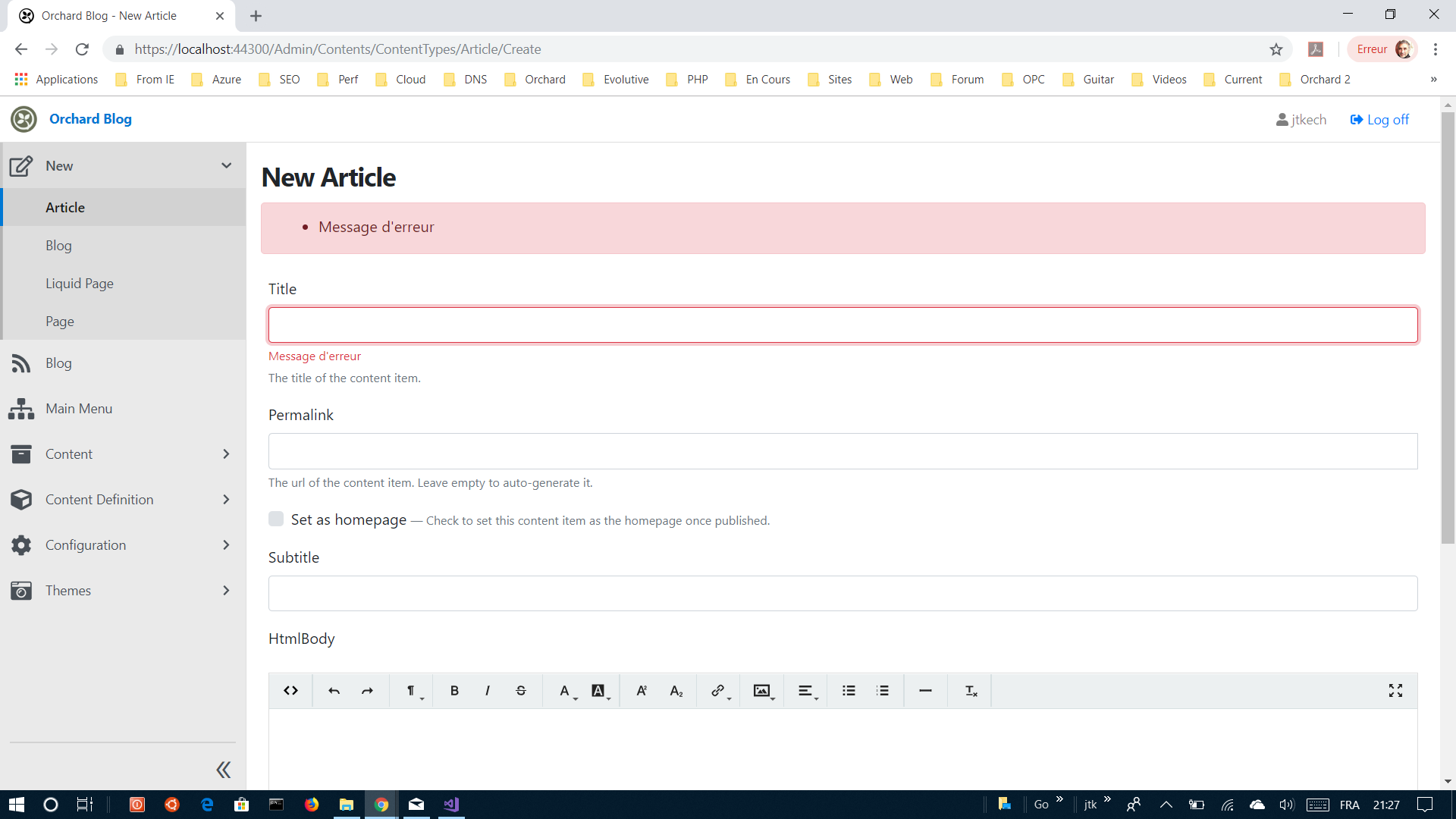
Here the result
 jtkech
on 28 Jan 2019
jtkech
on 28 Jan 2019
Did you have to modify the Title module sources? Is that also possible just with NuGet packages or do I need to manually add error messages to all the models I want localised?
inhumator
on 29 Jan 2019
Yes, the goal was to see if the ErrorMessage is localized when it is defined e.g if you define a model in a custom module. But here, you're right i needed to update the TitlePart source.
Otherwise, after a quick look on the aspnet code, it seems that if there is no ErrorMessage they use resources files (*.resx). Maybe you could have a custom module which overrides some services as IValidationAttributeAdapterProvider and / or configure the mvc options to use a custom ModelBindingMessageProvider, look at the DefaultModelBindingMessageProvider to see how strings are formatted. But there are not so obvious solutions.
So, i think you're right, in all our models using attributes accepting message parameters, we would need to provide these messages so that they can be localized.
jtkech
on 30 Jan 2019
So, i think you're right, in all our models using attributes accepting message parameters, we would need to provide these messages so that they can be localized.
Sound there are plenty of works
 HengzheLi
on 30 Jan 2019
HengzheLi
on 30 Jan 2019
Here is my code, and confirm DataAnnotation not work as spected:
`public void ConfigureServices(IServiceCollection services)
{
services.AddMvc()
.AddViewLocalization(LanguageViewLocationExpanderFormat.Suffix)
.AddDataAnnotationsLocalization()
.SetCompatibilityVersion(CompatibilityVersion.Version_2_2);
services.AddPortableObjectLocalization();

services.Configure<RequestLocalizationOptions>(options =>
{
    var supportedCultures = new List<CultureInfo>
    {
        new CultureInfo("es"),
        new CultureInfo("en")
    };

    options.DefaultRequestCulture = new RequestCulture("es");
    options.SupportedCultures = supportedCultures;
    options.SupportedUICultures = supportedCultures;
});

services.AddPortableObjectLocalization(options => options.ResourcesPath = "Localization");
}`
public void Configure(IApplicationBuilder app, IHostingEnvironment env)
{
    app.UseStaticFiles();
    app.UseRequestLocalization();
    app.UseAuthentication();
    app.UseMvcWithDefaultRoute();
}
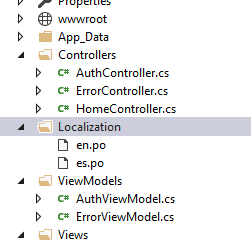
.po File:
`msgid "Log in"
msgstr "Iniciar sesión"
msgid "The Email field is required"
msgstr "El campo de correo electrónico es obligatorio"
msgid "The Email field is not a valid e-mail address"
msgstr "El campo Correo electrónico no es una dirección de correo electrónico válida"
msgid "Your Email"
msgstr "Tu correo electrónico"
msgid "The Password field is required"
msgstr "El campo de contraseña es obligatorio"
msgid "Your Password"
msgstr "Tu contraseña"`
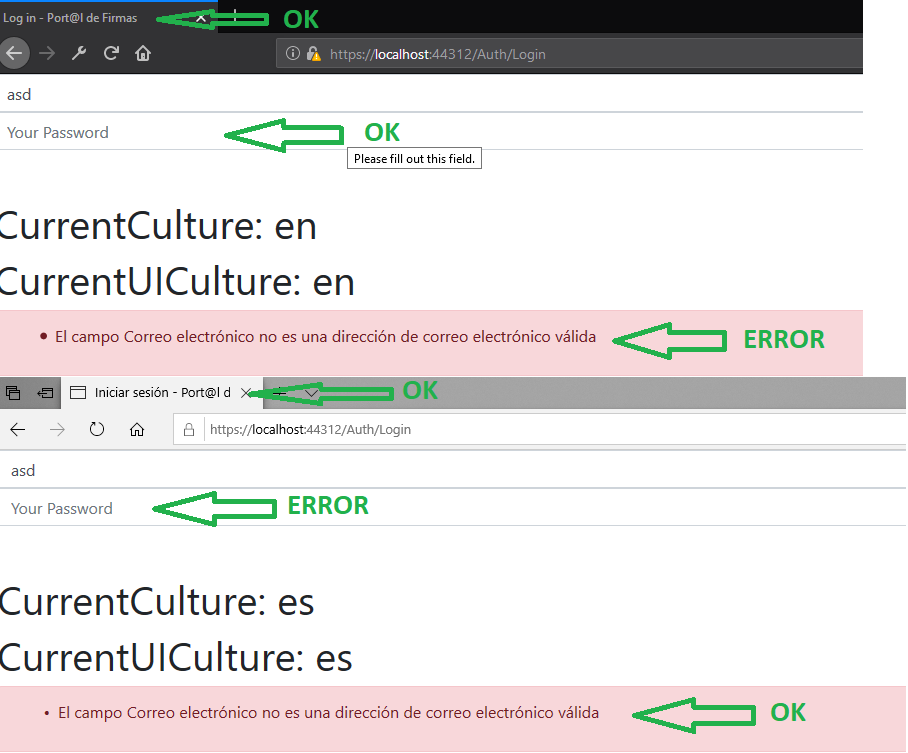
And result in browser:
 nicojmb
on 30 Jan 2019
nicojmb
on 30 Jan 2019
Where are you adding this code that is already in the Localization module?
Skrypt
on 30 Jan 2019
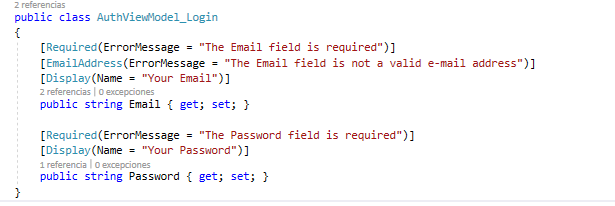
ViewModel:
View.cshtml
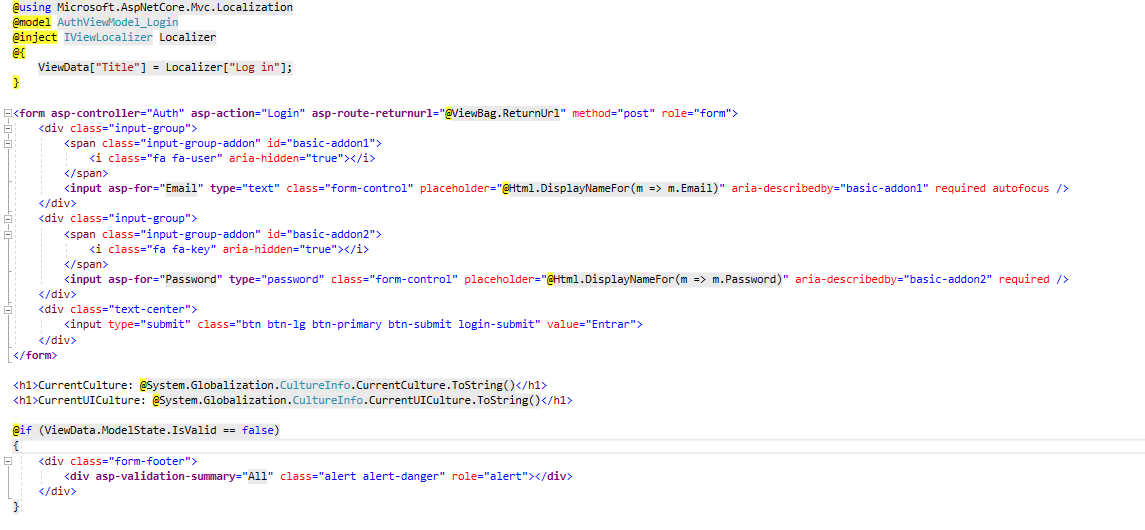
.PO files:
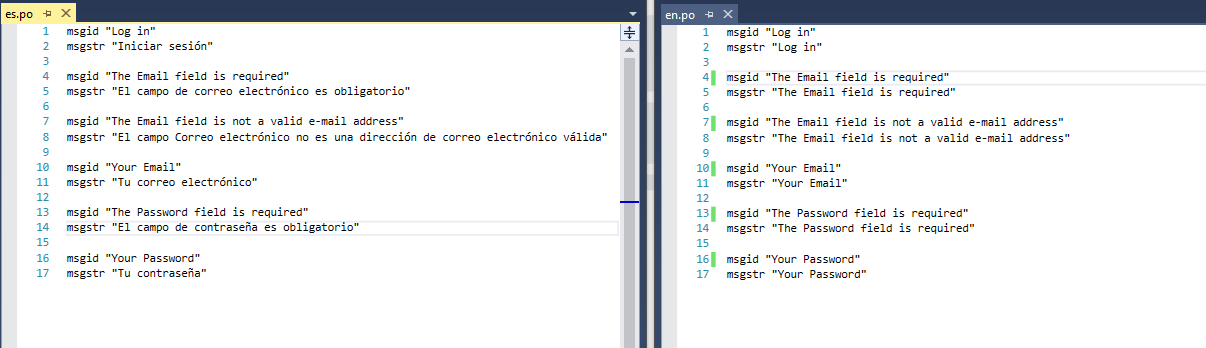
Startup.cs:
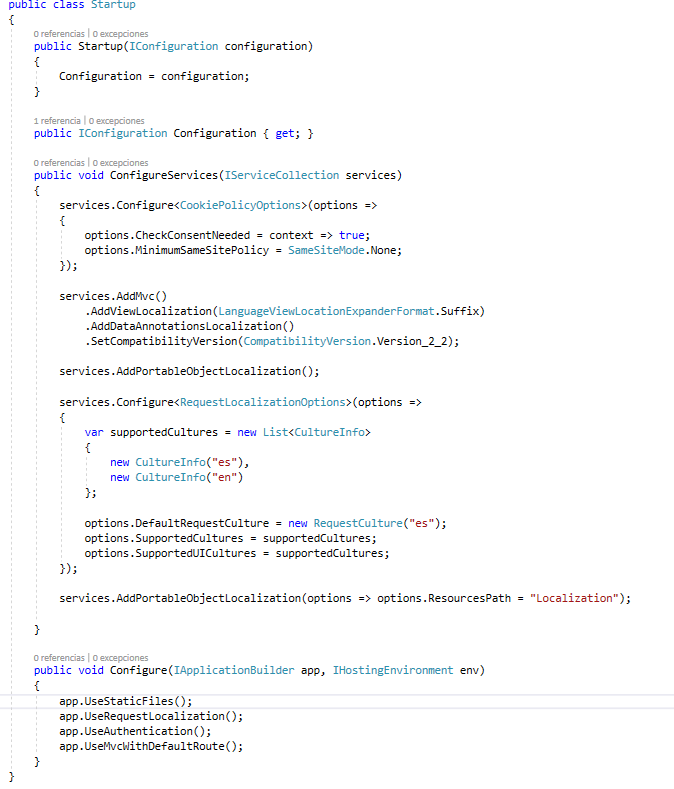
If you see title page always translate correctaly, but in dataAnnotations is ramdonly.
nicojmb
on 30 Jan 2019
In which project is this startup.cs file?
Skrypt
on 31 Jan 2019
I get source from this guide:
nicojmb
on 31 Jan 2019
Yes, but still, if you are using Orchard Core, you should only need to enable the Localization module. Else, I don't know from which VS project your are loading this startup.cs file and in which order it gets registered by the DI. You're not supposed to need to add this inside for example your own App project. What you are trying to do there is custom code which is different than our implementation of the ASP.NET core Localization middleware. I can't help much then if I'm not seeing your actual projects and what your are doing exactly. If you are using Orchard Core CMS then we can talk about the implementation that we did and test from this ; else I have no source code to test against. I'm relying on @jtkech tests to affirmate that this works in the context of the usage of our Localization module. If there's a use case that doesn't work in this context ; then we can help else it's pretty much in your hands.
Skrypt
on 31 Jan 2019
I'm creating a single project for a single website, i like use .po and i find OrchardCore, here is my project example:
nicojmb
on 31 Jan 2019
Hello,
I devised a workaround for missing error messages and display names to localize. It's a bit of a hack but so far seems to work.
public class LocalizedDisplayNameDetailsProvider : IDisplayMetadataProvider
{
    private readonly IStringLocalizer _localizer;

    public LocalizedDisplayNameDetailsProvider(IStringLocalizer<LocalizedDisplayNameDetailsProvider> localizer)
    {
        _localizer = localizer;
    }

    public void CreateDisplayMetadata(DisplayMetadataProviderContext context)
    {
        var displayAttribute = context.Attributes.OfType<DisplayNameAttribute>().FirstOrDefault();
        if (displayAttribute != null)
        {
            context.DisplayMetadata.DisplayName = () => _localizer[displayAttribute.DisplayName];
        }
        else
        {
            context.DisplayMetadata.DisplayName = () => _localizer[context.Key.Name];
        }
    }
}
public class CustomValidationMetadataProvider : IValidationMetadataProvider
{
    public void CreateValidationMetadata(
        ValidationMetadataProviderContext context)
    {
        if (context.PropertyAttributes != null)
        {
            foreach (var attribute in context.PropertyAttributes)
            {
                ValidationAttribute tAttr = attribute as ValidationAttribute;
                if (tAttr != null && tAttr.ErrorMessage == null
                        && tAttr.ErrorMessageResourceName == null)
                {
                    var errorMessageString = tAttr.ErrorMessage;

                    try
                    {
                        errorMessageString = (string)attribute.GetType().GetProperty("ErrorMessageString", System.Reflection.BindingFlags.NonPublic | System.Reflection.BindingFlags.Instance).GetValue(attribute);
                    }
                    catch { }

                    tAttr.ErrorMessage = errorMessageString;
                }
            }
        }
    }
}


md5-3e05ee83bf473c4a41a7bd2e563d4d53


public class CustomMvcOptionsSetup : IConfigureOptions<MvcOptions>
{
    private readonly IStringLocalizer<LocalizedDisplayNameDetailsProvider> _localizer;

    public CustomMvcOptionsSetup(IStringLocalizer<LocalizedDisplayNameDetailsProvider> localizer)
    {
        _localizer = localizer;
    }

    public void Configure(MvcOptions options)
    {
        options.ModelMetadataDetailsProviders.Add(
            new CustomValidationMetadataProvider()
            );

        options.ModelMetadataDetailsProviders.Add(
            new LocalizedDisplayNameDetailsProvider(_localizer)
            );
    }
}


md5-3e05ee83bf473c4a41a7bd2e563d4d53


public void ConfigureServices(IServiceCollection services)
{
    services.TryAddEnumerable(ServiceDescriptor.Transient<IConfigureOptions<MvcOptions>, CustomMvcOptionsSetup>());
}
@nicojmb Did you found a solution to your problem?
 dev-masih
on 26 Mar 2019
dev-masih
on 26 Mar 2019
@inhumator this issue is not just for Error messages, it's for all of DataAnnotations, like Display (for when you cerate a lable in razor view using Html.LableFor) i don't think with this kind of hacking you can achieve this.
dev-masih
on 26 Mar 2019
I am testing a project locally, and while debugging I see that when it's getting the localization entries for data annotations, it's asking for English instead of the language that is specified by the culture provider.
So the text in a view is correctly translated but not the ones from data anotation. Still investigating if it's a bug in MVC or Orchard.
 sebastienros
on 26 Mar 2019
sebastienros
on 26 Mar 2019
Has anyone tried without PO files but resx files? It looks like a single localizer is cached, even if the culture changes. It might be by design, or not. Views resolve a new localizer for each page view, but not data annotations.
sebastienros
on 26 Mar 2019
See my above comments. As i have tried it was working if we explicitly set messages when using attributes, but we don't do this in our solution when defining models.
Yes, the goal was to see if the ErrorMessage is localized when it is defined e.g if you define a model in a custom module. But here, you're right i needed to update the TitlePart source.
Otherwise, after a quick look on the aspnet code, it seems that if there is no ErrorMessage they use resources files (*.resx).
@nicojmb maybe you are missing the msgctxt line.
namespace OrchardCore.Title.Model
{
    public class TitlePart : ContentPart
    {
        [Required(ErrorMessage = "Error message")]
        public string Title { get; set; }
    }
}

// Could be in 'App_Data/Localization/fr-FR.po', but the app is a module
// so i tried it in 'App_Data/Localization/OrchardCore.Cms.Web/fr-FR.po'

msgctxt "OrchardCore.Title.Model.TitlePart"
msgid "Error message"
msgstr "Message d'erreur"
@jtkech Have you tried with the "Display" DataAnnotation attribute? There's a difference with this one that I don't remember but from what I tested. The ErrorMessage works but not the Display.
Skrypt
on 26 Mar 2019
Ah okay, i will try it as i have time
jtkech
on 26 Mar 2019
AFAIK the DisplayAttribute has a bug as @Skrypt mentioned above
hishamco
on 26 Mar 2019
Yes, I can repro the issue with the DisplayAttribute, and I can see that no localizer is created for them after the app is launched, so I would guess that whatever resolved the localizer in the first place (by calling StringLocalizerFactory.Create) is expecting a localizer to be able to handle the current context localization, which I find weird.
sebastienros
on 26 Mar 2019
I asked the feature owners and now I understand the issue is in the PoFile localizer. The resolution of the culture should be done on every call of GetString, and not when create the localizer instance. I will fix it right away. Thanks all.
sebastienros
on 26 Mar 2019
/cc @lukaskabrt just so you know what I am changing right now
sebastienros
on 26 Mar 2019
@sebastienros good to know it will be fixed. Hope there will be a release about it sooner
dev-masih
on 26 Mar 2019
@Skrypt @sebastienros
So, i re-tried
[Required(ErrorMessage = "Error message")]that works if we specify a message.Then i tried the
Displayattribute which was working, see below.public class TitlePartViewModel
{
[Display(Name = "TestingName")]
public string Title { get; set; }// in the *.cshtml
// in the *.po
msgctxt "OrchardCore.Title.ViewModels.TitlePartViewModel"
msgid "TestingName"
msgstr "French Title"
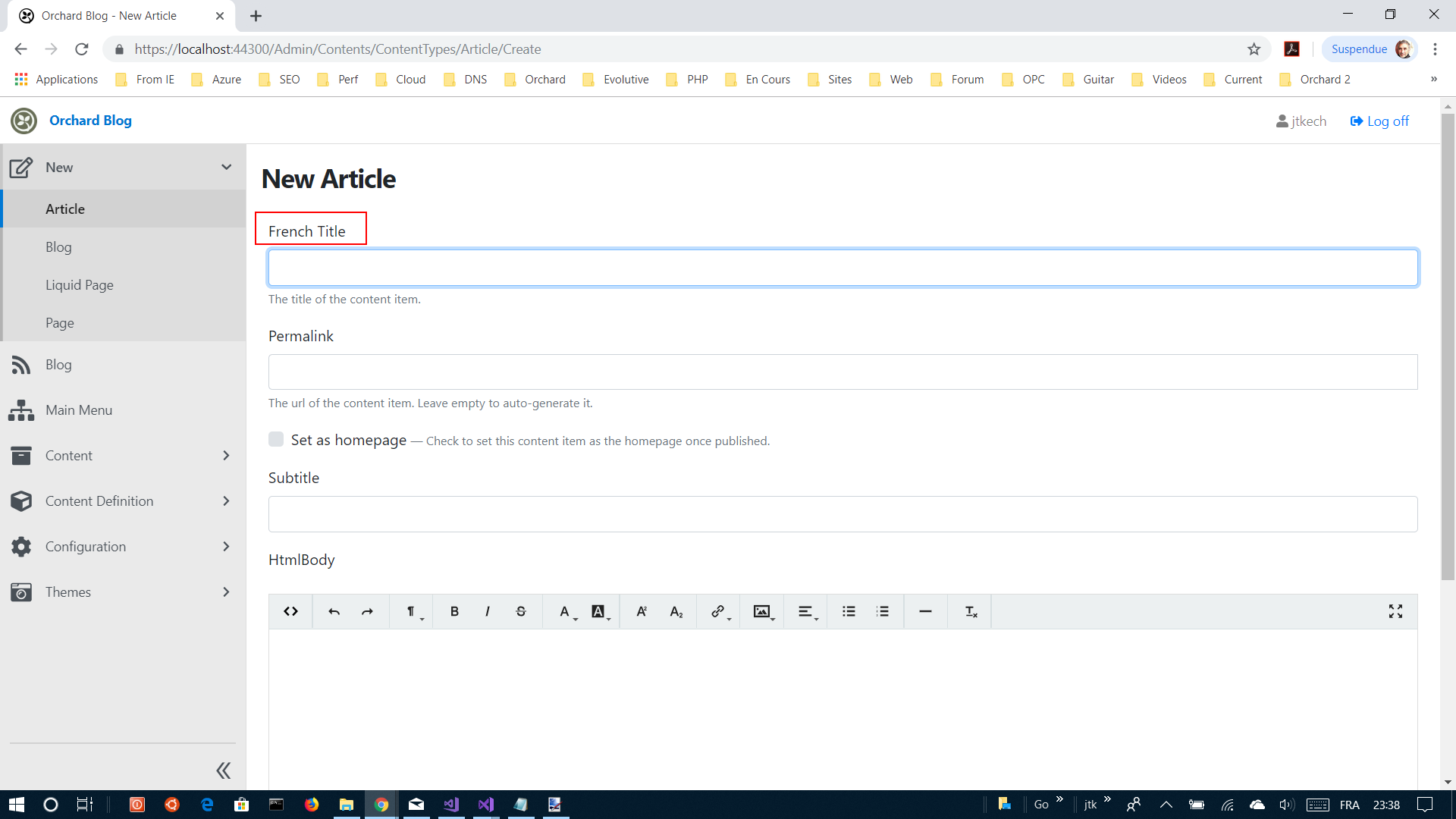
jtkech
on 26 Mar 2019
@jtkech it can only work if you are loading the page the first time with the matching culture once you enable localization. So because you are in a French browser that might work with french. Now try with "es" ;)
The PR is ready, it should take a few more minutes before it's merged and deployed on myget.
It will be on nuget once we publish beta3.
sebastienros
on 26 Mar 2019
Okay cool.
Just tried, also works by selecting the en-US culture but i needed to remove the fr-FR supported culture because of, as i remember, the accept header middleware that still wins. Then i also needed to save again the culture settings which restarts the site. Then it was working.
jtkech
on 27 Mar 2019
The nuget package is ready, can you guys test it: https://myget.org/feed/orchardcore-preview/package/nuget/OrchardCore.Localization.Core/1.0.0-beta3-71025
You will need to add this in your Nuget.config or in Visual Studio as a source feed:
<add key="OrchardCore" value="https://www.myget.org/F/orchardcore-preview/api/v3/index.json" />
sebastienros
on 27 Mar 2019
i can confirm that the problem is solved
dev-masih
on 27 Mar 2019
@sebastienros just got what you meant, i needed to check different supported cultures e.g through the url query string culture param, this without restarting the site as it is done when saving the culture settings. When i tried it my mind was not enough in the context of localization ;)
jtkech
on 27 Mar 2019
wow, yes, now works as spected !!!
nicojmb
on 28 Mar 2019
Related issues
 ns8482e
·
4Comments
ns8482e
·
4Comments
 JanSichula
·
3Comments
JanSichula
·
3Comments
 superluminalK
·
4Comments
superluminalK
·
4Comments
 deanmarcussen
·
3Comments
deanmarcussen
·
3Comments
 Ujinjinjin
·
3Comments
Ujinjinjin
·
3Comments
Most helpful comment
The nuget package is ready, can you guys test it: https://myget.org/feed/orchardcore-preview/package/nuget/OrchardCore.Localization.Core/1.0.0-beta3-71025
You will need to add this in your Nuget.config or in Visual Studio as a source feed:
<add key="OrchardCore" value="https://www.myget.org/F/orchardcore-preview/api/v3/index.json" />