Operating-system: Disk usage increases very rapidly after latest updates
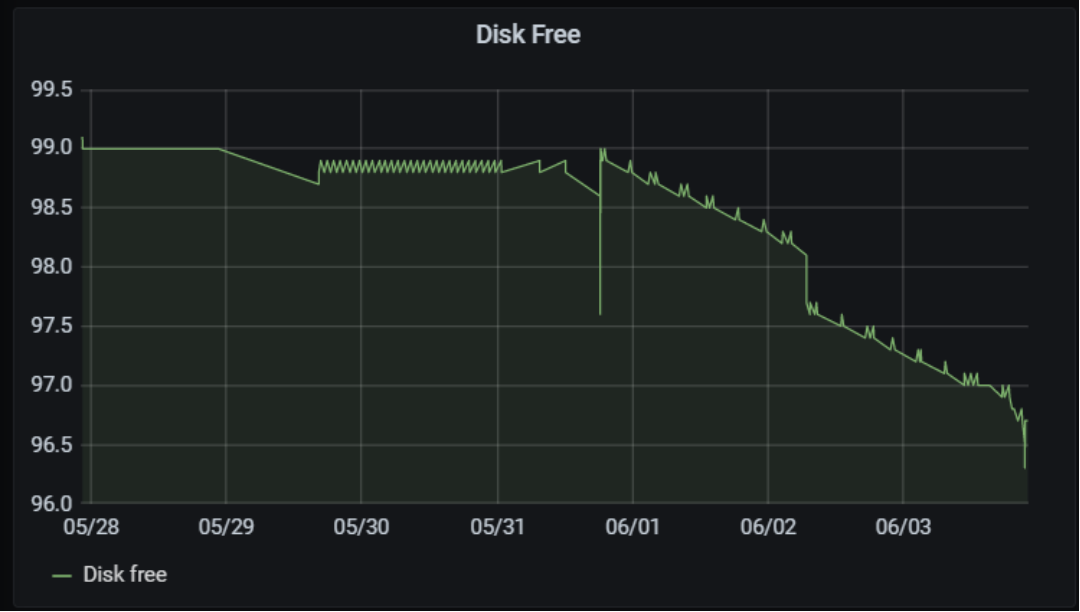
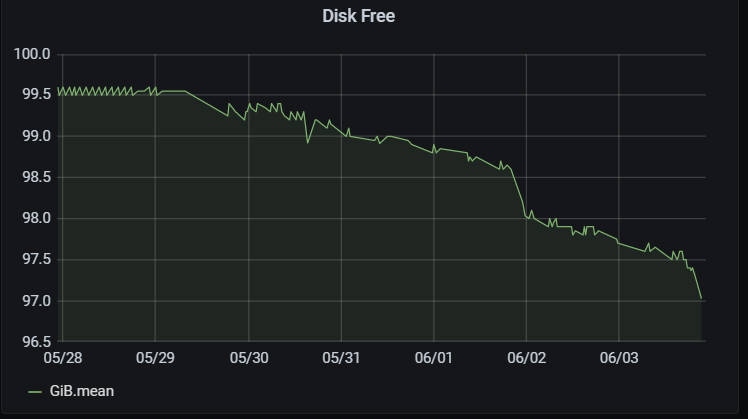
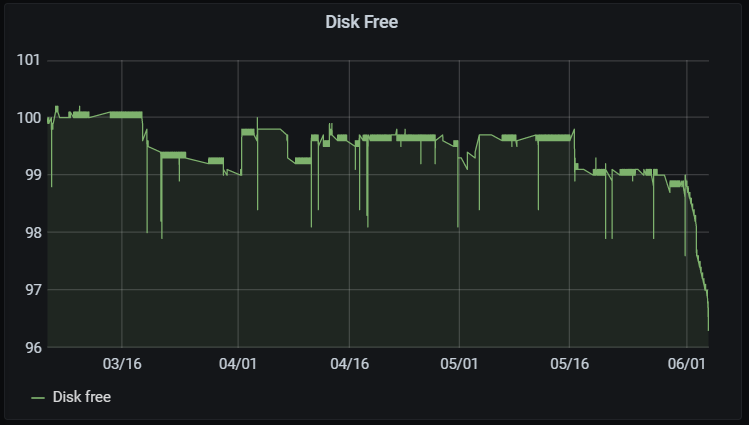
I have realized in my systems running Homeassistant in NUC (NUC image) that disk usage increases very rapidly. I think this happened within few days ago after updates with supervisor 226/HassOS 4.8/Grafana/Influx to latest versions.
For a long time my system monitor showed around 4 GiB used and 99 Gib free. Now it shows 7 GiB used and 96GiB free?
Below the status of my two NUCs with Disk Use in 7 days and one more chart below for 90 days
 tosion
All 19 comments
There is a memory leak somewhere....I'm noticing the same issue this was HassOS 4.8
 brinzlee
on 3 Jun 2020
brinzlee
on 3 Jun 2020
Yeah I've noticed an increase of ~5GB disk use per day since updating. My disk use was essentially flat for months before the update to 4.8.
Using HassOS NUC image.
 tomlut
on 3 Jun 2020
tomlut
on 3 Jun 2020
Any indication on where the disk space grows? As in, a specific folder?
 frenck
on 3 Jun 2020
frenck
on 3 Jun 2020
No not yet. It does not appear to be in /config. Or swapfile.
Apologies but I overstated my issue.
I thought I had a 500G SSD but it's only 125G. So the 1% increase today was only 1GB not 5GB. And it seems to have stopped increasing.
tomlut
on 3 Jun 2020
I would like to help but I am not sure what to look for.
tosion
on 3 Jun 2020
I have the same issue, NUC, HA OS 4.8, HA 110.4. Growing by 220Mb per day (including 30Mb per day for my DB)
I did not find what's taking so much space. It does not seems to be an add-on as I have removed them all (except deconz) and re-installed them later
 mbo18
on 3 Jun 2020
mbo18
on 3 Jun 2020
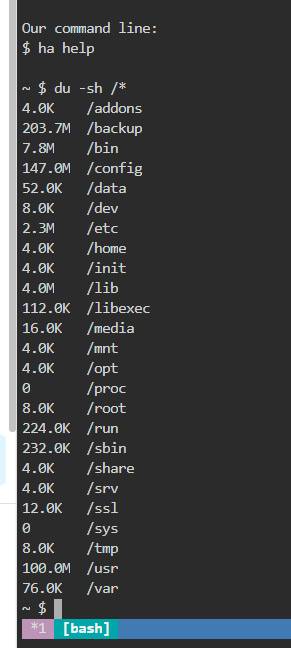
At the CLI try:
du -sh /*
To get a list of directory sizes.
tomlut
on 3 Jun 2020
This?
tosion
on 3 Jun 2020
Did it also in / using SSH Add-on from Franck. Made a diff a day later and only changed I saw is the size of the config folder due to my DB growing:
```4607c4607
< 7060 root
7068 root
4633c4633< 221884 config
230276 config
mbo18
on 3 Jun 2020
I have noticed the same issue since the upgrade to HassOS 4.8. A little investigation led me to the systemd journals in /mnt/data/logs. In a few days time it grew to 4GB.

So I wondered if this is normal/desired behaviour. But it seems that size limitations on the systemd journal config (/etc/systemd/journald.conf) have been removed in #649

 boekhorstr
on 3 Jun 2020
boekhorstr
on 3 Jun 2020
We made this change to align how other operating systems like Raspbian and Debian configure systemd. By limiting things we lose important logs that help with debugging.
Limiting used size would not help in reducing disk writes, as the MaxUse settings would remove old logs, while new logs are still written to disk.
For the default settings that apply now, see https://www.freedesktop.org/software/systemd/man/journald.conf.html#SystemMaxUse=
 balloob
on 4 Jun 2020
balloob
on 4 Jun 2020
Thanks for this valuable piece of info!
If anyone knows is this disk use just going to increase or stop somehow, I would appreciate that info also.
tosion
on 4 Jun 2020
It's in the docs I linked :)
balloob
on 4 Jun 2020
I tried my best to read it but with my background (you would be surprised how far I have gone with this HA as a passenger with no idea how to drive - many thanks for you guys!) understanding part was a bit difficult ;-)
tosion
on 4 Jun 2020
If I understand correctly, 10 and 15% of the file system size with a maximum of 4Gb
The first pair defaults to 10% and the second to 15% of the size of the respective file system, but each value is capped to 4G
mbo18
on 4 Jun 2020
This part is also important: "something else causes the file system to fill up, journald will stop using more space"
balloob
on 4 Jun 2020
Excellent - so I have plenty of room with my 120 G SSD ... and nothing to worry about
tosion
on 4 Jun 2020
Is there an easy way to restore the original MaxUse settings for journald.conf?
Looks like the file system is mounted read-only.
 aechelon
on 18 Jun 2020
aechelon
on 18 Jun 2020
This change is rather annoying for those of us who run HASSOS inside a VM and keep that image lean to accelerate snapshots.
Would it be possible to get an option to configure the MaxUse variables (or Storage=volatile) through the supervisor or even through ssh?
For those who are interested in a temporary solution, once you have ssh access to the host (see here) you can recreate the original journald.conf on a writable portion of the file system (e.g. under /root/), and then replace the default journald.conf with the modified version using mount -o bind. Once that's done just reload journald:
mount -o bind /root/journald.conf /etc/systemd/journald.conf
systemctl force-reload systemd-journald
I've tried to get this running at boot through udev rules (see here) but systemd-udev won't persist the mount outside the udev rule without mountflags=shared, so for now I'm stuck running the script manually after reboots (which luckily are infrequent).
aechelon
on 25 Jun 2020
Related issues
 pepeEL
·
8Comments
pepeEL
·
14Comments
pepeEL
·
8Comments
pepeEL
·
14Comments
 Ayo91
·
9Comments
Ayo91
·
9Comments
 ETaube
·
10Comments
ETaube
·
10Comments
 jodur
·
6Comments
jodur
·
6Comments
Most helpful comment
We made this change to align how other operating systems like Raspbian and Debian configure systemd. By limiting things we lose important logs that help with debugging.
Limiting used size would not help in reducing disk writes, as the
MaxUsesettings would remove old logs, while new logs are still written to disk.For the default settings that apply now, see https://www.freedesktop.org/software/systemd/man/journald.conf.html#SystemMaxUse=