Opentx: Companion crashes when loading bitmap files in telemetry LUA scripts
Hi,
I am testing a telemetry script for X9D+ that I found on the web. The script visualize the RSSI through a widget.
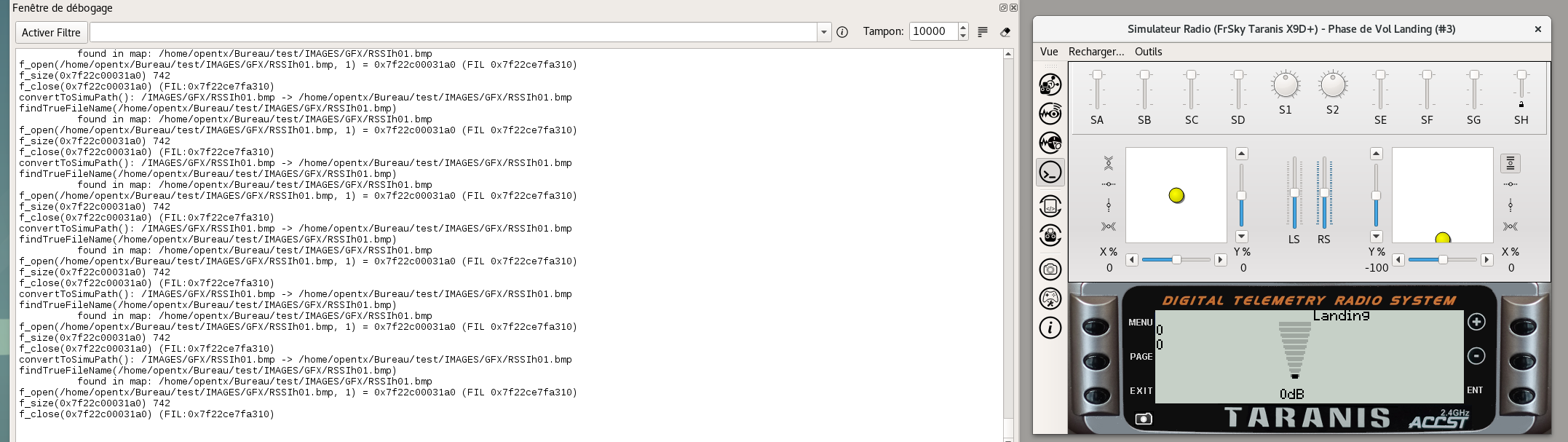
The script tuns just fine on the radio, but it hangs companion when I run it with the Telemetry Simulator enabled. The same script without calling the lcd.drawPixmap function runs perfectly. On the other hand, when I call the lcd.drawPixmap the script runs for few seconds, then companion crashes. Some times the script runs a little-bit longer, but it ends crashing anyway.
I am using companion on Debian GNU/Linux, 64 bit platform.
I am attaching here:
o) the model setup
setups_scripts.zip
o) the script (with the .bmp images)
telemetry_script.zip
o) the standard error output
companion_output.zip
I am available to provide further informations
Thanks
Marco
 zufus
zufus
All 11 comments
Edit: the same script, with the same model setups on Windows runs just fine. So I conclude that this is a Linux-related issue, (please note that the bug occurso on both my Linux machines).
zufus
on 22 Aug 2018
Thanks for the comprehensive report. Looks like this will need a debug session to chase down.
f_open(/home/zufus/modellismo/taranis/SDCard/IMAGES/GFX/RSSIh08.bmp, 1) = 0x7fe1240013d0 (FIL 0x7fe1327fa3f0)
munmap_chunk(): invalid pointer
 mpaperno
on 22 Aug 2018
mpaperno
on 22 Aug 2018
It doesn't fail here under Debian Strech, Did let it run over 10 mins (official 2.2.2 deb release)
 3djc
on 23 Aug 2018
3djc
on 23 Aug 2018
@zufus
- Where did your installer/build come from, is it the official OTX release, or self-built?
- Which version are we talking about... 2.2.2 Release?
- Any chance this only happens with particular bitmaps (eg.
RSSIh08but notRSSIh01)?
Thanks.
mpaperno
on 23 Aug 2018
@mpaperno thanks for following up.
I am using opentx 2.2.2, deb 64 bit package, downloaded from open-tx.org.
I am using latest sid (mostly everyday upgrade).
I tried to see if the crash happens on a particular bitmap.. I tried this by changing the RSSI value in the telemetry simulator: the script works just fine (and bitmap are displayed correctly as I increase/decrease the RSSI). But suddenly companion crashes. There's absolutely no relation.. some times it crashes as soon as I load the telemetry script.
I also checked individually all the bitmaps, they all looks ok in size and colour detph.
If I launch companion under strace, then no crash at all: it works just fine as in Windows 10.
I am attaching here the list of libraries loaded by companion (I hope it is useful to see their version)
companion_lsof.zip
Please let me know if I can do specific tests to debug this issue.
Thanks
zufus
on 23 Aug 2018
Reproduced. Mint 19 (Ubuntu/Debian based) which has Qt 5.9.5/gcc6 by default, using the OTX deb 2.2.2 release as well as versions built on the box, and also with Qt 5.7.1. And, luckily, even debug builds.
Seems directly related to the copious amount of debug output from TRACE_SIMPRGMSPACE during file access. More specifically to memory reallocation by QByteArray when buffering the debug output for display in Simulator. Or even more specifically in malloc() of libc-2.27 :)
Looks like a recurrence of an ongoing issue I've dealt with before, last time due to the huge amount of debug output dumped during X10/X12 startups. That was "fixed" by increasing the buffer size IIRC, but apparently it was just a stopgap.
Possibly some Qts are more susceptible to this... eg. it crashes here quicker with 5.9.5 than 5.7.1 (all else being the same). Last time I dealt/tested this was on 5.5.x IIRC, though I also remember 5.2 was very vulnerable. Or it could be the compiler/libs version, or some combination of the above.
Anyway, I'm testing a fix now which avoids any re-allocations altogether (at the expense of reserving more memory up front), and so far it seems solid.
mpaperno
on 24 Aug 2018
well, good finding! :) Thanks!
Marco
zufus
on 24 Aug 2018
Hi Marco, could you try this test version? It is the same as 2.2.2 except the (potential) crash fix.
companion22_2.2.2_amd64.deb.zip (Remove the GitHub-required .zip extension.)
I kept the internal version number the same so you wouldn't have to uninstall the test version to get the official one back. So the package installer will need to be forced to re-install.
This only includes the X9D+ simulator library. You can re-install the 2.2.2 official .deb package to get the others back. Or make a backup of the current ones in /usr/local/lib/companion22 and then put them back after installing this test version. The simu libraries haven't changed at all, only the GUI apps (companion22/simulator22).
Thanks!
mpaperno
on 24 Aug 2018
Max, sorry for the late replay. I have been offline. I will test it later and let you know.
Marco
zufus
on 26 Aug 2018
Dear Max, I confirm your version seems to fix the problem here, the script is now running since more than 10 minutes, and I restarted the simulator few times.
Thank you for your support, and sorry again for the time it took to reply :)
Marco
zufus
on 30 Aug 2018
Hi Marco. That's no problem at all, thanks a lot for testing and confirming! And again for the comprehensive reporting. I will get a patch into the next version.
Cheers,
-Max
mpaperno
on 30 Aug 2018
Related issues
 nitram509
·
13Comments
nitram509
·
13Comments
 abertheham
·
7Comments
abertheham
·
7Comments
 RookFPV
·
3Comments
RookFPV
·
3Comments
 notlebowski
·
9Comments
notlebowski
·
9Comments
 calril312
·
10Comments
calril312
·
10Comments