Opentrons: Connecting via FTDI to drive SmoothieBoard
Overview
I'm trying to connect to the SmoothieBoard on the OT-2 directly using an FTDI cable to run commands from the Robot class from the legacy api in my own fork of the opentrons repo.
Where I am
So far, I've been able to push my modified api to the OT-2 via
make push-api host=<robot-ip> br_ssh_key=<ssh_key>,
and then ssh into a robot to open a python terminal and test my edits via
make term host=<robot-ip>
successfully, but I'd now like to run the drivers directly from my machine, bypassing the onboard pi.
I understand from the contributing guide and from some conversations with support that I can do this by connecting to the pi debug header via FTDI cable and then using make local-shell inside api/, but haven't had success with this so far.
I've exported the following variables:
OT_ROBOT_SERVER_ws_host_name=$(hostname).local
OT_ROBOT_SERVER_hardware_server_enable=True
OT_SMOOTHIE_ID=<FTDI-serial-port>
where <FTDI-serial-port> = ttyUSB0 for a USB to FTDI cable (do I have this right?)
These are some issues I've been looking at which are a little relevant to mine:
Where I'm seeking help
Mainly, I'm looking for a way to check if a SmoothieBoard connection was successful within the local-shell. I'd also appreciate general guidance for controlling the SmoothieBoard drivers, as in, how low would you recommend going for something like realtime position logging / checks (wouldn't want to reinvent the wheel and go straight from here, or here.... or, should I?
Thanks for your help and for making this open-source.
 joaquin-gl
All 17 comments
I found the problem! in my python terminal, instead of using robot.connect() without any arguments as I'm used to, I passed robot.connect('/dev/ttyUSB1') with the FTDI serial port.
joaquin-gl
on 18 Dec 2020
Hey @joaquin-gl , sounds like you solved your issue, so I'm going to close this issue.
Given that this isn't a super common use case and we don't have documentation readily available, I'm not sure we'll be able to give much _general_ help outside of the source code for driving the Smoothie board. Happy to answer more specific questions in this thread as you run into them while experimenting, though!
 mcous
on 26 Jan 2021
mcous
on 26 Jan 2021
Hello,
I wanted to ask a couple of questions about driving the OT-2 using the robot class from the legacy api. I know this class is deprecated, and that this question may be a bit out of the 'standard' use of the machine, but I have an application which requires real time control of the gantry.
The level of abstraction I've settled with is this Robot class, where I can access the Mover objects for each axis or gantry and move using that. My question is, is there a better level of abstraction from baseline smoothieboard driver code to work from? I'm asking because I've run into these two issues:
- I have to switch the shield to
RasPiwhen booting up the OT-2 and _then_ switch it toDebugafter what seems to be a short homing sequence. Is there a digital way to do this, or is there a way where I can program that startup sequence into my machine? If I boot inDebug, the smoothieboard is inaccessible. - It appears there are no digital hard stops at this point. The only one i found was in the positive x direction, with an error from the smoothie driver. I could write my own simply, but I'm wondering if there is an implementation that would be best.
- When the robot runs into the wall or collides with something else, however light, the coordinates are off for that axis and I have to
robot.home()again. Is there a simpler way to potentially catch these hiccups?
Thanks so much for your help and time! And thank you @mcous for responding.
joaquin-gl
on 6 Feb 2021
Also, would this gain more visibility as a new issue, or is this thread okay? Thanks.
joaquin-gl
on 6 Feb 2021
This thread is all good! I'm going to throw this at someone who has more experience with the driver code than me, but it's end-of-day on Friday in New York so it may take a few days for a detailed response.
The level of abstraction I've settled with is this Robot class, where I can access the Mover objects for each axis or gantry and move using that.
I would definitely urge extreme caution taking this route. That class will be removed shortly, if it hasn't already been removed in the v4 line. I wonder if something like the Controller class or something higher level like the hardware API class might work for your use case.
I have to switch the shield to RasPi when booting up the OT-2 and then switch it to Debug after what seems to be a short homing sequence. Is there a digital way to do this, or is there a way where I can program that startup sequence into my machine? If I boot in Debug, the smoothieboard is inaccessible.
I'm not sure what you mean by this. Which "shield" are you referring to?
It appears there are no digital hard stops at this point. The only one i found was in the positive x direction, with an error from the smoothie driver. I could write my own simply, but I'm wondering if there is an implementation that would be best.
There is a hard stop in the positive X axis, yes. The Y stop is a soft stop, I believe. The various Z axes (left pipette, right pipette, left plunger, right plunger) all have hard stops, too. All stops are detected by watching for a SmoothieError from any given move.
When the robot runs into the wall or collides with something else, however light, the coordinates are off for that axis and I have to robot.home() again. Is there a simpler way to potentially catch these hiccups?
Unfortunately, due to the OT-2's usage of stepper drivers without encoding, it's a dead-reckoning system that's pretty susceptible to losing positional accuracy due to collisions.
mcous
on 6 Feb 2021
No worries! Thanks for responding so quickly. Yes, the class has been removed in v4 onwards, which is why I have been using the most recent v3.21.2 branch.
I'm not really sure how to instantiate a Controller to control the gantry, without a config file. I've been using the robot class because it has been the easiest to use so far.
This is the shield:
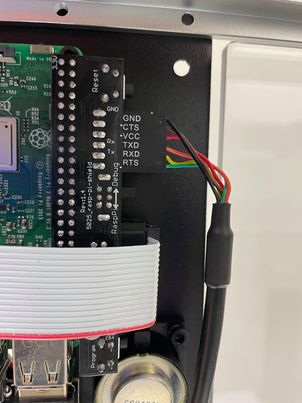
If the stops are all from SmoothieError does that mean they are all defined at the smoothie driver level?
joaquin-gl
on 6 Feb 2021
Hey @mcous just wanted to ask if anyone had any pointers for me. Sorry if you are busy! The biggest problem I'd like to fix is eliminating the raspi -> debug switch step to start up the robot correctly. Thanks!
joaquin-gl
on 10 Feb 2021
@joaquin-gl I think I understand your problem a little better now. When it comes down to it, the control interface that the motor controller board (smoothie board) uses is UART - more colloquially, "serial". UART is a 1-to-1 communication scheme; you can have the R. Pi talking to the motor controller board or you can have your computer talking to it; not both. IIRC that is what the "debug" switch does, electrically.
I _believe_ a problem that you are running into here, especially with system boot-up, is that the UART I/O isn't the only I/O needed to control the motor board. There are a few other lines that are connected to the Pi, including (off the top of my head) a "RESET" line, a "HALT" line, an "ISP" line.
I'm making some assumptions because this area of the code is not my primary area of expertise, but I believe during boot, our software running on the Pi relies on access to UART to set up the motor controller with respect to these other I/O lines. I'm sure the code on the Pi could be modified to, for example, hard code the I/O outputs so the UART hardware switch can always be in "debug" mode, but I don't really know the level of effort involved.
I'm continuing to ask around, so someone else may chime in here with additional (or different!) thoughts, but "control the OT-2's motors via G-code from an external computer" strikes me as a difficult thing to do, from an electrical standpoint, for anything other than experimentation and debugging. Additionally, the Python code, when run locally on your machine, expects to have access to the full suite of control GPIO, not just serial.
My current work in the system is designing and building structured control interfaces for the robot over HTTP, so I'd be curious to hear about your end use case.
mcous
on 11 Feb 2021
@joaquin-gl , if you want to use most recent version of the software server. I would recommend using the hardware_control, I use the hardware control for testing purposes. Here's a block of code that I use to connect via FTDI using the thread manager, this will allow you call functions from the https://github.com/Opentrons/opentrons/blob/edge/api/src/opentrons/hardware_control/api.py
from opentrons.hardware_control import *
from opentrons.hardware_control.types import Axis
from opentrons import types

tm = ThreadManager(API.build_hardware_controller, port = robot_port)
hc= tm.sync
hc.cache_instruments()

mount = types.Mount.LEFT
hc.home()
hc.move_to(mount ,types.Point(x,y,z), speed = specify_speed)
 Carlos-fernandez
on 12 Feb 2021
Carlos-fernandez
on 12 Feb 2021
Thanks for your help guys.
@mcous
you can have the R. Pi talking to the motor controller board or you can have your computer talking to it; not both. IIRC that is what the "debug" switch does, electrically.
Yes, and for my application I want to start up the OT-2 and control it entirely via the external computer. I'd love more clarification on these other lines you mention which are needed to boot up the motor controller board. Even if I could start with it switched to RasPi and then have some code on the pi execute to switch it to Debug for external UART control, that would be great. Ultimately, I really want to avoid having to switch back and forth every time the robot boots up.
My current work in the system is designing and building structured control interfaces for the robot over HTTP, so I'd be curious to hear about your end use case.
I can elaborate a bit. I started looking into controlling the motor controller directly because using the protocol methods from the opentrons wiki weren't cutting it. I'd like to control the robot axis motors live and return data form the motors. I'd like to, say, move the robot in a position for a camera or other sensor, and verify the position before moving away. This seemed like something which the suggested protocol methods were not built for.
@Carlos-fernandez
I have tried and used your suggestion more recently and think it might not be the best choice for me. It's a little too abstracted from the smoothie drivers for my use. I was hoping using it might fix my boot issue, but after booting up in Debug mode, it fails to connect to the motor driver and returns this:
Output
>>> tm = ThreadManager(API.build_hardware_controller, port='/dev/ttyUSB0')
This is intended to run on a robot, and while it can connect to a smoothie via a usb/serial adapter unexpected things using gpios (such as smoothie reset or light management) will fail. If you are seeing this message and you are running on a robot, you need to set the RUNNING_ON_PI environmental variable to 1.
/home/ubuntu/.opentrons/deck_calibration.json not found. Loading defaults
/home/ubuntu/.opentrons/robot_settings.json not found. Loading defaults
Failed to initialize character device, will not be able to control gpios (lights, button, smoothiekill, smoothie reset). Only one connection can be made to the gpios at a time. If you need to control gpios, first stop the robot server with systemctl stop opentrons-robot-server. Until you restart the server with systemctl start opentrons-robot-server, you will be unable to control the robot using the Opentrons app.
smoothie: timed out after 5
smoothie: timed out after 5
smoothie: timed out after 5
smoothie: timed out after 5
smoothie: timed out after 5
smoothie: timed out after 5
Motor driver could not connect, reprogramming if possible
Traceback (most recent call last):
  File "/home/ubuntu/opentrons/api/src/opentrons/drivers/smoothie_drivers/driver_3_0.py", line 1234, in _setup
    self._wait_for_ack()
  File "/home/ubuntu/opentrons/api/src/opentrons/drivers/smoothie_drivers/driver_3_0.py", line 968, in _wait_for_ack
    self._send_command('\r\n', timeout=SMOOTHIE_BOOT_TIMEOUT)
  File "/home/ubuntu/opentrons/api/src/opentrons/drivers/smoothie_drivers/driver_3_0.py", line 1028, in _send_command
    timeout)
  File "/home/ubuntu/opentrons/api/src/opentrons/drivers/smoothie_drivers/driver_3_0.py", line 1053, in _send_command_unsynchronized
    ack_timeout, DEFAULT_COMMAND_RETRIES)
  File "/home/ubuntu/opentrons/api/src/opentrons/drivers/smoothie_drivers/driver_3_0.py", line 1145, in _write_with_retries
    raise serial_communication.SerialNoResponse()
opentrons.drivers.serial_communication.SerialNoResponse

During handling of the above exception, another exception occurred:

Traceback (most recent call last):
  File "/home/ubuntu/opentrons/api/src/opentrons/hardware_control/api.py", line 160, in build_hardware_controller
    await backend.connect(port)
  File "/home/ubuntu/opentrons/api/src/opentrons/hardware_control/controller.py", line 248, in connect
    self._smoothie_driver.connect(port)
  File "/home/ubuntu/opentrons/api/src/opentrons/drivers/smoothie_drivers/driver_3_0.py", line 581, in connect
    self._setup()
  File "/home/ubuntu/opentrons/api/src/opentrons/drivers/smoothie_drivers/driver_3_0.py", line 1239, in _setup
    self._smoothie_reset()
  File "/home/ubuntu/opentrons/api/src/opentrons/drivers/smoothie_drivers/driver_3_0.py", line 1923, in _smoothie_reset
    self._wait_for_ack()
  File "/home/ubuntu/opentrons/api/src/opentrons/drivers/smoothie_drivers/driver_3_0.py", line 968, in _wait_for_ack
    self._send_command('\r\n', timeout=SMOOTHIE_BOOT_TIMEOUT)
  File "/home/ubuntu/opentrons/api/src/opentrons/drivers/smoothie_drivers/driver_3_0.py", line 1028, in _send_command
    timeout)
  File "/home/ubuntu/opentrons/api/src/opentrons/drivers/smoothie_drivers/driver_3_0.py", line 1053, in _send_command_unsynchronized
    ack_timeout, DEFAULT_COMMAND_RETRIES)
  File "/home/ubuntu/opentrons/api/src/opentrons/drivers/smoothie_drivers/driver_3_0.py", line 1145, in _write_with_retries
    raise serial_communication.SerialNoResponse()
opentrons.drivers.serial_communication.SerialNoResponse
Motor controller could not be connected and no firmware was provided for (re)programming
Exception in Thread Manager build
Traceback (most recent call last):
  File "/home/ubuntu/opentrons/api/src/opentrons/hardware_control/thread_manager.py", line 150, in _build_and_start_loop
    **kwargs))
  File "/home/ubuntu/.pyenv/versions/3.7.6/lib/python3.7/asyncio/base_events.py", line 583, in run_until_complete
    return future.result()
  File "/home/ubuntu/opentrons/api/src/opentrons/hardware_control/api.py", line 177, in build_hardware_controller
    raise RuntimeError(msg)
RuntimeError: Motor controller could not be connected and no firmware was provided for (re)programming
Traceback (most recent call last):
  File "<stdin>", line 1, in <module>
  File "/home/ubuntu/opentrons/api/src/opentrons/hardware_control/thread_manager.py", line 128, in __init__
    object.__getattribute__(self, 'managed_thread_ready_blocking')()
  File "/home/ubuntu/opentrons/api/src/opentrons/hardware_control/thread_manager.py", line 133, in managed_thread_ready_blocking
    raise ThreadManagerException("Failed to create Managed Object")
opentrons.hardware_control.thread_manager.ThreadManagerException: Failed to create Managed Object
If there is a way I could fix this or emulate that start-up sequence that would be awesome. I've written some basic drivers to control the smoothieboard via accessing robot._driver from the legacy api for now.
joaquin-gl
on 25 Feb 2021
@mcous @Carlos-fernandez Thanks for taking time to help me. Just wanted to bump this briefly to see if there are any new thoughts or new people which might get me closer to a solution.
joaquin-gl
on 3 Mar 2021
Hi @joaquin-gl! I have been giving this some thought, and the conclusion that I keep coming to is that I think you're going to have a much better time if you write your software to run on the Pi rather than your own computer.
The debug switch (if I'm understanding it correctly) physically disconnects the R.Pi. serial lines from the motor controller board and connects them to the serial header instead. The Pi cannot do this via software, because the debug switch changes the circuit layout.
This leaves you with two options if you want to go down to the level of issuing G-Code directly to the motor controller without flicking the switch
- Keep the switch in the "debug" position so you can issue G-Code from your computer
- This will require modifying the Opentrons software and/or environment on the Pi so that the robot can successfully boot and set the non-serial IO lines properly
- Do not touch the switch, modify the Opentrons software running on the robot
- This would be what I would personally do, given that you're already going to have mess with the Opentrons software
- In this environment, you have full control over all GPIO
mcous
on 3 Mar 2021
Hi @mcous Thanks for your response. I see what you have described. I have questions for each approach,
- Where can I find the boot code in the repo on the Pi to hard-code those other I/O lines? Perhaps in config/reset.py?
- Also, would it be possible to run this boot sequence on my own computer, or are those lines strictly wired to the Pi?
- this was my initial approach when editing the code. If you have an example for controlling the axes live and have them engage different behaviors on, say, a sensor readout, that would be enough for my application.
- From what I understand, the protocol API recommended by the wiki creates sequences or loops for the robot to complete, and doesn't offer this much flexibility.
- I can also just use my drivers on the robot, but the advantage of using my own computer allows me to connect other sensors and communicate with them too. If I could access the package manager on the Pi, which iirc I don't have access to, then I could potentially work with installing some framework like ROS for these communications instead.
joaquin-gl
on 3 Mar 2021
Hi @mcous , Wanted to see if there was any possible follow up to this question. Also, separately, I wanted to ask if there is a stripped down version of the repo to access the axes but without the webserver, protocol designer, labware designer, etc. packages I'm not using. I'm a bit space limited on the computer I'm using to control the robot, so stripping down some of these build files would be a big help. Thanks!
joaquin-gl
on 18 Mar 2021
Where can I find the boot code in the repo on the Pi to hard-code those other I/O lines
The method that configures the hardware can be found here: https://github.com/Opentrons/opentrons/blob/edge/api/src/opentrons/hardware_control/api.py#L133-L194. In general, all hardware control logic lives in api/src/opentrons/hardware_control and api/src/opentrons/drivers.
From what I understand, the protocol API recommended by the wiki creates sequences or loops for the robot to complete, and doesn't offer this much flexibility.
Apologies if this is just a simple miscommunication, but what wiki are you referring to? I'm not familiar with any Opentrons-maintained wiki for using the Protocol API (or at least, Opentrons-engineering-maintained). We do maintain a documentation site.
The Protocol API does have high-level loop constructs, like transfer and consolidate, but low level actions are possible as well. For example, the pipette.move_to method allows you to move a pipette to an arbitrary coordinate in deck space (where the point (0, 0, 0) is the front left of slot 1 at the deck).
Assuming you're able to connect your sensor to the Raspberry Pi and talk to it in Python, would this be sufficient for your needs?
If I could access the package manager on the Pi, which iirc I don't have access to, then I could potentially work with installing some framework like ROS for these communications instead
You can pip install any pure Python package onto the Pi, but anything that requires native compilation is going to be an issue. This is something we're trying figure out a better answer to, because obviously it's frustrating to not be able to install stuff onto this thing that is a full Linux computer.
I wanted to ask if there is a stripped down version of the repo to access the axes but without the webserver, protocol designer, labware designer, etc. packages I'm not using
I haven't personally tried this, but in theory you could use git-sparse-checkout. Off the top of my head, you'd need to check out:
apirobot-servershared-data
The makefiles also expect a working Node.js installation with the shx utility installed and available. I put robot-server on the list because on the robot, it's the HTTP server that ends up importing the opentrons package and spinning up + connecting the hardware controller.
One final thing: the Hardware Controller checks various environment variables to decide if it's running on an actual OT-2. You may want to try tricking it into thinking your computer is also an OT-2. RUNNING_ON_PI=1 is definitely one of the variables, but there may be others as you read through the code.
mcous
on 18 Mar 2021
@mcous Thanks so much for all your help thus far!
Yes, I was referring to that documentation site you sent. I may be able to communicate with the sensor connected to the pi, but how we have things built right now in our system, it would be a little too dramatic of an overhaul. We use a system built on ROS to have async checking of the sensors and control the gantry in a coordinated fashion, and without native compilation or access to apt to get ROS and other things we need, that route is a little infeasible. Thanks for illuminating those methods though, and the git sparse suggestion.
I've done a bit of digging into the code, and I've found the sequence which allows the smoothie to be responsive at startup. I was able to trick the system into thinking my computer was the pi with that environment variable and a couple of edits, but without a successful GPIO connection here, I'm not able to do that smoothie reset sequence and after can't control the smoothieboard how I'd like.
I'm wondering if there's a way I can command the pi to set this GPIO sequence at startup regardless of whether or not it detects a connection to the smoothieboard? The exact details of what's stopping it at this point, I'm not sure...
Some clarity on where I can surpass that check, or maybe how I could send a signal to the pi over ethernet to do so, would be much appreciated.Thanks so much
joaquin-gl
on 8 Apr 2021
Hey @joaquin-gl, thanks for your patience! GitHub notifications leave a lot to be desired, and your messages here get perpetually burried. I think this might be easier over email, so feel free to send me one: mike at opentrons dot com.
We have en environment variable called ENABLE_VIRTUAL_SMOOTHIE that you can set to true on the R-Pi to make it ignore the Smoothie altogether. I wonder if setting it will help in your case. Could you try adding the following file on the Rasp. Pi: /data/robot.env
ENABLE_VIRTUAL_SMOOTHIE=true
Related issues
 MarcelRobitaille
·
7Comments
MarcelRobitaille
·
7Comments
 SyntaxColoring
·
6Comments
SyntaxColoring
·
6Comments
 asogluizzo
·
6Comments
asogluizzo
·
6Comments
 IanLondon
·
7Comments
IanLondon
·
7Comments
 iansolano
·
4Comments
iansolano
·
4Comments