Openstreetmap-carto: area of barrier=wall not filled
Expected behavior
Barrier=wall with area=yes should be rendered filled with grey color.
Actual behavior
The wall areas are rendered as transparent.

Links and screenshots illustrating the problem
Bridge pillars of unbuilt bridge - https://www.openstreetmap.org/way/584963675
Use of area=yes with barrier=* is suggested in manual for thick walls:
for thicker hedges or walls or detailed mapping defined using an area add area=yes
 PontiacCZ
All 62 comments
Side note, but a bridge support structure should be tagged bridge:support=x, and in your case likely bridge:support=abutment:
 mboeringa
on 16 Oct 2018
mboeringa
on 16 Oct 2018
Sounds like a real problem, but we lack coders to solve issues - would you like to try making the code fixing it?
 kocio-pl
on 16 Oct 2018
kocio-pl
on 16 Oct 2018
My understanding is that currently non-hedge barriers are assumed to be linear rather than area features. I suspect it'd need a check in the database to find out roughly how many should be filled vs not filled.
 SomeoneElseOSM
on 16 Oct 2018
SomeoneElseOSM
on 16 Oct 2018
Am Di., 16. Okt. 2018 um 15:12 Uhr schrieb SomeoneElseOSM <
[email protected]>:
My understanding is that currently non-hedge barriers are assumed to be
linear rather than area features. I suspect it'd need a check in the
database to find out roughly how many should be filled vs not filled.
It is generally ok to assume closed way barriers as linear features (by
default), but it should be possible to explicitly make them either areas or
not with the key:area.
 dieterdreist
on 16 Oct 2018
dieterdreist
on 16 Oct 2018
Side note, but a bridge support structure should be tagged bridge:support=x, and in your case likely bridge:support=abutment:
You're right and I'll be happy to re-tag it after this issue is solved and wall areas render opaque. :-)
PontiacCZ
on 16 Oct 2018
I agree that they should have some filling, because lack of it causes weird holes on map. The same applies also to bridge:support=abutment and bridge:support=pier (the second one filling would be helpful for cayakers etc.).
I propose to test:
#b2b2b2forbarrier=wallareas fill#e5e5e5forbridge:support=abutment/ pierareas fill
 Tomasz-W
on 16 Oct 2018
Tomasz-W
on 16 Oct 2018
barrier=fence is only valid for lines (wiki)
barrier=wall should be valid for areas, too.
Some naturals/amenities are using barrier=fence as the border and the other tags as the fill on the same osm object (random example).
But this is used for walls, too:
https://www.openstreetmap.org/way/209604284#map=19/51.43414/7.02914
https://www.openstreetmap.org/way/144635248
So any change here needs good tests.
 HolgerJeromin
on 17 Oct 2018
HolgerJeromin
on 17 Oct 2018
There are multiple problems here
- is
barrier=wallsupposed to be used for areas? - is it OK to tag area object (like
leisure=playgroundand barrier around it (likebarrier=wall) on one closed way?
Adding rendering of fill for walls will end with #971 suddenly appearing for all walls.
Small sample of affected objects (barrier=wall with leisure=playground - but the same affects any object rendered as an area) - https://overpass-turbo.eu/s/D26
 matkoniecz
on 23 Oct 2018
matkoniecz
on 23 Oct 2018
What should be done to proceed - someone who thinks that barrier=wall is valid for areas should discuss it with people who think that this use is not OK and edit Wiki to either document disagreement and potential solution or to describe consensus position (on OSM wiki or tagging mailing list).
matkoniecz
on 23 Oct 2018
I do not understand the https://overpass-turbo.eu/s/D26 example - I clicked a couple of those object and all of them were tagged as barrier=wall, leisure=playground. I didn't happen to encounter any with area=yes (but I don't deny there are some).
Because that's what my original post is about: I only expect wall areas with area=yes to be rendered opaque. That would not affect those playgrounds.
PontiacCZ
on 23 Oct 2018
There is no real difference between leisure=playground barrier=wall area=yes object and leisure=playground barrier=wall, both in what is tagged and in how it is stored in rendering database.
leisure=playground has implicit area=yes. In current rendering this is not visible, as there is no fill defined for barrier=wall areas.
matkoniecz
on 23 Oct 2018
For me it's obvious that we mean only the ones with area=yes tag, and this tag shouldn't be used for objects that are typically aeral by theirs nature (e.g. playgrounds). Barrier=hedge areas rendering which was mentioned above is totaly not proper for me, I think that any barriers fillings should be turn on only for combinations with area=yes, which is not used for typical areas but outlines of typically point-like/ way-like objects.
Tomasz-W
on 23 Oct 2018
@Tomasz-W Note that achieving what you want would require osm2pgsql to create two geometries (line and area) from a single closed line. Last time I checked it was not doing this.
If nothing changed then this map style is not able to distinguish between explicit area=yes and implicit area=yes.
matkoniecz
on 23 Oct 2018
It sounds like this issue is not fixable with the current tools and
database?
This sounds like a job for an “area” data primitive!
As long as we only have nodes, ways and relations, it will always be
difficult to deal with closed ways.
Perhaps we have to close this issue for now?
On Wed, Oct 24, 2018 at 5:14 AM Mateusz Konieczny notifications@github.com
wrote:
@Tomasz-W https://github.com/Tomasz-W Note that achieving what you want
would require osm2pgsql to create two geometries (line and area) from a
single closed line. Last time I checked it was not doing this.If nothing changed then this map style is not distinguishing between
explicit area=yes and implicit area=yes.—
You are receiving this because you are subscribed to this thread.
Reply to this email directly, view it on GitHub
https://github.com/gravitystorm/openstreetmap-carto/issues/3453#issuecomment-432401956,
or mute the thread
https://github.com/notifications/unsubscribe-auth/AoxshJPAiWmC69J96SwwktKzOmv-KT4uks5un3ivgaJpZM4XeL8p
.
 jeisenbe
on 24 Oct 2018
jeisenbe
on 24 Oct 2018
sent from a phone
On 17. Oct 2018, at 12:08, Holger Jeromin notifications@github.com wrote:
Some naturals/amenities are using barrier=fence as the border and the other tags as the fill on the same osm object (random example).
But this is used for walls, too:
https://www.openstreetmap.org/way/209604284#map=19/51.43414/7.02914
https://www.openstreetmap.org/way/144635248So any change here needs good tests.
rather than good tests we should fix the mapping, as it is mixing different things into one element, and rendering is just one field where this may create problems
dieterdreist
on 24 Oct 2018
sent from a phone
On 23. Oct 2018, at 22:14, Mateusz Konieczny notifications@github.com wrote:
@Tomasz-W Note that achieving what you want would require osm2pgsql to create two geometries (line and area) from a single closed line. Last time I checked it was not doing this
I believe this should be fixed in the data, because osm2pgsql cannot know which tags and properties belong to which things, if there is more than one represented by the same object.
dieterdreist
on 24 Oct 2018
sent from a phone
On 23. Oct 2018, at 22:14, Mateusz Konieczny notifications@github.com wrote:
If nothing changed then this map style is not distinguishing between explicit area=yes and implicit area=yes.
isn’t barrier=hedge already implemented to work as both, areas and lines? Couldn’t walls just act similarly?
dieterdreist
on 24 Oct 2018
isn’t barrier=hedge already implemented to work as both, areas and lines? Couldn’t walls just act similarly?
Adding rendering of fill for walls will end with #971 suddenly appearing for all closed ways with barrier=wall and without area=yes.
Small sample of affected objects (barrier=wall with leisure=playground - but the same affects any object rendered as an area that has barrier=wall) - https://overpass-turbo.eu/s/D26
This effect is acceptable if we consider tagging barrier=wall areay=yes to valid and consider one closed way with linear barrier=wall and object with implicit area=yes to be a tagging mistake (though it would result in flood of reports of "bug" and many confused people that will not report it).
matkoniecz
on 24 Oct 2018
Currently main blocker is "is barrier=wall supposed to be used for areas?" People who care about it should discuss it and update wiki with result of discussion or documentation of disagreement.
EDIT: wiki describes area tagging as OK for walls, so it is not a blocker - https://wiki.openstreetmap.org/wiki/Tag:barrier%3Dwall
matkoniecz
on 24 Oct 2018
It makes sense to only render a closed way with barrier=* as area if it contains an area=yes tag. Otherwise it would only lead to problems like when you just have a closed wall/hedge surrounding a field.
For rendering hedges this works quite well.
Some examples where a similar rendering of barrier=wall with area=yes would be nice:
https://www.openstreetmap.org/#map=19/51.56127/5.08312
https://www.openstreetmap.org/#map=19/51.58827/5.07929
https://www.openstreetmap.org/#map=19/51.55192/5.08133
https://www.openstreetmap.org/#map=19/51.56581/5.13146
 bdxd111
on 1 Dec 2018
bdxd111
on 1 Dec 2018
It makes sense to only render a closed way with barrier=* as area if it contains an area=yes tag.
AFAIK this is impossible with our currently used technology (osm2pgsql). And there are no viable alternatives to osm2pgsql.
matkoniecz
on 1 Dec 2018
I never noticed a closed hedge was filled without the area tag. Somehow I always assumed the area tag was used for this map.
bdxd111
on 2 Dec 2018
Currently there are 2 layers for barriers in project.mml. 1 for line barriers and the other for closed barriers.
So how about splitting the area-barriers layer into 2 seperate layers based on the area=yes tag? Then you can get an additional closed-barriers layer which can use the existing style for line-barriers.
bdxd111
on 5 Dec 2018
So I just noticed that closed hedges without an area tag are drawn as a line...
See: https://www.openstreetmap.org/way/586399371#map=19/51.55986/5.06712
bdxd111
on 5 Dec 2018
It should be checked for which barrier types that applies as well. I have the following strange example:
Somebody mapped block barriers as small squares, tagged barrier=block + area=yes.
Most of them render as a thin line with the generic barrier dot in the middle. For one of them, the dot is apparently blocked by the bench, so only the empty square is rendered.

https://www.openstreetmap.org/?mlat=52.47568&mlon=13.46644#map=19/52.47568/13.46644
 polarbearing
on 9 Jan 2019
polarbearing
on 9 Jan 2019
We could change this during the next database reload, which we are discussing now at #3611 - however, as mentioned above it will lead to problems with features double-tagged with barrier=wall & amenity=, leisure=, etc. - since those keys are assumed to mark polygons features, all closed ways would be imported, and this would be a problem for amenities and leisure features that are just rendered with an icon and no color fill.
On the other hand, we do render barrier=hedge when it is imported as a polygon, so there is a precedent.
For the original poster, it seems the initial issue would actually be addressed by rendering bridge:support=abutment and bridge:support=pier - should a separate issue be opened about these features? They would also require changes at database reload.
jeisenbe
on 9 Apr 2019
On the other hand, we do render barrier=hedge when it is imported as a polygon, so there is a precedent.
I would not see it that way. The filled polygon rendering of barrier=hedge we have does not make any sense design wise or in terms of constructive mapper feedback. No one has touched this since the original port from the XML style. This should not be taken as a blueprint for other rendering decisions.
A closed way tagged barrier=wall or barrier=hedge should by default be interpreted as a circular linear wall. Rendering polygons with those tags should IMO depend on demonstration that this is an accepted and consistently used method of mapping.
 imagico
on 9 Apr 2019
imagico
on 9 Apr 2019
The filled polygon rendering of barrier=hedge we have does not make any sense design wise or in terms of constructive mapper feedback.
In that case, the easiest solution is to remove the polygon rendering for barrier=hedge and interpret all "barrier" tags as linestrings only. This is also consistent with how the ID editor interprets these features, I believe.
jeisenbe
on 9 Apr 2019
In that case, the easiest solution is to remove the polygon rendering for barrier=hedge and interpret all "barrier" tags as linestrings only. This is also consistent with how the ID editor interprets these features, I believe.
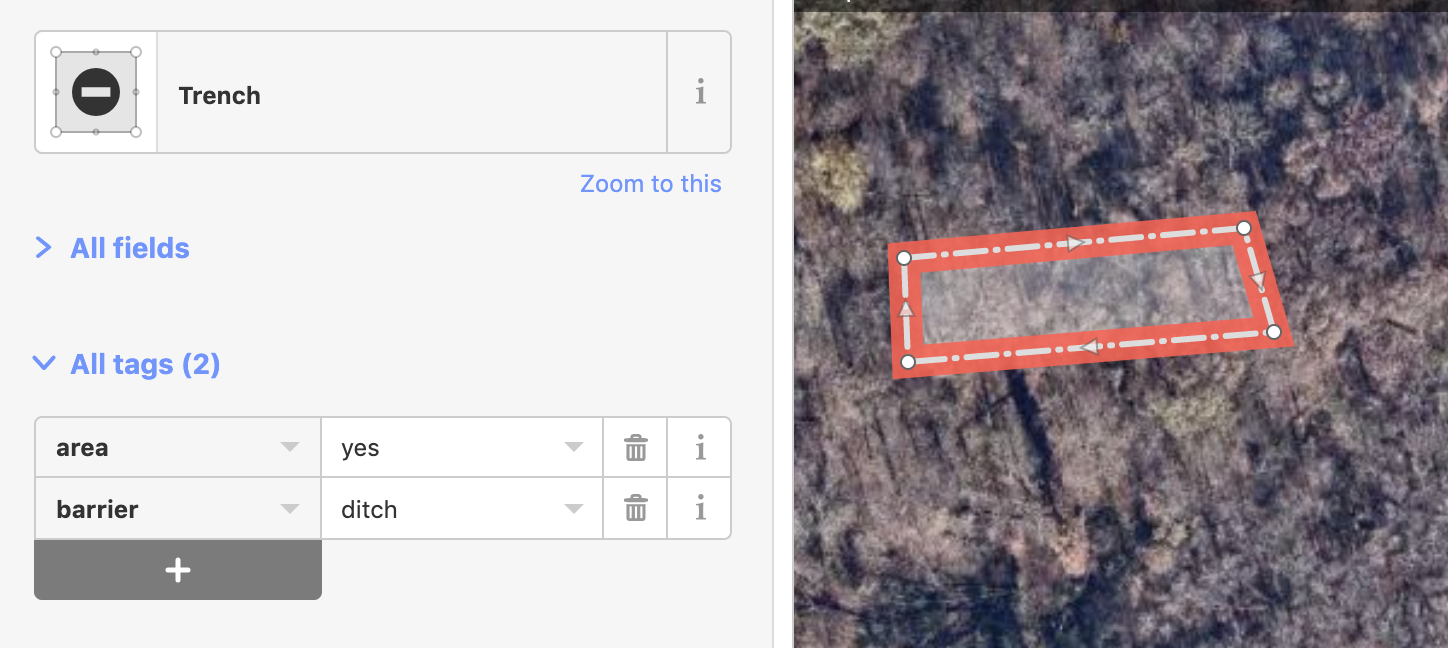
iD will add an explicit area=yes for features like hedges that can be mapped as either an area or a line.
 bhousel
on 9 Apr 2019
bhousel
on 9 Apr 2019
iD will add an explicit
area=yesfor features like hedges that can be mapped as either an area or a line.
Is this behavior just based on the geometry in presets/presets/hedge.json?
"Closed ways can be treated as both line or area geometry. If a preset allows both, iD will add an additional area=yes tag when choosing the preset for an area feature." https://github.com/openstreetmap/iD/blob/master/data/presets/README.md
"geometry": [
        "line",
        "area"
    ],
Is this true for every feature that has "line", "area" in this field, such as wall.json and ditch.json?
So in areaKeys.json "Barrier" is not listed as one of the area keys, because all of the features in this key that have "area" geometry also have "line" geometry as an option, and should have an "area=yes" tag, correct?
jeisenbe
on 10 Apr 2019
Is this true for every feature that has
"line", "area"in this field, such as wall.json and ditch.json?
yes..
bhousel
on 10 Apr 2019
For the original poster, it seems the initial issue would actually be addressed by rendering
bridge:support=abutmentandbridge:support=pier- should a separate issue be opened about these features? They would also require changes at database reload.
Well, I am the OP but this question should be probably aimed at someone else as I do not know anything about rendering of bridge:support= tag. I just expect an object with barrier=wall area=yes to render without a hole inside. :-)
I am looking at bridge:support (manual) now - since it is meant to be used as a node or area only, there is no need to add area=yes for a closed way, it should always render as an area.
PontiacCZ
on 10 Apr 2019
I am looking at bridge:support now - since it is meant to be used as a node or area only, there is no need to add area=yes for a closed way, it should always render as an area.
Right, that's why we would have to change the database import standards. Normally closed ways are imported just as lines, not as polygons (areas), unless they are tagged with area-yes, or on of the keys or tags found in the list at openstreetmap-carto.lua file.
We can change this by adding bridge:support as one of the keys that should be imported as a polygons when mapped as a closed way, since it should not require area=yes, but this will not apply until the database is reloaded on the OSM servers.
Since barrier=wall should be tagged with area=yes when it is mean to represent an area, we could render it now, in theory.
If you want to help make this happen, @PontiacCZ - you can help by doing some research.
If you know how to use JOSM and the Overpass-API, download all* of the ways that are tagged barrier=way, then check:
1) What is the total number of closed ways that are tagged barrier=wall? (JOSM lets you search for "closed" ways.
- Unfortunately I do not know of any way to filter for closed ways in Overpass API)
2) What percentage of closed ways are tagged area=yes?
- (It looks like there are 11, 594 combinations of barrier=wall and area=yes, but we should confirm that these are actually closed ways)
3) How many closed ways are double-tagged with barrier=wall and another key etc which is normally considered a polygon (eg: amenity, natural, leisure, landuse, historic, tourism)?
a) with area=yes
b) without area=yes
- This tells us how many features are going to be at risk for a problematic rendering.
(*There are 2 ,433, 249 ways, so perhaps you can just download a few countries as examples, if your computer does not have enough ram to handle a large number of ways in JOSM.)
jeisenbe
on 10 Apr 2019
download all* of the ways that are tagged barrier=way, then check...
It would also be great to do this research on barrier=hedge to compare
jeisenbe
on 10 Apr 2019
(It looks like there are 11, 594 combinations of barrier=wall and area=yes, but we should confirm that these are actually closed ways)
I run http://overpass-turbo.eu/s/HRM - currently there are:
- 1 node
- 43 unclosed ways
- 11 556 closed ways
matkoniecz
on 10 Apr 2019
How did you find out if the ways are closed?
The only way I know if doing this is downloading the data to JOSM and then
searching for type:way with closed or -closed
jeisenbe
on 10 Apr 2019
How did you find out if the ways are closed?
Run query in browser, see footer in bottom right: pois, lines, polygons
polygons are areas - both closed ways and multipolygons, lines are unclosed ways, pois are nodes.
not sure how it deals with closed ways representing linear features like leisure=track
There may be way to limit it within query but so far I never needed it.
matkoniecz
on 10 Apr 2019
I checked by downloading most of the data into JOSM. I got 11,409 ways with area=yes and barrier=wall (I must have missed a few in the Artic or Antarctic, since I was using hand-drawn bounding box). Of these 11373 are closed ways according to JOSM and 36 are not closed, so it looks like the overpass-turbo.eu classification is similar. It's good to know that is an option.
The most important piece of research to do is:
3) How many closed ways are double-tagged with barrier=wall and another key etc which is normally considered a polygon (eg: amenity, natural, leisure, landuse, historic, tourism)?
a) With area=yes
b) without area=yes
The result of 3 will tell us how many features may unexpectedly turn into the appearance of a filled wall if we add a polygon fill for barrier=wall polygons. Especially those in 3)b) may be confusing to mappers.
jeisenbe
on 11 Apr 2019
Actually I can check for 3)a) right now, since I have downloaded barrier=wall with area=yes.
I selected all features that were tagged with barrier=wall AND (aeroway, amenity, harbour, healthcare, historic, landuse, leisure, man_made, military, natural, office, place, power, public_transport, shop or tourism), then I deselected the linestring exceptions, eg man_made=citywalls, =breakwater, natural=cliff, etc.
There were 926 features tagged with barrier=wall and area=yes that are also double-tagged with one of these keys that would be imported as a polygon, out of the total of 11,373 closed ways with barrier=wall and area=yes; that's about 8%.
3)b) Someone with a better internet connection and faster CPU should do this. I couldn't download "amenity" or "leisure" with barrier=wall and area!=yes; too big.
But I did get tourism=* AND barrier=wall. There 1364 closed way features with this combination but without area=yes or building=yes (compared to 93 with area=yes).
This suggest that the majority of barrier=wall features that would be rendered would be mistakes, unless we specifically check for the tag "area=yes" prior to rendering an area fill.
Examples without area=yes:
https://www.openstreetmap.org/way/677570053/#map=19/48.197844/16.4794705
way 677570053
barrier=wall
fee=yes
landuse=farmyard
name=Vienna Kids Farm
phone=+43 699 110 30 628
tourism=zoo
website=https://www.viennakidsfarm.at/
zoo=petting_zoo
https://www.openstreetmap.org/way/15477129/#map=19/-37.8678406/144.9763443
way 15477129
barrier=wall
name=Luna Park
railway=miniature
tourism=theme_park
website=https://lunapark.com.au/
https://www.openstreetmap.org/way/4749328/#map=17/-37.785/144.953
way 4749328
barrier=wall
name:fr=Zoo de Melbourne
name=Melbourne Zoo
operator=Zoos Victoria
tourism=zoo
website=https://www.zoo.org.au/MelbourneZoo
wikidata=Q578027
wikipedia=en:Melbourne Zoo
https://www.openstreetmap.org/way/103105017/#map=19/33.4499334/-111.9448781
way 103105017
attraction=animal
barrier=wall
name=Tiger
tourism=attraction
zoo=enclosure
Example with Area=yes
https://www.openstreetmap.org/way/43486257/#map=19/50.33041/8.72032
way=43486257
access=private
area=yes
barrier=wall
historic=castle
name=Ockstädter Schloss
note=Privatbesitz - Öffentlich nicht zugänglich
tourism=attraction
wheelchair=no
If the numbers for amenity= and the other keys are within an order of magnitude similar, there are probably over 10,000 features that would need to be remapped to avoid them rendering as a solid wall.
But what about the alternative of only rendering the polygon fill for [barrier = wall][area = yes]? Is this feasible?
jeisenbe
on 11 Apr 2019
By comparison, I downloaded most of the features mapped as way["barrier"="hedge"]["area"!="yes"]["tourism"]. I found 31 closed ways tagged with hedge and tourism without area=yes.
Examples:
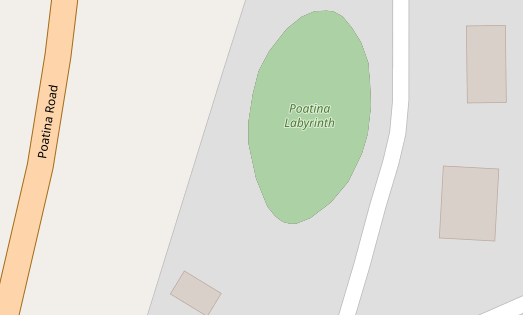
https://www.openstreetmap.org/way/397322471/#map=19/-41.7977126/146.9589326
way 397322471
barrier=hedge
landuse=meadow
name=Poatina Labyrinth
tourism=attraction
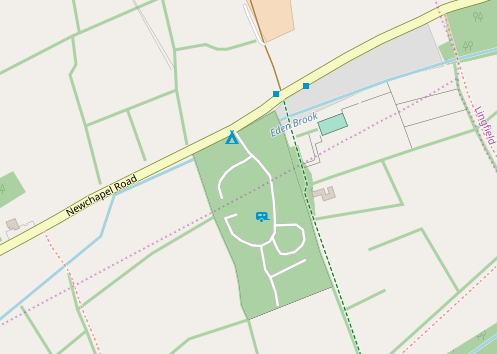
https://www.openstreetmap.org/way/225683577/#map=17/51.1651/-0.04265
way 225683577
barrier=hedge
name=Long Acres Caravan & Camping
tourism=caravan_site
jeisenbe
on 11 Apr 2019
If you want to help make this happen, @PontiacCZ - you can help by doing some research.
If you know how to use JOSM and the Overpass-API, download all* of the ways that are tagged barrier=way, then check:
I like JOSM and use it often, but unfortunatelly I am not familiar with Overpass-API... So it's great that you know how to use it. Actually I am starting to get more and more confused by recent conversation but you likely know what you're doing. :-)
PontiacCZ
on 11 Apr 2019
Good news, we can actually just render barrier=wall polygons that are also tagged area=yes!
I've shown an example of how this would work with hedges.
Since there are "only" 926 features tagged with barrier=wall and area=yes that are also double-tagged with another polygon keys, there are not too many that would have "wrong" renderings.
In these cases mappers should be able to figure out that the "area=yes" means that the barrier=wall is an area feature.
It's still questionable if this is a good idea cartographically. Should the fill color be the same as the outline? If it's lighter it may look a little like a building.
jeisenbe
on 11 Apr 2019
I like JOSM and use it often, but unfortunatelly I am not familiar with Overpass-API
That's okay, we can exclude all areas that are not tagged with "area=yes" so no more research is needed
jeisenbe
on 11 Apr 2019
It's still questionable if this is a good idea cartographically. Should the fill color be the same as the outline? If it's lighter it may look a little like a building.
Good point, lighter fill color could really resemble a building. Single color of the wall object would be better I guess...
PontiacCZ
on 11 Apr 2019
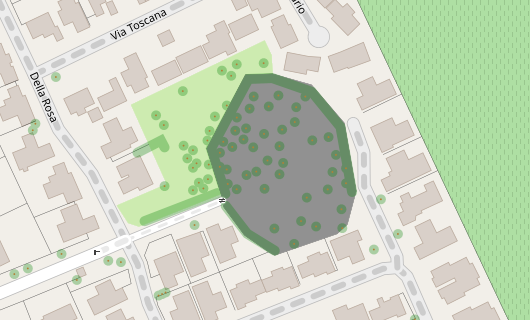
Well, I've got a test rendering, but in the process of looking for good data to test, I discovered that the majority of features tagged with barrier=wall + area=yes are questionable, and many others will look wrong if rendered with a fill color, because area=yes has been used even though there is another polygon key.
This is the nicest example I found in Germany, but it took quite some time searching:
https://www.openstreetmap.org/way/589834693/#map=18/51.5653/8.84373
way 589834693 area=yes barrier=wall - perhaps the ruins of an old church?
Current:
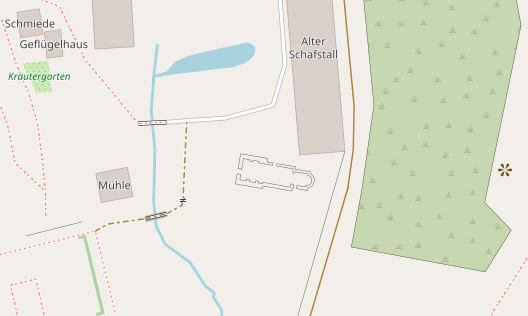
After:
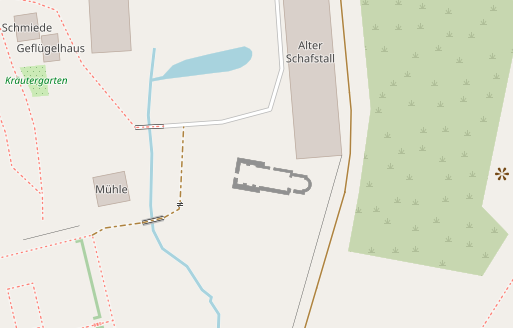
Here are examples Britain, the USA, and then randomly-picked examples from 6 inhabited continents, from the set of 11,500 features tagged area=yes barrier=wall
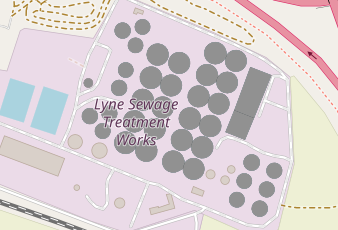
Lyne Sewage Treatment, Britain
https://www.openstreetmap.org/way/257812194/#map=16/51.3973/-0.5411
area=yes barrier=wall natural=water source=Bing 2012 water=wastewater
Current
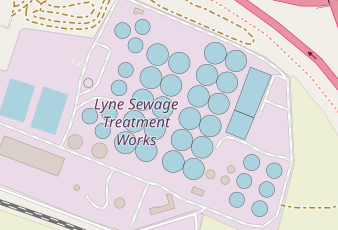
After - not good!
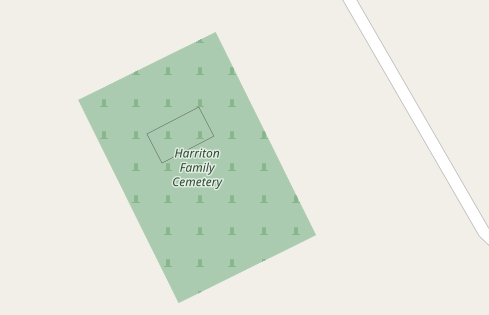
Hamilton Family Cemetery, USA
https://www.openstreetmap.org/way/663950475/#map=18/-33.82656/18.67818
area=yes barrier=wall wall=stone
Is this really an area feature? If so, is it really a wall if it's nearly square?
Castelo de Torres Vedras, Portugal
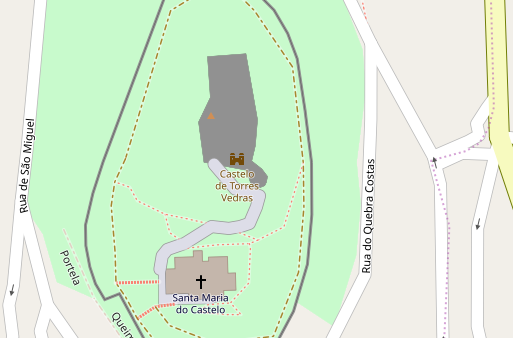
https://www.openstreetmap.org/way/150184582/#map=18/-32.13148/-53.73145
area=yes barrier=wall name=Paço dos Alcaides source=Local Survey
- This appears to be the wall of a castle building or ruins, not an area
After:
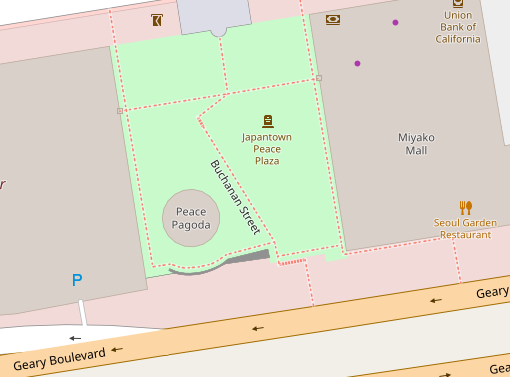
Japantown Peace Plaza, San Francisco
https://www.openstreetmap.org/way/546716701/#map=19/37.78521/-122.42962
area=yes barrier=wall material=concrete
- Probably the nicest example, but the fill is mainly helpful at high zoom level.
After:
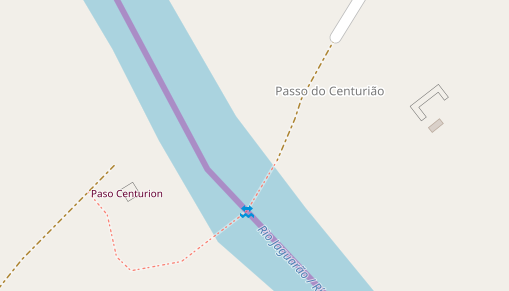
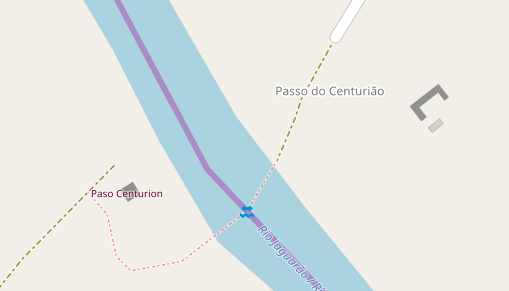
Paso Centurion / Pass do centurião, Brazil/Uruguay border
https://www.openstreetmap.org/way/346967685/#map=17/40.0302/-75.3103
area=yes barrier=wall only (2 features, left and right)
- These two are very common examples: a small squarish "wall" area, and a small 3-sided wall area. Perhaps these are old bridge abutments or piers? One has a tourism attraction tag on a node inside.
Before:
After:
Suburb of Capetown, South Africa
https://www.openstreetmap.org/way/449028245/#map=18/-33.82623/18.67830
area=yes barrier=wall
If only the mapper had left off the area=yes tag, this would have been lovely:
After:
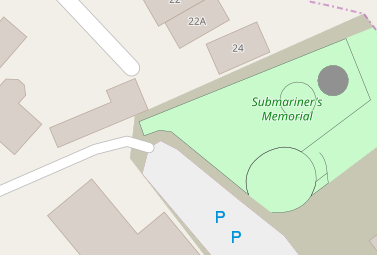
Submariner's Memoria, Sydney, Australia
https://www.openstreetmap.org/way/555939224/#map=19/-33.84229/151.21651
barrier=wall area=yes
One of the round walls is just tagged barrier=wall, but the other adds area=yes, why?!
After:
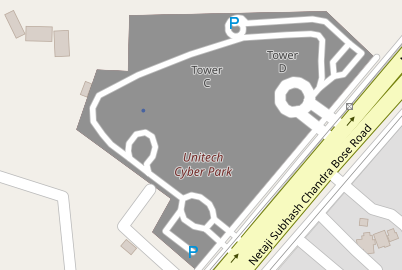
Unitech Cyber Park, India
https://www.openstreetmap.org/way/34940767/#map=17/28.44327/77.05627
area=yes barrier=wall landuse=commercial name=Unitech Cyber Park etc.
After: not good
If we cannot render the fill for barrier=wall, I am leaning towards removing it from barrier=hedge as well.
jeisenbe
on 11 Apr 2019
sent from a phone
On 11. Apr 2019, at 01:30, jeisenbe notifications@github.com wrote:
The result of 3 will tell us how many features may unexpectedly turn into the appearance of a filled wall if we add a polygon fill for barrier=wall polygons. Especially those in 3)b) may be confusing to mappers.
I would not let these come into the way, rather they will more likely be fixed after the renderer shows the problem.
These should be distinct objects, or implicit through a property, similar to this: https://taginfo.openstreetmap.org/keys/fenced
dieterdreist
on 11 Apr 2019
sent from a phone
On 11. Apr 2019, at 09:05, jeisenbe notifications@github.com wrote:
Since there are "only" 926 features tagged with barrier=wall and area=yes that are also double-tagged with another polygon keys, there are not too many that would have "wrong" renderings.
garbage in garbage out. „double tagging“ is not a mapping style, it is an error
dieterdreist
on 11 Apr 2019
I agree that double-tagging is a mapping error and it will continually get fixed as soon as mappers notice the new rendering.
I am leaning towards removing it from barrier=hedge as well.
Agree as well. I am looking at the referenced issue about hedge now and I have to say that it is actually odd that it renders as an area without area=yes. It should be a linear object by default, I believe.
PontiacCZ
on 11 Apr 2019
I like above renderings of filled walls which are correctly tagged. I also think that proposed rendering of them would help to remove bad tagging from database.
Tomasz-W
on 12 Apr 2019
rendering of them would help to remove bad tagging from database.
I agree that this would be the main reason for rendering. A good comparison is barrier=hedge; there are some mistakes, but much fewer than with barrier=wall, because tagging on areas leads to the hedge fill appearing.
jeisenbe
on 12 Apr 2019
BTW. What do you think about including also barrier=retaining_wall areas here? I think is so similar feature, that it should be treaten in the same way.
Tomasz-W
on 12 Apr 2019
The wiki page for barrier=retaining_wall only allows it to be drawn as a linear way.
It can't be drawn as an area because:
_"barrier=retaining_wall behaves same as natural=cliff, that is no crossing as left-right are different heights. Lower side on right side of way direction"_
So it needs to be drawn so that the left side of the way is the high ground, and the right side is lower. This is the same method used to map natural=cliff and man_made=embankment.
The wiki page has said this it was first created in 2008, after the barriers proposal was approved.
jeisenbe
on 13 Apr 2019
Maintainers: I suggest closing this issue as wontfix because most of the closed ways tagged barrier=wall and area=yes appear to be mapping errors. See this analysis: https://github.com/gravitystorm/openstreetmap-carto/issues/3453#issuecomment-482124742
jeisenbe
on 28 May 2019
And what about the minority that is not a mapping error?
I believe that:
- mapping errors should be fixed
- massive walls that need to be outlined and marked with
area=yesshould be rendered opaque
That's all.
PontiacCZ
on 28 May 2019
I am not sure how to treat this
In case where it is "valid tagging that is perfectly OK but there are many mistakes" rendering it would be OK as it would encourage fixing problems
In case where "basically no one is suing it correctly and this tagging scheme is rather unwanted" WONTFIXing it would be preferable.
matkoniecz
on 28 May 2019
IMHO the semantics of area=yes are clear and we should stick to the obvious interpretation, even if it will highlight a lot of problematic tagging initially. Ignoring it because of mapping errors will lead to inconsistency and in the long run will make it more difficult for contributors to understand the logic behind tagging (indeed it would dilute these logics).
dieterdreist
on 28 May 2019
@PontiacCZ, could you point to some examples of correct tagging in your area, for testing? As you saw above, I had trouble finding good examples.
I'm thinking that we should probably treat this the same as barrier=hedge - either the fill rendering for barrier=hedge should be removed because most of the features mapped as areas are mistakes (even with area=yes), or the fill should be added for barrier=wall even though the rendering will often not improve, if we decide that providing mapper feedback is the most important issue here.
I've recently given my opinion that this style should probably lean toward the option that provides the best mapper feedback, even if it isn't ideal cartographically, but this issue is a tough choice because there are very few benefits of having walls and hedges mapped as areas in the database, instead of as linear ways.
I can see how the area mapping could be helpful at very high scales, z20 and above, for wide features, but at most scales or zoom levels the linear mapping is more useful for almost all walls and hedges. With the current 3 pixel wide rendering for hedges (and city walls), a 1 meter thick feature is already life-size or larger up to z18 near the equator.
Even the 0.4 pixel wide rendering for barrier=wall and =fence is life-size up to z17 for 50 cm thick walls (near the equator)
jeisenbe
on 28 May 2019
@pnorman do you have thoughts on this issue, which is related to #3844?
jeisenbe
on 4 Sep 2019
I'm again recommending closing this issue, based on the results above (https://github.com/gravitystorm/openstreetmap-carto/issues/3453#issuecomment-482124742) and in PR #3834 and #3844. But I need input from @pnorman about this issue and #3844 first.
jeisenbe
on 10 Nov 2019
Closed: since #3844 hedges mapped as areas are now rendered with an outline, so the situation is now similar to that of barrier=wall. Testing has shown that rendering barrier=wall areas would mainly result in an issue similar to #971 even when limited to the small number of walls which are also tagged with area=yes, and that the new rendering would not be easy to interpret.
jeisenbe
on 5 Feb 2020
Hmm, well, what now...? Are we supposed to retag walls so they do not render transparent? How?
PontiacCZ
on 7 Feb 2020
It is uncommon to use “barrier=wall” as an area rather than as a linear
barrier feature. But those areas that are tagged “barrier=wall” will
continue to render as a thin black line, the same as all other walls.
If mappers want to develop a specific tag for the area of a wall (eg
area:barrier= or barrier_area= or similar) we could consider rendering that
in the future, if it becomes widely used by the community.
We can also reopen this issue if many more mappers start tagging walls as
areas in a consistent way.
jeisenbe
on 7 Feb 2020
Related issues
kocio-pl
·
4Comments
HolgerJeromin
·
3Comments
 meased
·
3Comments
Tomasz-W
·
4Comments
meased
·
3Comments
Tomasz-W
·
4Comments
 Phyks
·
3Comments
Phyks
·
3Comments
Most helpful comment
Am Di., 16. Okt. 2018 um 15:12 Uhr schrieb SomeoneElseOSM <
[email protected]>:
It is generally ok to assume closed way barriers as linear features (by
default), but it should be possible to explicitly make them either areas or
not with the key:area.