Openstreetmap-carto: Render underground buildings different
We have some buildings in the database that are fully underground, such as parking garages. Due to the Dutch BAG Import, the number of such buildings has drastically increased. They are typically tagged with a negative layer tag: Example.
It would be good to render such buildings differently, for example with no fill and a dashed outline.
 matthijsmelissen
All 98 comments
I would say we should not render any level<0 at all.
 Rovastar
on 22 May 2014
Rovastar
on 22 May 2014
2014-05-22 1:31 GMT+02:00 Rovastar [email protected]:
I would say we should not render any level<0 at all.
You are talking about level, which I don't think we have available as key
in the db: http://wiki.openstreetmap.org/wiki/Key:level
If instead you wanted to write "layer", then this is available but doesn't
say anything about on the ground vs. underground:
http://wiki.openstreetmap.org/wiki/Key:layer
There is also the key: "location" with values like "underground".
IMHO we could render also underground stuff but they should be visually
distinct and contained.
 dieterdreist
on 22 May 2014
dieterdreist
on 22 May 2014
Note that the example in the OP is actually using the "level" tag, not "layer" as originally stated, although the BAG Import documentation says "layer" should be used.
 lest69
on 23 May 2014
lest69
on 23 May 2014
Good spot, that is a tagging mistake which I will correct. It should have been layer.
matthijsmelissen
on 23 May 2014
Note that negative layer doest not imply that object is underground. For this purpose location=underground should be used (that is not available in the current database).
 matkoniecz
on 29 Aug 2014
matkoniecz
on 29 Aug 2014
I disagree. A negative layer should be used for tunnels, etc. Therefore the inference is there.
Rovastar
on 29 Aug 2014
-1 is also frequently used for waterways under bridges.
matkoniecz
on 29 Aug 2014
@Rovastar no, -1 just means below features that are at local ground level. So a road in an underpass could be tagged layer=-1 without that implying being in a tunnel.
 gravitystorm
on 29 Aug 2014
gravitystorm
on 29 Aug 2014
Note also that it is typical to use negatives for objects below local ground level but it is necessary only in case of intersecting objects.
For example underground silo in remote area may be not tagged with any layer value (but with location=underground).
matkoniecz
on 29 Aug 2014
Il giorno 29/ago/2014, alle ore 12:09, Andy Allan [email protected] ha scritto:
@Rovastar no, -1 just means below features that are at local ground level. So a road in an underpass could be tagged layer=-1 without that implying being in a tunnel.
no, layers are only indications relative to other features at the same spot. You cannot infer overground or underground from it, but only which feature is over the other where they cross.
Typically tunnels get negative layers and bridges positive ones but this is only a convention to reduce oversights, because features without layer tag are on layer 0
dieterdreist
on 29 Aug 2014
I came here looking for a solution to the rendering of Oxford's Radcliffe Camera building http://www.openstreetmap.org/#map=19/51.75337/-1.25390 - this is a round building in the middle of a courtyard and an iconic view of the city (http://www.geograph.org.uk/photo/801213). Showing the underground building on top of the grass means the map isn't really showing what someone would see if they visited - what's "on the ground". Could the underground buildings (with negative layer= tags) be rendered underneath the elements of the courtyard (e.g. the grass, which has layer=1 on it)?
 scat0324
on 12 Feb 2015
scat0324
on 12 Feb 2015
with negative layer= tags
Please read previous comments, especially https://github.com/gravitystorm/openstreetmap-carto/issues/552#issuecomment-53845730 and https://github.com/gravitystorm/openstreetmap-carto/issues/552#issuecomment-53864614 and https://github.com/gravitystorm/openstreetmap-carto/issues/552#issuecomment-53858762
matkoniecz
on 12 Feb 2015
I think the suggestion from @scat0324 can be understood as "honor the layer tags".
Not necessarily layer<0 but rather render A above B if A:layer>B:layer.
Related to https://github.com/gravitystorm/openstreetmap-carto/issues/688
 althio
on 12 Feb 2015
althio
on 12 Feb 2015
Ahh, yes @althio has it. I came here looking for underground buildings, saw the problems described with the level= tag, wondered if layer= could be dealt with instead, and should have searched again in order to discover #688. Apologies for derailing the issue with more general rendering of undergound buildings.
scat0324
on 12 Feb 2015
@althio: That's exactly what I'd like to be in #688 - layer is an abstract way of defining what is above/under, so it should be respected by software. Some features - like tunnel - needs to be rendered different and we have to define what is default in layering if a mapper omits such an information (for example B>A), but when she says A is layer 1 and B is layer 0, then we should render it like A>B, because now we know what is covered by what.
 kocio-pl
on 12 Feb 2015
kocio-pl
on 12 Feb 2015
2015-02-12 17:30 GMT+01:00 kocio-pl [email protected]:
layer is an abstract way of defining what is above/under, so it should be
respected by software. ..., but when she says A is layer 1 and B is layer
0, then we should render it like A>B, because now we know what is covered
by what.
no, we should not confuse cartography with aerial photography.
dieterdreist
on 17 Feb 2015
Well, if the data sticks to the reality, we have no reason to claim the standard (not specialized) map should not follow it when possible - isn't it?
I mean that there are some exceptions of course, when we really want to see something not visible from the sky (like tunnels), but in general the layering is a valuable hint what to show on the map and what should be hidden. Aggressively overriding this (because the software ignores tagging) can make a mess - I gave the example of center of Warsaw in the other layering ticket:
http://www.openstreetmap.org/#map=18/52.22888/21.00496
Train platform over all the parking areas, buildings and grass, but at the same time always below pedestrian areas - really? For me it's a broken cartography and even straight aerial one would be more relevant.
My point is we have to know what to do by default with overlapping objects (when no layering hints are given), but when we have these tags, we should use them for rendering purposes more than it is now. We went too far trying to set global layering scheme.
kocio-pl
on 17 Feb 2015
2015-02-17 11:33 GMT+01:00 kocio-pl [email protected]:
Well, if the data sticks to the reality, we have no reason to claim the
standard (not specialized) map should not follow it when possible - isn't
it?
can't agree, and you don't even agree yourself (see below).
I mean that there are some exceptions of course
, when we really want to see something not visible from the sky (like
tunnels), but in general the layering is a valuable hint what to show on
the map and what should be hidden.
see? If there are exceptions, there's no rule. ;-)
This is exactly the point: in a map you choose the style you need to show
something in the way you want, not in the way it ressembles most the view
in reality, e.g. you make roads larger than true scale would suggest to put
emphasis on them, and you might want to render something that in reality is
below above in order to make it visible.
dieterdreist
on 17 Feb 2015
see? If there are exceptions, there's no rule. ;-)
Quite the opposite: if there are no rules, there's no exceptions too (exceptions from what?)... =}
- I intentionally said about general map. The specialized could be anything, even underground cables net only, but the general is a different beast: it should look more or less like in reality (in my opinion) to be recognized properly.
- See where it leads us? Of course it's just a matter of consistency with what we want to put emphasis on, but I bet it is impossible to predict all the cases when centrally crafted layering doesn't make sense.
kocio-pl
on 17 Feb 2015
If it's possible, maybe it's worth testing how the map would look when the layer tag is used to determine the rendering order on buildings and highways. We've seen a lot of areas where it doesn't look good right now, and it's not always bad tagging.
For underground buildings, I'd like to take negative "level" tags into account, or, better "location=underground". Since that's not in the database yet, we can't try rendering yet. But I'd propose something with transparency, similar to how "highway=proposed" looks now.
 daganzdaanda
on 25 Feb 2015
daganzdaanda
on 25 Feb 2015
when the layer tag is used to determine the rendering order on buildings and highways.
That would imply that any footway or platform in a train station with a roof would not show up. I don't think that's what we want.
matthijsmelissen
on 25 Feb 2015
Roofs need transparency, IMHO. Were they not transparent before the switch to Carto-CSS?
Of course, the stuff under a roof wouldn't be as visible as "outside", but the data is still there for routing, and it could actually help to understand a complex situation better if you see that the footway is not outside anymore.
@mboeringa has an example https://github.com/gravitystorm/openstreetmap-carto/issues/1130#issuecomment-63101198
Right now, I can't understand the layout of complex train stations from the map, because we show too much. Maybe transparent roofs would help a little bit, or transparent underground features.
(side track) Or we could decide to leave out everything that is a roof or has a level<>0 or a location=underground. I hope the 3-D and indoor mapping people come up with good solutions to show all that complex information. Then the main map could be for 2-D on the ground floor, and a quick switch to the 3-D-map is all that's needed...(/ side track)
daganzdaanda
on 25 Feb 2015
Roofs need transparency, IMHO. Were they not transparent before the switch to Carto-CSS?
They were and I don't know why it was changed, but I think it was a big mistake. Anybody knows the reasoning behind this move?
Right now, I can't understand the layout of complex train stations from the map, because we show too much. Maybe transparent roofs would help a little bit, or transparent underground features.
I also think that we should move any further complexities to the "public transport" map and leave the main map uncluttered. It won't be a cure for everything - for example Berlin Hauptbahnhof (http://www.openstreetmap.org/node/539318419) has so many levels that no 2D map can handle it properly if we want to show how it is organized inside, but we can at least separate the general shape of the building from its inner view. For now we don't even see there's a building at all!
(side track) Or we could decide to leave out everything that is a roof or has a level<>0 or a location=underground. I hope the 3-D and indoor mapping people come up with good solutions to show all that complex information. Then the main map could be for 2-D on the ground floor, and a quick switch to the 3-D-map is all that's needed...(/ side track)
That would be the ultimate solution of this problem!
kocio-pl
on 25 Feb 2015
I hope the 3-D and indoor mapping people come up with good solutions to show all that complex information.
They actually have, but it would require some more concise and clearer documentation, including tagging examples of different buildings that implement the standard right, in the Wiki, because a lot of people trying to tag mixed 2D/3D get it wrong.
The OSM Simple 3D tagging scheme, actually defines a role = outline for a closed way or multipolygon feature part of a type = building relation, to perform the role of the total 2D outline of the building, so without any of the complexity of the individual building parts.
The Bode Museum in Berlin, is actually an example that fully, and properly, implements this proposal, including putting the main tags relevant to the entire building on the building outline, instead of on the type = building relation, thus making it most accessible for both 2D and 3D mapping, and adding a building = x tag on this outline too for rendering. It also doesn't make the fault of adding a building = x tag on the individual building parts.
It _is_ valid to add a building:*_part_ *= building_type tag, e.g.:
building:part = office
building:part = restaurant
just _don't_ add a building = x tag on a building _part_, as it will cause double rendering in most cases: both the _outline_, and the _part_ will render in that case, as most renders assume any building = x must be rendered.
Bode Museum type = building super relation:
http://www.openstreetmap.org/relation/2186879
Multipolygon relation with role = outline that is part of the above super relation (notice all tags relevant for the entire building are on this object, ideal for 2D and 3D mapping):
http://www.openstreetmap.org/relation/4211594
Example of a building:part on the Bode Museum, notice correctly no builing = x set on this:
http://www.openstreetmap.org/way/229997283
 mboeringa
on 25 Feb 2015
mboeringa
on 25 Feb 2015
Roofs need transparency
I've said this before and I'll say it again. No transparency.
Transparency is used to change the colour of another feature. So if you have a red feature (e.g. a path) and you want to change the colour of it (say to an indecipherable brown), then you draw a transparent colour over the top (e.g. a building).
If, however, you want to draw a roof structure, and still see that there are footpaths underneath, you draw the roof structure first, and then you draw the footpaths afterwards. That way, the footpath colour is consistent, and matches the key.
If you want a special colour of footpaths for when they are indoors, or underground, or whatever, then you achieve that by choosing a colour (e.g. yellow) for the footpath, and drawing it that colour based on its tags. You don't achieve it by drawing the footpath red, then trying to change the colour of the footpath by drawing a big translucent polygon over the top of it and hoping for the best.
Almost without exception, whenever someone says here "we need to draw X transparent" what they actually mean either "we need to change the colour of Y" or "we need to change so that X is drawn before Y".
We do not, and we must not, simply draw everything in strict z_order and attempt to fix it with transparency effects. Draw everything in the correct colours, and in the correct order.
gravitystorm
on 26 Feb 2015
If, however, you want to draw a roof structure, and still see that there are footpaths underneath, you draw the roof structure first, and then you draw the footpaths afterwards. That way, the footpath colour is consistent, and matches the key.
Or, as I did, you can use a very fine (cross-)hatch to symbolize the roof structure. This doesn't require transparency, nor should it affect colours of features lying below the "transparent" feature. Of course, there is some influence on colour perception, but with a well chosen hatch, this is acceptable. I think the results I showed earlier, in the issue @daganzdaanda linked, are quite convincing, they should be even better on high dpi mobile devices based on the original vector data (the screenshots I pasted are actually from 100% vector PDFs with no transparencies defined in them).
mboeringa
on 26 Feb 2015
OK, I miss roof transparency, but I can live without it. What really bothers me is that now we have no "strict z_order" rendering: AFAIR at least the roof and the pedestrian areas z_orders are hardcoded and do not follow layers tagging - am I right?
kocio-pl
on 26 Feb 2015
2015-02-26 11:54 GMT+01:00 Andy Allan [email protected]:
If, however, you want to draw a roof structure, and still see that there
are footpaths underneath, you draw the roof structure first, and then you
draw the footpaths afterwards. That way, the footpath colour is consistent,
and matches the key.
yes, it will be visible, but for the price of another inconsistency: a
footpath underneath the roof will appear just the same as one on or above
the roof.
dieterdreist
on 26 Feb 2015
and do not follow levels tagging - am I right?
I think you meant to say "layer tagging"?
Anyway, maybe this is easier in Mapnik/Carto than in ArcGIS, but realizing a "layer" based Z-order first rendering for all features (multipolygons, closed ways, ways and nodes), while at the same time having "thematic" layers, is next to impossible in many GISs, due to data being handled "thematic" first in most GISs. Putting Z-order first, would in most GISs require an unwieldy duplication of thematic layers (I have only done this for the roads and railways as special cases in my personal ArcGIS renderer)
mboeringa
on 26 Feb 2015
yes, it will be visible, but for the price of another inconsistency: a
footpath underneath the roof will appear just the same as one on or above
the roof.
That's where extra tags like "covered=yes" come in, as Andy hinted at in the next paragraph.
daganzdaanda
on 26 Feb 2015
I created a own issue regarding the level-tag: #1551
 saerdnaer
on 15 May 2015
saerdnaer
on 15 May 2015
I'd also like to see this issue fixed. When I tag underground parkings I use the following tags:
amenity=parking
building=yes
layer=-1
location=underground
parking=underground
That might give some more options to fix this issue than just the layer tag.
 de-vries
on 9 Mar 2017
de-vries
on 9 Mar 2017
On Thu, Mar 9, 2017 at 6:48 AM, de-vries notifications@github.com wrote:
I'd also like to see this issue fixed. When I tag underground parkings I
use the following tags:amenity=parking
building=yes
layer=-1
location=underground
parking=undergroundlocation=* seems redundant given that you have layer=-1 handling the Z axis
and the lat/long handling the X and Y already.
 BalooUriza
on 9 Mar 2017
BalooUriza
on 9 Mar 2017
sent from a phone
On 9 Mar 2017, at 14:21, BalooUriza notifications@github.com wrote:
location=* seems redundant given that you have layer=-1 handling the Z axis
layer is not handling the z-axis, only locally with respect to explicitly mapped, crossing objects
Objects with negative layer values can well be overground
cheers,
Martin
dieterdreist
on 9 Mar 2017
On Thu, Mar 9, 2017 at 7:29 AM, dieterdreist notifications@github.com
wrote:
>
>
sent from a phone
On 9 Mar 2017, at 14:21, BalooUriza notifications@github.com wrote:
location=* seems redundant given that you have layer=-1 handling the Z
axislayer is not handling the z-axis, only locally with respect to explicitly
mapped, crossing objects
Objects with negative layer values can well be overground
Really? I've yet to see an instance where this hasn't been true relative
to ground level, with layer=0 equal to the ground plane regardless of
elevation above sea level.
BalooUriza
on 9 Mar 2017
2017-03-09 14:33 GMT+01:00 BalooUriza notifications@github.com:
Really? I've yet to see an instance where this hasn't been true relative
to ground level, with layer=0 equal to the ground plane regardless of
elevation above sea level.
have a look at building passages for instance...
dieterdreist
on 9 Mar 2017
Really? I've yet to see an instance where this hasn't been true relative to ground level, with layer=0 equal to the ground plane regardless of elevation above sea level.
I think your experience is mostly based on the simple fact that there is a natural tendency for people to not tag anything anything belowground with a 0 or positive layer tag, or anything aboveground with a negative layer tag, _simply because it doesn't feel right to do so_.
Technically though and based on the Wiki @dieterdreist is right though: layer is just a relative reference of crossing objects.
mboeringa
on 10 Mar 2017
It is important to see the examples in this #2579, closed issue.
Then you see there must something be done, especially example 2, not only for building but also highway with underground tag. This is totally under the grass.

 AllroadsNL
on 10 Mar 2017
AllroadsNL
on 10 Mar 2017
Two things that might not have been pointed out in discussion so far:
- Currently we cannot really do much about this because the keys indicating underground features are not in the database at the moment.
- I find it doubtful if it makes sense to render underground buildings independent of their function. The wiki does not specify what exactly an underground building is so such tagging is likely used for more or less any man made underground structure. Rendering something like an underground parking with a distinct function is a whole different matter of course.
 imagico
on 10 Mar 2017
imagico
on 10 Mar 2017
Then you see there must something be done, especially example 2, not only for building but also highway with underground tag. This is totally under the grass.
In my personal ArcGIS renderer, I do hide these kind of buildings:

As @imagico pointed out, this will need additional keys. Once the database finally is reloaded and hstore enabled, carto could do this as well.
However, whether or not it is desired is a cartographic discussion and will have a wide range of opinions though... it may take time for consensus.
mboeringa
on 10 Mar 2017
This is totally under the grass.
I would consider underground parking to not be a building. In that case I would simply retag it (underground parkings may deserve special rendering, this is a separate issue).
Though in this case I am not really sure is there consensus how this structure should be tagged.
matkoniecz
on 11 Mar 2017
It is a building, it has a door in it. It is officially a building in the Netherlands.
AllroadsNL
on 11 Mar 2017
I am not sure. You can see at most one wall of the structure.
 HolgerJeromin
on 11 Mar 2017
HolgerJeromin
on 11 Mar 2017
It is a building, it has a door in it. It is officially a building in the Netherlands.
I am not sure. You can see at most one wall of the structure.
The building is from the official Dutch BAG buildings administration:
http://www.openstreetmap.org/way/264626824#map=19/52.08511/4.31801
https://www.kadaster.nl/Basisregistratie-gebouwen
This is a legally binding cadastral administration for the Netherlands, so at least from a Dutch "legal" point-of-view, it is considered a building.
Whether that has any relevance to the cartographic discussion here, I leave up to the reader's discretion...
mboeringa
on 11 Mar 2017
Let's keep this discussion about OpenStreetMap Carto, not tagging, and definitely not the legal status of a particular building.
layer=-1cannot be used to determine if a building is underground. It is a relative ordering only. Areas with hills and complex topography will be more likely to have alayer=-1building not underground.Sorting everything by
layeris not an option for technical reasons. It is not practical to render something from the landuse layer (e.g.leisure=pitch) on top of something from the building layer withlayer=-1unless everything from the landuse layer is rendered on top of everything from the building layer.It's best not to think of parking garages. They have distinct cartographic expectations, and what works for them might not work in the general case.
 pnorman
on 12 Mar 2017
pnorman
on 12 Mar 2017
layer=-1 cannot be used to determine if a building is underground. It is a relative ordering only. Areas with hills and complex topography will be more likely to have a layer=-1 building not underground.
Yes and no. From a purely semantical and Wiki point of view, layer is unsuitable.
Reality is though, that almost all buildings tagged with layer < 0, are buildings that people actually _want to hide_. They specifically set layer=-1 in a vain attempt to see it being hidden by structures drawn over it.
So using layer < 0 in rendering to hide certain buildings can lead to cartographically sound results (at least for 90% of buildings tagged so).
It's best not to think of parking garages. They have distinct cartographic expectations, and what works for them might not work in the general case.
I think parking garages and subway stations currently constitute by far the majority, and probably well over 90%, of all buildings tagged with layer < 0.
So I don't think there is really a "general case". Rather, there are mostly two distinct features for which a cartographic rendering decision could be made.
mboeringa
on 12 Mar 2017
Underground building (parking).
The forum discussions still coming back, there is the "need" for a answer and solutions to this problem. They watch Carto and want it changed.
And searching for their own solution in how to tag, using only building:part=*.
(See images in forum link.)
But their must be a building=* , before you can make a building:part=.
As I see it; Only tagging building:part= is wrong tagging.
So, decisions, could be, should be, must be made.
AllroadsNL
on 26 Jun 2017
The prominent park in downtown Chicago has an parking structure underneath all of it. The rendering of the parking structure makes it look very strange:

https://www.openstreetmap.org/#map=18/41.88257/-87.62244
 fgregg
on 25 Sep 2017
fgregg
on 25 Sep 2017
I guess for underground parking (or the one within a building) we could use this icon:
https://github.com/mapbox/maki/blob/master/icons/parking-garage-15.svg
The problem is with underground buildings.
kocio-pl
on 25 Sep 2017
Maybe "P" character under straight line would be better? An arrow symbol suggest a roof, but underground parkings doesn't have it (not in this shape)
 Tomasz-W
on 25 Sep 2017
Tomasz-W
on 25 Sep 2017
I guess P with an arrow down could be more clear for underground parking.
kocio-pl
on 25 Sep 2017
I guess P with an arrow down could be more clear for underground parking.
I am not so sure. The original icon you suggested is quite generally in use world wide also for underground parkings (e.g. here in the Netherlands and Germany for sure), so it might be wise to stick with it.
mboeringa
on 25 Sep 2017
Another idea would be to not render underground parking in any way, only the entrance (#270) - since this is what's really useful for drivers and visible on the ground, not interfering with other objects out of nowhere.
kocio-pl
on 25 Sep 2017
Are there any underground buildings (other than parkings) which we would like to render somehow?
It would be good to render such buildings differently, for example with no fill and a dashed outline.
@math1985 Do you still support this idea?
kocio-pl
on 1 Oct 2017
Are there any underground buildings (other than parkings) which we would like to render somehow?
Just for info, a question about military/historic bunkers ("how to map" and "how to map so that OSM Carto renders it") did pop up on IRC recently. There are a few other issues referring to non-golf bunkers of course. Another slightly related question is caves and cave entrances (again likely best handled elsewhere, not here).
 SomeoneElseOSM
on 1 Oct 2017
SomeoneElseOSM
on 1 Oct 2017
With bunkers I guess we should follow cave, subway or parkings - we should just show the entrance IMO, not the whole structure. We still show tunnels, so it might be of some use here.
An example of underground facility, which should not be rendered on a standard map:
http://www.openstreetmap.org/way/447745654
kocio-pl
on 9 Oct 2017
Take look at these examples: https://github.com/gravitystorm/openstreetmap-carto/issues/2475#issuecomment-371912685
What about dashed-border without filling for underground buildings? @Penegal Can you try to make test renderings?
Tomasz-W
on 26 Mar 2018
I'd like this idea (I would test filling version too), it would be similar to the tunnel.
kocio-pl
on 26 Mar 2018
I can try, but that will take time, as I don't have much of it these days.
 Penegal
on 27 Mar 2018
Penegal
on 27 Mar 2018
+1 for dashed-border without filling. See also #2620
 jragusa
on 8 May 2018
jragusa
on 8 May 2018
I'm eager to see how would it look like. Maybe somebody else than @Penegal could try?
kocio-pl
on 8 May 2018
test with the following colours:
@building-minor-fill: lighten(@building-fill, 6%);
@building-minor-line: lighten(@building-line, 6%);
location 1
https://www.openstreetmap.org/way/562323280
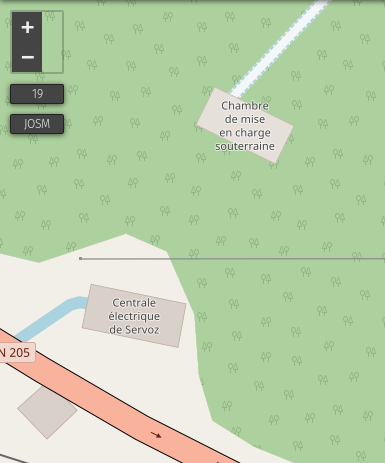
polygon-opacity: 0.33;
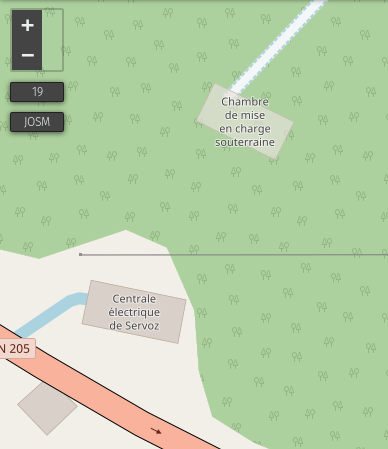
polygon-opacity: 0;
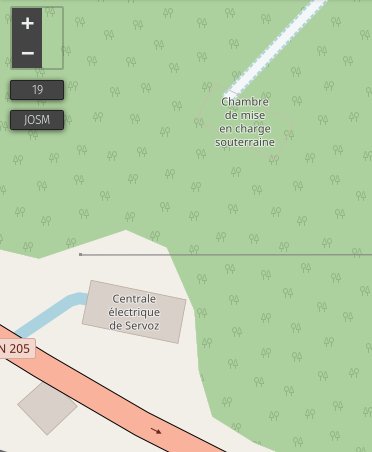
jragusa
on 25 Nov 2018
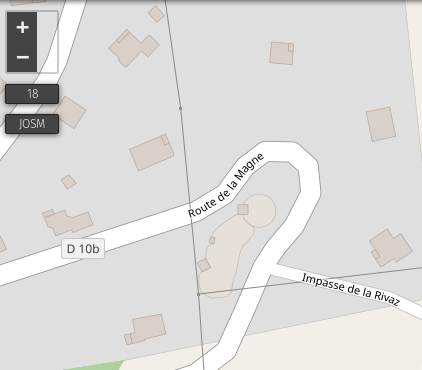
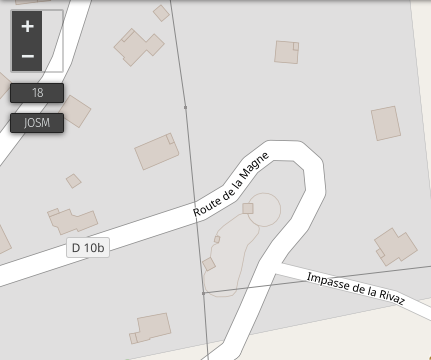
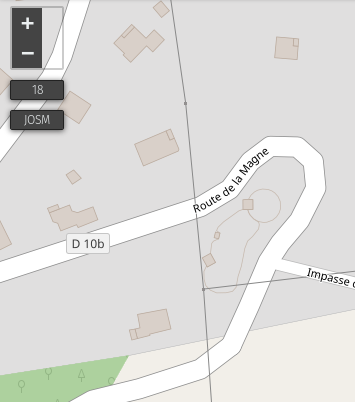 jragusa
on 25 Nov 2018
jragusa
on 25 Nov 2018
I would try with some dashed outlines (maybe wider) without polygon filling, same as we render e.g. metro lines or underground water streams also by dashed lines. I think transparency won't work here and non-dashed line looks more like a barrier at the moment.
Tomasz-W
on 25 Nov 2018
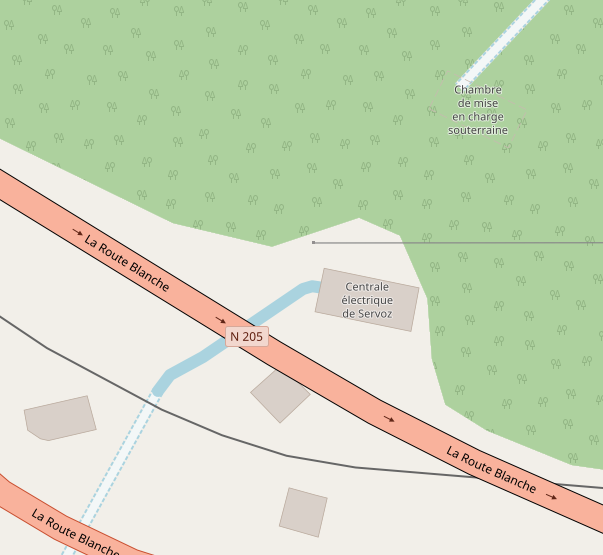
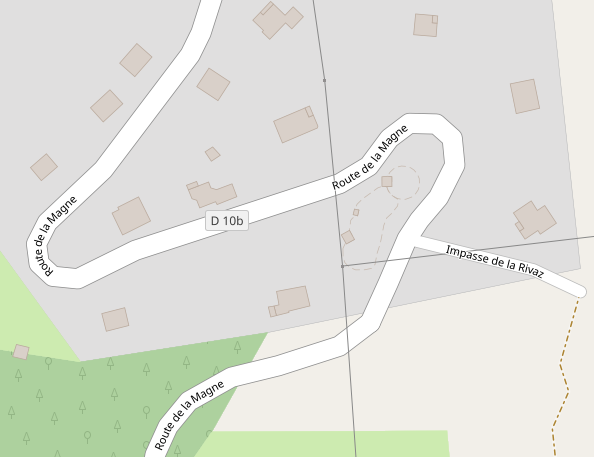
no background and dashed outline
location 1
line-color: @building-line;
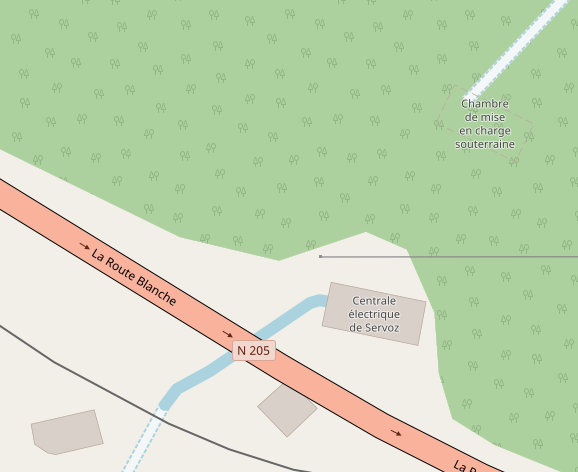
line-color: @building-minor-line;
location 2
line-color: @building-line;
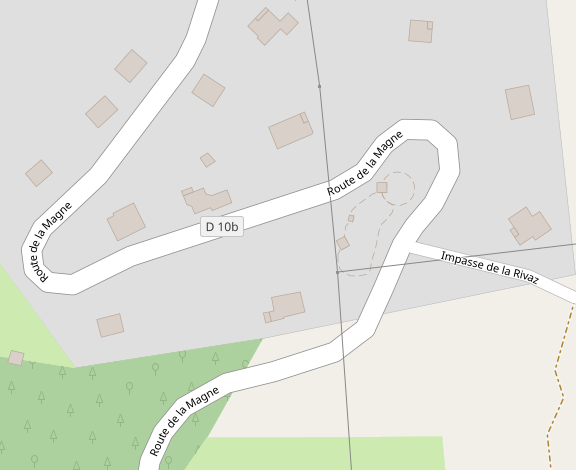
line-color: @building-minor-line;
jragusa
on 26 Nov 2018
Cases without fill look completely like paths/minor roads.
matkoniecz
on 26 Nov 2018
test with dashed outline and filling (polygon-fill: @building-minor-fill;)
location 1
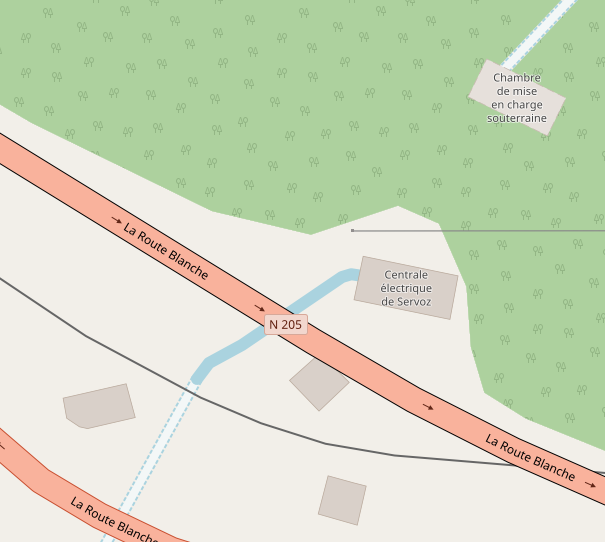
polygon-opacity: 0.33;
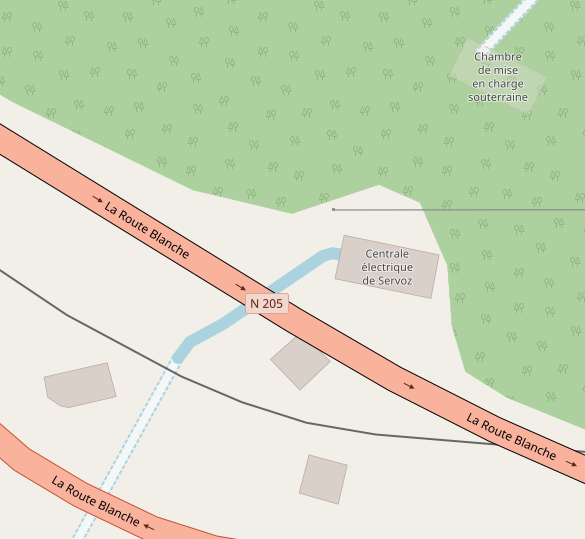
location 2
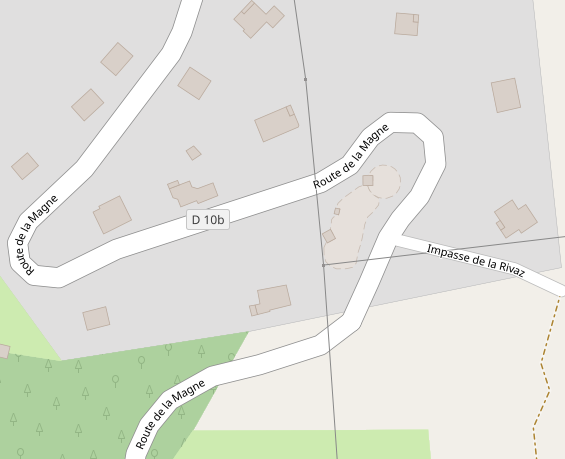
polygon-opacity: 0.33;
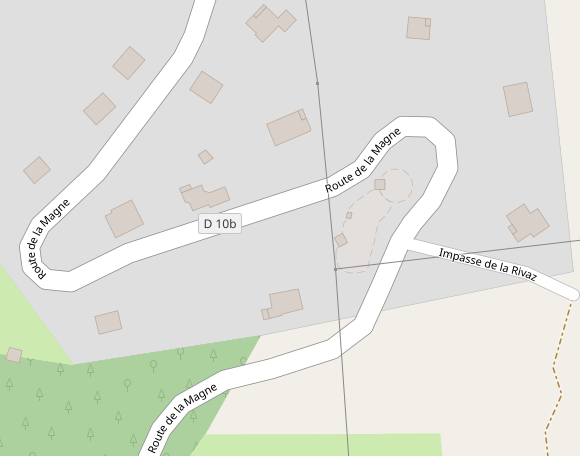
jragusa
on 26 Nov 2018
Another interesting option to test would be a scheme with striped fill with dashed outline for undergrounf buildings and striped fill with default outline for roofs (see discussion since https://github.com/gravitystorm/openstreetmap-carto/issues/2475#issuecomment-372573746, btw. I think these tripes should be 2x wider), @jragusa Can you try it?
Tomasz-W
on 26 Nov 2018
EDITED: IMO, outlines might be too thin to avoid disambiguation between dashed and continuous outlines if the filling is too prominent to emphasise the different outlines.
test with 4px width hatches
location 2
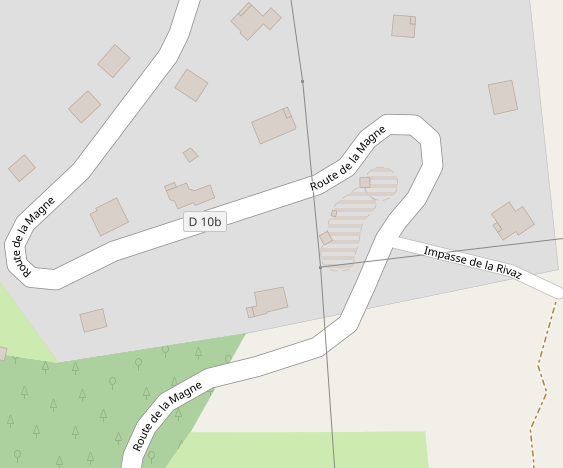
light version
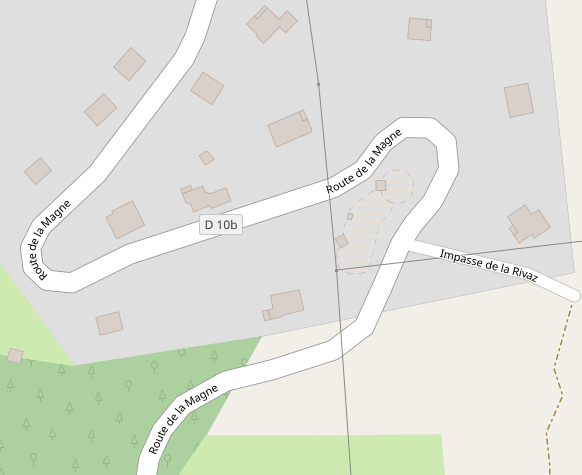
mixed colour
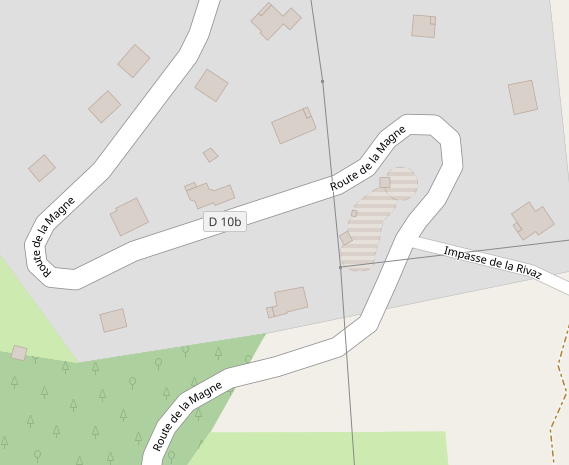
My suggestion is to use
- light filling (without opacity) with dashed outline for underground building
- light filling (without opacity) with continuous outline for minor buidling as suggested in #3426
- hatched pattern with continuous outline for roof as suggested by @kocio-pl in #2475
jragusa
on 27 Nov 2018
location 1
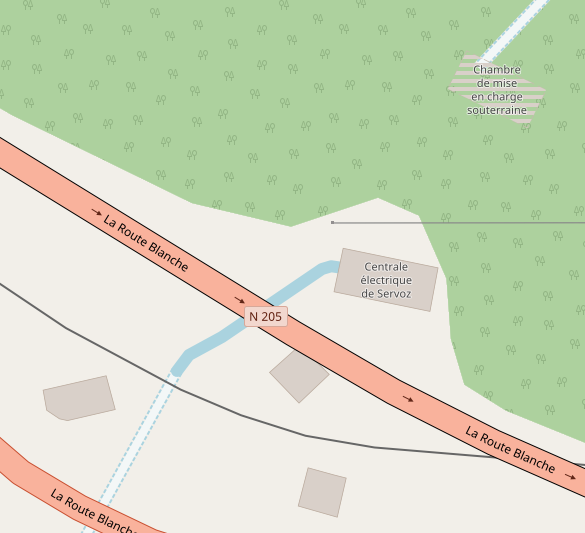
light colour
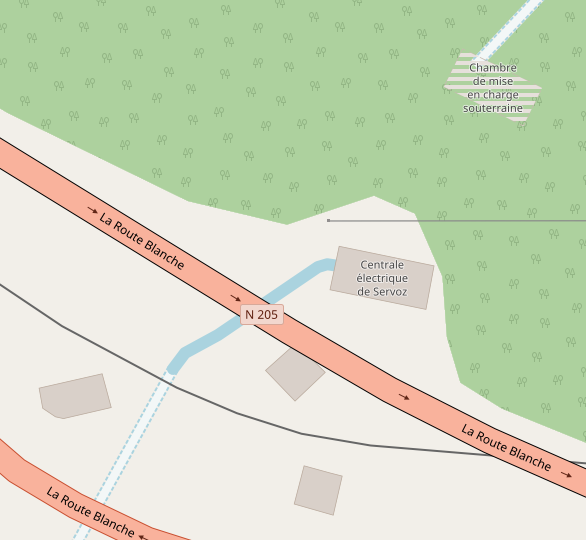
mixed colour
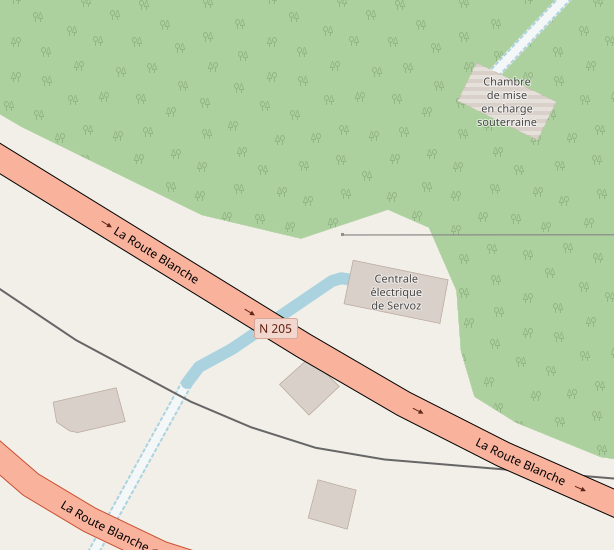
jragusa
on 27 Nov 2018
@jragusa Thanks! Can you try with 45 degree hatching + wider dashed outline (to make it more visible)? "light filling (without opacity) with dashed outline" is also an option but remember about 'minor buildings category' idea from https://github.com/gravitystorm/openstreetmap-carto/pull/3426.
Here are some examples of underground buildings under another landcover, maybe you will be interested in it :)
https://www.openstreetmap.org/way/64978364
https://www.openstreetmap.org/way/64978210
https://www.openstreetmap.org/way/388758688
https://www.openstreetmap.org/way/457313286
https://www.openstreetmap.org/way/289030475
https://www.openstreetmap.org/way/225384089
https://www.openstreetmap.org/way/129989100
Tomasz-W
on 27 Nov 2018
@Tomasz-W I have largely edited my message in the meantime. I will test on several links
jragusa
on 27 Nov 2018
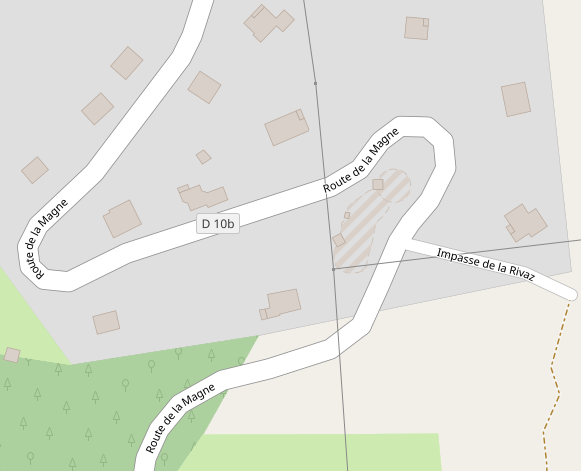
jragusa
on 27 Nov 2018
IIRC we were thinking about using hatching for rendering roofs, but there was some technical problem. If I understand well, nothing is decided yet and you just check different options?
kocio-pl
on 27 Nov 2018
As I said in a previous edited comment, my proposition is to use light filling (without opacity) with dashed outline for underground building as the following (I reduced below dash array to 6):
- light colour because it's a minor building
- dashed outline because the outline can not be accurately constrained in some cases since it's buried building
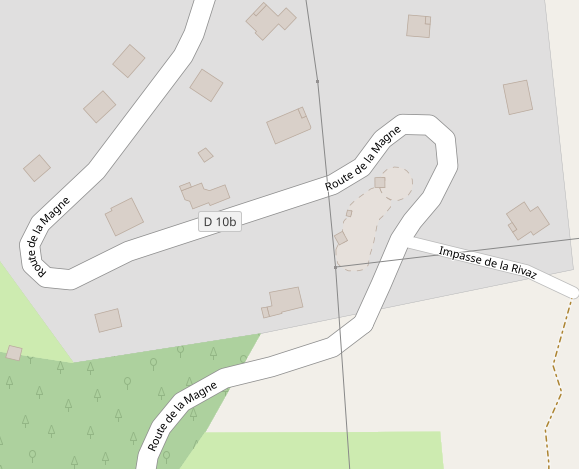
jragusa
on 28 Nov 2018
None of those seem very intuitive or clear what they are. I don't know what a good alternative would be though.
 Adamant36
on 28 Nov 2018
Adamant36
on 28 Nov 2018
Light as a minor building with a dashed outline (as opposed to the light minor with the outline when being on the ground) looks and sounds OK for me.
kocio-pl
on 28 Nov 2018
I would like to see a test rendering with one of more complicated places from https://github.com/gravitystorm/openstreetmap-carto/issues/552#issuecomment-442157266 to rate it.
Tomasz-W
on 28 Nov 2018
I would try faint, non-transpatent fill (like one four posts earlier) with a faint outline. Dashes generally tend to work for examples and later fail miserable in real use.
Also, it would be a good idea to test also some more complex cases.
matkoniecz
on 28 Nov 2018
I agree that dashes are a problem. We have too many already, and they
obscure complex geometries.
On Wed, Nov 28, 2018 at 9:47 PM Mateusz Konieczny notifications@github.com
wrote:
I would try faint, non-transpatent fill (like one four posts earlier) with
a faint outline. Dashes generally tend to work for examples and later fail
miserable in real use.Also, it would be a good idea to test also some more complex cases.
—
You are receiving this because you are subscribed to this thread.
Reply to this email directly, view it on GitHub
https://github.com/gravitystorm/openstreetmap-carto/issues/552#issuecomment-442434872,
or mute the thread
https://github.com/notifications/unsubscribe-auth/AoxshJBy3ed7tG_PQ91b7P7x7NHuep85ks5uzoXWgaJpZM4B9HX2
.
 jeisenbe
on 28 Nov 2018
jeisenbe
on 28 Nov 2018
from locations provided by @Tomasz-W
https://www.openstreetmap.org/way/129989100
before

after
dashed line

continuous line

https://www.openstreetmap.org/way/225384089
before

after
dashed line

continuous line

https://www.openstreetmap.org/way/289030475
before

after
dashed line

continuous line

https://www.openstreetmap.org/way/457313286
before

after
dashed line

continuous line

https://www.openstreetmap.org/way/388758688
before

after
dashed line

continuous line

https://www.openstreetmap.org/way/64978210
before

after
dashed line

continuous line

https://www.openstreetmap.org/way/64978364
before

after
dashed line

continuous line

jragusa
on 30 Nov 2018
Thanks, for me this is more readable with dashed line.
I guess Virgilkapelle building should be not visible at all, because pedestrian area does not have a hole there: https://www.openstreetmap.org/relation/152813#map=19/48.20859/16.37281
kocio-pl
on 30 Nov 2018
I'm not satisfied with the filled ones.
Let's analyze what's the issue:
- we want to show that there is a building, but
- it's not above ground as usual but it's hidden under ground, and
- we want to show type of landcover which building is hidden by
- we want to show building's edges
Test renderings above looks like some type of building, but it's totally not intuitive that it's a underground one. We should look for a way to show underground building shape and landcover above it at the same time, I think hatching is the only way to do it. @jragusa Can you test locations above (or at least one) with:
- 45 degree hatching with dashed outline
- 45 degree hatching without outline
- 45 degree hatching with very delicate outline
?
Tomasz-W
on 30 Nov 2018
You dont think with hatched people will think its showing a multi-story building/inside mapping or something? Plus, with hatching its usually laying on top of the surface. Not under it. Thats how it is with water bodies at least.
Adamant36
on 30 Nov 2018
@Tomasz-W an example with 45° hatched pattern is provided in this comment but I don't think it's a good solution since it's already used for building=roof (#2475). I agree with you about rendering the landcover but it's also the case for roof.
The best answer of all of your remarks would be to only render the shape with a (dashed ?) outline. However, as @matkoniecz said, it looks like a path/track.
So, an intermediate solution would be to use opacity parameter to allow the rendering of landcover through the building as I provided in my first renderings
jragusa
on 10 Dec 2018
@jragusa Can you provide some more exaples of it (opacity parameter version) with some locations which I mentioned above?
Tomasz-W
on 10 Dec 2018
with polygon-opacity: 0.33; (that's look better for me)


jragusa
on 10 Dec 2018
Its a tad to light. Which makes it slightly hard to see. It looks good outside of that though. How would a large building rendered that way look zoomed out?
Adamant36
on 10 Dec 2018
@jragusa Please test more prominent version with polygon-opacity: 0.5;
Tomasz-W
on 11 Dec 2018
polygon-opacity: 0.5;


jragusa
on 12 Dec 2018
I think that switching 2 mentioned rendering methods would give better, more intuitive results: stripes for underground buildings and opacity for roofs. As some of underground buildings are often partly visible (e.g. here) striped 50/50 rendering fits better there.
@jragusa What do you think about https://github.com/gravitystorm/openstreetmap-carto/issues/688 in the context of underground/ roof buildings? I think that buildings should be moved above highways to make map more intuitive and readable, because it makes a lot of weird rendered places at the moment.
Tomasz-W
on 12 Dec 2018
@Tomasz-W we need to discuss with @kocio-pl as he manages #2475 about building=roof but I agree about #688. That's would improve rendering tests for both roof and underground buildings.
However, I prefer using hatches for roof because IMO the rendering of landcover is more obstructed than with opacity. This better corresponds to what we expect for roof. If we use hatches for underground building, I would use also opacity to avoid that underground buildings stand out too much.
In term of visibility, I consider the following sequence: major building > building > roof > minor building > underground building
jragusa
on 12 Dec 2018
I don't try to manage building=roof ticket, I just marked it as something interesting to do if I will be looking for task. Since we have a working team now and you are testing in reality, you may discuss freely. In the end someone will need to accept it by merging, but it's still a melting pot.
kocio-pl
on 12 Dec 2018
@jragusa, how come you put roof's before minor buildings? I would consider a garage more important then something with a roof like a rain shelter or gazebo that doesn't have walls. Also, minor buildings before underground ones isn't so easy to classify. Something like an underground bomb shelter could be more important then a garage depending. Not that I'm saying we should prioritize rendering bomb shelters.
Adamant36
on 12 Dec 2018
Trying to exhume this old issue.
@Adamant36 I considered this sequence because initially hatching was tested for roof while lighter colour was proposed for minor building, and hatching would stands out much more.
My starting point is the last rendering I made but changing transparency with a dedicated colour based on the discussions in #4077 and #4078. Does this rendering still satisfy everyone or do you have any alternative ?
jragusa
on 20 Mar 2020
Looking above, gravitystorm says pretty strongly: "no transparency." https://github.com/gravitystorm/openstreetmap-carto/issues/552#issuecomment-76158611
I believe the best solution is to stop rendering buildings with location=underground, since the geometry of these features is rarely something that a mapper can confirm to be correct or incorrect.
A different rendering for roofs or greenhouses could be considered in addition, but I believe that should be discussed in the relevant issues. It will be hard enough to find a unique rendering for roofs and greenhouses, without also trying to render underground buildings in an intuitive way.
jeisenbe
on 21 Mar 2020
Looking above, gravitystorm says pretty strongly: "no transparency." #552 (comment)
You don't think his comment might have applied more then compared to now?
I believe the best solution is to stop rendering buildings with location=underground, since the geometry of these features is rarely something that a mapper can confirm to be correct or incorrect.
That's probably a good call, but it might just lead to people not using the location tag anymore.
Also, functionally what's the difference between something like say the color distortion caused by the intermittent pattern on a body of water rendered above something else compared to the color change due to transparency?
Adamant36
on 21 Mar 2020
I believe the best solution is to stop rendering buildings with location=underground, since the geometry of these features is rarely something that a mapper can confirm to be correct or incorrect.
I'm not against. We have already removed the mapping of underground parking.
A different rendering for roofs or greenhouses could be considered in addition, but I believe that should be discussed in the relevant issues. It will be hard enough to find a unique rendering for roofs and greenhouses, without also trying to render underground buildings in an intuitive way.
What about man_made=reservoir_covered (#2620) ? At least in France, they are mapped on cadastre.
jragusa
on 21 Mar 2020
Related issues
 Vort
·
3Comments
Vort
·
3Comments
 dktue
·
3Comments
dktue
·
3Comments
 Thorwynn
·
3Comments
Thorwynn
·
3Comments
 d1g
·
4Comments
d1g
·
4Comments
 MarkusStue
·
4Comments
MarkusStue
·
4Comments
Most helpful comment
Another idea would be to not render underground parking in any way, only the entrance (#270) - since this is what's really useful for drivers and visible on the ground, not interfering with other objects out of nowhere.