Opensourcepos: Agregar artículos a venta desde la sesión de inventario
Background information
__IMPORTANT: If you choose to ignore this issue report template, your issue will be closed as we cannot help without the requested information.__
Please make sure you tick (add an x between the square brackets with no spaces) the following check boxes:
- [] Reporting an issue of an unmodified OSPOS installation
- [] Checked open and closed issues and no similar issue was already reported (please make sure you searched!)
- [] Read README, WHATS_NEW, INSTALL.md and UPGRADE
- [] Read the FAQ for any known install and/or upgrade gotchas (in specific PHP extensions installed)
- [] Read the wiki
- [] Executed any database upgrade scripts if an upgrade pre 3.0.0 (e.g. database/2.4_to_3.0.sql)
- [] Aware the installation code is in bintray (see README), and GitHub master is for developers only and therefore not complete nor stable
Installation information
- OSPOS version is:
- OSPOS git commit hash is:
- PHP version is:
- MySQL or MariaDB version is:
- OS and version is:
- WebServer is:
- Selected language is:
- (If applicable) Docker installation:
- (If applicable) Installation package for the LAMP/LEMP stack is:
Issue / Bug / Question / New Feature
Please write your issue here. If a bug, please make sure to provide as much information as possible including configuration settings (e.g. Decimals set, Tax mode), language and steps to reproduce the bug.
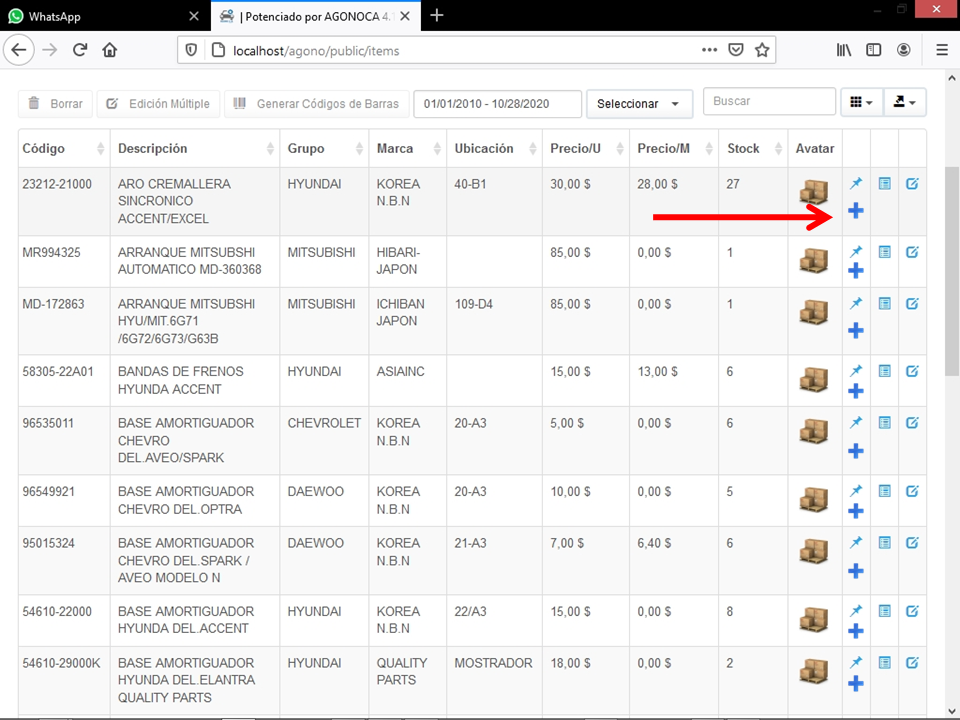
Versión de OSPOS 3.3.2 Que tal grupo no han tenido la idea de adaptar la vista de inventario con venta de una manera mas directa por ejemplo los vendedores no se saben todos los códigos de los productor y por ende tampoco la descripción. Y tienen que salir de venta para navegar hasta inventario buscar el articulo copiar el código y regresar a venta siendo esto seria mas conveniente colocar un botón que mientras este en búsqueda de inventario le permita ir agregando los artículos a la venta. algo parecido a esto.
Translated: OSPOS version 3.3.2 That such a group has not had the idea of adapting the inventory view with sales in a more direct way. For example, sellers do not know all the codes of the producers and therefore neither the description. And they have to go out of sale to navigate to inventory, search for the article, copy the code and return to sale, this being more convenient to place a button that while searching for inventory allows you to add the items for sale. something like this.
 ozzylamberth
All 4 comments
Have you tried printing the barcode for the Item then scanning it at the Register. It works.
¿Ha intentado imprimir el código de barras del artículo y luego escanearlo en el Registro? Funciona.
 odiea
on 30 Oct 2020
odiea
on 30 Oct 2020
Claro no existe problema en ello aparte del recurso invertido en imprimir las etiquetas, Pero que sucede cuando la tienda no posee las herramienta o la misma se daña.... Tendrían esa alternativa bueno es mi opinión..
Of course, there is no problem in this, apart from the resource invested in printing the labels, but what happens when the store does not have the tools or it is damaged ... They would have that good alternative is my opinion.
ozzylamberth
on 30 Oct 2020
You can also set the search suggestions in configuration and that should show the product in the Register.
También puede establecer las sugerencias de búsqueda en la configuración y eso debe mostrar el producto en el Registro.
odiea
on 30 Oct 2020
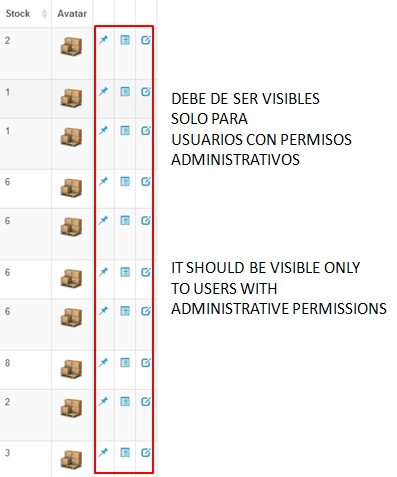
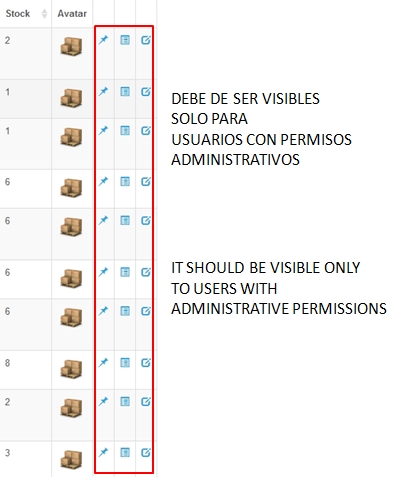
Que tal amigos nuevamente por aqui. Se que los permisos se asignan a la DB en ospos_modules y ospos_permissions ya estoy claro en ello y se que los
Action buttons de CRUD su funciones se encuentra en controllers/Items.php lines 336 y en tabular_helper.php en la linea 432 pero no logro decirle que usuario puede tener acceso a eso botones en el CRUD de inventario es decir que solo el administrador pueda ver esas opciones pero el vendedor no.
Con respecto a otro detalle sobre la lista de inventario la misma muestra toda la lista sin importar si tiene exixtencia en 0. Lo solucione de esta manera en la aplication/models/item.php en la linea 224 hasta la linea 226
Este es el codigo original
if($filters['low_inventory'] != FALSE)
{
$this->db->where('quantity <=', 'reorder_level');
Este es el codigo que modifique para que solo me mostrara los articulos que tengan existencia unicamente en la lista.
if($filters['low_inventory'] != TRUE)
{
$this->db->where('quantity >', 'reorder_level');
Solo cambie la manera de realizar la peticion de <= a > y para ver todo el inventario completo solo cambie
if($filters['low_inventory'] != FALS) a if($filters['low_inventory'] != TRUE)
How about friends here again. The permissions are assigned to the DB in ospos_modules and ospos_permissions I am already clear on it and I know that the
CRUD Action buttons their functions are found in controllers / Items.php lines 336 and in tabular_helper.php on line 432 but I can't tell you which user can have access to those buttons in the inventory CRUD, that is, only the administrator can see those options but the seller doesn't.
With respect to another detail about the inventory list, it shows the entire list regardless of whether it has a 0 existence. I solved it this way in the application / models / item.php on line 224 to line 226
This is the original code
if ($ filters ['low_inventory']! = FALSE)
{
$ this-> db-> where ('quantity <=', 'reorder_level');
This is the code that I modified so that it would only show me the articles that only exist in the list.
if ($ filters ['low_inventory']! = TRUE)
{
$ this-> db-> where ('quantity>', 'reorder_level');
Just change the way you make the request from <= a> and to see all the complete inventory just change
if ($ filters ['low_inventory']! = FALS) to if ($ filters ['low_inventory']! = TRUE)
ozzylamberth
on 1 Nov 2020
Related issues
 izeblood
·
5Comments
izeblood
·
5Comments
 asakpke
·
4Comments
asakpke
·
4Comments
 RamkrishnaMondal
·
4Comments
RamkrishnaMondal
·
4Comments
 objecttothis
·
4Comments
objecttothis
·
4Comments
 danersan
·
4Comments
danersan
·
4Comments
Most helpful comment
You can also set the search suggestions in configuration and that should show the product in the Register.
También puede establecer las sugerencias de búsqueda en la configuración y eso debe mostrar el producto en el Registro.