Openshot-qt: windows 7 64 error right after install.
Hi everyone!
I get this error right after installation on Win7 64.
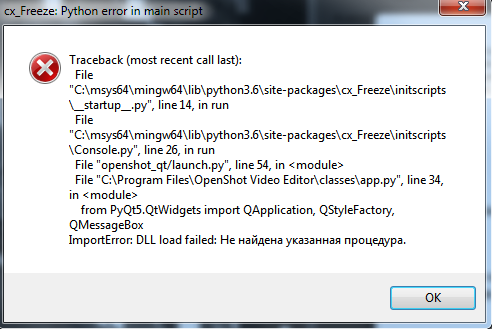
I searched on Internet, but no luck.
Thanks!
 kazham
All 33 comments
Hi @kazham did you download 2.4.3 or a daily build and did you try and reinstall it.
 speedytechdev
on 20 Nov 2018
speedytechdev
on 20 Nov 2018
Yeah, many times...thanks anyway.
kazham
on 20 Nov 2018
Isn't it strange that my PC doesn't contain such folder like "c:\msys64"?
kazham
on 20 Nov 2018
That is odd @ferdnyc Maybe be able to help you.
speedytechdev
on 20 Nov 2018
The path thing is normal, those paths are effectively "inside" the frozen Python install that's contained within whatever.exe (I forget if it's OpenShot.exe or launch.exe or whatever.)
Not really sure what's going on here. Can you please translate the text at the very end of the Traceback, @kazham ? Might provide a clue.
 ferdnyc
on 21 Nov 2018
ferdnyc
on 21 Nov 2018
Basically it's trying to load the Windows DLL that contains the QtWidgets library -- which _should_ ALSO be inside the frozen .exe... and failing to, for some reason.
Do you have PyQt5 for Windows actually installed directly (separate from OpenShot), by any chance? Could be a version mismatch. (These are just wild guesses at this point.)
ferdnyc
on 21 Nov 2018
Thank you for reply. I'm not sure about PyQt5, but I have Qt-creator installed.
Last line means "Procedure hasn't been found".
kazham
on 21 Nov 2018
Just found IronPython installed on my PC.
kazham
on 21 Nov 2018
Removed IronPython. Nothing changed.
kazham
on 21 Nov 2018
Hmm. Well, QtCreator must mean Qt, since it's useless without it.
I don't want you to go crazy tearing apart your system uninstalling things just because they "might" possibly be a problem, so let's not make too many assumptions. (Especially since, as I say, I'm kind of just wildly guessing here — apologies that I don't have more definitive information on the problem, but I don't believe anyone's reported anything along these lines before, so we're in uncharted territory.)
Having QtCreator installed... well, _shouldn't_ affect anything, but like I said some part of Qt itself must also be installed. It shouldn't be an issue either, and I can't imagine nobody's tried running OpenShot with Qt installed before now, but... well, something's clearly causing problems.
If you could check the version number(s) of QtCreator and/or Qt that's installed and report those back, that'd be helpful. I am curious if a really, really old/new version could be causing problems, if indeed OpenShot is mistakenly trying to pull in an external Qt. The bundled version is neither particularly new nor particularly old.
Meanwhile, I'll see if I can find time to get a Windows install up and running here, so maybe I can look at how PyQt5's modules are loaded and see whether anything external can influence that process.
ferdnyc
on 22 Nov 2018
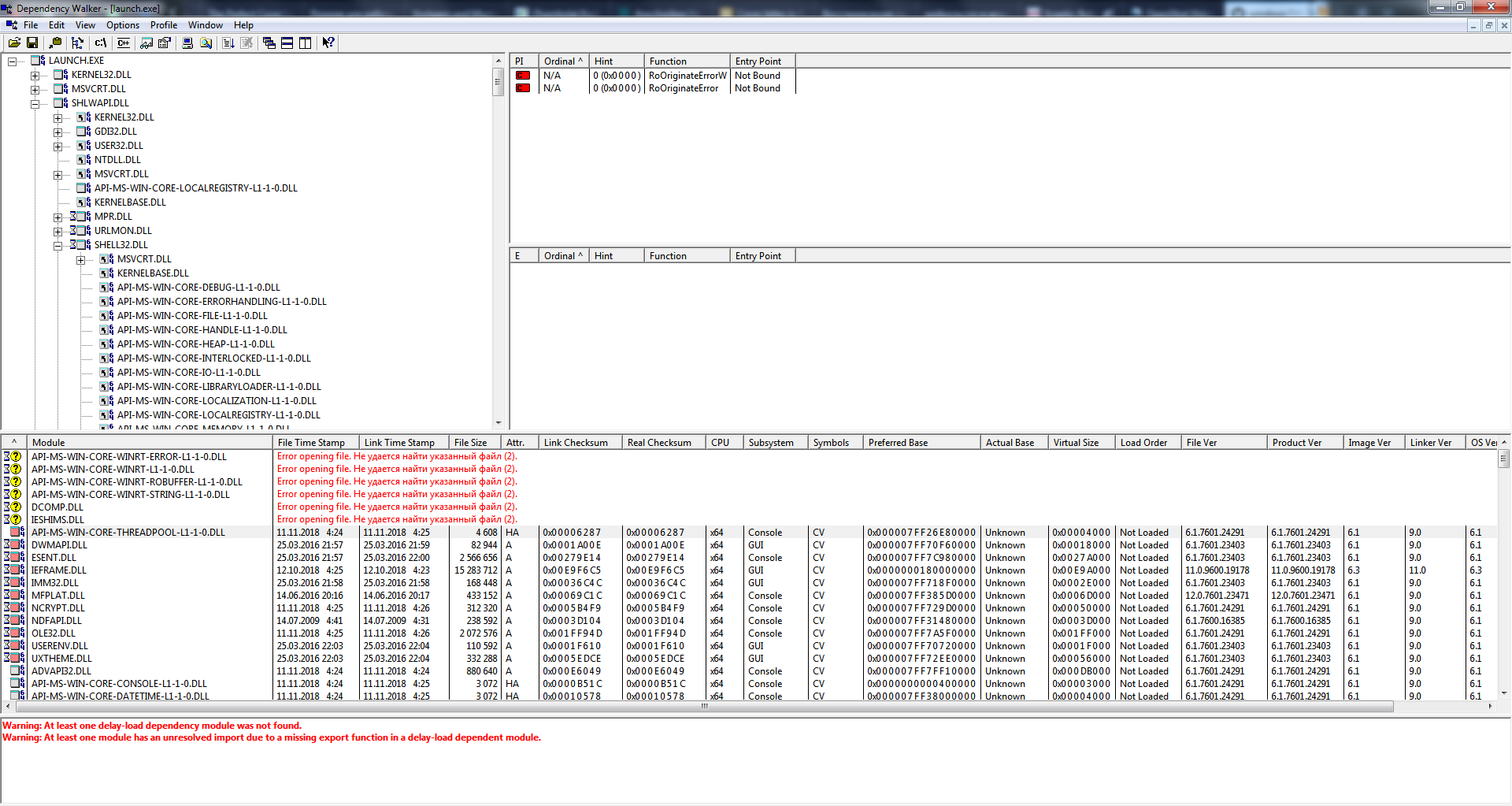
Thank you very much for help! Maybe Dependency Walker screenshot can help you?
kazham
on 22 Nov 2018
@kazham : Thanks, unfortunately it seems those are false negatives, merely a sign of Dependency Walker's age w/r/t Windows 10. So, they're not what's causing the issue here.
It would have to be something within the DLLs that OpenShot loads for PyQt5/Qt, since it's failing right at the (very first) PyQt5 import line in src/classes/app.py. So, the first time it goes to access a Qt component, splat! Right on its face.
ferdnyc
on 22 Nov 2018
Does OpenShot or PyQt5 rely on system PATH variable?
kazham
on 23 Nov 2018
Does OpenShot or PyQt5 rely on system PATH variable?
For loading things like DLLs, it _shouldn't_ — especially not in the frozen version. I'm a little more worried about the possibility of _other_ variables being used. Most of the ones that would affect things, OpenShot overrides as part of its setup, but...
Let's try two more things:
- Can you please check whether any of these are set in your _overall_ user environment, independent of OpenShot... and if they are, what they contain?
PYTHON_PATHQT_PLUGIN_PATHDYLD_LIBRARY_PATH
- Open a Windows Command Prompt window, and then...
```console
cd "C:\Program Files\OpenShot Video Editor\"
launch-win.bat
``That'll set a few environment variables, place the current directory right at the start of%PATH%, and then launch OpenShot'slaunch.exe` from there. If anything weird is going on with path locations that's preventing it from finding the DLLs, doing it that way should hopefully overcome that.
ferdnyc
on 23 Nov 2018
None of the above variables are set.
Here what get after launch-win.bat:

kazham
on 23 Nov 2018
So, exactly the same, huh? Argh.
And (I assume the answer to this is yes, but)... all of the relevant DLLs and other files are present in your C:\Program Files\OpenShot\ directory, and your user account that's running OpenShot has permission to read them all, yes?
The files that would be involved at that point in the process should be found at...
- (These are all paths relative to
C:\Program Files\OpenShot\)
\Qt5Widgets.dlland other\Qt5*.dll\lib\python3.6\PyQt5\QtWidgets.pyd\lib\python3.6\PyQt5\QtWidgets.pyi- possibly some of
\imageformats\q*.dll - probably
\platforms\qwindows.dll
- It's also worth making sure that translation files exist in
\language\matching the system locale — there should be the following set of translations for each locale codeXX:
qt_XX.qmqt_help_XX.qmqtbase_XX.qmOpenShot.XX.qm
...Though, actually, the OpenShot.XX.qm files wouldn't be used, because they should all be compiled into the single resource file openshot_lang.py — that's where OpenShot's translations would be loaded from, instead.
ferdnyc
on 24 Nov 2018
\Qt5Widgets.dll and other \Qt5.dll - checked
\lib\python3.6\PyQt5\QtWidgets.pyd - checked
\lib\python3.6\PyQt5\QtWidgets.pyi - checked
\imageformats\q.dll - 11 files checked
language files all there. openshot_lang.py is there too.
kazham
on 25 Nov 2018
Well, crap. I am _really_ out of ideas, at this point.
I even went and downloaded qt-opensource-windows-x86-mingw492-5.6.0.exe and installed it, since I noticed it in your path and it was _vaguely_ possible that was causing issues. But even with Qt 5.6.0 installed, even with it in my %PATH%, I just couldn't get it to cause any problems with OpenShot — even though there _is_ a Qt5Widgets.dll in C:\Qt\Qt5.6.0\5.6\mingw49_42\bin\, OpenShot ignores it as it's supposed to.
In fact, I even tried this:
> cd C:\Qt\Qt5.6.0\5.6\mingw49_42\bin\
> "C:\Program Files\OpenShot Video Editor\launch.exe"
...OpenShot ran with no problems.
The only thing I can think to suggest, at this point — I'm not sure if Dependency Walker will work for this, but if _not_ then you can definitely get Process Explorer and install that, as it'll definitely work — is, if you launch OpenShot and wait for that error box to come up, then take a look at the running state of the launch.exe process, you can get a look at what DLLs it's loading from where, which might provide some clue as to the source of the import error.
Like, if I launch Process Explorer, hit Ctrl+D to open the DLLs list in the lower pane, and then select launch.exe, I get this listing:
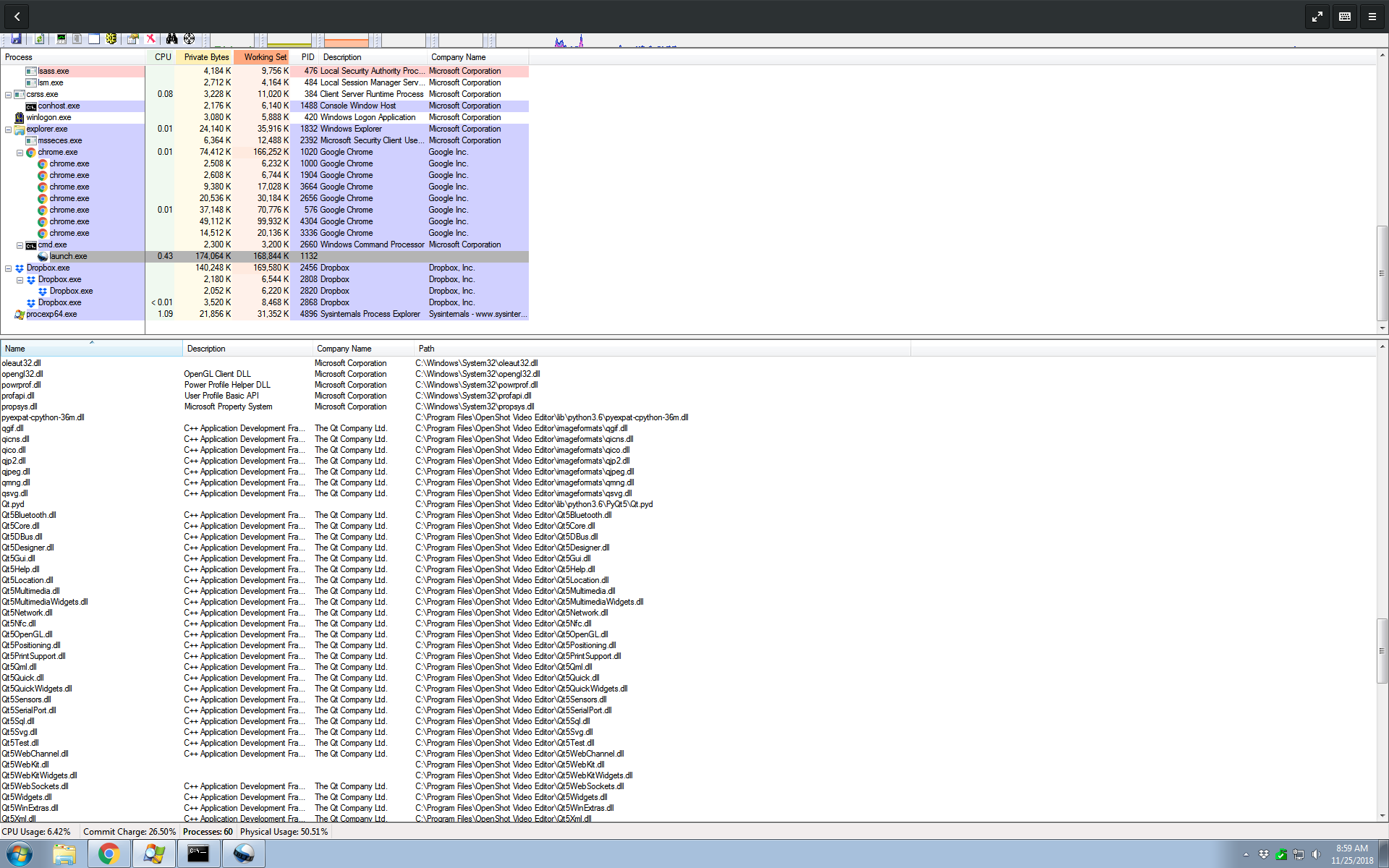
Maaaaybe there will be something useful there, though honestly I have no idea. I freely admit I'm grasping at straws, at this point, because I simply have no idea what the problem could be, and I can't manage to find any way to replicate it. (Though I am working with Windows 7, as that's the only Windows install I have available to me. Still, plenty of other users run OpenShot on Windows 10 so I can't believe that it's inherently the problem.)
ferdnyc
on 25 Nov 2018
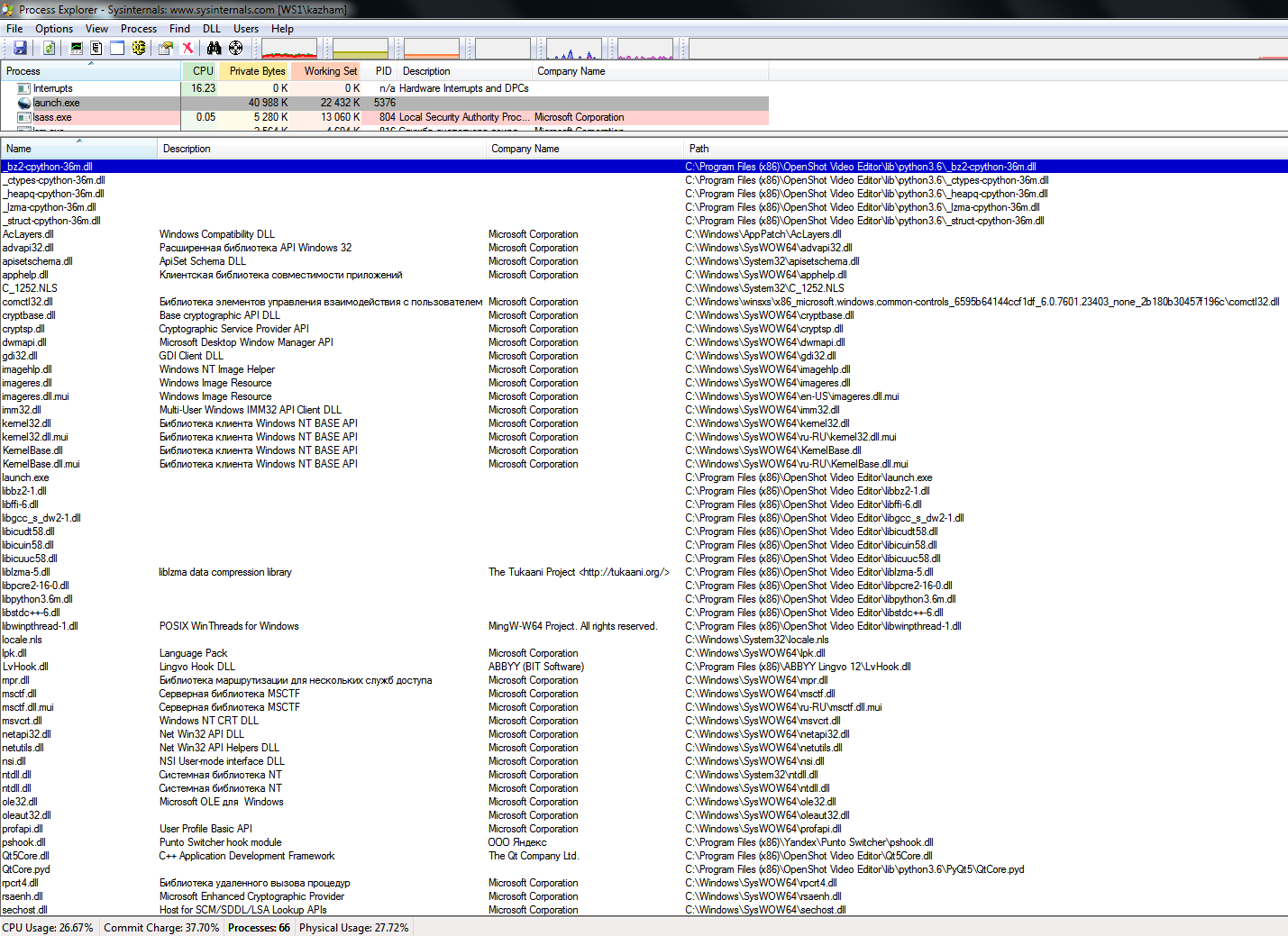
I had installed OpenShot in Windows 10(in VirtualBox) and experienced no problems with it. It must be something with my system. I uninstalled Antivirus+Firewall, but nothing changed. Here my ProcessExplorer DLLs list:
kazham
on 25 Nov 2018
Just for the case I have installed 32 bit OpenShot.
kazham
on 25 Nov 2018
Thank you very much, anyway!
kazham
on 25 Nov 2018
Most interesting thing is that I already had OpenShot installed once, but don't remember exactly what version. I probably will start to downgrade it until I get luck.
kazham
on 25 Nov 2018
Just for the case I have installed 32 bit OpenShot.
Meaning, all of your _previous_ attempts before that point were with the 64-bit version, correct? (I agree it was worth trying, but if anything I'd normally expect the 32-bit version to cause more problems than the 64-bit version, in 64-bit Windows.) ...I'm guessing the 32-bit version showed exactly the same symptoms as the 64-bit version, though?
Most interesting thing is that I already had OpenShot installed once, but don't remember exactly what version. I probably will start to downgrade it until I get luck.
Yeah... like trying the 32-bit version, downgrading is worth trying and if it works for you, then great and it at least gives us a data point that the problem is really on our end, and at least roughly where it came in. (So I guess two data points.)
I had installed OpenShot in Windows 10(in VirtualBox) and experienced no problems with it. It must be something with my system. I uninstalled Antivirus+Firewall, but nothing changed. Here my ProcessExplorer DLLs list:
Yeah, unfortunately it's only partial, I kind of wish I could see the whole thing but there doesn't seem to be a way to do that in Process Explorer. There are a _couple_ of unusual DLLs showing there (the LvHook.dll for Lingvo, and pshook.dll for Punto Switcher... I have no reason to suspect that they're the problem, but at this point everything's sort of on the table and they're (a) unknown to me and (b) third-party (neither Microsoft nor anything shipped as part of OpenShot). So, *shrug*
Ooh, I just accidentally found out how to save a DLL list from Process Explorer! So, if you could do this, (assuming you still have the necessary pieces installed):
- Run the 64-bit version of OpenShot 2.4.3 release (since I don't have the 32-bit version installed, it'll be much easier for me to compare with my own install if the data is from the same version+arch)
- Get to the error dialog you've shown us, and leave it open
- Go to (or launch) Process Explorer, and click on the
launch.exeprocess - Click down inside the DLL list in the lower pane
- Hit Ctrl+a which, for some reason, instead of doing a select-all, will open a file-save dialog offering to write a text file.
- Save the text file, and then drag-and-drop it into a comment on this issue to upload it to GitHub.
I'll take a look at that and see if anything jumps out at me. Unfortunately, if nothing does then I'm afraid I'm completely out of ideas. Sorry about that, extremely frustrating I'm sure. (I know it is for me!) :slightly_frowning_face:
ferdnyc
on 25 Nov 2018
Thank you for keeping digging!
Here is my full DLLs list:
launch.exe.txt
LvHook is a part of my English-Russian translator and pshook is automatic keyboard language switcher.
kazham
on 25 Nov 2018
Hm. As expected, there's not much there, as it's dying pretty early in the process. It does manage to load QtCore.pyd and Qt5Core.dll, but never gets to any of the rest of Qt.
Huh!! Well, here's one odd thing.
For some reason, your system isn't loading zlib1.dll from the OpenShot distribution. It's finding one in the Windows system directory (even though it didn't come with Windows), so that takes priority:
zlib1.dll zlib data compression library C:\Windows\System32\zlib1.dll
That DLL is _supposed_ to be loaded from OpenShot, along with the CPython interface to it. From my system:
zlib1.dll   C:\Program Files\OpenShot Video Editor\zlib1.dll
zlib-cpython-36m.dll    C:\Program Files\OpenShot Video Editor\lib\python3.6\zlib-cpython-36m.dll
Some other software installed on your machine must've put zlib1.dll in C:\Windows\System32\ for some (badly-behaved) reason — they're not supposed to do that.
This _could_ be nothing. It could be that the zlib1.dll in C:\Windows\System32\ is just fine and totally compatible with OpenShot. But if it's _not_, and especially since the CPython interface that has to talk to it _is_ coming from the OpenShot directory, it could definitely be the source of the problem. (That isn't just theoretical: this issue can and does cause people problems.)
Comparing the file sizes and dates of the two different zlib1.dll files can give you an idea of how close in age/version they are — the more difference between them, the more likely it is to be a problem. The date that C:\Windows\System32\zlib1.dll was created may also give you an idea of what software installation process placed it there.
As for the best way to test whether C:\Windows\System32\zlib1.dll is the problem... well, my personal approach would probably be to _delete_ it entirely, after taking a backup copy. Since it's not part of Windows, it won't break the _entire_ system, and my take would be "Whatever software put it there, if it _does_ break I can figure out how to fix that after I've checked whether OpenShot works now." But, that's not without risk.
Slightly _less_ risky would be to do what the reporter in that bug I just linked to did: Copy _OpenShot's_ zlib1.dll into C:\Windows\System32\, overwriting the zlib1.dll that's already there, and letting OpenShot keep loading it from the system path. Odds are whatever program placed it there won't have any problem with a newer version (assuming OpenShot's _is_ the newer version). But, still, slight amounts of risk.
Also, either of those approaches would probably involve you having to administratively override some file protections designed to keep users from messing with the contents of C:\Windows\System32\ (and for good reason, mostly) so you might have to know your way around the cacls command and tools like that. Depends how protected the zlib1.dll in the system directory is — if it was installed by some random software, probably not very. Not nearly as much as the actual Windows system files are, anyway.
And, again, let me stress: This may not actually have _anything_ to do with why OpenShot won't start on your system.
...But it might. Perhaps.
ferdnyc
on 26 Nov 2018
Hey there,
sorry to barge in (and I haven't read the conversations) but similar issues with cxfreeze have been worked-around before by deleting the .openshot_qt directory (folder) in the user's home directory. Perhaps it might help you too (and give @ferdnyc some more clues as to what is causing this problem!).
 peanutbutterandcrackers
on 26 Nov 2018
peanutbutterandcrackers
on 26 Nov 2018
Huh! I'll be embarrassed if that's it, because I really should've suggested that sooner!
My only request, if you do try that @kazham (and you should!), would be that instead of _deleting_ the directory, you move it somewhere else (like Documents). Then, if moving it DOES solve the issue, a copy of the old contents would be _very_ helpful in figuring out why.
ferdnyc
on 26 Nov 2018
I deleted that folder every time before I reinstalled OpenShot.
kazham
on 26 Nov 2018
Congratulations! That was it! Damn, zlib1.dll file. I have deleted(renamed) it and Open Shot started with no errors!
Thank you very much @ferdnyc!!! God bless you!
kazham
on 26 Nov 2018
@kazham - God bless @ferdnyc, indeed, good sir! Glad things worked out for you!
peanutbutterandcrackers
on 26 Nov 2018
I deleted that folder every time before I reinstalled OpenShot.
I was really hoping that would be it, too. Would've been so easy. I'm always very much in favor of my own obliviousness as the explanation for everything.
Congratulations! That was it! Damn, zlib1.dll file. I have deleted(renamed) it and Open Shot started with no errors!
That's great news! And nobody is more surprised than I am, trust me! :laughing: That was a TOTAL shot in the dark.
I hope you noted the creation date of that rogue zlib1.dll, so you can track down which program installed it and shame them into oblivion. 😉
ferdnyc
on 26 Nov 2018
@kazham Feel free to Close this issue once you're sure that everything's sorted out and you're fully up and running.
ferdnyc
on 26 Nov 2018
Thanks to everyone who helped me to run this cool video editing software, especially to @ferdnyc!
kazham
on 26 Nov 2018
Related issues
 Yesideez
·
3Comments
Yesideez
·
3Comments
 carlosnewmusic
·
3Comments
carlosnewmusic
·
3Comments
 GrandpaBill3006
·
3Comments
GrandpaBill3006
·
3Comments
 mnally8
·
3Comments
mnally8
·
3Comments
 CarlBicknell
·
3Comments
CarlBicknell
·
3Comments
Most helpful comment
Congratulations! That was it! Damn, zlib1.dll file. I have deleted(renamed) it and Open Shot started with no errors!
Thank you very much @ferdnyc!!! God bless you!