Openshot-qt: cx_Freeze: Python error in main script // openshot2.4.3
My Question:
I can't open my OpenShot 2.4.3. The error pop up when I click to open it.
I have no idea how to solve this problem, and I have tried all method that I found, but I still can't open it.
p.s. I saw that some can open it by clicking the icon from the start menu, but in my case, it's useless.
System Details
- Operating System / Distro: Windows 10
- OpenShot Version 2.4.3
- Laptop: DELL Inspirson 15 7000 Series with Intel i7
Screenshots
<
>
 TingChen1998
All 12 comments
@DylanC ^^^ python error
 speedytechdev
on 10 Oct 2018
speedytechdev
on 10 Oct 2018
@peanutbutterandcrackers - cx_freeze again? This bug never goes away. :rofl:
 DylanC
on 10 Oct 2018
DylanC
on 10 Oct 2018
@speedytechdev @DylanC So...,is that means I can only wait for version upgrade? ;_;
TingChen1998
on 10 Oct 2018
@TingChen1998 We will try and work on a patch to fix it. All I can recommend is using an older version of Openshot.
speedytechdev
on 11 Oct 2018
@speedytechdev Okay, I'll try. Thanks for your answer.
TingChen1998
on 11 Oct 2018
@TingChen1998 We will try and work on a patch to fix it. All I can recommend is using an older version of Openshot.
Where are the older versions of Openshot available for download?
 prabab
on 21 Oct 2018
prabab
on 21 Oct 2018
Please delete the .openshot_qt folder in your home folder; deleting it has been known to solve quite a lot of similar issues.
Hope that helps.
Please don't forget to close this if this has been resolved. Thank you!
 peanutbutterandcrackers
on 27 Nov 2018
peanutbutterandcrackers
on 27 Nov 2018
@peanutbutterandcrackers Unfortunately, It doesn't work. I deleted .openshot_qt folder but the same warning pop up as usual.
TingChen1998
on 5 Jan 2019
Hi! Same here :(
Openshot 2.4.3 64bit
Windows 10 Home 64bit
MSI GT 73VR 7RE
Deleting .openshot_qt doesn't help...
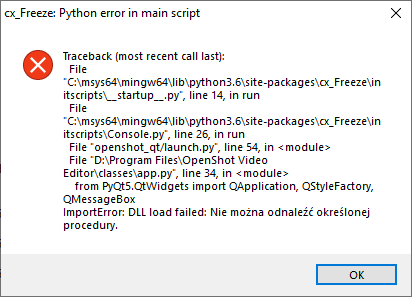
 wyspiansky87
on 15 Feb 2019
wyspiansky87
on 15 Feb 2019
I'm seeing a similar error on one of my Win 10 machines. It has QT Creator and Visual Studio installed (Several versions of each.) The non-development machines appear to be OK. The qt.conf file is in place and appears correct (On the surface) so it should be using the correct version of qt and not defaulting to the one in the system folder. Any other suggestions. I haven't tried building from source yet.
 klinzey
on 4 Sep 2019
klinzey
on 4 Sep 2019
@klinzey If you're using the released version of OpenShot 2.4.4 (or an older version, even), we've made significant improvements to the packaging process on Windows since then. (This is especially true if you're running a 32-bit Windows build, but the 64-bit packages have been improved as well.)
If you can, I'd recommend going to https://openshot.org/download/ and clicking the Daily Builds button, then downloading the most recent (top) build for your OS. Installing that version is very likely to clear up the launch issues you're experiencing. (If not, then we can certainly investigate other possible issues.)
 ferdnyc
on 5 Sep 2019
ferdnyc
on 5 Sep 2019
I'm going to close this as a dup of #2748, which is probably the most complete & current information we have on this problem. (Though the _length_ of that issue may be pretty intimidating!)
ferdnyc
on 5 Sep 2019
Related issues
 Sefran007
·
3Comments
Sefran007
·
3Comments
 carlosnewmusic
·
3Comments
carlosnewmusic
·
3Comments
 TavernSenses
·
3Comments
TavernSenses
·
3Comments
 sspmrsomebody1
·
3Comments
sspmrsomebody1
·
3Comments
 CarlBicknell
·
3Comments
CarlBicknell
·
3Comments
Most helpful comment
@DylanC ^^^ python error