Openshot-qt: the preview video and audio is lagy
 aidansstuff
All 15 comments
@aidansstuff - Need much more details or else I will have to close this.
 DylanC
on 30 Sep 2018
DylanC
on 30 Sep 2018
@DylanC after updating v2.4.3 the preview of any video is lagging/choppy and unable to edit or do a voice over narration on that because of that slow motion
 justquest007
on 2 Oct 2018
justquest007
on 2 Oct 2018
@DylanC What are you pc specs?
 speedytechdev
on 4 Oct 2018
speedytechdev
on 4 Oct 2018
@speedytechdev - I think you mean to ask @aidansstuff. @aidansstuff - Would you mind sharing details of your specs on that PC?
DylanC
on 4 Oct 2018
@speedytechdev - I think you mean to ask @aidansstuff. @aidansstuff - Would you mind sharing details of your specs on that PC?
Sorry my bad
speedytechdev
on 5 Oct 2018
I'm facing this problem too. I tried to decrease the video preview quality but the outcome is exactly the same.
For what I understand it can be an error in the preview part that is being pre-rendered. One part of the blue line is in the right place but there is a gap before the next part.
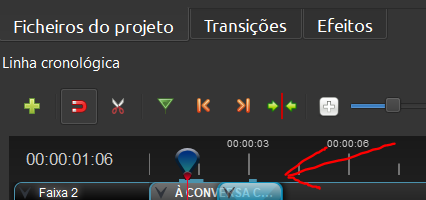
SPECS:
Laptop - Acer Aspire A515-51G
OS - Windows 10 Home 64 bit
CPU - Intel Core i7-8550U @1.80 GHz 1.99GHz
RAM - 8 GB
OpenShot v2.5.1
libopenshot v0.2.5
 super-pirata
on 11 Apr 2020
super-pirata
on 11 Apr 2020
Hi DylanC,
I'm having the same problem but would have picked a better thread subject.
Issue:
Preview audio & video is choppy due to incorrect buffering. As the playback occurs OS seems to buffer before and after area of playback as indicated by a blue bar above the timeline. The blue bar develops a hole in it where OS has not buffered the proper content and then preview playback becomes REALLY choppy.
This is happening on OpenShot 2.5.1 on Windows 64 (Windows 10)
but does not happen on my MacOS system with OpenShot 2.5.1 (MacOS 10.15.4)
In extreme cases the program becomes unusable and edits have to be made by best-guess.
PC System stats:
Lenovo P52, 32GB RAM, 500GB SSD, 6-core i7 processor, Windows 10
Mac System stats:
Older Macbook Pro mid-2014, 16GB RAM, 500GB SSD, 4-core i7 processor, MacOS 10.15.4
 Londo-Mollari
on 17 May 2020
Londo-Mollari
on 17 May 2020
Blue bar over the Timeline's Tracks indicates uncompressed (already composed, "final") frames that was produced by _libopenshot_ (OpenShot's own library). Memory used to store this "final" frames can be adjusted in _Preferences_ of the application. If library struggles to read, unpack, apply effect, combine and add audio to the frame in real-time then playback will not be smooth. Already processed frames ("blue line" segment) always should playback smooth (audio may has wrong/old data for a few sec). When PC running too many or too small number of threads (1 frame = 1 thread, playback waits for the last frame/thread to complete) performance drop may occur. The number of threads OpenShot may use is also adjustable in _Preferences_ of the application.
 SuslikV
on 17 May 2020
SuslikV
on 17 May 2020
Best practice when working with video in OpenShot is to reduce the frame rate (you can select a profile with lighter resolution and frame rate) for editing. This alone, makes a huge difference. Once editing is complete, return your resolution/FPS profile to the same as the source video, then render at the same resolution/FPS as your source video.
You don't need a higher frame rate for editing, so reducing it while editing then returning it normal after editing before rendering will provide you with a much better experience.
 ctsdownloads
on 18 May 2020
ctsdownloads
on 18 May 2020
Best practice when working with video in OpenShot is to reduce the frame rate (you can select a profile with lighter resolution and frame rate) for editing. This alone, makes a huge difference. Once editing is complete, return your resolution/FPS profile to the same as the source video, then render at the same resolution/FPS as your source video.
You don't need a higher frame rate for editing, so reducing it while editing then returning it normal after editing before rendering will provide you with a much better experience.
Better to not do this.
Cuts will be broken on export in this case. Because different FPS of the clip than the Preview (Timeline) has - will unavoidably set _Time_ option (that itself in frames - not in seconds).
FPS should remain same.
SuslikV
on 20 May 2020
I tried adjusting the number of threads in preferences, however, a hole still appears in the processed frames indicator: processed frames appear behind the cursor and ahead of it, with an empty gap that travels along with the cursor & processed frames. It's as if the system is processing the frames, unloading them, then having to process them again on the fly during preview playback.
I have checked OS history and found that this operational observation has been present in a great number of versions.
Londo-Mollari
on 23 May 2020
Mine is fine for the first 5 mins of editing, then becomes laggy, choppy and clipped. Closing OpenShot and re-opening fixes it for another 5 mins,
 rbutterworth
on 17 Jun 2020
rbutterworth
on 17 Jun 2020
Oddly, what I've found is that when I get into that laggy, choppy state and the blue line is fragmented, if I move (even slightly) the divider between the timeline section at the bottom and the video preview/project section at the top to resize the preview screen, even a teeny bit, the blue line segments vanish and when I start playback they reform properly right in front of the cursor and the choppiness is gone.
I was editing some videos yesterday and this method worked at least a dozen times in a row without fail!
 kenwdelong
on 23 Jun 2020
kenwdelong
on 23 Jun 2020
@kenwdelong by resizing _Preview_ dock window - you actually flush all cached frames. So, they are will be recreated again. This trick is useful if _Preview_ shows something strange ("old" pictures, for example).
SuslikV
on 23 Jun 2020
Thank you so much for submitting an issue to help improve OpenShot Video Editor. We are sorry about this, but this particular issue has gone unnoticed for quite some time. To help keep the OpenShot GitHub Issue Tracker organized and focused, we must ensure that every issue is correctly labelled and triaged, to get the proper attention.
This issue will be closed, as it meets the following criteria:
- No activity in the past 180 days
- No one is assigned to this issue
We'd like to ask you to help us out and determine whether this issue should be reopened.
- If this issue is reporting a bug, please can you attempt to reproduce on the latest daily build to help us to understand whether the bug still needs our attention.
- If this issue is proposing a new feature, please can you verify whether the feature proposal is still relevant.
Thanks again for your help!
![stale[bot] picture](https://avatars3.githubusercontent.com/in/1724?v=4&s=40) stale[bot]
on 5 Jan 2021
stale[bot]
on 5 Jan 2021
Related issues
 gbbbbb
·
3Comments
gbbbbb
·
3Comments
 Obed9
·
3Comments
Obed9
·
3Comments
 Yesideez
·
3Comments
Yesideez
·
3Comments
 carlosnewmusic
·
3Comments
carlosnewmusic
·
3Comments
 sspmrsomebody1
·
3Comments
sspmrsomebody1
·
3Comments