Openshot-qt: How to modify some parameters?
Greetings from Spain.
First that all, thanks by this marvelous software. It is my favorite over Kdenlive or Pitivi. It is really a great jobs.
Two things:
1- The tutorial windows modal open in few moments without i made it. When i click over the buttons it doesn't make nothing. This is not very important.

2-
I would like to make some modifications to the Openshot...
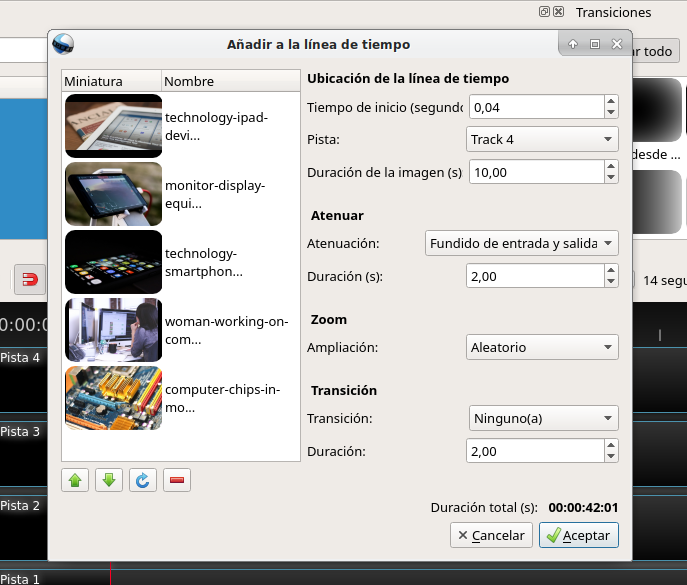
I want to modify the random numbers when we insert the items (Pictures and Videos) to the timeline.
I want to predefine that numbers.
In an specify range for Zoom and Position.
For example: I want to have the zoom random but just between 1,50 and 2. And position between -0,15 and 0,15.
I just need to know where to modify the code to make it as i need. Thanks!.

Someone can help me?
 sirvaseusted
All 17 comments
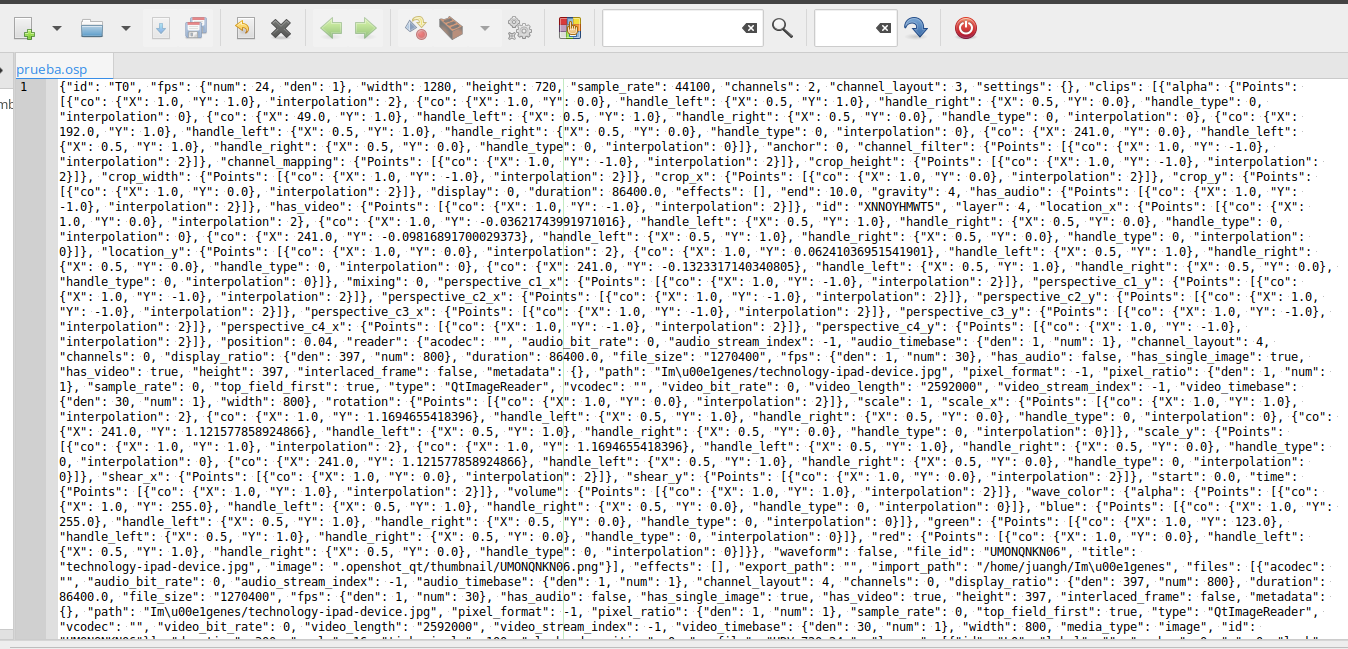
I fund the information inside the OSD file. Into the project saved. But this information is in multiples places. I'm not afraid to make this modifications, but if i have several pictures or videos, it could be really hard.
I think it could be done in the moment that we pass the items to the timeline. as i show in the picture below. Thanks to @DylanC for clasify my note!.
sirvaseusted
on 21 Jul 2018
@sirvaseusted - Did you build this screen yourself?
I can help give advice on the code but maybe @ferdnyc would be the better person to help you.
 DylanC
on 23 Jul 2018
DylanC
on 23 Jul 2018
Hello there @DylanC. No, i don't build that. (I mean it is just a Screenshot! *edited) It is just the moment when you attach the items to the timeline in a project. Just that it is in spanish and i change the theme. Thank you and thanks to @ferdnyc.
my main problem is that i want to make a lot of videos with massive photos each one. and i want to make it as this video for example:
https://www.youtube.com/watch?v=RsHvm2suIAI
Just waiting some solutions, thanks by your time and your excellent work!
sirvaseusted
on 23 Jul 2018
Yeah, that's just the standard add window (the one I just added track names to in PR #1876), it comes up when you right-click on Project Files entries and choose "Add to Timeline".
The window's functionality is implemented in src/windows/add_to_timeline.py, pretty much entirely within the accept() function. However, a lot of the initial/default values and constraints are specified by the window _layout_ file, which is src/windows/ui/add_to_timeline.ui. (That's a Qt Designer UI description, which can be edited in QT Designer, QT Creator, or even just by hand — it's simple XML)
Right now the operation of that window is pretty much hardcoded, there's no facility for scripting so to customize it you're pretty much stuck with just editing the source and modifying the hardcoded options.
~It also only updates a limited set of parameters, tho there's no reason others couldn't be added. In other words, if you wanted to create clips with randomized X and Y positions, you'd have to do the randomization yourself, and then add the computed values as values for new_clip["location_x"] and new_clip["location_y"] in keyframes on the first frame of the clip.~
(Scratch that, I hadn't noticed that the zoom randomization animates both location_x/location_y and scale_x/scale_y.)
So to change the randomization of Zoom: Random, you'd adjust the arguments to the uniform() calls around line 270, something like:
            # Adjust zoom amount
            if zoom_value != None:
                # Location animation
                if zoom_value == "Random":
                    animate_start_x = uniform(-0.15, 0.15)
                    animate_end_x = uniform(-0.15, 0.15)
                    animate_start_y = uniform(-0.15, 0.15)
                    animate_end_y = uniform(-0.15, 0.15)

                    # Scale animation
                    start_scale = uniform(1.5, 2.0)
                    end_scale = uniform(1.5, 2.0)
 ferdnyc
on 23 Jul 2018
ferdnyc
on 23 Jul 2018
Ignore the email-notification version of my previous comment, I rewrote it extensively after posting.
ferdnyc
on 23 Jul 2018
@ferdnyc Thanks a lot!. I already do the modification and take exactly what i need. Please, tell me if i can make a video and post it to show and share the solution in Youtube?. Can I?
You save me a lot of time to edit one by one picture parameters.
Right now i can not donate money, just time, but i promise that when i has my own credit card (I'm original from Cuba but now in Spain since 8 months ago. That's why i have not a CC yet.) i will donate to this project. Thanks a lot to @DylanC too.
Just waiting for your aprove to make and share the video with the source code to this solutions.
Thanks!
sirvaseusted
on 23 Jul 2018
@ferdnyc Thanks a lot!. I already do the modification and take exactly what i need. Please, tell me if i can make a video and post it to show and share the solution in Youtube?. Can I?
You save me a lot of time to edit one by one picture parameters.
Glad to hear it worked out!
Editing the OpenShot code to do these things isn't an ideal approach, of course, and not something we generally recommend to the average user. In a perfect world all of that would be configurable from the "Add..." window, or through some sort of user scripting feature that didn't modify OpenShot itself. (Editing the OpenShot code also isn't an available option for users who run OpenShot from the AppImage, where the source is mounted read-only and can't be modified.)
But, all that being said, it's an option that remains open for resourceful and determined users like yourself, and one that shouldn't be ignored when looking to solve real-world problems. I certainly don't have any objection, if you wish to post a video guide to the modification — though I can only speak for myself, as only @jonoomph speaks for the OpenShot project officially.
I'd only ask that you stress that editing the OpenShot code is not officially supported, and very much at-your-own-risk for any bugs or problems that arise.
ferdnyc
on 23 Jul 2018
This is my explain. Thanks again.
As @ferdnyc say, do it at your own risk. Please, if you are here, read carefully all the text.
Here the video link to Youtube Channel. It is NOT necesary that you subscribe. It is mainly for me. If it is good for you...So, wonderful.
Again, thanks comunity!
sirvaseusted
on 23 Jul 2018
Wow! I didn't know this existed! Thank you guys! This will be a lot of help! :+1:
 peanutbutterandcrackers
on 17 Oct 2018
peanutbutterandcrackers
on 17 Oct 2018
Hello there @peanutbutterandcrackers
Nice to be useful.
Here you can saw the way. Sorry for my english pronuntiation.
https://youtu.be/5h3Li_otxRo
Thanks!
sirvaseusted
on 17 Oct 2018
Yes, sir! It was your video that helped me out. Thank you!
May I request that you make a quick video tutorial on how to crop videos in OpenShot? There is a crop effect under effects tab to do it. It seems it hasn't been documented well, and I just had to deal with a complaint from a (relatively) angry user. If you have the time, please. :)
Good luck with your video making work, sir! :+1:
peanutbutterandcrackers
on 17 Oct 2018
Of course, i would love to do it!
I will make it in my first free time...Today.
Here in Canary Island 17:01 (+1 UTC)
I will make it in around 2 hours. I will notify it.
Thanks!
sirvaseusted
on 17 Oct 2018
Great! Thank you! :+1:
peanutbutterandcrackers
on 17 Oct 2018
This is the video. Please, take a look, just verify if it is the answer that you need to share, before i put it public...Rigth now, i share it here, but, it is hidden in the Youtube Channel...
I will be waiting...this are just 8 minutes.
https://youtu.be/FzTYq9nJpk8
sirvaseusted
on 17 Oct 2018
I will make something different, my computer freeze a few times...I think that i can make it better...
I will wait for your note, if it is what you need...and then, i will repeat the video in a better way...
sirvaseusted
on 17 Oct 2018
The tricky thing about Crop is that, as an Effect, it doesn't alter the _output_ video at all, and it doesn't alter the _input_ video until after it's placed on the Timeline / in the output frame. Many people believe they can use it to crop their output, when it just doesn't work that way.
It could crop an _input_ video to fit a given _output_, but there's really no need for that since that cropping is effectively automatic — if you resize the input video to be larger than the output frame, it'll be cropped implicitly, and in practice that's easier than bothering with the Crop effect.
The real usefulness (only usefulness, TBH) of the Crop effect is when combining multiple clips, if you want to overlay _part_ of one video over another.
ferdnyc
on 17 Oct 2018
Sorry for the late reply
Yes, I like it. Pretty good explanation of things. Thank you. :)
@ferdnyc - I always though this is the defacto use case for crop - for combining multiple clips. Perhaps that issue was just a one off? Hopefully? :D
peanutbutterandcrackers
on 17 Oct 2018
Related issues
 TavernSenses
·
3Comments
TavernSenses
·
3Comments
 Sefran007
·
3Comments
Sefran007
·
3Comments
 adswan
·
3Comments
adswan
·
3Comments
 BofingerRick
·
3Comments
BofingerRick
·
3Comments
 lukashajek78
·
3Comments
lukashajek78
·
3Comments
Most helpful comment
@ferdnyc Thanks a lot!. I already do the modification and take exactly what i need. Please, tell me if i can make a video and post it to show and share the solution in Youtube?. Can I?
You save me a lot of time to edit one by one picture parameters.
Right now i can not donate money, just time, but i promise that when i has my own credit card (I'm original from Cuba but now in Spain since 8 months ago. That's why i have not a CC yet.) i will donate to this project. Thanks a lot to @DylanC too.
Just waiting for your aprove to make and share the video with the source code to this solutions.
Thanks!