Openshot-qt: Release Versions Differ from whats required
I Loaded OpenShot like I normally do and seen a little button that said Update Available(or however it was worded) So I clicked it and it took me to the OpenShot website. So I thought for a second and remembered I installed it from the PPA. So I closed the app and figured I'll just run a "sudo apt-get install openshot-qt" and sure enough it came back with "Updating" and when it finished everything went downhill...
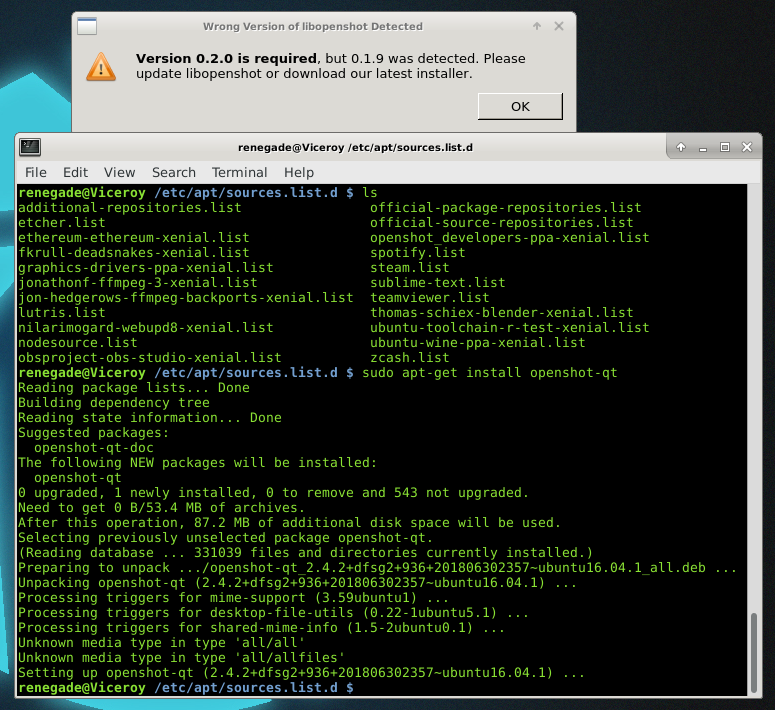
Upon launching the application it gave me this lovely error stating the following...
"Version 0.2.0 is required, but 0.1.9 was detected. Please update libopenshot or download our latest installer."
Soooo yeah... Figuring It might be a library file that got stuck on the install. I rebooted directly into console, removed OpenShot. Even performed a purge, and then after all of that, I re-installed while still in console. Rebooted back into my Xfce Desktop and low and behold... it still didn't work, got the same error.
OS= Linux Mint 18.1 Serena
OpenShot Version= Whatever Version you get when installing from (ppa:openshot.developers/ppa)
And BTW if this is a Duplicate Bug report by all means delete it, but just point me in the direction of were to go to fix it or were I can track the progress of it being fixed.
Thank you, Love the application keep up the great work!
 MrRenegade
All 16 comments
@MrRenegade - Thanks for the report. We will investigate.
 DylanC
on 2 Jul 2018
DylanC
on 2 Jul 2018
@MrRenegade - Are you sure you are not using the daily PPA rather than the stable one? The stable one has been known to work (at least according to a report from a user, just today). Could you please, if you are indeed on the daily PPA, remove openshot and the PPA and then re-add the stable one and then install OpenShot again (after an upgrade), please?
Hope that helps!
Please do let us know if it doesn't.
 peanutbutterandcrackers
on 2 Jul 2018
peanutbutterandcrackers
on 2 Jul 2018
When I added the PPA I only used the Stable one. Here is whats in app sources after setting up the PPA.
deb http://ppa.launchpad.net/openshot.developers/ppa/ubuntu xenial main
deb-src http://ppa.launchpad.net/openshot.developers/ppa/ubuntu xenial main
Below is a screenshot of some of the packages I use under my sources list and the process of the install and the error OpenShot gives me when i launch it.
MrRenegade
on 2 Jul 2018
Also btw running the standalone version of the Appimage version of openshot randomly closes A LOT and isn't stable for me to use at all. Before I updated it was perfect and I could have OpenShot open for hours and even leave it over night, But this new one with the AppImage (since currently thats the only way I can launch it) I can open it and leave it sit with nothing in it and poof its gone within an hour...
I loaded it from terminal and it doesn't even report any errors to console. It just closes...
MrRenegade
on 2 Jul 2018
Dunno what you guys did but its working now,
I ran the following Literally less than a minute ago...
"sudo apt-get remove openshot-qt"
"sudo apt-get purge"
"sudo apt autoremove"
"sudo apt-get install openshot-qt"
And it works now.... So I guess close the ticket?
MrRenegade
on 3 Jul 2018
Wow! It worked like that? I should probably give that a try too! Thank you for informing!
peanutbutterandcrackers
on 3 Jul 2018
Thanks @MrRenegade !
 kholis34
on 3 Jul 2018
kholis34
on 3 Jul 2018
I was having the same problem as described here, funny enough ubuntu requested a daily update (as it usually does) and after restarting openshot worked fine for me, I didnt need to re-install it or do anything special
 purefan
on 7 Aug 2018
purefan
on 7 Aug 2018
MrRenegade, Thank you so! It works for me! :+1:
 Skyline405
on 22 Aug 2018
Skyline405
on 22 Aug 2018
I did the uninstall and purge on Ubuntu 18.0.4 but the alert box remains: "Version 0.2.2 is required, but 0.1.9 was detected. Please update libopenshot or download our latest installer." Of course, the application does not start.
 starapple2
on 20 Dec 2018
starapple2
on 20 Dec 2018
@starapple2 - Please try the following commands:
sudo apt-get remove openshot-qt
sudo apt-get purge
sudo apt autoremove
sudo apt-get install openshot-qt
Hope that helps.
peanutbutterandcrackers
on 24 Dec 2018
I had the same problem, penutbutterandcrackers suggestion worked for me.
FYI, I installed the editor from linux mint repository, then i got the update available notice, then i added stable PPA. That is how i got the error.
 whitakerz
on 12 Feb 2019
whitakerz
on 12 Feb 2019
@starapple2 - Please try the following commands:
sudo apt-get remove openshot-qt
sudo apt-get purge
sudo apt autoremove
sudo apt-get install openshot-qt
Hope that helps.
Just seeing this reply months later. I discovered that remove, purge, autoremove were all leaving traces of openshot no matter how I removed openshot and rebooted the machine. I tracked a couple files using dpkg -L libopenshot14 that I then removed (one was sudo mv /usr/lib/x86_64-linux-gnu/libopenshot.so.15 and the other sudo rm /usr/lib/x86_64-linux-gnu/libopenshot.so.0.1.9) before updating and installing.
After removing those I found that apt update seemed more efficient or better (?) than apt-get and so I subsequently succeeded with sudo apt-get install openshot-qt libopenshot*.
Exactly what solved it? I'm not sure. Possibly manually removing those files.
starapple2
on 12 Feb 2019
I hard the same problem and this i what I did to get to a clear solution, @starapple2 gave me the ideas. Hey, I'm running openshot on Pop OS. So these commands works.
sudo apt remove openshot-qt
sudo apt purge
sudo apt autoremove
sudo apt install openshot-qt libopenshot*
Run the commands in that order, I really didn't get the significance of purge, but, I just had to run it that way. This should get your openshot back and running.
 Domodan
on 6 Jan 2020
Domodan
on 6 Jan 2020
The apt purge command removes a package's configuration files from the system, where a simple apt remove would normally leave them in place (in case the package is going to be reinstalled).
OpenShot doesn't have any system configuration files, though (any configs are stored in the user's home directory, where even apt purge won't touch them), so I suspect in this instance it isn't really necessary — though, of course, it can't _hurt_ and there's really no such thing as "too thorough".
As far as the issue... hmm. It's possible what's happening here is due to a deficiency in the dependencies specified for the packages, that's allowing an update of the openshot-qt DEB _without_ an update of the libraries.
The openshot-qt/debian/control file makes openshot-qt depend on python3-openshot, but not on any particular _version_ of it, which means that updating openshot-qt with python3-openshot already installed won't necessarily cause python3-openshot to be updated, even if it needs to be.
What's more, the libopenshot/debian/control file doesn't specify that the python3-openshot package is dependent on the _specific_ version of libopenshot## that it's being built with — I'm not sure if that dependency will be automatically established or not.
It would probably be a good idea for python3-openshot and _especially_ openshot-qt to depend on libopenshot17 explicitly, to ensure that all of the necessary upgrades happen automatically whenever openshot-qt is updated.
cc: @jonoomph who'd be the person with access to make such changes.
 ferdnyc
on 6 Jan 2020
ferdnyc
on 6 Jan 2020
Thank you so much for submitting an issue to help improve OpenShot Video Editor. We are sorry about this, but this particular issue has gone unnoticed for quite some time. To help keep the OpenShot GitHub Issue Tracker organized and focused, we must ensure that every issue is correctly labelled and triaged, to get the proper attention.
This issue will be closed, as it meets the following criteria: - No activity in the past 180 days - No one is assigned to this issue
We'd like to ask you to help us out and determine whether this issue should be reopened. - If this issue is reporting a bug, please can you attempt to reproduce on the latest daily build to help us to understand whether the bug still needs our attention. - If this issue is proposing a new feature, please can you verify whether the feature proposal is still relevant.
Thanks again for your help!
![stale[bot] picture](https://avatars3.githubusercontent.com/in/1724?v=4&s=40) stale[bot]
on 26 Oct 2020
stale[bot]
on 26 Oct 2020
Related issues
 Obed9
·
3Comments
Obed9
·
3Comments
 GrandpaBill3006
·
3Comments
GrandpaBill3006
·
3Comments
 TavernSenses
·
3Comments
TavernSenses
·
3Comments
 Geoff0627
·
3Comments
Geoff0627
·
3Comments
 LadyReader
·
3Comments
LadyReader
·
3Comments
Most helpful comment
Dunno what you guys did but its working now,
I ran the following Literally less than a minute ago...
"sudo apt-get remove openshot-qt"
"sudo apt-get purge"
"sudo apt autoremove"
"sudo apt-get install openshot-qt"
And it works now.... So I guess close the ticket?