Openshot-qt: Crash / Windows 10 or 7 / Profile
Describe the bug
Import video, set it on track, split video with cisors, move 2nd part over 1st one to make an effect, move playhead back and forward again and again (or just export), then, quite quickly, launch.exe crashes.
Same issue with 2 different files with a fade effect
System Details (please complete the following information):
- Operating System / Distro: Windows 10, Windows 7
- OpenShot Version 2.4.1 . 115 daily built, 64 plus stable 2.4.1
To Reproduce
Import other video from other source, split it, move one part over an other to get a fade... move playhead or export.
Logs
Attached 2 sets. 1st one, 720 against 1080 ; 2nd one 1080 progressive against 1080 progresive. 3rd test worked like a charm (interleave progressive????), so no log...
Additional context
As per default, profile loaded is 720 24p
As per default video tracks used are 1080 and feel it is 25 P
So 1st basic test crashed
In this context, no warning that object used (video, image) does not match profile but feel it is linked as using a 720 video in 720 profile or 1080 in 1080 run safe when mixing source size with a different profile size, ends in a seconds or 2 with the crash when playing with the play head.
App may consider and tune elements, but feel it crashes 1st...
Don't know if linked to resolution, frame rate or P against I, but there is something not matching between file and profile that makes app crash.
Side of that really looks fine...
Looking for a fix / tip to really appreciate it...
Best
In logs, it reports AMD, but computer is Intel inside
In logs it reports fr-fr, but do not see fr-fr folder (just fr) and menues are displayed in English...
Openshot crashes.zip
 nsgitfr
All 48 comments
That you for the good issue reporting, good sir.
For the time being, I would like to suggest that you try out the latest daily build, as it has been reported to be a lot more stable, esp. on windows.
Hope that helps!
 peanutbutterandcrackers
on 17 May 2018
peanutbutterandcrackers
on 17 May 2018
Hello,
This happen with 2.4.1 (stable release) and daily build 115 64 bits and x86 at least...
Report based on the .115 build.
Best
nsgitfr
on 17 May 2018
I see. Hmm... Sorry for the inconvenience. Hope this will be resolved soon. We shall try our best to help you (after all, this is a community project where everyone scratches each other's back).
@DylanC - Could you please help us out here, Cap'ain?
peanutbutterandcrackers
on 18 May 2018
Hi guys,
Quick try with OpenShot-v2.4.1-117-g964d420-59-704-x86_64.exe and get the same issues (crash and fr translation missing).
BTW, I tried another video file and it failes what ever profile I used... Maybe not the right one.
Any tips to see what profile should match a file to test using the right one ?
Any import or render before workingf with files ?
Thanks
Best
nsgitfr
on 19 May 2018
@nsgitfr - Hmm... Good sir, in case of crashes, could you please attach the logs? It would really help the devs help you out. Other than that, you might want to try trans-coding the video, if you want to (not sure if this is going to help out or not), with HandBrake before editing. You might also want to note OpenShot's behavior with different types of media files by checking the media files themselves with something like MediaInfo.
Please do keep on supporting OpenShot. This is, after all, a community project, and the labor of love of a single man. We are all trying to scratch each other's back here, and doing our part to make an awesome free and open source video editor. And the sad part is that this project lacks volunteers from Windows Platform, and thus there are lesser significant steps towards stability on the OS. Hope you will be a part of the change.
Sorry for the inconvenience caused. Hope you keep on supporting OpenShot. it's still a diamond in the rough.
peanutbutterandcrackers
on 20 May 2018
@peanutbutterandcrackers and team.
Logs are attached in 1st post, Please confirm you can find what you are looking for.
Before transcoding would you point me to a sample file I could download and test OpenShot against ?
Yes awesome project...
The only help I could be is sending logs ! Am not handy in developping, unfortunately !
Even translations looks too technical for me (missining ones)...
but I keep an eye, if I could help... or see an egg...
Best
nsgitfr
on 20 May 2018
Oopsie. All this time I was thinking of this thread as just one of those normal issues. It seems you are more interested in profiling/testing OpenShot. Awesome! Thank you for the willingness to help.
Perhaps @N3WWN and @DylanC would have some suggestions to give you?
I think, for the translations, all you need to do is to type the things in your own language. And all you have to do is have a launchpad account to do that. I haven't yet tried translating the program. Perhaps I should give it a try, and have it done in my native language, too.
peanutbutterandcrackers
on 20 May 2018
@peanutbutterandcrackers initial thread is for the issue as right now, am unable to use, test or even report... as I crash in a second or 2 moving play head over a short video (couple seconds) with a basic effect...
We need a fix, maybe I could help focusing if we have a certified sampe video (bunny one, but which one ?) providing some more logs...
Side of that, I could give some feed back on what I see...
=> language not properly targetted here ('en' when expecting 'fr-fr' or just 'fr') on the daily buid,
=> logs reporting AMD when am Intel...
HTH
nsgitfr
on 21 May 2018
@DylanC - Any ideas regarding the language issue? o.O
peanutbutterandcrackers
on 21 May 2018
@nsgitfr - Regarding the 'AMD' part: 32 bit machines are known technically as i386, i486 or i686 depending on the case. AMD was the company that came up with 64 bit CPUs, and that is why, technically, 64 bit CPUs are known as amd64. Even if it is Intel or any other company. So, no need to be worried about that part. Hope that clears things up a bit. :)
Oh, the rabbit video! You mean Big Buck Bunny! But I don't that that the video is the problem, though.
@N3WWN - Care to lend a hand here, good sir?
peanutbutterandcrackers
on 21 May 2018
@peanutbutterandcrackers - He/she is probably seeing that language issue in v2.4.1. Its already confirmed as resolved in the daily builds.
 DylanC
on 21 May 2018
DylanC
on 21 May 2018
@peanutbutterandcrackers - Ok for Intel / AMD... jiust saw in logs, so informed you.
@peanutbutterandcrackers - As about Big Buck Bunny! do you have any download links and an OpenShot profile that match, so I could try to reproduce with a known/common file... Depending on results you may be able to reproduce...
Let me know if interested.
@DylanC - I was using latest daily built... At least, 115 daily built, 64 when I reported issues... logs attachedat the bery top message.
Since, I uninstalled previous version and installed latest 709 64...
Will have to cross check and confirm...
Side of that, have to locate the issue and understand what fails... making OpenShot lauch.exe crash
Best
nsgitfr
on 21 May 2018
@DylanC - I think I have seen another issue somewhere after the fix was merged saying that from a certain daily build, the issue has come back. But I am not sure about it. Perhaps you'd like to test it out, for sure? If I can, I'll try to do so, too. Also, is there a certain file of Big Buck Bunny that Mr. Thomas uses? o.O
peanutbutterandcrackers
on 22 May 2018
@peanutbutterandcrackers - I think the issue is he/she was using an older daily build which maybe didn't have the fix merged yet. We can wait for him/her to confirm. Not sure what clip he uses but maybe he downloaded the fully movie and uses that.
https://peach.blender.org/download/
The download page has many links for this movie in different formats.
DylanC
on 22 May 2018
@DylanC - He says that he used daily build 115, which is after the merge. Perhaps I should test it out on my machines to see if the issue still persists.
peanutbutterandcrackers
on 22 May 2018
Hy guys
Uninstalled prevouis version
Removed %user app data%.openshot_qt
Installed OpenShot-v2.4.1-117-g964d420-60-711-x86_64.exe
Same crashes
Logs attached
libopenshot.log
openshot-qt.log
Will start a new thread as FR locale... we are not
nsgitfr
on 23 May 2018
@DylanC - As about https://peach.blender.org/download/
Wanna get one file name (URL) and the profile to use against that file to test with it...
If I crash, will be easy for you to reproduce...
1 local MP4 was fine, no crah, even exporting 1080p against 720p profile.
One .MTS (from camcoder) 1080/25p (according file properties in OpenShot) failed against 720 24p profile using using play head back and foreward
Same file with 1080p 25 profile. No crash playing with playhead (but I may not have used enough the playhead) ; export crashed.
There is something there...
Both with OpenShot-v2.4.1-117-g964d420-60-711-x86_64.exe
So tring to focus file type and profile to see what's make the system fail.
nsgitfr
on 23 May 2018
@DylanC - I got http://download.blender.org/peach/bigbuckbunny_movies/big_buck_bunny_720p_h264.mov
Default profile (HDV 720 24p) looks fine from OpenShot-v2.4.1-129-g42fbaf5-2d81121d-e7451201-x86_64.exe just installed (previous version was uninstalled)
Cut tool used, overlap one part with other one to make a fade effect and cut second part to remove end to shorten against couple of seconds for the test...
Export crash ; logs attached
1st thoughts that launch.exe was crashinbg was from a difference between media and profile (fps,i/p,size, ratio) do no longer seems to match...
Logs attached
Best
video details "big_buck_bunny_720p_h264.mov" from Openshot :
{
"acodec": "aac",
"audio_bit_rate": 437605,
"audio_stream_index": 2,
"audio_timebase": {
"den": 48000,
"num": 1
},
"channel_layout": 63,
"channels": 6,
"display_ratio": {
"den": 9,
"num": 16
},
"duration": 596.461669921875,
"file_size": "416751190",
"fps": {
"den": 1,
"num": 24
},
"has_audio": true,
"has_single_image": false,
"has_video": true,
"height": 720,
"id": "M95TOPN0T3",
"interlaced_frame": false,
"media_type": "video",
"metadata": {
"com.apple.quicktime.player.movie.audio.balance": "0.000000",
"com.apple.quicktime.player.movie.audio.bass": "0.000000",
"com.apple.quicktime.player.movie.audio.gain": "1.000000",
"com.apple.quicktime.player.movie.audio.mute": "",
"com.apple.quicktime.player.movie.audio.pitchshift": "0.000000",
"com.apple.quicktime.player.movie.audio.treble": "0.000000",
"com.apple.quicktime.player.movie.visual.brightness": "0.000000",
"com.apple.quicktime.player.movie.visual.color": "1.000000",
"com.apple.quicktime.player.movie.visual.contrast": "1.000000",
"com.apple.quicktime.player.movie.visual.tint": "0.000000",
"com.apple.quicktime.player.version": "7.4.1 (14)",
"com.apple.quicktime.version": "7.4.1 (14) 0x7418000 (Mac OS X, 10.5.2, 9C31)",
"compatible_brands": "qt",
"creation_time": "2008-05-27T18:36:22.000000Z",
"encoder": "H.264",
"handler_name": "Apple Alias Data Handler",
"language": "eng",
"major_brand": "qt",
"minor_version": "537199360",
"timecode": "00:00:00:00"
},
"path": "C:/Users/Utilisateur/Desktop/big_buck_bunny_720p_h264.mov",
"pixel_format": 0,
"pixel_ratio": {
"den": 1,
"num": 1
},
"sample_rate": 48000,
"top_field_first": true,
"type": "FFmpegReader",
"vcodec": "h264",
"video_bit_rate": 5589645,
"video_length": "14315",
"video_stream_index": 0,
"video_timebase": {
"den": 2400,
"num": 1
},
"width": 1280
}
openshot-qt.log
libopenshot.log
nsgitfr
on 25 May 2018
Any feed back from logs ?
What could we do to prevent crashes as we use an effect, move play head or export ?
Best
nsgitfr
on 26 May 2018
@N3WWN or @ferdnyc - Spot anything unusual in the logs?
DylanC
on 29 May 2018
Spot anything unusual in the logs?
Not offhand, at least related to the crash. Though I do notice this line (twice) in each openshot.log:
language:INFO Skipping English language (no need for translation): fr_FR
Which _sounds_ odd, and makes me wonder if it could be related to the language issue.
Regarding the crashes, @nsgitfr am I correct in thinking that these logs were _not_ captured with debugging enabled (via Preferences > Debug > Debug Mode (verbose))? I'm just asking because they seem a little spare (the libopenshot.log files are literally empty except for the header.)
Unfortunately with many crashes, despite best efforts to the contrary, OpenShot simply goes down hard with no indication why. So, I can't say with any certainty that turning on debugging would provide any more information than what's currently there. But, I can't say for sure that it wouldn't, either.
As much as I hate the idea of sending you back to the log-collection well again, the crashes you're seeing _appear_ to be related to video decoding, so having more detailed logs from libopenshot, especially, might be helpful. Probably won't be, I'll be the first to admit. But, maybe.
I do have some questions about the report, just to clear up my own confusion. As part of the steps to reproduce the crash, you wrote:
Import other video from other source, split it, move one part over an other to get a fade...
which confuses me only because OpenShot _doesn't_ normally apply an automatic transition to overlapped clips — on my system, laying one clip over another _doesn't_ automatically create a transition between them — the second clip simply becomes visible when the first clip ends. The only way I know of to create a smooth crossfade between two video clips is:
- Place the second clip on a track below the first clip, with its start positioned before the end of the clip above
- Add a Transitions > Fade to the timeline, placed on top of the upper (earlier) clip, spanning the time in which the two clips overlap on the timeline
- Choose "Reverse Transition" from the Fade's context menu. (I don't quite understand why I have to reverse the Fade every time, but it's the only way I've been able to get it to do what I want. It's probably a sign that I'm doing something wrong.)
That leaves me with a setup that looks something like this, and results in the video smoothly fading between the two clips:
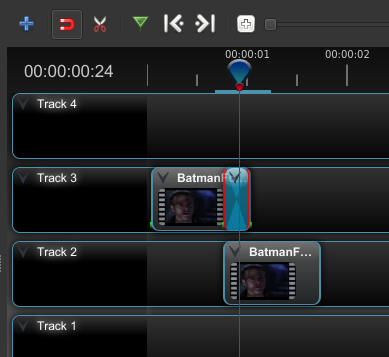
Please note that I don't think this has anything to do with your crashes, I'm just trying to ensure we're all on the same page regarding expectations for what OpenShot should be doing. Other than expecting it not to crash, which is something I think we can all agree on.
I suspect this issue is going to be akin to #1443 in that it's a (likely) Windows-only (likely) codec issue that we can't reproduce on Linux. I haven't been able to trigger any OpenShot crashes on my (Linux) system, performing the steps in the report. It _may_ be related to the output profile selection, but it also may simply be an issue with decoding the input, independent of output profile.
 ferdnyc
on 29 May 2018
ferdnyc
on 29 May 2018
@ferdnyc - dummy user on report...
Correct for the verbose mode, it was not enabled... :-/
It is now... This is the only change from preferences.
Let start again...
So, uninstalled previous Openshot version,
Removed .openshot_qt from user's profile
Reboot.
Download OpenShot-v2.4.1-138-g35fb2f9-704d9ea5-e7451201-x86_64.exe
so latest daily build as per now is installed.
French choosen during setup.
Setup was in French, but not interface at startup.
You can have a look at language issue even if this thread is focusing the repeating crashes when using OpenShot on very small test projects...
Sample video used against default profile HDV 720 24p. :
http://download.blender.org/peach/bigbuckbunny_movies/big_buck_bunny_720p_h264.mov
Playing with playhead crashed
Same with export.
Other file from a local source, also an .MP4 file, but 1920x1080 30p
Profile used is the (same) default one HDV 720 24p (same as above).
Playing with play head crashed.
Export crashed.
Logs attached
Process remains the same, drag'n drop file in project file zone, drag file on track 4, use scissors to split in 2 parts, move the right one over the left one (delete a 3rd part on the Bunny sample as too long for the test when exporting) to get a fade effect...
Then, neither drag playhead, move right left right left again and again (no drop), get the crah one time or another... Sometime happens quick, sometimes takes some time... Can't figure out why... ; moving back and forward the playhead is done quickly... I can see small blue marks on timeframe,.
OR
Same process, but no playhead move, just export, so I crash during export process... Not sure if related to the fade effect timecode or not when crash happen, but looks like...
Only track used is #4 (see attached)

Project not saved.
Each time I crash, I reopen OpenShot, to clean the lock file. then delete le logs to start again on clean files.
System does not bring back un saved project.
Here we are,
Logs attached
File name with Export is a crashlog when exporting
File name with Moving playhead is a crashlog when I move back and forward the playhead
openshot-qt.Export Big_Buck_Bunny..zip
openshot-qt.Export Visualizer.zip
openshot-qt.Moving playhead Big_Buck_Bunny..zip
openshot-qt.Moving playhead Visualizer.zip
Thanks for clues
Best
nsgitfr
on 30 May 2018
@nsgitfr Great, thanks. I've got them all and will take a look to see if anything helpful shows up.
ferdnyc
on 30 May 2018
@ferdnyc Thx
If more needed, please ask. Would be fine to get it fixed for Windows users... as for 2.4.2... as rc1 is on... (it fails and language remains as is)
Best
nsgitfr
on 1 Jun 2018
@ferdnyc @N3WWN @DylanC or @peanutbutterandcrackers
I was wondering if any news since RC1... was also wondering where to find what is fixed in a new daily release... to see if any upcoming fix, and then we get OpenShot-v2.4.1-143 yesterday...
I gave a quick try, and know what ? No crash during my quick tests. Sounds good...
Is that because you found some issues and this is now fixed or pure chance today ?
Thanks for clues
Best
nsgitfr
on 9 Jun 2018
That's actually a really good question.
There _was_ a code change (5e5b1e7b) between daily builds 115 and 143 specifically related to frame positioning during a slice operation. That change was _intended_ to prevent missed or repeated frames, I don't believe there was any intention to address crashing issues — but it's certainly possible that your crashes were a (previously undiagnosed) side-effect of slices not being positioned on a frame boundary. (Perhaps something that was only an issue with your particular combination of operating system, file format, and codec library.) In which case, @jonoomph may have accidentally addressed the crashes you were seeing, as well, with 5e5b1e7b.
I'd advise cautious optimism: Definitely kick the tires some more, to see if it isn't just a fluke that you haven't hit any crashes so far. But, based on the nature of the crashes you were seeing and the specifics of the code change in 5e5b1e7b, it's not _impossible_ that the crashes were indeed fixed in the newest builds.
(EDIT: Fixed commit ref)
ferdnyc
on 9 Jun 2018
@ferdnyc
Feel you are right !
Playing some more made a crash.
In facts it is different now.
No longer see the launch.exe crash window, system silently crashes, and closes.
Please find attached some new logs from OpenShot-v2.4.1-143-ge04a1af-c34ffdcd-f32c7c30-x86_64 running on top of Windows 10.
I previousliy uninstalled old version.
Logs attached
Best
Logs.zip
nsgitfr
on 11 Jun 2018
@ferdnyc
Any tips from the logs ?
Issue fixed in updates (where could we see what is fixed in releases ?) ?
What's best rc2 compared to OpenShot-v2.4.1-156-g0c3e65c-2a76d83e-f32c7c30-x86_64.exe
Best
nsgitfr
on 13 Jun 2018
@peanutbutterandcrackers would say... "For the time being, I would like to suggest that you try out the latest daily build, as it has been reported to be a lot more stable, esp. on windows."
So, just go to downloads page, and choose Windows, then, daily buils... This is it.
Hope that helps!
nsgitfr
on 18 Jun 2018
@nsgitfr - Hehehe :blush: :smile: :sweat_smile: Thank you for helping out here in the forums, good sir. I'm so glad that you're doing your small part in making OpenShot better. One of the main reasons OpenShot sucks on windows is that we don't have dedicated volunteers testing and submitting bugs from windows platforms (except for @MisterTeeXD). And OpenShot is a program that is backed by the community. So, thank you, good sir, for doing your small bit here. :)
P. S: Hopefully, Mr. Ferd will be here soon. Or, perhaps the issue will be resolved in new daily builds? :)
@KaylynnStrain - Good sir, please do as suggested by @nsgitfr and use the daily builds. Thank you!
peanutbutterandcrackers
on 18 Jun 2018
@Dylanc why did you close issue #1596 as it is still pending ?
Or am I missing a fix ?
Best
nsgitfr
on 18 Jun 2018
@nsgitfr - No problem. I didn't know you still had an issue.
DylanC
on 18 Jun 2018
@Dylanc unfortunately... I would be happy to get a fix to be able to use as for the now, it crashes very quickly (and no longer reopen a temporary saved file)...
Allways doing the same... cut track, move the right over the lef to get a quick effect, and neither use the playheador export...
You get latest logs... any clues inside ?
Best
nsgitfr
on 19 Jun 2018
@nsgitfr - If you are switching profile during editing then that is the cause of the problem. Are you switching the profiles during your edits?
I didn't find anything in the logs really. If you could delete the logs and try again with the latest daily build that may help. Your libOpenshot log is over 20000 lines long. Its hard to read.
DylanC
on 19 Jun 2018
@DylanC Please find new set of logs.
Let me know if some more details are found.
I tried with latest build tonight (logs are from yesterday) and It still fails the same way.
Any clues are welcome
Best
Openshot.crashes9.zip
nsgitfr
on 22 Jun 2018
I will, again, post this thread over at the slack channel and see if any of the devs can find anything... sorry to keep you waiting, @nsgitfr.
Update: Done!
peanutbutterandcrackers
on 24 Jun 2018
@nsgitfr @peanutbutterandcrackers - I see in libOpenshot.log:
---- Unhandled Exception: Stack Trace ----
Timeline::add_layer (Copy Audio) (source_clip->Reader()->info.has_audio=1.0000, source_frame->GetAudioChannelsCount()=2.0000, info.channels=2.0000, clip_frame_number=174.0000, timeline_frame_number=132.0000)
So its something to do with the audio but I've no idea what. :laughing:
DylanC
on 24 Jun 2018
@N3WWN probably can provide some insight into this. :)
peanutbutterandcrackers
on 25 Jun 2018
Sorry, been distracted with other things recently, but I did note @KaylynnStrain 's comment...
nearly every time I attempt to export a video that is longer then 10 minutes my Windows 10 64-bit computer crashes and restarts. I have no other tabs or apps/programs open at the time as I only have 8 gigs of ram. just about a half hour ago the program froze when I tried to reopen the project I had just edited to try to export again and ended up closing it after 3 attempts. I have version 2.4.1 and I saw no option to update to a newer version.
Your COMPUTER restarts while exporting? Completely? Like, with no warning, just exporting exporting exporting... screen goes black, and suddenly it's booting up again like you just turned it on?
If that's the case, it's _very_ unlikely that OpenShot is directly responsible for the problem. It's certainly triggering something, but the actual fault is almost certainly going to be either a driver issue or a hardware problem.
(One good bet, with symptoms like that, is that the computer is overheating. The export process really exercises the processor hard, and during sustained activity with no breaks to cool down it's not uncommon for systems to overheat if they have poor ventilation or inadequate cooling.)
It just isn't really possible for a "userland" (meaning, not hooked in to the operating system) software application like OpenShot to crash the entire computer. The crash has to be occurring in one of the system resources. If it's not a heat problem, then I'd look at possible video driver issues, or perhaps power problems if the power supply is older or its max power rating isn't sufficient to power all of the system components.
ferdnyc
on 25 Jun 2018
(One good bet, with symptoms like that, is that the computer is overheating. The export process really exercises the processor hard, and during sustained activity with no breaks to cool down it's not uncommon for systems to overheat if they have poor ventilation or inadequate cooling.)
BTW: One way to determine whether there _is_ an issue with overheating, or some other hardware fault with the computer, is to take OpenShot out of the equation and stress the CPU and RAM directly. (Bad RAM is one more possibility I left out of my previous comment.)
The Prime95 tool is frequently used by overclockers and system builders to stress-test systems, as a way of ensuring that they can handle sustained heavy workloads without glitching or crashing. As their page says, for stress testing you just download the Windows 64-bit archive, unzip it, run the prime95.exe program contained within, and select "Just Stress Testing" when that option appears. For more info, they refer to the Wikipedia article for Prime95 which offers good, simple guidance on using it for stress-testing in both CPU and CPU+RAM modes.
Once Prime95 is running, you're basically simulating a CPU load similar to the one OpenShot would create while exporting. If the problem is overheating, or flaky memory, or whatever, that should also cause the computer to eventually crash/restart. If it does, then you know the issue isn't with any particular piece of software, it's a system fault.
ferdnyc
on 25 Jun 2018
@peanutbutterandcrackers wrote:
N3WWN probably can provide some insight into this. :)
Actually, I think @ferdnyc is right on target with this one; it sure sounds like a hardware issue at this point if the system is reboot/restarting.
 N3WWN
on 25 Jun 2018
N3WWN
on 25 Jun 2018
Sorry for confusion, but MY initial thread and follow up are based on a simple test, and nearly get the same results...
I drop a video in the file box, from there, I drop in on track, split in 2 parts with scissors, then move the right over the left to get an effect, then, neither play with play head back and forward or export and then :
- with old daily builds launch.exe was crashing, and
- with latest one, launch.exe silently crash.
I have the same situation with couple samples files (see thread), even with the rabbit video.
I have the issue on 3 or 4 different hardware, 3 are W10, one is W7.
As about W10, one is desktop, i3 + 4 Go + SSD (latest computer), Laptops are i3 + 4 Go + regular HDD, or dual core Pentium also 3 or 4 Gb , don't remember the W7 hardware, but a safe computer, that should be ok for a 15/30 seconds video sample test..
Sample videos are short.
None of the config ran into a hard reset (just like using the reset button).
Only the Openshot app crashes, and I can start just after so (FYI, old builds just asked me to reopen unsaved, now, after a crash, system asks for nothing).
This is my thread.
as for @KaylynnStrain who asked for latest version, and since, not very active, he/she was have the restart issue, but no logs and not me... so, not considering here.
I will try to save a sample with the rabbit and get logs, so we will be able to share and maybe focus... I any clues by the time, you're welcome
Best
nsgitfr
on 26 Jun 2018
@nsgitfr Can you try v2.4.2 and let us know if you have any success?
DylanC
on 2 Jul 2018
Sorry for confusion, but MY initial thread and follow up are based on a simple test, and nearly get the same results...
[...]
as for @KaylynnStrain who asked for latest version, and since, not very active, he/she was have the restart issue, but no logs and not me... so, not considering here.
Yeah, sorry, that was my fault for cherry-picking someone else's comment out of the stream.
We probably should be better about encouraging people to open their own Issues when their problems are not clearly related to the OP, rather than interleaving multiple people's completely-different reports.
@DylanC , @peanutbutterandcrackers — does GitHub provide any sort of moderation tools in that regard, things like moving individual comments out of one Issue and into another (or to a new Issue of their own)? I've also been thinking of the fact that there are a _lot_ of duplicate issues, all of which are being left OPEN — which really clutters up the issue list. I was going to suggest simply closing the duplicates in favor of the earlier report, unless they really add new information... but it would be even nicer if the duplicate report could be migrated into the earlier one, so that the duplicate-Issue reporter is included in that earlier conversation and the information they posted gets attached.
If it's not doable administratively, we probably just need to get better about saying things like, "Please post this as a new issue" for unrelated comments, and "Closing this as a duplicate of #____, please follow the progress there instead" for dupes.
ferdnyc
on 3 Jul 2018
@ferdnyc - I am not aware of such an ability to move comments and stuff. However, partly because of your suggestion, I have been trying to close all duplicates and telling users to follow discussions over at the original issue. All I need now is a good vacation to sort through all the issues here on GitHub. A really good long vacation (perhaps after August?) :)
peanutbutterandcrackers
on 12 Jul 2018
@ferdnyc - If this feature does exist then I don't know about it at all. I reckon its a great feature to have though.
DylanC
on 12 Jul 2018
However, partly because of your suggestion, I have been trying to close all duplicates and telling users to follow discussions over at the original issue.
That's much appreciated, because to be honest OpenShot has kind of taken over my GMail account, and it's getting a little overwhelming.
(Not to mention, I'm getting pretty confused trying to keep everything straight among all the slightly-different discussions of the same problem(s), all happening with different users each on their own separate Issue.)
The goal, ideally, should be only one open Issue per bug. (Everyone else who reports the same concern gets directed to that Issue, as long as we're sure it's really the same.)
We should _also_ strive for only one problem per Issue. "Me too"s either get pointed to a more appropriate Issue or told to file a new one of their own, unless their situation is exactly the same as the OP's.
(So what we're doing right now, cluttering up an open bug with this meta-discussion about Issue management, is a huge no-no and we should both be thoroughly ashamed. ...It's also not fair to @nsgitfr, and for that I do apologize. #ShuttingUpNow)
ferdnyc
on 12 Jul 2018
@ferdnyc - I do feel the same with the e-mails. My inbox is very full of new Openshot mail on a daily basis. We can start by closing duplicates and following just one issue number per bug. Also I agree that these discussions should really be taken some place else. Sorry for the spam @nsgitfr
DylanC
on 12 Jul 2018
Related issues
 ppkakkar
·
3Comments
ppkakkar
·
3Comments
 adswan
·
3Comments
adswan
·
3Comments
 Obed9
·
3Comments
Obed9
·
3Comments
 gbbbbb
·
3Comments
gbbbbb
·
3Comments
 CarlBicknell
·
3Comments
CarlBicknell
·
3Comments
Most helpful comment
@peanutbutterandcrackers would say... "For the time being, I would like to suggest that you try out the latest daily build, as it has been reported to be a lot more stable, esp. on windows."
So, just go to downloads page, and choose Windows, then, daily buils... This is it.
Hope that helps!