Openshot-qt: Tutorial Dialog Flashing
System Details:
- Operating System / Distro: Linux Mint 18.3 (Fresh Install)
- OpenShot Version: 2.4.1
- _Please attach log files if crash_
Issue Description and steps to reproduce:
I've just downloaded OpenShot, when the app runs the Tutorial dialog box appears and it's flickering very fast, so fast I can't cancel it, I have to press Alt+F4, it'll disappear but if I go to another open window and return back to OpenShot the Tutorial dialog re-appears flickering really fast forcing me to close the program
 ghost
ghost
All 39 comments
Dup of #1264
 DylanC
on 4 May 2018
DylanC
on 4 May 2018
Here us a work-around, for the time being. Hope that helps!
 peanutbutterandcrackers
on 8 May 2018
peanutbutterandcrackers
on 8 May 2018
Hey there, a fix to this issue was just merged into the source tree and is ready for testing. Could you please try out the latest daily builds and see if this has been resolved? Thanks!
peanutbutterandcrackers
on 15 Jun 2018
@peanutbutterandcrackers Hi! I've just upgraded to Linux Mint 19 (Beta), I'm not sure why but OpenShot won't run, it asked me if I wanted to make a desktop shortcut, I accepted, but then nothing happened.
OpenShot-v2.4.1-160-g0b2fdd1-2a76d83e-f32c7c30-x86_64.AppImage
ghost
on 15 Jun 2018
I dunno if this will help, but I tried to run the AppImage from the command line, this was the output:
` launch:INFO ------------------------------------------------
launch:INFO OpenShot (version 2.4.1-dev1)
launch:INFO ------------------------------------------------
QFactoryLoader::QFactoryLoader() checking directory path "/tmp/.mount_ILSuHz/usr/bin/platforms" ...
QFactoryLoader::QFactoryLoader() looking at "/tmp/.mount_ILSuHz/usr/bin/platforms/libqeglfs.so"
Found metadata in lib /tmp/.mount_ILSuHz/usr/bin/platforms/libqeglfs.so, metadata=
{
"IID": "org.qt-project.Qt.QPA.QPlatformIntegrationFactoryInterface.5.2",
"MetaData": {
"Keys": [
"eglfs"
]
},
"className": "QEglFSIntegrationPlugin",
"debug": false,
"version": 328193
}
Got keys from plugin meta data ("eglfs")
QFactoryLoader::QFactoryLoader() looking at "/tmp/.mount_ILSuHz/usr/bin/platforms/libqkms.so"
Found metadata in lib /tmp/.mount_ILSuHz/usr/bin/platforms/libqkms.so, metadata=
{
"IID": "org.qt-project.Qt.QPA.QPlatformIntegrationFactoryInterface.5.2",
"MetaData": {
"Keys": [
"kms"
]
},
"className": "QKmsIntegrationPlugin",
"debug": false,
"version": 328193
}
Got keys from plugin meta data ("kms")
QFactoryLoader::QFactoryLoader() looking at "/tmp/.mount_ILSuHz/usr/bin/platforms/libqlinuxfb.so"
Found metadata in lib /tmp/.mount_ILSuHz/usr/bin/platforms/libqlinuxfb.so, metadata=
{
"IID": "org.qt-project.Qt.QPA.QPlatformIntegrationFactoryInterface.5.2",
"MetaData": {
"Keys": [
"linuxfb"
]
},
"className": "QLinuxFbIntegrationPlugin",
"debug": false,
"version": 328193
}
Got keys from plugin meta data ("linuxfb")
QFactoryLoader::QFactoryLoader() looking at "/tmp/.mount_ILSuHz/usr/bin/platforms/libqminimal.so"
Found metadata in lib /tmp/.mount_ILSuHz/usr/bin/platforms/libqminimal.so, metadata=
{
"IID": "org.qt-project.Qt.QPA.QPlatformIntegrationFactoryInterface.5.2",
"MetaData": {
"Keys": [
"minimal"
]
},
"className": "QMinimalIntegrationPlugin",
"debug": false,
"version": 328193
}
Got keys from plugin meta data ("minimal")
QFactoryLoader::QFactoryLoader() looking at "/tmp/.mount_ILSuHz/usr/bin/platforms/libqminimalegl.so"
Found metadata in lib /tmp/.mount_ILSuHz/usr/bin/platforms/libqminimalegl.so, metadata=
{
"IID": "org.qt-project.Qt.QPA.QPlatformIntegrationFactoryInterface.5.2",
"MetaData": {
"Keys": [
"minimalegl"
]
},
"className": "QMinimalEglIntegrationPlugin",
"debug": false,
"version": 328193
}
Got keys from plugin meta data ("minimalegl")
QFactoryLoader::QFactoryLoader() looking at "/tmp/.mount_ILSuHz/usr/bin/platforms/libqoffscreen.so"
Found metadata in lib /tmp/.mount_ILSuHz/usr/bin/platforms/libqoffscreen.so, metadata=
{
"IID": "org.qt-project.Qt.QPA.QPlatformIntegrationFactoryInterface.5.2",
"MetaData": {
"Keys": [
"offscreen"
]
},
"className": "QOffscreenIntegrationPlugin",
"debug": false,
"version": 328193
}
Got keys from plugin meta data ("offscreen")
QFactoryLoader::QFactoryLoader() looking at "/tmp/.mount_ILSuHz/usr/bin/platforms/libqxcb.so"
Found metadata in lib /tmp/.mount_ILSuHz/usr/bin/platforms/libqxcb.so, metadata=
{
"IID": "org.qt-project.Qt.QPA.QPlatformIntegrationFactoryInterface.5.2",
"MetaData": {
"Keys": [
"xcb"
]
},
"className": "QXcbIntegrationPlugin",
"debug": false,
"version": 328193
}
Got keys from plugin meta data ("xcb")
QFactoryLoader::QFactoryLoader() checking directory path "/tmp/.mount_ILSuHz/usr/platforms" ...
loaded library "/tmp/.mount_ILSuHz/usr/bin/platforms/libqxcb.so"
loaded library "Xcursor"
QFactoryLoader::QFactoryLoader() checking directory path "/tmp/.mount_ILSuHz/usr/bin/platformthemes" ...
QFactoryLoader::QFactoryLoader() checking directory path "/tmp/.mount_ILSuHz/usr/platformthemes" ...
QFactoryLoader::QFactoryLoader() checking directory path "/tmp/.mount_ILSuHz/usr/bin/platforminputcontexts" ...
QFactoryLoader::QFactoryLoader() checking directory path "/tmp/.mount_ILSuHz/usr/platforminputcontexts" ...
QFactoryLoader::QFactoryLoader() checking directory path "/tmp/.mount_ILSuHz/usr/bin/generic" ...
QFactoryLoader::QFactoryLoader() checking directory path "/tmp/.mount_ILSuHz/usr/generic" ...
QFactoryLoader::QFactoryLoader() checking directory path "/tmp/.mount_ILSuHz/usr/bin/styles" ...
QFactoryLoader::QFactoryLoader() checking directory path "/tmp/.mount_ILSuHz/usr/styles" ...
app:INFO openshot-qt version: 2.4.1-dev1
app:INFO libopenshot version: 0.1.9
app:INFO platform: Linux-4.15.0-23-generic-x86_64-with-LinuxMint-19-tara
app:INFO processor: x86_64
app:INFO machine: x86_64
app:INFO python version: 3.4.3
app:INFO qt5 version: 5.2.1
app:INFO pyqt5 version: 5.2.1
language:INFO Attempting to load qt_en_GB.UTF-8 in '/tmp/.mount_ILSuHz/usr/bin/translations'
language:INFO Attempting to load qt_en in '/tmp/.mount_ILSuHz/usr/bin/translations'
language:INFO Attempting to load en_GB.UTF-8/LC_MESSAGES/OpenShot in '/tmp/.mount_ILSuHz/usr/bin/locale'
language:INFO Attempting to load en/LC_MESSAGES/OpenShot in '/tmp/.mount_ILSuHz/usr/bin/locale'
language:INFO Attempting to load qt_en_GB in '/tmp/.mount_ILSuHz/usr/bin/translations'
language:INFO Attempting to load qt_en in '/tmp/.mount_ILSuHz/usr/bin/translations'
language:INFO Attempting to load en_GB/LC_MESSAGES/OpenShot in '/tmp/.mount_ILSuHz/usr/bin/locale'
language:INFO Successfully loaded en_GB/LC_MESSAGES/OpenShot in '/tmp/.mount_ILSuHz/usr/bin/locale'
language:INFO Qt Detected Languages: ['en-GB', 'en']
language:INFO LANG Environment Variable: en_GB.UTF-8
language:INFO LOCALE Environment Variable: en_GB
language:INFO Skipping English language (no need for translation): en_GB.UTF-8
language:INFO Skipping English language (no need for translation): en_GB
project_data:INFO Setting default profile to HDV 720 24p
QFactoryLoader::QFactoryLoader() checking directory path "/tmp/.mount_ILSuHz/usr/bin/iconengines" ...
QFactoryLoader::QFactoryLoader() checking directory path "/tmp/.mount_ILSuHz/usr/iconengines" ...
app:INFO Setting font to /tmp/.mount_ILSuHz/usr/bin/images/fonts/Ubuntu-R.ttf
logger_libopenshot:INFO Connecting to libopenshot with debug port: 5556
app:INFO Setting custom dark theme
connectionpool:INFO Starting new HTTP connection (1): www.google-analytics.com
connectionpool:INFO Starting new HTTP connection (1): www.google-analytics.com
connectionpool:INFO Starting new HTTP connection (1): www.google-analytics.com
QFactoryLoader::QFactoryLoader() checking directory path "/tmp/.mount_ILSuHz/usr/bin/imageformats" ...
QFactoryLoader::QFactoryLoader() looking at "/tmp/.mount_ILSuHz/usr/bin/imageformats/libqgif.so"
Found metadata in lib /tmp/.mount_ILSuHz/usr/bin/imageformats/libqgif.so, metadata=
{
"IID": "org.qt-project.Qt.QImageIOHandlerFactoryInterface",
"MetaData": {
"Keys": [
"gif"
],
"MimeTypes": [
"image/gif"
]
},
"className": "QGifPlugin",
"debug": false,
"version": 328193
}
Got keys from plugin meta data ("gif")
QFactoryLoader::QFactoryLoader() looking at "/tmp/.mount_ILSuHz/usr/bin/imageformats/libqico.so"
Found metadata in lib /tmp/.mount_ILSuHz/usr/bin/imageformats/libqico.so, metadata=
{
"IID": "org.qt-project.Qt.QImageIOHandlerFactoryInterface",
"MetaData": {
"Keys": [
"ico"
],
"MimeTypes": [
"image/vnd.microsoft.icon"
]
},
"className": "QICOPlugin",
"debug": false,
"version": 328193
}
Got keys from plugin meta data ("ico")
QFactoryLoader::QFactoryLoader() looking at "/tmp/.mount_ILSuHz/usr/bin/imageformats/libqjpeg.so"
Found metadata in lib /tmp/.mount_ILSuHz/usr/bin/imageformats/libqjpeg.so, metadata=
{
"IID": "org.qt-project.Qt.QImageIOHandlerFactoryInterface",
"MetaData": {
"Keys": [
"jpg",
"jpeg"
],
"MimeTypes": [
"image/jpeg",
"image/jpeg"
]
},
"className": "QJpegPlugin",
"debug": false,
"version": 328193
}
Got keys from plugin meta data ("jpg", "jpeg")
QFactoryLoader::QFactoryLoader() looking at "/tmp/.mount_ILSuHz/usr/bin/imageformats/libqsvg.so"
Found metadata in lib /tmp/.mount_ILSuHz/usr/bin/imageformats/libqsvg.so, metadata=
{
"IID": "org.qt-project.Qt.QImageIOHandlerFactoryInterface",
"MetaData": {
"Keys": [
"svg",
"svgz"
]
},
"className": "QSvgPlugin",
"debug": false,
"version": 328193
}
Got keys from plugin meta data ("svg", "svgz")
QFactoryLoader::QFactoryLoader() checking directory path "/tmp/.mount_ILSuHz/usr/imageformats" ...
loaded library "/tmp/.mount_ILSuHz/usr/bin/imageformats/libqsvg.so"
link SVGID_18_-5 hasn't been detected!
link SVGID_18_-5 hasn't been detected!
link SVGID_22_-5 hasn't been detected!
link SVGID_24_-2 hasn't been detected!
link SVGID_24_-2 hasn't been detected!
loaded library "/tmp/.mount_ILSuHz/usr/bin/imageformats/libqgif.so"
loaded library "/tmp/.mount_ILSuHz/usr/bin/imageformats/libqico.so"
loaded library "/tmp/.mount_ILSuHz/usr/bin/imageformats/libqjpeg.so"
metrics:INFO Track metric: [200] http://www.google-analytics.com/collect?cd3=5.2.1&an=OpenShot+Video+Editor&cd=main-screen&cd5=LinuxMint-19-tara&aid=org.openshot.openshot-qt&cd2=3.4.3&v=1&t=screenview&cd1=0.1.9&cid=0bbd11bf-721c-4a63-a0c2-ff27be44c095&aip=1&ul=en-gb&tid=UA-4381101-5&ua=Mozilla%2F5.0+%28X11%3B+Linux+x86_64%29+AppleWebKit%2F537.36+%28KHTML%2C+like+Gecko%29+Chrome%2F37.0.2062.120+Safari%2F537.36&av=2.4.1-dev1&cd4=5.2.1 | (35 bytes)
metrics:INFO Track metric: [200] http://www.google-analytics.com/collect?cd3=5.2.1&an=OpenShot+Video+Editor&cd=initial-launch-screen&cd5=LinuxMint-19-tara&aid=org.openshot.openshot-qt&cd2=3.4.3&v=1&t=screenview&cd1=0.1.9&cid=0bbd11bf-721c-4a63-a0c2-ff27be44c095&aip=1&ul=en-gb&tid=UA-4381101-5&ua=Mozilla%2F5.0+%28X11%3B+Linux+x86_64%29+AppleWebKit%2F537.36+%28KHTML%2C+like+Gecko%29+Chrome%2F37.0.2062.120+Safari%2F537.36&av=2.4.1-dev1&cd4=5.2.1 | (35 bytes)
metrics:INFO Track metric: [200] http://www.google-analytics.com/collect?cd3=5.2.1&an=OpenShot+Video+Editor&cd=launch-app&cd5=LinuxMint-19-tara&aid=org.openshot.openshot-qt&sc=start&cd2=3.4.3&v=1&t=screenview&cd1=0.1.9&cid=&aip=1&ul=en-gb&tid=UA-4381101-5&ua=Mozilla%2F5.0+%28X11%3B+Linux+x86_64%29+AppleWebKit%2F537.36+%28KHTML%2C+like+Gecko%29+Chrome%2F37.0.2062.120+Safari%2F537.36&av=2.4.1-dev1&cd4=5.2.1 | (35 bytes)
ui_util:INFO Initializing UI for MainWindow
ui_util:INFO Binding event MainWindow:actionNew_trigger
ui_util:WARNING Icon theme document-new not found. Will use backup icon.
ui_util:INFO Binding event MainWindow:actionOpen_trigger
ui_util:WARNING Icon theme document-open not found. Will use backup icon.
ui_util:INFO Binding event MainWindow:actionSave_trigger
ui_util:WARNING Icon theme document-save not found. Will use backup icon.
ui_util:INFO Binding event MainWindow:actionUndo_trigger
ui_util:WARNING Icon theme edit-undo not found. Will use backup icon.
ui_util:INFO Binding event MainWindow:actionSaveAs_trigger
ui_util:WARNING Icon theme document-save-as not found. Will use backup icon.
ui_util:INFO Binding event MainWindow:actionImportFiles_trigger
ui_util:WARNING Icon theme list-add not found. Will use backup icon.
ui_util:INFO Binding event MainWindow:actionImportImageSequence_trigger
ui_util:WARNING Icon theme list-add not found. Will use backup icon.
ui_util:WARNING Icon theme list-add not found. Will use backup icon.
ui_util:INFO Binding event MainWindow:actionRedo_trigger
ui_util:WARNING Icon theme edit-redo not found. Will use backup icon.
ui_util:INFO Binding event MainWindow:actionRemoveClip_trigger
ui_util:WARNING Icon theme list-remove not found. Will use backup icon.
ui_util:INFO Binding event MainWindow:actionRemoveTransition_trigger
ui_util:WARNING Icon theme list-remove not found. Will use backup icon.
ui_util:INFO Binding event MainWindow:actionExportVideo_trigger
ui_util:WARNING Icon theme media-record not found. Will use backup icon.
ui_util:INFO Binding event MainWindow:actionUploadVideo_trigger
ui_util:WARNING Icon theme folder-remote not found. Will use backup icon.
ui_util:INFO Binding event MainWindow:actionAddTrack_trigger
ui_util:WARNING Icon theme list-add not found. Will use backup icon.
ui_util:INFO Binding event MainWindow:actionPreferences_trigger
ui_util:WARNING Icon theme document-properties not found. Will use backup icon.
ui_util:INFO Binding event MainWindow:actionPlay_trigger
ui_util:INFO Binding event MainWindow:actionJumpStart_trigger
ui_util:WARNING Icon theme media-skip-backward not found. Will use backup icon.
ui_util:INFO Binding event MainWindow:actionRewind_trigger
ui_util:WARNING Icon theme media-seek-backward not found. Will use backup icon.
ui_util:INFO Binding event MainWindow:actionFastForward_trigger
ui_util:WARNING Icon theme media-seek-forward not found. Will use backup icon.
ui_util:INFO Binding event MainWindow:actionJumpEnd_trigger
ui_util:WARNING Icon theme media-skip-forward not found. Will use backup icon.
ui_util:INFO Binding event MainWindow:actionArrowTool_trigger
ui_util:INFO Binding event MainWindow:actionRazorTool_trigger
ui_util:INFO Binding event MainWindow:actionSnappingTool_trigger
ui_util:INFO Binding event MainWindow:actionAddMarker_trigger
ui_util:INFO Binding event MainWindow:actionPreviousMarker_trigger
ui_util:WARNING Icon theme go-first not found. Will use backup icon.
ui_util:INFO Binding event MainWindow:actionNextMarker_trigger
ui_util:WARNING Icon theme go-last not found. Will use backup icon.
ui_util:INFO Binding event MainWindow:actionFilesShowAll_trigger
ui_util:INFO Binding event MainWindow:actionFilesShowVideo_trigger
ui_util:INFO Binding event MainWindow:actionFilesShowAudio_trigger
ui_util:INFO Binding event MainWindow:actionFilesShowImage_trigger
ui_util:WARNING Icon theme edit-clear not found. Will use backup icon.
ui_util:INFO Binding event MainWindow:actionTransitionsShowAll_trigger
ui_util:INFO Binding event MainWindow:actionTransitionsShowCommon_trigger
ui_util:WARNING Icon theme edit-clear not found. Will use backup icon.
ui_util:INFO Binding event MainWindow:actionEffectsShowAll_trigger
ui_util:INFO Binding event MainWindow:actionEffectsShowVideo_trigger
ui_util:INFO Binding event MainWindow:actionEffectsShowAudio_trigger
ui_util:WARNING Icon theme edit-clear not found. Will use backup icon.
ui_util:INFO Binding event MainWindow:actionTimelineZoomIn_trigger
ui_util:INFO Binding event MainWindow:actionTimelineZoomOut_trigger
ui_util:INFO Binding event MainWindow:actionTitle_trigger
ui_util:WARNING Icon theme font not found. Will use backup icon.
ui_util:INFO Binding event MainWindow:actionAnimatedTitle_trigger
ui_util:WARNING Icon theme video-x-generic not found. Will use backup icon.
ui_util:INFO Binding event MainWindow:actionFullscreen_trigger
ui_util:WARNING Icon theme view-fullscreen not found. Will use backup icon.
ui_util:INFO Binding event MainWindow:actionAbout_trigger
ui_util:WARNING Icon theme gtk-info not found. Will use backup icon.
ui_util:INFO Binding event MainWindow:actionThumbnailView_trigger
ui_util:WARNING Icon theme view-list-icons not found. Will use backup icon.
ui_util:INFO Binding event MainWindow:actionDetailsView_trigger
ui_util:WARNING Icon theme view-list-details not found. Will use backup icon.
ui_util:INFO Binding event MainWindow:actionReportBug_trigger
ui_util:WARNING Icon theme dialog-error not found. Will use backup icon.
ui_util:INFO Binding event MainWindow:actionAskQuestion_trigger
ui_util:WARNING Icon theme im-message-new not found. Will use backup icon.
ui_util:INFO Binding event MainWindow:actionTranslate_trigger
ui_util:WARNING Icon theme stock_person not found. Will use backup icon.
ui_util:INFO Binding event MainWindow:actionDonate_trigger
ui_util:WARNING Icon theme bookmark-new not found. Will use backup icon.
ui_util:INFO Binding event MainWindow:actionHelpContents_trigger
ui_util:WARNING Icon theme help not found. Will use backup icon.
ui_util:INFO Binding event MainWindow:actionSimple_View_trigger
ui_util:WARNING Icon theme go-home not found. Will use backup icon.
ui_util:INFO Binding event MainWindow:actionAdvanced_View_trigger
ui_util:WARNING Icon theme get-hot-new-stuff not found. Will use backup icon.
ui_util:INFO Binding event MainWindow:actionFreeze_View_trigger
ui_util:WARNING Icon theme locked not found. Will use backup icon.
ui_util:INFO Binding event MainWindow:actionUn_Freeze_View_trigger
ui_util:WARNING Icon theme locked not found. Will use backup icon.
ui_util:INFO Binding event MainWindow:actionShow_All_trigger
ui_util:WARNING Icon theme document-open-recent not found. Will use backup icon.
ui_util:INFO Binding event MainWindow:actionProfile_trigger
ui_util:WARNING Icon theme video-x-generic not found. Will use backup icon.
ui_util:INFO Binding event MainWindow:actionAdd_to_Timeline_trigger
ui_util:WARNING Icon theme list-add not found. Will use backup icon.
ui_util:INFO Binding event MainWindow:actionPreview_File_trigger
ui_util:INFO Binding event MainWindow:actionRemove_from_Project_trigger
ui_util:WARNING Icon theme list-remove not found. Will use backup icon.
ui_util:INFO Binding event MainWindow:actionFile_Properties_trigger
ui_util:WARNING Icon theme video-x-generic not found. Will use backup icon.
ui_util:WARNING Icon theme edit-clear not found. Will use backup icon.
ui_util:INFO Binding event MainWindow:actionRemoveTrack_trigger
ui_util:WARNING Icon theme list-remove not found. Will use backup icon.
ui_util:INFO Binding event MainWindow:actionRemoveMarker_trigger
ui_util:WARNING Icon theme list-remove not found. Will use backup icon.
ui_util:INFO Binding event MainWindow:actionAddTrackAbove_trigger
ui_util:WARNING Icon theme list-add not found. Will use backup icon.
ui_util:INFO Binding event MainWindow:actionAddTrackBelow_trigger
ui_util:WARNING Icon theme list-add not found. Will use backup icon.
ui_util:INFO Binding event MainWindow:actionRemoveEffect_trigger
ui_util:WARNING Icon theme list-remove not found. Will use backup icon.
ui_util:INFO Binding event MainWindow:actionSplitClip_trigger
ui_util:WARNING Icon theme edit-cut not found. Will use backup icon.
ui_util:INFO Binding event MainWindow:actionProperties_trigger
ui_util:WARNING Icon theme document-properties not found. Will use backup icon.
ui_util:INFO Binding event MainWindow:actionRenameTrack_trigger
ui_util:WARNING Icon theme gtk-edit not found. Will use backup icon.
ui_util:INFO Binding event MainWindow:actionUpdate_trigger
ui_util:INFO Binding event MainWindow:actionTutorial_trigger
ui_util:WARNING Icon theme im-message-new not found. Will use backup icon.
ui_util:INFO Binding event MainWindow:actionAnimation_trigger
ui_util:WARNING Icon theme video-x-generic not found. Will use backup icon.
ui_util:INFO Binding event MainWindow:actionLockTrack_trigger
ui_util:INFO Binding event MainWindow:actionUnlockTrack_trigger
ui_util:WARNING Icon theme transform-move not found. Will use backup icon.
ui_util:INFO Binding event MainWindow:actionEditTitle_trigger
ui_util:WARNING Icon theme gtk-edit not found. Will use backup icon.
ui_util:INFO Binding event MainWindow:actionDuplicateTitle_trigger
ui_util:WARNING Icon theme edit-copy not found. Will use backup icon.
ui_util:INFO Binding event MainWindow:actionClearHistory_trigger
ui_util:WARNING Icon theme edit-clear not found. Will use backup icon.
connectionpool:INFO Starting new HTTP connection (1): www.openshot.org
QFactoryLoader::QFactoryLoader() checking directory path "/tmp/.mount_ILSuHz/usr/bin/sensors" ...
QFactoryLoader::QFactoryLoader() checking directory path "/tmp/.mount_ILSuHz/usr/sensors" ...
QFactoryLoader::QFactoryLoader() checking directory path "/tmp/.mount_ILSuHz/usr/bin/bearer" ...
QFactoryLoader::QFactoryLoader() checking directory path "/tmp/.mount_ILSuHz/usr/bearer" ...
files_model:INFO updating files model.
transition_model:INFO updating transitions model.
version:INFO Found current version: {"openshot_version": "2.4.1"}
effects_model:INFO updating effects model.
effects_model:INFO category: Video
effects_model:INFO category: Video
effects_model:INFO category: Video
effects_model:INFO category: Video
effects_model:INFO category: Video
effects_model:INFO category: Video
effects_model:INFO category: Video
effects_model:INFO category: Video
effects_model:INFO category: Video
effects_model:INFO category: Video
effects_model:INFO category: Video
effects_model:INFO category: Video
effects_model:INFO category: Video
effects_model:INFO category: Video
main_window:INFO foundCurrentVersion: Found the latest version: 2.4.1
properties_model:INFO updating clip properties model.
main_window:INFO InitCacheSettings
main_window:INFO cache-mode: CacheMemory
main_window:INFO cache-limit-mb: 250
main_window:INFO Creating CacheMemory object with 262144000 byte limit
preview_thread:INFO QThread Start Method Invoked
preview_thread:INFO initPlayer
main_window:ERROR Unhandled crash detected... will attempt to recover backup project: /home/linux/.openshot_qt/backup
/tmp/.mount_ILSuHz/usr/bin/launch: symbol lookup error: /usr/lib/x86_64-linux-gnu/libGLX_mesa.so.0: undefined symbol: drmGetDevice2
`
ghost
on 15 Jun 2018
@peanutbutterandcrackers can I ask, why does it look like there's google tracking embedded in the error message?
ghost
on 15 Jun 2018
@Have-a-Laugh (what a wonderful username!) - Good sir, perhaps the reason why the AppImage is not running is because it is LM 19 BETA? Could you please use another program's AppImage to see if it works?
The google analytics thingy is to track anonymous metrices so that the devs can track the project's stability over time, and how crashes are happening and stuff (I don't quite fully know about it myself; but it doesn't breach the users privacy). You can opt out of it any time by going over to Edit > Preferences > Debug and un-checking the "send anonymous metrics ..." button.
Also, could you please give the PPAs a shot? They might work. Please use the latest daily PPA instead of the stable one (#LivingOnTheEdge lol). Thanks!
peanutbutterandcrackers
on 18 Jun 2018
@peanutbutterandcrackers
what a wonderful username!
Thanks!
Good sir, perhaps the reason why the AppImage is not running is because it is LM 19 BETA? Could you please use another program's AppImage to see if it works?
You're absolutely right, the more I was using LM19 beta the more I noticed things broken, so I've changed to Ubuntu 18.04, I've setup the PPA and when I ran OpenShot it took 5 presses of the Hide Tutorial button for it to disappear, but it's gone now :)
Thanks for clearing up about the metrices thing!
LivingOnTheEdge indeed! :) :+1:
ghost
on 18 Jun 2018
@Have-a-Laugh - So, what you're saying is, even with the daily PPA, you are having issues with the tutorial button (not disappearing)?
@ferdnyc - You were kinda' right. It didn't fully resolve all the tutorial related issues, then. :/
peanutbutterandcrackers
on 19 Jun 2018
You were kinda' right. It didn't fully resolve all the tutorial related issues, then. :/
*nod* I had a feeling. It seemed way too easy, if the change so far had _completely_ fixed it. I just wanted to get a sense if I was even on the right track, and to make sure I hadn't made things worse instead of better. It sounds, like I have confirmation of that much, at least.
And I also have something of a plan, after examining how QT handles its own floating QDockWidget child windows. It should be possible, by being smarter about management of children, to update their status ONLY when necessary, meaning only when there's a state change in the main window. (Instead of what we're doing right now, which is too-aggressively spamming the window manager with lots of _un_-necessary updates, "just in case" they might be needed, which I'm sure is causing the flickering for those who are seeing it.) We also need to stop forcing unnecessary state changes in the main window, which is another thing the tutorial process does arbitrarily and often.
I am a _little_ bit surprised that this change doesn't fix the window's response to input. (Though I'm curious, @Have-a-Laugh , do you have any sense of whether it's improved at all, compared to 2.4.1? Is it less of a struggle to get the tutorial to accept clicks? Or, no change at all? You'd probably have to try it a few times to really get a good feel, since there can always be that one "lucky click" that gets accepted right away.)
This most likely means that means that input unresponsiveness and the flickering are one and the same problem, caused by the too-frequent window updates. The window goes unresponsive while it's updating, under some window managers, and flickers during updates, with other window managers. ...Probably does _both_, in some cases.
So, getting the window updates under control should solve both issues at once. And it'll also let me solve the problem where, if you minimize the main window, the tutorial window also minimizes, but any floating docks _don't_... and then when you restore the main window, the tutorial doesn't restore with it. (I just have to figure out what to do with floating docks when the window maximizes/fullscreens. I think forcing them back into docked state is the only really workable option. But then do they automatically float again when the window unmaximizes?)
 ferdnyc
on 19 Jun 2018
ferdnyc
on 19 Jun 2018
@peanutbutterandcrackers
So, what you're saying is, even with the daily PPA, you are having issues with the tutorial button (not disappearing)?
yes, that's correct, I've just double checked looking in the sources list and the PPA is there and active.
@ferdnyc
@Have-a-Laugh , do you have any sense of whether it's improved at all, compared to 2.4.1? Is it less of a struggle to get the tutorial to accept clicks? Or, no change at all?
It's much better now, in 2.4.1 I couldn't get the tutorial window to go away, this time it goes, but I've just tried it again, and it does go but this time it took 9 clicks to get rid of the window, whereas when I made the previous post it was only 5 clicks.
Oh, and another thing, I dunno if this helps in anyway, if I click the Hide Tutorial button slowly the dialogue box won't disappear, it will only disappear when I click the button as fast as I can, so perhaps it is a lucky click that makes it disappear?
Well this is strange, I've restarted OpenShot three more times after pressing the Hide Tutorial button slowly, (just to confirm I'm re-calling the dialogue box for this experiment) this time the dialogue box won't close in 5 clicks, it's just increased to 18 clicks, so perhaps it is a lucky click?
Can I ask @peanutbutterandcrackers and @ferdnyc are you's having this issue? because if your not and as I am, I'm just wondering if it's some form of hardware conflict perhaps? would you like me to post my hardware specifications?
Edit: I've just restarted, this time it took 36 clicks before the dialogue box would disappear, so it's changing with each reboot.
ghost
on 19 Jun 2018
Well this is strange, I've restarted OpenShot three more times after pressing the Hide Tutorial button slowly, (just to confirm I'm re-calling the dialogue box for this experiment) this time the dialogue box won't close in 5 clicks, it's just increased to 18 clicks, so perhaps it is a lucky click?
I wouldn't expect there to be anything magical about a specific number of clicks, per se. Unless I'm very mistaken about the core of what's going on here, it's really a _timing_ issue, with the Hide Tutorial button's click only being accepted if it occurs within a small window of time. (Which may be _very_ small and also very frequent, making it difficult to predict whether a click will successfully hit the window.) The number of clicks it takes would be essentially random.
I was hoping my change might perhaps, at least, have made that window a bit longer, which would've made it easier to hit. But it sounds to me like really there was no change at all, and the initial low click counts were indeed just "lucky". That's fine, and good information to have so thanks for taking the time to test it.
Can I ask @peanutbutterandcrackers and @ferdnyc are you's having this issue? because if your not and as I am, I'm just wondering if it's some form of hardware conflict perhaps? would you like me to post my hardware specifications?
We aren't, which makes debugging it that much more difficult. It's only been a problem for a few specific users, so we have to rely on those of you who are experiencing it for testing and information. I don't _believe_ it's a hardware issue, though. Again, unless I'm very wrong about what's going on, it's most likely some issue with the current tutorial code that's causing weird interactions with certain desktop environments. What code precisely is the problem, which environments does it affect, and what about those environments causes these behaviors? I couldn't give you an answer to any of those, as we haven't yet gotten enough reports to identify any patterns.
But there are definitely some unusual things in the way the tutorial windows are managed (as they're rather early / nonstandard code), and my belief is that those things are behind these issues. If nothing else, it's worth it to eliminate those issues, and as with my much smaller initial change the worst case is that the problems don't clear up.
So that's where things stand right now. I'm actually currently at work on a pretty comprehensive revamp of the code that's responsible for creating and managing the tutorial popups, and I'm hopeful that it will avoid these problems entirely. So, I'd say stay tuned for that, and we'll see how it goes.
ferdnyc
on 21 Jun 2018
@ferdnyc please keep me posted, i'm happy to continue testing when needed! thanks.
ghost
on 21 Jun 2018
@ferdnyc - I've got my eye on ferd/tutorial2 branch. All the very best!. :+1:
peanutbutterandcrackers
on 22 Jun 2018
I just checked in what I have so far, which feels like it's 90% of the way there. I need to test it under Windows next, which is the reason I committed the code in its current state.
Additionally, I added logic to the main window processing so that ALL floating docks are minimized/restored in tandem with the main window. So, no more floating Properties hanging around if you minimize OpenShot.
(The new tutorial popups should look identical to the old ones, but behind-the-scenes they're a specially-configured floating QDockWidget. Which means this will also clear up the issue where the tutorial disappears when you minimize OpenShot, but doesn't come back again on restore.)
ferdnyc
on 23 Jun 2018
I should've mentioned, in my previous comment, that the changes I mentioned are checked in to _my_ tutorial2 branch, not the OpenShot repo itself. At this point they're really only ready for internal preview by the developers, but they need more work before they're suitable for general testing. Hopefully once things are farther along, builds will be available so that others can take a look. I'll be sure to update the users who've reported these problems if/when those are ready.
ferdnyc
on 23 Jun 2018
Those changes are now published in OpenShot PR #1726, though they're not yet incorporated into any builds.
ferdnyc
on 24 Jun 2018
Awesome! I hope the PR will make it into the 2.4.2.x bug-fix releases! :+1:
peanutbutterandcrackers
on 24 Jun 2018
Hey there! Could you all please try this build that incorporates the changes from the PR by @ferdnyc? This issue has, hopefully, been resolved. And if you give confirm it as resolved, we can go ahead and merge the changes into the main source. Thanks!
peanutbutterandcrackers
on 2 Jul 2018
@peanutbutterandcrackers Hey!, sorry I can't test it as it's an exe file, and I'm on Linux.
ghost
on 2 Jul 2018
@Have-a-Laugh - Ooops. Sorry. My bad. Could you please give this a try, then, please? It is an AppImage, so you might run into the same issue as you did previously... so there's that issue...
@ferdnyc - Good sir, could you please help us out with doing some detective work regarding this issue? Similar issue here too. While this user does not have the issue. Could you please figure things out like that time you figured issues with my setup regarding qt? Thank you! (Sorry to bug you so often)
peanutbutterandcrackers
on 2 Jul 2018
@peanutbutterandcrackers thanks for the reply, I downloaded the AppImage, the same issue as before is present, when I double clicked on the file it asked me if I wanted to create a desktop shortcut, I said yes, it made a shortcut in the menu and that was it, OpenShot didn't open, I tried multiple times and nothing happened.
ghost
on 2 Jul 2018
Oh... I see. The issue is currently being investigated. Please be in the loop! :)
peanutbutterandcrackers
on 3 Jul 2018
@Have-a-Laugh - Please try this work-around. It worked for me! Hope that helps!
peanutbutterandcrackers
on 4 Jul 2018
@peanutbutterandcrackers so sorry for the late reply, I can verify it's working! Thanks :+1:
ghost
on 7 Jul 2018
@Have-a-Laugh : Just to clarify, you mean both that the AppImage loads with the workaround, and the tutorial windows function properly with the test AppImage?
ferdnyc
on 8 Jul 2018
Yeah, I have the same question as @ferdnyc, @Have-a-Laugh good sir. Is the tutorial dialogue responsive and okay now?
peanutbutterandcrackers
on 8 Jul 2018
@ferdnyc @peanutbutterandcrackers I can confirm the AppImage (OpenShot-v2.4.1-180-gfdd5e96-2f45a4eb-f32c7c30-x86_64.AppImage) is running using the workaround (export LD_PRELOAD=/usr/lib/x86_64-linux-gnu/libdrm.so.2.4.0), but once I close the AppImage it won't open from the icon, so I went back to the command line and tried again, it still wouldn't run, so I ran the workaround command again and it runs.
I've just noticed there's an updated daily build image as I typed the above message, so I will check that now... I've just tried (OpenShot-v2.4.2-1530957397-628eb373-554d9f2f-x86_64.AppImage) and it runs straight away, no issue's, loaded within 5 seconds, no issue's with the tutorial window either, I've just tried it a couple times and it's absolutely fine :+1:
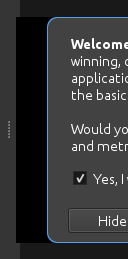
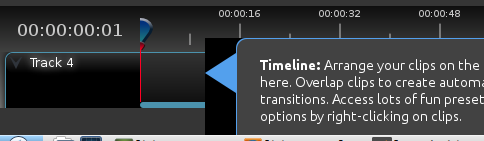
as I typed the above message I thought I'd have a quick play with the tutorial dialog and noticed a couple bugs, the first is down the left hand side of the dialogue there is a black box, https://image.ibb.co/cUXkST/black.png and when the dialogue get's to the time line it's off the screen so I can't click next https://image.ibb.co/hWxwZ8/off_the_screen.png.
I hope the above image links are okay, it was the first image hosting site that I came across.
I hope my testing is of help, thanks again!
ghost
on 8 Jul 2018
@Have-a-Laugh Yeah, the workaround breaks the ability to launch the AppImage from an installed icon, it will only work from the command line. I should note that over on the startup-crash bug.
The issue with the tutorial transparency, one other user has reported so far (#1708), it's very strange to me as most people aren't seeing that.
The off-the-screen thing, arrgh! I didn't even think of that. I suspect it would've been a problem for the old tutorial code as well, since it positions itself based on the location of the Timeline widget. If that widget is too small and too close to the edge, it's going to end up beyond the screen dimensions. I think the solution to that is just to make the tutorial draggable. There's no reason the user should be prohibited from moving the tutorial, if they choose to. And if you could drag it back on screen, there wouldn't be a problem.
... ... ...In fact, now that I think about it, that new daily build shouldn't _have_ my new tutorial code in it, since it isn't checked in to the repository. So, you may have been using the _old_ tutorial code.
Yeah, I just confirmed. OpenShot-v2.4.2-1530957397-628eb373-554d9f2f-x86_64.AppImage does not contain my new tutorial code, so if you were seeing both non-transparent tutorial popups and _working_ tutorial popups from it (when 2.4.1's tutorials did not work) then that's very confusing, and complicates the whole discussion of tutorial issues quite a bit (not that that's your fault at all).
ferdnyc
on 8 Jul 2018
@Have-a-Laugh Oh, I did also just want to mention: One nice thing about Github is that you don't need any image hosting at all, you can include images right in your issue comments. Just drag-and-drop or click at the bottom of the comment box to upload.
Have-a-Laugh's screenshots, for future reference:
ferdnyc
on 8 Jul 2018
The off-the-screen thing, arrgh! I didn't even think of that. I suspect it would've been a problem for the old tutorial code as well, since it positions itself based on the location of the Timeline widget. If that widget is too small and too close to the edge, it's going to end up beyond the screen dimensions.
"...On some systems." I just re-tested and with either old or new tutorial code, under Gnome Shell (at least on Fedora), the widget is prevented from extending beyond the screen borders, so its position is just forced out of place when necessary so that it's still all visible. But obviously not all window managers have that policy, so I stand by this as the most universal approach:
I think the solution to that is just to make the tutorial draggable. There's no reason the user should be prohibited from moving the tutorial, if they choose to. And if you could drag it back on screen, there wouldn't be a problem.
ferdnyc
on 8 Jul 2018
@ferdnyc thanks for the heads up about dragging images I had no idea that was a thing, much appreciated, and sorry again about being out of sync with version testing.
ghost
on 8 Jul 2018
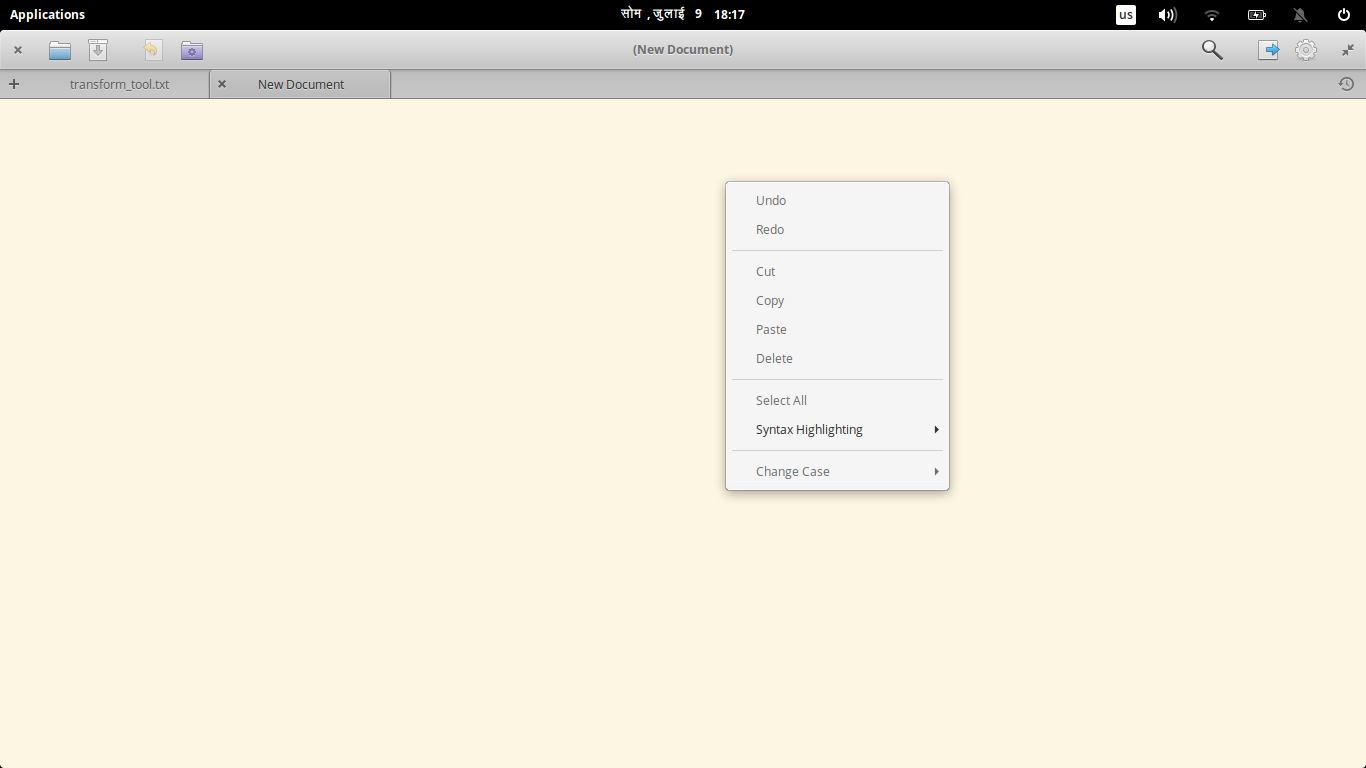
I wonder if something can be done to make the tutorial window to make it aware of when it is near the border of the openshot window and align itself properly... like this:
or something... But drag-able ones seem pretty cool too.
peanutbutterandcrackers
on 9 Jul 2018
I have no idea what that screenshot is supposed to be telling me. There's nothing anywhere near a window border there.
ferdnyc
on 9 Jul 2018
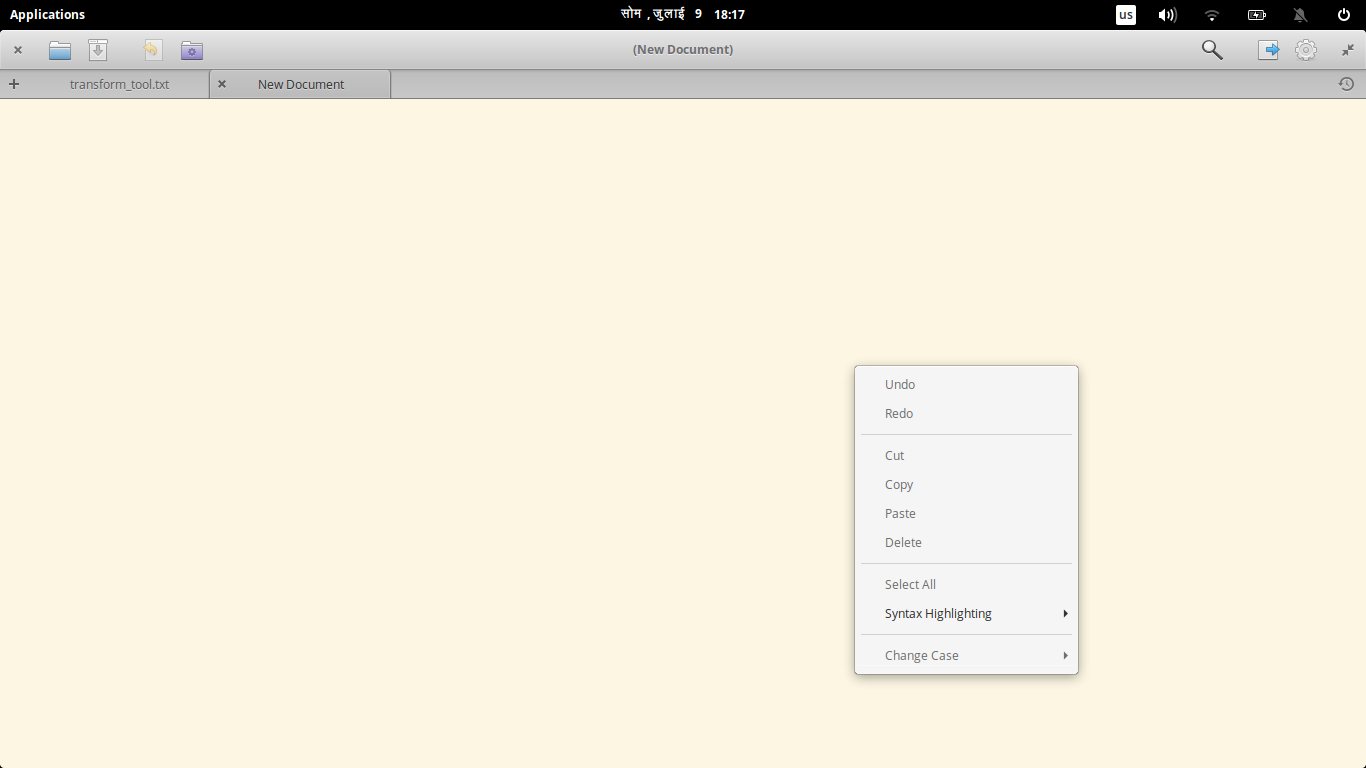
Ooops. Sorry I thought there were two screenshots. Agh. My bad.
So, that pop up thingy - with the undo and stuff? - it goes down (as shown in the screenshot) when I click up there near the top of the window but goes up when I click near the bottom. So, I thought perhaps the tutorial pop-ups could also use the same kind of logic (if it can be somehow modified and baked into it?)
Yeah. I am well aware that this is probably a stupid idea. lol :smile:
peanutbutterandcrackers
on 10 Jul 2018
It's not a stupid idea at all. It's just not practical with the current tutorial design.
(The arrow placement, at the top of the widget and pointing left, limits the options for autopositioning it greatly. If it auto shifts up, the arrow doesn't point where it belongs. If the positioning of the arrow has to ALSO be "intelligent", someone has to write that code. There is no possible universe in which that person is me.)
The other thing is, the more logic as someone loads into a system, the more assumptions they inevitably make along the way. There will always, _always_ be cases "in the wild" that weren't expected and that the logic doesn't account for, so the most important thing is giving the users the ability to deal with those issues themselves.
Like, with your menu. That intelligent positioning is great and all, but eventually it's going to run into a setup where it fails to properly detect the bottom of the screen.
Say, if the user has a vertically-stacked multi-monitor setup, or their screen is only showing part of a larger virtual desktop. If the software thinks the screen extends below the bottom edge, it might decide it can position the menus too low to fit onscreen.
With a pop-up menu like that, the workaround is easy. You just click higher up. Its positioning is ultimately based on user input, so they're still in control. But with our popups, the user has no real control over their placement. It's an inevitability that at some point that'll be a problem for SOMEONE, no matter how hard we try to make them "smart" about their auto-placement. Letting the users retain control is the only logic that's guaranteed to cover every possible scenario.
ferdnyc
on 11 Jul 2018
@ferdnyc - I agree with what you have said (like all the other times, once I read your compelling arguments). Yes, drag-able seems nice. I wonder if drag-able windows should remember their position or get back to defaults in the next session (I can think of pros and cons of both). I wonder if reverting to default positions would be better...
peanutbutterandcrackers
on 12 Jul 2018
@peanutbutterandcrackers : please close as dup of... some other Tutorial-problems bug. We'll have to choose the one with the most data about the problem to consolidate on.
ferdnyc
on 15 Jul 2018
Closing as dup of #714 and #1708. Fix in progress. Should be resolved in the upcoming release.
peanutbutterandcrackers
on 16 Jul 2018
Related issues
 GrandpaBill3006
·
3Comments
GrandpaBill3006
·
3Comments
 CarlBicknell
·
3Comments
CarlBicknell
·
3Comments
 Geoff0627
·
3Comments
Geoff0627
·
3Comments
 malinga91
·
3Comments
malinga91
·
3Comments
 Obed9
·
3Comments
Obed9
·
3Comments
Most helpful comment
It's not a stupid idea at all. It's just not practical with the current tutorial design.
(The arrow placement, at the top of the widget and pointing left, limits the options for autopositioning it greatly. If it auto shifts up, the arrow doesn't point where it belongs. If the positioning of the arrow has to ALSO be "intelligent", someone has to write that code. There is no possible universe in which that person is me.)
The other thing is, the more logic as someone loads into a system, the more assumptions they inevitably make along the way. There will always, _always_ be cases "in the wild" that weren't expected and that the logic doesn't account for, so the most important thing is giving the users the ability to deal with those issues themselves.
Like, with your menu. That intelligent positioning is great and all, but eventually it's going to run into a setup where it fails to properly detect the bottom of the screen.
Say, if the user has a vertically-stacked multi-monitor setup, or their screen is only showing part of a larger virtual desktop. If the software thinks the screen extends below the bottom edge, it might decide it can position the menus too low to fit onscreen.
With a pop-up menu like that, the workaround is easy. You just click higher up. Its positioning is ultimately based on user input, so they're still in control. But with our popups, the user has no real control over their placement. It's an inevitability that at some point that'll be a problem for SOMEONE, no matter how hard we try to make them "smart" about their auto-placement. Letting the users retain control is the only logic that's guaranteed to cover every possible scenario.