Openshot-qt: Black frames before the transition
System Details:
- Operating System / Distro: ? Windows 10
- OpenShot Version: ? 2.4.1
Issue Description and steps to reproduce:
Insert a transtition at any point in the middle of a clip. At the begin of the transition until the mid, the screen is black, then the effect starts until the view is normal.
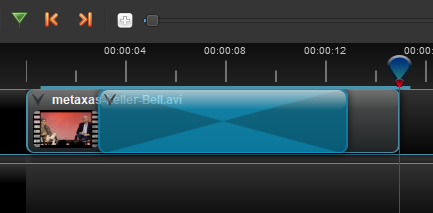
This is the effect it produces.

 aseques
All 19 comments
That is not quite how transitions work. You are supposed to use transitions in between two clips, good sir. Not on a single clip. If you want transition at a certain point in the video, you should first slice it at that point, and overlap it with the other clip. Hope that helps!
 peanutbutterandcrackers
on 6 Apr 2018
peanutbutterandcrackers
on 6 Apr 2018
@aseques - Yes, I think you are not using transitions for how they were intended to be used. Try the advice from @peanutbutterandcrackers
 DylanC
on 6 Apr 2018
DylanC
on 6 Apr 2018
This is just an example, the same effect happens when I add the transition to the end of a fragment of a video to fade the video to black, so I can add the title just after. Do you want another example showing the effect?
aseques
on 7 Apr 2018
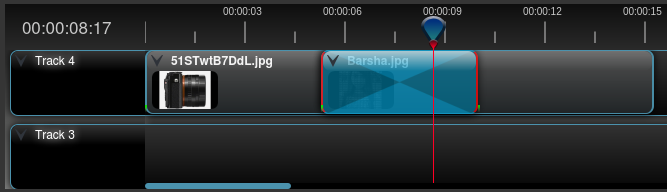
@aseques - So this is how you apply a transition correctly:
And these are some ways how you can apply a transition incorrectly:
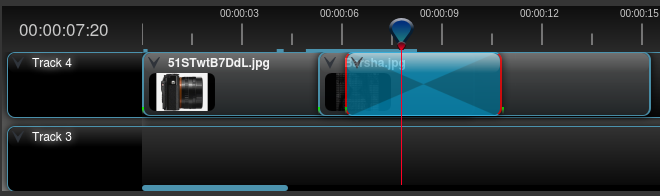
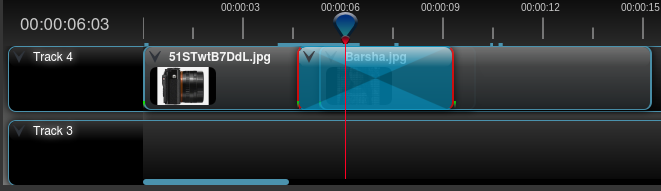
I hope that helps! :)
The thing is, the transition has to start exactly where the 2nd clip starts.
peanutbutterandcrackers
on 7 Apr 2018
@peanutbutterandcrackers I understand what you mean, but it's not properly working (at least in windows), see this capture:
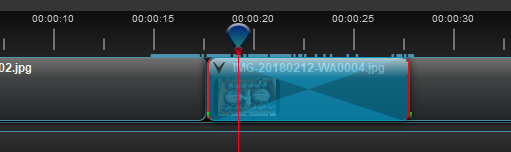
There's a static image until 00:17, just after this one there's another one. I add the transition from there until 00:27, the first two seconds (until 00:19) the video is totally black. The effect I want is the following:
- 00:17 until 00:22 going from normal to black
- 00:22 until 00:27 gorin from black to normal (with the second picture)
I can upload the project if you want
aseques
on 7 Apr 2018
Good sir, you actually have to overlap the two clips by dragging the right clip over the left one. Doing so will also add an automatic transition which you can remove and replace with a transition of your choice (from the 'transitions' tab), in which case, you'll have to make sure you apply them correctly (as pointed out in the screenshots in my previous comment). Hope that helps!
If you take a look at my screenshot, you'll see that the two clips have been overlapped while in your screenshot, they have not.
peanutbutterandcrackers
on 7 Apr 2018
@peanutbutterandcrackers then it's a bug isn't it? When clip A i followed immediately by clip B there's no black interval. When I add the transtition it appears the black interval. Your solution might be a workaround, but the bug is still present. (unless I haven't yet understood how transitions are suposed to work)
aseques
on 7 Apr 2018
Good sir, OpenShot has been designed to have a transition only when two videos overlap each other. And when you add a transition, you have to add it so that the beginning of transition is at the exact beginning of the 2nd clip. Or else there would be a black interval. Please look at the screenshots I have provided in my previous comment for proper placement of transitions. This is not a bug, as far as I am concerned. I hope that helps. :)
peanutbutterandcrackers
on 7 Apr 2018
That's what I am doing I add the transition to start at 00:17, just the same time I add the second clip.
aseques
on 7 Apr 2018
Good sir, your second clip is not over the end of the 1st clip. You have to overlap the two clips.
peanutbutterandcrackers
on 7 Apr 2018
This, too, might be quite helpful!
peanutbutterandcrackers
on 7 Apr 2018
In this video, too, please note how the transitions are applied (automatic transitions, though). You have to overlap the two clips you want a transition between, good sir!
peanutbutterandcrackers
on 7 Apr 2018
I already read those docs, but they're no clear enough for me to understand. If I have two clips with audio (home recordings) and I want a transition from clipA to clipB but I need them not to overlap (because I would lose the ambient audio. How should I proceed? Isn't it accomplished by at transition?
Basically I need to get:
- fade from transparent to opaque and to transparent again
aseques
on 7 Apr 2018
You might want to use keyframes, then, good sir. But it might take a bit of learning. However, once you master keyframes, a whole new world of possibilities will open up to you and OpenShot, with it's everything is keyframe-able approach will become your favorite video editor of all time (except for the stability issues which will soon be fixed).
You might want to go through the items on the list that I recently posted for another new user.
Hope that helps, good sir! :)
peanutbutterandcrackers
on 7 Apr 2018
If it's the intended way of working then close this issue, I still don't understand the rationalle of this choice, but I can't comment more on this. Thanks anyway
aseques
on 7 Apr 2018
@aseques - Good sir, if you have a suggestion, then please do explain. This is an open source project. The community has a say on how things will go forward. If you have a better idea, please explain (with illustrations, too, hopefully). Perhaps the devs will like and implement it? :)
peanutbutterandcrackers
on 9 Apr 2018
I also like to fade in/out between multiple clips. I put the clips on different tracks and do the following:
Top clip -> Right Click -> Fade -> End of clip -> Fade Out (Fast)
Bottom clip -> Right Click -> Fade -> Start of clip -> Fade In (Fast)
Then, I align the keyframes on the two clips by dragging the bottom clip to the left until the left edge of the bottom clip is aligned with the fade out keyframe (green mark) of the top clip.
Here's the end effect:

How much or little your overlap the two clips can change how the fade in/out looks to match your needs or preference.
 N3WWN
on 9 Apr 2018
N3WWN
on 9 Apr 2018
Thanks a lot @N3WWN , this is what I was looking for
aseques
on 9 Apr 2018
I'm so glad you found what you were looking for @aseques!
Awesome!
Hope you create amazing videos using OpenShot!
@N3WWN - You're awesome!!!
peanutbutterandcrackers
on 14 Apr 2018
Related issues
 gbbbbb
·
3Comments
gbbbbb
·
3Comments
 LadyReader
·
3Comments
LadyReader
·
3Comments
 TavernSenses
·
3Comments
TavernSenses
·
3Comments
 ppkakkar
·
3Comments
ppkakkar
·
3Comments
 Sefran007
·
3Comments
Sefran007
·
3Comments
Most helpful comment
I also like to fade in/out between multiple clips. I put the clips on different tracks and do the following:
Top clip -> Right Click ->
Fade->End of clip->Fade Out (Fast)Bottom clip -> Right Click ->
Fade->Start of clip->Fade In (Fast)Then, I align the keyframes on the two clips by dragging the bottom clip to the left until the left edge of the bottom clip is aligned with the fade out keyframe (green mark) of the top clip.
Here's the end effect:
How much or little your overlap the two clips can change how the fade in/out looks to match your needs or preference.