Openshot-qt: How to mute the sound in a certain place in the video? openshot 2.4.1
System Details:
- Operating System / Distro: Ubuntu 16.04
- OpenShot Version: 2.4.1
 donkikhot
All 13 comments
Probably I hurried, I'll study in detail!
donkikhot
on 6 Mar 2018
Apparently such a parameter is missing
donkikhot
on 6 Mar 2018
@donkikhot - Why does your version say 2.3.4? This is an out of date version of Openshot. You should try either the v2.4.1 or v2.4.1 daily build.
 DylanC
on 6 Mar 2018
DylanC
on 6 Mar 2018
@donkikhot - Hey there, again!
First and foremost, please use OpenShot v2.4.1. It is the latest stable release. Or, if you're feeling even more adventurous (as I presume is more likely), please use the latest daily build.
And, once you're using v2.4.1 or the daily PPA, right click on the clip, click 'properties'. On the properties tab that will open to the side of the timeline, you should find a 'volume' property that can be changed (keyframe-able, actually). You can have the volume go from silent to loud within a certain time. You can have it change using various curves too.
You might want to look up 'OpenShot Keyframes' on youtube and also look at the user guide at openshot.org. I guarantee you that you'll fall in love with OpenShot once you get the hang of keyframes and how to use them in OpenShot. The possibilities are virtually limitless!
 peanutbutterandcrackers
on 7 Mar 2018
peanutbutterandcrackers
on 7 Mar 2018
@donkikhot - A simple method would be to cut the clips on the start and end of the video. On the middle clip you can right click and set audio level to 0%.
DylanC
on 7 Mar 2018
@donkikhot - Why does your version say 2.3.4?
Misprint
@donkikhot - A simple method would be to cut the clips on the start and end of the video. On the middle clip you can right click and set audio level to 0%.
Then the video will break, and I need to mute the sound in the video in a certain place and let the sound from the other track where the music is attached
donkikhot
on 7 Mar 2018
@peanutbutterandcrackers - Any ideas about this? Not sure if this is possible yet.
DylanC
on 7 Mar 2018
It is possible, actually, yes.
Here is how:
Right click on the video in the time line and click on 'Properties'. A tab will appear to the left of the time line.

Drag the play head to the point where you want to mute the audio. (Use the arrowed keys to step frame-by-frame.) Click on the 'volume' property and set it to 0. A green marker will appear on the clip at that point. It's a keyframe. Volume keyframe.

If you play it now, you'll see that the volume fades out gradually from the start of the clip, and turns completely silent at the point where you set the volume to 0. Probably not what you want.
If you take a look at the 'Volume' tab, you'll see that there is a graph on the right side. This is quite important.

Go back to the *exact frame - the exact key frame - * where you set the volume to be 0. You'll know you've reached that point when the 'volume' property turns green.

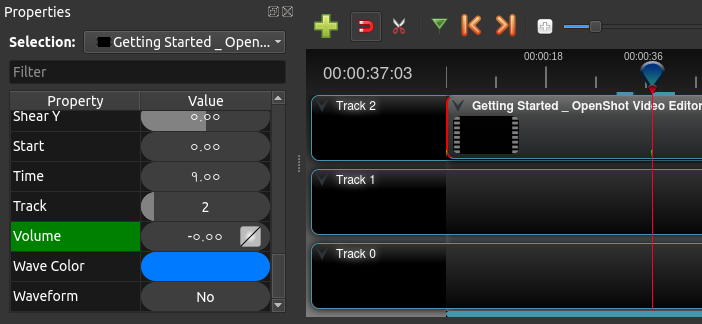
Now right click on the graph in the 'volume' property. Select 'Constant'.
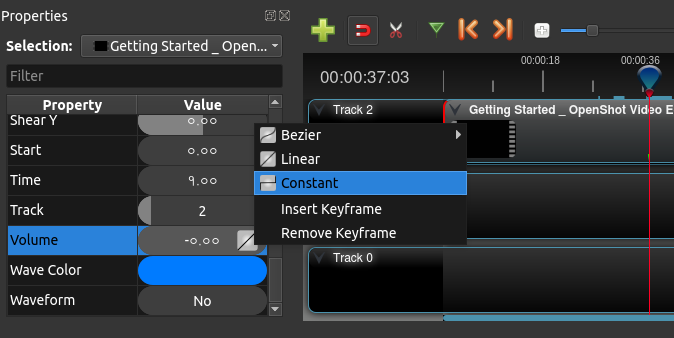
Please note that I am on the same exact frame (keyframe) where I set volume to 0. It's just that because it is selected, it looks blue instead of green.
The 'volume' property thingy now looks like this:

Now if you play the clip from the beginning, you should see that right at that point, the volume shifts from 1 to 0, thereby achieving what you wanted.
Hope that helps!
P. S: You should totally look up 'OpenShot Keyframes' on YouTube and read the user guide too.
P. P. S: The greatest power of OpenShot is keyframes. Please do learn to harness it. :)
peanutbutterandcrackers
on 7 Mar 2018
P. S: You should totally look up 'OpenShot Keyframes' on YouTube and read the user guide too.
P. P. S: The greatest power of OpenShot is keyframes. Please do learn to harness it. :)
Thank you all very much, have made for Google more informative)
donkikhot
on 7 Mar 2018
@peanutbutterandcrackers - Wow, this was really great! @donkikhot - Hopefully this fully answers your question.
DylanC
on 7 Mar 2018
Yeah. OpenShot is really powerful once you know how to use keyframes. :+1:
peanutbutterandcrackers
on 8 Mar 2018
@donkikhot - Closing this question as answered. Thanks again @peanutbutterandcrackers
DylanC
on 8 Mar 2018
@DylanC - You're most welcome! :)
peanutbutterandcrackers
on 8 Mar 2018
Related issues
 ghost
·
3Comments
ghost
·
3Comments
 BofingerRick
·
3Comments
BofingerRick
·
3Comments
 CarlBicknell
·
3Comments
CarlBicknell
·
3Comments
 Yesideez
·
3Comments
Yesideez
·
3Comments
 Obed9
·
3Comments
Obed9
·
3Comments