Openshot-qt: Openshot 2.4.1 for Windows 10 x64 is very very slow, often unresponsive.
**System Details: i5-6200U 2.3GHz / 8GB Ram
- Operating System / Distro: ? Windows 10 x64
- OpenShot Version: 2.4.1
- _Please attach log files if crash_
Issue Description and steps to reproduce:
extremely slow, often become unresponsive. Simple action such as moving items on a track takes up to 15 seconds for the system to take the next instruction.
Current video is only 1 minute, with 1 audio and 2 vid tracks, with only a couple of pix and several keyframes, with zoom effect.
Opening the project takes more than 60 seconds to load
 AchilleZh
All 28 comments
I have the same problem, primarily when editing a video file that has HEVC (h.265) video codec compression. W10 Home (x64) v1709 with all updates, i7(6700) cpu,16GB ram, NVidia GeForce GTX 750.
 dancetheskies
on 28 Nov 2017
dancetheskies
on 28 Nov 2017
OpenShot Version: OpenShot-v2.4.1-2-g445a326-57-656-x86_64
I have same problem too on windows 8.1 and windows 10 pro (both windows are 64 bit)
When adding to timeline still ok but when it comes to timeline location settings...
Once I click OK, whole openshot become not responding ...
 slashcombo
on 28 Nov 2017
slashcombo
on 28 Nov 2017
I also have this problem. Dual GPU, quad core i7 4GHZ NVIDIA GTX 960m gaming laptop, windows 10 (Asus ZenBook Pro - brand new)
 whendricso
on 29 Nov 2017
whendricso
on 29 Nov 2017
@AchilleZh - Your steps to reproduce does not include any steps to reproduce.
 DylanC
on 29 Nov 2017
DylanC
on 29 Nov 2017
Re: Steps to reproduce.
Most anything can lead to these random "sleep periods" of the program. E.g., from a test I just did:
- Boot the program: 20 sec. delay before the edit window opens.
- Drag in a 1080p-60fps video clip, slice it keeping both sides, then overlap the two: 30 to 60 sec. delay before the overlapped video can be played or any other function can be applied. CPU ramps to 100% usage during the sleep period.
During the sleep periods sometimes the time line marker can by moved and the preview play button can be toggled on as if nothing is wrong, but nothing happens until the program wakes up. Sometimes the program windows grays out with the rotating busy icon while asleep if trying other edited during the sleep periods, sometimes just no response. CPU utilization drops back to very low when the sleep period ends.
I've not had a crash during any of this yet, just long delays between actions, but not every time! No known background task going on during these sleep periods. The fact that the CPU usage ramps to 100% during these sleep periods than back down when awaking points to some OS program activity going on.
dancetheskies
on 29 Nov 2017
@dancetheskies - The problem is I try this on my PC and I have no issues. For me OpenShot starts almost instantly. I will try to reproduce this problem but so far I cannot.
DylanC
on 4 Dec 2017
The startup delay is not so much of a problem... I have a commercial editor that does the same when booting up. But the delays that occur most of the time (30 sec. minimum with CPU ramped to 100% while I wait) are the problem. The computer eventually wakes up and I can do a next edit, then another long wait, etc. Even just simple things like moving or trimming clips can do this. I'll see if this also happens on my Surface Pro 2 tablet, also running W10 (x64) FW 1709 with all updates but less memory (12GB rather than 16GB), and only integrated graphics, no separate video card.
dancetheskies
on 4 Dec 2017
I have a similar experience. Slice operations take longer and longer to complete as I edit a video. The first few go fast, but subsequent slices take longer to complete, until after 10 slices each operation is taking up to 3 minutes.
Windows 10 / i7-3770 3.4GHz 16BG RAM
- Create new project
- Add two PNG picture files to the start of Track 4.
- Drag video file onto Track 3.
- H264-MPEG-4 AVC, 1280x720 / MPEG AAC
- Slice clip, keep both sides.
- Select the right-most clip, move play head, and slice / keep right side.
- Drag the truncated clip leftwards so it snaps against the previous clip.
- Repeat from 5,
 phillipstewart
on 5 Dec 2017
phillipstewart
on 5 Dec 2017
@dancetheskies @phillipstewart - This is a vague issue but Github issues are supposed to be specific. For example we already have an issue for the slicing problem #902.
I don't see anything specific in this issue report. It seems very similar to issue #550 which had no real details for us to use. Unless we are provided an example project from @AchilleZh or logs this will have to be closed.
DylanC
on 6 Dec 2017
@DylanC DylanC, have you actually tried to reproduce the problem with Windows 10? I'm using this software too on Windows 10 64 bit and have been reading through your responses, and you're basically dismissing this every time but you have not said anything about trying to reproduce the problem. You literally have 10s of people all saying the same thing and you're not trying to reproduce. You're just waiting for them to give you information and in my opinion, that is now how software support works. So... are you going to try and reproduce the problem?
 KEdoubleV
on 7 Dec 2017
KEdoubleV
on 7 Dec 2017
@KEdoubleV
Did you even read this previous comment?
The problem is I try this on my PC and I have no issues. For me OpenShot starts almost instantly. I will try to reproduce this problem but so far I cannot.
I have tried to reproduce but I cannot reproduce on my hardware. I need more information or something like an example project to test to reproduce this issue. This is why im waiting for information.
Anyway, we can only take on issues if they are specific enough to be reproduced. This issue is really not specific enough or providing test data and like #550 not of any real use to the developers.
DylanC
on 7 Dec 2017
Dup of #902
DylanC
on 19 Dec 2017
@DylanC
I'm having this problem too. I know you're looking for specifics, but what would that include? I'd be happy to provide exact data from a log or something. Anyways, I'll try to give specific info: (after the basics)
Specs: Windows 10 - i7-7500 CPU 2.70 GHZ - 8GB RAM
OpenShot Version 2.4.1
Steps to replicate:
1. Start adding video, audio, etc. to the timeline. Anything.
2. Once your timeline is has clips to ~1 minute in, you can stop.
3. Perform literally any action. Move the playhead, make a clip run in reverse, anything.
4. Voila. Program freezes for a few seconds.
I honestly don't know what's causing it, but it has nothing to do with my system, since I can run more demanding software with no problems. One thing I noticed (maybe someone else pointed this out) is that OpenShot takes a huge chunk of my CPU when I perform said actions (3). Maybe something else
that could help you is the "profile" (top of screen), which I have set to HDV 720 24p.
The log doesn't show anything predominant either. Sections (appearing to be -- I'm no expert) displaying data from where I do things like move the playhead don't seem to show any problems. It just freezes for a while and eats a load of CPU, but the log doesn't reflect that.
Anything else you need? Please let me know.
Thanks for trying to help, and sorry for my excessive use of parenthesis.
 J0Br
on 22 Dec 2017
J0Br
on 22 Dec 2017
This is the first time I use openshot and already I have the same issue as @J0Br does.
Specs: WIndows 10 Education - i7 2.4GHz - 12GB RAM
Openshot ver 2.4.1
My video is 15 seconds long and consists of 9 .svg files, 3 transitions, 2 .jpg files and a few animations which is spread accross 5 tracks (0 to 4). Profile: HD 720p 30fps.
Steps to replicate:
- Clicking anything (yes anything, be it a tab, toolbar, play button, track elements, project files, etc) => freeze for about 10 seconds then the clicked element is selected
- Inserting transition and project files to any of the tracks => freezing for almost half a minute then no effect (transition/file isnt inserted)
- Editor suddenly quits by itself for unknown reason
During all above actions my laptop works just fine and all other programs (browser, music player) run smoothly as usual.
 24carats
on 22 Dec 2017
24carats
on 22 Dec 2017
same here. using nov23, 2017 daily build
 phlemoine
on 26 Dec 2017
phlemoine
on 26 Dec 2017
Hi,
I have the same issue with regards to the slow functions, with the 2.4.1. I recorded a video to show my concern (youtube link below). As in the video, it takes around 20s to cut a movie, no matter how many movies are there or their quality, other task such as dragging a video or deleting something takes a while to. As a matter of fact, any task involving timeline rearangement takes a lot (tryed track deleting, track adding, timeline zooming in and out and effect adding). My machine: Alienware - i7-6700HQ, 8G, 250GSSD, GeForce GTX670M, running win10(x64)Home.
https://youtu.be/EmlqzfeH60o
btw Video Preview is working like a charm to me, as well as exporting (4K60fps).
Please let me know if there is any further test or explanation you would like me to do.
 israelsaba
on 28 Dec 2017
israelsaba
on 28 Dec 2017
@DylanC you say this thread is a dup but when we follow the links we end up in a dead end: you say you are closing because it is a dup of another but this another is also closed because it is a dup of the first.
israelsaba
on 28 Dec 2017
@israelsaba
902 is open. Not sure what you are talking about.
DylanC
on 28 Dec 2017
@DylanC
My bad then, but it seems that the issue here comprehends way more than #902
Anyway if I can send you anything so you can better understand the problem please let me know.
israelsaba
on 28 Dec 2017
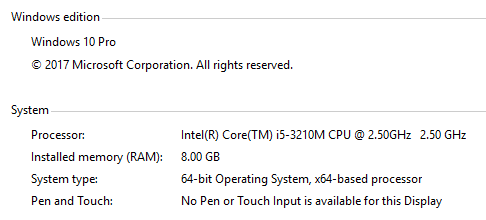
open shot very slow, playback freezes for minutes at a time, every single function, operation, command, button, or menu selection lags horrendously and often times causes "not responding" to pop up and then all the work done is lost, even though upon reopening open shot the program tells me "we recovered your last project" but the recovery doesn't save often enough to be useful given that the program freezes so often and in such short notice.
When I move the slider during playback, whether paused or actively playing, it lags, freezes, becomes unresponsive, etc. When the slider is moved, it takes the program minutes to catch up to where I put it at, so i just leave it playing and do other stuff on my computer, which my other programs work at lightning speed like normal, until i start hearing the sound and i go back to the open shot program to complete the next step/task i was working on when it lagged. Lagging to me means that it isn't unresponsive but takes a long time to catch up. I see great reviews for this program and the interface is simple and easy to use for someone like me that has never video edited before.
I have complete a couple projects, but it is painstakingly slow and stressful to not be able to just do the work. If the program functioned properly, I feel it would be amazing and i know you are working hard on fixes. It seems that the people having problems are with speed and operational capacities of the program are all on windows 10 x64, so that must have something to do with it.
There is no 'bug report' that you need, it literally is slow in every aspect of its operation no matter what you try to do, so telling users "thats a bad bug report" is silly because they told you what they are having problems with. I tried to be more verbose so you didn't just dismiss my input/feedback. Thank you for all your hard work <3
update @ 5pm on 11-15-2018; 4 hours after original posting
still trying to clip 1 part out of 4 different files and combine them, been at this since about 2 hours before original post which i made at about 1pm cst. started this project at like 6 hours ago, lol. it won't even play the video for longer than 3 seconds or so before freezing for like a whole minute. have restarted computer, restarted program, reinstalled program, etc.
 jseal1987
on 15 Jan 2018
jseal1987
on 15 Jan 2018
The same, veeeeeery slow, I found it unusable.
win10 home, 64bits\
Intel i7-6700HA @2.60Ghz
16gb ram
What is weird, when OpenShot is hanging, performance shows about 20% cpu and 30% memory
zb
 zalekbloom
on 20 Jan 2018
zalekbloom
on 20 Jan 2018
Same here.
Win 10 Pro, 64bits
Intel i7-4790K 4.0Ghz
16gb ram
Version: 2.4.1
I noticed, that app works very slow when You save the project file. If You open a new file, and just work on it without saving into .osp file, it will works faster, than if You save the file. Maybe this will be helfpul
 yodous
on 24 Jan 2018
yodous
on 24 Jan 2018
Hello,
I just tried OpenShot v2.4.1 for the first time on Windows 10, at first it worked great but as I added more items to the tracks the performance gradually dropped to the point of being unusable. Any action to move, adjust or even select a track item is now taking over 30 seconds, with the application operating at 100% on one core during this period.
The preview playback is fine and clear, not lagging, when I can start it. The issue is that any action to adjust any of the tracks is incredibly slow. The performance issue remains when I restarted the application.
I found this thread, and clearly I am facing the same issue as other Windows 10 users. Seems there is a scalability issue somewhere in the application.
In my case I am adding subtitles to a 2 minute video. I have 1 video file and around 20 title files, all mixed on three tracks. The issue is not around startup time or time to load a project, it is around the time to carry out any editing action. Adding the first 10 title files were fine, after that it started to get slower and slower, to the point of being unusable.
To reproduce, take a 2 minute video file, and keep adding different title files overlapping the video until the performance starts to reduce.
 roblev
on 30 Jan 2018
roblev
on 30 Jan 2018
Is this possibly an issue with the codecs used by a GoPro? I saw a comment stating that someone was editing a video made with a GoPro 3. I am doing the same and things are very very slow. But when I edit an intro video that I made out of a couple PNGs and a WAV, I don't see the slow down. I am also seeing that the CPU and RAM are not maxed out during times of slowness (15% to 30% only). BTW - This is not just slicing video, this is just about any action in the timeline, adding or moving video or audio files, moving to new locations in the timeline, adjusting properties on a video, literally just about anything.
Like others, I am using Windows 10 Pro x64 (version 1709 Build 16299.192). AMD FX 8320 - 8 core processor (3.5 gHz) with 16GB RAM. This is a development machine and even Visual Studio is snappy.
This application has a great deal of promise, but this issue makes it completely unusable. I hope to see it resolved so I can go back to using it.
 jwestes
on 5 Feb 2018
jwestes
on 5 Feb 2018
Is this possibly an issue with the codecs used by a GoPro? I saw a comment stating that someone was editing a video made with a GoPro 3.
No, I was simply doing some slicing to a 14min clip and reusing portions of that clip in various places. Editing then became extremely slow. However, after about 3 minutes of not editing anything and simply waiting while doing /nothing/ the editor sped up again temporarily.
Changing from Memory to HDD did nothing to help speed issues.
I have similar specs to @yodous and @ortund (somewhere between the two, but closer to @yodous ) and it's lagging in both CPU and Memory no matter what I try to do with the timeline area (editing properties is not much of a problem though) -- I can run games amazingly fast. The whole program just quits responding when dragging stuff around in the timeline or trying to stretch/shrink a clip.
Does anyone here have problems with the 32bit version on Windows 10? -- I've yet to try, but I don't want to bother if it makes no difference. :(
 astraldata
on 10 Feb 2018
astraldata
on 10 Feb 2018
With Windows 10 it's rather unusable. It's a pitty, because it would be a really nice programme, but unfortunately it crashes after each step!
 Gitto777
on 18 Feb 2018
Gitto777
on 18 Feb 2018
The same thing is happening to me. I have windows 10 64bit, and I cant even open my project without it saying Not Responding. In task manager, it says CPU at 98-100, Memory is high too. HELP!!!
 EBW1
on 25 Feb 2018
EBW1
on 25 Feb 2018
Guys please stop with the "me too" comments. We already know this affects lots of people.
DylanC
on 25 Feb 2018
Related issues
 Sefran007
·
3Comments
Sefran007
·
3Comments
 BofingerRick
·
3Comments
BofingerRick
·
3Comments
 gbbbbb
·
3Comments
gbbbbb
·
3Comments
 mnally8
·
3Comments
mnally8
·
3Comments
 Geoff0627
·
3Comments
Geoff0627
·
3Comments
Most helpful comment
The startup delay is not so much of a problem... I have a commercial editor that does the same when booting up. But the delays that occur most of the time (30 sec. minimum with CPU ramped to 100% while I wait) are the problem. The computer eventually wakes up and I can do a next edit, then another long wait, etc. Even just simple things like moving or trimming clips can do this. I'll see if this also happens on my Surface Pro 2 tablet, also running W10 (x64) FW 1709 with all updates but less memory (12GB rather than 16GB), and only integrated graphics, no separate video card.