Openshot-qt: Export a movie over previously saved version, Launch.exe crashed
System Details:
- Operating System / Distro: win 10 64
- OpenShot Version: 2.4
- _Please attach log files if crash_
I have had the same issue as multiple users.. to fix, to no avail I have re installed display adapt, Micro c ++, openshot, blender, and all the other alternatives one can find... It began suddenly when I tried to export a movie over top of the previously saved version of same movie, it began exporting, crashed, and has not started since.. launches, shows display and almost simultaneously the Runtime Error halts all progress, it then announces windows must close the program...
No changes were made to any part of pc, I installed openshot yesterday, got the paths for blender working today finally, and this afternoon, it will no longer function.
There is no help topic that actually either fixes this directly, or acknowledges that it is "an unfixed bug".. please advise, I can not access the project obviously that we spent the day on, I can't imagine what long time users are going through... any help would be noble and appreciated bud.... t y
 davefrostlion
All 9 comments
@davefrostlion - I'm sure saving over the same filename is a bug at the moment. I have seen similar reports of this issue.
 DylanC
on 9 Oct 2017
DylanC
on 9 Oct 2017
@davefrostlion - This should be working in the latest daily build.
DylanC
on 10 Nov 2017
@DylanC, I have a same problem as @davefrostlion, tried with latest 2.4.1 version but no changes, openshot is hanging during exporting video
Watched on CPU and memory utilitzation, there is no bottleneck
CPU: Intel(R) Xeon(R) CPU E5-2650 0 @ 2.00GHz
RAM: 16 GB
OS: Windows 10 Pro
How to debug?
I love openshot but this bug is very critical and annoying, I lost hours, so I need to have this issue fixed. I can donate some money for researching this issue if you want.
@davefrostlion, try to use for now other opensource editors, like Kdenlive or Shotcut
 pavelsr
on 13 Nov 2017
pavelsr
on 13 Nov 2017
@pavelsr - Thanks. I will let the guys know.
DylanC
on 14 Nov 2017
@davefrostlion - Should be working in v2.4.1 now.
DylanC
on 21 Nov 2017
First of all, thanks for a great program!
I have this issue as well with version 2.4.1 on Windows 10.
I import an .mp4 file that I had previously saved from OpenShot, cut 15 seconds off of the front end and try exporting it to the same filename and get a C++ Runtime Library error indicating that launch.exe "has requested the Runtime to terminate in an unusual way".
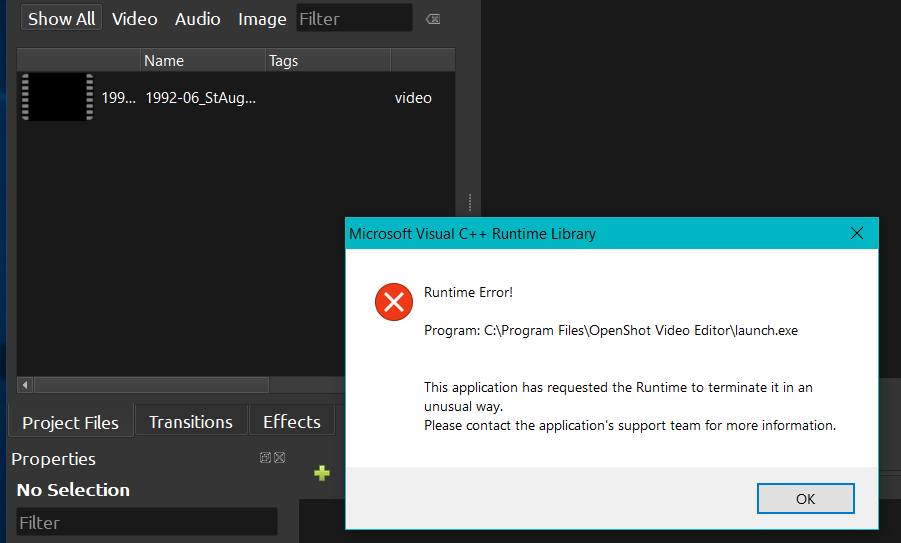
Tried uninstalling, reboot computer, reinstall and immediately get the same problem and interestingly enough the file that I was editing shows up automatically in the Project Files area after a clean install (which is probably causing the problem to persist). I'm guessing something is not being cleaned up during the uninstall?
 thepodfather
on 30 Nov 2017
thepodfather
on 30 Nov 2017
@thepodfather - Delete your backup.osp file and maybe try not to write over your input file.
DylanC
on 3 Dec 2017
Hello,
I uninstalled and deleted the %HOMEPATH%.openshot_qt folder.
I redid the installation and the problem was fixed.
Openshot v2.4.1 Windows 10 x64
 BrunoV974
on 1 Jan 2018
BrunoV974
on 1 Jan 2018
Thank you so much for submitting an issue to help improve OpenShot Video Editor. We are sorry about this, but this particular issue has gone unnoticed for quite some time. To help keep the OpenShot GitHub Issue Tracker organized and focused, we must ensure that every issue is correctly labelled and triaged, to get the proper attention.
This issue will be closed, as it meets the following criteria:
- No activity in the past 180 days
- No one is assigned to this issue
We'd like to ask you to help us out and determine whether this issue should be reopened.
- If this issue is reporting a bug, please can you attempt to reproduce on the latest daily build to help us to understand whether the bug still needs our attention.
- If this issue is proposing a new feature, please can you verify whether the feature proposal is still relevant.
Thanks again for your help!
![stale[bot] picture](https://avatars3.githubusercontent.com/in/1724?v=4&s=40) stale[bot]
on 28 Oct 2020
stale[bot]
on 28 Oct 2020
Related issues
 Geoff0627
·
3Comments
Geoff0627
·
3Comments
 gbbbbb
·
3Comments
gbbbbb
·
3Comments
 malinga91
·
3Comments
malinga91
·
3Comments
 BofingerRick
·
3Comments
BofingerRick
·
3Comments
 adswan
·
3Comments
adswan
·
3Comments
Most helpful comment
@DylanC, I have a same problem as @davefrostlion, tried with latest 2.4.1 version but no changes, openshot is hanging during exporting video
Watched on CPU and memory utilitzation, there is no bottleneck
CPU: Intel(R) Xeon(R) CPU E5-2650 0 @ 2.00GHz
RAM: 16 GB
OS: Windows 10 Pro
How to debug?
I love openshot but this bug is very critical and annoying, I lost hours, so I need to have this issue fixed. I can donate some money for researching this issue if you want.
@davefrostlion, try to use for now other opensource editors, like Kdenlive or Shotcut